1
 →
→
Muesli: agent-native local meeting transcription + dictation for macOS (Granola + WisprFlow alternative)
Muesli-HQ/muesli is an open-source project on GitHub, mainly written in Swift. Muesli: agent-native local meeting transcription + dictation for macOS (Granola + WisprFlow alternative) It currently holds 1,281 stars and 131 forks with 0 open issues, and was last pushed on an unknown date (repository created unknown).
AI Homed tracks it on the Local & On-Device AI board.

Local-by-default dictation & meeting transcription for macOS
On-device speech-to-text by default · Optional OpenAI or OpenRouter dictation · Privacy by default

---
Muesli is a lightweight native macOS app that combines WisprFlow-style dictation and Granola-style meeting transcription in one tool. Dictation and meeting transcription run locally on Apple Silicon by default. Optional hosted dictation sends audio to OpenAI or through OpenRouter to your selected model. Hosted cleanup, Quill, summaries, and Computer Use send the input needed for those features when selected. iCloud sync transfers text and sync metadata, never audio.
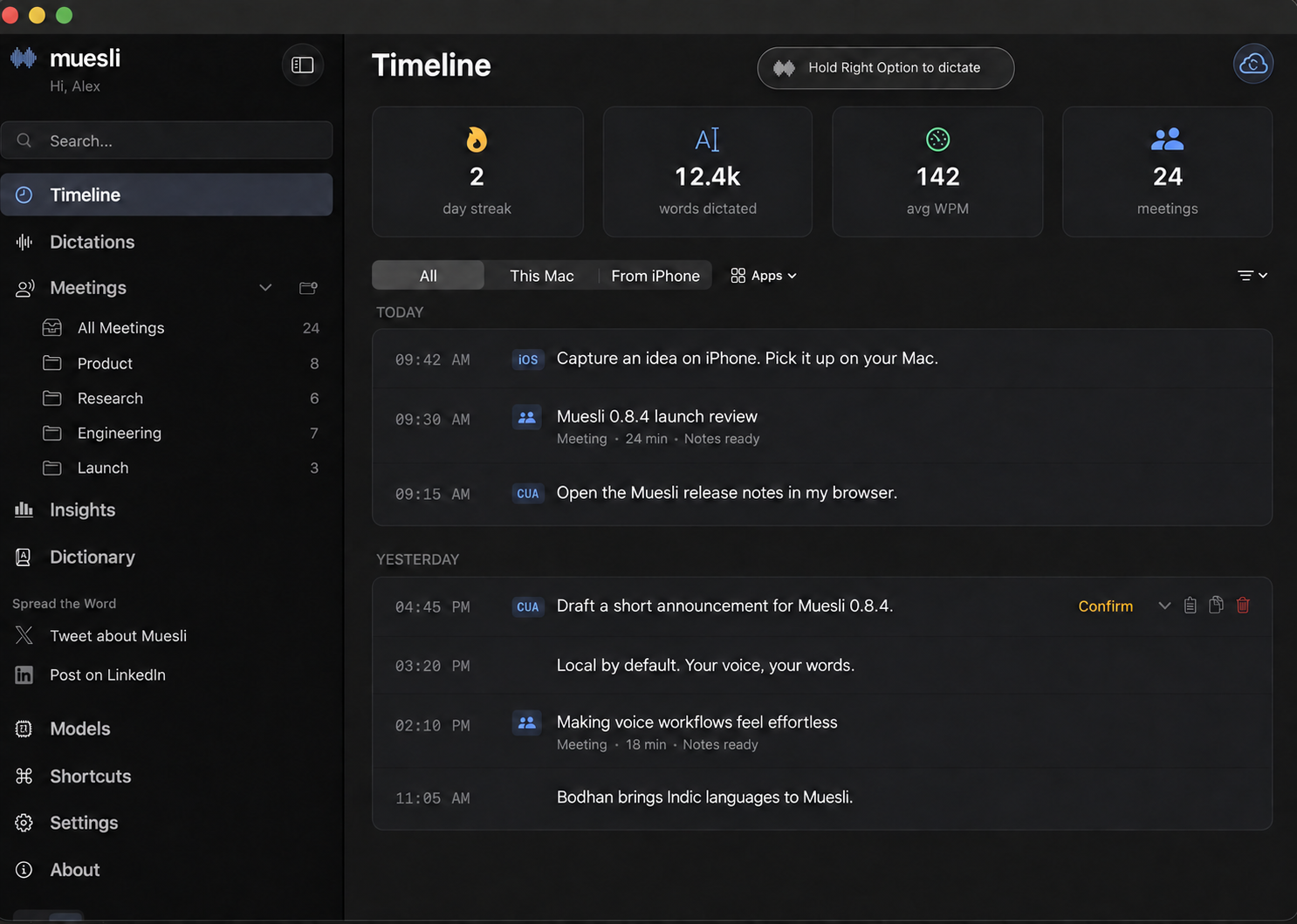
Illustrative entries and usage statistics. Personal content has been replaced.
| Feature | What you can do | |---|---| | Quill | Ask a question, rewrite selected text, or create text at the cursor with your voice. | | Bodhan for Indic languages | Dictate across Indic languages and English, including code-switching. | | Live meeting transcripts | Use Apple Speech on macOS 26+. Live transcription is off by default. | | Re-summarize meetings | Choose a different summary model for a saved meeting. | | BYOK dictation | Use OpenAI or OpenRouter when you want hosted transcription. Local by default. |
This release also adds S1-mini English cleanup, Apple Shortcuts and Siri actions, clearer macOS calendar management, and iCloud reconnection recovery. Read the full 0.8.4 release notes.
By default, dictation uses an on-device model. You can instead opt into OpenAI Speech-to-Text with your own API key, which streams microphone audio directly to OpenAI over a Realtime WebSocket, or connect OpenRouter and explicitly choose a transcription model. OpenRouter dictation sends the completed recording through OpenRouter to the selected upstream model. Muesli retains the local recording only long enough to fall back to a compatible installed on-device model if the hosted request fails; streaming-only models are excluded from fallback.
Live meeting transcripts have two explicit modes. Nemotron 3.5 and Apple Speech supply live captions and the normal final raw transcript before diarization and note generation. The existing recorded-audio transcription pipeline remains available for missing or incomplete streaming results. Parakeet Realtime EOU provides provisional live previews while a separately selected meeting model creates the final transcript. Apple Speech adds system-supported languages on macOS 26+, while Parakeet Realtime EOU remains the low-latency English option. Settings always shows which model owns the final transcript.
Live transcription is off by default. Choose Apple Speech, or download Parakeet Realtime EOU or Nemotron 3.5, from Models and then select one under Settings → Meetings → Transcription. The waveform-hover preview can be enabled separately from the same section. Making a live model available does not activate it automatically.
---
EKEventStoreChangedNotification for instant calendar change detection. Pre-meeting countdowns via Marauder's Map easter egg.Download the latest .dmg from Releases, open it, and drag Muesli to Applications — or double-click to install automatically.
brew install --cask muesli
Current Homebrew also resolves brew install muesli to the official cask; the
--cask form is shown to make the app install explicit.
Build requirements: Xcode 26.6 (Swift 6.3) on a compatible macOS 26 build host. The app deployment target remains macOS 14.2.
# Clone
git clone https://github.com/Muesli-HQ/muesli.git
cd muesli
Build the bundled echo-cancellation runtime once
./scripts/build_localvqe.sh
Build and install to /Applications
./scripts/build_native_app.sh
Contributor dev build without the maintainer Developer ID certificate
MUESLI_SKIP_SIGN=1 ./scripts/dev-test.sh
Release builds are signed by the maintainer Developer ID certificate. External
contributors can use the unsigned dev build for local testing; it installs
MuesliDev.app with a separate bundle ID and app data directory.
See CONTRIBUTING.md for the full local development workflow.
The selected transcription model downloads on demand (~565 MB for the default English Parakeet Unified; ~450 MB for multilingual Parakeet v3). The app bundle also includes the arm64 LiteRT-LM runtime (~61 MB) for experimental Gemma 4 support; its ~2.6 GB model weights download only when Gemma is selected.
---
Muesli bundles an agent-friendly local CLI inside the app bundle:
/Applications/Muesli.app/Contents/MacOS/muesli-clinative/MuesliNative/.build/arm64-apple-macosx/debug/muesli-climuesli once the official cask exposes the bundled binary as a commandtranscribe prints plain transcript text by default so it works naturally in shell pipelines.
1. Discover the CLI:
command -v muesli-cli || echo "/Applications/Muesli.app/Contents/MacOS/muesli-cli"
/Applications/Muesli.app/Contents/MacOS/muesli-cli spec
/Applications/Muesli.app/Contents/MacOS/muesli-cli transcribe file.mp3
muesli transcribe file.mp3
   /Applications/Muesli.app/Contents/MacOS/muesli-cli meetings list --limit 10
   /Applications/Muesli.app/Contents/MacOS/muesli-cli dictations list --limit 10
   /Applications/Muesli.app/Contents/MacOS/muesli-cli meetings get 125
   /Applications/Muesli.app/Contents/MacOS/muesli-cli dictations get 42
cat notes.md | /Applications/Muesli.app/Contents/MacOS/muesli-cli meetings update-notes 125 --stdin
muesli-cli specmuesli-cli infomuesli-cli transcribe [--format text|json|markdown] [--model parakeet-v3|parakeet-v2|parakeet-eou-320ms|sensevoice|qwen3-asr|nemotron35|whisper-tiny|whisper-tiny-english|whisper-small|whisper-small-english|whisper-medium-english|whisper-large-turbo] [--dictionary PATH] [--summarize] [--save-meeting] [--title TITLE] [--output PATH]muesli-cli meetings list [--limit N] [--folder-id ID]muesli-cli meetings get muesli-cli meetings update-notes (--stdin | --file )muesli-cli dictations list [--limit N]muesli-cli dictations get Supported input files: .mp3, .mp4, .m4a, and .wav.
Default output is transcript text only:
muesli-cli transcribe interview.mp3
Agent-friendly JSON output uses the normal CLI envelope:
muesli-cli transcribe interview.m4a --format json
{
  "ok": true,
  "command": "muesli-cli transcribe",
  "data": {
    "transcript": "Raw transcript text...",
    "summary": null,
    "durationSeconds": 123.4,
    "wordCount": 420,
    "model": "parakeet-v3",
    "warnings": [],
    "savedMeetingID": null,
    "title": "interview"
  },
  "meta": {
    "schemaVersion": 1,
    "generatedAt": "2026-07-08T00:00:00Z",
    "dbPath": "/Users/example/Library/Application Support/Muesli/muesli.db",
    "warnings": []
  }
}
Generate markdown notes with the configured API/local summary backend when available:
muesli-cli transcribe interview.mp4 --summarize --format markdown --output notes.md
--summarize uses configured OpenAI, OpenRouter, Ollama, LM Studio, or Custom LLM settings. If the configured backend is unavailable in headless CLI mode, Muesli keeps the transcript and reports a warning instead of discarding the transcription.
Save the import into Muesli as source = audio_import:
muesli-cli transcribe interview.wav --save-meeting --title "Customer Interview"
The app's Dictionary tab supports importing and exporting the personal dictionary as JSON. Import merges entries by match word, updates an existing match when the imported definition differs, and appends new words. Export produces the same portable format accepted by muesli-cli --dictionary:
[
  {
    "word": "museli",
    "replacement": "muesli",
    "matching_threshold": 0.85
  }
]
The CLI also accepts an app config.json directly when it contains a custom_words array:
muesli-cli transcribe interview.wav --dictionary ~/Library/Application\ Support/Muesli/config.json
parakeet-eou-320ms is available for batch file transcription. The CLI chunks the audio internally and returns the completed transcript; it does not expose streaming partials for file transcription.
Direct app-bundle fallback path:
/Applications/Muesli.app/Contents/MacOS/muesli-cli transcribe file.mp3
Data commands return JSON on stdout. transcribe returns plain text by default; pass --format json to use the envelope below.
Success shape:
{
  "ok": true,
  "command": "muesli-cli meetings get",
  "data": {},
  "meta": {
    "schemaVersion": 1,
    "generatedAt": "2026-03-17T00:00:00Z",
    "dbPath": "/Users/example/Library/Application Support/Muesli/muesli.db",
    "warnings": []
  }
}
Failure shape:
{
  "ok": false,
  "command": "muesli-cli meetings get 999",
  "error": {
    "code": "not_found",
    "message": "No meeting exists with id 999.",
    "fix": "Run muesli-cli meetings list to find a valid ID."
  },
  "meta": {
    "schemaVersion": 1,
    "generatedAt": "2026-03-17T00:00:00Z",
    "dbPath": "",
    "warnings": []
  }
}
Important meeting fields:
rawTranscriptformattedNotesnotesStatecalendarEventIDmicAudioPathsystemAudioPathnotesState values:
missingraw_transcript_fallbackstructured_notestranscribe is text-first by default; use --format json for structured agent workflows.formattedNotes is the only write-back surface in v1.rawTranscript is read-only and should be treated as source material.notesState is missing or raw_transcript_fallback, agents should prefer summarizing from rawTranscript.--db-path or --support-dir only when the default Muesli data location is wrong.---
| Model | Backend | Runtime | Size | Languages | Latency | |-------|---------|---------|------|-----------|---------| | Apple Speech | SpeechAnalyzer / SpeechTranscriber | System-managed | No Muesli model download | System-supported locales | Dictation, live + final meetings on macOS 26+ | | Parakeet Unified (default for English) | FluidAudio | CoreML / Neural Engine | ~565 MB | English | Offline batch | | Parakeet v3 (multilingual) | FluidAudio | CoreML / Neural Engine | ~450 MB | 25 languages | ~0.13s | | Parakeet v2 | FluidAudio | CoreML / Neural Engine | ~450 MB | English only | ~0.13s | | Parakeet Realtime EOU | FluidAudio | CoreML / Neural Engine | ~430 MB | English only | Live preview | | Cohere Transcribe 2B | CoreML | FP16 encoder + INT8 decoder | ~3.8 GB | 14 languages | ~1s | | Nemotron 3.5 Multilingual | FluidInference | CoreML / Neural Engine | ~665 MB | 100+ locales | Live + final | | SenseVoice Small | FluidAudio | INT8 CoreML / Neural Engine | ~240 MB | 50+ languages | ~1s | | Qwen3 ASR | FluidAudio | CoreML / Neural Engine | ~1.3 GB | 52 languages | ~2-3s | | Bodhan Core | CoreML + MLX | CoreML encoder + autoregressive decoder | ~2.46 GB FP16 / ~1.27 GB INT8 weights | 25 languages, including English; auto-detect | Final transcription | | Bodhan Flex | CoreML + MLX | CoreML encoder + autoregressive decoder | ~2.46 GB FP16 / ~1.27 GB INT8 weights | 27 languages, including English; auto-detect | Final transcription | | Gemma 4 E2B | LiteRT-LM | Metal GPU decoder + CPU audio encoder | ~2.6 GB | Multilingual | Experimental | | Whisper Tiny Multilingual | WhisperKit | CoreML / Neural Engine | ~153 MB | Multilingual | Fastest Whisper option | | Whisper Tiny English | WhisperKit | CoreML / Neural Engine | ~153 MB | English only | Fastest English Whisper option | | Whisper Small Multilingual | WhisperKit | CoreML / Neural Engine | ~250 MB | Multilingual | ~1-2s | | Whisper Small English | WhisperKit | CoreML / Neural Engine | ~250 MB | English only | ~1-2s | | Whisper Medium English | WhisperKit | CoreML / Neural Engine | ~1.5 GB | English only | Slower, more accurate English option | | Whisper Large Turbo Multilingual | WhisperKit | CoreML / Neural Engine | ~626 MB | Multilingual | ~2-4s |
Bodhan Core and Flex replace the former seven-language AI4Bharat IndicASR integration. Core uses native-script output, including many English terms spoken within Indic utterances. Flex supports mixed-script output—Indic text in its native script and English terms in Latin letters—and spoken-number formatting. Output quality varies, so try both from the production model catalog. Each card has a precision dropdown beside the language selector, with independently downloadable FP16 and INT8 choices. Both require macOS 15 or later and warm up before the app reports readiness. Longer recordings are processed in overlapping chunks.
Both FP16 and INT8 use a CoreML encoder and a native MLX decoder. The precision dropdown changes weight precision for both components, with no development settings required. Fresh FP16 downloads include the MLX decoder instead of the older CoreML decoder and cross-projection packages. The variants have separate downloads and can be removed independently. INT8 is weight-only quantization: activations and KV cache remain floating point. The 1.27 GB figure covers encoder and MLX decoder weights, excluding compilation caches. These are storage sizes, not RAM requirements: runtime memory also includes activations, decoder KV cache, and CoreML/MLX allocations. CoreML device placement is runtime-dependent; Neural Engine execution is not guaranteed.
Existing saved IndicASR selections migrate to Bodhan Flex, preserving their language preference. Previously downloaded legacy model files are not automatically deleted.
Apple Speech uses the system SpeechAnalyzer and SpeechTranscriber APIs on
macOS 26 and compatible Apple hardware. Its language assets are managed by the
operating system rather than downloaded into Muesli's model cache; older macOS
versions continue to use Muesli's downloadable local ASR backends.
Whisper's Tiny and Small sizes are available as either multilingual
→ →
→ →
→ →
→ →
→ →
→ →
→ →
→