1
 →

Open-source AI job search agent and job finder: scan job boards, score each job 1-5 against your CV before you apply, tailor an ATS-friendly resume and cover letter
career-ops-hq/career-ops is an open-source project on GitHub, mainly written in JavaScript. Open-source AI job search agent and job finder: scan job boards, score each job 1-5 against your CV before you apply It currently holds 79,797 stars and 0 forks with 0 open issues, and was last pushed on an unknown date (repository created unknown).
AI Homed tracks it on the AI Agent Skills board and on the AI AI Agent Skills list.

The open-source AI job search agent.
English | Español | Deutsch | Français | Português (Brasil) | 한국어 | 日本語 | 简体中文 | 繁體中文 | Українська | Русский | Polski | Dansk | தமிழ் | العربية | हिन्दी | Türkçe | Tiếng Việt | Bahasa Indonesia
 Created by @santifer, with

Months of sending CVs into silence.
So I built the filter I needed.
740 listings evaluated. 68 applied. 12 interviews. 1 offer.
I was its first user. I got the job. Then I open-sourced it.
Paste a job. On your machine, it tells you if it's still open and if it fits.
It tailors your CV and drafts your answers. You press Submit.
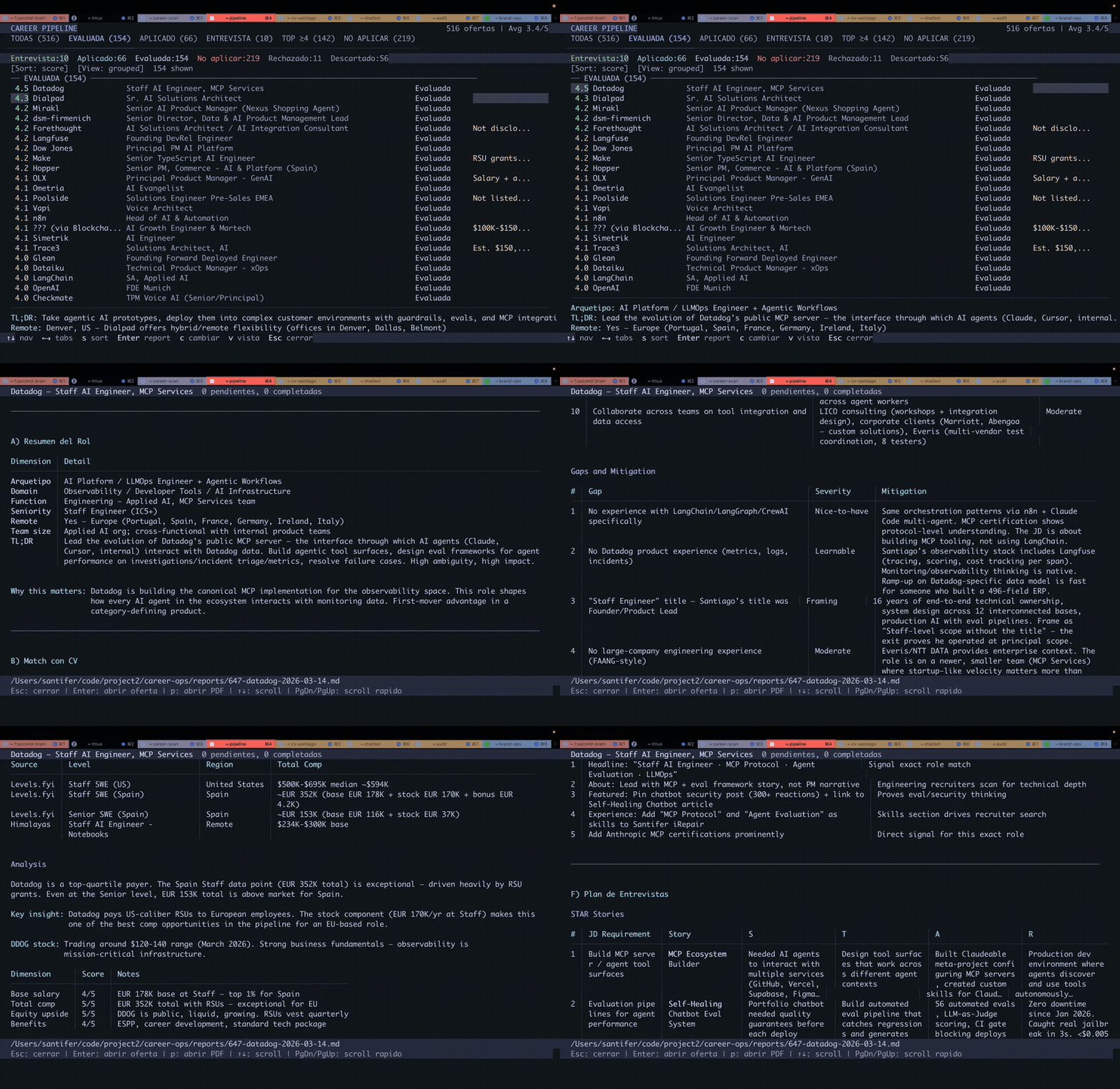
My own search, partway through, with the UI in Spanish.
Companies use AI to filter candidates.
I just gave candidates AI to choose companies.
Six months later, I left that job.
Now we build career-ops, so you can land yours.
Try it on one job ↓ · Read the full story →
Prefer not to use a terminal? Join the waitlist for a web version →
The people who came after me wrote down how they got hired.

Every card is a public issue you can open. Landed yours? Leave your card →
⭐ If career-ops helped you, a star helps the next person find it.




Paste one job you were about to apply to tonight. If it comes back do not apply, you just got the night back. If it comes back with a plan, you know what to do next.
npx @santifer/career-ops init
Open source. Local. In the AI CLI you already use. Free and local models included.
The silence after you hit send is not about you. Enough people saw the same thing to write the practice down, in six lines:
Apply better to fewer. Signal over volume. Evidence over keywords. A human decides. Local-first. Dignity on both sides of the table.
A few of them, in their own words.

Every signature is a commit you can audit. Read them all, or add yours → · What is AI job search?
Hiring will not fix itself. The people going through it can, and they are already in the room, comparing notes and fixing each other's setups.
This is where the fix gets written. A room, not a club. Let's build together.
career-ops is free for candidates, forever. These companies sponsor the project:

SerpApi · Build a portfolio project with live search data. SerpApi gives developers structured JSON/Markdown from Google Search, Maps, Shopping, and other engines through a simple API call.
Sponsorship buys clearly labeled visibility, never influence: no amount of money changes the roadmap or places anything in the product. Sponsors never appear in evaluations, rankings or recommendations.
Paste a job. It tells you whether that night is worth it.
On first launch it asks for all that in chat. Nothing to configure by hand.
prepare-application.mjs).HIRED.md and its issues.| Feature | Description |
| ------------------------ | ---------------------------------------------------------------------------------------------------------------------------------------- |
| A-H Evaluation | Role summary, CV match (with how much each requirement matters for this posting, and whether that weight came from the JD's own wording, its structure, or an estimate, labelled per requirement; an estimate can never be top-band), level strategy, comp research, personalization, interview prep (STAR+R) -- plus a Block G posting-legitimacy check (is it still open, is it a repost: observations, not verdicts), and a Work-Auth signal that flags an explicit no-sponsorship JD as a hard blocker |
| Human-in-the-Loop | AI evaluates and recommends, you decide and act. The system never submits an application -- you always have the final call |
| ATS PDF Generation | ATS-readable CVs tailored to each JD from your own experience, in Space Grotesk + DM Sans design |
| Cover Letter Generator | Research-backed cover letters with keyword mirroring, four interactive angle prompts (why/problems/approach/tone), draft-in-chat approval gate, and A4 PDF via the same HTML + Playwright pipeline as CVs. Auto-drafts on every evaluation; complete and generate on demand via /career-ops cover |
| Beyond the CV | Company research (deep) surfaces AI strategy, recent moves, engineering culture, and the angle your profile should take. Contact discovery (contacto) identifies the hiring manager, recruiter, or team peer worth reaching out to and drafts a ≤300-character LinkedIn message tuned to each contact type. Formal application email drafts (email) turn an evaluated report or pasted JD into a subject line, body, and attachment checklist without sending, submitting, or clicking anything. Applications get you in the queue; research gets you a conversation. |
| Pattern Analysis | Rejection patterns and per-ATS-channel advance rates (analyze-patterns.mjs), lifetime funnel stats (stats.mjs), repost detection, a possible sign of a ghost job (detect-reposts.mjs) |
| Feature | Description |
| ------------------------ | ---------------------------------------------------------------------------------------------------------------------------------------- |
| Auto-Pipeline | Paste a URL, get a full evaluation + PDF + tracker entry |
| Interview Story Bank | Accumulates STAR+Reflection stories across evaluations -- 5-10 master stories you can adapt to the behavioral questions you get |
| Negotiation Scripts | Salary negotiation frameworks, geographic discount pushback, competing offer leverage |
| Application Email Drafts | Formal recruiter/referral/cold application emails from a report or pasted JD, with subject line, attachment checklist, source-backed fit points, and a profile-driven contact block. Draft-only -- career-ops never sends, submits, or clicks anything. |
| Portal Scanner | 100+ companies pre-configured (Anthropic, OpenAI, ElevenLabs, Retool, n8n...) + custom web-search queries across Ashby, Greenhouse, Lever, Wellfound |
| Funded Company Discovery | Review-first npm run company:funded script surfaces recently funded companies and source diagnostics from structured public feeds without editing your data |
| Batch Processing | Parallel evaluation with headless CLI workers (claude -p / opencode run) |
| Dashboard TUI | Terminal UI to browse, filter, and sort your pipeline |
| Pipeline Integrity | Automated merge, dedup, status normalization, health checks |
| Interview Suite | Time-blocked prep plans, practice sessions with feedback, post-interview debriefs (interview/), and a company red-flag detector (interview-redflag) |
| Offer Stage | Contract reading companion -- clause walk plus a lawyer question list (offer-prep) -- and a desired/advertised/actual salary-gap analyzer (salary-gap.mjs) |
| Follow-ups & Replies | Follow-up cadence calculator and seeded reminders (followup-cadence.mjs, followup-seed.mjs); turn them off with follow_ups.enabled: false in config/profile.yml; employer reply classification into tracker updates (reply-watch) |
| Plugin System | Opt-in integrations (Gmail, Notion, Apify + a community registry), disabled by default -- see docs/PLUGINS.md |
| LinkedIn job alerts | Paste a LinkedIn alert email on the dashboard or with node linkedin-import.mjs. No Google account. See docs/LINKEDIN_JOBS.md |
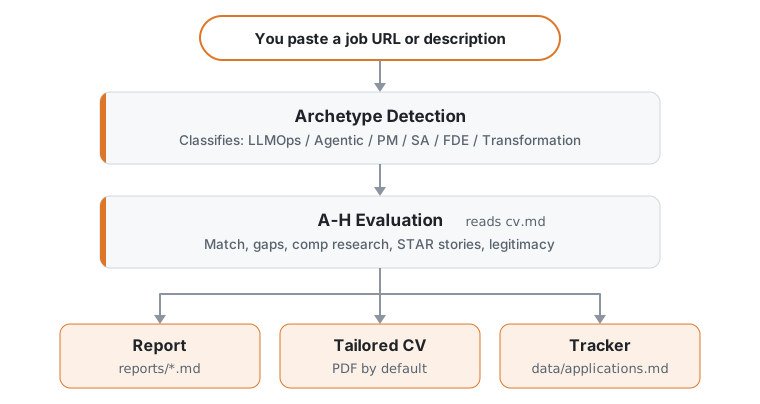
Fastest way, one command:
npx @santifer/career-ops init
💡 npx ships with Node.js: it runs the installer once,
without installing anything globally. No Node yet? Install it first.
(Already using a Claude Code / Codex CLI? Then you already have it.)
This clones the latest release into ./career-ops and installs dependencies. Then:
cd career-ops
claude   # or codex / qwen / opencode / agy / grok — open your AI CLI here
On first launch, career-ops walks you through setup (your CV, profile and target roles) just by chatting. Nothing to edit by hand.
git clone https://github.com/career-ops-hq/career-ops.git
cd career-ops && npm install
npx playwright install chromium   # only needed for PDF generation
On a non-Debian/Ubuntu Linux distro (Fedora, Arch, ...), Chromium's system
libraries aren't installed by the line above — install them yourself with
your distro's package manager if PDF generation fails to launch the browser
(Playwright's own docs list the required libraries per platform).
2. Open your AI CLI in this directory. On first launch it walks you
through setup (your CV, profile and target roles) by chatting
claude   # or codex / opencode / qwen / agy / grok
Then ask your CLI to adapt the system to you:
"Change the archetypes to backend engineering roles"
"Translate the modes to English"
"Add these 5 companies to portals.yml"
"Update my profile with this CV I'm pasting"
3. Start using
Paste a job URL or JD text to trigger auto-pipeline.
Every other mode, and how to ask for it in your CLI: see Usage below.
LinkedIn job alerts: paste the email. No Google account. See docs/LINKEDIN_JOBS.md.
npm i -g @santifer/career-ops
This installs the career-ops binary globally, so you can run career-ops init [folder] without npx. init is its only command: it sets up a workspace, and everything after that happens inside your AI coding CLI (see Usage below), not through this binary.
Which one should you use?
npx @santifer/career-ops init: best for first use; creates a dedicated project folder.npm i -g @santifer/career-ops: if you'd rather type career-ops init than the npx form. It adds no other commands.The system is designed to be customized by your AI coding CLI itself. Modes, archetypes, scoring weights, negotiation scripts -- just ask it to change them. It reads the same files it uses, so it knows exactly what to edit.
See docs/SETUP.md for the full setup guide (including scanning through an outbound proxy), docs/SUPPORTED_CLIS.md for how to run career-ops in each supported CLI, and its headless command where it has one, docs/RUNNING_ON_A_BUDGET.md for instructions on running career-ops cheaply using custom or local models (and docs/FREE_TIER.md for running it at zero cost on Antigravity CLI's free tier), docs/AUTOMATION.md for scheduling recurring scans and a zero-token triage-to-shortlist recipe, docs/KEEPING_PORTALS_LIVE.md for keeping your company list current, docs/BACKUP_STRATEGIES.md for backing up your CV, tracker and reports, docs/APPLY_AUTOFILL.md for details on the ATS auto-fill flow, docs/LINKEDIN_JOIN.md for cross-referencing a LinkedIn connections export against the companies in your funnel, and docs/FAQ.md for answers to common setup questions, including how story provenance prevents invented numbers. Design principles live in ARCHITECTURE.md; runtime flows in docs/ARCHITECTURE.md.
Paste a job URL or description into your AI CLI. career-ops checks that a linked posting is still live (pasted text has no link to check), scores it against your CV, writes a report, tailors your CV (a PDF by default) and adds a row to your tracker. That covers most days. Everything else is a mode you ask for by name. If a posting can't be read, the pipeline stops and asks you to paste the text or share a screenshot.
| CLI | How you ask for scan |
| --- | --- |
| Claude Code, OpenCode, Antigravity CLI (agy), Grok Build CLI | /career-ops scan |
| Pi | /skill:career-ops scan |
| Codex, Qwen, Cursor, or any other supported CLI | Plain language: "Run the career-ops scan mode" |
/career-ops with nothing after it shows the command menu in the CLIs that use it. Plain language works in every supported CLI. As a Claude Code plugin, the command is /career-ops:career-ops.
All of them share one router, .agents/skills/career-ops/SKILL.md, and the same modes/*.md files, so every CLI routes a request the same way (browser-heavy modes also need Playwright tools). Slash commands are not guaranteed in Codex: ask in plain language, or run one prompt headless with codex exec "Evaluate this JD with career-ops auto-pipeline: https://company.com/jobs/123" (docs/CODEX.md). How to run it in each supported CLI, headless commands where a CLI has one, and per-CLI setup notes are in docs/SUPPORTED_CLIS.md.
| Command | What it does |
| --- | --- |
| paste a URL or JD | Full pipeline: liveness check (URLs only), A-G evaluation plus H at high scores, report, tailored CV (PDF by default), tracker row |
| scan | Scan your portals for new postings and add them to the inbox (data/pipeline.md) |
| pipeline | Work through the URLs waiting in the inbox (the standard and premium tiers may skip obvious mismatches) |
| apply | Fill an application form with you, field by field. It stops before Submit |
| tracker | Where every application stands |
| followup | Which applications are due a follow-up, with drafts |
oferta, ofertas and contacto keep their original Spanish names: offer, offers, contact.
Find roles
| Command | What it does |
| --- | --- |
| scan | Scan portals and discover new offers |
| discover | Resolve a list of company names to scannable ATS boards. Previews by default; adds them to portals.yml only with --write (zero-token
→ →
 →
 →
 →
 →
 →
 →