1
 →
→
Claude generates a daily new tab page based on your browser history.
ThariqS/ai-newtab is an open-source project on GitHub, mainly written in TypeScript. Claude generates a daily new tab page based on your browser history. It currently holds 487 stars and 37 forks with 0 open issues, and was last pushed on an unknown date (repository created unknown).
AI Homed tracks it on the Today's Trending board.
A new tab that reads the internet for you.
AI Homepage replaces Chrome's new-tab page with one that's written for you. An agent looks at what you've actually been browsing, opens the pages you follow (signed in as you), and writes a fresh homepage from what it finds there. It rebuilds itself in the background, so each new tab is up to date.
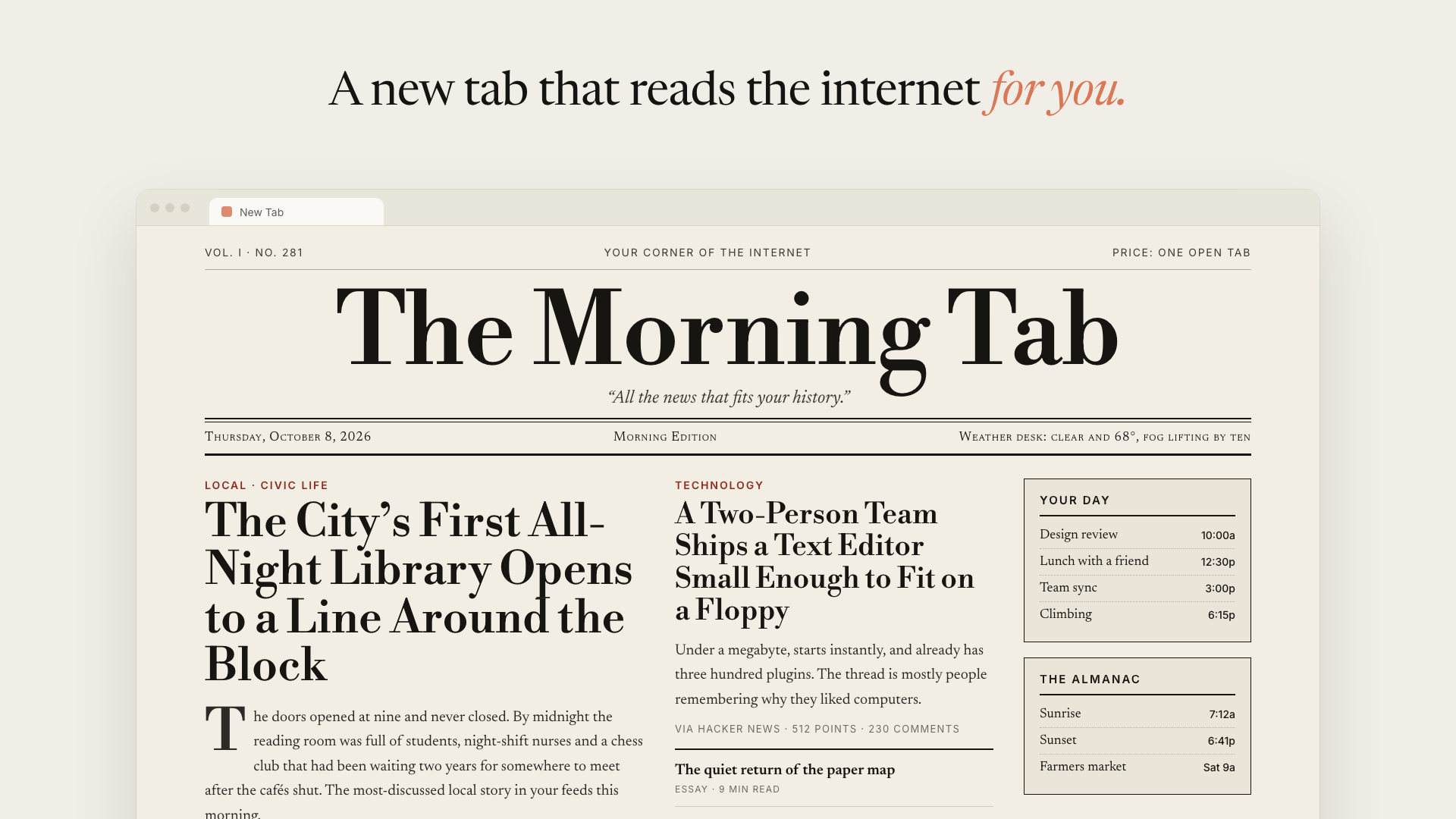 Illustration. Your homepage is built from your own browsing, so its stories will be different.
A morning newspaper is just one look. You can describe any look and the next build follows it: a quiet one-column digest, a dense dashboard, a green-on-black terminal, a zine.
Privacy, up front. To build your homepage, the extension sends a summary of
your browsing history (top domains, visit counts, a few page titles) and the
cleaned-up HTML of up to 8 pages to the Anthropic API, using your own API key.
Those pages are loaded in your signed-in browser, so they can include private
content. The agent session and every uploaded page are deleted when each build
ends. Your API key stays in the extension's local storage. More detail in
ARCHITECTURE.md.
---
You need Chrome (or another Chromium browser), Node.js 20+, and an Anthropic API key.
git clone https://github.com/ThariqS/ai-newtab.git
cd ai-newtab
npx pnpm@10.11.1 install
npx pnpm@10.11.1 build
(If you already have pnpm, plain pnpm install && pnpm build works too.)
Then load it into Chrome:
1. Go to chrome://extensions.
2. Turn on Developer mode (top right).
3. Click Load unpacked and choose apps/extension/.output/chrome-mv3.
If Chrome asks whether to keep the changed new-tab page, choose Keep it.
1. Open a new tab and paste your Anthropic API key. 2. Click Build today's homepage. 3. Watch it work. The progress view walks through each step: preparing the agent, reading your history, opening pages in your browser, analyzing them, and writing your homepage.
The first build takes a few minutes. You can close the tab while it runs, since the build lives in the extension's background worker and appears in any new tab you open.
Click ⚙️ Settings on the new tab.
Instructions. Anything you write here goes into every build and takes priority over the agent's own defaults. This box sets both the content and the look:
| You write | You get | | --- | --- | | "A morning newspaper. Serif type, a big masthead, a lead story, a column of briefs." | A broadsheet front page | | "One calm column. No images. Five things worth reading, with one line on why." | A quiet reading list | | "Dense dashboard: GitHub PRs and issues first, then Hacker News, then everything else." | A work cockpit | | "Green-on-black terminal, monospace, like a 1980s BBS." | Exactly that | | "Skip sports and politics. Always show the weather and my next three calendar events." | Your rules, every day |
Click Save & rebuild to apply them right away.
Model. Choose which Claude model writes your page:
Rebuild automatically. On by default. Once your homepage is older than the interval you pick (6, 12, 24 or 48 hours), the extension rebuilds it quietly in the background. It only starts after you've built once by hand, and it won't retry a failed build until the next interval, so it never loops.
↻ Rebuild in the top-right corner rebuilds right away.
npx pnpm@10.11.1 build again, thenchrome://extensions.
1. getHistory: the agent gets a ranked summary of your most-visited domains.
2. getPageHtml: it picks up to 8 pages, which the extension opens in a
background window, cleans up, and mounts into the agent's sandbox as files.
3. grep / read: the agent pulls headlines, posts and links out of those
files inside its sandbox.
4. write: it writes one React component, which the new tab renders.
The extension's background worker drives a
Claude Managed Agents session directly, with no server
in between. The two custom tools run in the extension because they need
chrome.history and chrome.tabs. Everything else happens in the agent's
sandbox, where shell access is off: scraped pages are untrusted input.
See ARCHITECTURE.md for the event flow, the layout, and the gotchas worth knowing.
packages/agent-core   the agent loop: host-agnostic, no chrome. or node:
apps/extension        the MV3 extension (WXT + React)
harness               Bun scripts that run agent-core outside Chrome, and test the built extension
pnpm dev                 # WXT with hot reload
pnpm typecheck           # all packages
pnpm test                # unit tests (no API calls; needs Bun)
pnpm extension:test      # loads the built extension into headless Chrome (no API calls)
cp .env.example .env     # add ANTHROPIC_API_KEY, then:
pnpm agent:run           # a full build against the real API, with fixture history
pnpm agent:verify        # check the output actually renders
Early and experimental. It's a tool you run yourself with your own key. Don't publish it to a store as-is: anyone with access to the browser profile can read the stored API key.
MIT
→ →
→ →
→ →
→ →
→ →
→ →
→ →
→