1
 →
→
The all-in-one local AI studio for your desktop: chat, image and video generation and a coding agent in one free, open source app. Windows and Linux. No Docker, no terminal, no cloud required.
PurpleDoubleD/locally-uncensored is an open-source project on GitHub, mainly written in TypeScript. The all-in-one local AI studio for your desktop: chat, image and video generation and a coding agent in one free, open source app. Windows and Linux. It currently holds 1,831 stars and 295 forks with 9 open issues, and was last pushed on 2026-09-28 (repository created 2026-03-24).
AI Homed tracks it on the AI Video Projects board and on the AI AI Video Projects list.

The all-in-one local AI studio for your desktop. Chat, images, video and a coding agent in one app. Install it, pick a model, go.
Free and open source. In local mode everything runs on your own machine. No Docker, no terminal, no config files. The platforms are listed under Download.

Download · Three steps · What is in the box · How it compares · Models · FAQ
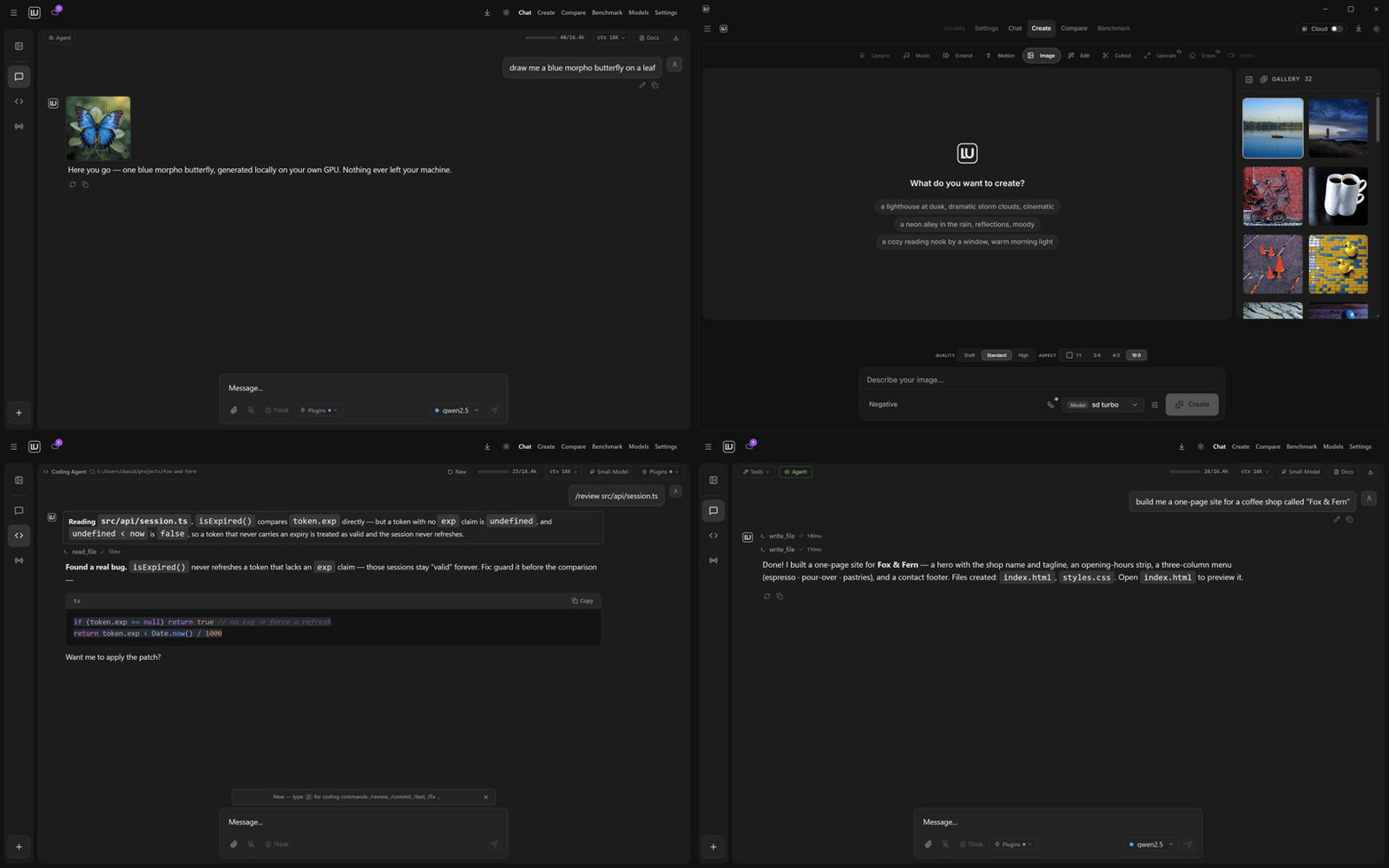
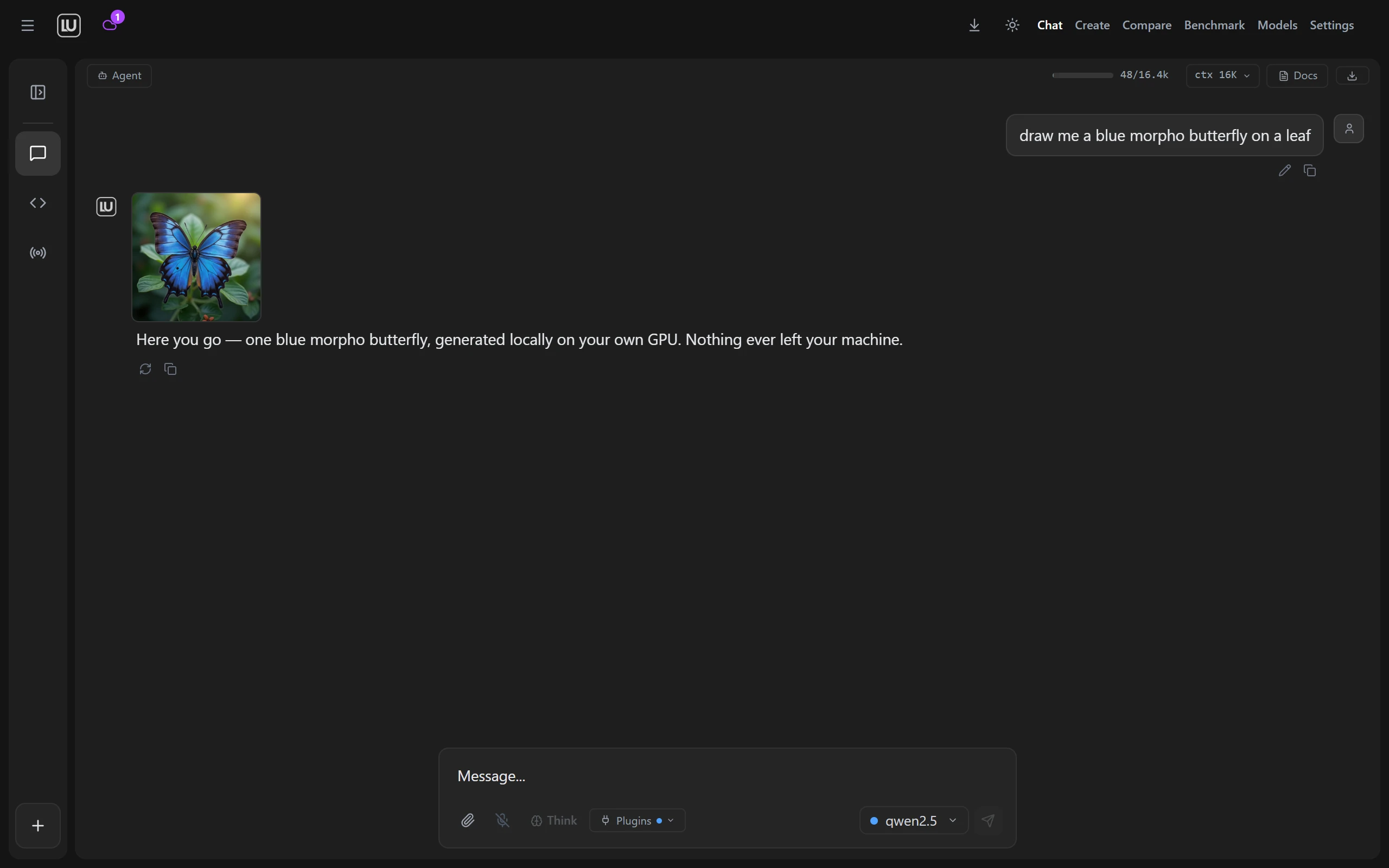
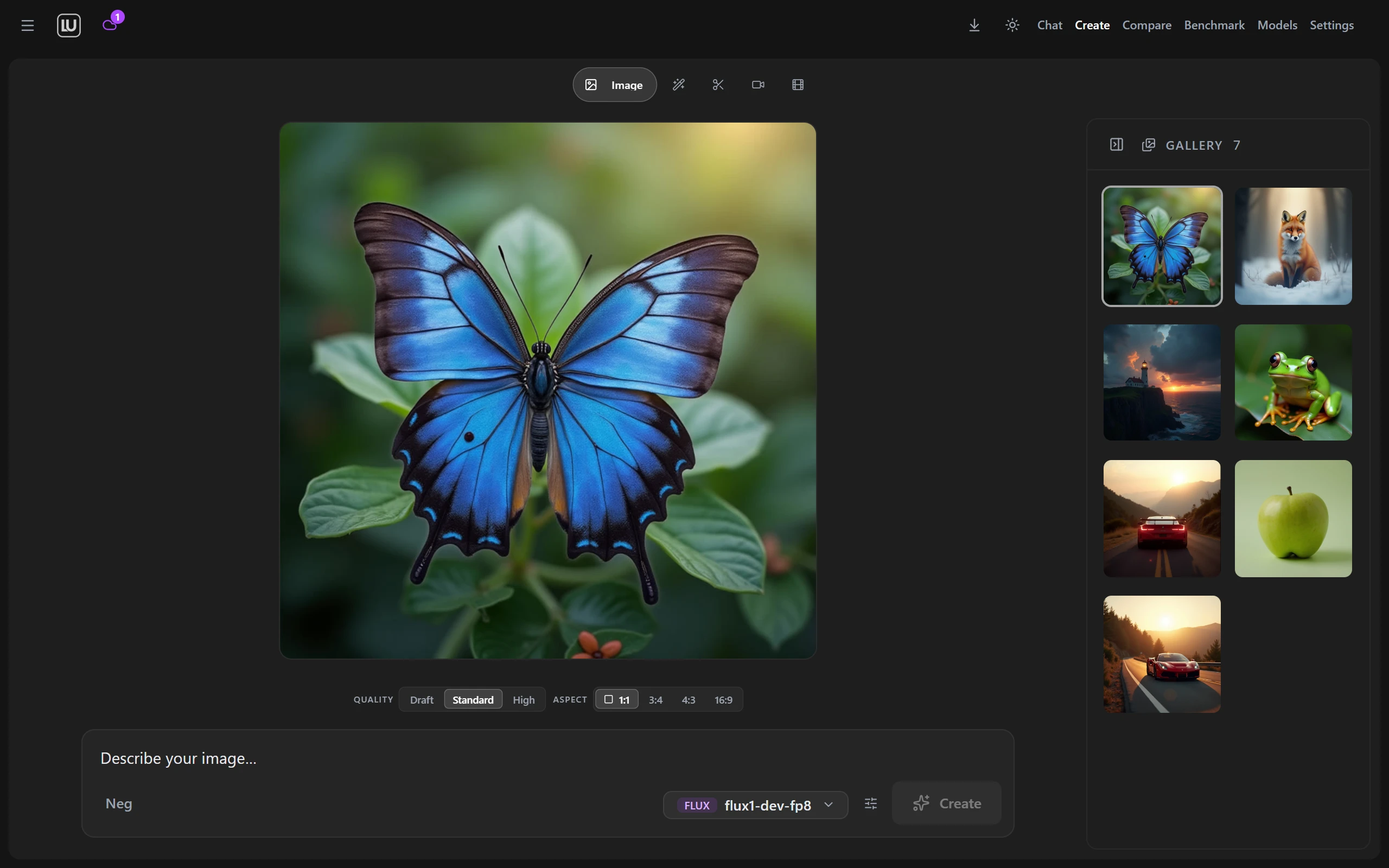
| Chat that draws your images | Images and video in the same window |
|:---:|:---:|
|  |
|  |
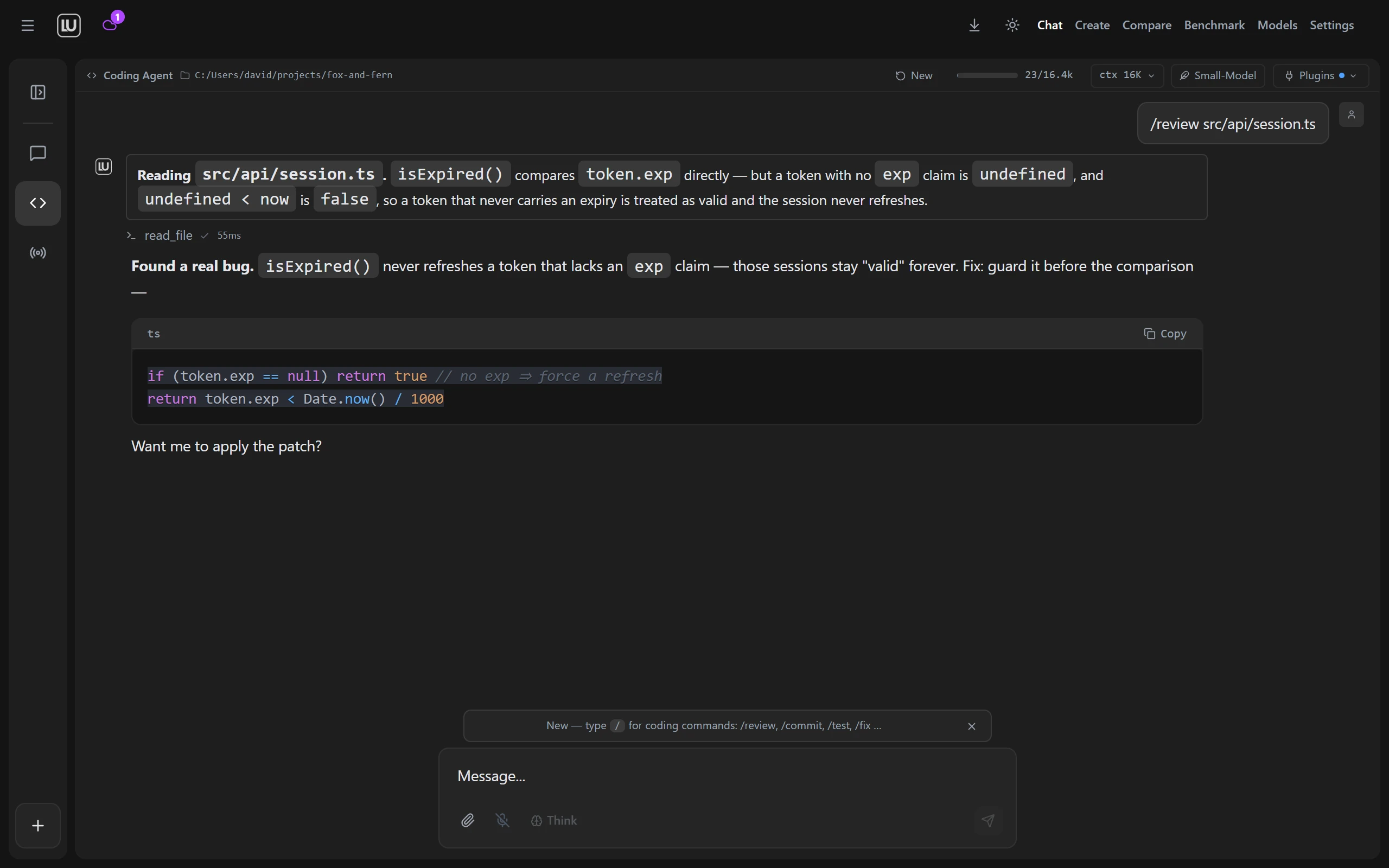
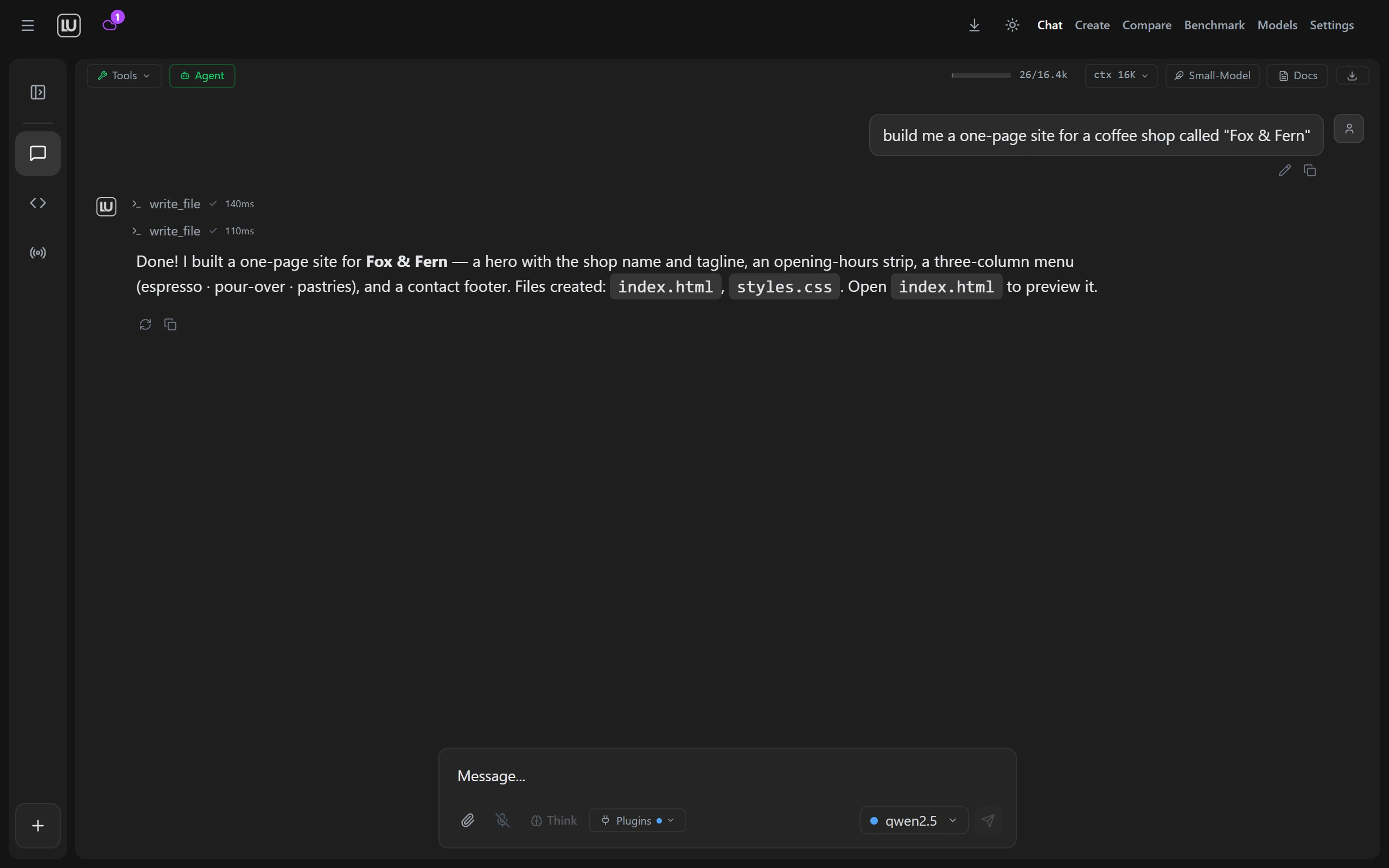
| The coding agent shows the diff first | Agent mode does the legwork |
|
|
| The coding agent shows the diff first | Agent mode does the legwork |
|  |
|  |
|
---
Take the latest build from Releases.
| Platform | File | Status |
|----------|------|--------|
| Windows 10 and 11 | Locally.Uncensored_3.0.6_x64-setup.exe (NSIS, recommended) or Locally.Uncensored_3.0.6_x64_en-US.msi | Tested every release, signed auto update channel |
| Linux | Locally.Uncensored_3.0.6_amd64.AppImage, Locally.Uncensored_3.0.6_amd64.deb or Locally.Uncensored-3.0.6-1.x86_64.rpm | Built on every release |
| macOS 14 or newer, Apple Silicon (Beta) | LU_3.0.6_aarch64.dmg | Signed with an Apple Developer ID and notarized by Apple. Intel Macs are not supported. The app has run on one Mac so far. Voice has been tried by hand in the app on a Mac and works. Computer control is in the Mac app but not fully tested yet on macOS. Remote Access and the automatic update are not confirmed on macOS |
Some antivirus engines flag unsigned NSIS installers that download other binaries, which is a false positive. The installer is built by GitHub Actions from the public source on master, and the update channel is signed against a public minisign key, so you can verify both: see SECURITY.md.
Code signing for the Windows installers: free code signing provided by SignPath.io, certificate by SignPath Foundation. SignPath Foundation has accepted the project. The production certificate is not in place yet, and until it is the installers ship unsigned.
Current release: v3.0.6 (October 2026). Every change since 1.0.0 is in CHANGELOG.md.
3.0.6 adds Voice and computer control, both in beta. Voice is a spoken conversation with the chat model you picked: speech recognition and the voice run on your own machine, there are fifteen voices, and the model can use the agent tools while you talk. With computer control a model uses the mouse and keyboard in apps you approve, and it is off until you switch it on. Dialogs have a new look, a running task shows the LU mark with a plain word for what it is doing, and LU Cloud lists ten more chat models, in beta as well. Our check of both in the real app ran on Windows.
3.0.5 was about Create: LTX 2.5, FastH3 and YuE2 run on your own machine, Qwen-Image 2.1 gets a transparent background and its prompt enhancer, Edit, Remove Background and Enhance Image take up to 50 images in one go, and LU Cloud adds Qwen Image 2.1, LTX 2.5, MiniMax H3 and Wan 3.0 Reference. Chat takes any file, each model in a group chat can have its own persona, dropdowns stay inside the window (issue 149), and the speech install works again on Ubuntu 24.04.
3.0.4 fixed the Code agent and the agent in chat on LU Cloud: writing a long file no longer ends the run, "continue" picks up where a run stopped instead of starting over, the agent keeps a plan only when you ask for one, and cloud context is 32K by default and can be set per model. It also fixed the bugs reported on GitHub and Discord since 3.0.3 (issues 144 to 147): MiniMax H3 runs as a video model with sound, Edit takes up to three extra images with Qwen-Image 2.1, a missing encoder or VAE is named and offered as a download instead of ending in "Value not in list", the LoRA stack follows the loras folder, and group chat works with every LU Engine model.
3.0.3 was a hotfix: chats with many images no longer run the app out of memory, Create reads a model's family from the file instead of its name, and the five bugs reported on GitHub since 3.0.2 are fixed (issues 139 to 143).
3.0.2 was a hotfix: the Code tab lost its scrollbar and its input box once a conversation grew taller than the window (issue 138, a regression in 3.0.1) and is held to the window height again, and the count of open cloud models now takes the Create Studio endpoints in, which makes it fourteen video models and seven image models.
models/loras folder, see what is installed with its size and trigger word, and delete what you no longer want.1. Install. Run the installer like any other program. On first launch a wizard looks for an AI engine that is already running on your machine, and installs one for you with a single click if there is none. It does the same for ComfyUI, which draws the images and video. 2. Pick a model. The model manager marks which models fit your hardware and downloads them in one click. It works with the engine you already have (Ollama, LM Studio and others) and can link models those tools already store, without copying them. Loading a model in Ollama or LM Studio can be cancelled, and an Ollama model that runs partly on the processor says so. 3. Create. Chat, Create, Code and Agent are tabs in one window. Type in one, switch to the next, keep the same models.
Walkthrough with screenshots: Getting started guide. New to local AI: the five minute beginner guide.
git clone https://github.com/PurpleDoubleD/locally-uncensored.git
cd locally-uncensored
npm install
npm run dev          # browser dev mode
npm run tauri build  # desktop binary
setup.bat on Windows and setup.sh on Linux and macOS bootstrap Node, Git and Ollama for dev mode. See the contributing guide.
Chat. Models that answer directly, without refusals, next to the mainstream ones in the same menu. Thinking is shown as it happens, with an effort control on the models that offer one. Upload an image and ask about it (a local model with image input is downloaded together with its image part, the second file it needs to see pictures), chat with your own documents through a local index, talk instead of typing and have answers read back, keep a memory across conversations, switch personas, and import your ChatGPT, Claude or Gemini export so the old threads come with you. A long conversation folds its older turns into a summary instead of running out of room.
Create. Images and video on your own GPU through a ComfyUI the app installs, starts, repairs and updates for you. No node graphs. The lanes are text to image, edit and image to image with a mask for inpainting, remove background, video, animate an image, extend a clip, motion control, talking character, music, and Character Studio, which trains a character on your own card and drops it into your local LoRA folder. A LoRA picker with a stack and strength sliders reads the folder live, and everything you make lands in the gallery. Upscale and Erase Object are the two lanes that run in the cloud only. How it works.
Code. A coding agent that builds a map of the repo, edits only the lines you asked for, shows the diff before it applies anything, runs your tests and reads the failures, and carries typed git tools and per project rules in a .lurules file. Ask, Plan and Bypass modes per conversation, a file explorer with preview, and a workspace per project. A Local API in Settings puts every local model on one OpenAI compatible address behind a token, so your other coding tools can use the same machine.
Agent. Web search and fetch, reading and writing files, a shell, code execution, screenshots, image and video generation, and your own MCP servers on top. Long jobs go to background agents that work while you carry on, and a panel shows what is running. Every tool call passes a permission gate you control, and a read only run stays read only.
Voice (Beta). A spoken conversation with the chat model you picked. Speech recognition, the voice and the turn taking run on your own machine, in English, with fifteen voices. You can interrupt an answer by speaking, the model can use the agent tools with the same permissions, and you decide whether those tools reach your workspace folder or the whole computer. Voice runs in local mode only, and with the Cloud switch on it is hidden. Voice is in beta: it is new, and your computer may still show rough edges. Our check in the real app ran on Windows, and on a Mac Voice has been tried by hand in the app. VOICE.md has the setup and what was measured.
Computer control (Beta). A model looks at the screen and uses the mouse and the keyboard in apps you approve. It is off until you switch it on, asks once in every new chat before it starts, asks before every action unless you make a session autonomous, and never touches terminals, password managers or password fields. Anything that sends, buys or deletes needs your click, and so does a button without a name. In an autonomous session, moving the mouse pauses it, and a shortcut stops it at any time. It is in beta: it is new and not proven in every app yet, so watch what it does and stop it when it goes wrong. Our check in the real app ran on Windows. On a Mac it is in the app but not fully tested yet. COMPUTER-CONTROL.md lists what it asks and what it never touches.
Everywhere. Reach the app from your phone over your LAN or through a Cloudflare tunnel, paired by QR code and a passcode, off until you turn it on, with connected devices listed. Compare two models side by side, benchmark them on your own hardware for speed, cost and correctness, and take updates over a signed channel. Phone details.
Some models are larger than any desktop card. Flip the Cloud switch in the same app and those run on hosted GPUs instead, with the heavy Create lanes alongside them. The same account works in the browser at lu-labs.ai, on a plan or on credit packs that do not expire. The local app stays free either way, and switching back to local costs nothing: plans and prices. With Create in chat (Beta), a cloud chat model can put together an order for images, video, music or voice, and nothing runs until you approve it.
Since 3.0.0 the catalogue says what it can back up. Every cloud chat model was asked the same two questions twice and judged on the answer, and a longer three-round test on 2026-10-05 took the mark from five more: 19 of the 46 we measured answer in full, and only those carry the No Filter mark in the picker. Across all measured answers, 5% were refusals. Ten more chat models that their makers release to answer without refusing are listed as a group of their own, marked Uncensored (Beta). They were not part of the measurement above. On an active plan, 11 models on Hosted and 12 on Pro and Max cost no credits in chat, up to a daily limit. For images and video, 14 video and 7 image models run without a built-in content restriction, most of them with Uncensored in the name, and your account decides what they may produce.
| | Locally Uncensored | Open WebUI | LM Studio | Jan | SillyTavern | |---|:-:|:-:|:-:|:-:|:-:| | Chat | Yes | Yes | Yes | Yes | Yes | | Image generation | Yes | No | No | No | Partial | | Video generation | Yes | No | No | No | No | | Image to image and image to video | Yes | No | No | No | No | | Coding agent | Yes | No | No | No | No | | Agent with tools and MCP | Yes | No | No | No | No | | Works out of the box | Yes | No | Yes | Yes | No | | Remote access from your phone | Yes | Partial | No | No | Partial | | Compare and benchmark | Yes | No | No | No | No | | Answers directly, without refusals | Yes | No | No | No | Partial | | Voice in and out | Yes | Partial | No | No | Partial | | Document chat | Yes | Yes | No | No | No | | Runs without Docker | Yes | No | Yes | Yes | Yes | | Open source | Yes | Yes | No | Yes | Yes |
Deep dives: vs LM Studio · vs Jan · vs Open WebUI · vs GPT4All · vs Msty · vs KoboldCpp · vs SillyTavern · LM Studio alternatives · Best local AI apps 2026
The model manager holds the full catalog and marks what fits your machine. These are the ones worth starting with.
| Model | Download | Notes | |-------|----------|-------| | Qwen 3.8 27B Uncensored | 18 GB | Vision, tools and switchable thinking, 262K context. The IQ2_M build is 11 GB and fits a 12 GB card. | | Gemma 4 12B Heretic | 7.4 GB | Vision, a different voice from the Qwen line. The IQ4_XS build is for 8 GB cards. | | Qwen3-VL 8B Abliterated | 5 GB | Image understanding on an 8 GB card. | | Hermes 3 Llama 3.1 8B | 5 GB | Native tool calling. The small model to give the agent. | | Llama 3.1 8B Abliterated | 5 GB | Fast and reliable, the usual first download. | | GLM 4.7 Flash Heretic | 10 GB | 30B class in an IQ2_M build that fits 12 GB. | | Qwen 3.6 35B MoE Abliterated | 24 GB | 35B total with 3B active, vision and agentic coding. |
GLM 5.3 is in the catalog too, but its smallest local quant is 217 GB, so on a desktop it is cloud territory. Kimi K3 is further out still.
| Model | VRAM | Notes | |-------|------|-------| | Juggernaut XL V9 | 6-8 GB | Photoreal SDXL, the friendliest entry point. | | DreamShaper XL Turbo V2 | 6-8 GB | Anime and stylized. | | FLUX.1 schnell or dev | 8-10 GB | Fast, or slower and better. | | FLUX 2 Klein 4B | 8-10 GB | The newest FLUX, and the quickest of them. | | Z-Image Turbo | 10-16 GB | Unfiltered. Loads slowly below 16 GB. | | Qwen-Image 2.1 | 16-24 GB | Generates and edits in one model. Needs ComfyUI 0.37.0 or newer. Research license, non-commercial. | | Qwen-Image 2.1 (No Filter) | 16-24 GB | The same model with a community text encoder that has its refusals removed (Heretic). | | Noct Q (Qwen-Image 2.1, Unfiltered) | 16-24 GB | A community finetune of Qwen-Image 2.1 with modified image model weights. Research license, non-commercial. | | ERNIE-Image Turbo | 24 GB | Baidu DiT, eight steps. |
| Model | VRAM | Notes | |-------|------|-------| | AnimateDiff Lightning | 6-8 GB | Four step animation, the cheapest way in. | | FramePack F1 | 6-8 GB | Image to video on a small card. | | Wan 2.1 1.3B | 8-10 GB | Light text to video. | | Wan 2.1 14B FP8 | 12+ GB | The quality step up. | | Wan 2.2 TI2V 5B | 12+ GB | Image and text to video in one model. | | HunyuanVideo 1.5 FP8 | 12+ GB | Strong frame to frame consistency. | | LTX Video 2.3 22B FP8 | 16+ GB | The newest LTX. |
Music runs on ACE Step 1.5 Turbo at 6-8 GB, and Talking Character on Wan 2.2 S2V from 10-12 GB.
If you already run a local engine, the app finds it and lists it instead of installing a second one. It detects twelve of them: Ollama, LM Studio, Jan, GPT4All, KoboldCpp, llama.cpp, vLLM, LocalAI, text-generation-webui, TabbyAPI, Aphrodite and SGLang. It also ships its own LU Engine for people who have none. Cloud providers are optional and use your own keys: OpenAI, Anthropic, OpenRouter, Groq, Together, DeepSeek, Mistral, or any OpenAI compatible address you paste in.
Is it really free and offline? Yes. AGPL-3.0, no account, no usage limits. In local mode chat, agent runs and image and video generation all happen on your machine, and after the model download they work without a connection. The app has no analytics kit and sends no crash reports. On its own it uses the network for two things: it checks GitHub Releases for updates shortly after start and at most every six hours after that, and it counts each press of the Cloud switch (which way, platform, app version, no identifier). While you are signed in to LU Cloud it also checks your account every five minutes. Settings, General, Privacy has the full list.
What does "uncensored" mean? Abliterated models have the trained in refusal behaviour removed from the weights, so it is not a jailbreak that can be patched or break. They answer directly, without refusals. Full guide.
What hardware do I need? Chat runs a 3B model on 8 GB of system RAM with no GPU at all, and an 8B model comfortably on a 6 GB card. Image generation starts at 6 to 8 GB of VRAM, and so does video on AnimateDiff Lightning or FramePack F1; the Wan and Hunyuan models want 12 GB or more. The model manager marks what fits before you download.
Can it replace ChatGPT or Claude? For most chat, writing and coding, yes, with a good 8B to 14B local model, and it stays private and unlimited. Frontier cloud models are still stronger on the hardest reasoning. You can add them with your own API keys, or use the Cloud switch.
Does remote access leak data? Remote access is off until you start it, sits behind a six-digit passcode, and shows when a device is connected. On your own network the chat goes straight from phone to PC. Over the internet Cloudflare relays it: the traffic is encrypted to and from Cloudflare, not end to end, so Cloudflare could read it.
What about macOS? The macOS row of the Download table says whether the current release has a Mac build. On a Mac, chat runs on local models through the bundled server with Metal, and Create makes images and video on the Mac itself, without ComfyUI, so what this README says about ComfyUI, VRAM and LoRA folders describes Windows and Linux. On any Mac you can use LU Cloud in the browser at lu-labs.ai, which runs chat, images and video on hosted GPUs.
Tauri v2 with a Rust backend, React 19, TypeScript, Tailwind CSS 4, Vite 8, ComfyUI for images and video, faster-whisper for speech to text, Piper for reading answers aloud, and Pipecat with Whisper and Pocket TTS for Voice.
Discord: https://locallyuncensored.com/discord, with help channels for chat, images, video and the coding agent. Bugs and ideas: Issues and Discussions.
AGPL-3.0-only. See LICENSE.
---
In local mode your data stays on your machine.
Website · Beginner guide · Blog · Report a bug · Request a feature
→ →
→ →
→ →
→ →
→ →
→ →
→ →
→