1
 →
→
Record your screen, ship a demo. Free and open-source, GPU-accelerated, no watermarks, no subscriptions. Windows, macOS, Linux. Actively maintained.
getopenscreen/openscreen is an open-source project on GitHub, mainly written in TypeScript. Record your screen, ship a demo. Free and open-source, GPU-accelerated, no watermarks, no subscriptions. Windows, macOS, Linux. Actively maintained. It currently holds 3,365 stars and 218 forks with 48 open issues, and was last pushed on 2026-09-29 (repository created 2026-03-14).
AI Homed tracks it on the AI Video Projects board and on the AI AI Video Projects list.
OpenScreen
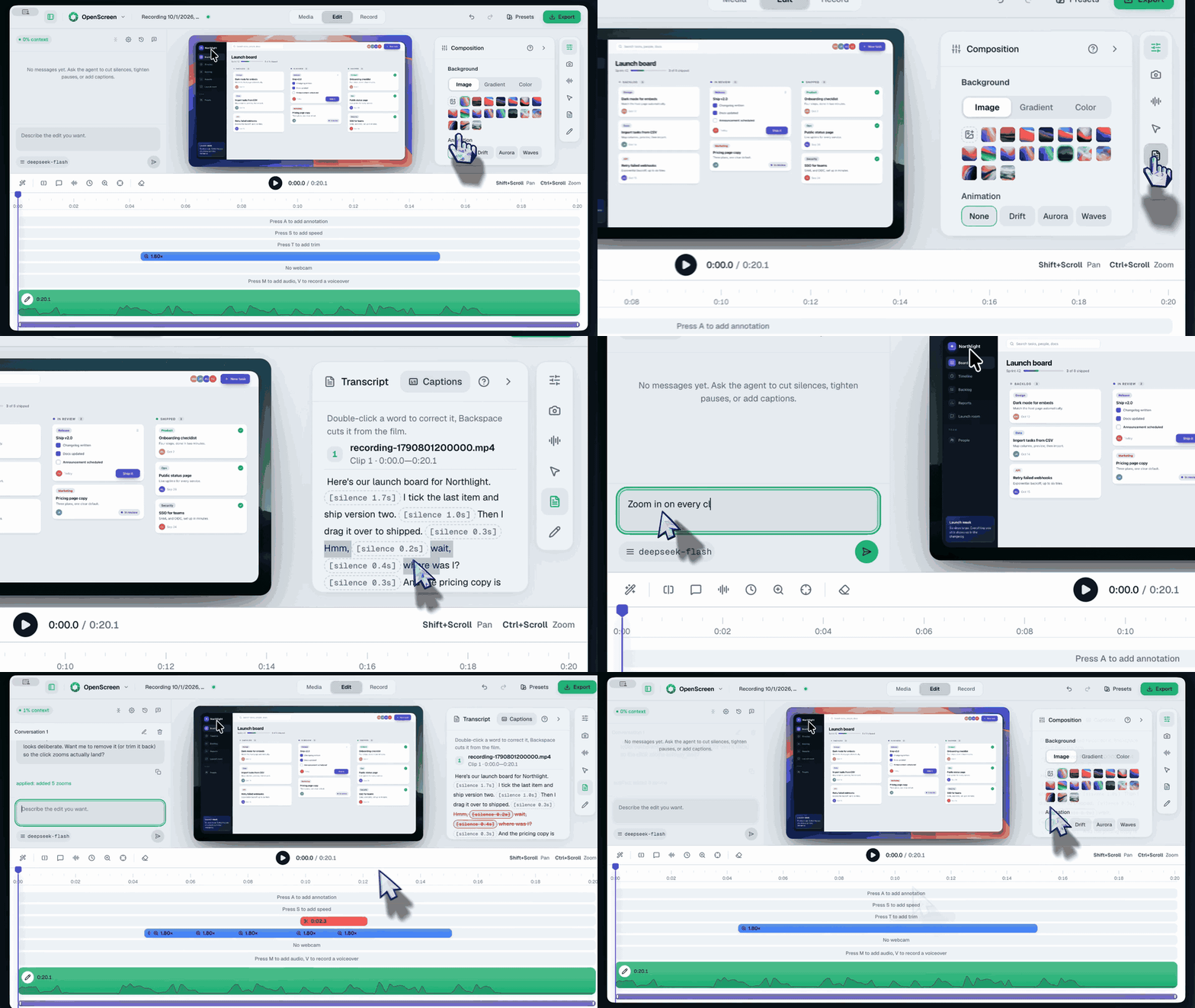
A free, open-source desktop app for recording your screen and turning the result into polished product demos and walkthroughs.
[!NOTE]
This is OpenScreen, continued. Siddharth Vaddem created the project and archived the original repository after v1.5.0. Development moved here with his approval, under the same name and the same MIT license.
A raw capture goes in and comes out ready to post — on X, Reddit, YouTube, a docs page, or a landing page. That is the category Screen Studio defined; OpenScreen is the open-source entry in it, and not a clone.
100% free for personal and commercial use, with nothing held behind a paywall.
Project status. OpenScreen is under active development — expect rough edges and occasional breaking changes, including to the .openscreen project format and the CLI. Bug reports are welcome: open an issue.
OpenScreen ships a CLI for scripts, CI, and AI coding agents: record the screen
headlessly, edit the .openscreen project JSON programmatically (zooms,
annotations, trims), and render MP4/GIF with the full export pipeline — no
visible windows, NDJSON output with --json.
openscreen record --duration 20 --project demo.openscreen --json
openscreen export demo.openscreen -o demo.mp4 --json
See the CLI reference.
Paste this into Claude Code:
Install the OpenScreen demo skill with npx skills add getopenscreen/openscreen --skill openscreen-demo -a claude-code, then follow it to add a video of this change to the PR.
The skill sets everything up: it installs OpenScreen if it is missing (once you agree), connects its MCP server, then asks you to open a new session and say "continue the OpenScreen demo", the one step an agent cannot do for itself. By hand, it is these two commands, with the executable of your system:
claude mcp add openscreen -- "/Applications/Openscreen.app/Contents/MacOS/Openscreen" mcp
npx skills add getopenscreen/openscreen --skill openscreen-demo
From then on, ask: "Add a video of this change to the PR." The agent plans the storyboard, records the app, edits the take with OpenScreen's own editing tools, exports the MP4, checks it frame by frame, and attaches it to the pull request, where reviewers watch it in place. Ask for a launch demo instead and it drafts a post for X, which it publishes only once you say yes. The executable on Windows and Linux, and the other clients, are in AI editing.
Every platform has a recommended route below. On Windows that is the Microsoft Store; everywhere else it is the installer from the GitHub Releases page.
xdg-desktop-portal and PipeWire for native capture and system audio; recording still works without them through the browser-capture fallback, with fewer capabilities (see Platform differences)Download the .dmg installer directly from the Releases page and drag OpenScreen into your Applications folder. Builds from 1.9.0 onward are signed with a Developer ID certificate and notarized by Apple, so Gatekeeper does not block them and no terminal step is needed.
On first launch, open System Settings > Privacy & Security and grant the two permissions OpenScreen needs: Screen Recording and Accessibility. Recording cannot start until both are granted.
[!NOTE]
macOS 15 and later re-ask for screen-recording permission periodically. That prompt comes from macOS itself and applies to every third-party screen recorder — it is not a sign that anything is wrong with your install or that an update broke something. Grant it again when asked.
[!NOTE]
Upgrading from a version older than 1.9.0? Those builds were not signed with a Developer ID certificate, and macOS ties Screen Recording and Accessibility grants to an app's signature — so it cannot tell the new build is the same app, and the permissions you granted the old one do not carry over. If the new version won't record even after you grant them, remove OpenScreen's existing entries under System Settings > Privacy & Security (both Screen Recording and Accessibility), then launch it again and grant them when prompted.
[!NOTE]
OpenScreen quits as soon as you pick what to record, or when the countdown starts? It is most likely a utility that quits apps once their last window closes, such as the Quit on close option of Vorssaint. It does not count OpenScreen's recording bar, which floats above other windows, so it quits OpenScreen whenever the bar hides or a source window closes. Add OpenScreen to that utility's exceptions, or turn the option off. The FAQ shows how to check which app asked OpenScreen to quit.
Recommended — Microsoft Store
Get OpenScreen from the Microsoft Store, or from a terminal:
winget install --source msstore OpenScreen
Microsoft signs the Store package during certification, so it installs with no security warning and updates itself.
Alternative — standalone installer
Download the .exe from the Releases page. Installers are provided for both x64 (Openscreen.Setup.-x64.exe) and ARM64 (Openscreen.Setup.-arm64.exe) — on an ARM64 device the x64 build runs under emulation and records poorly, so take the ARM64 one. Use this if you can't reach the Store — Windows LTSC, a locked-down work machine, an offline install, or if you want a specific older version.
[!NOTE]
The .exe is not code-signed, so Windows SmartScreen shows "Windows protected your PC" and reports an unknown publisher. Choose More info → Run anyway to continue.
> This is not a sign that something is wrong with the download: an unsigned installer earns SmartScreen's trust per file, so a brand-new build always starts out untrusted no matter how many people installed the previous one. Verifying the signature isn't an option here — there is nothing to verify. If you want the checked path, use the Store build above. If you use the .exe, download it only from the Releases page linked here.
[!NOTE]
Recording bar not clickable in OpenScreen 2.0.0 on Windows 10? Run setx OPENSCREEN_DISABLE_CONTENT_PROTECTION 1, quit OpenScreen from its tray icon, then start it again. The bar can then appear in your recordings. The FAQ explains how to undo it once the fix ships.
Four packages are published to the Releases page for each version. Pick the one that matches your distro:
Debian / Ubuntu / Pop!_OS (.deb)
sudo apt install ./Openscreen-Linux-*.deb
Fedora / RHEL / CentOS (.rpm)
sudo dnf install ./Openscreen-Linux-*.rpm
Arch / Manjaro (.pacman)
sudo pacman -U Openscreen-Linux-*.pacman
Any distro (.AppImage)
chmod +x Openscreen-Linux-*.AppImage
./Openscreen-Linux-*.AppImage
NixOS / Nix (flake)
Try without installing:
nix run github:getopenscreen/openscreen
Install into your user profile:
nix profile install github:getopenscreen/openscreen
For a NixOS system config (flake):
{
  inputs.openscreen.url = "github:getopenscreen/openscreen";
outputs = { nixpkgs, openscreen, ... }: {
    nixosConfigurations. = nixpkgs.lib.nixosSystem {
      modules = [
        openscreen.nixosModules.default
        { programs.openscreen.enable = true; }
      ];
    };
  };
}
For Home Manager, use openscreen.homeManagerModules.default with the same programs.openscreen.enable = true;.
You may need to grant screen recording permissions depending on your desktop environment.
Sandbox error: If the AppImage fails to launch with a "sandbox" error, run it with --no-sandbox:
./Openscreen-Linux-*.AppImage --no-sandbox
Everything in the editor and export is the same on macOS, Windows, and Linux: zooms, backgrounds, motion blur, crop/trim/speed, blur regions, annotations, auto-captions, AI editing, projects, export, and all languages. All three now record through a native capture pipeline; the remaining differences are narrower than they used to be:
input group, set up as Mouse clicks on Wayland shows. Without that, recording is unaffected and every cursor sample is simply a move.This repository is the community-maintained continuation of OpenScreen.
Official / trusted links:
OpenScreen is community-driven. If you need help, want to report a bug, or just want to chat with other users and contributors:
This project is licensed under the MIT License. By using this software, you agree that the authors are not liable for any issues, damages, or claims arising from its use.
→ →
→ →
→ →
→ →
→ →
→ →→
→→