
1
 →
→PaddlePaddle/PaddleX is an open-source project on GitHub, mainly written in Python. All-in-One Development Tool based on PaddlePaddle It currently holds 6,290 stars and 0 forks with 0 open issues, and was last pushed on an unknown date (repository created unknown).
AI Homed tracks it on the AI Audio Projects board and on the AI AI Audio Projects list.





PaddleX 3.0 是基于飞桨框架构建的低代码开发工具,它集成了众多开箱即用的预训练模型,可以实现模型从训练到推理的全流程开发,支持国内外多款主流硬件,助力AI 开发者进行产业实践。
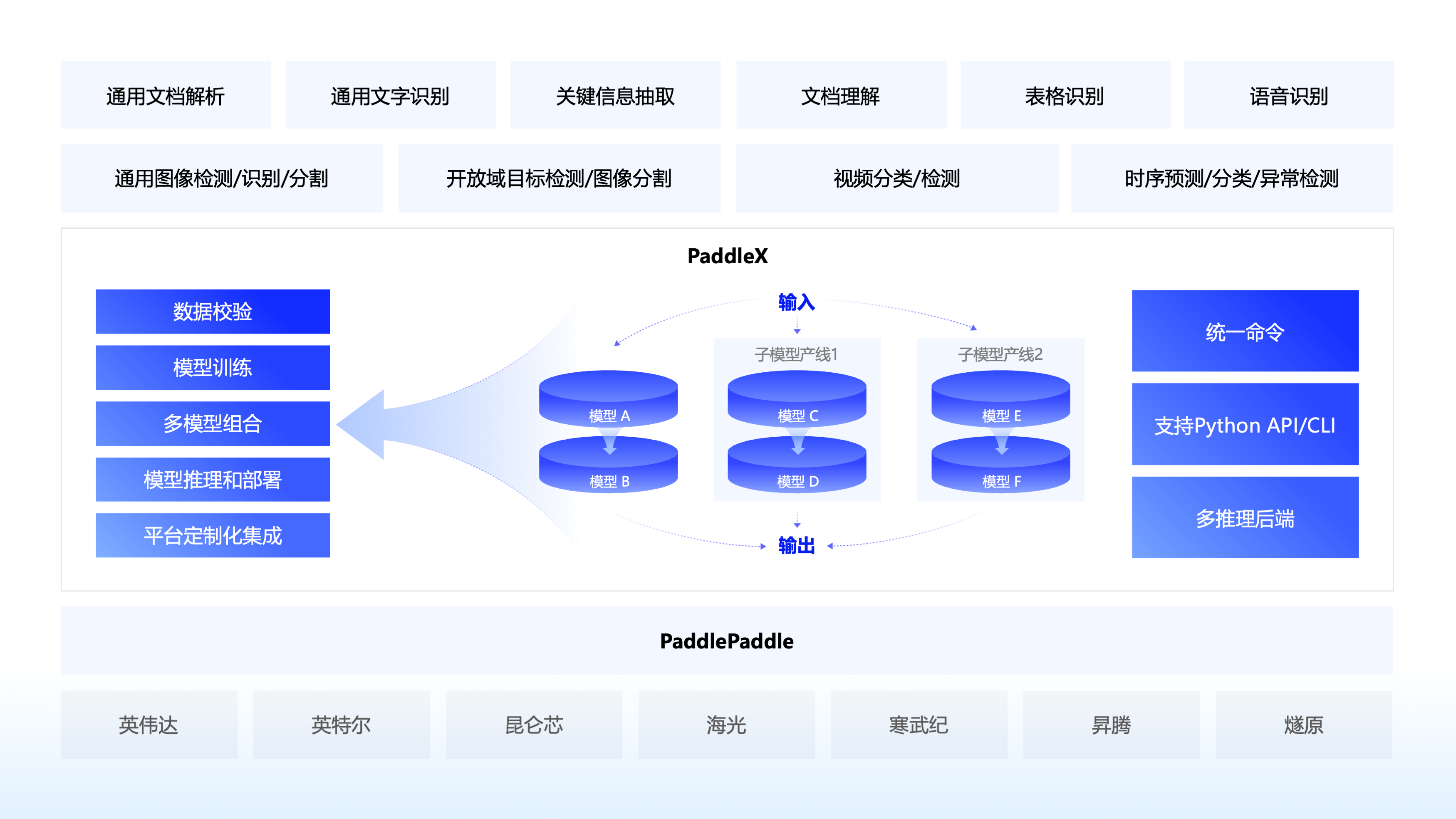
🚀 提高效率降低门槛:实现基于统一命令和图形界面的模型全流程开发,打造大小模型结合、大模型半监督学习和多模型融合的8 条特色模型产线,大幅度降低迭代模型的成本。
🌐 多种场景灵活部署:支持高性能推理、服务化部署和端侧部署等多种部署方式,确保不同应用场景下模型的高效运行和快速响应。
🔧 主流硬件高效支持:支持英伟达 GPU、昆仑芯、昇腾和寒武纪等多种主流硬件的无缝切换,确保高效运行。
🔥🔥 2025.10.16,发布 PaddleX v3.3.0,新增能力如下:
PaddlePredictorOption 中的 model_name 参数移至 PaddleInfer 中,改善了用户易用性。🔥🔥 2025.6.28,发布 PaddleX v3.1.0,新增能力如下:
🔥🔥 2025.5.20,发布 PaddleX v3.0.0,相比PaddleX v2.x,核心升级如下:
丰富的模型库:
-o Global.dy2st=True 即可开启编译器训练,在 GPU 上,多数模型训练速度可提升 10% 以上,少部分模型训练速度可以提升 30% 以上。推理方面,模型整体适配飞桨 3.0 中间表示技术(PIR),拥有更加灵活的扩展能力和兼容性,静态图模型存储文件名由 xxx.pdmodel 改为 xxx.json。PaddleX 致力于实现产线级别的模型训练、推理与部署。模型产线是指一系列预定义好的、针对特定AI任务的开发流程,其中包含能够独立完成某类任务的单模型(单功能模块)组合。
## 📊 能力支持
PaddleX的各个产线均支持本地快速推理,部分模型支持在AI Studio星河社区上进行在线体验,您可以快速体验各个产线的预训练模型效果,如果您对产线的预训练模型效果满意,可以直接对产线进行高性能推理/服务化部署/端侧部署,如果不满意,您也可以使用产线的二次开发能力,提升效果。完整的产线开发流程请参考PaddleX产线使用概览或各产线使用教程。
此外,PaddleX在AI Studio星河社区为开发者提供了基于云端图形化开发界面的全流程开发工具, 点击【创建产线】,选择对应的任务场景和模型产线,就可以开启全流程开发。详细请参考教程《零门槛开发产业级AI模型》
| 模型产线 | 在线体验 | 快速推理 | 高性能推理 | 服务化部署 | 端侧部署 | 二次开发 | 星河零代码产线 |
|---|---|---|---|---|---|---|---|
| 通用OCR | 链接 | ✅ | ✅ | ✅ | ✅ | ✅ | ✅ |
| 文档场景信息抽取v3 | 链接 | ✅ | ✅ | ✅ | 🚧 | ✅ | ✅ |
| 文档场景信息抽取v4 | 链接 | ✅ | ✅ | ✅ | 🚧 | ✅ | ✅ |
| 通用表格识别 | 链接 | ✅ | ✅ | ✅ | 🚧 | ✅ | ✅ |
| 通用目标检测 | 链接 | ✅ | ✅ | ✅ | ✅ | ✅ | ✅ |
| 通用实例分割 | 链接 | ✅ | ✅ | ✅ | 🚧 | ✅ | ✅ |
| 通用图像分类 | 链接 | ✅ | ✅ | ✅ | ✅ | ✅ | ✅ |
| 通用语义分割 | 链接 | ✅ | ✅ | ✅ | ✅ | ✅ | ✅ |
| 时序预测 | 链接 | ✅ | ✅ | ✅ | 🚧 | ✅ | ✅ |
| 时序异常检测 | 链接 | ✅ | ✅ | ✅ | 🚧 | ✅ | ✅ |
| 时序分类 | 链接 | ✅ | ✅ | ✅ | 🚧 | ✅ | ✅ |
| 小目标检测 | 链接 | ✅ | ✅ | ✅ | 🚧 | ✅ | ✅ |
| 图像多标签分类 | 链接 | ✅ | ✅ | ✅ | 🚧 | ✅ | ✅ |
| 公式识别 | 链接 | ✅ | ✅ | ✅ | 🚧 | ✅ | ✅ |
| 印章文本识别 | 链接 | ✅ | ✅ | ✅ | 🚧 | ✅ | ✅ |
| 行人属性识别 | 链接 | ✅ | ✅ | ✅ | 🚧 | ✅ | ✅ |
| 车辆属性识别 | 链接 | ✅ | ✅ | ✅ | 🚧 | ✅ | ✅ |
| 图像异常检测 | 🚧 | ✅ | ✅ | ✅ | 🚧 | ✅ | 🚧 |
| 人体关键点检测 | 🚧 | ✅ | ✅ | ✅ | 🚧 | ✅ | 🚧 |
| 开放词汇检测 | 🚧 | ✅ | ✅ | ✅ | 🚧 | 🚧 | 🚧 |
| 开放词汇分割 | 🚧 | ✅ | ✅ | ✅ | 🚧 | 🚧 | 🚧 |
| 旋转目标检测 | 🚧 | ✅ | ✅ | ✅ | 🚧 | ✅ | 🚧 |
| 3D多模态融合检测 | 🚧 | ✅ | ✅ | ✅ | 🚧 | ✅ | 🚧 |
| 通用表格识别v2 | 链接 | ✅ | ✅ | ✅ | 🚧 | ✅ | ✅ |
| 通用版面解析 | 🚧 | ✅ | ✅ | ✅ | 🚧 | ✅ | 🚧 |
| 通用版面解析v3 | 链接 | ✅ | ✅ | ✅ | 🚧 | 🚧 | ✅ |
| 文档图像预处理 | 🚧 | ✅ | ✅ | ✅ | 🚧 | ✅ | 🚧 |
| 通用图像识别 | 🚧 | ✅ | ✅ | ✅ | 🚧 | ✅ | 🚧 |
| 人脸识别 | 🚧 | ✅ | ✅ | ✅ | 🚧 | ✅ | 🚧 |
| 多语种语音识别 | 🚧 | ✅ | 🚧 | ✅ | 🚧 | 🚧 | 🚧 |
| 通用视频分类 | 🚧 | ✅ | ✅ | ✅ | 🚧 | ✅ | 🚧 |
| 通用视频检测 | 🚧 | ✅ | ✅ | ✅ | 🚧 | ✅ | 🚧 |
| 文档理解 | 🚧 | ✅ | 🚧 | ✅ | 🚧 | 🚧 | 🚧 |
❗注:以上功能均基于 GPU/CPU 实现。PaddleX 还可在昆仑芯、昇腾、寒武纪和海光等主流硬件上进行快速推理和二次开发。下表详细列出了模型产线的支持情况,具体支持的模型列表请参阅模型列表(昆仑芯XPU)/模型列表(昇腾NPU)/模型列表(寒武纪MLU)/模型列表(海光DCU)。我们正在适配更多的模型,并在主流硬件上推动高性能和服务化部署的实施。
🔥🔥 国产化硬件能力支持
| 模型产线 | 昇腾 910B | 昆仑芯 R200/R300 | 寒武纪 MLU370X8 | 海光 Z100/K100AI |
|---|---|---|---|---|
| 通用OCR | ✅ | ✅ | ✅ | ✅ |
| 通用表格识别 | ✅ | 🚧 | 🚧 | 🚧 |
| 通用目标检测 | ✅ | ✅ | ✅ | ✅ |
| 通用实例分割 | ✅ | 🚧 | ✅ | 🚧 |
| 通用图像分类 | ✅ | ✅ | ✅ | ✅ |
| 通用语义分割 | ✅ | ✅ | ✅ | ✅ |
| 时序预测 | ✅ | ✅ | ✅ | ✅ |
| 时序异常检测 | ✅ | 🚧 | 🚧 | 🚧 |
| 时序分类 | ✅ | 🚧 | 🚧 | 🚧 |
| 图像多标签分类 | ✅ | 🚧 | 🚧 | ✅ |
| 行人属性识别 | ✅ | 🚧 | 🚧 | 🚧 |
| 车辆属性识别 | ✅ | 🚧 | 🚧 | 🚧 |
| 通用图像识别 | ✅ | 🚧 | ✅ | ✅ |
| 印章文本识别 | ✅ | 🚧 | 🚧 | 🚧 |
| 图像异常检测 | ✅ | ✅ | ✅ | ✅ |
| 人脸识别 | ✅ | ✅ | ✅ | ✅ |
❗在安装 PaddleX 之前,请确保您已具备基本的 Python 运行环境(注:目前支持 Python 3.8 至 Python 3.13)。PaddleX 3.0.x 版本依赖的 PaddlePaddle 版本为 3.0.0 及以上版本,请在使用前务必保证版本的对应关系。
# CPU 版本
python -m pip install paddlepaddle==3.3.0 -i https://www.paddlepaddle.org.cn/packages/stable/cpu/
GPU 版本,需显卡驱动程序版本 ≥450.80.02(Linux)或 ≥452.39(Windows)
 python -m pip install paddlepaddle-gpu==3.3.0 -i https://www.paddlepaddle.org.cn/packages/stable/cu118/
GPU 版本,需显卡驱动程序版本 ≥550.54.14(Linux)或 ≥550.54.14(Windows)
 python -m pip install paddlepaddle-gpu==3.3.0 -i https://www.paddlepaddle.org.cn/packages/stable/cu126/
❗无需关注物理机上的 CUDA 版本,只需关注显卡驱动程序版本。更多飞桨 Wheel 版本信息,请参考飞桨官网。
pip install "paddlex[base]"
❗ 更多安装方式参考 PaddleX 安装教程
一行命令即可快速体验产线效果,统一的命令行格式为:
paddlex --pipeline [产线名称] --input [输入图片] --device [运行设备]
PaddleX的每一条产线对应特定的参数,您可以在各自的产线文档中查看具体的参数说明。每条产线需指定必要的三个参数:
pipeline:产线名称或产线配置文件input:待处理的输入文件(如图片)的本地路径、目录或 URLdevice:使用的硬件设备及序号(例如gpu:0表示使用第 0 块 GPU),也可选择使用 NPU(npu:0)、 XPU(xpu:0)、CPU(cpu)等。以通用 OCR 产线为例:
paddlex --pipeline OCR \
        --input https://paddle-model-ecology.bj.bcebos.com/paddlex/imgs/demo_image/general_ocr_002.png \
        --use_doc_orientation_classify False \
        --use_doc_unwarping False \
        --use_textline_orientation False \
        --save_path ./output \
        --device gpu:0
{'res': {'input_path': 'general_ocr_002.png', 'page_index': None, 'model_settings': {'use_doc_preprocessor': False, 'use_textline_orientation': False}, 'doc_preprocessor_res': {'input_path': None, 'model_settings': {'use_doc_orientation_classify': True, 'use_doc_unwarping': False}, 'angle': 0},'dt_polys': [array([[ 3, 10],
       [82, 10],
       [82, 33],
       [ 3, 33]], dtype=int16), ...], 'text_det_params': {'limit_side_len': 960, 'limit_type': 'max', 'thresh': 0.3, 'box_thresh': 0.6, 'unclip_ratio': 2.0}, 'text_type': 'general', 'textline_orientation_angles': [-1, ...], 'text_rec_score_thresh': 0.0, 'rec_texts': ['www.99*', ...], 'rec_scores': [0.8980069160461426,  ...], 'rec_polys': [array([[ 3, 10],
       [82, 10],
       [82, 33],
       [ 3, 33]], dtype=int16), ...], 'rec_boxes': array([[  3,  10,  82,  33], ...], dtype=int16)}}
可视化结果如下:
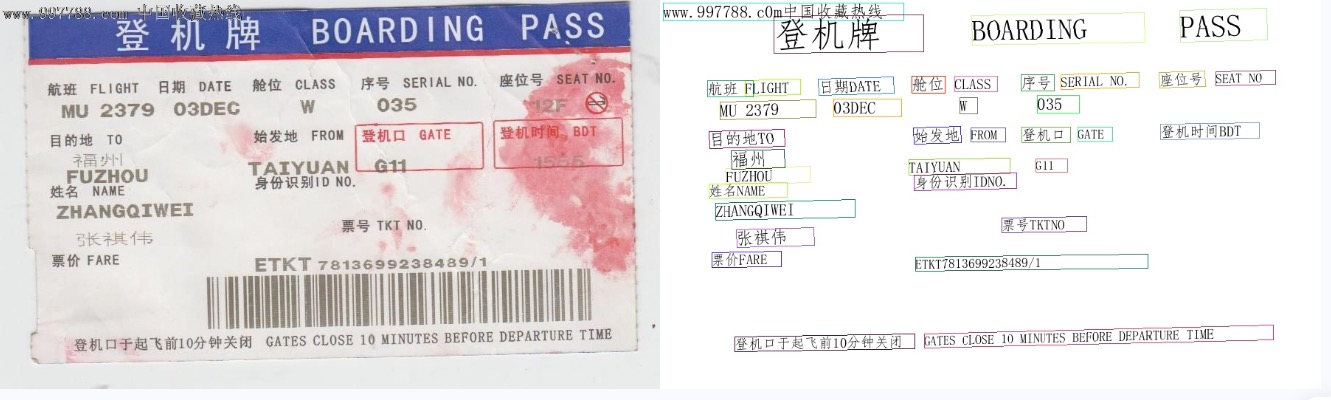
其他产线的命令行使用,只需将 pipeline 参数调整为相应产线的名称,参数调整为对应的产线的参数即可。下面列出了每个产线对应的命令:
| 产线名称 | 使用命令 |
|--------------------|---------------------------------------------------------------------------------------------------------------------------------------------------------------------------------------------|
| 通用图像分类 | paddlex --pipeline image_classification --input https://paddle-model-ecology.bj.bcebos.com/paddlex/imgs/demo_image/general_image_classification_001.jpg --device gpu:0 --save_path ./output/ |
| 通用目标检测 | paddlex --pipeline object_detection --input https://paddle-model-ecology.bj.bcebos.com/paddlex/imgs/demo_image/general_object_detection_002.png --threshold 0.5 --save_path ./output/ --device gpu:0 |
| 通用实例分割 | paddlex --pipeline instance_segmentation --input https://paddle-model-ecology.bj.bcebos.com/paddlex/imgs/demo_image/general_instance_segmentation_004.png --threshold 0.5 --save_path ./output --device gpu:0 |
| 通用语义分割 | paddlex --pipeline semantic_segmentation --input https://paddle-model-ecology.bj.bcebos.com/paddlex/PaddleX3.0/application/semantic_segmentation/makassaridn-road_demo.png --target_size -1 --save_path ./output --device gpu:0 |
| 图像多标签分类 | paddlex --pipeline image_multilabel_classification --input https://paddle-model-ecology.bj.bcebos.com/paddlex/imgs/demo_image/general_image_classification_001.jpg --save_path ./output --device gpu:0 |
| 小目标检测 | `paddlex --pipeline small_object_detection --in
→ →
→ →
→ →
→ →
→ →
→ →
→ →
→