1
 →
→
Local-first desktop widget for tracking token usage, costs, and limits across 37+ AI coding tools—including Claude Code, Codex, Cursor, OpenCode, and OpenClaw—with multi-device sync.
Javis603/token-monitor is an open-source project on GitHub, mainly written in JavaScript. Local-first desktop widget for tracking token usage, costs, and limits across 37+ AI coding tools—including Claude Code, Codex, Cursor, OpenCode It currently holds 2,164 stars and 211 forks with 0 open issues, and was last pushed on an unknown date (repository created unknown).
AI Homed tracks it on the Today's Trending board.
One live dashboard for every AI coding tool, synced across every machine.
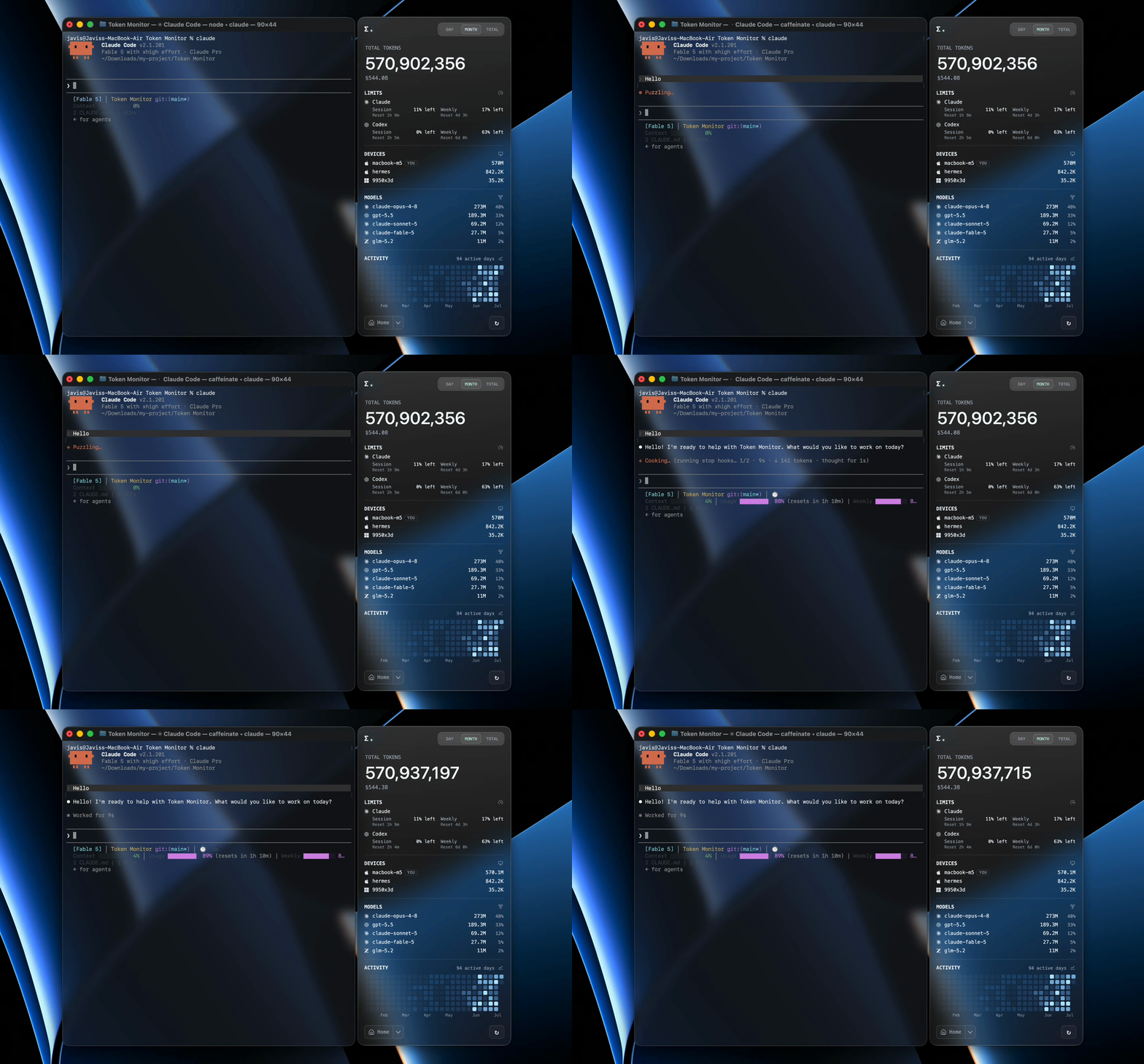
A desktop widget that shows live token usage and AI Tool Limits across 37+ AI coding tools — Claude Code, Codex, Cursor, GitHub Copilot, Cherry Studio, and more — with real-time multi-device sync, historical usage trends, and breakdowns by tool, device, model, session, or project.
Token Monitor supports token usage, account-limit checks, and session details separately:
| Logo | Tool | Data path | Token Usage | AI Tool Limits | Session Details |
|:---:|------|-----------|:---:|:---:|:---:|
|  | Claude Code |
 ~/.claude/projects/, ~/.claude/transcripts/ | ✅ | ✅ | ✅ |
|  | Codex |
 ~/.codex/ (sessions/, archived_sessions/) | ✅ | ✅ | ✅ |
|  | OpenCode |
 ~/.local/share/opencode/ (opencode*.db, storage/message/) | ✅ | ✅ | ✅ |
|  | Hermes Agent |
 ~/.hermes/state.db | ✅ | — | — |
|  | OpenClaw |
 ~/.openclaw/agents/ | ✅ | — | — |
|  | Cursor IDE / Cursor CLI |
 ~/.config/tokscale/cursor-cache/ (account-level usage export) | ✅ | ✅ | — |
|  | Antigravity |
 ~/.gemini/ (antigravity/, antigravity-ide/, antigravity-backup/, antigravity-cli/conversations/) | ✅ | ✅ | — |
|  | Cline | VS Code globalStorage tasks (
.../saoudrizwan.claude-dev/tasks/), ~/.cline/data/sessions/ | ✅ | — | — |
|  | Amp |
 ~/.local/share/amp/threads/ | ✅ | — | — |
|  | Factory Droid |
 ~/.factory/sessions/ | ✅ | ✅ | — |
|  | Kimi CLI / Kimi Code / Kimi Work |
 ~/.kimi/sessions/, ~/.kimi-code/sessions/, /kimi-desktop/ | ✅ | ✅ | — |
|  | Qwen CLI |
 ~/.qwen/projects/ | ✅ | — | — |
|  | Grok Build |
 ~/.grok/ (sessions/, logs/unified.jsonl) | ✅ | ✅ | — |
|  | GitHub Copilot | VS Code
 workspaceStorage/*/chatSessions/, ~/.copilot/ (otel/, data.db) | ✅ | ✅ | — |
|  | Pi / Oh My Pi |
 ~/.pi/agent/sessions/, ~/.omp/agent/sessions/ | ✅ | — | — |
|  | Zed |
 ~/.local/share/zed/threads/threads.db | ✅ | ✅ | — |
|  | Kilo |
 ~/.local/share/kilo/kilo.db; VS Code globalStorage tasks (.../kilocode.kilo-code/tasks/) — extension logs on Linux & remote/WSL only | ✅ | — | — |
|  | Command Code |
 ~/.commandcode/projects/**/*.jsonl | ✅ | ✅ | — |
|  | MiMo Code |
 ~/.local/share/mimocode/mimocode.db | ✅ | ✅ | — |
|  | ZCode / GLM |
 ~/.zcode/ (projects/, cli/db/db.sqlite) | ✅ | ✅ | — |
|  | Kiro |
 ~/.kiro/sessions/cli/, Kiro IDE globalStorage & kiro-cli DB | ✅ | ✅ | — |
|  | CodeBuddy |
 ~/.codebuddy/projects/ + IDE / VS Code extension logs | ✅ | — | — |
|  | WorkBuddy |
 ~/.workbuddy/projects/, ~/.workbuddy/workbuddy.db | ✅ | ✅ | — |
|  | Proma |
 ~/.proma/agent-sessions/*.jsonl | ✅ | — | — |
|  | Qoder |
 /QoderCN/SharedClientCache/cache/db/local.db (CN only) | ✅ | ✅ | — |
|  | Reasonix |
 ~/.reasonix/ (stats/, sessions/, projects/*/sessions/) | ✅ | — | — |
|  | DeepSeek / DeepSeek Harness |
 ~/.dsh/sessions/ (session.jsonl, session.jsonl.zstd) | ✅ | ✅ | ✅ |
|  | Cherry Studio |
 /CherryStudio/ (Data/Agents/.claude/projects/ V2, .claude/projects/ legacy) | ✅ | — | — |
|  | LM Studio |
 ~/.lmstudio/server-logs/**/*.log | ✅ | — | — |
|  | Unsloth Studio |
 ~/.unsloth/studio/studio.db | ✅ | — | — |
|  | OpenRouter | OpenRouter API key (usage/key limit; balance when credits access is authorized, documented for Management keys) | — | ✅ | — |
|
| OpenRouter | OpenRouter API key (usage/key limit; balance when credits access is authorized, documented for Management keys) | — | ✅ | — |
|  | Minimax | Minimax API key (Token Plan quota via Minimax API) | — | ✅ | — |
|
| Minimax | Minimax API key (Token Plan quota via Minimax API) | — | ✅ | — |
|  | Volcengine | Ark API key or Volcengine AK/SK (Ark Coding Plan & Agent Plan quota via Volcengine API) | — | ✅ | — |
|
| Volcengine | Ark API key or Volcengine AK/SK (Ark Coding Plan & Agent Plan quota via Volcengine API) | — | ✅ | — |
|  | Ollama | Ollama Cloud cookie (session/weekly usage via ollama.com/settings) | — | ✅ | — |
|
| Ollama | Ollama Cloud cookie (session/weekly usage via ollama.com/settings) | — | ✅ | — |
|  | Trae CN | Trae CN access token (Trae CN / SOLO credits via trae.cn) | — | ✅ | — |
|
| Trae CN | Trae CN access token (Trae CN / SOLO credits via trae.cn) | — | ✅ | — |
|  | Alibaba Cloud | Alibaba Cloud console cookie (Bailian / Model Studio Token Plan quota, Team & Personal) | — | ✅ | — |
|
| Alibaba Cloud | Alibaba Cloud console cookie (Bailian / Model Studio Token Plan quota, Team & Personal) | — | ✅ | — |
|  | Third-party APIs | New API / Sub2API-compatible account presets (including compatible One API forks), a New API API-key preset, and a Custom balance endpoint | — | ✅ | — |
$XDG_DATA_HOME for the ~/.local/share/ roots, and per-tool variables such as $CODEX_HOME, $GROK_HOME, $HERMES_HOME, $KIMI_CODE_HOME, $UNSLOTH_STUDIO_HOME, $LM_STUDIO_HOME, $DSH_HOME, $REASONIX_STATE_HOME, $REASONIX_HOME and the $CLINE_* family./v1/chat/completions and /v1/responses requests recorded in server logs. Conversations started from LM Studio's built-in Chat UI and native /api/v1/chat requests are not included.studio.db: Studio chats and its local API. Local inference has zero API cost; recognized metered providers use Tokscale's price estimates. Training tokens are not included. See Unsloth source notes.Qoder CN token usage is read from the app's local SQLite database, not an API — enable it in Settings → tools (opt-in, off by default). The database is auto-detected per platform: macOS ~/Library/Application Support/QoderCN/SharedClientCache/cache/db/local.db, Windows %APPDATA%\QoderCN\SharedClientCache\cache\db\local.db, Linux ~/.config/QoderCN/SharedClientCache/cache/db/local.db — overridable with TOKEN_MONITOR_QODER_CN_DB_PATH.
This is an advanced local integration: reading needs a sqlite3 CLI on PATH or a Node runtime with unflagged node:sqlite (Node ≥ 23.4; the Electron widget may need the CLI). Read failures are logged, and an existing complete snapshot is retained instead of being replaced with zero usage. Costs are estimated from the models.dev catalog for each mapped model; the adapter may break if Qoder changes its database schema.
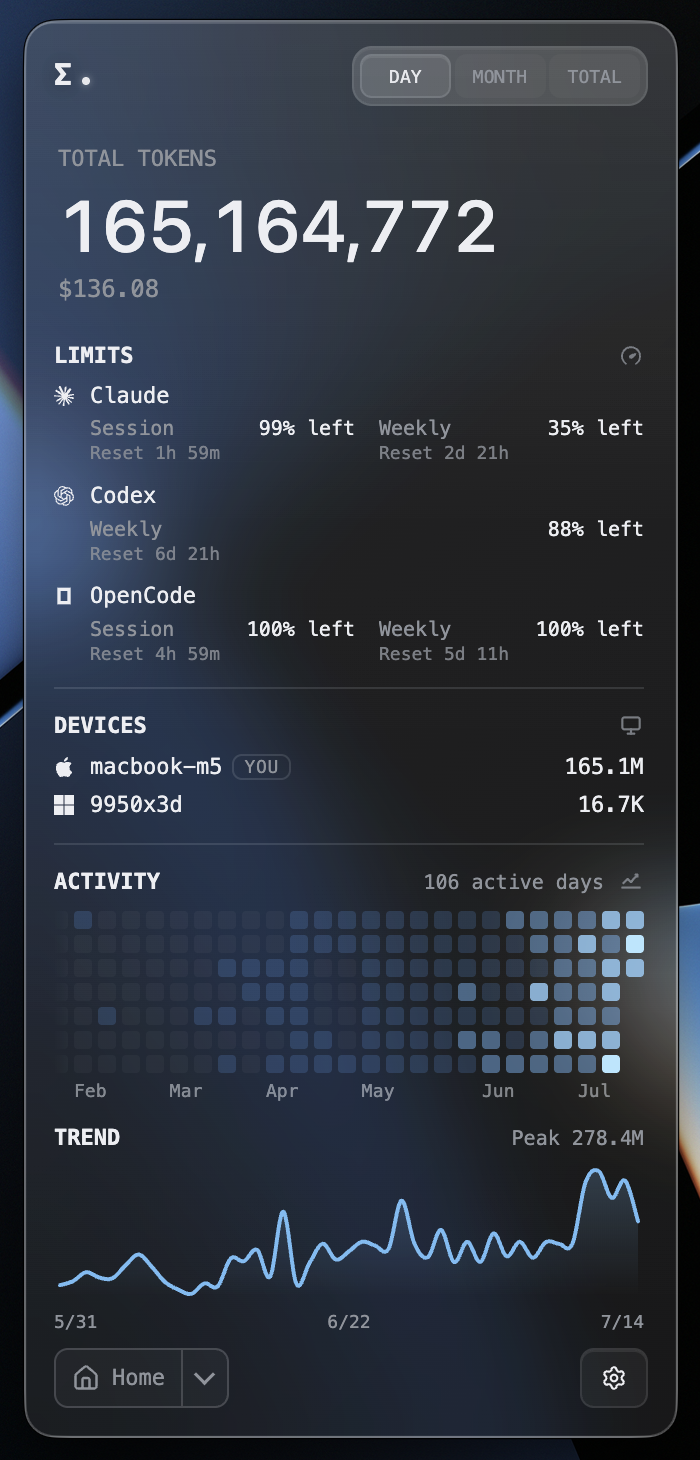 Customizable dashboard — choose which modules show and their order |
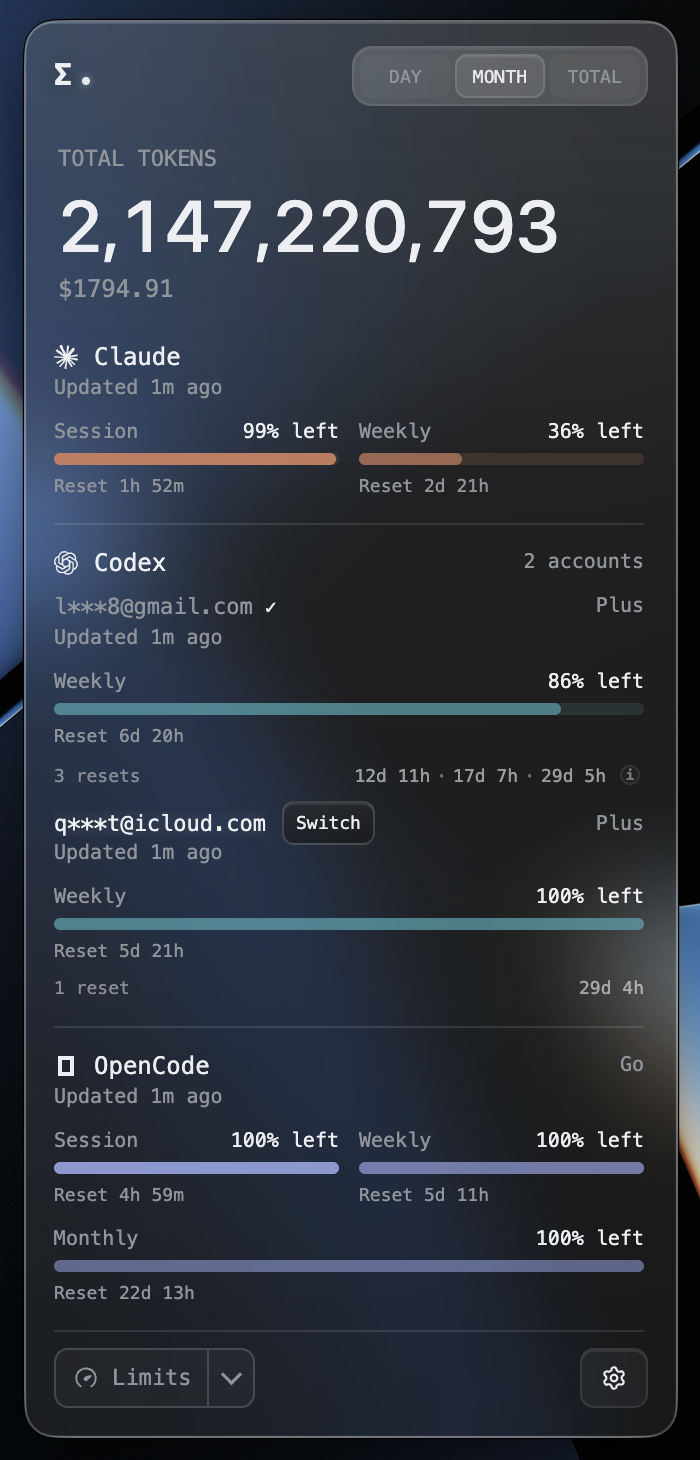 Multiple accounts side by side, one-click switch of the active Codex account |
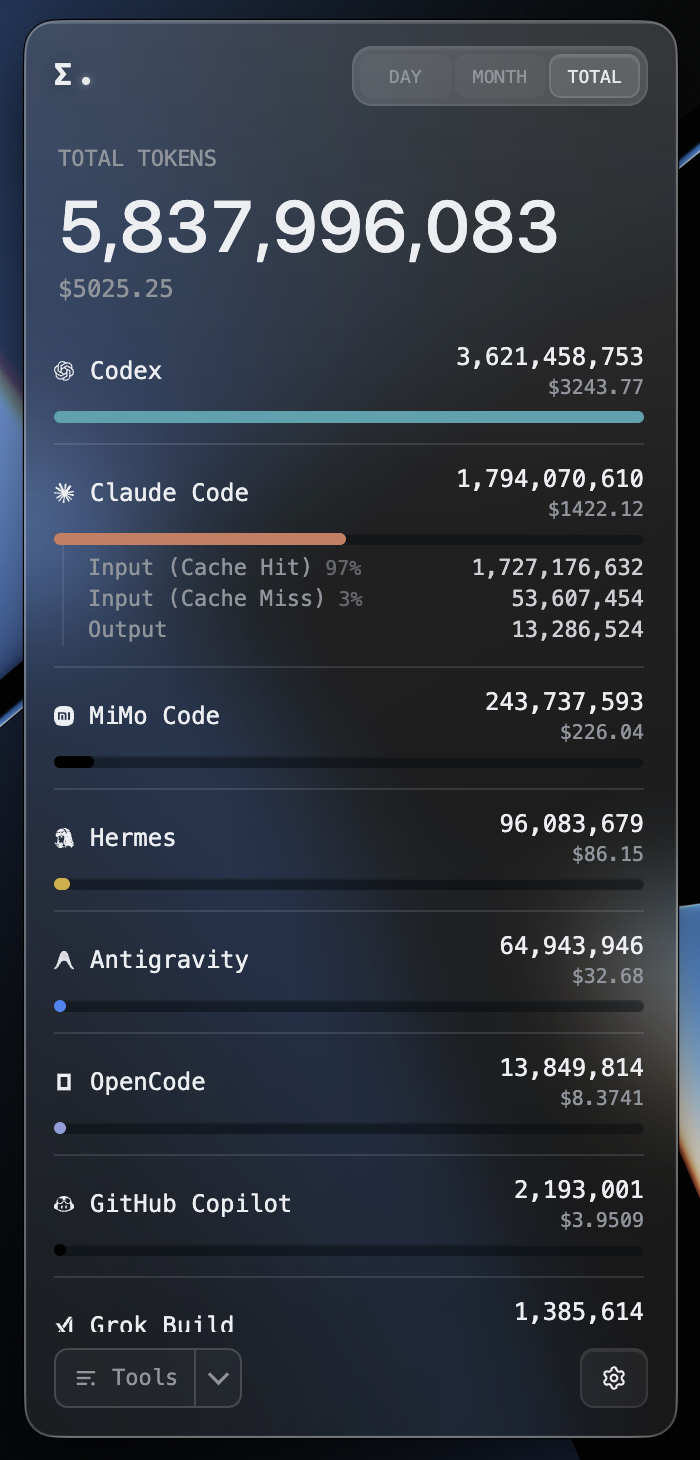 Click any tool to expand input / output and cache-hit detail |
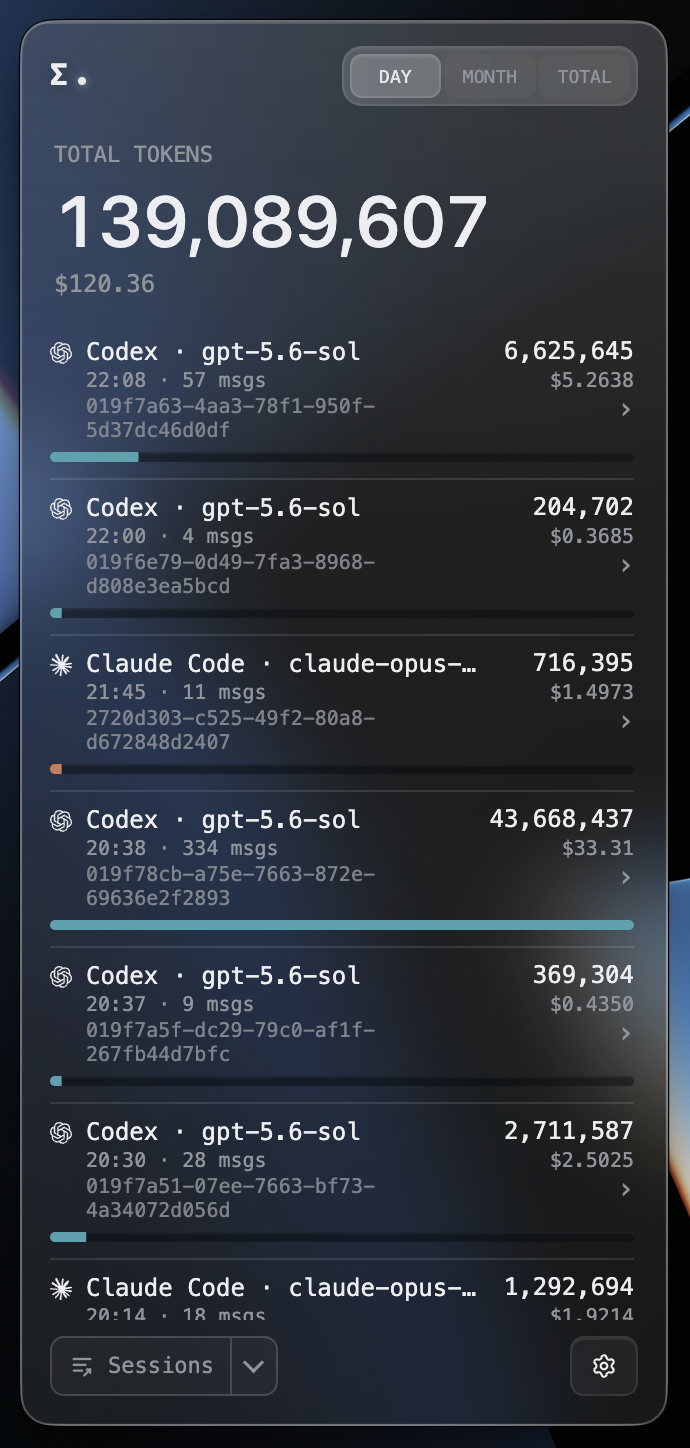 Open a single session to break each prompt into tokens and tools used |
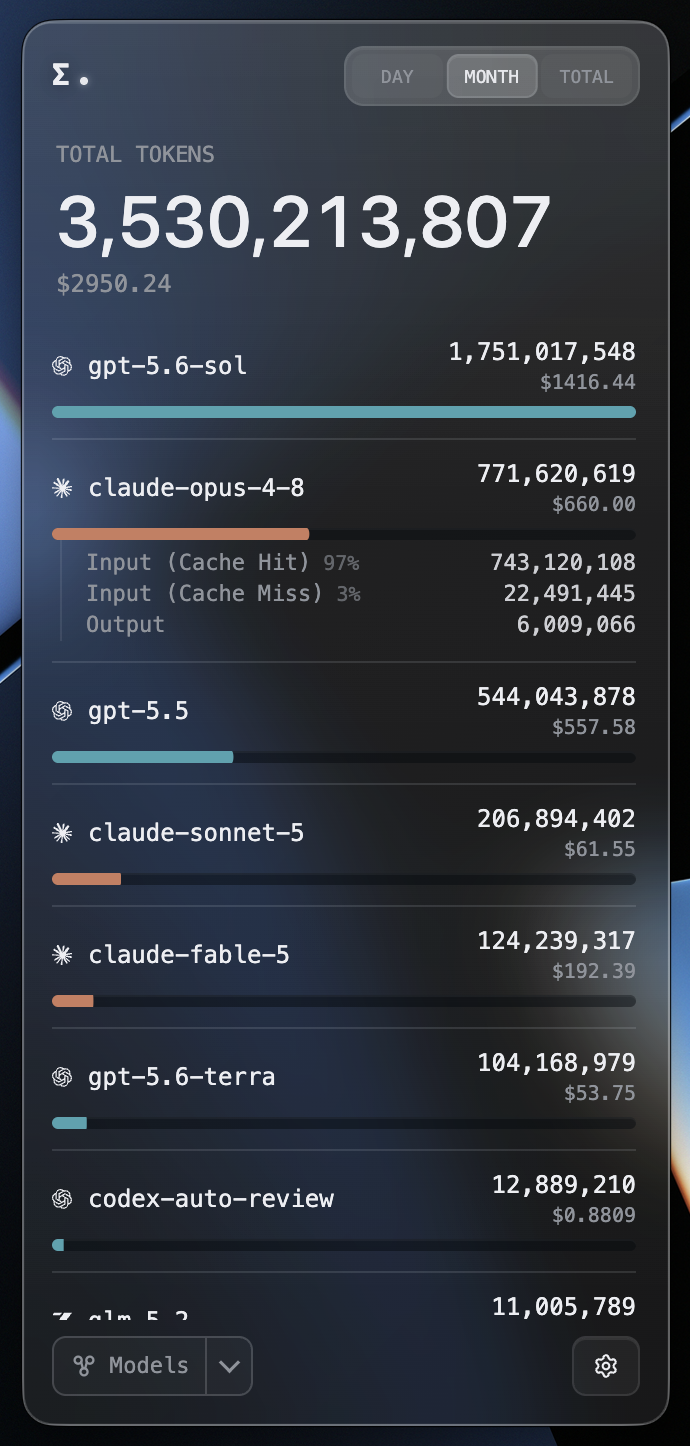 Every model's usage and cost, aggregated across tools |
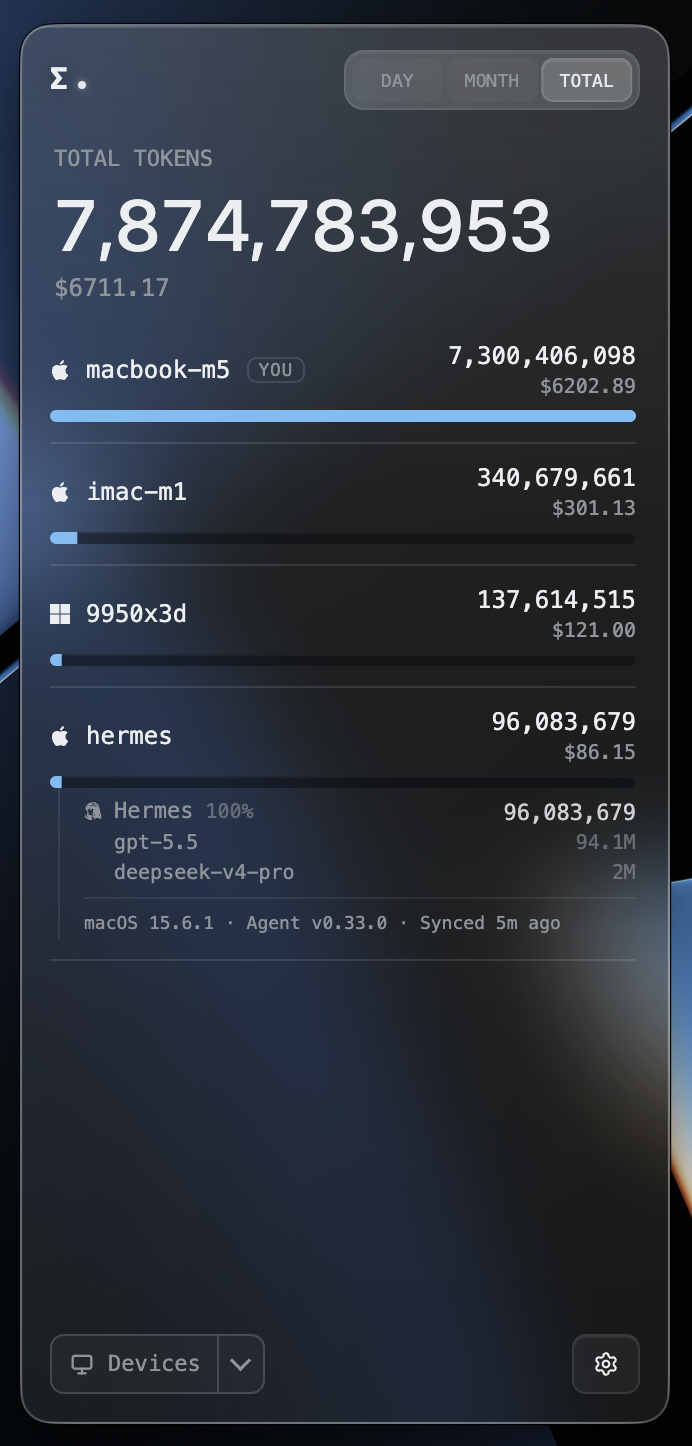 Each device's usage, cost, and sync status — expand for per-machine detail |
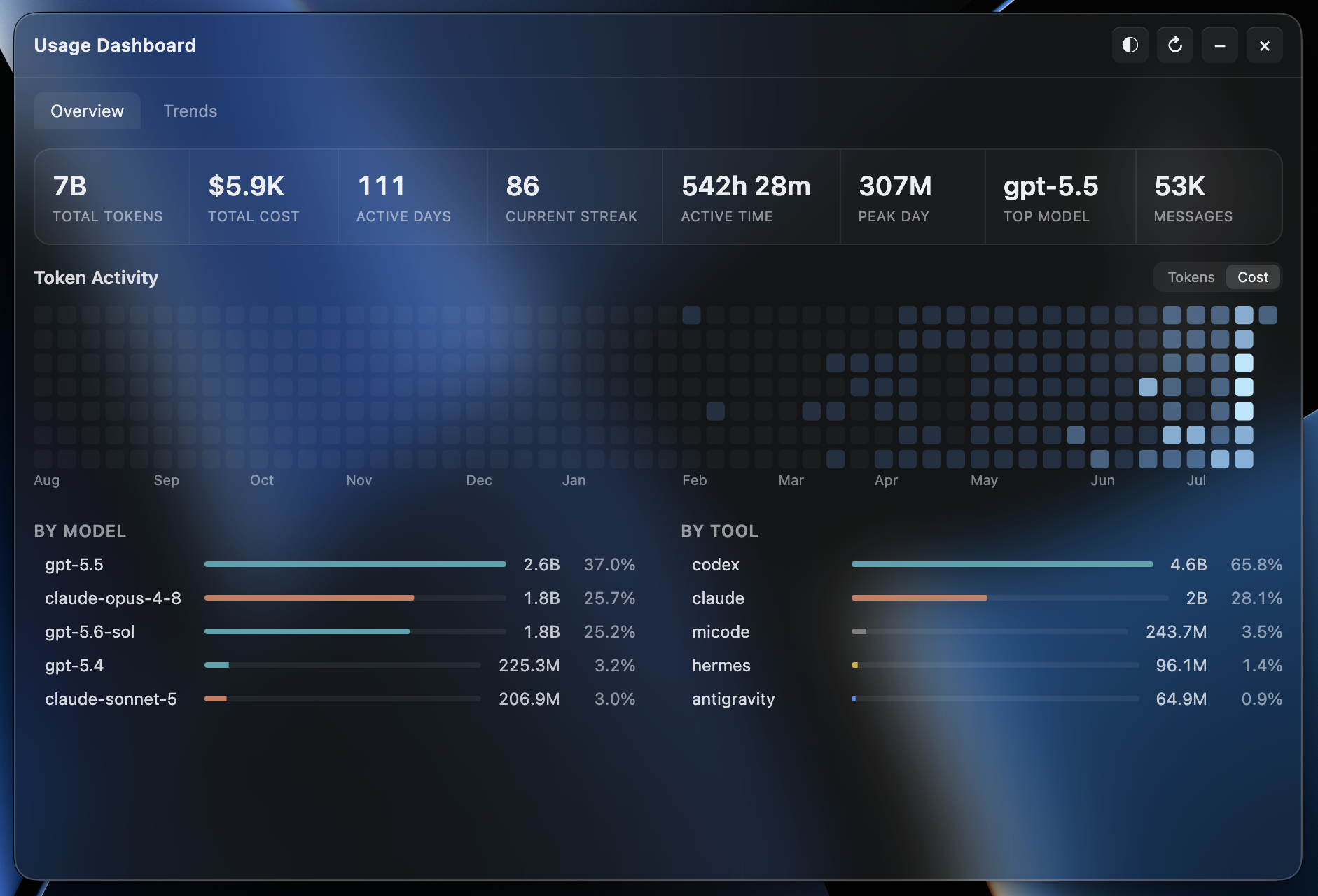 A year of activity heatmap and streaks, aggregated across all devices |
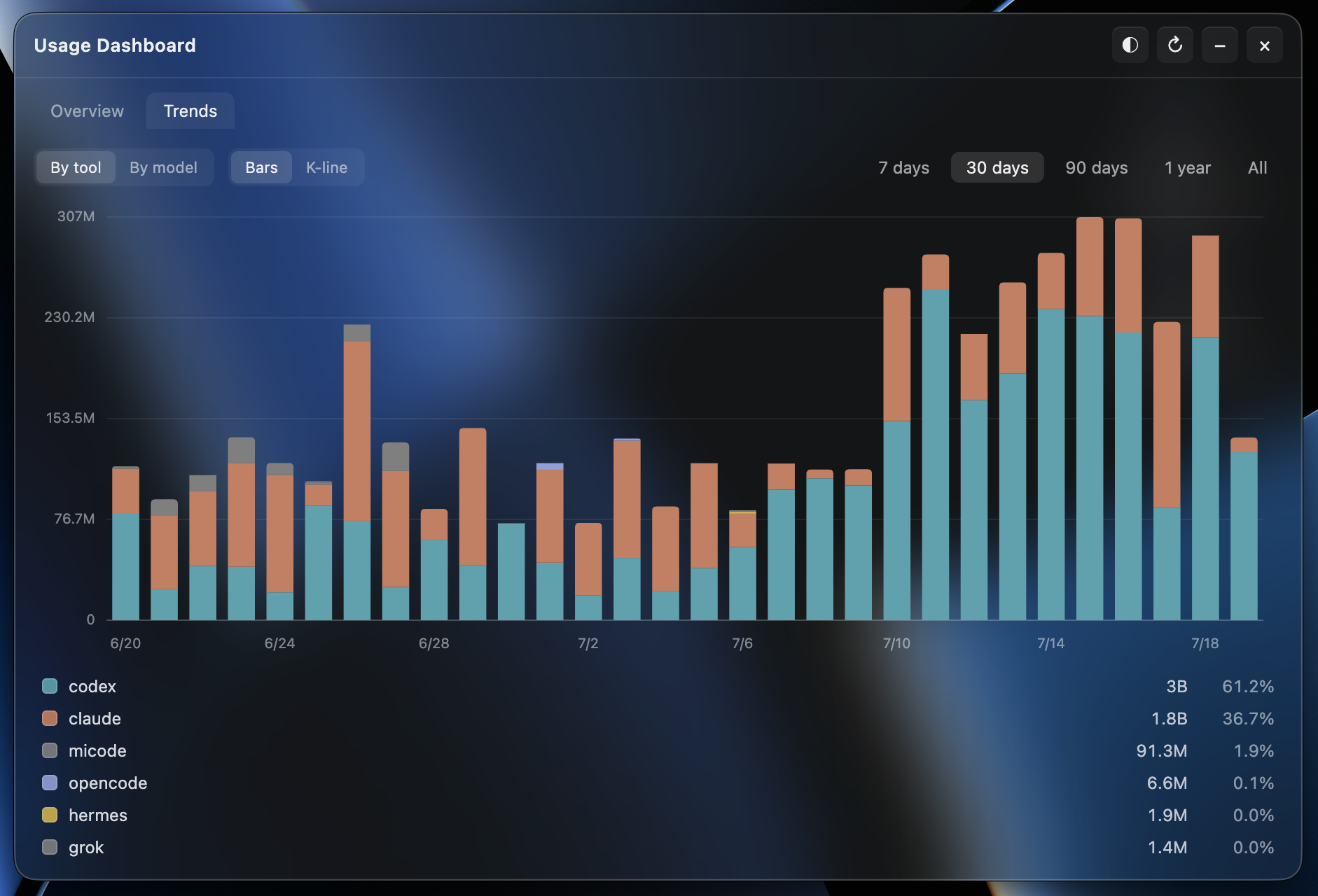 A year of daily trends, stacked by tool / model, with K-line |
Most usage monitors are useful on the machine they run on. Token Monitor is built for multi-device work: each device watches its own local logs, sends summary updates to your hub, and every connected widget sees token changes almost immediately.
tok/s or total burn in tok/minOn macOS, install through the official Homebrew Cask:
brew install --cask token-monitor
Or download from GitHub Releases.
.dmg, signed and notarized.dmg, signed and notarized.exe, code-signed.AppImageLocal mode is the default: launch the app and it starts tracking this device. No hub, agent, or config required.
Pick ONE hub backend that all your devices (and any headless agents) connect to. On each device, open the widget and pick a mode under Settings → Multi-device Sync. The widget contributes this device's usage automatically; run npm run agent only on machines without a widget.
In the widget on one always-on machine, open Settings → Multi-device Sync and pick Host hub on this device. The widget generates a random secret and lists the LAN URLs other devices can connect to (Tailscale or ZeroTier addresses appear here too). On every other device, pick Connect to a hub and paste the URL + secret.
The hub runs while Token Monitor is running — quitting (not just closing the window) stops it for all connected devices.
# on the always-on machine
cp .env.example .env
set TOKEN_MONITOR_SECRET to something private, then:
npm run hub
One-click deploy — Cloudflare will prompt for the TOKEN_MONITOR_SECRET during setup. Or deploy manually:
cd worker
npm install
npx wrangler login
npx wrangler secret put TOKEN_MONITOR_SECRET
npx wrangler deploy
Paste the deployed URL into each device's widget at Settings → Multi-device Sync. See worker/README.md for the iOS widget recipe and endpoint reference, or docs/API.md for the hub HTTP API.
App state lives in the OS user-data dir — delete it along with the app to fully uninstall.
| Platform | Path |
|----------|------|
| macOS | ~/Library/Application Support/Token Monitor/ |
| Windows | %APPDATA%/Token Monitor/ |
| Linux | ~/.config/Token Monitor/ |
To build your own installer, use Node.js 22.15+ on the target OS (electron-builder can't cross-build a macOS .dmg on Windows, or vice-versa).
npm install
npm run dist:mac     # macOS arm64 .dmg           → dist/
npm run dist:mac:x64 # macOS Intel x64 .dmg       → dist/
npm run dist:win     # Windows x64 installer .exe → dist/
npm run dist:linux   # Linux x64 AppImage         → dist/
npm run pack         # unpacked app dir (no installer), for quick local testing
Output lands in dist/. Windows and Linux use the matching dist:* script above on the target OS. Packaging the macOS release build requires a local Developer ID Application signing identity; use npm start for local development or unsupported platforms.
Runtime and packaging scripts explicitly ensure the pinned tokscale binary on the four vendored targets. Other source platforms keep the npm binary and filter clients it does not support; npm install, lint, and tests do not download it.
Mode A — Local (default, no setup)
    widget (Electron) ──▶ tokscale ──▶ ~/.claude, ~/.codex, $HERMES_HOME
Mode B — Sync (opt-in, multi-device)
    device A agent ──▶
    device B agent ──▶  hub  ──▶  widget on any device
    device C agent ──▶
The widget chooses local vs sync mode based on Settings → Multi-device Sync. The hub itself can run as a separate npm run hub process, a Cloudflare Worker, or directly inside one of the widgets (Host mode). In sync mode the hub pushes aggregated stats to every connected widget over Server-Sent Events, so updates on one device appear on the others within a few seconds.
With Preserve deleted session usage enabled (Settings → Collection), Token Monitor archives observed daily tool/model usage locally with no time limit — so even after a source tool prunes its own sessions, the heatmap and trends are unaffected.
The heatmap and sync payload use a rolling 370-day window (older observations remain available locally for future views). Claude Code keeps only 30 days of transcripts by default (cleanupPeriodDays); to keep the full rolling year before the archive kicks in, raise it in ~/.claude/settings.json before the window passes:
{
  "cleanupPeriodDays": 370
}
A larger value keeps more, at the cost of transcripts living on disk for as long as you set. tokscale's Session Data Retention table covers the other tools' defaults and config paths.
This archive only covers days Token Monitor has already observed; data deleted before it started tracking cannot be recovered.
There are two places to configure Token Monitor; day-to-day use only needs the first:
→ →
→ →
→ →
→ →
→ →
→ →
→ →
→