
1
 →
→enhuiz/vall-e is an open-source project on GitHub, mainly written in Python. An unofficial PyTorch implementation of the audio LM VALL-E It currently holds 2,968 stars and 0 forks with 0 open issues, and was last pushed on an unknown date (repository created unknown).
AI Homed tracks it on the AI Audio Projects board and on the AI AI Audio Projects list.
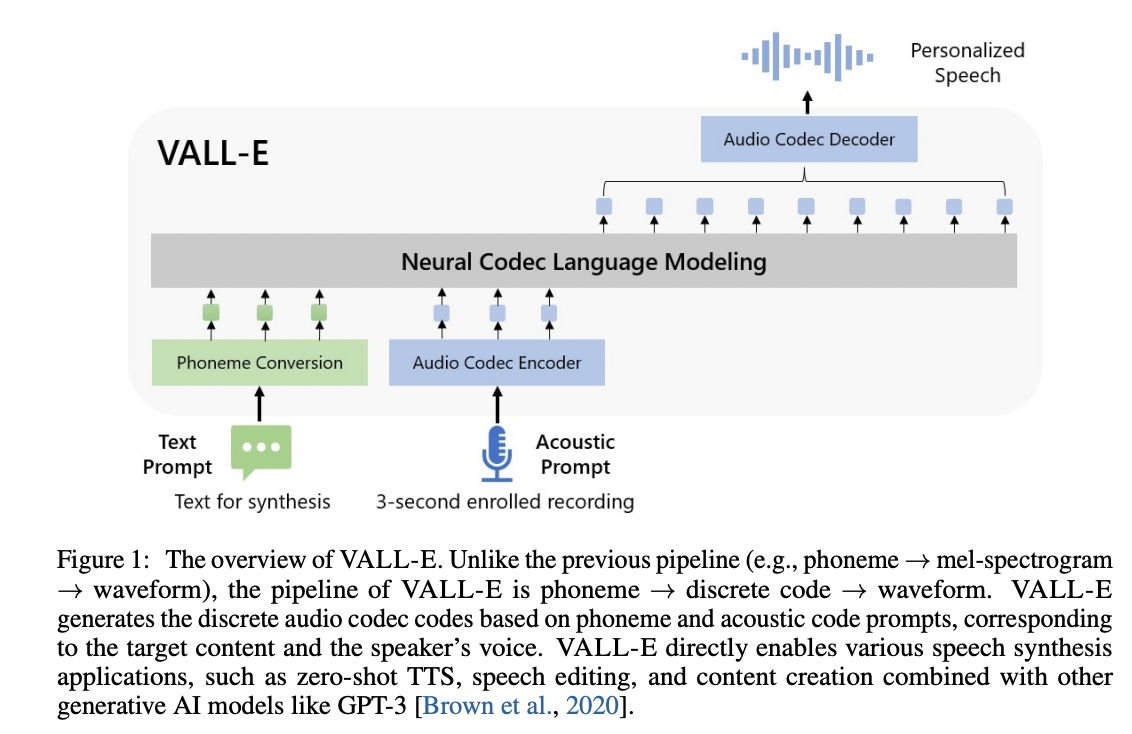
An unofficial PyTorch implementation of VALL-E, based on the EnCodec tokenizer.

A toy Google Colab example:.
Please note that this example overfits a single utterance under the data/test and is not usable.
The pretrained model is yet to come.
Since the trainer is based on DeepSpeed, you will need to have a GPU that DeepSpeed has developed and tested against, as well as a CUDA or ROCm compiler pre-installed to install this package.
pip install git+https://github.com/enhuiz/vall-e
Or you may clone by:
git clone --recurse-submodules https://github.com/enhuiz/vall-e.git
Note that the code is only tested under Python 3.10.7.
1. Put your data into a folder, e.g. data/your_data. Audio files should be named with the suffix .wav and text files with .normalized.txt.
2. Quantize the data:
python -m vall_e.emb.qnt data/your_data
3. Generate phonemes based on the text:
python -m vall_e.emb.g2p data/your_data
4. Customize your configuration by creating config/your_data/ar.yml and config/your_data/nar.yml. Refer to the example configs in config/test and vall_e/config.py for details. You may choose different model presets, check vall_e/vall_e/__init__.py.
5. Train the AR or NAR model using the following scripts:
python -m vall_e.train yaml=config/your_data/ar_or_nar.yml
You may quit your training any time by just typing quit in your CLI. The latest checkpoint will be automatically saved.
Both trained models need to be exported to a certain path. To export either of them, run:
python -m vall_e.export zoo/ar_or_nar.pt yaml=config/your_data/ar_or_nar.yml
This will export the latest checkpoint.
python -m vall_e <ref_path> <out_path> --ar-ckpt zoo/ar.pt --nar-ckpt zoo/nar.pt
@article{wang2023neural,
  title={Neural Codec Language Models are Zero-Shot Text to Speech Synthesizers},
  author={Wang, Chengyi and Chen, Sanyuan and Wu, Yu and Zhang, Ziqiang and Zhou, Long and Liu, Shujie and Chen, Zhuo and Liu, Yanqing and Wang, Huaming and Li, Jinyu and others},
  journal={arXiv preprint arXiv:2301.02111},
  year={2023}
}
@article{defossez2022highfi,
  title={High Fidelity Neural Audio Compression},
  author={Défossez, Alexandre and Copet, Jade and Synnaeve, Gabriel and Adi, Yossi},
  journal={arXiv preprint arXiv:2210.13438},
  year={2022}
}
 →
→ →
→ →
→ →
→ →
→ →
→ →
→