1
 →
→
A framework for prompt tuning using Intent-based Prompt Calibration
Eladlev/AutoPrompt is an open-source project on GitHub, mainly written in Python. A framework for prompt tuning using Intent-based Prompt Calibration It currently holds 3,019 stars and 264 forks with 0 open issues, and was last pushed on an unknown date (repository created unknown).
AI Homed tracks it on the AI Prompt Engineering board.


Auto Prompt is a prompt optimization framework designed to enhance and perfect your prompts for real-world use cases.
The framework automatically generates high-quality, detailed prompts tailored to user intentions. It employs a refinement (calibration) process, where it iteratively builds a dataset of challenging edge cases and optimizes the prompt accordingly. This approach not only reduces manual effort in prompt engineering but also effectively addresses common issues such as prompt sensitivity and inherent prompt ambiguity issues.
Our mission: Empower users to produce high-quality robust prompts using the power of large language models (LLMs).
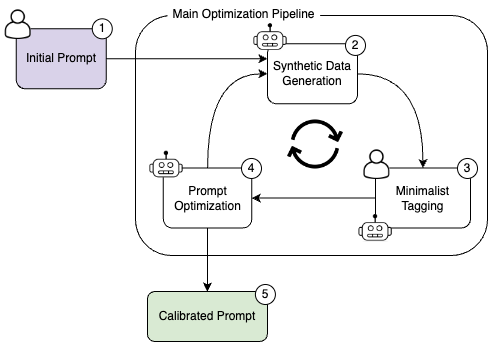
The system is designed for real-world scenarios, such as moderation tasks, which are often challenged by imbalanced data distributions. The system implements the Intent-based Prompt Calibration method. The process begins with a user-provided initial prompt and task description, optionally including user examples. The refinement process iteratively generates diverse samples, annotates them via user/LLM, and evaluates prompt performance, after which an LLM suggests an improved prompt.
The optimization process can be extended to content generation tasks by first devising a ranker prompt and then performing the prompt optimization with this learned ranker. The optimization concludes upon reaching the budget or iteration limit.
This joint synthetic data generation and prompt optimization approach outperform traditional methods while requiring minimal data and iterations. Learn more in our paper Intent-based Prompt Calibration: Enhancing prompt optimization with synthetic boundary cases by E. Levi et al. (2024).
Using GPT-4 Turbo, this optimization typically completes in just a few minutes at a cost of under $1. To manage costs associated with GPT-4 LLM's token usage, the framework enables users to set a budget limit for optimization, in USD or token count, configured as illustrated here.

python <= 3.10
Step 1 - Download the project
git clone git@github.com:Eladlev/AutoPrompt.git
cd AutoPrompt
Step 2 - Install dependencies
Use either Conda or pip, depending on your preference. Using Conda:
conda env create -f environment_dev.yml
conda activate AutoPrompt
Using pip:
pip install -r requirements.txt
Using pipenv:
pip install pipenv
pipenv sync
Step 3 - Configure your LLM.
Set your OpenAI API key by updating the configuration file config/llm_env.yml
Step 4 - Configure your Annotator
v1.29.0 instead of the latest tag.predictor section of config/config_default.yml.max_usage parameter. For OpenAI models, max_usage sets the maximum spend in USD. For other LLMs, it limits the maximum token count.Step 5 - Run the pipeline
First, configure your labels by editing config/config_default.yml
dataset:
    label_schema: ["Yes", "No"]
For a classification pipeline, use the following command from your terminal within the appropriate working directory:
python run_pipeline.py
python run_pipeline.py \
    --prompt "Does this movie review contain a spoiler? answer Yes or No" \
    --task_description "Assistant is an expert classifier that will classify a movie review, and let the user know if it contains a spoiler for the reviewed movie or not." \
    --num_steps 30
If you are using pipenv, be sure to activate the environment: ``` bash pipenv shell python run_pipeline.py
or alternatively prefix your command with pipenv run:
Generation pipeline
To run the generation pipeline, use the following example command:
For more information, refer to our generation task example.


Benchmark optimization (optimize-only mode)
If you already have an annotated dataset and want to skip sample generation and annotation, use the benchmark optimization script. This mode runs a pure optimization loop: predict → evaluate → refine.
Your dataset should be a CSV file with text and annotation columns:
Run the optimization:
Arguments:
--dataset (required): Path to CSV with text and annotation columns--prompt: Initial prompt to optimize (interactive if omitted)--task_description: Task description (interactive if omitted)--labels: Label schema (default: Yes No)--num_steps: Number of optimization iterations (default: 10)--output: Output JSON file for results (default: benchmark_results.json)--config: Configuration file (default: config/config_benchmark.yml)
This is useful when:
- You already have labeled benchmark data
- You want faster iteration without sample generation
- You're fine-tuning a prompt for a specific dataset
Enjoy the results. Completion of these steps yields a refined (calibrated)
prompt tailored for your task, alongside a benchmark featuring challenging samples,
stored in the default dump path.
Tips
- Prompt accuracy may fluctuate during the optimization. To identify the best prompts, we recommend continuous refinement following the initial generation of the benchmark. Set the number of optimization iterations with
--num_steps and control sample generation by specifying max_samples in the dataset section. For instance, setting max_samples: 50 and --num_steps 30 limits the benchmark to 50 samples, allowing for 25 additional refinement iterations, assuming 10 samples per iteration.
- The framework supports checkpoints for easy resumption of optimization from the last saved state. It automatically saves the most recent optimization state in a
dump path. Use --output_dump to set this path and --load_path to resume from a checkpoint.
- The iterations include multiple calls to the LLM service, with long prompts and requests for a relatively large amount of generated tokens by the LLM. This might take time ~1 minute (especially in the generative tasks), so please be patient.
- If there are some issues with the Argilla server connection/error, try to restart the space.
Prompt Sensitivity Example
You write a prompt for identifying movie spoilers:
This prompt scores 81 on your benchmark using GPT-4 LLM. Then, you make a minor modification:
Surprisingly, the second prompt scores 72, representing an 11% drop in accuracy. This illustrates the need for a careful prompt engineering process.
🚀 Contributing
Your contributions are greatly appreciated! If you're eager to contribute, kindly refer to our Contributing Guidelines) for detailed information.
If you wish to be a part of our journey, we invite you to connect with us through our Discord Community. We're excited to have you onboard!
🛡 Disclaimer
The AutoPrompt project is provided on an "as-is" basis without any guarantees or warranties, expressed or implied.
Our perspective on the optimization and usage of prompts:
1. The core objective of AutoPrompt is to refine and perfect prompts to achieve high-quality results. This is achieved through an iterative calibration process, which helps in reducing errors and enhancing the performance of LLMs. However, the framework does not guarantee absolute correctness or unbiased results in every instance.
2. AutoPrompt aims to improve the reliability of prompts and mitigate sensitivity issues, but it does not claim to completely eliminate such issues.
Please note that using LLMs like OpenAI's GPT-4, supported by AutoPrompt, may lead to significant costs due to token usage. By using AutoPrompt, you acknowledge your responsibility to monitor and manage your token use and expenses. We advise regularly reviewing your LLM provider's API usage and establishing limits or alerts to prevent unexpected charges.
To manage costs associated with GPT-4 LLM's token usage, the framework enables users to set a budget limit for optimization, in USD or token count, configured as illustrated here.
Citation
If you have used our code in your research, please cite our paper:
This framework is licensed under the Apache License, Version 2.0.
→ →
→ →
→ →
→ →
→ →
→ →
→ →
→