1
 →
→
Tiny, fast and accurate Turkish text-to-speech. 8.6M parameters, 0.92% WER on Freya-TR-Eval, first audio in ~4 ms and 1,300× real time on one GPU.
canberk7/ema-lightning is an open-source project on GitHub, mainly written in Python. Tiny, fast and accurate Turkish text-to-speech. 8.6M parameters, 0.92% WER on Freya-TR-Eval, first audio in ~4 ms and 1,300× real time on one GPU. It currently holds 108 stars and 17 forks with 0 open issues, and was last pushed on an unknown date (repository created unknown).
AI Homed tracks it on the Today's Trending board, currently at rank #83 with 0 new stars today.
Tiny, fast and accurate Turkish text to speech. 8.6M parameters, about 34 MB, Apache-2.0. It runs on your own GPU or CPU, offline: no text or audio leaves the machine.
| System | Size | Word error rate | Speed, RTX 4090 | |---|---|---|---| | EMA Lightning | 8.6M | 0.92% | 440× real time | | Trendyol-TTS | 2.38B | 0.98% | 2.8× | | Gemini 3.8 Flash-Lite | cloud | 1.31% | — | | ElevenLabs v4 | cloud | 1.43% | — | | Anka TTS † | 336M | 1.73% | 6.3× | | XTTS-v2 † | 470M | 3.34% | 7.1× | | FreyaTTS † | 183M | 12.02% | 8.4× |
Freya-TR-Eval, all 495 sentences, speed 1.0. † Reported on the Anka TTS model card. The full table and how it was measured are on the model card.
python -m pip install ema-lightning
CPython 3.11 to 3.13 with PyTorch 2.1 or newer. The weights (about 34 MB) download from Hugging Face on first use.
On Linux the default PyTorch build includes CUDA, which pulls in about 1.5 GB of NVIDIA packages. On a machine without an NVIDIA GPU, install the CPU-only build instead:
python -m pip install ema-lightning --extra-index-url https://download.pytorch.org/whl/cpu
Thanks to @keyiflerolsun for spotting the 1.5 GB of unneeded NVIDIA packages on CPU machines (#4).
Make one EMA and keep it for the whole program. There are two ways to get
speech out of it:
| | say() | stream() |
|---|---|---|
| Gives you | the whole audio, once it's ready | the audio piece by piece, as it's made |
| Takes | one text, or a list of texts | one text per call |
| Use it for | files, voiceovers, batch jobs | playing as you go: speakers, phone calls, live apps |
say(): a whole text, back when it's readyfrom ema_lightning import EMA
tts = EMA() # loads the model, on the GPU if there is one
speech = tts.say("Merhaba, size nasıl yardımcı olabilirim?", path="merhaba.wav")
print(speech.duration, speech.sample_rate) # seconds of audio, 48000
say() returns a Speech: the audio (a float32 NumPy array, mono, between -1
and 1), its sample_rate, its duration in seconds, and the seed that made it.
With path, it also writes a WAV file. Pass the same seed again to get the same
audio.
Give it a list and every text is made in shared batches, one Speech per text, in
order. With path, the list is written into that folder as 0.wav, 1.wav, …:
speeches = tts.say(["Günaydın.", "Siparişiniz yola çıktı.", "İyi günler dileriz."], path="clips")
Every Speech from say() carries words: each spoken word with its start and
end in seconds. They come from the same frame plan the audio is made from, so
they cost nothing extra and land exactly on the audio. Use them for live captions,
karaoke highlighting, lip-sync, or to know where a voice agent was cut off.
speech = tts.say("Merhaba, size nasıl yardımcı olabilirim?")
for w in speech.words:
    print(f"{w.start:5.2f}  {w.end:5.2f}  {w.text}")
0.00   0.60  merhaba,
0.60   0.84  size
0.84   1.12  nasıl
1.12   1.56  yardımcı
1.56   2.12  olabilirim?
text is the word as it was read aloud, after normalization: "5 kg" comes back as
"beş kilogram". Times are on a 40 ms grid (the model's 25 Hz frames), and the pause
between sentences falls between two words, never inside one.
stream(): hear it while it's being madeimport sounddevice as sd # python -m pip install sounddevice
with sd.OutputStream(samplerate=48000, channels=1, dtype="float32") as speaker:
for chunk in tts.stream("Merhaba! Bu ses siz dinlerken üretiliyor. İlk kelimeyi duyduğunuzda, "
"cümlenin geri kalanı çoktan hazır."):
speaker.write(chunk)
The first chunk is one second of audio and is ready in about 4 ms on a GPU. The
rest follows four seconds at a time, far faster than it plays, so playback never
waits. Each chunk is a float32 NumPy array, so it can go to a speaker, a phone
line or a WebSocket. Leave the loop early and the rest of that text's work is
dropped. Joined together, the chunks are the same audio say() gives.
stream() takes one text per call, so each stream's chunks belong to one text and
nothing gets mixed up. To stream many texts at the same time, call stream() once
per text, each from its own thread. All the calls share the same model, and
Playhead runs them together on the GPU:
from concurrent.futures import ThreadPoolExecutor
texts = ["Merhaba, size nasıl yardımcı olabilirim?", "Siparişiniz yola çıktı.", "Randevunuz onaylandı, görüşmek üzere."]
def stream_one(text):
    chunks = []
    for chunk in tts.stream(text):
        chunks.append(chunk)                    # in a real app: send it to this caller right away
    return chunks
with ThreadPoolExecutor(max_workers=len(texts)) as pool:
    results = list(pool.map(stream_one, texts))  # one list of chunks per text, in the same order
In a server it's the same idea: one EMA for the whole server, and one stream()
call per connection. With FastAPI, for example:
from fastapi import FastAPI, WebSocket
from starlette.concurrency import iterate_in_threadpool
from ema_lightning import EMA
app = FastAPI()
tts = EMA().lightning()                         # one model for every connection
@app.websocket("/speak")
async def speak(ws: WebSocket):
    await ws.accept()
    text = await ws.receive_text()
    async for chunk in iterate_in_threadpool(tts.stream(text)):
        await ws.send_bytes(chunk.tobytes())    # float32 PCM, 48 kHz, mono
    await ws.close()
If you don't need the audio while it's being made, say() with a list is simpler:
it returns every text's audio at once, in order.
.lightning(): the fast path on NVIDIA GPUstts = EMA().lightning()
Call it once at startup. It measures the best batch size for your GPU (once, then cached), compiles the model, records CUDA graphs, checks them against the plain path and prints when it's ready, with its first-audio time. It takes seconds, and everything after is faster. Without it, or on a CPU, everything works the same, just slower.
say() and stream() take the same options; path is for say() only.
| Option | Values | Default |
|---|---|---|
| speed | 0.25 to 4 | 1.0 |
| seed | a non-negative integer; the same seed gives the same audio | random, returned in speech.seed |
| sample_rate | 48000, 24000, 16000, 8000 | 48000 |
| path | a .wav file for one text, a folder for a list | none |
Any text is accepted, and text never raises. Invalid settings raise ValueError
before any work starts.
Every say() and stream() call goes through Playhead, a scheduler inside EMA.
You never call it yourself. It is what lets one model serve many callers at once.
Why it exists. A GPU making one sentence at a time is mostly idle: it can make many sentences in about the time it takes to make one. So instead of running each call on its own, Playhead collects what every caller needs at that moment and runs it together. Think of one kitchen cooking for every table: orders are taken in the order they arrive, and each round the cooks make as many dishes as fit on the stove, for whichever tables are next.
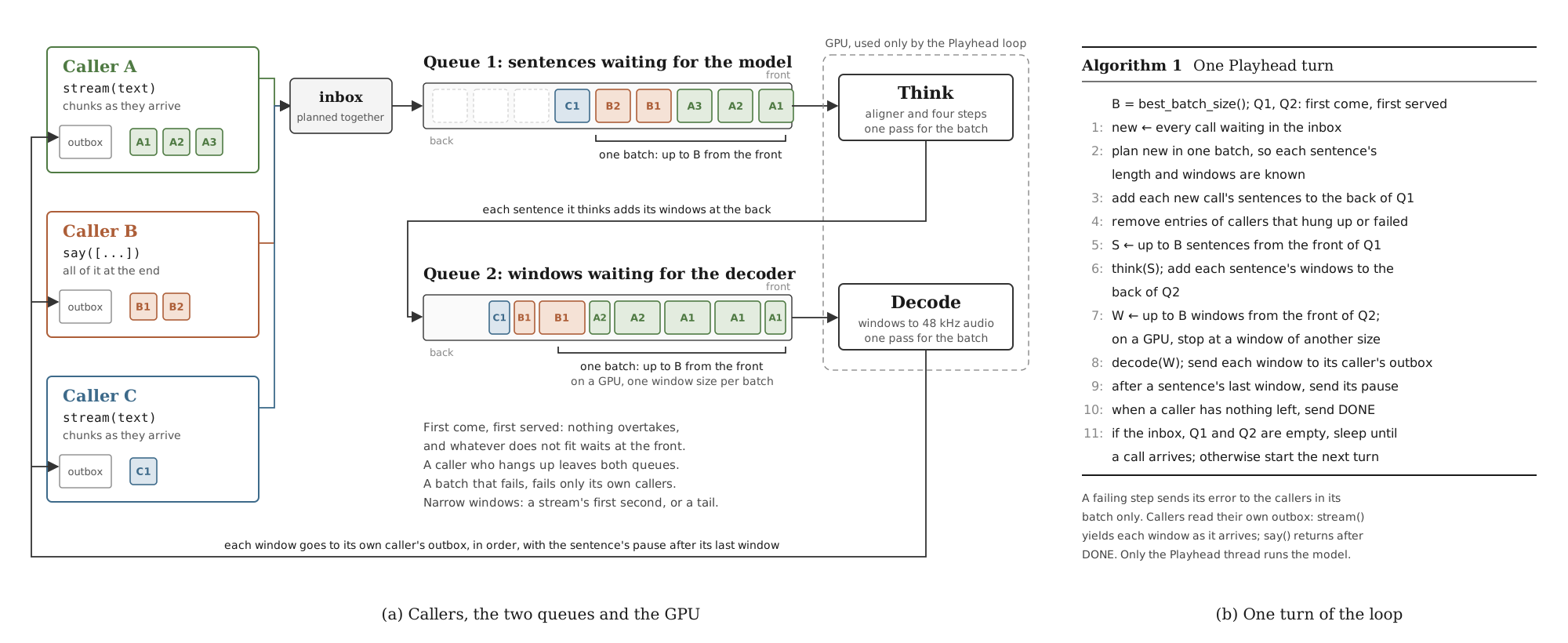
How it works. Your text is cut into sentences, and Playhead keeps two queues, both strictly first come, first served:
1. Queue 1, before the model. Your sentences join the back of it, behind
everything that arrived before them.
2. Each turn, Playhead takes up to one batch of sentences from the front of
queue 1, from any callers, and makes their sound in one pass on the GPU. The
batch size is measured for your GPU by best_batch_size(), for example 16.
3. The finished sound waits in queue 2, before the decoder, cut into windows
of about four seconds.
4. In the same turn, Playhead takes up to one batch of windows from the front of
queue 2 and turns them into audio in one pass.
5. Each window goes straight back to the call that asked for it, in order.
stream() hands it to you right away; say() returns when the last one is in.
Turns repeat every few milliseconds while there is work. New callers join the queues while the GPU is busy, Playhead never waits for a batch to fill up, and it sleeps when there is nothing to do.
What it means for you.
EMA, and as many threads as you have callers.On one RTX PRO 6000, 64 streams started at the same instant made 887 seconds of audio in 0.74 seconds, and every one matched its text said alone. The details are in many callers.
Text goes in as people write it. normalizer-tr,
with its fallback policy, reads numbers, dates, times, amounts, units,
abbreviations and symbols aloud, and spells out anything it cannot resolve instead
of skipping it. Long text is cut at sentence and clause boundaries, with natural
pauses between the pieces.
| Written | Spoken |
|---|---|
| 5 kişi geldi. | beş kişi geldi. |
| %15 indirim | yüzde on beş indirim |
| 12,5 kg un | on iki virgül beş kilogram un |
| Dr. Ayşe geldi. | doktor ayşe geldi. |
| Kod: 00042 | kod: sıfır sıfır sıfır dört iki |
Words written in all capitals are spelled letter by letter. The text guide has the full pipeline and its known limits.
| RTX 4090 | Plain PyTorch | .lightning() |
|---|---|---|
| One request | 87× real time | 440× real time |
| Batch of 64 | 952× real time | 1,316× real time |
| First audio, typical sentence | | 3.86 ms |
On a CPU it runs about 6× faster than real time. The details, the RTX PRO 6000 numbers and how to measure on your own machine are in PERFORMANCE.md.
| Guide | Contents | |---|---| | API reference | Every class, method, option and error | | Text | Normalization, the alphabet, splitting and pauses | | Many callers | Playhead's two queues, windows and batches | | Performance | Accuracy and speed, with how they were measured | | Contributing | Setup, code layout, tests and checks | | Changelog | Changes by release |
Special thanks to Erdem Tuna, who built normalizer-tr, the Turkish text normalizer behind EMA Lightning. Every number, date, amount and symbol you hear read aloud goes through his work.
Thanks also to Freya for the Freya-TR-Eval benchmark, and to the Anka TTS authors for the published baselines marked †.
Apache-2.0, for the code and the weights. Commercial use included. normalizer-tr is also Apache-2.0.
@misc{aslan2026emalightning,
  title        = {EMA Lightning: Tiny, Fast and Accurate Turkish Text to Speech},
  author       = {Aslan, Canberk},
  year         = {2026},
  howpublished = {\url{https://huggingface.co/canberkkkkkk/ema-lightning}}
}
 →
→ →
→ →
→ →
→ →
→ →
→ →
→