1
 →
→
Atomic Agent is a local-first AI agent. Runs open-weight models on your own machine via llama.cpp.
AtomicBot-ai/atomic-agent is an open-source project on GitHub, mainly written in TypeScript. Atomic Agent is a local-first AI agent. Runs open-weight models on your own machine via llama.cpp. It currently holds 2,526 stars and 247 forks with 0 open issues, and was last pushed on an unknown date (repository created unknown).
AI Homed tracks it on the Local & On-Device AI board.

Drives your browser, edits files, runs approved commands, and remembers context across sessions. Open source, running on our TurboQuant llama.cpp for +30-50% throughput on small local models.

Quick Install · Uninstall · Benchmarks · Why Local-First · Ways to Use It · Docs

---
A local-first AI agent that runs the control loop and all state on your machine. It drives your desktop: browse, read and edit files, run approved shell commands, inspect documents, remember context across sessions, schedule follow-ups, and call external tools over MCP. Embed it in your own apps over HTTP or a Tauri sidecar. llama.cpp first, so small quantized models stay useful for long, multi-step work on consumer hardware.
macOS / Linux:
curl -fsSL https://atomicagent.io/install | sh
Windows (PowerShell):
irm https://atomicagent.io/install.ps1 | iex
The installer downloads the release archive, verifies the checksum, and installs the CLI plus support assets (grammars/, native prebuilds, and bundled ripgrep). Atomic Agent updates itself in place; after an update the TUI prompts you to restart. Outside the TUI, run atomic-agent update (or atag update) to check for a newer release and re-run the installer in place — atomic-agent update --check probes without installing, and --version pins a specific release. Only the installed binary can self-update; a dev checkout updates via git.
[!NOTE]
Developer preview. APIs, commands, config, and behavior are still moving, so pin a release if you need a stable integration point. Current builds: macOS (Apple Silicon), Linux x64 / arm64, and Windows x64.
atomic-agent
Both installers also drop a short alias next to the binary, so this is the same thing:
atag
[!TIP]
Need a second agent? Press Ctrl+N (or run /window) inside the TUI — it opens a new terminal window with a fresh atomic-agent in the same directory.
[!TIP]
Coming from another agent? The first run offers to bring your data over from Hermes, OpenClaw, Claude Code, Codex, Pi, or Oh-My-Pi — skills, memory, MCP servers, sessions, cron jobs, and (opt-in) provider keys, with a dry-run preview before anything is written. Later, run/importin the TUI oratomic-agent importfrom the shell.
One command removes everything — the state directory (config, memory, sessions, tasks, traces, downloaded models), the binary and its atag alias, the asset directories beside them, and the PATH line the installer added to your shell rc file:
atomic-agent uninstall
It prints exactly what it will delete, with sizes, and then asks you to type the word uninstall. Nothing is uploaded and nothing is kept — this cannot be undone. Preview it with atomic-agent uninstall --dry-run, keep your data with --keep-data, or skip the prompt in a script with --yes. The same flow is the last entry in the TUI's own menu (Esc → Danger zone, or /uninstall).
If something isn't working:
1. Copy your error logs and system specs. 2. Open an issue on GitHub. 3. Or ask for help in our Discord.
Building something with Atomic Agent, stuck on setup, or just want to share what you are working on? Grab a slot and talk to the team directly: cal.com/atomicagent/demo. No agenda required. Questions, feedback, feature requests, or a plain hello all count. We read every issue and every Discord message too, but sometimes a 15-minute call beats a week of comments.
On the public GAIA validation Level 1 split (53 tasks), Atomic Agent and Hermes drove the same local qwen-3.6-35b-a3b (llama-server, UD-Q4_K_XL), with the same step budget and timeout. The only variable is the agent loop.
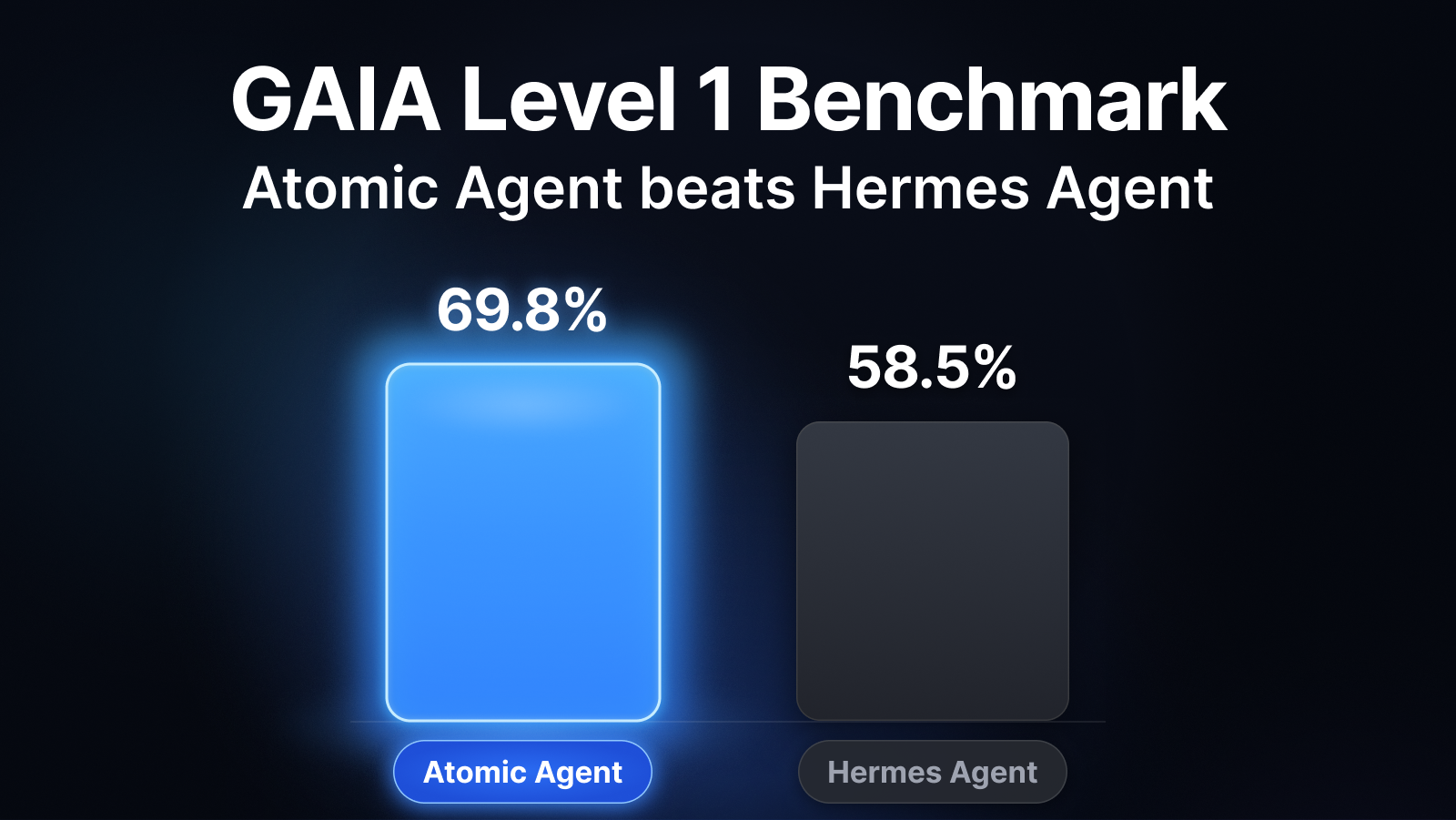
| Metric | Atomic Agent | Hermes | |---|---|---| | Accuracy | 37/53 = 69.8% | 31/53 = 58.5% | | Avg wall / task | ~217 s | ~351 s | | Head-to-head wins | +15 atomic-only | +9 Hermes-only |
%%{init: {"themeVariables": {"xyChart": {"backgroundColor": "transparent", "titleColor": "#0b63f6", "plotColorPalette": "#0b63f6"}}}}%%
xychart-beta
    title "GAIA L1 accuracy (higher is better, %)"
    x-axis ["Atomic Agent", "Hermes"]
    y-axis "Accuracy (%)" 0 --> 100
    bar [69.8, 58.5]
%%{init: {"themeVariables": {"xyChart": {"backgroundColor": "transparent", "titleColor": "#0b63f6", "plotColorPalette": "#0b63f6"}}}}%%
xychart-beta
    title "Avg wall time per task (lower is better, s)"
    x-axis ["Atomic Agent", "Hermes"]
    y-axis "Seconds / task" 0 --> 400
    bar [217, 351]
The same loop holds up as the local model shrinks. Same GAIA L1 split, Atomic Agent alone:
| Chat model | Accuracy | Avg wall / task |
|---|---|---|
| qwen-3.6-35b-a3b (UD-Q4_K_XL) | 37/53 = 69.8% | ~217 s |
| qwen-3.5-9b (Q4_K_M) | 28/53 = 52.8% | ~152 s |
| gemma-4-12b (it-qat UD-Q4_K_XL) | 24/53 = 45.3% | ~423 s |
Even a 9B model clears half of GAIA L1 through the same context-frugal loop. (Different Atomic Agent versions per row; see the write-up for provenance.)
Full reproducible write-up: GAIA-L1-EXPERIMENT.md · Raw artifacts (matrices, NDJSON traces, logs): gaia-l1-eval-2026-06-11 release.
The control loop and all state run on your machine, not a hosted service:
.env secrets live under `` as plain files and SQLite databases. See Privacy and Egress for what can leave the machine and how to switch it off.llama.cpp. Bring your own llama-server or let the CLI manage one.An agent is a loop: the model picks an action, something runs it, the result feeds back in, and it repeats until the job is done. The catch is cost. Every turn re-sends the growing context through the model, so a naive loop gets slower and pricier each pass, and small local models choke on it fastest.
Atomic Agent keeps the loop cheap. One inference produces one JSON array of tool calls, and it runs them without re-encoding the whole world every turn:
flowchart LR
    A[Prompt] --> B[Decide]
    B --> C[Run]
    C --> D[Compress]
    D -->|not done| A
    D -->|done| E[Reply]
1. Prompt: a compact prompt goes to the local model. 2. Decide: the model returns one JSON array of tool calls, grammar-checked so the format is always valid. 3. Run: the core executes them; independent reads run in parallel, risky actions ask first. 4. Compress: results and state are summarized, not pasted back in full. 5. Repeat: loop again until reply, finish, cancel, or a max-step limit.
The model chooses actions. Atomic Agent owns the loop, the state, the approvals, the traces, the stop conditions, and the failure boundaries.
We run local models on our own TurboQuant llama.cpp (AtomicBot-ai/atomic-llama-cpp-turboquant-nightly):
llama.cpp setup.Atomic Agent's prompt is engineered so a small model never wastes tokens or breaks format:
cache_prompt and slot_id can reuse KV-cache instead of re-encoding the prompt every turn.[{...}].Atomic Agent drives a full desktop tool surface. Dangerous actions are routed through approvals; independent read-only calls run in parallel.
| Area | Capabilities |
|---|---|
| Browser | Navigate, click, type, search, manage tabs, scroll, and read compact ARIA state via playwright-core (Chrome / Edge / Chromium). |
| Web & HTTP | Web search with configurable providers (Exa, DuckDuckGo, Brave, SearXNG); fetch and extract pages or make arbitrary HTTP requests, both SSRF-guarded, separate from the browser. |
| Filesystem & shell | Read, write, edit, patch, glob, grep, diff, watch, hash, list, archive extract, run approved shell commands, and inspect or kill processes. |
| Desktop | Clipboard read/write, desktop notifications, and window list/focus. |
| Documents | Extract text locally from PDF, DOC, DOCX, XLSX, PPTX, ODT, RTF, and plain text. |
| Git | Read-only status, log, diff, show, blame, and branch inspection, plus local write tools — init, add, commit, checkout — behind the same approval ladder as file writes (no remotes, no network). |
| Memory | Profile facts, notes with hybrid recall, links, lessons, procedures, voting, and reflection. |
| Tasks | Durable deferred turns, cron schedules, intervals, webhooks, and agent-created reminders. |
| Skills | View and run Markdown skill playbooks (scripts are approval-gated), install more from ClawHub. Ships with 17 starter skills (Docker, GitHub, Notion, Obsidian, PDF, and more), auto-installed on first run. |
| Vision | Optional vision.describe for multimodal models with mmproj, kept outside the text transcript. |
| MCP | Connect external MCP servers; their tools, resources, and prompts join the same registry. |
| Providers | Local llama-server by default; OpenAI-compatible, OpenRouter, AI/ML API, and Gemini providers when configured, with live model catalogs and mid-session switching. Your existing Claude Code and OpenAI Codex subscriptions work too, driven through their own signed-in CLIs with no API key. Reasoning-only completions from reasoning models are recovered instead of failing the turn. |
| Telegram | Single-user remote control with owner pairing, inline approval buttons, and opt-in result reports from scheduled tasks. |
| Composio | Connect 1500+ SaaS toolkits (Gmail, Slack, Notion, Linear, and more) with OAuth handled for you. Set up from the Integrations tab; tools arrive as mcp.composio.* and every write to a real account stays approval-gated. |
Atomic Agent's memory is not a giant chat log pasted back into the prompt. It's a local, inspectable store: durable identity, episodic notes, associations, distilled lessons, and reusable procedures. The prompt sees compact pointers, and full bodies are recalled by tool call only when the agent needs them.
### profile with contextual keyword gating; facts are versioned, with queryable history.Use the CLI for simple sessions, automation, and debugging. Use the TUI for an interactive control console: approvals, logs, models, skills, tasks, memory, MCP, Telegram, and traces.
atomic-agent run --cwd /path/to/work
atomic-agent tui --cwd /path/to/work
atomic-agent skill list
atomic-agent task list
atomic-agent trace list --limit 10
The context readout. The chip at the right of the composer gauges the prompt against the model's real context window — 8/20 tasks · 39.9k/48k — so you can see whether there is room for what you are about to send. History is limited in tasks, not tokens: one task is a thing you asked plus everything the agent did answering it, and agent.conversationMaxPairs (1-100, default 20) says how many the prompt carries. Tokens are the wrong unit to steer with — nobody thinks in them — but they are still the ceiling underneath, because one task can run twenty tool calls and no task count keeps a prompt inside the window on its own. Once history has been dropped it says so in words (· 3 tasks lost) and turns violet: that is the point where the agent stops knowing things it knew a minute ago, and answers quietly start getting less consistent. Cloud models take their window from the model catalogue, so the gauge is drawn against a real scale there too; when nothing knows the window at all it falls back to the transcript's own ceiling, labelled cap so the number cannot be mistaken for one.
Click the chip (or /context) for the breakdown, and for the one control that matters: a selector for how many tasks the next prompt carries, with a button either side of the number (- and + from the keyboard). Every figure above it — the total, the percentage, the conversation row, the free space — recalculates as you move it, so the cost of the choice is on screen while you are making it rather than one turn later. Each step applies immediately; there is nothing to confirm.
agent.conversationMaxTokens still exists as the ceiling underneath, and 0 makes it fill whatever the window leaves — worth setting if you size your own llama-server with -c. It is no longer something you have to think about: the task count is the limit you steer with, and the token cap only intervenes when a single task is large enough to threaten the window on its own.
Handy slash commands: /help lists every command, /tools lists the built-in tool families, /model jumps to the LLM panel and reopens the model picker for the active cloud provider, /privacy shows what leaves the machine (/privacy analytics off turns analytics off). The chat log scrolls with PgUp / PgDn (fn+arrows on macOS).
Coding modes. A chip at the right end of the composer's bar says which rules are in force. Clicking it — or ctrl+g M, or /mode — opens a menu of the four, each with a line saying what it does; ↑↓ moves, Enter applies, Esc cancels. /mode sets one directly without the menu.
| mode | |
|---|---|
| default | approvals follow the level set on the Privacy tab |
| plan | read-only — every tool that would change something is refused, with a note telling the agent to present a plan instead. Reading, searching and fetching all still work. When the plan lands, three buttons appear under the plan itself, beside its [copy] row: run it in auto, run it in bypass permissions, or dismiss it. Typing instead keeps you in plan mode and revises the plan — the composer says so while the offer is up. |
| auto | file writes inside this workspace stop asking; everything else still does |
| bypass permissions | nothing asks, for this session. Hardline shell-guard rules still block. |
All four are session state and none are written to config.json — a bypass that survived a restart would be a standing grant nobody remembers making. default restores the level you actually configured, so a session that passed through bypass and back lands where it started. The cycle order keeps plan and bypass two presses apart in either direction.
Answering an approval prompt. The prompt draws its verbs as buttons — click one, or use its chord: ctrl+y approves the call, ctrl+d denies, ctrl+f grants its category for the session, esc aborts the run. Every decision is a chord and never a bare letter, because the input field below stays live: typing "yes, but put it somewhere else" must be a message, not a verdict. Two more ways out:
ctrl+b — write it somewhere else. On an os.fs.write prompt the target path becomes an editable field, prefilled with the full path. Type any other target (~ works, missing folders are created) and Enter confirms it. The new path is re-checked against the approval ladder first: a target on the same rung as the one you approved is written, a target on a different rung (workspace → home, say) asks once more, and a target that is the agent's own config.json / .env is refused.esc is the one exception: with a draft in the buffer it clears the draft rather than aborting the run.shell prompt ctrl+b grants the command's shape for the session (git, npm) instead of the whole category — except for bash -c-style interpreters, where the binary name hides what actually runs, so no shape grant is offered. The retarget and the shape grant share ctrl+b because they can never both be on screen: one is os.fs.write only, the other shell only.
Look. The TUI ships with the classic-dark palette: an indigo rail, raised + new / ≡ Menu / send → controls, a RUN badge and session title in the top bar, AGENT / YOU labels on the transcript, and green tool results. Five more ship with it — classic-light, toxic-green, khorne-red, darky-dark and moon-yellow. /theme lists them, /theme switches, and the choice persists.
All six are designed here rather than transcribed from upstream terminal themes, and every colour pair the UI paints is held to WCAG AA by theme-contrast.test.ts. The registry that preceded them carried twelve palettes and failed that check on 154 of its 396 pairs — including light text on the light status-bar ground at 1.09:1. Configs naming one of the retired themes are rehomed to the nearest surviving palette rather than silently reset.
Small windows. The layout degrades as the window shrinks — the right rail drops at 100 columns, the splash art steps down through three sizes, the chrome grows a row under 60 columns — down to a floor of 40x16. Below that it stops: Ink overlaps a frame taller than the terminal instead of clipping it, so a 16-row UI in a 10-row window is two UIs painted over each other rather than a cramped one. Under the floor the app draws a single card saying what it needs and what it has, on the main screen and the first-run screen alike, and goes back to the real UI as soon as the window is dragged big enough.
Mouse. The TUI is clickable: the breadcrumb (which opens the menu, the same as Esc on an idle prompt), sidebar sessions and tasks, every list row (skills, tasks, memory, MCP, models, providers), the session / theme / slash pickers, approval buttons, tool cards, and the prompt itself — clicking in the input places the caret. A click selects a row, a second click on the selected row opens it, and the wheel scrolls the chat or walks the focused panel.
While mouse reporting is on the terminal hands clicks to the app, so its own plain drag-to-select is unavailable — a terminal-level constraint, not a choice. To select text, just drag over it: a drag that starts on plain text (a chat message, panel prose, empty rail space) pauses the mouse for 10 seconds and says so in chat — drag again to select, then copy the way you normally would. The pause ends on its own and clicks come back. This works in every terminal, no modifier to remember. Some terminals also offer an instant path: a Shift-modified drag bypasses reporting natively on kitty, WezTerm, GNOME Terminal and Windows Terminal, and i
→ →
→ →
→ →
→ →
→ →
→ →
→ →
→