


1
 →
→zinja-coder/jadx-ai-mcp is an open-source project on GitHub, mainly written in Java. Plugin for JADX to integrate MCP server It currently holds 2,896 stars and 268 forks with 0 open issues, and was last pushed on an unknown date (repository created unknown).
AI Homed tracks it on the Today's Trending board, currently at rank #85 with 6 new stars today.
⚡ Fully automated MCP server + JADX plugin built to communicate with LLM through MCP to analyze Android APKs using LLMs like Claude — uncover vulnerabilities, analyze APK, and reverse engineer effortlessly.


Thanks to these wonderful people for their contributions ⭐

JADX-AI-MCP is a plugin for the JADX decompiler that integrates directly with Model Context Protocol (MCP) to provide live reverse engineering support with LLMs like Claude.
Think: "Decompile → Context-Aware Code Review → AI Recommendations" — all in real time.
sequenceDiagram
LLM CLIENT->>JADX MCP SERVER: INVOKE MCP TOOL
JADX MCP SERVER->>JADX AI MCP PLUGIN: INVOKE HTTP REQUEST
JADX AI MCP PLUGIN->>REQUEST HANDLERS: INVOKE HTTP REQUEST HANDLER
REQUEST HANDLERS->>JADX GUI: PERFORM ACTION/GATHER DATA
JADX GUI->>REQUEST HANDLERS: ACTION PERFORMED/DATA GATHERED
REQUEST HANDLERS->>JADX AI MCP PLUGIN: CRAFT HTTP RESPONSE
JADX AI MCP PLUGIN->>JADX MCP SERVER:HTTP RESPONSE
JADX MCP SERVER->>LLM CLIENT: MCP TOOL RESULT
It is combination of two tools: 1. JADX-AI-MCP 2. JADX MCP SERVER
JADX MCP Server is a standalone Python server that interacts with a JADX-AI-MCP plugin (see: jadx-ai-mcp) via MCP (Model Context Protocol). It lets LLMs communicate with the decompiled Android app context live.
---
The following MCP tools are available:
fetch_current_class() — Get the class name and full source of selected classget_selected_text() — Get currently selected textget_all_classes() — List all classes in the projectget_class_source() — Get full source of a given classget_method_by_name() — Fetch a method's sourcesearch_method_by_name() — Search method across classessearch_classes_by_keyword() — Search for classes whose source code contains a specific keyword (supports pagination)get_methods_of_class() — List methods in a classget_fields_of_class() — List fields in a classget_smali_of_class() — Fetch smali of classget_main_activity_class() — Fetch main activity from jadx mentioned in AndroidManifest.xml file.get_main_application_classes_code() — Fetch all the main application classes' code based on the package name defined in the AndroidManifest.xml.get_main_application_classes_names() — Fetch all the main application classes' names based on the package name defined in the AndroidManifest.xml.get_android_manifest() — Retrieve and return the AndroidManifest.xml content.get_manifest_component - Retrieve specific manifest component instead of whole manifest fileget_strings() : Fetches the strings.xml fileget_all_resource_file_names() : Retrieve all resource files names that exists in applicationget_resource_file() : Retrieve resource file contentrename_class() : Renames the class namerename_method() : Renames the methodrename_field() : Renames the fieldrename_package() : Renames whole packagerename_variable() : Renames the variable within a methodadd_comment() : Adds a comment to a class, method, field, or a single code line (line=, the 1-based line number of the decompiled source), shown in JADX-GUI and saved with the project (re-commenting the same target updates it, an empty comment removes it)list_comments() : Lists the comments stored in the project, optionally filtered to one classdebug_get_stack_frames() : Get the stack frames from jadx debuggerdebug_get_threads() : Get the insights of threads from jadx debuggerdebug_get_variables() : Get the variables from jadx debuggerxrefs_to_class() : Find all references to a class (returns method-level and class-level references, supports pagination)xrefs_to_method() : Find all references to a method (includes override-related methods, supports pagination)xrefs_to_field() : Find all references to a field (returns methods that access the field, supports pagination)🔍 Basic Code Understanding
"Explain what this class does in one paragraph."
"Summarize the responsibilities of this method."
"Is there any obfuscation in this class?"
"List all Android permissions this class might require."
🛡️ Vulnerability Detection
"Are there any insecure API usages in this method?"
"Check this class for hardcoded secrets or credentials."
"Does this method sanitize user input before using it?"
"What security vulnerabilities might be introduced by this code?"
🛠️ Reverse Engineering Helpers
"Deobfuscate and rename the classes and methods to something readable."
"Can you infer the original purpose of this smali method?"
"What libraries or SDKs does this class appear to be part of?"
"Tell me which classes contains code related to 'encryption'?"
📦 Static Analysis
"List all network-related API calls in this class."
"Identify file I/O operations and their potential risks."
"Does this method leak device info or PII?"
🤖 AI Code Modification
"Refactor this method to improve readability."
"Add comments to this code explaining each step."
"Rewrite this Java method in Python for analysis."
📄 Documentation & Metadata
"Generate Javadoc-style comments for all methods."
"What package or app component does this class likely belong to?"
"Can you identify the Android component type (Activity, Service, etc.)?"
🐞 Debugger Assistant
   "Fetch stack frames, varirables and threads from debugger and provide summary"
"Based the stack frames from debugger, explain the execution flow of the application"
"Based on the state of variables, is there security threat?"
---
[!NOTE]
> Download bothjadx-ai-mcp-.jarandjadx-mcp-server-.zipfiles.
# 0. Download the jadx-ai-mcp-.jar and jadx-mcp-server-.zip
https://github.com/zinja-coder/jadx-ai-mcp/releases
1.
unzip jadx-ai-mcp-.zip
├jadx-mcp-server/
  ├── jadx_mcp.py
  ├── requirements.txt
  ├── README.md
  ├── LICENSE
├jadx-ai-mcp-.jar
2. Install the plugin
For this you can follow two approaches:
1. One liner - execute below command in your shell
jadx plugins --install "github:zinja-coder:jadx-ai-mcp"
The above one line code will install the latest version of the plugin directly into the jadx, no need to download the jadx-ai-mcp's .jar file.
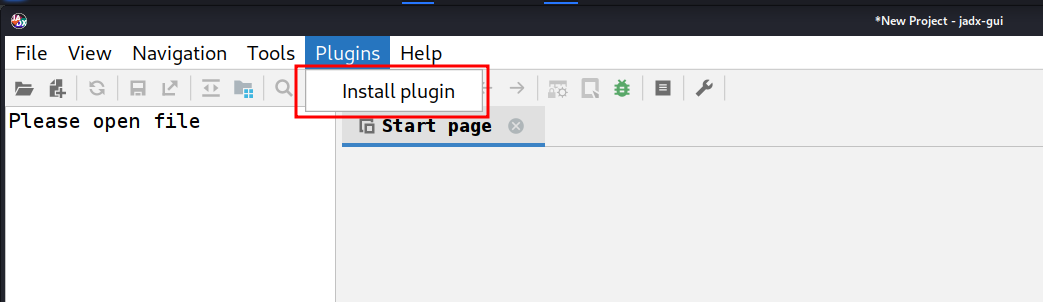
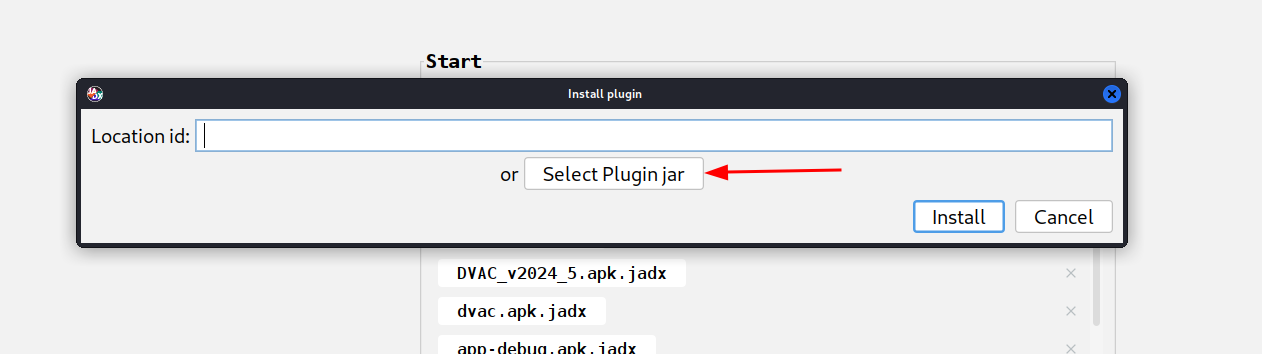
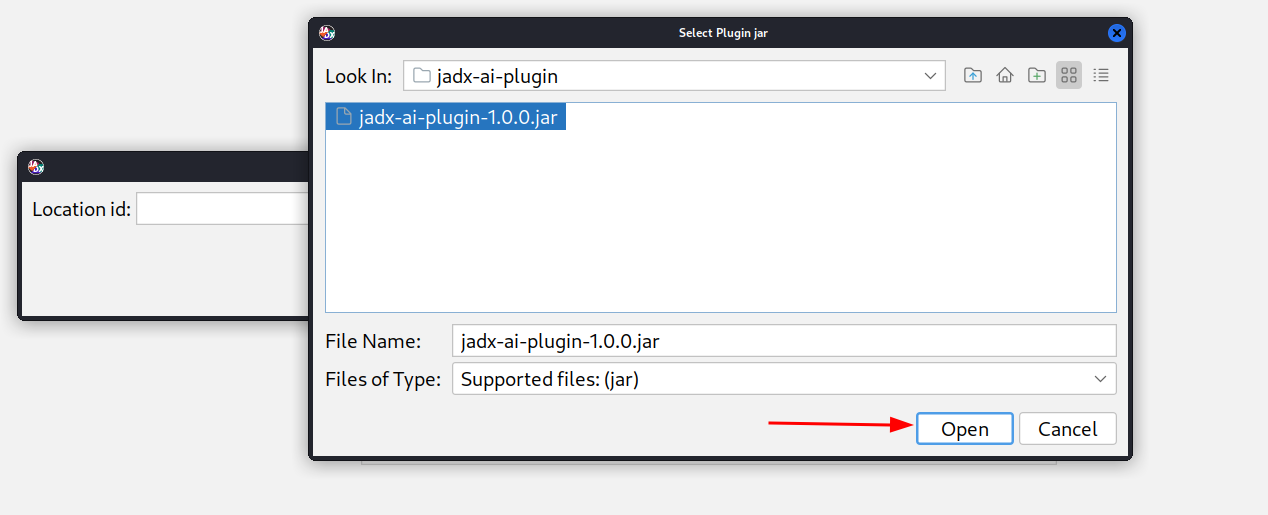
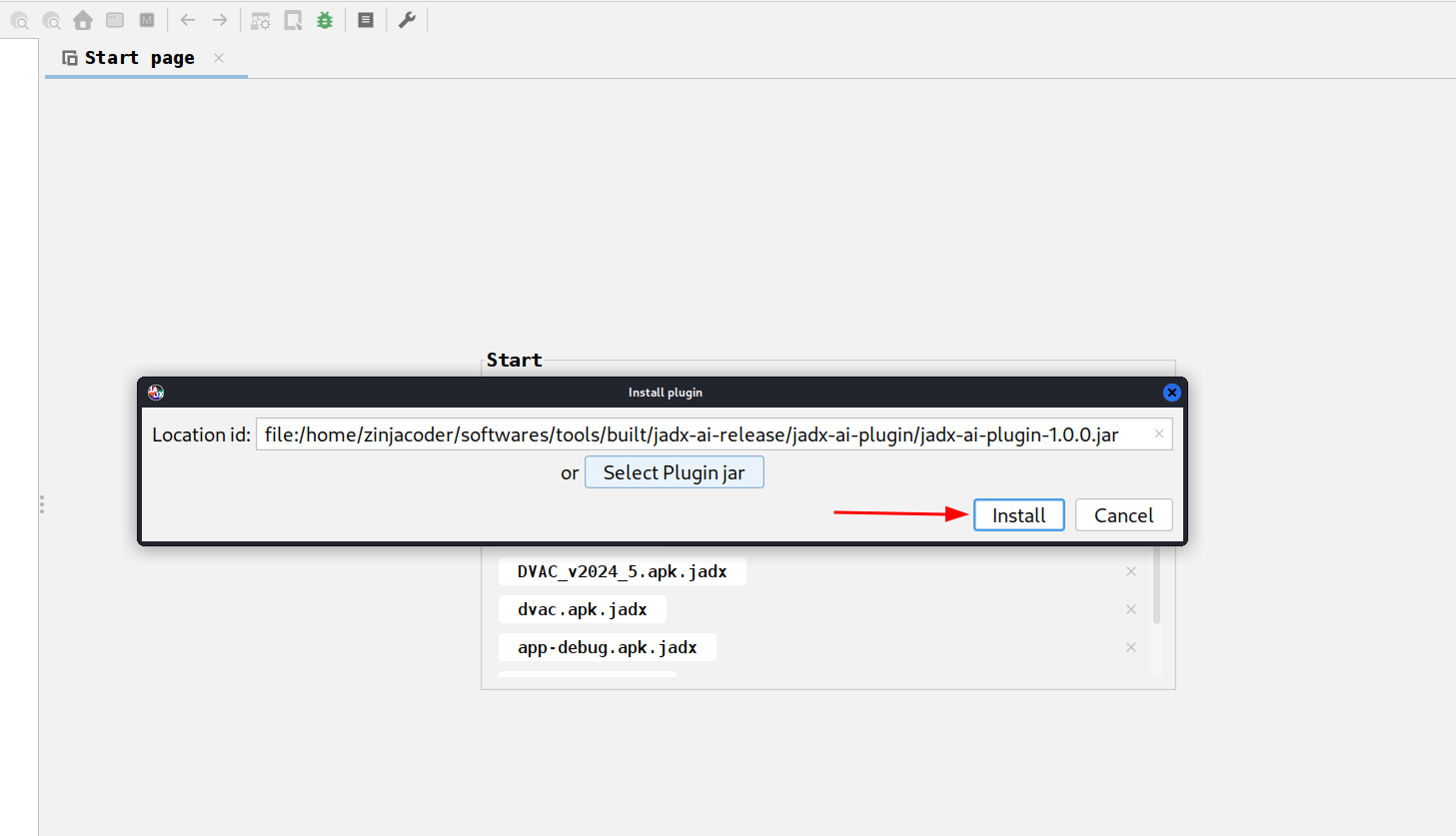
2. Or you can use JADX-GUI to install it by following images as shown below:
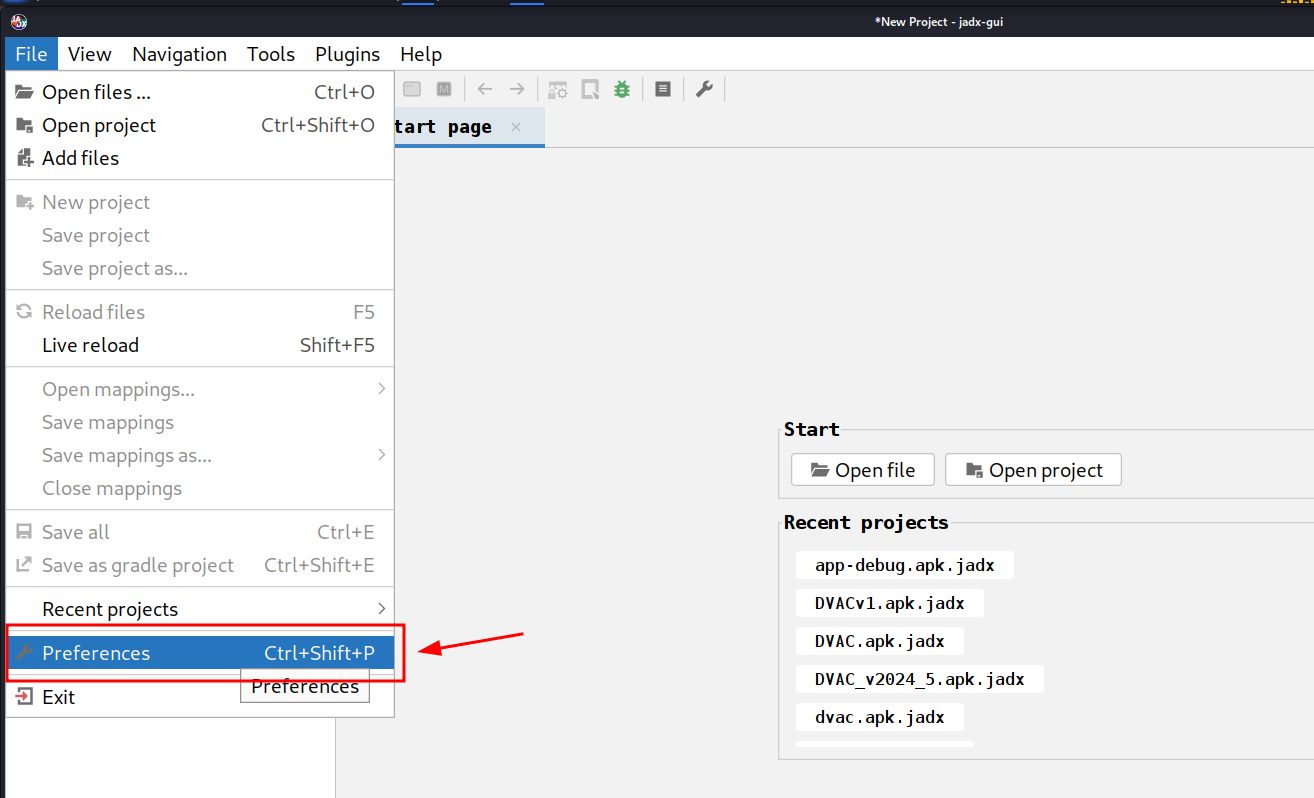
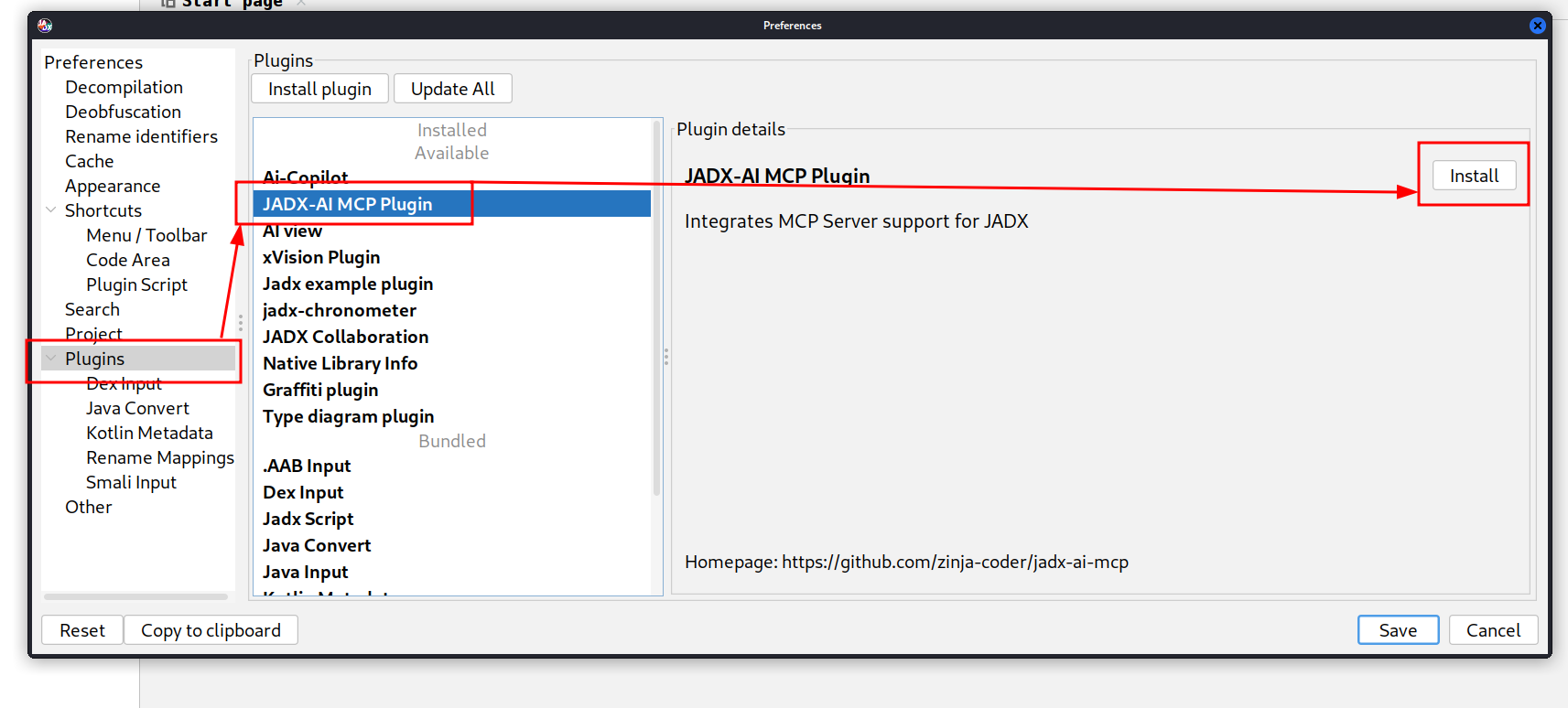
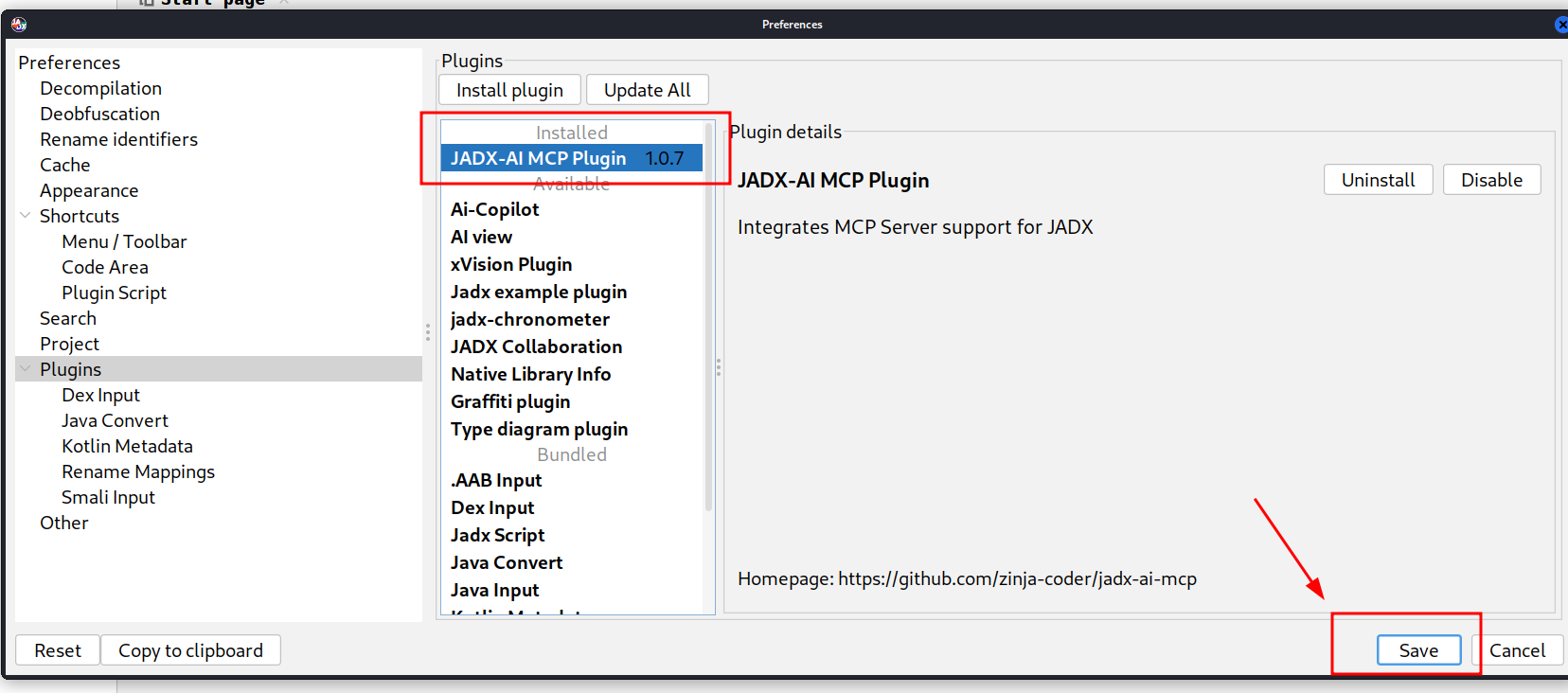
## 3. GUI method, download the .jar file and follow below steps shown in images
# 3. Navigate to jadx-mcp-server directory
cd jadx-mcp-server
4. This project uses uv - https://github.com/astral-sh/uv instead of pip for dependency management.
    ## a. Install uv (if you dont have it yet)
curl -LsSf https://astral.sh/uv/install.sh | sh
    ## b. OPTIONAL, if for any reasons, you get dependecy errors in jadx-mcp-server, Set up the environment
uv venv
source .venv/bin/activate  # or .venv\Scripts\activate on Windows
    ## c. OPTIONAL Install dependencies
uv pip install httpx fastmcp
The setup for jadx-ai-mcp and jadx_mcp_server is done.
Make sure Claude Desktop is running with MCP enabled.
For instance, I have used following for Kali Linux: https://github.com/aaddrick/claude-desktop-debian
Configure and add MCP server to LLM file:
nano ~/.config/Claude/claude_desktop_config.json
For:
%APPDATA%\Claude\claude_desktop_config.json~/Library/Application Support/Claude/claude_desktop_config.json{
"mcpServers": {
"jadx-mcp-server": {
"command": "///uv",
"args": [
"--directory",
"jadx-mcp-server/",
"run",
"jadx_mcp_server.py"
]
}
}
}
Replace:
path/to/uv with the actual path to your uv executablepath/to/jadx-mcp-server with the absolute path to where you cloned thisThen, navigate code and interact via real-time code review prompts using the built-in integration.
OR
or you can install the jadx_mcp_server directly as executable directly using below command:
uv tool install git+https://github.com/zinja-coder/jadx-mcp-server
and then you can just provide jadx_mcp_server in command section of mcp configuration.
If you want to configure the MCP tool in Cherry Studio, you can refer to the following configuration.
--directory
path/to/jadx-mcp-server
run
jadx_mcp_server.py
path/to/jadx-mcp-server with the absolute path to where you cloned thisYou can also use JADX AI MCP Server with LM Studio by configuring it's mcp.json file. Here's the video guide.
https://github.com/user-attachments/assets/b4a6b280-5aa9-4e76-ac72-a0abec73b809
You can also use Jadx in HTTP Stream Mode using --http option with jadx_mcp_server.py as shown in following:
uv run jadx_mcp_server.py --http
OR
uv run jadx_mcp_server.py --http --port 9999
There are two separate connections and each has its own host/port:
┌─────────────┐    --host / --port     ┌──────────────────┐   --jadx-host / --jadx-port   ┌──────────────────┐
│  LLM Client │ ◄──────────────────►   │  jadx-mcp-server │ ──────────────────────────►   │  JADX-GUI Plugin │
│  (Claude,   │   Where the MCP server │                  │   Where the MCP server looks  │  (jadx-ai-mcp)   │
│   Codex..)  │   LISTENS for clients  │                  │   for the JADX plugin         │                  │
└─────────────┘                        └──────────────────┘                               └──────────────────┘
| Flag | Default | Controls |
|------|---------|----------|
| --http | off | Use HTTP transport instead of stdio |
| --host | 127.0.0.1 | Where the MCP server listens (bind address for LLM clients) |
| --port | 8651 | Which port the MCP server listens on |
| --jadx-host | 127.0.0.1 | Where to find the JADX plugin (the target JADX-GUI machine) |
| --jadx-port | 8650 | Which port the JADX plugin is on |
Scenario 1 — Everything on the same machine (most common):
# Default: MCP server on localhost:8651, connects to JADX plugin on localhost:8650
uv run jadx_mcp_server.py --http
Scenario 2 — Docker container or WSL (MCP server accessible from host network):
# MCP server listens on ALL interfaces so the host can reach it
JADX plugin is still on the same machine
uv run jadx_mcp_server.py --http --host 0.0.0.0
Scenario 3 — JADX-GUI running on a different machine (e.g., remote VM):
# MCP server runs locally, but connects to JADX plugin on a remote machine
uv run jadx_mcp_server.py --http --jadx-host 192.168.1.100
Scenario 4 — Full remote setup (everything on different machines):
# MCP server listens on all interfaces on port 9999
JADX plugin is on a different machine at 192.168.1.100:8652
uv run jadx_mcp_server.py --http --host 0.0.0.0 --port 9999 --jadx-host 192.168.1.100 --jadx-port 8652
[!CAUTION]
### ⚠️ Security Warning — Remote Binding
> When using --host 0.0.0.0 (or any non-localhost address), the MCP server binds to all network interfaces over plain HTTP with no authentication. This means:
> - Anyone on the network can connect and invoke all MCP tools
- There is no TLS encryption — traffic can be intercepted
- An attacker can use the server to read decompiled code, rename classes/methods, and access debug info
> Mitigations:
- Only bind to 0.0.0.0 on trusted, isolated networks (e.g., Docker bridge, local VM)
- Use a firewall to restrict access to the MCP port
- Consider an SSH tunnel instead: ssh -L 8651:127.0.0.1:8651 remote-host
[!NOTE]
When running in stdio mode (the default, without --http), all human-readable output (banner, health check) is written to stderr to keep stdout reserved for the MCP JSON-RPC stream. This ensures compatibility with Codex, Claude Desktop, and other stdio-based MCP clients.
1. Configure Port: Configure the port on which the JADX AI MCP Plugin will listen on. 2. Default Port: Revert back the changes and listen on default port. 3. Restart Server: Force restart the JADX AI MCP Plugin server. 4. Server Status: Check the status of JADX AI MCP Plugin server.
To connect with JADX AI MCP Plugin running on custom port, the --jadx-port option will be used as shown in following:
uv run jadx_mcp_server.py --jadx-port 8652
If the JADX AI MCP Plugin is running on a different machine (e.g., JADX on a remote VM, MCP server on your local host), use the --jadx-host option:
# Connect to JADX plugin on a remote host
uv run jadx_mcp_server.py --jadx-host 192.168.1.100 --jadx-port 8650
There are two separate connections and each has its own host/port:
┌─────────────┐    --host / --port     ┌──────────────────┐   --jadx-host / --jadx-port   ┌──────────────────┐
│  LLM Client │ ◄──────────────────►   │  jadx-mcp-server │ ──────────────────────────►   │  JADX-GUI Plugin │
│  (Claude,   │   Where the MCP server │                  │   Where the MCP server looks  │  (jadx-ai-mcp)   │
│   Codex..)  │   LISTENS for clients  │                  │   for the JADX plugin         │                  │
└─────────────┘                        └──────────────────┘                               └──────────────────┘
| Flag | Default | Controls |
|------|---------|----------|
| --http | off | Use HTTP transport instead of stdio |
| --host | 127.0.0.1 | Where the MCP server listens (bind address for LLM clients) |
| --port | 8651 | Which port the MCP server listens on |
| --jadx-host | 127.0.0.1 | Where to find the JADX plugin (the target JADX-GUI machine) |
| --jadx-port | 8650 | Which port the JADX plugin is on |
Scenario 1 — Everything on the same machine (most common):
# Default: MCP server on localhost:8651, connects to JADX plugin on localhost:8650
uv run jadx_mcp_server.py --http
Scenario 2 — Docker container or WSL (MCP server accessible from host network):
# MCP server listens on ALL interfaces so the host can reach it
JADX plugin is still on the same machine
uv run jadx_mcp_server.py --http --host 0.0.0.0
Scenario 3 — JADX-GUI running on a different machine (e.g., remote VM):
# MCP server runs locally, but connects to JADX plugin on a remote machine
uv run jadx_mcp_server.py --http --jadx-host 192.168.1.100
Scenario 4 — Full remote setup (everything on different machines):
# MCP server listens on all interfaces on port 9999
JADX plugin is on a different machine at 192.168.1.100:8652
uv run jadx_mcp_server.py --http --host 0.0.0.0 --port 9999 --jadx-host 192.168.1.100 --jadx-port 8652
The MCP Configuration for custom jadx port will be as follows for claude:
``` { "mcpServers": { "jadx-mcp-server": { "command": "/path/to/uv", "args": [ "--directory", "/path/to/jadx-mcp-server/", "run", "jadx_mcp_se
→ →
→ →
→ →
→ →
→ →
→ →
→ →
→