1
 →
→
official code repo for paper "CogView2: Faster and Better Text-to-Image Generation via Hierarchical Transformers"
zai-org/CogView2 is an open-source project on GitHub, mainly written in Python. official code repo for paper "CogView2: Faster and Better Text-to-Image Generation via Hierarchical Transformers" It currently holds 951 stars and 85 forks with 0 open issues, and was last pushed on an unknown date (repository created unknown).
AI Homed tracks it on the AI Image Projects board and on the AI AI Image Projects list.

Generate vivid Images for Chinese / English text
CogView2 is a hierarchical transformer (6B-9B-9B parameters) for text-to-image generation in general domain. This implementation is based on the SwissArmyTransformer library (v0.2).
@article{ding2022cogview2,
  title={CogView2: Faster and Better Text-to-Image Generation via Hierarchical Transformers},
  author={Ding, Ming and Zheng, Wendi and Hong, Wenyi and Tang, Jie},
  journal={arXiv preprint arXiv:2204.14217},
  year={2022}
}
--max-inference-batch-size or training smaller models on less powerful GPUs.pip install -r requirements.txt. git clone https://github.com/Sleepychord/Image-Local-Attention
cd Image-Local-Attention && python setup.py install
--only-first-stage for text-to-image generation.
SAT_HOME. You can download from here and place them (folders named coglm/cogview2-dsr/cogview2-itersr) under SAT_HOME.
./text2image.sh --input-source input.txt
--input-source [path or "interactive"]. The path of the input file, can also be "interactive", which will launch a CLI.--output-path [path]. The folder containing the results.--batch-size [int]. The number of samples will be generated per query.--max-inference-batch-size [int]. Maximum batch size per forward. Reduce it if OOM. --debug. Only save concatenated images for all generated samples, and name them by input text and date. --with-id. When it toggled, you must specify an "id" before each input, e.g. 001\t一个漂亮的女孩, \t denoting TAB (NOT space). It will generate batch-size split images in a folder named "id" for each input. Confict with --debug.--device [int]. Running on which GPU. --inverse-prompt. Use the perplexity to generate the original text to sort the generated images.--only-first-stage. --style. The style of the generated images, choices=['none', 'mainbody', 'photo', 'flat', 'comics', 'oil', 'sketch', 'isometric', 'chinese', 'watercolor']. The default style is mainbody, usually an isolated object with white background.SAT_HOME to specify the path to store the downloaded model.
Chinese input is usually much better than English input.
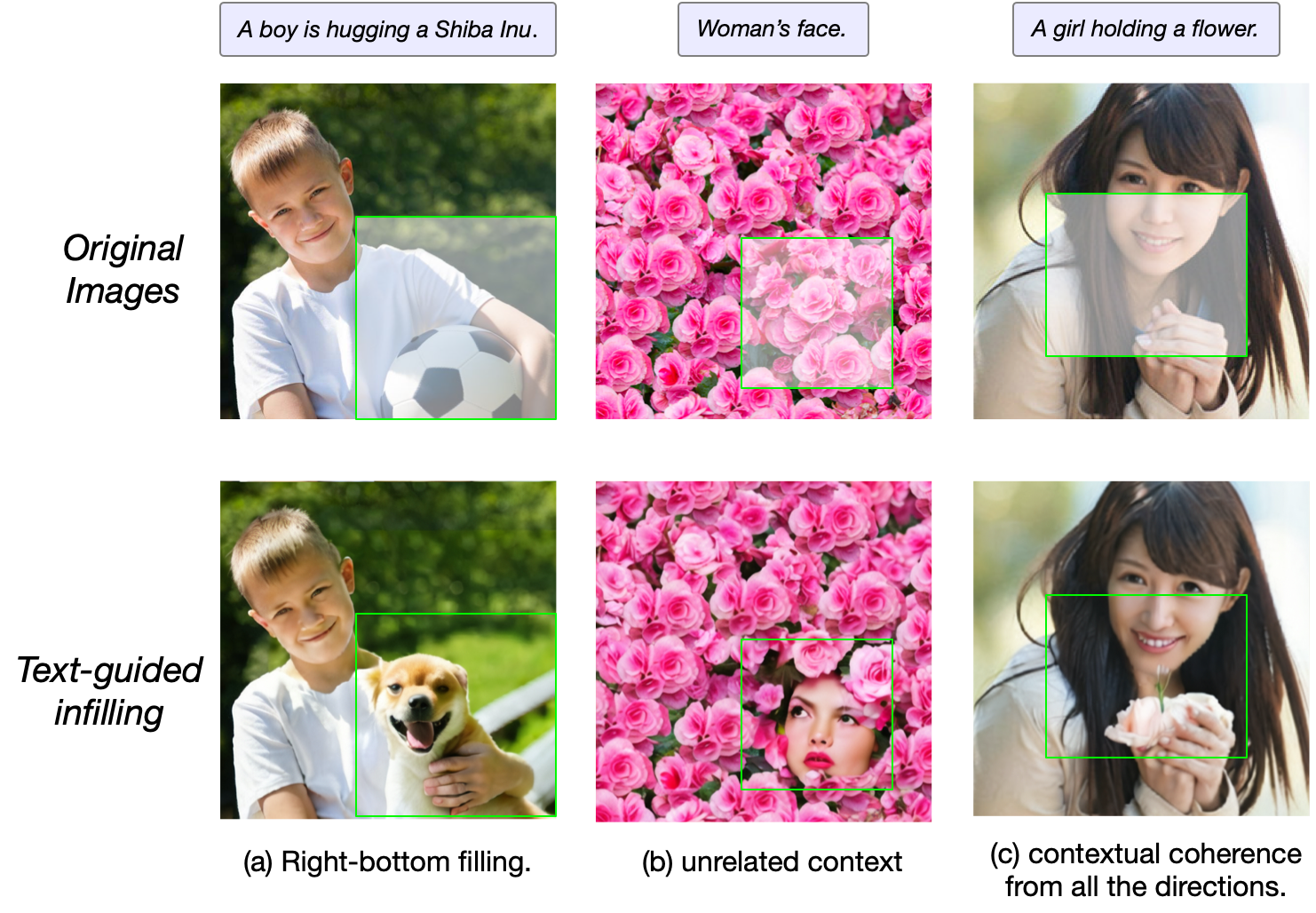
./text_guided_completion.sh --input-source input_comp.txt
text image_path h0 w0 h1 w1, where all the separation are TAB (NOT space). The image at image_path will be center-cropped to 480*480 pixels and mask the square from (h0,w0)to (h1,w1). These coordinations are range from 0 to 1. The model will fill the square with object described in text. Please use a square much larger than the desired region.
 →→
→→ →
→ →
→ →
→ →
→ →
→ →
→