1
 →
→
An Obsidian plugin that embeds Claude Code/Codex as an AI collaborator in your vault
YishenTu/claudian is an open-source project on GitHub, mainly written in TypeScript. An Obsidian plugin that embeds Claude Code/Codex as an AI collaborator in your vault It currently holds 15,434 stars and 1,032 forks with 0 open issues, and was last pushed on an unknown date (repository created unknown).
AI Homed tracks it on the AI Coding Agents board.
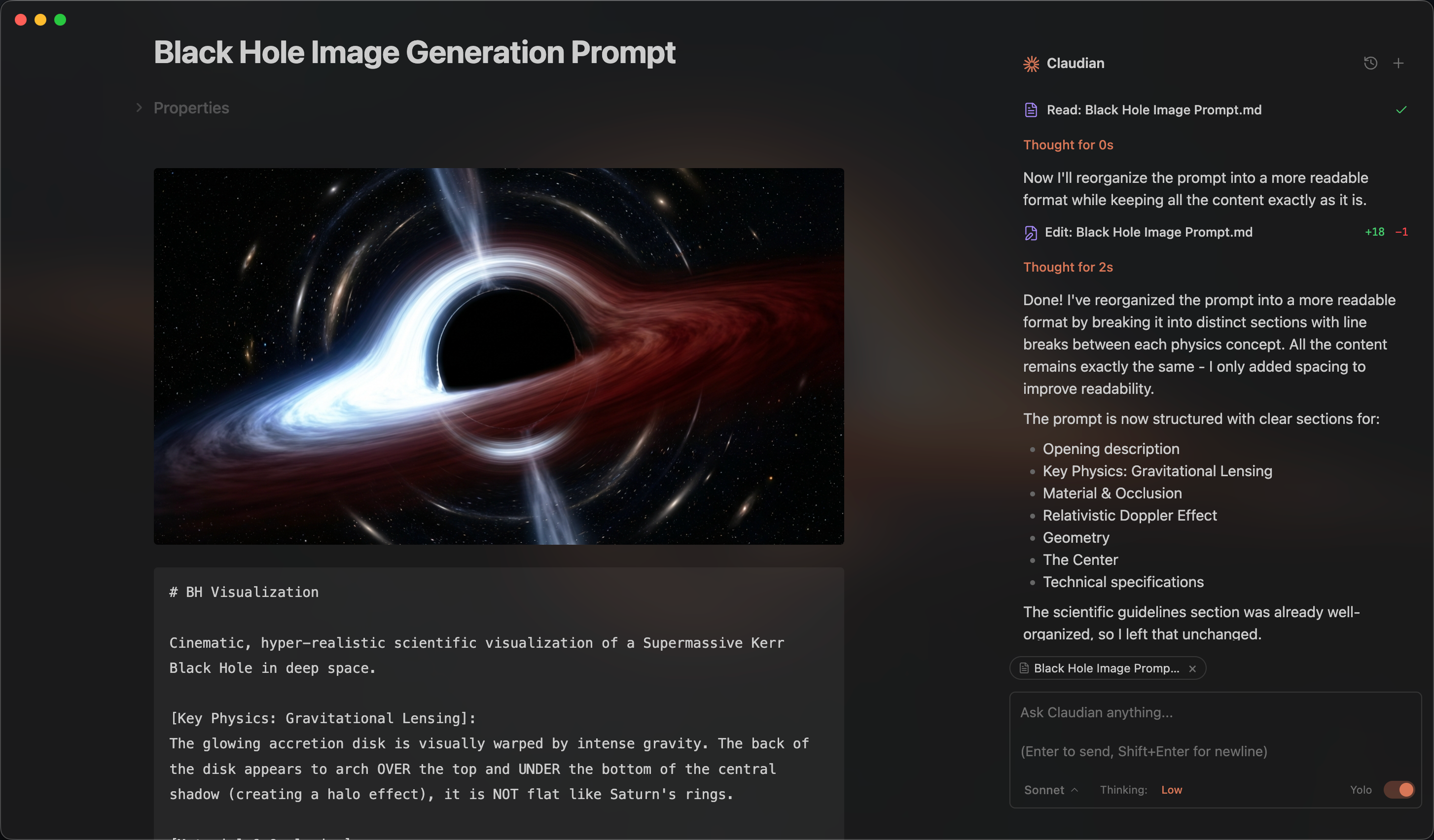
An Obsidian plugin that embeds AI coding agents (Claude Code, Codex, Grok, Opencode, Pi, and more to come) in your vault. Your vault becomes the agent's working directory — file read/write, search, bash, and multi-step workflows all work out of the box. Visit claudian.md to learn more.
Open the chat sidebar from the ribbon icon or command palette. Select text and use the shortcut for inline editing. Everything works like your familiar coding agent, Claude Code, Codex, Grok, Opencode, and Pi — talk to the agent, and it reads, writes, edits, and searches files in your vault.
Inline Edit — Select text or start at the cursor position + hotkey to edit directly in notes with word-level diff preview.
Slash Commands & Skills — Type / or $ for reusable prompt templates or Skills from user- and vault-level scopes.
@mention — Type @ to reference vault files, folders, and Collab member changes. Type # to reference Collab tickets.
Instruction Mode (/instruction) — Refined custom instructions added from the chat input.
MCP Servers — Connect external tools through each coding agent's native CLI-managed MCP configuration.
Tabs & Session Management — Use multiple tabs in single-panel mode or a persistent session manager beside the chat in dual-pane mode.
Collab Mode (Experimental) — Collaborate on shared projects with other Claudian users. Learn more.
1. Open Obsidian → Settings → Community plugins → Browse 2. Search for "Claudian" and click Install 3. Enable the plugin
Or install directly from the community plugin page.
Despite considerable effort to reduce the bundle size, keeping it below 5 MB is no longer practical with the latest Claude Agent SDK. The Obsidian community plugin page may therefore display a large-plugin warning, and Obsidian's official Sync service cannot sync the main plugin file because it supports only files smaller than 5 MB.
If you use Obsidian Sync across multiple desktop devices, install and update Claudian separately on each device instead of relying on Sync to copy the plugin files.
1. Clone this repository into your vault's plugins folder:
   cd /path/to/vault/.obsidian/plugins
   git clone https://github.com/YishenTu/claudian.git
   cd claudian
2. Install dependencies and build:
   npm install
   npm run build
3. Enable the plugin in Obsidian:
# Watch mode
npm run dev
Production build
npm run build
The following sections use Claude Code as an example.
If Claudian cannot auto-detect a provider CLI, verify that the CLI is installed and available to GUI applications through PATH. Typical errors include spawn claude ENOENT and Claude CLI not found. This issue is common with Node version managers (nvm, fnm, volta).
Leave the CLI path setting empty first so Claudian can auto-detect the CLI. If auto-detection fails, find the executable path and set it in Settings → Advanced → Claude CLI path.
| Platform | Command | Example Path |
|----------|---------|--------------|
| macOS/Linux | which claude | /Users/you/.volta/bin/claude |
| Windows (native) | where.exe claude | C:\Users\you\AppData\Local\Claude\claude.exe |
| Windows (npm) | npm root -g | {root}\@anthropic-ai\claude-code\cli-wrapper.cjs |
Note: On Windows, avoid.cmdand.ps1wrappers. Useclaude.exefor native installs, orcli-wrapper.cjsfor package-manager installs.cli.jsis only a legacy fallback for older Claude Code npm packages.
Alternative: Add your Node.js bin directory to PATH in Settings → Environment → Custom variables.
When using an npm-installed provider CLI, make sure its executable and Node.js are available from the same environment. Check their paths:
dirname $(which claude)
dirname $(which node)
If the paths differ, GUI apps like Obsidian may not find Node.js.
Either:
1. Install the native binary (recommended).
2. Add the Node.js path in Settings → Environment: PATH=/path/to/node/bin.
For provider-specific installation and configuration guidance, refer to the provider documentation linked in the Requirements section. If you have a feature request or run into a bug, please submit a GitHub issue.
src/
├── main.ts                      # Plugin entry point
├── app/                         # Application services, storage, and lazy Collab infrastructure
├── core/                        # Provider-neutral execution, registry, and type contracts
│   ├── execution/               # Provider execution, session lifecycle, and interaction contracts
│   ├── providers/               # Provider registry and workspace services
│   ├── auxiliary/               # Shared provider auxiliary services
│   ├── bootstrap/               # Plugin bootstrap wiring
│   ├── security/                # Approval utilities
│   └── ...                      # commands, prompt, storage, tools, types
├── providers/
│   ├── claude/                  # Claude SDK adaptor, prompt encoding, storage, MCP, plugins
│   ├── codex/                   # Codex app-server adaptor, JSON-RPC transport, JSONL history
│   ├── grok/                    # Grok Build ACP adaptor, native history, models, and tools
│   ├── opencode/                # Opencode adaptor
│   ├── pi/                      # Pi RPC adaptor, model discovery, JSONL history
│   └── acp/                     # Agent Client Protocol shared transport
├── features/
│   ├── chat/                    # Sidebar chat: tabs, controllers, renderers
│   ├── collab/                  # Collab sidebar, review, conflict, and access UI
│   ├── inline-edit/             # Inline edit modal and provider-backed edit services
│   └── settings/                # Settings shell with provider tabs
├── shared/                      # Reusable UI components and modals
├── i18n/                        # Internationalization (10 locales)
├── types/                       # Shared ambient types
├── utils/                       # Cross-cutting utilities
└── style/                       # Modular CSS
Issues and focused pull requests are welcome. Issues are the preferred starting point: describe the problem, reproduction steps, and environment clearly so it can be investigated.
Before opening a pull request, please read the contribution guide. Pull requests must explain the problem, the proposed solution, why the approach is appropriate, and how the change was validated. Pull requests that add a new provider are not accepted; the guide explains this maintenance and product-quality boundary in detail.

Thanks to Kimi (Moonshot AI), our Open Source Friend, for supporting Claudian! With 2.8T parameters, native vision, and a 1-million-token context window, Kimi K3 delivers frontier performance across long-horizon coding, knowledge work, and reasoning.
New users receive bonus API credits equal to 10% of their first successful top-up. Use the discount link for the CN or Global platform. This offer ends September 30, 2026. Claudian receives no affiliate commission from these links.
Claudian is proudly sponsored by Ke Holdings Inc. (BEIKE) and the MOMA team. Their support helps Claudian continue to improve through ongoing development and maintenance.
Want to support Claudian or appear here? Contact me: tysk01213@gmail.com.
Licensed under the MIT License.
→ →
→ →
→ →
→ →
→ →
→ →
→ →
→