1
 →
→
📦 Repomix is a powerful tool that packs your entire repository into a single, AI-friendly file. Perfect for when you need to feed your codebase to Large Language Models (LLMs) or other AI tools like
yamadashy/repomix is an open-source project on GitHub, mainly written in TypeScript. 📦 Repomix is a powerful tool that packs your entire repository into a single, AI-friendly file. It currently holds 28,432 stars and 0 forks with 0 open issues, and was last pushed on an unknown date (repository created unknown).
AI Homed tracks it on the AI Models & LLM Tools board.



Pack your codebase into AI-friendly formats
Use Repomix online! 👉 repomix.com
Need discussion? Join us on Discord!
Share your experience and tips
Stay updated on new features
Get help with configuration and usage


📦 Repomix is a powerful tool that packs your entire repository into a single, AI-friendly file. It is perfect for when you need to feed your codebase to Large Language Models (LLMs) or other AI tools like Claude, ChatGPT, DeepSeek, Perplexity, Gemini, Gemma, Llama, Grok, and more.
Please consider sponsoring me.


We're honored! Repomix has been nominated for the Powered by AI category at the JSNation Open Source Awards 2025.
This wouldn't have been possible without all of you using and supporting Repomix. Thank you!
.gitignore, .ignore, and .repomixignore files.--compress option uses Tree-sitter to extract key code elements, reducing token count while preserving structure.>_You can try Repomix instantly in your project directory without installation:
npx repomix@latest
Or install globally for repeated use:
# Install using npm
npm install -g repomix
Alternatively using yarn
yarn global add repomix
Alternatively using bun
bun add -g repomix
Alternatively using Homebrew (macOS/Linux)
brew install repomix
Then run in any project directory
repomix
That's it! Repomix will generate a repomix-output.xml file in your current directory, containing your entire
repository in an AI-friendly format.
You can then send this file to an AI assistant with a prompt like:
This file contains all the files in the repository combined into one.
I want to refactor the code, so please review it first.
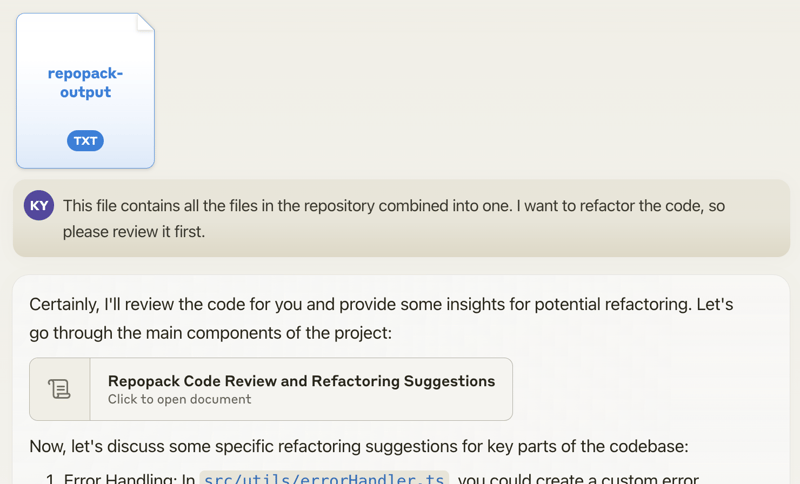
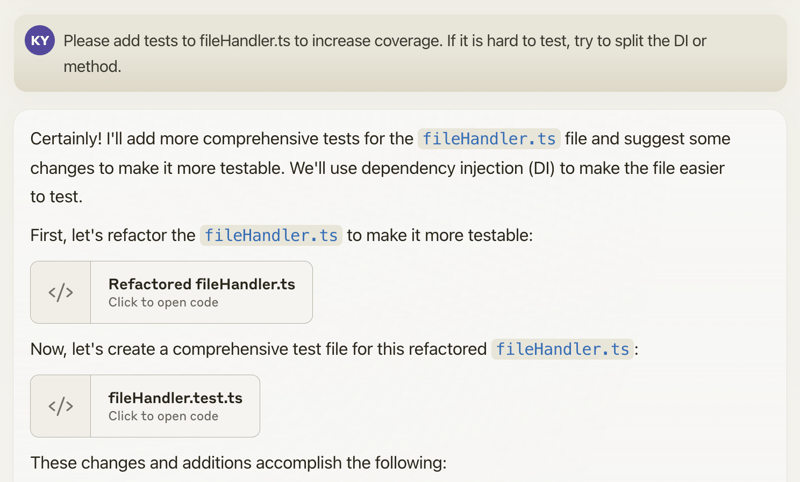
When you propose specific changes, the AI might be able to generate code accordingly. With features like Claude's Artifacts, you could potentially output multiple files, allowing for the generation of multiple interdependent pieces of code.
Happy coding! 🚀
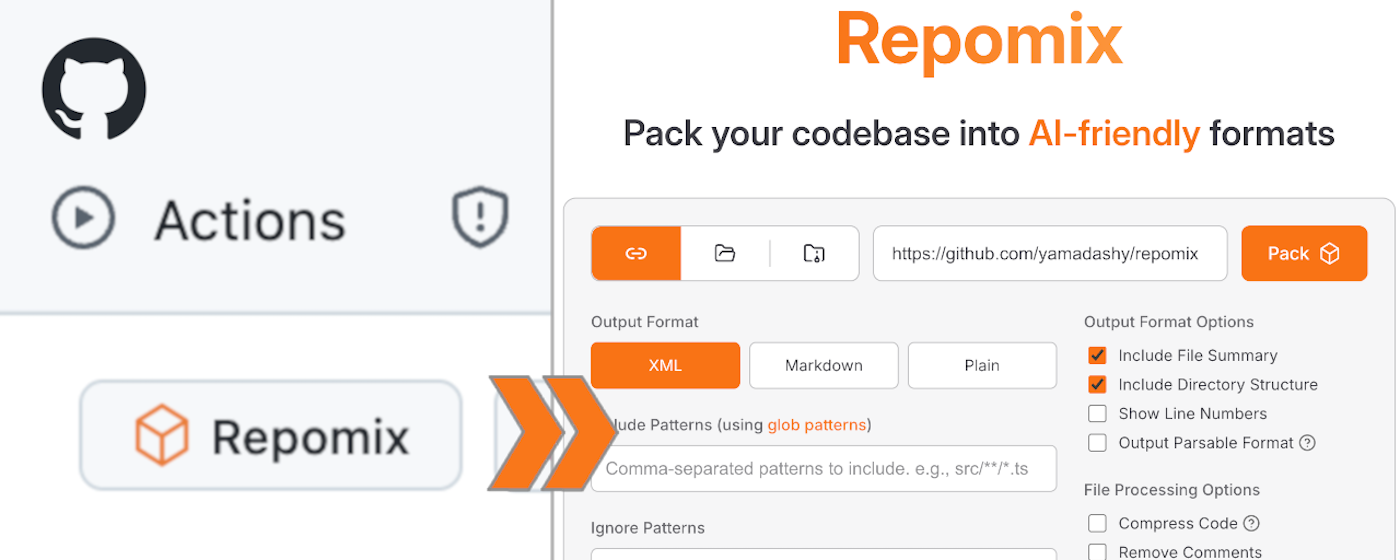
Want to try it quickly? Visit the official website at repomix.com. Simply enter your repository name, fill in any optional details, and click the Pack button to see your generated output.
The website offers several convenient features:
Get instant access to Repomix directly from any GitHub repository! Our Chrome extension adds a convenient "Repomix" button to GitHub repository pages.
A community-maintained VSCode extension called Repomix Runner (created by massdo) lets you run Repomix right inside your editor with just a few clicks. Run it on any folder, manage outputs seamlessly, and control everything through VSCode's intuitive interface.
Want your output as a file or just the content? Need automatic cleanup? This extension has you covered. Plus, it works smoothly with your existing repomix.config.json.
Try it now on the VSCode Marketplace! Source code is available on GitHub.
If you're using Python, you might want to check out Gitingest, which is better suited for Python ecosystem and data
science workflows:
https://github.com/cyclotruc/gitingest
To pack your entire repository:
repomix
To pack a specific directory:
repomix path/to/directory
To pack specific files or directories using glob patterns:
repomix --include "src/**/*.ts,**/*.md"
To exclude specific files or directories:
repomix --ignore "**/*.log,tmp/"
To pack a remote repository:
repomix --remote https://github.com/yamadashy/repomix
You can also use GitHub shorthand:
repomix --remote yamadashy/repomix
You can specify the branch name, tag, or commit hash:
repomix --remote https://github.com/yamadashy/repomix --remote-branch main
Or use a specific commit hash:
repomix --remote https://github.com/yamadashy/repomix --remote-branch 935b695
Another convenient way is specifying the branch's URL
repomix --remote https://github.com/yamadashy/repomix/tree/main
Commit's URL is also supported
repomix --remote https://github.com/yamadashy/repomix/commit/836abcd7335137228ad77feb28655d85712680f1
To pack files from a file list (pipe via stdin):
# Using find command
find src -name "*.ts" -type f | repomix --stdin
Using git to get tracked files
git ls-files "*.ts" | repomix --stdin
Using grep to find files containing specific content
grep -l "TODO" **/*.ts | repomix --stdin
Using ripgrep to find files with specific content
rg -l "TODO|FIXME" --type ts | repomix --stdin
Using ripgrep (rg) to find files
rg --files --type ts | repomix --stdin
Using sharkdp/fd to find files
fd -e ts | repomix --stdin
Using fzf to select from all files
fzf -m | repomix --stdin
Interactive file selection with fzf
find . -name "*.ts" -type f | fzf -m | repomix --stdin
Using ls with glob patterns
ls src/**/*.ts | repomix --stdin
From a file containing file paths
cat file-list.txt | repomix --stdin
Direct input with echo
echo -e "src/index.ts\nsrc/utils.ts" | repomix --stdin
The --stdin option allows you to pipe a list of file paths to Repomix, giving you ultimate flexibility in selecting which files to pack.
When using --stdin, the specified files are effectively added to the include patterns. This means that the normal include and ignore behavior still applies - files specified via stdin will still be excluded if they match ignore patterns.
[!NOTE]
When using --stdin, file paths can be relative or absolute, and Repomix will automatically handle path resolution and deduplication.
To include git logs in the output:
# Include git logs with default count (50 commits)
repomix --include-logs
Include git logs with specific commit count
repomix --include-logs --include-logs-count 10
Combine with diffs for comprehensive git context
repomix --include-logs --include-diffs
The git logs include commit dates, messages, and file paths for each commit, providing valuable context for AI analysis of code evolution and development patterns.
To compress the output:
repomix --compress
You can also use it with remote repositories:
repomix --remote yamadashy/repomix --compress
To initialize a new configuration file (repomix.config.json):
repomix --init
Once you have generated the packed file, you can use it with Generative AI tools like ChatGPT, DeepSeek, Perplexity, Gemini, Gemma, Llama, Grok, and more.
You can also run Repomix using Docker. This is useful if you want to run Repomix in an isolated environment or prefer using containers.
Basic usage (current directory):
docker run -v .:/app -it --rm ghcr.io/yamadashy/repomix
To pack a specific directory:
docker run -v .:/app -it --rm ghcr.io/yamadashy/repomix path/to/directory
Process a remote repository and output to a output directory:
docker run -v ./output:/app -it --rm ghcr.io/yamadashy/repomix --remote https://github.com/yamadashy/repomix
Once you have generated the packed file with Repomix, you can use it with AI tools like ChatGPT, DeepSeek, Perplexity, Gemini, Gemma, Llama, Grok, and more. Here are some example prompts to get you started:
For a comprehensive code review and refactoring suggestions:
This file contains my entire codebase. Please review the overall structure and suggest any improvements or refactoring opportunities, focusing on maintainability and scalability.
To generate project documentation:
Based on the codebase in this file, please generate a detailed README.md that includes an overview of the project, its main features, setup instructions, and usage examples.
For generating test cases:
Analyze the code in this file and suggest a comprehensive set of unit tests for the main functions and classes. Include edge cases and potential error scenarios.
Evaluate code quality and adherence to best practices:
Review the codebase for adherence to coding best practices and industry standards. Identify areas where the code could be improved in terms of readability, maintainability, and efficiency. Suggest specific changes to align the code with best practices.
Get a high-level understanding of the library
This file contains the entire codebase of library. Please provide a comprehensive overview of the library, including its main purpose, key features, and overall architecture.
Feel free to modify these prompts based on your specific needs and the capabilities of the AI tool you're using.
Check out our community discussion where users share:
Repomix generates a single file with clear separators between different parts of your codebase. To enhance AI comprehension, the output file begins with an AI-oriented explanation, making it easier for AI models to understand the context and structure of the packed repository.
The XML format structures the content in a hierarchical manner:
This file is a merged representation of the entire codebase, combining all repository files into a single document.
<file_summary>
  (Metadata and usage AI instructions)
</file_summary>
<directory_structure>
src/
cli/
cliOutput.ts
index.ts
(...remaining directories)
</directory_structure>
// File contents here
(...remaining files)
(Custom instructions from output.instructionFilePath)
For those interested in the potential of XML tags in AI contexts: https://docs.anthropic.com/en/docs/build-with-claude/prompt-engineering/use-xml-tags
When your prompts involve multiple components like context, instructions, and examples, XML tags can be a
game-changer. They help Claude parse your prompts more accurately, leading to higher-quality outputs.
This means that the XML output from Repomix is not just a different format, but potentially a more effective way to feed your codebase into AI systems for analysis, code review, or other tasks.
To generate output in Markdown format, use the --style markdown option:
repomix --style markdown
The Markdown format structures the content in a hierarchical manner:
`
This file is a merged representation of the entire codebase, combining all repository files into a single document.
File Summary
(Metadata and usage AI instructions)
Repository Structure
(...remaining directories)
Repository Files
File: src/index.js
(...remaining files)
Instruction
(Custom instructions from output.instructionFilePath)
This format provides a clean, readable structure that is both human-friendly and easily parseable by AI systems.
To generate output in JSON format, use the --style json option:
repomix --style json
The JSON format structures the content as a hierarchical JSON object with camelCase property names:
{
  "fileSummary": {
    "generationHeader": "This file is a merged representation of the entire codebase, combined into a single document by Repomix.",
    "purpose": "This file contains a packed representation of the entire repository's contents...",
    "fileFormat": "The content is organized as follows...",
    "usageGuidelines": "- This file should be treated as read-only...",
    "notes": "- Some files may have been excluded based on .gitignore, .ignore, and .repomixignore rules..."
  },
  "userProvidedHeader": "Custom header text if specified",
  "directoryStructure": "src/\n  cli/\n    cliOutput.ts\n    index.ts\n  config/\n    configLoader.ts",
  "files": {
    "src/index.js": "// File contents here",
    "src/utils.js": "// File contents here"
  },
  "instruction": "Custom instructions from instructionFilePath"
}
This format is ideal for:
jqjqThe JSON format makes it easy to extract specific information programmatically:
# List all file paths
cat repomix-output.json | jq -r '.files | keys[]'
Count total number of files
cat repomix-output.json | jq '.files | keys | length'
Extract specific file content
cat repomix-output.json | jq -r '.files["README.md"]'
cat repomix-output.json | jq -r '.files["src/index.js"]'
Find files by extension
cat repomix-output.json | jq -r '.files | keys[] | select(endswith(".ts"))'
Get files containing specific text
cat repomix-output.json | jq -r '.files | to_entries[] | select(.value | contains("function")) | .key'
Extract directory structure
cat repomix-output.json | jq -r '.directoryStructure'
Get file summary information
cat repomix-output.json | jq '.fileSummary.purpose'
cat repomix-output.json | jq -r '.fileSummary.generationHeader'
Extract user-provided header (if exists)
cat repomix-output.json | jq -r '.userProvidedHeader // "No header provided"'
Create a file list with sizes
cat repomix-output.json | jq -r '.files | to_entries[] | "\(.key): \(.value | length) characters"'
To generate output in plain text format, use the --style plain option:
repomix --style plain
This file is a merged representation of the entire codebase, combining all repository files into a single document.
================================================================
File Summary
================================================================
(Metadata and usage AI instructions)
================================================================
Directory Structure
================================================================
src/
  cli/
    cliOutput.ts
    index.ts
  config/
    configLoader.ts
(...remaining directories)
================================================================
Files
================================================================
================
File: src/index.js
================
// File contents here
================
File: src/utils.js
================
// File contents here
(...remaining files)
================================================================
Instruction
================================================================
(Custom instructions from output.instructionFilePath)
-v, --version: Show version information and exit| Option | Description |
|--------|-------------|
| --verbose | Enable detailed debug logging (shows file processing, token counts, and configuration details) |
| --quiet | Suppress all console output except errors (useful for scripting) |
| --stdout | Write packed output directly to stdout instead of a file (suppresses all logging) |
| --stdin | Read file paths from stdin, one per line (specified files are processed directly) |
| --copy | Copy the generated output to system clipboard after processing |
| --token-count-tree [threshold] | Show file tree with token counts; optional threshold to show only files with ≥N tokens (e.g., --token-count-tree 100) |
| --top-files-len | Number of largest files to show in summary (default: 5) |
| Option | Description |
|--------|-------------|
| -o, --output | Output file path (default: repomix-output.xml, use "-" for stdout) |
| --style | Output format: xml, markdown, json, or plain (default: xml) |
| --output-file-path-style | How file paths are shown in output: target-relative or cwd-relative (default: target-relative) |
| --parsable-style | Escape special characters to ensure valid XML/Markdown (needed when output contains code that breaks formatting) |
| --compress | Extract essential code structure (classes, functions, interfaces) using Tree-sitter parsing |
| --output-show-line-numbers | Prefix each line with its line number in the output |
| --no-file-summary | Omit the file summary section from output |
| --no-directory-structure | Omit the directory tree visualization from output |
| --no-files | Generate metadata only without file contents (useful for repository analysis) |
| --remove-comments | Strip all code comments before packing |
| --remove-empty-lines | Remove blank lines from all files |
| --truncate-base64 | Truncate long base64 data strings to reduce output size |
| --header-text | Custom text to include at the beginning of the output |
| --instruction-file-path | Path to file containing custom instructions to include in output |
| --split-output | Split output into multiple numbered files (e.g., repomix-output.1.xml); size like 500kb, 2mb, or 1.5mb |
| --include-empty-directories | Include folders with no files in directory structure |
| --include-full-directory-structure | Show complete directory tree in output, inclu
→ →
→ →
→ →
→ →
→ →
→ →
→ →
→