1
 →
→
Infrastructure for the next generation of voice agents, designed to provide universal memory. It is divided into a left brain and a right brain, storing information and emotions respectively
xzf-thu/VoiceMem is an open-source project on GitHub, mainly written in Python. Infrastructure for the next generation of voice agents, designed to provide universal memory. It currently holds 2,027 stars and 0 forks with 0 open issues, and was last pushed on an unknown date (repository created unknown).
AI Homed tracks it on the AI Agent Memory board.

中文 | English
项目主页 🌐 / 技术报告 📖 / VoiceMem Utils 🤗 / VoiceMem Model Families 🤗 / ChatMem-400K 🤗


---
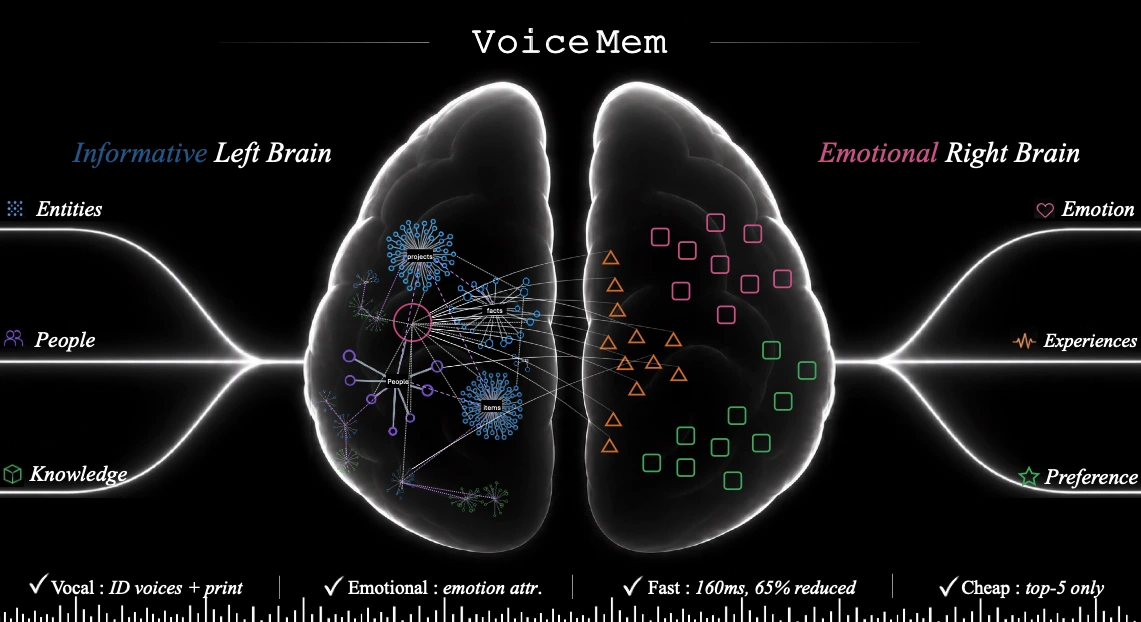
我们带来 VoiceMem,为语音模型增加最后一个组件:灵魂,让它真正越来越懂你。VoiceMem 建立在「流式双脑」架构之上,提供精准、有情感、懂人格、低延迟且最便宜的记忆服务。本仓库将「永久保持全部开源」。
快速理解 VoiceMem:
注意: 播放前需要先取消静音。
https://github.com/user-attachments/assets/0d919f8c-e9ba-4fdb-8078-b049e4b99a28
git clone https://github.com/xzf-thu/VoiceMem.git
cd VoiceMem
安装记忆系统(含 ASR / 声纹 / 场景 / 情绪 / 本地 embedding 全套内置组件)
pip install voicemem
可选:用我们微调的 Qwen 回复模型
pip install "voicemem[slm]"
pip install -U huggingface_hub
hf download zhifeixie/VoiceMem_Default_Models_Env --local-dir ./models
from voicemem import VoiceMem
vm = VoiceMem(
    mode="normal",
    openai_key="api_xxx",
    top_k=5,
)
本地模型是懒加载的,先热起来,别让第一次调用去等加载
vm.warmup()
存:音频文件
内部跑 ASR / 声纹 / 场景 / 情绪感知 / Embedding 抽取
print("入库开始")
vm.ingest(audio="assets/input.wav")  # 我是素食主义者,对坚果过敏。
print("入库结束")
查:写入慢是因为要抽事实、打标签、建图;查询走的是纯向量检索,跟写入无关
print("检索开始")
result = vm.search("我的饮食禁忌是什么?")
print("检索结束")
print(result.result_leftbrain, result.result_rightbrain)
存:左脑信息文本(无情感)
vm = VoiceMem(
    mode="leftbrain_only",
    openai_key="api_xxx",
    top_k=5,
)
vm.ingest("我是素食主义者,对坚果过敏。")
result = vm.search("我的饮食禁忌是什么?")
可以把 VoiceMem 的流式接口看作一个持续处理音频的 VAD 接口。
下面这段:先显式存一条事实,再喂一段问句音频,看记忆是怎么在人还没说完时就查好的;最后照例走一次入库判断。
import asyncio
import os
from pprint import pprint
import numpy as np
import soundfile as sf
from voicemem import VoiceMem
沿用上面那个 vm;单独跑这段就自己建一个
vm = VoiceMem(mode="normal", openai_key=os.environ["OPENAI_API_KEY"], top_k=5)
本地模型是懒加载的,先热起来,别让第一块音频去等模型加载
vm.warmup()
先存一条事实,等下那个问句才有东西可查
vm.ingest("我是素食主义者,对坚果过敏。")
SPEC_MIN_CHARS = 6
searching = False
def on_partial(text):
    """边说边出字。够长了就说明后台这一刻已经开查了。"""
    global searching
    print(f"\r[partial] {text}", end="", flush=True)
    if not searching and len(text) >= SPEC_MIN_CHARS:
        searching = True
        print("\n[检索开始] 人还没说完,后台已经在查了", flush=True)
async def main():
    # 这段音频里是一个问句:「我的饮食禁忌是什么?」
    audio, sr = sf.read("assets/question.wav", dtype="float32")
    pcm = (np.clip(audio, -1, 1) * 32767).astype(np.int16)
stream = vm.stream(src_rate=sr, vad_threshold=0.5, on_partial=on_partial)
    step = int(sr * .032)
for i in range(0, len(pcm), step):
        st = await stream.feed(pcm[i:i + step].tobytes())
        if st.state != "turn_over":
            continue
# VAD 确认这一轮说完了。记忆早在说话过程中就查好了,这里直接取,不再等
        print("[检索结束]")
        print("转写  ", st.transcript)
        print("左脑  ", st.result_leftbrain)
        print("右脑  ", st.result_rightbrain)
        pprint({k: getattr(st, k) for k in
                ["speaker_id", "speaker_voiceprint", "emotion",
                 "entity", "schema", "text_embedding"]})
# 每一轮都要走一次入库判断
        print("[入库] LLM 正在判断这句话值不值得入库…", flush=True)
        res = vm.ingest(st.transcript)
        print(f"[入库] 抽出 {res['facts_count']} 条事实 -> {res['memory_ids']}")
asyncio.run(main())
演示代码在仓库里(pip 装的包只有库本身),先确认已经克隆并进入仓库目录。
python web/run.py
然后访问:
http://localhost:8787
Demo 默认把终端输出(含 Python logging 和 Uvicorn 的日志)保存一份到
results/logs/voicemem-时间-PID.log,每行带时间戳和 stdout/stderr 标记。
启动时终端会打印实际路径。指定文件或临时关闭如下。
python web/run.py --log-file results/logs/debug.log
python web/run.py --no-file-log
回复模型的上下文由当前输入、本次会话尚未入库的对话和检索记忆组成。每轮对话先 进入内存 SessionBuffer;异步记忆写入完成并确认产生持久记忆后,对应 turn 从 SessionBuffer 移除。没有产生长期记忆的临时对话会保留到本次会话结束,不同 Memory Space 和不同 WebSocket 会话互相隔离。
播放期间的插话使用两阶段控制:VAD 首先暂停并保留音频队列;明确停止指令或稳定
ASR 文本确认后才清空队列并取消回复;附和、回声、无文字声音和单音节碎片会恢复
播放。候选静音回退和最长等待时间可分别通过 BARGE_REJECT_SILENCE_MS、
BARGE_CANDIDATE_TIMEOUT_MS 调整。
两种回复模式共用以 PCM 样本位置为基准的输出时间轴。浏览器 AudioWorklet 回报
实际渲染进度,打断时只把已经播放的回复写入 SessionBuffer。TTS 后端可选返回
TimedAudioChunk 提供文字对齐;普通 PCM 后端按分段音频长度和动态语速估算。
VoiceMem 是一个面向实时语音智能体的记忆系统。
VoiceMem 不把所有记忆放进同一个检索数据库,而是将记忆拆分成两个互相配合的部分:
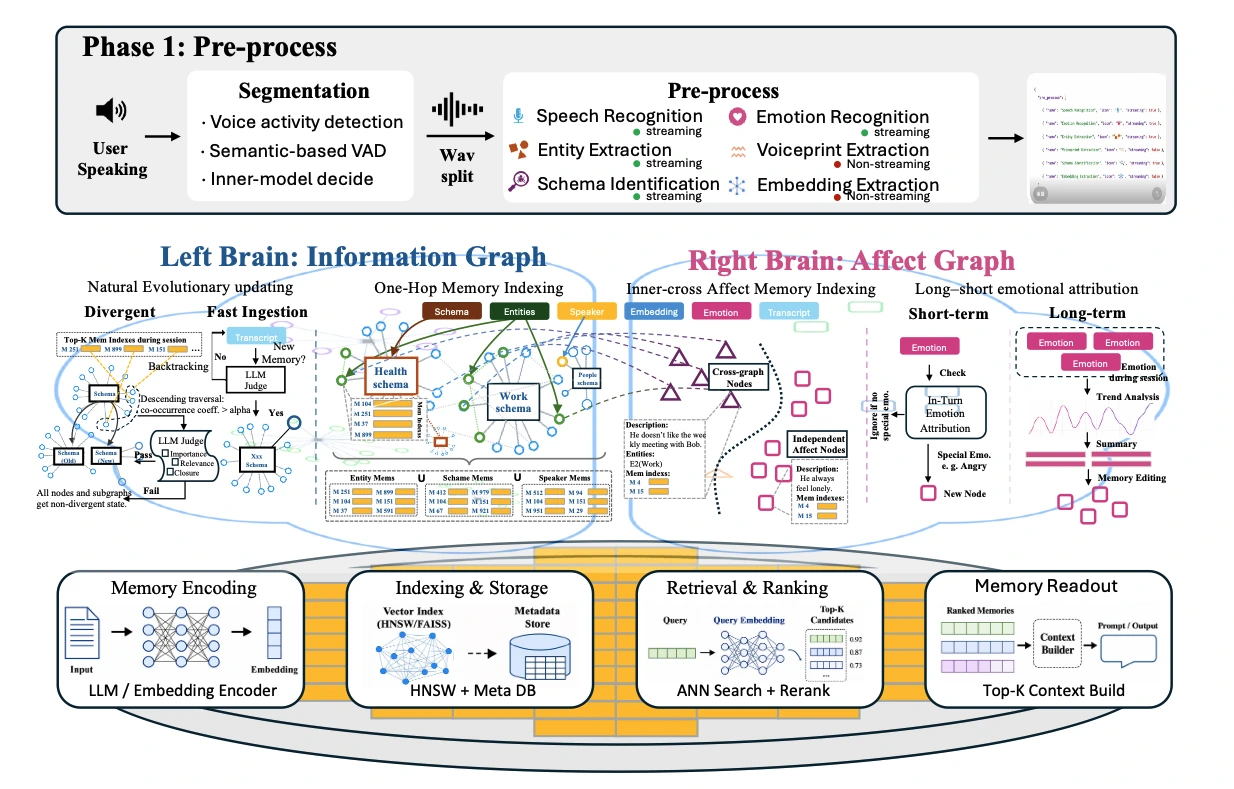
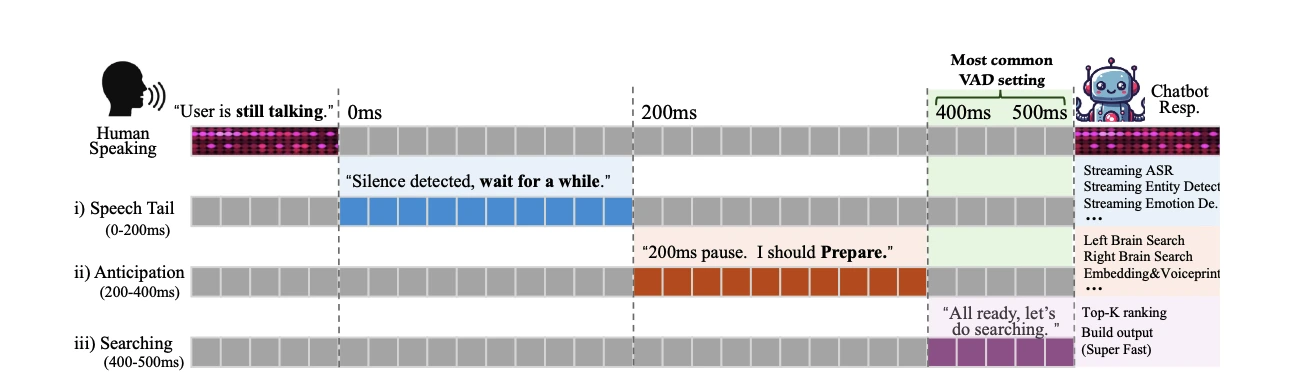
整个流程都是流式的。
在用户仍然说话时,VoiceMem 会持续完成音频分段、语音转写、记忆提取,并把结构化信息写入记忆图中。
查询时,VoiceMem 会先路由,再排序,最后只把 Top-K 条记忆注入模型上下文,从而在保留相关信息的同时控制上下文长度。
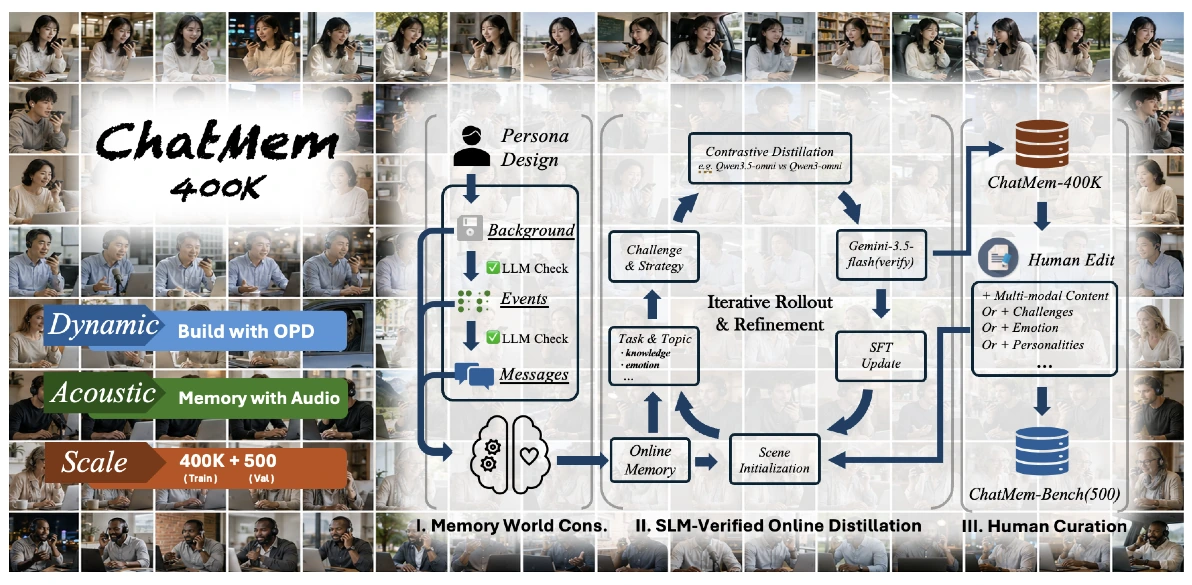
我们通过三阶段 OPD 训练流程构建 ChatMem-400K:
1. Memory-world construction 2. SLM-validated online on-policy distillation(OPD) 3. Human refinement
同一套流程在人工编辑后形成 ChatMem-Bench,评测语音模型是否能够在长期沉淀中形成对用户的理解。
VoiceMem 家族开源模型包括 Qwen2.5-Omni、Qwen3-Omni 和 Step-Audio2-Mini。这些模型可以在对话时接受并理解 VoiceMem 提供的记忆信息。
你可以将 VoiceMem 接入自己的语音模型,用于构建带有长期记忆能力的实时语音智能体。
整体流程如下:
麦克风 → VoiceMem 监听语音并提前检索相关记忆 → 你的模型读取这些记忆并生成回答
export OPENAI_API_KEY=sk-...
仅在写入记忆时用于事实信息提取。
记忆检索完全在本地运行。
python examples/03_simple_agent_with_voicemem_memory.py
换成你自己的模型:把生成那一步换掉就行,记忆那半边一行都不用动。
def my_reply(text, memory_context):        # 同步函数也可以,会自动丢线程
    return my_model.generate(system=memory_context, user=text)
vm = VoiceMem(reply=my_reply)
VoiceMem 提供完整的微调代码,可用于训练自己的 VoiceMem Model Family Adapter。
默认训练配置与发布的 checkpoint-3318 使用的配置一致。
使用默认参数运行下面的命令,可以复现相同的 Adapter:
pip install ms-swift==4.5.2 bitsandbytes
python finetune/train.py --data data/train.jsonl
训练数据格式、GPU 显存要求,以及如何更换基础模型,请参阅 finetune/README.md。
评测流程完全开源,并且可以复现。
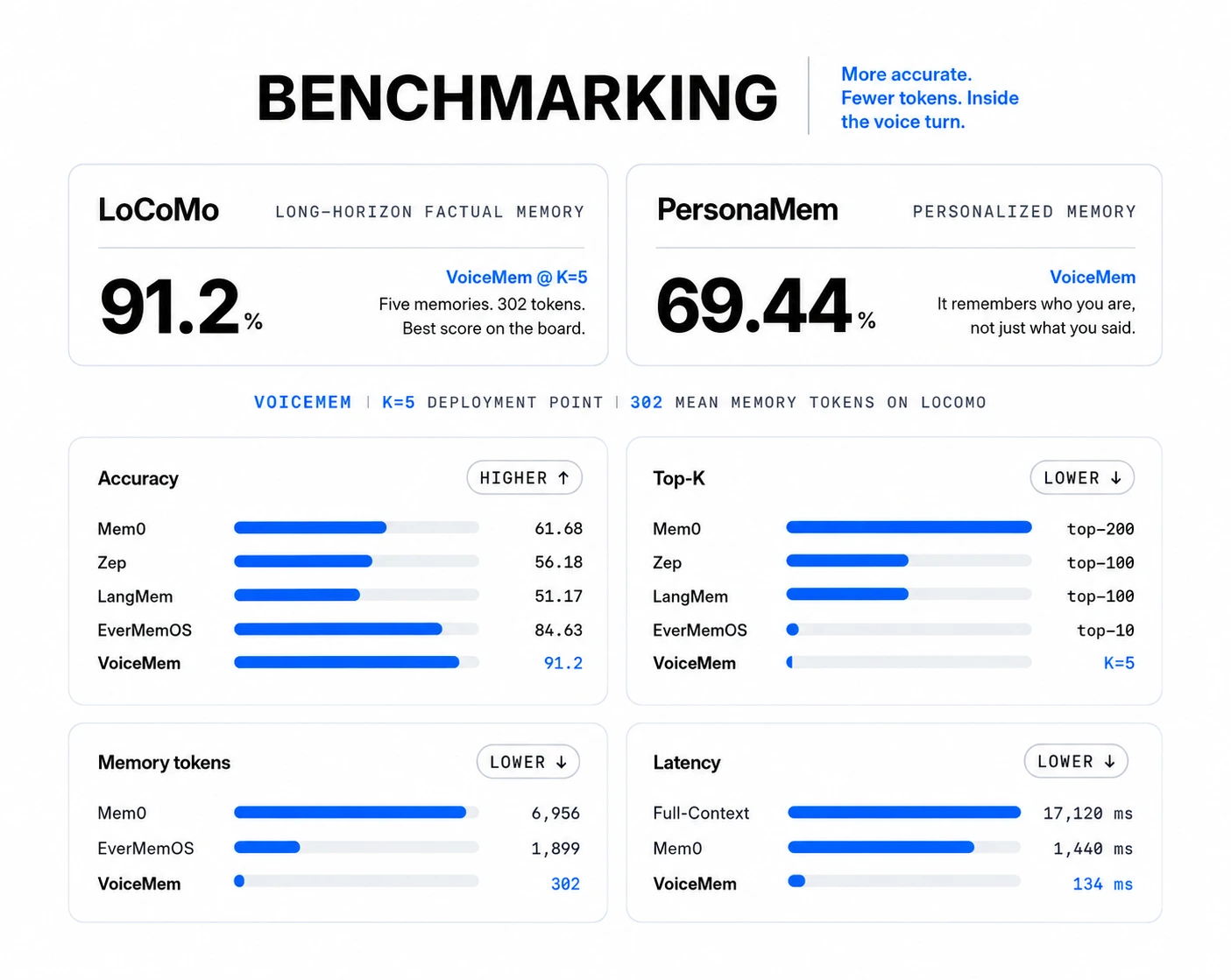
只需要一条命令即可运行 Benchmark:
export OPENAI_API_KEY=sk-...
建议先运行仓库中自带的小型示例,
确认环境和配置没有问题。
2 个对话,5 个问题。
python evaluation/run.py \
    --dataset locomo \
    --data evaluation/examples/locomo_sample.json
然后运行完整数据集。
python evaluation/run.py \
    --dataset locomo \
    --data data/locomo.json
示例结果:
LoCoMo: 10 conversations · 152 questions
Score: 139/152 = 91.4%
multi_hop     88.2%
  temporal      85.7%
  single_hop    95.1%
Median retrieval latency: 12 ms
Median retrieved memory: 298 tokens
在运行完整评测之前,可以加入 --inspect,检查数据集是否被正确解析。
这个模式不会调用模型,因此也不会产生 API 费用:
python evaluation/run.py \
    --dataset locomo \
    --data data/locomo.json \
    --inspect
评测过程中,回答模型只会收到检索得到的记忆,不会收到原始对话历史。
如果直接把完整对话交给模型,Benchmark 测试的就会变成模型的阅读理解能力,而不是记忆系统本身的能力。
完整评测流程,以及添加新 Benchmark 的方法,请参阅 evaluation/README.md。添加一个新的 Benchmark 只需要增加一个文件并实现两个函数。
如果 VoiceMem 对你的研究有帮助,请引用我们的论文:
@misc{2608.26005,
  author = {Zhifei Xie and Jiaqi Lang and Ze An and Yifan Zhao and Dongchao Yang and Kai Li and Ziyang Ma and Mingbao Lin and Chunyan Miao and Shuicheng Yan},
  title = {{V}oice{M}em: {S}treaming {D}ual-{B}rain {M}emory for {R}eal-{T}ime {I}nteraction},
  year = {2026},
  eprint = {2608.26005},
  note = {arXiv:2608.26005v1}
}
我们感谢以下优秀的开源项目:
paraformer-zh-streaming 的流式 ASRVoiceMem 基于 Apache License 2.0 开源。
详细信息请参阅 LICENSE。
---
中文 | English
Project Page 🌐 / Technical Report 📖 / VoiceMem Utils 🤗 / VoiceMem Model Families 🤗 / ChatMem-400K 🤗
---
We introduce VoiceMem, adding the final component to voice models: a soul, so they truly come to understand you better over time. VoiceMem is built on a streaming dual-brain architecture and provides accurate, emotional, personality-aware, low-latency, and lowest-cost memory services. This repository will remain fully open source, permanently.
A quick overview of VoiceMem:
Note: Please unmute the video before playback.https://github.com/user-attachments/assets/0d919f8c-e9ba-4fdb-8078-b049e4b99a28
Prerequisite: Python 3.10+
git clone https://github.com/xzf-thu/VoiceMem.git
cd VoiceMem
Install the memory system (bundles ASR / speaker ID / scene / emotion / local embedding)
pip install voicemem
Optional: run our fine-tuned Qwen reply model
pip install "voicemem[slm]"
pip install -U huggingface_hub
hf download zhifeixie/VoiceMem_Default_Models_Env --local-dir ./models
from voicemem import VoiceMem
vm = VoiceMem(
    mode="normal",
    openai_key="api_xxx",
    top_k=5,
)
Local models load lazily -- warm them up so the first call doesn't pay for it.
vm.warmup()
Store an audio file.
VoiceMem internally runs ASR / speaker ID / scene / emotion / embedding extraction.
print("ingest start")
vm.ingest(audio="assets/input.wav")  # I am vegetarian and allergic to nuts.
print("ingest done")
Writing is slow because it extracts facts, tags them and builds the graph.
Reading is a pure vector lookup -- independent of write cost.
print("search start")
result = vm.search("What are my dietary restrictions?")
print("search done")
print(result.result_leftbrain, result.result_rightbrain)
Store Left Brain factual text directly (no emotional information).
vm = VoiceMem(
    mode="leftbrain_only",
    openai_key="api_xxx",
    top_k=5,
)
vm.ingest("I am vegetarian and allergic to nuts.")
result = vm.search("What are my dietary restrictions?")
Think of VoiceMem's streaming interface as a VAD interface that continuously processes audio.
The example below stores one fact explicitly, then feeds a question as audio to show how the memory is already retrieved before the speaker finishes. It ends, as always, with the ingest decision.
import asyncio
import os
from pprint import pprint
import numpy as np
import soundfile as sf
from voicemem import VoiceMem
Reuses the vm above; building one here so the block runs standalone
vm = VoiceMem(mode="normal", openai_key=os.environ["OPENAI_API_KEY"], top_k=5)
Local models load lazily -- warm them up so the first audio chunk doesn't wait
vm.warmup()
Store one fact first, so the question below has something to find
vm.ingest("I am vegetarian and allergic to nuts.")
SPEC_MIN_CHARS = 6
searching = False
def on_partial(text):
    """Partial transcripts as they arrive. Long enough = the search already started."""
    global searching
    print(f"\r[partial] {text}", end="", flush=True)
    if not searching and len(text) >= SPEC_MIN_CHARS:
        searching = True
        print("\n[search start] speaker isn't done yet, retrieval already running", flush=True)
async def main():
    # This audio is a question: "What are my dietary restrictions?"
    audio, sr = sf.read("assets/question.wav", dtype="float32")
    pcm = (np.clip(audio, -1, 1) * 32767).astype(np.int16)
stream = vm.stream(src_rate=sr, vad_threshold=0.5, on_partial=on_partial)
    step = int(sr * .032)
for i in range(0, len(pcm), step):
        st = await stream.feed(pcm[i:i + step].tobytes())
        if st.state != "turn_over":
            continue
# VAD confirmed end of turn. Memory was fetched while the user spoke -- just read it
        print("[search end]")
        print("transcript  ", st.transcript)
        print("left brain  ", st.result_leftbrain)
        print("right brain ", st.result_rightbrain)
        pprint({k: getattr(st, k) for k in
                ["speaker_id", "speaker_voiceprint", "emotion",
                 "entity", "schema", "text_embedding"]})
# Every turn runs the ingest decision
        print("[ingest] LLM deciding whether this is worth storing...", flush=True)
        res = vm.ingest(st.transcript)
        print(f"[ingest] extracted {res['facts_count']} facts -> {res['memory_ids']}")
asyncio.run(main())
The demo lives in the repo (the pip package ships the library only) — make sure you have cloned it and are in the repo root.
python web/run.py
Then open:
http://localhost:8787
By default, the demo mirrors terminal output — including Python logging and
Uvicorn's own logs — to results/logs/voicemem-TIME-PID.log, one timestamped
line per record, tagged stdout or stderr. The resolved path is printed at
startup. To choose a path or disable file logging:
python web/run.py --log-file results/logs/debug.log
python web/run.py --no-file-log
Reply context combines the current input, turns from this session that are not yet represented by persistent memory, and retrieved memory. Each turn enters an in-memory SessionBuffer first. The asynchronous ingest completion callback removes it only after persistent memory is created. Buffers are isolated by Memory Space and WebSocket session.
Barge-in uses two stages during playback. VAD first pauses playback while
preserving the audio queue. An explicit stop command or stable ASR updates
confirm cancellation; backchannels, echo, non-text sounds, and isolated
syllables resume playback. BARGE_REJECT_SILENCE_MS and
BARGE_CANDIDATE_TIMEOUT_MS configure rejection timing.
Both reply modes share a PCM-sample media timeline. The browser AudioWorklet
reports actual rendered progress, so interrupted context contains only the
heard prefix. TTS providers may return TimedAudioChunk alignment metadata;
plain PCM providers use segment duration and an adaptive speech-rate fallback.
VoiceMem is a memory system built for real-time voice agents.
Instead of storing every type of memory in a single retrieval database, VoiceMem separates memory into two complementary parts:
The entire pipeline is streaming.
While the user is still speaking, VoiceMem continuously segments audio, transcribes speech, extracts useful memories, and writes structured information into the memory graph.
At query time, VoiceMem routes first, ranks second, and injects only the Top-K memories into the model context. This keeps the context small while preserving the most relevant information.
We built ChatMem-400K through a three-stage OPD training pipeline:
1. Memory-world construction 2. SLM-validated online on-policy distillation (OPD) 3. Human refinement
After human editing, the same pipeline produces ChatMem-Bench, which evaluates whether a voice model can build a long-term understanding of the user over time.
The open-source VoiceMem model family includes Qwen2.5-Omni, Qwen3-Omni, and Step-Audio2-Mini. These models can receive and understand memory information provided by VoiceMem during conversations.
You can integrate VoiceMem with your own voice model to build a real-time voice agent with long-term memory.
The basic flow is:
microphone → VoiceMem listens and prefetches relevant memories → your model reads those memories and generates a response
export OPENAI_API_KEY=sk-...
Only used for fact extraction when writing memories.
Memory retrieval runs entirely locally.
python examples/03_simple_agent_with_voicemem_memory.py
To use your own model, replace the generation step — the memory half stays exactly as is:
def my_reply(text, memory_context):        # a sync function is fine, it runs off-thread
    return my_model.generate(system=memory_context, user=text)
vm = VoiceMem(reply=my_reply)
VoiceMem provides the complete finetuning pipeline for training your own VoiceMem Model Family adapter.
The default training configuration matches the one used for the released checkpoint-3318.
Running the following command with the default settings reproduces the same adapter:
pip install ms-swift==4.5.2 bitsandbytes
python finetune/train.py --data data/train.jsonl
See finetune/README.md for the training data format, GPU memory req
→ →
→ →
→ →
→ →
→ →
→ →
→ →
→