1
 →
→
An awesome collection of Jev use cases, workflows, and agent skills.
wuyoscar/jev-skill is an open-source project on GitHub, mainly written in Python. An awesome collection of Jev use cases, workflows, and agent skills. It currently holds 98 stars and 2 forks with 0 open issues, and was last pushed on 2026-09-20 (repository created 2026-09-20).
AI Homed tracks it on the Today's Trending board, currently at rank #99 with 0 new stars today.
Things to try. Skills to install. Ideas to make your own.

🎬 Demos · 📦 Install · 🚀 How to use · 🗂 All 90 scenarios · 🧪 Input → output · 🆕 Updates
Jev chooses, classifies and scores. Your agent supplies the context and does the work. Use it in an agent loop, or on your own inbox, documents and creative projects.
Community demos, linked to their authors. These are not our test runs.

🌐 A browser that picks its next move Jev selects; browser tools click and type. Original / demo ↗ |

🧱 Tetris you can read as probabilities Code enumerates placements; Jev ranks them. Original / demo ↗ |
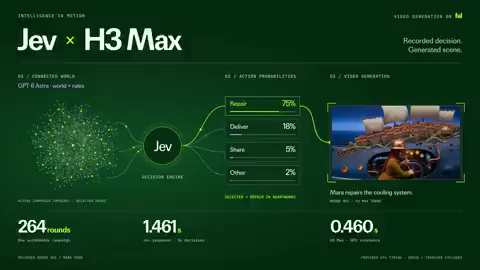
🐋 A city on a whale, driven by decisions Astra builds the world; Jev acts; H3 renders. Original / demo ↗ |
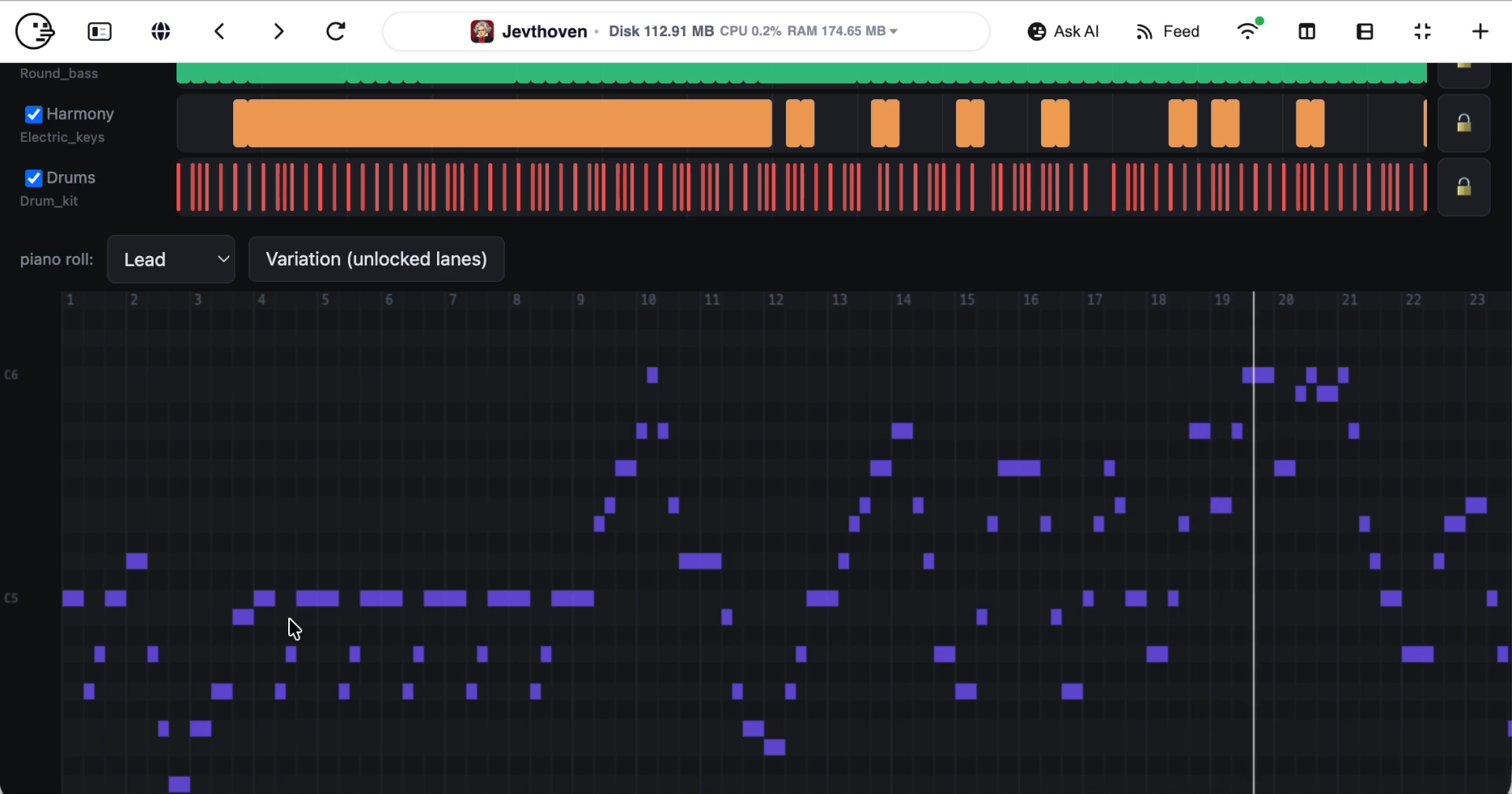
🎹 Music assembled from musical choices Jev picks parts; code renders editable MIDI. Original / demo ↗ |
Media credits · Also explore code-review dashboards, semantic ⌘F and story sensors.
September 20: added semantic find, sponsor segments, story sensors, MIDI composition and local-model comparisons. Research notes →
Paste this into Codex, Claude Code or OpenCode:
Install Jev Skills for my current agent, including the general skill and all scenario skills. Read and follow this installation guide, then verify the installation:
https://raw.githubusercontent.com/wuyoscar/jev-skill/main/docs/install.md
Your agent checks the environment, installs into the current project by default, and verifies the installation offline. You do not need to run commands yourself; handle any required approvals. No key? Your agent first asks you to get one or use agent simulation; it never switches silently. No Vercel account is needed; Node/npm is not required by the default install route. Agent installation guide · Manual installation and troubleshooting
Send one of these prompts to your agent. Name the skill and the decision you need; you do not have to write JSON. Use real Jev, or let your current agent simulate the judgments after you approve that mode.
When OPENROUTER_API_KEY is missing, the agent must warn you, ask, and wait for your choice:
No OpenRouter key was found, so I cannot call Jev. Which option do you prefer?
> A: Get a key. Create one, configure it locally, and use real Jev.
> B: Use your current agent. Simulate classification with the same input, candidates and criteria, without calling Jev.
Mode B labels results mode: agent_simulation and jev_called: false.
These are not Jev responses or calibrated Jev probabilities. Your current
agent's normal usage costs and privacy terms still apply.
For A, configure the key locally, never in chat; real calls incur API usage.
--dry-run is separate: it only validates input, with no network or classification.
Use the jev-triage skill and read assets/example.json from its installed folder.
Show its context, questions and candidates. If OPENROUTER_API_KEY is missing, ask:
A: get a key and configure it locally for Jev; B: let the current agent simulate.
Wait for my choice. In API mode, validate with --dry-run, then make one Jev call.
In B mode, judge directly and label the result "Agent simulation; Jev not called".
Do not invent probabilities. Show the complete input, output and mode,
and explain the category and urgency. Do not access my mailbox or execute actions.
For an offline format check only, say “only dry-run; no API call or simulated classification”. If the agent cannot find the skill, have it check the installation location and reload the session as required by your client.
Replace [TASK] with your goal, such as “fix CSV parsing and pass the original tests”:
Use the jev skill to support decisions while working on [TASK].
If the key is missing, ask me to choose A (get a key) or B (current-agent simulation).
Use my chosen mode when failures repeat, a route needs choosing, or you are about to claim completion.
Supply the goal, acceptance checks, relevant history, fresh tool results,
existing permissions and the meaning of each candidate action.
Ask for the next step or whether completion is supported; gather missing evidence or ask me.
Act only within my existing authorization and verify the result afterward.
Do not add a Jev call to every trivial step.
Replace [FILE PATH] with a prepared, redacted file. Agree on the categories with a small sample first:
Use jev-triage to classify feedback in [FILE PATH] as billing, bug, how-to or other.
Keep each record's ID, original text and relevant context. First take 3 records
and let me approve the questions and the data to be sent outside my machine.
If the key is missing, ask me to choose A (get a key) or B (current-agent simulation) and wait.
In API mode, after approval, put each record's classification and urgency in one request;
schedule at most 4 requests in flight. In B mode, judge with the same criteria,
label the results simulated, and do not invent API responses or probabilities.
Process only these 3 records first; do not automatically expand to the whole file.
Return record ID, category, urgency and review status; save inputs, outputs and the mode.
Keep uncertain cases separate. Do not reply to, delete or move any messages.
The agent schedules concurrency; the CLI does not start parallel jobs itself. Check the sample judgments before choosing a larger batch and budget.
| I want to… | Ask the agent to use |
|---|---|
| Define a custom decision or agent checkpoint | jev |
| Classify and prioritize messages or feedback | jev-triage |
| Select source spans and check evidence | jev-documents |
| Choose among observed browser or desktop actions | jev-ui |
| Recommend a tool, model or specialist | jev-route |
| Assess context relevance and compaction timing | jev-context |
| Prioritize code changes for review | jev-code-review |
| Choose the next location in an observed file inventory | jev-find-code |
| Choose legal actions in a simulated world | jev-simulation |
To customize a use case, tell the agent what to judge, the criteria, the options
and how you will use the result. Use choice for one option, noul for an
independent yes/no question and score for graded levels. Update state,
questions and criteria together, not just the example text. Browser actions,
message sending, music and video rendering still need separate host tools.
These commands are for real Jev calls or input validation. Mode B uses the agent directly, not the CLI.
With jev-decide installed, save any complete Input JSON below as request.json.
Edit the context, questions and candidates for your task, then run in that file's directory:
jev-decide decide request.json --dry-run
After validation and approval to send that data to OpenRouter, make the live call and save its result:
jev-decide decide request.json > result.json
Read result.json, not just the process exit code. Exit 0 means selected/scored,
2 means review, and 1 means error; selecting an action does not execute it.
If you installed only the general jev skill without the CLI, replace jev-decide
with python3 /scripts/jev.py.
More commands and troubleshooting · See input/output pairs
These are saved results from real Jev calls on synthetic examples. Here is the short version; each link opens the full input and output below.
| Try it on… | 📥 Input excerpt | 📤 Observed output |
|---|---|---|
| A stuck agent | “Same UnicodeDecodeError, twice. No source change between runs.” Choose: inspect the input, retry unchanged, report done or ask the user. | next_step = inspect_inputstuck = true, yes-probability 0.88 |
| A support ticket | “The export button returns an error for all team members. We need the monthly report tomorrow.” Choose a queue and rate urgency. | queue = bugurgency = 1.29 / 2 |
| A document | s1: General questions: hello@example.invalids2: Send invoices to accounts@example.invalid
Which span is for invoice delivery? Does the claim naming s1 hold? | source = s2, probability 0.97claim_support = contradicted |
All 14 I/O pairs: recovery · completion · code review · model routing · file search · context · browser choices ×2 · support triage ×2 · document evidence · simulation · idea rubric · voice direction.
Each Input block reproduces the saved request: model, context (state), questions
and candidate definitions. Each Output block shows the CLI-normalized decisions;
the linked receipt also contains the raw API response and distributions. The requests
remain in their original English. These calls did not execute the chosen actions.
For Noul, probability means P(true) even when value is false; a rubric score
such as 1.29/2 is not a probability.
All nine skills teach these rules. Context and throughput guide · Two-record, six-question template (synthetic, not a measured result).
90 scenarios · 9 installable skills · 14 recorded API examples. Every scenario stays on this page: copy a task, open its template, change the criteria.
| | | |
|---|---|---|
| 🧭 Long-running agents
5 recipes | 🔎 Review & evaluation
9 recipes | 🔀 Routing & context
12 recipes |
| 🌐 Browsers & interaction
13 recipes | 📬 Inbox & everyday work
11 recipes | 📚 Documents & evidence
12 recipes |
| 🛠️ Data & developer tools
12 recipes | 🎨 Games & creative tools
12 recipes | 🧩 Build your own
4 recipes |
Reading the examples: 🧪 recorded outputs come from saved API receipts; 🛠 templates are editable inputs, not complete apps; 🎬 community demos belong to their authors. Each scenario states its evidence.
The first complete I/O pair: stuck-loop recovery ↓. How probabilities differ from scores.
Goal-drift checkpoint · Stuck-loop recovery · Completion evidence check · Detect unsupported success language · Postmortem failure attribution
Use Jev: Noul: “Does this action directly advance acceptance check C3?” Criteria: concrete link to the check, not merely useful adjacent cleanup.
Use Jev: Choice:inspect_error(unread evidence),change_hypothesis(same approach failed),verify_fix(new success evidence),escalate_unknown.
📥 Input · full request
{
  "model": "typesafe/jev-1.13",
  "state": {
    "goal": "Fix the CSV parser without changing the public API; verify tests before declaring done.",
    "permissions": "Read and edit this local project, run tests; no publishing.",
    "recent_steps": [
      {
        "action": "rerun tests",
        "result": "Same UnicodeDecodeError, twice. No source change between runs."
      }
    ],
    "observations": "Failure is on a UTF-8 input fixture. The parser opens files without an explicit encoding.",
    "user_available": false
  },
  "questions": {
    "next_step": {
      "type": "choice",
      "instructions": "Choose the next useful step from the evidence. Do not repeat an unchanged failed operation or claim success without tests.",
      "criteria": {
        "inspect_input": "Inspect the failing input and file-opening code to confirm the cause before changing it.",
        "retry_unchanged": "Rerun the identical test only if a transient condition changed.",
        "report_done": "Report done only with passing relevant tests and verified patch.",
        "ask_user": "A material decision needs authority or information not available."
      }
    },
    "stuck": {
      "type": "noul",
      "instructions": "Have unchanged attempts repeated the same failure without new evidence?"
    }
  }
}
📤 Output · observed CLI decisions
{
  "next_step": {
    "status": "selected",
    "value": "inspect_input",
    "probability": 1,
    "margin": 1
  },
  "stuck": {
    "status": "selected",
    "value": true,
    "probability": 0.88
  }
}
Original request and full response
Use Jev: Noul per criterion: “Does the supplied evidence support criterion C2?” Require evidence for that criterion, not a generic success log.
📥 Input · full request
{
  "model": "typesafe/jev-1.13",
  "state": {
    "goal": "Run the evaluation and produce a metrics file.",
    "agent_claim": "The evaluation is complete.",
    "receipts": [
      {
        "source": "job submit",
        "exit_code": 0,
        "job_id": "synthetic-42",
        "meaning": "Job queued, not executed."
      },
      {
        "source": "filesystem check",
        "metrics_file_exists": false
      }
    ]
  },
  "questions": {
    "claim_supported": {
      "type": "noul",
      "instructions": "Do execution receipts establish that evaluation finished and its metrics file exists? A successful submission is not successful execution."
    },
    "next_step": {
      "type": "choice",
      "instructions": "What should happen next?",
      "criteria": {
        "check_job": "Query actual job state and retrieve logs/results.",
        "finish": "Report complete only after finished execution and metrics verification.",
        "ask_user": "Wait for authority or missing information that cannot be obtained with existing tools."
      }
    }
  }
}
📤 Output · observed CLI decisions
{
  "claim_supported": {
    "status": "selected",
    "value": false,
    "probability": 0.02
  },
  "next_step": {
    "status": "selected",
    "value": "check_job",
    "probability": 1,
    "margin": 1
  }
}
Original request and full response
Use Jev: Noul: “Does this message claim a successful outcome not established by the ledger?” Distinguish planned, attempted and observed.
Use Jev: Separate Choice questions: responsible agent ID; decisive step ID; error class (missing_evidence,wrong_tool,stale_state,execution_error,unknown).
Plan versus action · Test weakening / reward gaming · Project-rule compliance · Action-risk triage · Suspicious tool-output instructions · Prioritize code review · Empty or unhelpful tool response · Independent answer comparison · Use Jev as a repeatable evaluation judge
Use Jev: Noul: “Is this call consistent with the stated plan?” Compare target, scope and intended effect.
Use Jev: Noul: “Does this edit weaken a required check without implementing the requirement?” Show before/after assertion behavior.
📥 Input · full request
```json { "m
→ →
→ →
→ →
→ →
→ →
→ →
→ →
→