1
 →

Code-first platform for workflows, apps and AI agents, on the fastest self-hostable orchestrator (benchmarked against Airflow, Prefect and Temporal).
windmill-labs/windmill is an open-source project on GitHub, mainly written in Rust. Code-first platform for workflows, apps and AI agents, on the fastest self-hostable orchestrator (benchmarked against Airflow, Prefect and Temporal). It currently holds 18,440 stars and 1,139 forks with 871 open issues, and was last pushed on 2026-11-06 (repository created 2022-05-05).
AI Homed tracks it on the Today's Trending board, currently at rank #38 with 31 new stars today.

Open-source, self-hostable code-first platform for workflows, apps and AI agents, running on the fastest self-hostable orchestrator. Engineers write code in 20+ languages and sync it with Git. Business teams build on the same platform with AI, while review, promotion between environments and isolated workers keep engineers in control of what ships. Self-hostable alternative to Lovable, Retool, n8n and a simplified Temporal.
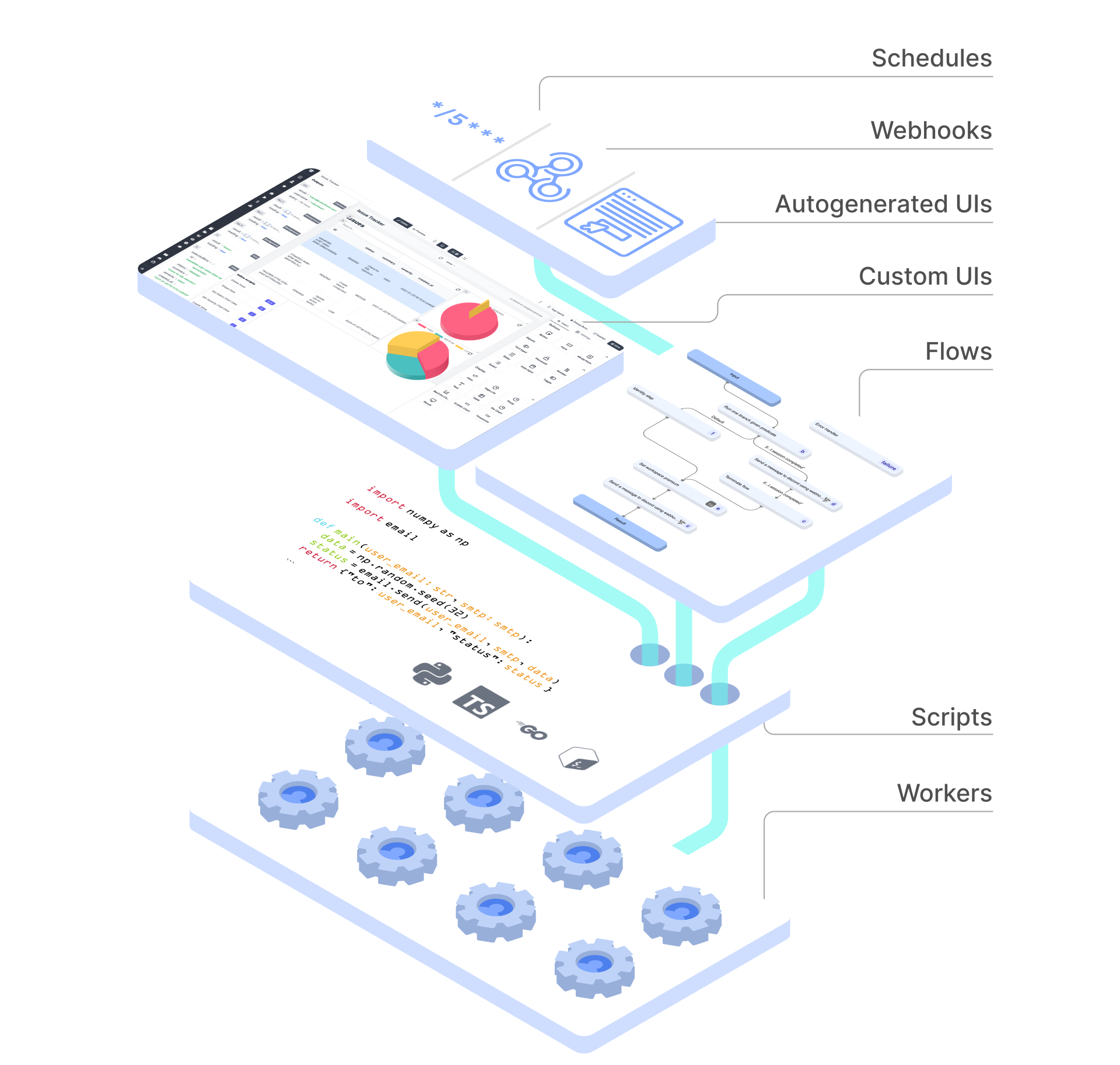
Scripts are turned into sharable UIs, APIs and cron jobs automatically, and can be composed together into flows, data pipelines, AI agents or full-code React and Svelte apps. Supported languages: Python, TypeScript, Go, Bash, SQL, GraphQL, PowerShell, Rust, and more.



Try it - Website - Docs - Discord - Hub - Contributing
Windmill is fully open-sourced (AGPLv3) and Windmill Labs offers dedicated instances and commercial support and licenses.
https://github.com/user-attachments/assets/d80de1d9-64de-4d89-aacd-6df23fa81fc4
Business teams and engineers build on the same Windmill instance. What the AI builds is an ordinary script, flow or app, and goes through the same review as code written by engineers:
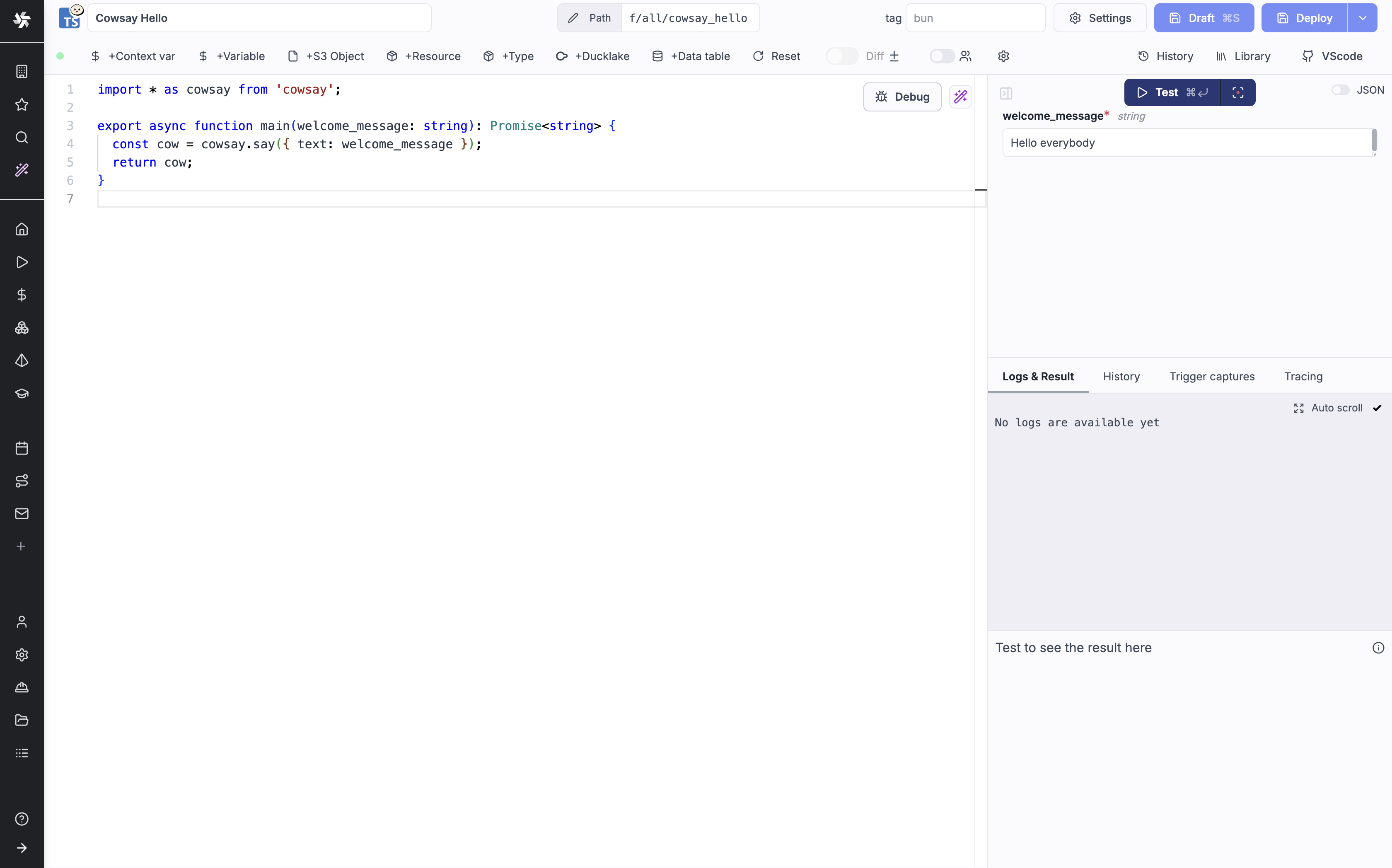
1. Define a minimal and generic script in Python, TypeScript, Go or Bash that solves a specific task. The code can be defined in the provided Web IDE or synchronized with your own GitHub repo (e.g. through VS Code extension): provided Web IDE or synchronized with your own GitHub repo (e.g. through VS Code extension):
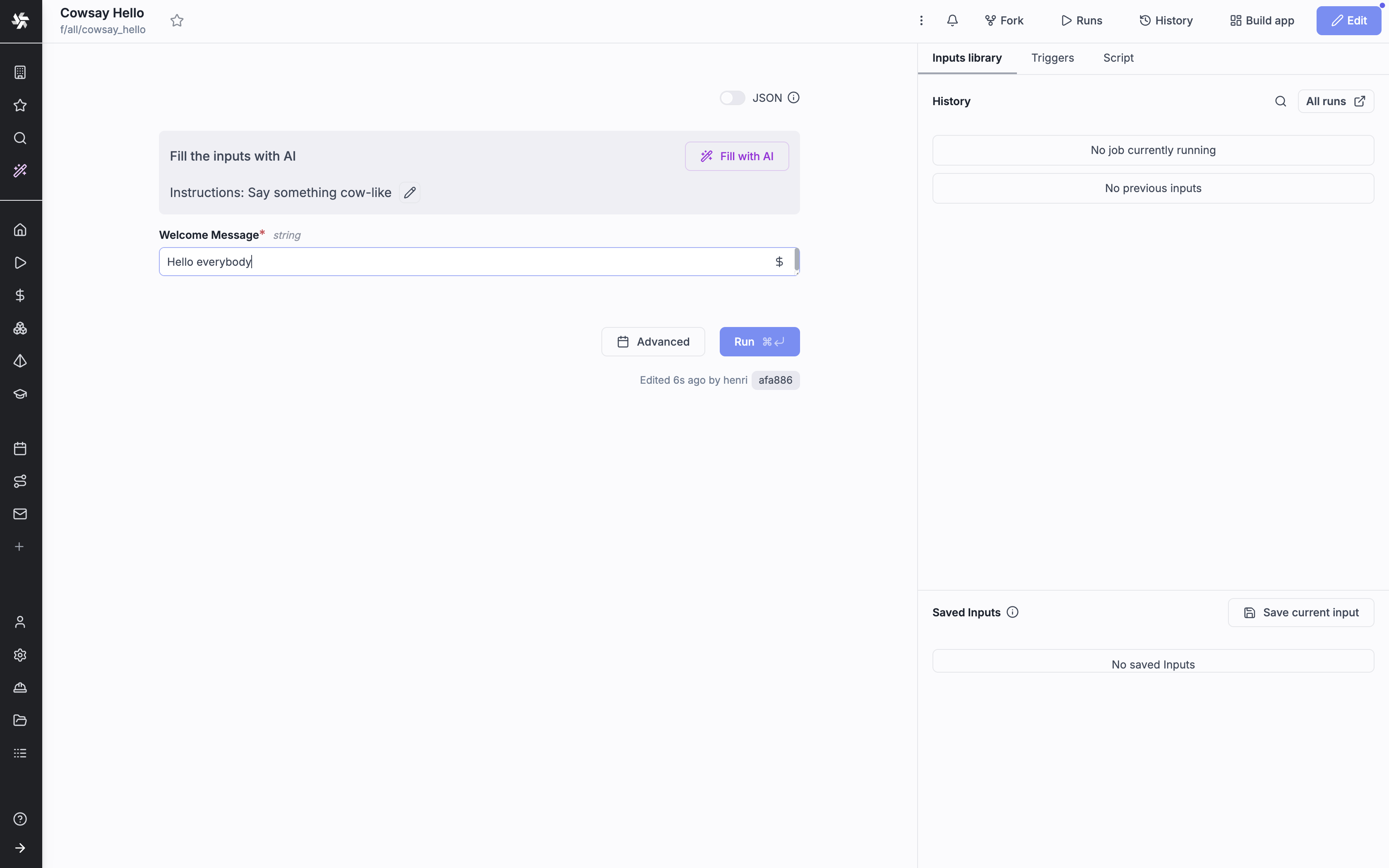
2. Your scripts parameters are automatically parsed and generate a frontend.
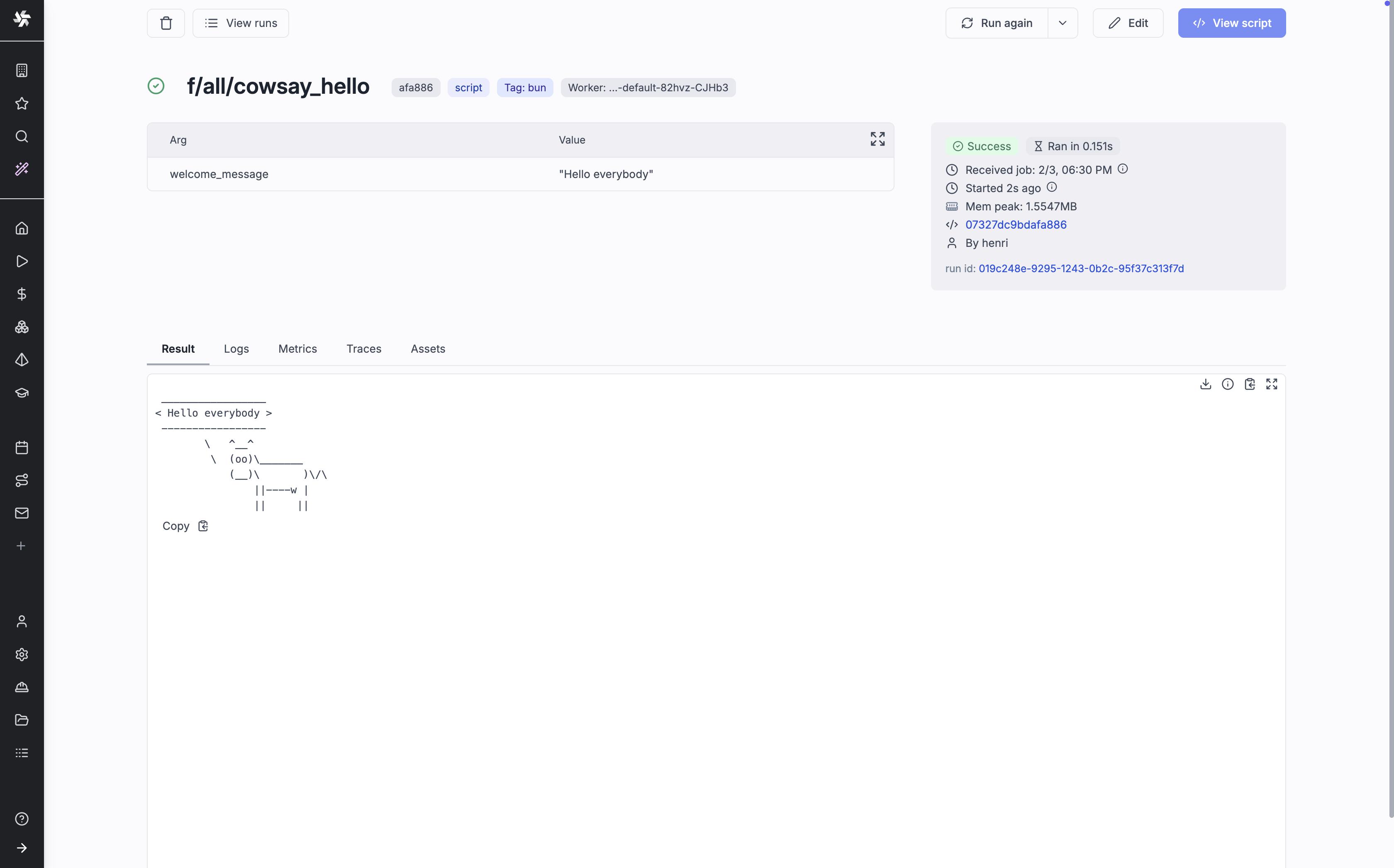
3. Make it flow! You can chain your scripts or scripts made by the community shared on WindmillHub.
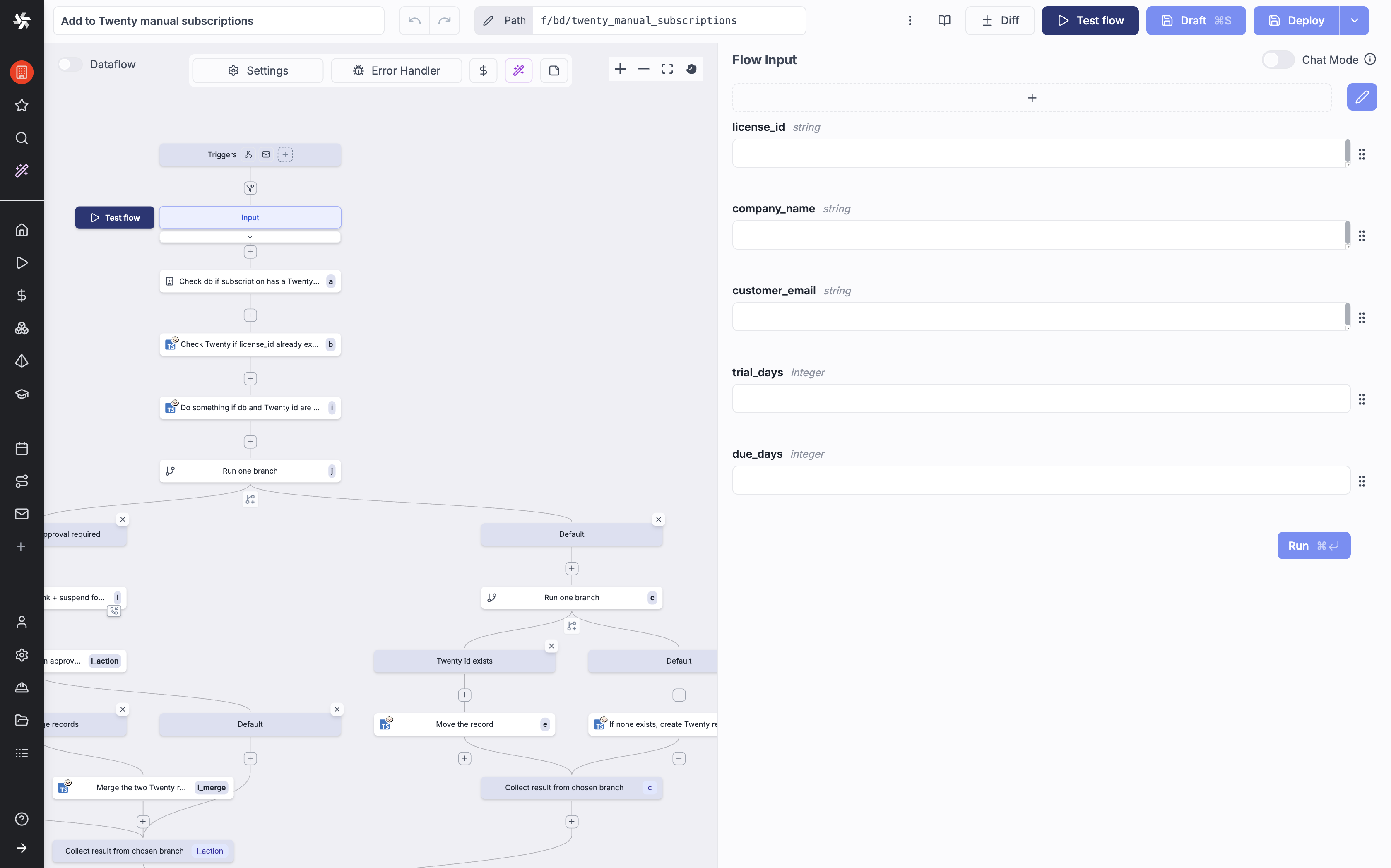
4. Build complex UIs on top of your scripts and flows.
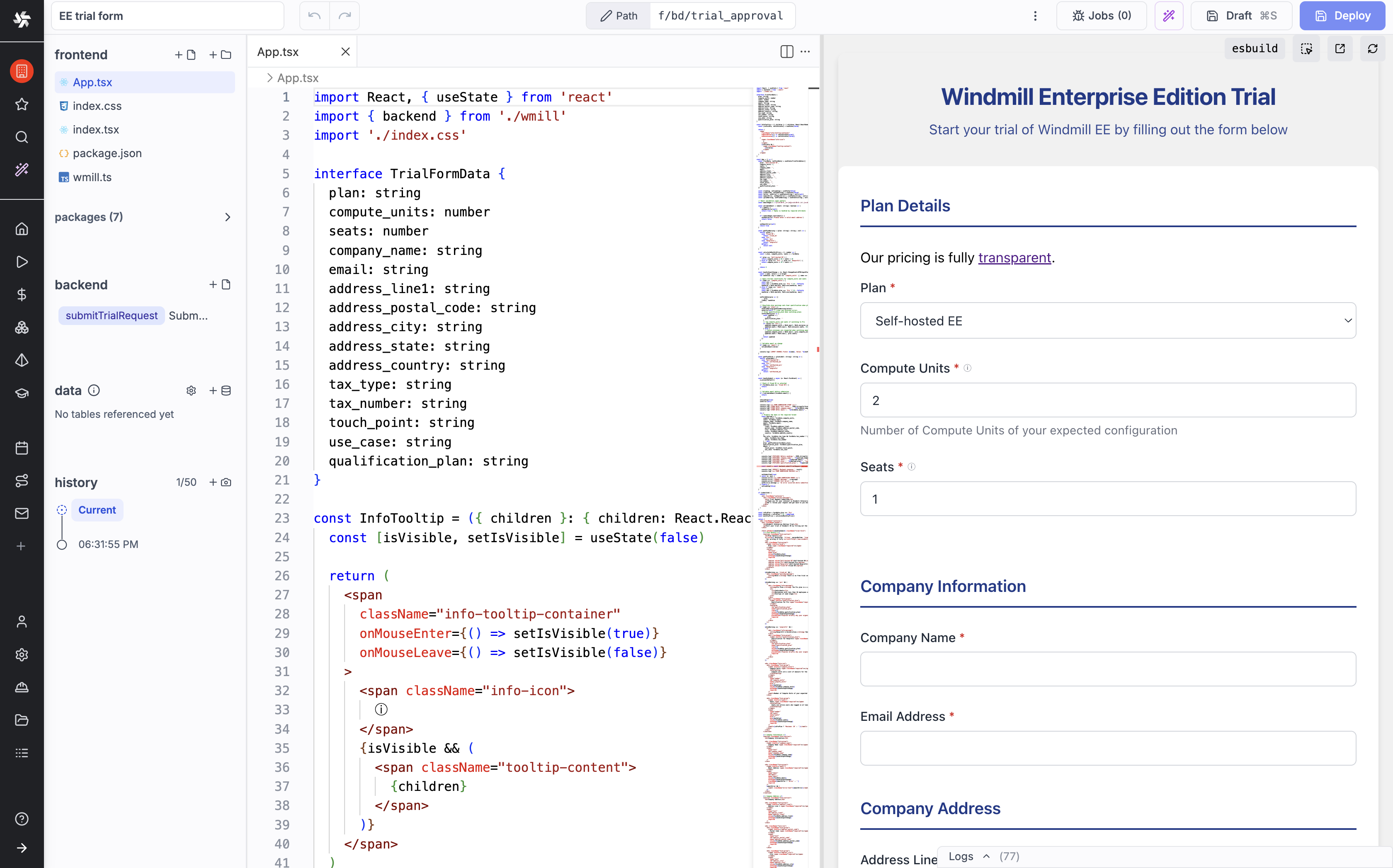
Scripts and flows can be triggered by schedules, webhooks, HTTP routes, Kafka, WebSockets, emails, and more.
Build your entire infra on top of Windmill!
A script is a plain function. Its typed arguments become a generated form, an HTTP endpoint and a CLI command:
import * as wmill from "windmill-client";
import dayjs from "dayjs"; // any npm package, resolved and pinned automatically
export async function main(
  customerId: string,
  plan: "starter" | "pro", // a union of strings becomes a dropdown
  trialDays = 14 // defaults infer the type
) {
  const trialEnd = dayjs().add(trialDays, "day").toISOString();
// a data table: the workspace's Postgres, queried without a connection string
  const sql = wmill.datatable();
  await sqlINSERT INTO trials (customer_id, plan, trial_end) VALUES (${customerId}, ${plan}, ${trialEnd}).fetch();
// secrets are permissioned by path
  const slackToken = await wmill.getVariable("f/sales/slack_token");
  await fetch("https://slack.com/api/chat.postMessage", {
    method: "POST",
    headers: { Authorization: Bearer ${slackToken}, "Content-Type": "application/json" },
    body: JSON.stringify({ channel: "#sales", text: New ${plan} trial: ${customerId} }),
  });
console.log(Trial started for ${customerId}); // logs stream live in the UI
  return { customerId, plan, trialEnd }; // returned as JSON
}
Workflows are code too. Each task runs as its own job with its own logs, and waiting for an approval releases the worker:
import { task, waitForApproval, workflow } from "windmill-client";
async function plan(env: string) {
  return { env, changes: 3 };
}
async function apply(plan: { env: string; changes: number }) {
  return applied ${plan.changes} changes to ${plan.env};
}
export const main = workflow(async (env: string) => {
  const changes = await task(plan)(env);
  const approval = await waitForApproval({ timeout: 3600 });
  if (!approval.approved) {
    return rejected by ${approval.approver};
  }
  return await task(apply)(changes);
});
Flows can also be built in the visual flow editor or as YAML, with scripts like the first one as steps. See workflows as code.
events is materialized, and materializes its own table:-- pipeline
-- on ducklake://main/events
-- materialize ducklake://main/events_by_kind
ATTACH 'ducklake://main' AS dl;
SELECT kind, count(*) AS n
FROM dl.events
GROUP BY kind;
Existing dbt projects run unmodified as scripts. See the pipelines quickstart.
Engineers work from their editor and coding agent, business teams build with AI in the browser, and both land in the same workspace:
| Tool | Description |
|------|-------------|
| CLI | Sync a workspace with local files and Git, run scripts and flows from the command line. wmill init generates AGENTS.md and skill files for Claude Code, Cursor and other AI tools |
| VS Code extension | Edit and test scripts and flows from VS Code or Cursor with full IDE support |
| Git sync | Two-way sync between a workspace and your Git repository |
| MCP server | Let coding agents and AI clients run scripts, manage resources and monitor jobs in a workspace |
| AI sessions | The same agent loop in the browser, with nothing to install: plan mode, skills and MCP servers, a live preview, and a diff to review before deploying, in a fork of the workspace |
https://github.com/user-attachments/assets/c541c326-e9ae-4602-a09a-1989aaded1e9
You can run scripts locally by passing the right environment variables for the wmill client library to fetch resources and variables from your instance. See local development docs.
windmill-full imageswindmill-full imagesWe have compared Windmill to other self-hostable workflow engines (Airflow, Prefect & Temporal) and Windmill is the most performant solution for both benchmarks: one flow composed of 40 lightweight tasks & one flow composed of 10 long-running tasks.
All methodology & results on our Benchmarks page.
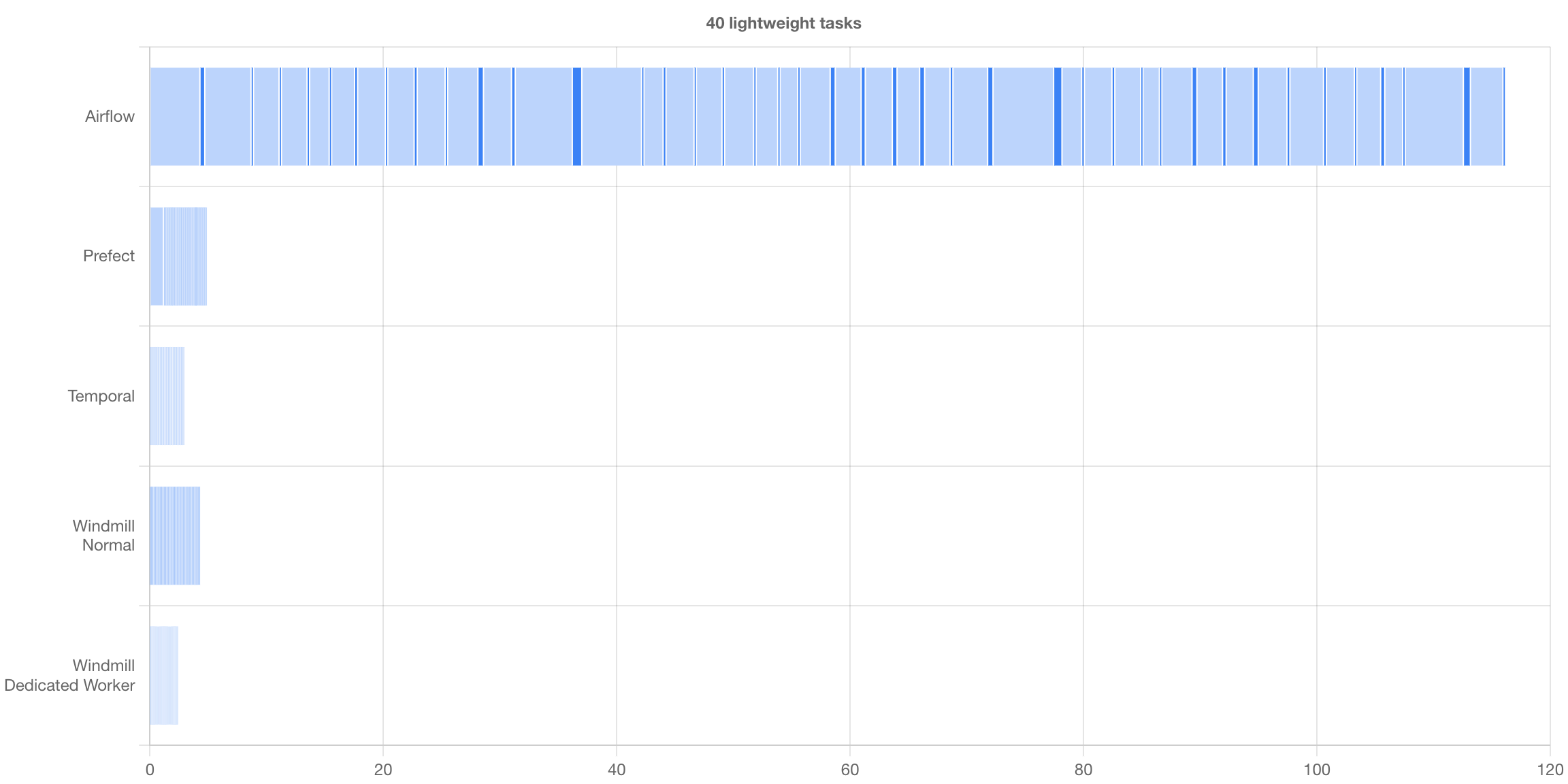
Once a job started, there is no overhead compared to running the same script on the node with its corresponding runner (Deno/Go/Python/Bash). The added latency from a job being pulled from the queue, started, and then having its result sent back to the database is ~50ms. A typical lightweight deno job will take around 100ms total.
Stateless API servers and workers share a PostgreSQL database that holds the job queue and all workspace state (remote agent workers go through the API servers instead). Workers pull jobs by tag, so each worker group can run in its own network, for example dev workers that only reach dev systems and prod workers that only run reviewed code.
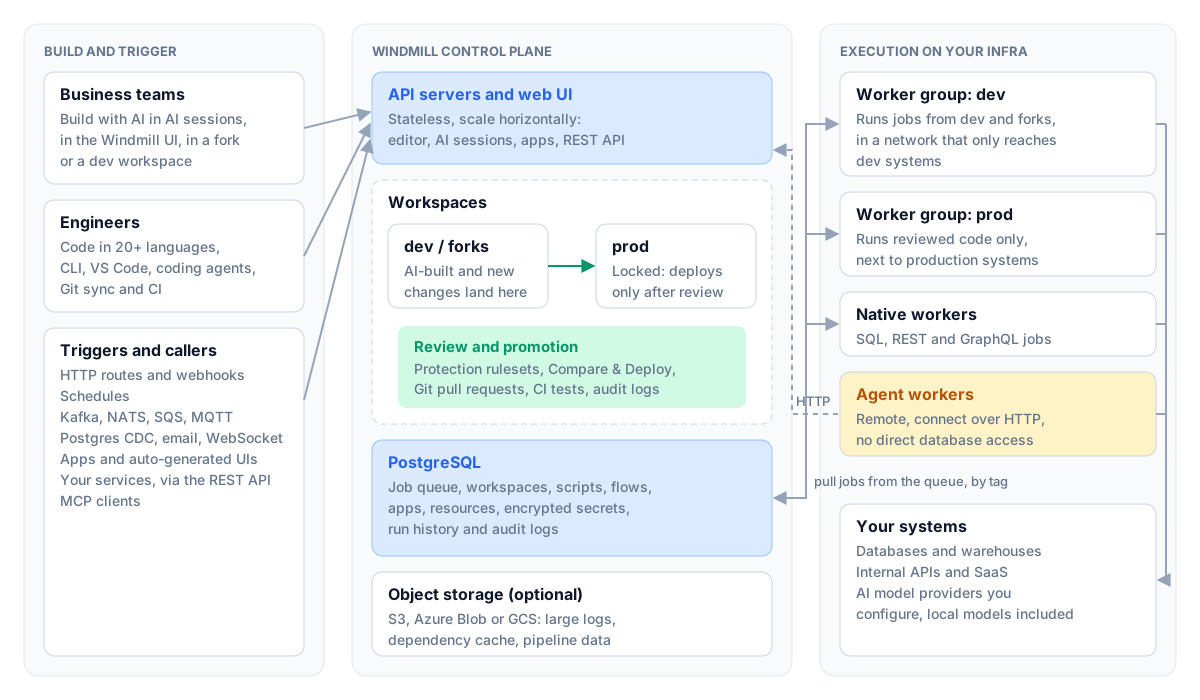
For detailed setup options, see Self-Host documentation.
Deploy Windmill with 3 files (docker-compose.yml, Caddyfile, .env):
curl https://raw.githubusercontent.com/windmill-labs/windmill/main/docker-compose.yml -o docker-compose.yml
curl https://raw.githubusercontent.com/windmill-labs/windmill/main/Caddyfile -o Caddyfile
curl https://raw.githubusercontent.com/windmill-labs/windmill/main/.env -o .env
docker compose up -d
Go to http://localhost - default credentials: admin@windmill.dev / changeme
Using an external database: Set DATABASE_URL in .env to point to your managed Postgres (AWS RDS, GCP Cloud SQL, Azure, Neon, etc.) and set db replicas to 0.
helm repo add windmill https://windmill-labs.github.io/windmill-helm-charts/
helm install windmill-chart windmill/windmill --namespace=windmill --create-namespace
See windmill-helm-charts for configuration options.
Windmill works on AWS (EKS/ECS), GCP, Azure, Ubicloud, Fly.io, Render.com, Hetzner, Digital Ocean, and others. Rule of thumb: 1 worker per 1vCPU and 1-2 GB RAM.
Configure OAuth and SSO (Google Workspace, Microsoft/Azure, Okta) directly from the superadmin UI. See documentation.
enterprise feature flag is open source under AGPLv3: the same uses are then allowed under the AGPLv3 terms, or with a commercial license. The API clients and the OpenAPI spec are Apache 2.0.In Windmill, integrations are referred to as resources and resource types. Each Resource has a Resource Type that defines the schema that the resource needs to implement.
On self-hosted instances, you might want to import all the approved resource types from WindmillHub. A setup script will prompt you to have it being synced automatically everyday.
The variables most deployments set:
| Environment Variable name | Default | Description | Api Server/Worker/All | | ------------------------- | --------------------- | ------------------------------------------------------------------------------------------------------------ | --------------------- | | DATABASE_URL | | The Postgres database url. | All | | MODE | standalone | The mode of the binary: standalone, server, worker, agent (EE), indexer (EE image, full-text search), mcp | All | | WORKER_GROUP | default | The worker group the worker belongs to and gets its configuration pulled from | Worker | | BASE_URL | http://localhost:8000 | The base url that is exposed publicly to access your instance. Is overriden by the instance settings if any. | Server | | LICENSE_KEY (EE only) | None | License key checked at startup for the Enterprise Edition of Windmill | Worker |
All other variables (database pool, queue, runtimes, private registries, certificates, zombie jobs and more) are documented in the environment variables reference.
At this time, we are not seeking outside contribution. Bug reports and feature requests remain very welcome, and small, trivially-verified PRs that fix a problem are still accepted. See CONTRIBUTING.md for the full policy.
To run Windmill from source, see frontend/README_DEV.md.
© 2023-2026 Windmill Labs, Inc.
→ →
 →
 →
 →
 →
 →
 →