1
 →
→
A practical Claude Code guide with clear mental models and copy-paste examples — setup, prompt engineering, slash commands, skills, hooks, subagents, agent teams, and MCP servers.
wesammustafa/Claude-Code-Everything-You-Need-to-Know is an open-source project on GitHub, mainly written in Python. A practical Claude Code guide with clear mental models and copy-paste examples — setup, prompt engineering, slash commands, skills, hooks, subagents It currently holds 3,027 stars and 344 forks with 0 open issues, and was last pushed on an unknown date (repository created unknown).
AI Homed tracks it on the AI Prompt Engineering board.

From first prompt to agent teams — one guide.

A practical guide to Claude Code — from your first prompt to multi-agent automation, hooks, MCP, and team workflows. Built around clear mental models and real examples, not marketing.
npm install -g @anthropic-ai/claude-code
Who this is for: Developers using (or about to use) Claude Code. Beginners get a guided path; power users get depth on Skills, Hooks, MCP, and Agent Teams.
---
| You are… | Start here | Time | |---|---|---| | 🚀 New to Claude Code | Setup → Prompt Engineering → Your First Skill | ~15 min | | ⚡ Already using it, want depth | Skills · Hooks · MCP | ~30 min each | | 🧠 Building teams or automation | Dynamic Workflows · Agent Teams · BMAD | varies |
---
The five extension points in Claude Code, side by side:
| Tool | Use when… | Skip if… | Lives in |
|---|---|---|---|
| Skills (slash commands) | You repeat the same prompt or workflow ≥3 times | One-off task | .claude/commands/*.md |
| Hooks | You want code to run automatically on tool use, session start, etc. | You only want manual triggers | .claude/settings.json |
| Subagents | A subtask is big enough to need its own isolated context | The task fits in your main session | .claude/agents/*.md |
| Workflows | The job needs more agents than one conversation can coordinate | A couple of subagents would do | .claude/workflows/*.js |
| MCP servers | You need Claude to use external tools (browsers, DBs, APIs) | All your data is in local files | Configured per project |
💡 These five compose. Most polished setups combine 2–3.
---
Fundamentals — What is Claude Code? · Setup · Prompt Engineering
Workflow extensions — Slash Commands · Skills · Hooks
Multi-agent & integration — Subagents · Dynamic Workflows · Agent Teams · Automation surface · MCP
Productivity & frameworks — Effort levels · Fast Mode · Super Claude · BMAD Method
Reference — Slash Command Cheatsheet · Effort levels · Workflows · Agent Teams · Skills · FAQ · Updates & Deprecations · Further Reading
Claude Code is Anthropic's official CLI for working with Claude from your terminal. You point it at a project; it reads the code, plans, edits files, runs commands, and commits — all from the prompt line.
Three things it does that a chat UI can't:
grep, follows imports, and grounds answers in real context.pytest/vitest/go test on the spot to verify the change.claude # start a session in the current repo
explain what this codebase does
fix the failing test in src/api.test.ts
open a PR with the changes
---
Three launches landed in quick succession this summer: Claude Opus 4.8 (May 28, 2026) took over as the Opus-tier flagship, Claude Fable 5 and its restricted sibling Claude Mythos 5 (June 9, 2026) opened a new Mythos-class tier above Opus, and Claude Sonnet 5 (June 30, 2026) became Claude Code's default model. 1M-token context is now standard across current Opus, Sonnet, and Fable models — no beta flag, no long-context surcharge — with 128K max output.
Choosing a model — quick guide:
| Model | Reach for it when… | |---|---| | Sonnet 5 (default) | Everyday coding — most tasks live here. Intro pricing $2/$10 per MTok through Aug 31, 2026 (then $3/$15) | | Opus 4.8 | Complex reasoning, large refactors, orchestrating agents — $5/$25, unchanged from 4.7 | | Fable 5 | Genuinely hard problems — Mythos-class capability above Opus at $10/$50 | | Haiku 4.5 | Fast, lightweight tasks — quick questions, doc updates ($1/$5, 200K context) |
Opus 4.7 / 4.6 and Sonnet 4.6 are now legacy models (still available via API and /model); Opus 4.1 retires August 5, 2026. Mythos 5 is the same underlying model as Fable 5 with fewer safeguards — invitation-only for approved organizations via Project Glasswing.
> → Full specs, capabilities, and pricing in docs/reference/models.md
---
⏱️ 5-minute setup. Get from zero to your first AI-assisted commit.
npm install -g @anthropic-ai/claude-code
Requires Node.js 18+. For other install methods (Homebrew, curl, native binary), see the official install guide.
claude
On first run, Claude Code opens a browser to sign in with your Anthropic account (Pro, Max, or API key all work). After that, you can re-authenticate any time with /login (and sign out with /logout) inside a session, or claude auth login|status|logout from your shell.
From any project directory:
cd ~/your-project
claude
Once Claude Code is running, try one of these:
explain what this codebase does — Claude reads your repo and summarizes.add a README section about installation — generates content based on your project.find and fix the failing test in src/api.test.ts — diagnoses and edits in place.CLAUDE.md/init
Creates a project-level instruction file that Claude reads on every session — your project's "house rules." More on this in Prompt Engineering Deep Dive.
This repo's .claude/ directory is a working, runnable Claude Code project — one of each extension point, not screenshots of one. Every path below is something you can copy into your own project today:
| Path | What you get | Copy it when… |
|---|---|---|
| .claude/commands/ | 7 slash skills — /pr, /review, /tdd, /test, /five, /ux, /todo | You want PR hygiene and review rigor without writing the prompts |
| .claude/skills/ | An Agent Skill — /claude-md-review audits a CLAUDE.md for vagueness, dead paths, and bloat | You want a worked example of the frontmatter contract |
| .claude/agents/ | 5 subagents, plus 10 more role prompts in specialized-agents/ | You want specialists without authoring role prompts — they double as Agent Teams teammates |
| .claude/workflows/ | A dynamic workflow — /stale-docs-audit fans agents across your docs, then refutes its own findings | You want a real script to read before writing your own |
| .claude/hooks/ | Python hooks — post_tool_use.py, notification.py, stop.py, subagent_stop.py | You want lifecycle automation (needs uv) |
| .claude/settings.json | Permissions + hook wiring | You're copying the hooks — swap the hardcoded uv path for $(which uv) |
git clone --depth 1 https://github.com/wesammustafa/Claude-Code-Everything-You-Need-to-Know /tmp/cc-guide
cp -r /tmp/cc-guide/.claude/commands/pr.md  your-project/.claude/commands/   # take what you want
⚠️ Read before you copy. Skills, hooks, agents, and workflows are executable instructions that run with your permissions — including from this repo. Copy file by file and read each one, the same way you'd review a shell script before sourcing it. Don'tcp -ra whole.claude/you haven't opened.
💡 Next: Claude Skills to build your own in 3 minutes.
---
📖 Claude Initialization
Run the/initcommand to automatically generate aCLAUDE.mdfile.
Your CLAUDE.md files become part of Claude's prompts, so they should be refined like any frequently used prompt. A common mistake is adding extensive content without iterating on its effectiveness. Take time to experiment and determine what produces the best instruction following from the model.
Versatile workflow for complex problems.
"think", "think hard", "think harder", or "ultrathink" to nudge depth in the prompt — see Effort levels for the full reasoning dial. Optionally save the plan for future reference. Plan Mode and Accept Edits Mode. You can toggle between them using the Shift + Tab keys.

💡 Pro Tip: Research & planning first significantly improves performance for complex tasks.
---
Ideal for changes verifiable with unit/integration tests.
🔹 Clear targets (tests, mocks) improve iteration efficiency.
---
🔹 Iteration significantly improves output quality (2-3 rounds usually enough).
---
→ Full guide in docs/reference/effort-levels.md
Mental model: Effort is a behavioural dial, not a token budget — it shifts thinking depth, tool-call appetite, response length, and how persistently Claude pushes through multi-step work. Higher ≠ smarter; context quality often matters more.
The API knows 5 levels (low → max, default high); Claude Code adds a sixth:
| Level | Reach for it when… |
|---|---|
| low | Fast interactive queries you're steering — file renames, simple greps |
| medium | General coding, small refactors, autonomous sessions where the plan is clear |
| high | Multi-file refactors, complex debugging — the default on current models |
| xhigh | Long autonomous agentic sessions (Fable 5, Mythos 5, Opus 4.8/4.7, Sonnet 5) |
| max | Architecture, subtle bugs, security review — genuinely hard problems only. Session-only |
| ultracode (Claude Code only) | xhigh reasoning plus automatic multi-agent workflow orchestration. Session-only |
Current defaults (July 2026): Opus 4.8 → high on all surfaces; Sonnet 5 → high on API and Claude Code. Check yours with /effort. (Historical footnote: Claude Code v2.1.117, April 2026, first standardized Pro/Max defaults to high after the March "nerfed medium" episode.)
Setting it, in order of persistence:
# This turn only — adds an in-context cue (does not change API effort)
ultrathink — design the migration strategy
This session — slider with no args, level name with arg
/effort xhigh
/effort ultracode               # xhigh + automatic multi-agent workflows
/effort auto                    # reset to model default
All sessions (low/medium/high/xhigh) — add this key to .claude/settings.json:
"effortLevel": "high"
max and ultracode are session-only by design and can't be persisted.
⚠️ Two gotchas worth knowing:
- max shows diminishing returns on routine work and is more prone to overthinking — Anthropic's own guidance. Don't default to it.
- Context quality often beats more effort. If you're reaching for max on a task that shouldn't need it, ~80% of the time the fix is upstream — sharper CLAUDE.md, atomic plan, named files. Full breakdown →
💡 Pattern: plan-with-Opus / execute-with-Sonnet. Plan in Opus 4.8 (or Fable 5) at xhigh or max; hand the atomic, zero-ambiguity plan to Sonnet 5 at lower effort to execute. Sonnet follows clear plans without drift, so the cheap execution is reliable when the plan is sharp.
---
Claude Code ships dozens of built-in slash commands (official reference) plus the ability to define your own as skills (markdown files in .claude/commands/). The two work together — built-ins for common operations, custom skills for your team's workflows.
| Command | Purpose |
|---|---|
| /init | Generate a CLAUDE.md for your project — your "house rules" Claude reads every session |
| /help | List all available commands |
| /clear | Reset conversation history when you want a clean slate |
| /usage | Track token and plan usage (merged /cost + /stats as of v2.1.118) |
| /model | Switch models — your pick persists as the default for new sessions (press s for session-only) |
→ Curated slash-command cheatsheet indocs/reference/commands.md(including/fast,/hooks,/mcp,/teleport,/workflows,/rewind, …)
Define a frequently-used prompt once as a markdown file, invoke it forever with /skill-name:
mkdir -p .claude/commands
echo "Analyze this code for performance issues and suggest optimizations:" \
  > .claude/commands/optimize.md
💡 Next level: custom slash commands and Skills are the same thing. Head to Claude Skills for the deep dive — built-in skills, the 7 custom skills in this repo, workflow recipes, and how to write your own.
---
~3 min read · Full guide in docs/skills.md →
Mental model: Skills package a workflow into a markdown file. Two equivalent formats — officially one system now:
- Slash skills —.claude/commands/.md, you invoke them with/
- Agent Skills — .claude/skills//SKILL.md with YAML frontmatter; Claude can also auto-invoke these when the description matches the task
>.claude/commands/deploy.mdand.claude/skills/deploy/SKILL.mdboth create/deploy. Skills follow the open agentskills.io standard, adopted by ~40 products beyond Claude Code (Codex, Copilot, Cursor, Gemini CLI, …).
⚠️ Security: Skills are executable instructions running with your shell permissions. Read every third-party skill before adding it — exactly like reviewing a shell script before sourcing it.
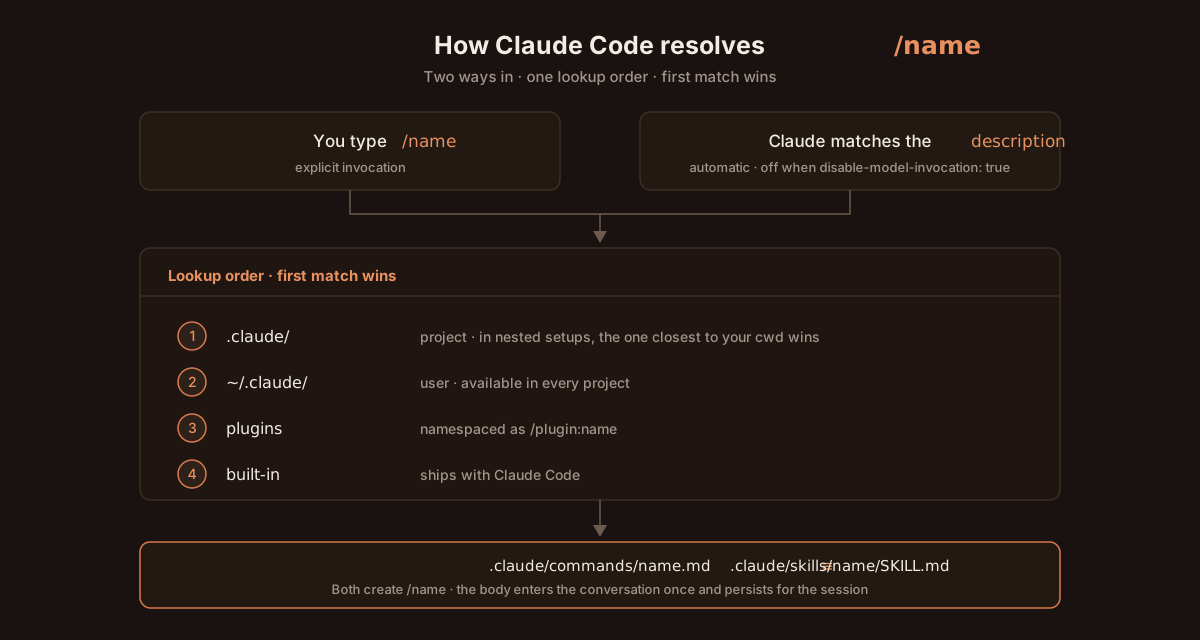
Project beats user beats built-in — which is how this repo's custom /review deliberately shadows the built-in one. Slash skills load on / autocomplete; Agent Skills preload only their metadata and read the body on demand. Full lookup table →
mkdir -p .claude/commands
cat > .claude/commands/analyze.md << 'EOF'
Code Analysis
Analyze the current code for:
- Potential bugs and edge cases
- Performance optimizations
- Code quality improvements
- Security vulnerabilities
Provide specific, actionable recommendations.
EOF
claude # then type: /analyze
That's it — a working slash skill. Promote it to an Agent Skill later by moving it to .claude/skills/analyze/SKILL.md and adding name/description frontmatter.
The full Skills guide in docs/skills.md covers:
/pr, /review, /tdd, /test, /five, /ux, /todo, plus the Agent Skill /claude-md-review/dataviz, /debug, /keybindings-help)allowed-tools grants permission rather than restricting itThe community has built an enormous catalog of Agent Skills. Three places to start browsing:
| Resource | What it offers |
|---|---|
| anthropics/skills | Anthropic's official skills — PDF, slides, brand guidelines, document creation (158k+ ⭐) |
| SkillHub · SkillsMP · Smithery · skills.sh | Searchable marketplaces — community Agent Skills indexed from GitHub at massive scale |
| travisvn/awesome-claude-skills · ComposioHQ/awesome-claude-skills | Curated lists for high-signal picks |
Notable community skills: skill-creator, skill-installer, mcp-builder, systematic-debugging, pair-programming, github-code-review, pptx, react, frontend-design, prompt-engineering-patterns, superpowers, brainstorming, market-research-reports, senior-data-engineer, and many more — see the full ecosystem section in docs/skills.md for categorized tables and install paths.
---
Mental model: Hooks are programmable checkpoints on Claude Code's lifecycle (before/after a tool call, session start, prompt submit, etc.). Your script inspects the proposed action and returns allow / deny / modify.
Three cases that win most teams over:
| Use case | What the hook does |
|---|---|
| Auto-format on save | Runs prettier / ruff / gofmt after every Edit so Claude's output matches your style |
| Block sensitive paths | Refuses changes to .env, secrets/, infra/prod/ regardless of what Claude tries |
| Action audit log | Records every tool call to a file — paper trail of what Claude did and when |
If none of those resonate, skip ahead.
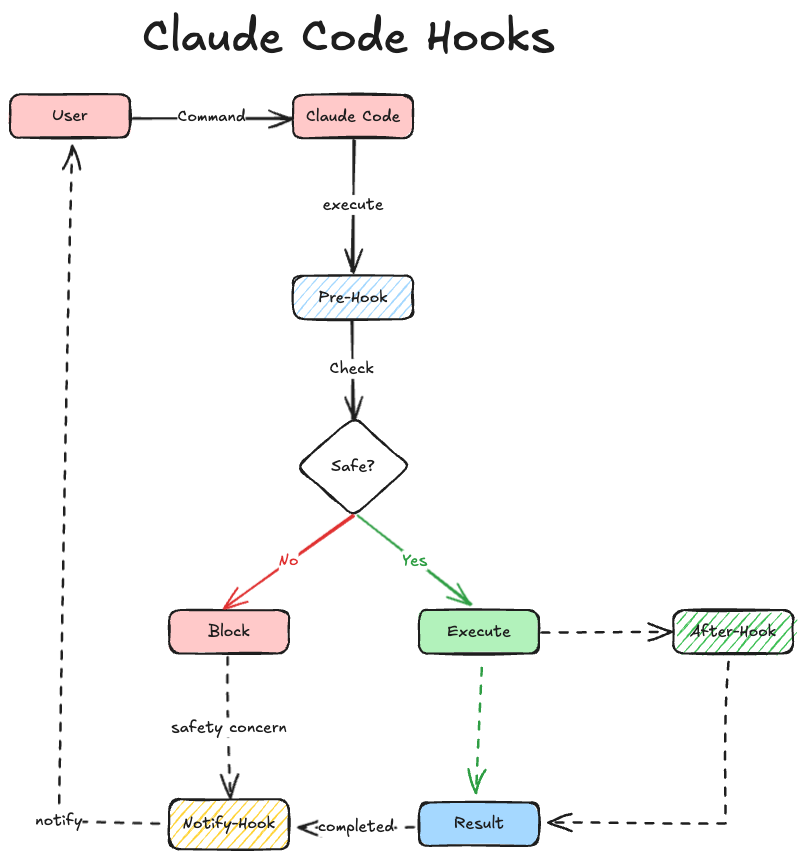
Hooks live in settings files at four scopes (later overrides earlier):
| Scope | Path |
|---|---|
| User-wide | ~/.claude/settings.json |
| Project (committed) | .claude/settings.json |
| Project (local, gitignored) | .claude/settings.local.json |
| Enterprise managed policy | platform-specific |
Quickest setup — use the interactive menu:
/hooks # browse, enable, configure hooks without touching JSON
Manual setup — for the hook scripts in this repo:
1. Copy .claude/hooks/ into your project's .claude/ folder.
2. Delete the hook scripts you don't need; keep the rest.
3. Install uv (required to run the Python hook scripts).
4. Copy .claude/settings.json into your project's .claude/ folder.
5. In settings.json, replace any hardcoded uv path with the output of $(which uv).
project-root/
└── .claude/
    ├── hooks/
    │   ├── notification.py
    │   ├── post_tool_use.py
    │   └── ...
    └── settings.json
Hooks run in response to various events within Claude Code's lifecycle: examples
PreToolUse: Runs after Claude creates tool parameters but before processing the tool call.PostToolUse: Runs immediately after a tool completes successfully.Notification: Runs when Claude Code sends notifications, such as when permission is needed to use a tool or when prompt input has been idle.UserPromptSubmit: Runs when the user submits a prompt, before Claude processes it.Stop: Runs when the main Claude Code agent has finished responding (does not run if stopped by user interrupt).SubagentStop: Runs when a Claude Code subagent (Task tool call) has finished responding.SessionEnd: Runs when a Claude Code session ends.PreCompact: Runs before Claude Code is about to run a compact operation.SessionStart: Runs when Claude Code starts a new session or resumes an existing session.TeammateIdle: Runs when an agent teammate becomes idle (Agent Teams) — exit code 2 sends the teammate back to work.→ →
→ →
→ →
→ →
→ →
→ →
→ →
→