WecoAI/weco-cli is an open-source project on GitHub, mainly written in Python. Production-Grade Autoresearch. Ideal for agent harness engineering, prompt engineering, ML model development, GPU kernels, and other optimizable code. It currently holds 105 stars and 15 forks with 0 open issues, and was last pushed on an unknown date (repository created unknown).
Project Overview
AI Homed tracks it on the AI Prompt Engineering board.
Weco systematically optimizes your code, guided directly by your evaluation metrics.
Example applications include:
Agent & Harness Engineering: Improve the harness around your LLM agents, from prompts and tools to agentic scaffolding, optimizing for accuracy, win_rate, or cost.
Prompt Engineering: Refine prompts for LLMs (e.g., for math problems) or compress them while holding accuracy, optimizing for win_rate, relevance, or format_adherence.
Model Development: Tune feature transformations, architectures or the whole training pipeline, optimizing for validation_accuracy, AUC, or Sharpe Ratio.
General Performance Optimization: Speed up any code with a measurable objective, including GPU kernels in CUDA or Triton, optimizing for latency, throughput, or memory_bandwidth.
---
Overview
The weco CLI leverages a tree search approach guided by LLMs to iteratively explore and refine your code. It automatically applies changes, runs your evaluation script, parses the results, and proposes further improvements based on the specified goal.
Skills (Claude Code & Cursor)
Weco ships as a skill for AI coding assistants. A skill is a set of instructions that teaches your assistant how to use Weco end-to-end — from setting up optimizations to interpreting results. Once installed, just describe what you want to optimize in plain language and your assistant handles the rest.
weco setup claude-code   # installs skill into Claude Code
weco setup cursor        # installs skill into Cursor
Then prompt naturally:
Use Weco to make this function faster.
Your assistant will inspect your code, write the evaluation, configure weco run, monitor the iterations, and explain the results — no CLI flags needed.
Running your own optimization loop with an LLM agent, a custom script, or a manual workflow? weco observe lets you track those experiments in the Weco dashboard with tree visualization, code diffs, and metric tracking — without handing off control of the optimization itself.
# Initialize a run
WECO_RUN_ID=$(weco observe init --name "my-experiment" --metric val_bpb --goal min --source train.py)
Failures print to stderr. weco observe init exits non-zero on any failure, so a captured WECO_RUN_ID is always valid. weco observe log exits non-zero only for errors you must fix (bad flags, unreadable files, not logged in, a rejected request); Weco-side blips are retried, then reported without failing the command, so they never crash an agent loop (pass --strict to make them fatal). There is also a Python SDK for scripts with a Python loop.
See the full Observe guide for branching, lifecycle, and more.
git clone https://github.com/wecoai/weco-cli.git
cd weco-cli
pip install -e .
Getting Started
Quickstart with an example project
Configure optimization parameters yourself - If you need precise control over the optimization parameters, you can use the direct weco run command:
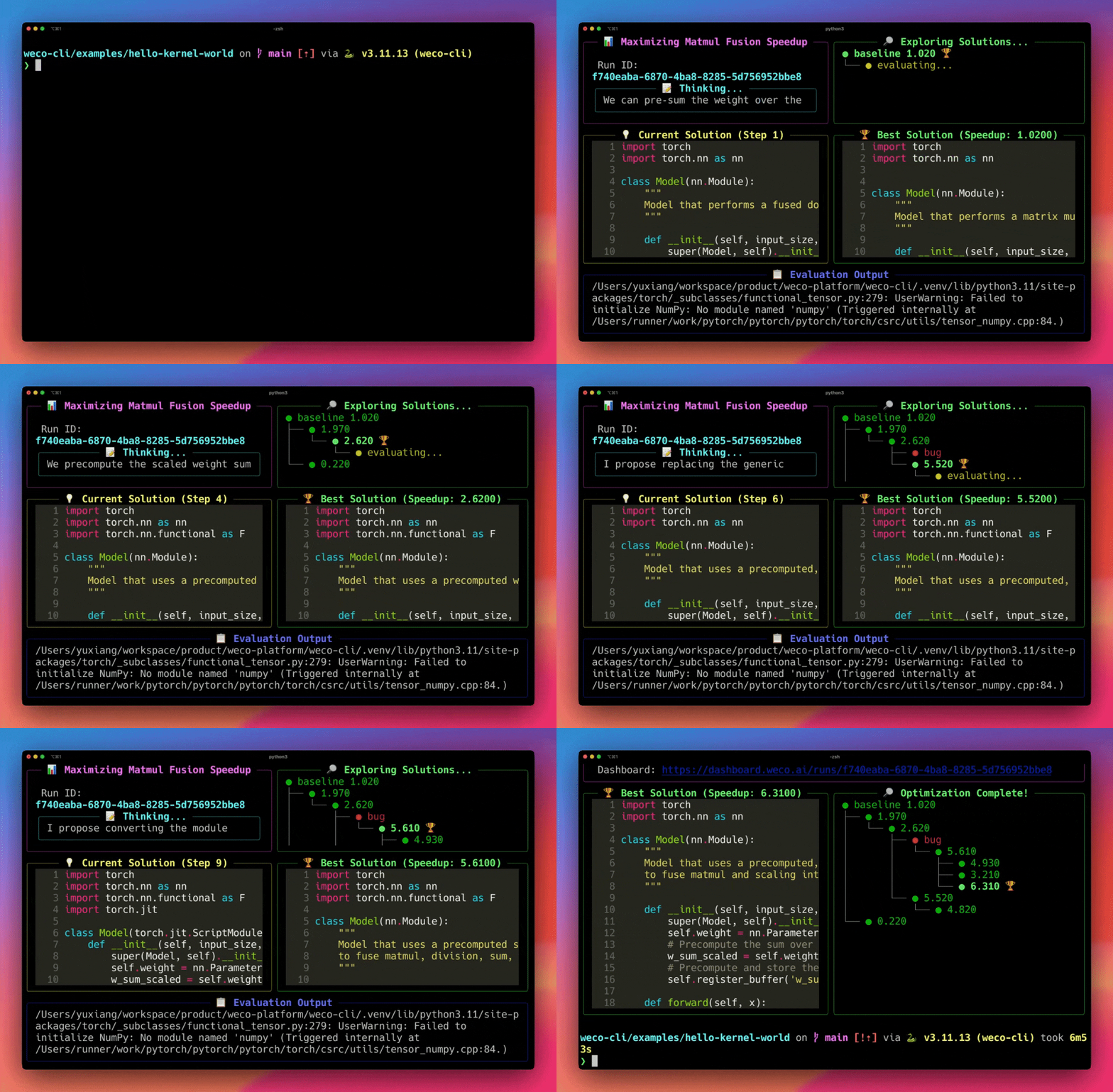
Example: Optimizing Simple PyTorch Operations
git clone https://github.com/WecoAI/weco-cli.git
cd weco-cli/examples/hello-world/
pip install -r requirements.txt
Run Weco with configuration
weco run --source module.py \
     --eval-command "python evaluate.py --path module.py" \
     --metric speedup \
     --goal maximize \
     --steps 10 \
     --additional-instructions "Fuse operations in the forward method while ensuring the max float deviation remains small. Maintain the same format of the code."
Note: If you have an NVIDIA GPU, change the device in the --eval-command to cuda. If you are running this on Apple Silicon, set it to mps.
Multi-file optimization: If your code spans multiple files, use --sources to optimize them together:
Note: When recommend removing any backticks from your code if any are present. We currently don't support backticks but will support this in the future.
---
Arguments for weco run
Required:
| Argument | Description | Example |
| :------------------ | :------------------------------------------------------------------------------------------------------------------------------------------------------------------------------------------- | :-------------------- |
| -s, --source | Path to a single source code file to be optimized. Mutually exclusive with --sources. | -s model.py |
| --sources | Paths to multiple source code files to be optimized together. Mutually exclusive with -s, --source. | --sources model.py utils.py config.py |
| -c, --eval-command| Command to run for evaluating the code in --source. This command should print the target --metric and its value to the terminal (stdout/stderr). See note below. | -c "python eval.py" |
| -m, --metric | The name of the metric you want to optimize (e.g., 'accuracy', 'speedup', 'loss'). This metric name does not need to match what's printed by your --eval-command exactly (e.g., its okay to use "speedup" instead of "Speedup:"). | -m speedup |
| -g, --goal | maximize/max to maximize the --metric or minimize/min to minimize it. | -g maximize |
Optional:
| Argument | Description | Default | Example |
| :----------------------------- | :------------------------------------------------------------------------------------------------------------------------------------------------------------------------------------------------------------------------- | :------------------------------------------------------------------------------------------------------------------------------------------------------ | :------------------ |
| -n, --steps | Number of optimization steps (LLM iterations) to run. | 100 | -n 50 |
| -M, --model | Model identifier for the LLM to use (e.g., gpt-5.2, claude-opus-4-5, gemini-3.1-pro-preview). | gemini-3-flash-preview (with --api-key: your key's provider default) | -M gpt-5.2 |
| -i, --additional-instructions| Natural language description of specific instructions or path to a file containing detailed instructions to guide the LLM. Supported file formats include - .txt, .md, and .rst. | None | -i instructions.md or -i "Optimize the model for faster inference"|
| -l, --log-dir | Path to the directory to log intermediate steps and final optimization result. | .runs/ | -l ./logs/ |
| --eval-timeout | Timeout in seconds for each step in evaluation. | No timeout (unlimited) | --eval-timeout 3600 |
| --save-logs | Save execution output from each optimization step to disk. Creates timestamped directories with raw output files and a JSONL index for tracking execution history. | False | --save-logs |
| --apply-change | Automatically apply the best solution to the source file without prompting. | False | --apply-change |
| --api-key | API keys for LLM providers (BYOK). Format: provider=key. Can specify multiple providers. | None | --api-key openai=sk-xxx |
---
Command Reference
Basic Usage Patterns
| Command | Description | When to Use |
|---------|-------------|-------------|
| weco run [options] | Start a new optimization | When you know what to optimize and how |
| weco resume | Resume an interrupted run | Continue from the last completed step |
| weco login | Authenticate with Weco | First-time setup or switching accounts |
| weco logout | Clear authentication credentials | Switch accounts or troubleshoot auth |
| weco credits balance | Check your current credit balance | Monitor usage |
| weco credits topup [amount] | Purchase additional credits | When you need more credits (default: 10) |
| weco credits autotopup | Configure automatic top-up | Set up automatic credit replenishment |
Run Subcommands
Inspect and manage optimization runs. All output is JSON, designed for programmatic access (AI coding agents, scripts).
| Command | Description |
|---------|-------------|
| weco run status | Run progress, pending nodes, review mode flag |
| weco run results | Results sorted by metric |
| weco run show --step | Single node detail with code |
| weco run diff --step | Unified code diff between steps |
| weco run stop | Graceful termination (tree preserved) |
| weco run instruct "" | Update instructions mid-run |
| weco run review | List pending approval nodes (review mode) |
| weco run revise --node --source | Replace a node's code |
| weco run submit --node | Evaluate and submit a node |
# Check progress
weco run status 0002e071-1b67-411f-a514-36947f0c4b31
Top 5 results as JSON
weco run results 0002e071-1b67-411f-a514-36947f0c4b31 --top 5
Diff best solution against baseline
weco run diff 0002e071-1b67-411f-a514-36947f0c4b31 --step best
Review mode: inspect, optionally edit, and submit
weco run review 0002e071-1b67-411f-a514-36947f0c4b31
weco run submit 0002e071-1b67-411f-a514-36947f0c4b31 --node
Submit with your own code (explicit path mapping)
weco run submit  --node  --source module.py=./my_version.py
Source path mapping: When using --source with revise or submit, you can map local files to the run's source paths using target_path=local_path syntax (e.g., --source module.py=./optimized.py). Without an explicit mapping, files are matched positionally to the run's original source paths.
Observe Commands
Track experiments from your own optimization loop (LLM agents, custom scripts, manual experiments) in the Weco dashboard:
| Command | Description |
|---------|-------------|
| weco observe init | Create a run and print the run ID |
| weco observe log | Log a step with metrics and code |
# Initialize a run
WECO_RUN_ID=$(weco observe init --name "my-experiment" --metric val_bpb --goal min --source train.py)
Log baseline (step 0) and experiments (step 1, 2, ...)
Failures print to stderr; init exits non-zero on any failure, while log exits non-zero only for caller errors and shrugs off Weco-side blips (retried, reported, exit 0) so it never crashes an agent's loop — pass --strict to change that. For branching, pass --parent-step explicitly. See weco observe init --help and weco observe log --help for all options.
Setup Commands (Experimental)
| Command | Description |
|---------|-------------|
| weco setup claude-code | Set up Weco skill for Claude Code |
| weco setup cursor | Set up Weco skill for Cursor |
| weco setup codex | Set up Weco skill for Codex |
| weco setup openclaw | Set up Weco skill for OpenClaw |
| weco setup all | Set up Weco for all supported AI tools |
The setup command installs Weco skills for AI coding assistants:
weco setup              # Interactive picker, defaults to "All of the above"
weco setup claude-code  # For Claude Code
weco setup cursor       # For Cursor
weco setup codex        # For Codex
weco setup openclaw     # For OpenClaw
weco setup all          # For all supported tools
Claude Code: Downloads the Weco skill to ~/.claude/skills/weco/ and writes CLAUDE.md inside the installed skill
Cursor: Downloads the Weco skill to ~/.cursor/skills/weco/
Codex: Downloads the Weco skill to $CODEX_HOME/skills/weco/ (defaults to ~/.codex/skills/weco/)
OpenClaw: Downloads the Weco skill to ~/.openclaw/skills/weco/
Model Selection
You can specify which LLM model to use with the -M or --model flag:
weco run --model gpt-5 --source optimize.py [other options...]
kimi-k2.7-code (thinking-only coding model with a 256K context window)
All models are available through Weco. If no model is specified, Weco automatically selects the best model for your optimization task.
---
Resuming Interrupted Runs
If your optimization run is interrupted (network issues, restart, etc.), resume from the most recent node:
# Resume an interrupted run
weco resume 0002e071-1b67-411f-a514-36947f0c4b31
Arguments for weco resume:
| Argument | Description | Example |
|----------|-------------|---------|
| run-id | The UUID of the run to resume (shown at the start of each run) | 0002e071-1b67-411f-a514-36947f0c4b31 |
| --apply-change | Automatically apply the best solution to the source file without prompting | --apply-change |
| --api-key | (Optional) API keys for LLM providers (BYOK). Format: provider=key | --api-key openai=sk-xxx |
Notes:
Works only for interrupted runs (status: error, terminated, etc.).
You’ll be prompted to confirm that your evaluation environment (source file + evaluation command) hasn’t changed.
The source file is restored to the most recent solution before continuing.
All progress and metrics from the original run are preserved.
Log directory, save-logs behavior, and evaluation timeout are reused from the original run.
Performance & Expectations
Weco, powered by the AIDE algorithm, optimizes code iteratively based on your evaluation results. Achieving significant improvements, especially on complex research-level tasks, often requires substantial exploration time.
The following plot from the independent Research Engineering Benchmark (RE-Bench) report shows the performance of AIDE (the algorithm behind Weco) on challenging ML research engineering tasks over different time budgets.
As shown, AIDE demonstrates strong performance gains over time, surpassing lower human expert percentiles within hours and continuing to improve. This highlights the potential of evaluation-driven optimization but also indicates that reaching high levels of performance comparable to human experts on difficult benchmarks can take considerable time (tens of hours in this specific benchmark, corresponding to many --steps in the Weco CLI). Factor this into your planning when setting the number of --steps for your optimization runs.
---
Saving Execution Logs
When using the --save-logs flag, Weco saves the execution output from each optimization step to help with debugging and analysis. The logs are organized as follows:
.runs/
└── /
    └── /
        ├── exec_output.jsonl      # Index file with metadata for each step
        ├── outputs/
        │   ├── step_0.out.txt      # Raw output from initial evaluation
        │   ├── step_1.out.txt      # Raw output from step 1
        │   ├── step_2.out.txt      # Raw output from step 2
        │   └── ...
        ├── step_0.py               # Code snapshot from initial evaluation
        ├── step_1.py               # Code snapshot from step 1
        ├── step_2.py               # Code snapshot from step 2
        └── ...
Each run is organized under the source file name (e.g., spaceship-titanic for spaceship-titanic.py) and a unique UUID. The outputs/ directory and exec_output.jsonl file are only created when the --save-logs flag is used.
The exec_output.jsonl file contains one JSON object per line with:
step: The optimization step number
timestamp: When the execution occurred
output_file: Relative path to the full output file
output_length: Total length of the output
With --parallel K, artifacts are keyed by node UUID instead of step number
(steps are allocated server-side and can complete out of order): code
snapshots land under nodes//, outputs as
outputs/node_.out.txt, and exec_output.jsonl entries carry



 →
→
 →
→ →
→ →
→ →
→ →
→ →
→ →
→