
1
 →
→w3cj/jev-chat is an open-source project on GitHub, mainly written in TypeScript. A tool calling chat bot built with Jev and no LLM. It currently holds 66 stars and 14 forks with 0 open issues, and was last pushed on 2026-09-18 (repository created 2026-09-18).
AI Homed tracks it on the Today's Trending board.
A chat-shaped command bar that calls real tools, without an LLM writing anything.
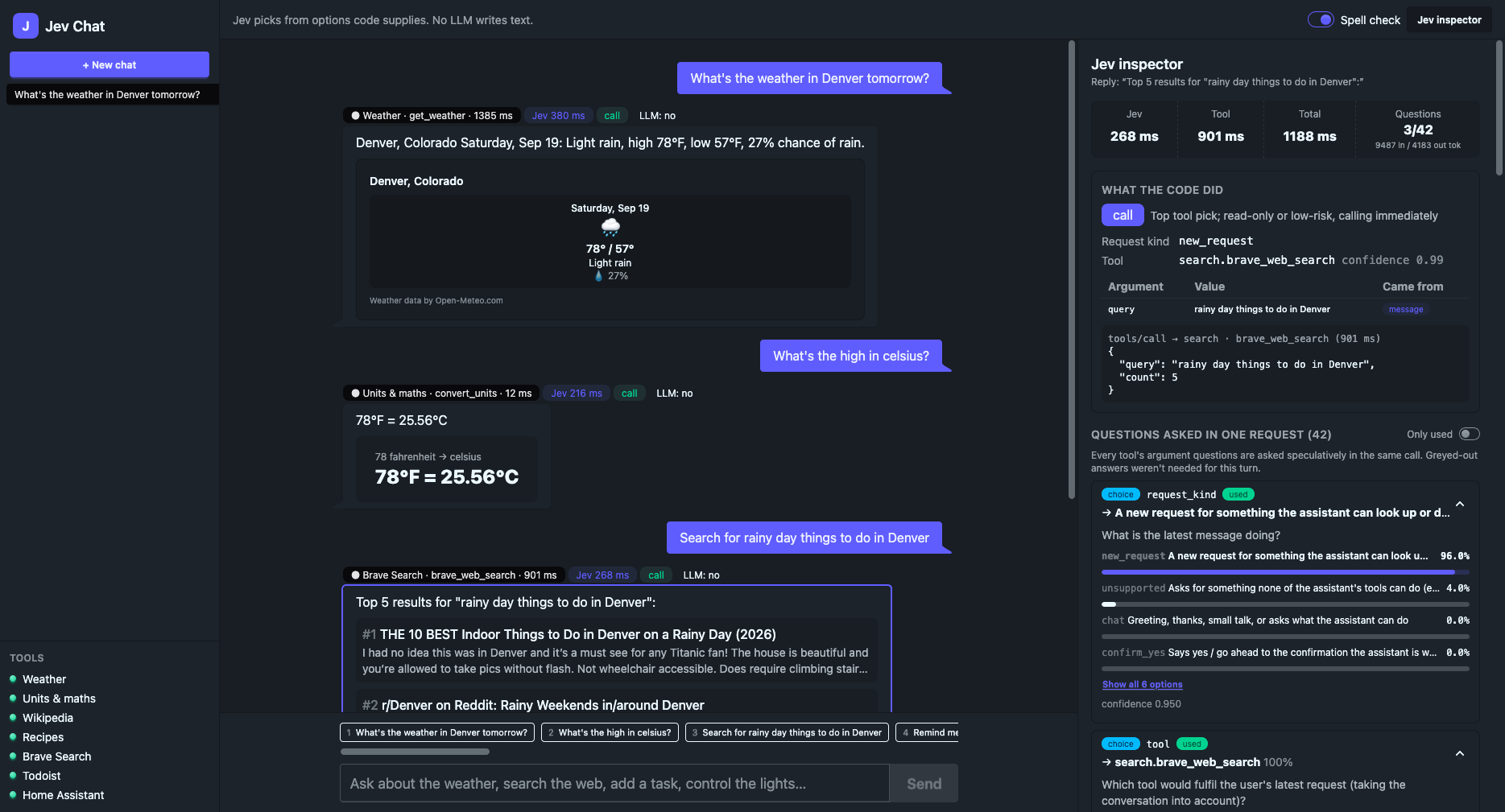
Every turn, a classifier picks: what was asked, which tool to call, which value goes in each argument, whether to confirm first, and what kind of reply to give. Code does the rest: it calls the MCP servers and builds the reply from the tools' own data. Because no model ever writes the text, the assistant cannot invent a fact: every value on screen was either typed by the user or returned by a tool.
An inspector pane shows the whole decision for any reply: the request, every question, every probability, and what the code did with the answers.
Jev is a classifier from TypeSafe. You hand it some state and a set of named questions; it answers each one by choosing among options you supply. This app uses two of its question types:
| Type | Question | Answer | | ---------- | ----------------------------------------- | -------------------------------------------------- | | Choice | "Which of these tools fits?" | one option key, with probabilities for all of them | | Noul | "Does the user say when the task is due?" | a probability that the answer is yes |
Jev does not produce text. Every text argument, such as a search query, a task title or a city, is copied from the user's message, the conversation or an earlier tool result.
You need Node 24 or later and pnpm 11 (corepack enable picks up the version pinned in
package.json). better-sqlite3 is a native module; if no prebuilt binary matches your platform,
pnpm install compiles it and needs a C++ toolchain.
pnpm install
cp .env.example .env   # fill in the keys you have
pnpm dev               # server :8787, web http://localhost:5173
Only TYPESAFE_API_KEY is required. Jev is a paid API: get a key from the
TypeSafe console. Without one the app still starts, but
every message gets an error reply. Other servers without a key show as "no key" in the sidebar and
everything else keeps working, so weather, units, Wikipedia and recipes need nothing beyond the Jev
key.
The API has no login, so it listens on 127.0.0.1 only and refuses requests addressed to, or sent
from a page on, any host other than localhost, 127.0.0.1 or [::1]. Open the app on this
machine. This is a dev setup: pnpm build only builds the web app, and nothing serves the built
files.
| Server | Needs |
| ---------------------------------------------------------- | -------------------------------------------------------- |
| Weather (packages/mcp-weather, Open-Meteo) | nothing |
| Units & maths (packages/mcp-units) | nothing |
| Wikipedia (packages/mcp-wiki) | nothing |
| Recipes (packages/mcp-recipes, TheMealDB) | nothing (public test key; MEALDB_API_KEY for your own) |
| Brave Search (@brave/brave-search-mcp-server) | BRAVE_API_KEY |
| Todoist (@doist/todoist-ai) | TODOIST_API_KEY |
| Home Assistant (its MCP Server integration, at /api/mcp) | HASS_URL, HASS_TOKEN |
| Jev itself | TYPESAFE_API_KEY |
Some things to try:
apps/server/jev-chat.db (DATABASE_PATH is relative to
apps/server). Delete the file to start over.
pnpm test          # unit tests; no network or API keys needed
pnpm typecheck
pnpm lint          # oxlint; lint:fix to apply fixes
pnpm format        # oxfmt; format:check to only check
pnpm tools:list    # what each connected MCP server exposes (add -- --schema for input schemas)
This app only works in English. See ASSISTANT_TZ and DEFAULT_UNITS in .env.example for the
locale settings you can configure.
flowchart TD
  User([User]) -->|types or clicks| Chat
subgraph App[Web app]
    Chat[Chat]
    Inspector[Inspector]
  end
Chat -->|message or button| Server[Server]
  DB[(Database)] -->|conversation state| Server
  Server -->|reply, state and trace| DB
  Server -->|asks questions| Jev{{Jev}}
  Jev -->|picks answers| Server
  Server -->|calls a tool| Tools
  Tools -->|returns data| Server
  Server -->|reply and card| Chat
  Server -->|every decision| Inspector
subgraph Tools[Tools]
    direction LR
    Weather ~~~ Units[Units and maths] ~~~ Wikipedia ~~~ Recipes
    Search[Web search] ~~~ Todoist ~~~ Home[Home Assistant]
  end
The server is Hono; the web app talks to it over Hono RPC. Conversations and every trace go into SQLite via drizzle. Each turn loads the conversation's state (what it's waiting on, the last result and the recent chat), and the reply comes back with its trace, so the inspector never waits on a second request.
flowchart TD
  Msg([Typed message]) -->|fix typos| Spell[Spell check]
  Spell -->|fill in short follow-ups| Follow[Follow-up check]
  Follow -->|one request| Jev{{Jev}}
  Jev -->|answers| Policy{Policy, in code}
Policy -->|clear request| Run[Run the tool]
  Policy -->|missing a detail| Ask[Ask the user]
  Policy -->|changes something| Confirm[Confirm card]
  Policy -->|top two tools close| Choices[Two buttons]
  Policy -->|small talk or can't do| Help[What I can do]
  Policy -->|cancel| Cancelled[Cancelled]
Ask -.->|user replies| Msg
  Confirm -.->|user types yes| Msg
  Confirm -.->|confirm button| Run
  Choices -.->|picked tool, no rewrites| Jev
  Run -->|tool data| Reply([Reply card])
  Run -->|tool or server fails| Error([Error card])
This is handleTurn in apps/server/src/turn/turn.ts, which takes both typed messages and
button clicks. Up to two small Jev requests run first (turn/preprocess/, see
Pre-processing). Then the main request, then the policy, which is plain code
reading Jev's answers in order: cancel or confirm a pending action, small talk, which tool (two
buttons when its confidence is below CONFIDENT and the runner-up is within CLOSE_MARGIN), a
missing argument, a confirmation, and finally the call.
Buttons skip the rewrites. A confirm click runs the stored arguments without asking Jev again; a tool pick re-runs the main request with that tool forced, so it can still ask or confirm.
stateDiagram-v2
  [*] --> Idle
  Idle --> Asking: a detail is missing
  Idle --> Confirming: the tool changes something
  Idle --> Choosing: two tools are close
  Asking --> Asking: still missing one
  Asking --> Confirming: answered, needs a yes
  Asking --> Idle: answered and run, or cancel
  Choosing --> Asking: picked, a detail is missing
  Choosing --> Confirming: picked, needs a yes
  Choosing --> Idle: picked and run, or cancel
  Confirming --> Idle: yes and run, or cancel
The waiting state is pending on the conversation (shared/state.ts). Jev sees it described in the
request and answers request_kind: new_request, answers_pending, confirm_yes, cancel,
chat (small talk) or unsupported. A new request drops the pending action and is handled from
scratch. The web app only enables the newest reply's buttons; on the server, a click that doesn't
match what's pending gets "That button has expired." ("Nothing to do." when nothing is pending).
Before the main request, a typed message goes through two rewrites: spell check, then follow-ups. Both do what they can in code and only ask Jev to choose when there's more than one reading. The inspector shows the original message, what changed and who decided.
flowchart TD
  Msg([Typed message]) --> Known{Known word?}
  Known -->|"yes: dictionary, name, place,
device or recent result"| Checked[Checked message]
  Known -->|no| Sure{One sure fix?}
  Sure -->|"common misspelling or
only close match"| Fix[Fixed in code]
  Sure -->|several suggestions| SpellJev{{"Jev: which fix, or keep it?"}}
  Fix --> Checked
  SpellJev --> Checked
  Checked --> Short{Short follow-up,
nothing pending?}
  Short -->|no| Main([Main request])
  Short -->|yes| Slot{"New date, number or place,
and the last question has one?"}
  Slot -->|yes| Swap[Swapped in by code]
  Slot -->|no| FollowJev{{"Jev: which rewrite, or as is?"}}
  Swap --> Main
  FollowJev --> Main
This is correctSpelling and resolveFollowUp in turn/preprocess/preprocess.ts. Neither runs
for a button click or without a Jev key, spell check can be switched off in the sidebar, and if
either Jev request fails the step is skipped and the message goes on as it was.
Spell check (preprocess/spelling.ts) looks words up in cspell's English, company and software
dictionaries. It skips short words, anything compromise tags as a name, acronym, link or hashtag,
place names, Home Assistant device and area names, and words from recent
results. Then, for each unknown word:
Follow-ups (preprocess/followup.ts) only apply to a short message that leans on the previous
one ("what about Boston?", "and tomorrow?", "the second one") when nothing is pending:
Three libraries read the text before Jev sees it: compromise, chrono-node and cspell-lib. None of them writes anything: they find words, spans and suggestions, which code either applies as a sure fix or offers to Jev as options.
| Library | Finds | Used by | | ----------- | ----------------------------------------------------------------------------- | ------------------------------------------- | | compromise | names, acronyms and links; places; numbers in words ("twenty six"); sentences | spell check, follow-ups, pools, web answers | | chrono-node | date phrases ("next Friday", "tomorrow at 5") | pools, follow-ups, web answers | | cspell-lib | known words, common misspellings, suggestions | spell check |
flowchart LR
  Msg[Message, recent chat, shown results, pending action] -->|what's being asked| Jev{{Jev}}
  Options[Pools: message spans, numbers, earlier results, home devices] -->|choices to pick from| Jev
  Jev -->|what the message is doing| Kind[Request kind]
  Jev -->|which tool| Tool[Chosen tool]
  Jev -->|details for every tool| Details[All tool details]
  Details -->|only the chosen tool's| Tool
  Details -->|the rest, greyed out| Inspector[Inspector]
buildRequest in turn/request.ts asks every tool's questions in one round trip, before it knows
which tool will be used. The code reads the answers for the tool that was picked and ignores the
rest, and the inspector greys those out. When the message answers a pending question or comes from
a tool button, the tool is already known and the "which tool?" answer is ignored.
The options come from buildPools in apps/server/src/jev/pools.ts: date phrases, word spans
and numbers from the message; titles and items ("the first one") from the newest result; numbers
and short arguments from the last three results; and the message behind a pending question. The
smart-home devices come from homeTargetPool in tools/home/catalog.ts. Jev sees each option
under a key like t3; code maps the key back to its value and Args records where it came from.
Jev can only pick from these pools, so they are the only values that can end up in a text
argument.
sequenceDiagram
  actor User
  participant Server
  participant Jev
  participant Wiki as Wikipedia
User->>Server: How tall is Mount Rainier?
  Server->>Jev: Which tool and topic?
  Jev-->>Server: Wikipedia, Mount Rainier
  Server->>Wiki: Search
  Wiki-->>Server: Matching articles
  Server->>Jev: Which article?
  Jev-->>Server: Mount Rainier
  Server->>Wiki: Read it
  Wiki-->>Server: Infobox fields and sentences
  Server->>Jev: Which line answers it?
  Jev-->>Server: Line 3
  Server-->>User: Quote and link
Some tools need more than one call. They are a MultiStepAdapter: they implement run() instead
of present() and drive their own sequence. See wikiFact in
apps/server/src/tools/wiki/wiki.ts and runMultiStep in turn/execute.ts. The reply quotes
the chosen line word for word. If the article is a disambiguation page, the reply lists its meanings
instead, and the user can pick one next turn.
sequenceDiagram
  actor User
  participant Server
  participant Jev
  participant Brave as Brave Search
User->>Server: Who hosts the Syntax podcast?
  Server->>Jev: Which tool, query and kind of answer?
  Jev-->>Server: Web answer, "hosts the Syntax podcast", people
  Server->>Brave: Search
  Brave-->>Server: Five results
  Note over Server: Split snippets into sentences,
find candidate names
  Server->>Jev: Is each name an answer? Which sentence proves it?
  Jev-->>Server: Two names yes, sentence 4
  Server-->>User: Names, evidence and sources
webAnswer in tools/search/search.ts is the other multi-step tool. The main request also picks
the kind of answer wanted: people, a number, a date, a place, or something else. Code finds
candidates of that kind in the search snippets, then a single Jev request judges them and picks the
sentence that proves the answer. People get one Noul each, since more than one can be right; the
other kinds get one Choice. For "something else" there are no candidates and Jev only picks the
sentence.
The candidate finders in tools/search/extract.ts are plain code (regexes, chrono-node and
compromise). They cast a wide net and leave the judging to Jev:
| Kind | Candidates | | ------ | --------------------------------------------------------------------------------- | | People | two- and three-word windows of capitalised runs, without non-name words or places | | Number | numbers, with any currency symbol and unit ("14,406 ft", "$4.5 million") | | Date | full dates via chrono-node, plus bare years and month-years | | Place | capitalised spans of one to three words, known places ranked first |
Each list is ranked by how often it appears across the sources. Accepted people that overlap ("Wes Bos Scott" and "Wes Bos") are deduplicated by score.
"Known places" is isPlace in tools/search/places.ts: about 1,900 countries, capitals and
subdivisions in places.txt (compared without case or accents), plus shapes like "Mount …",
"Lake …" and "… County". The same check keeps spell check off place names, lets a follow-up swap
one place for another, and keeps places out of the people list.
Each tool is an adapter, one object per tool, in apps/server/src/tools//, with one folder
per MCP server. The contract is in tools/kit/adapter.ts and has three phases:
export const myTool: SingleStepAdapter = {
  id: "myserver.do_thing",
  server: "myserver",
  mcpName: "do_thing",
  label: "Do the thing",
  description: 'Shown to Jev as the option for the "which tool?" question',
  examples: ["Do the thing to my stuff"],
// 1. what to ask Jev: options only, never free text
  questions: (pools) => ({
    target: candidateQ("Which thing?", pools.text, "No thing named"),
    mode: choiceQ("How thoroughly?", { quick: "A quick pass", deep: "Properly" }),
  }),
// 2. turn the answers into MCP arguments, and say where each one came from
  build(a, pools) {
    const args = new Args(a);
    args.pick("target", pools.text); // a value Jev chose out of a pool
    args.option("mode", "quick"); // a Choice that is itself an argument
    return args.require("target", "Which thing?"); // asks the user when it's missing
  },
// 3. turn the result into a reply and a card
  present(result) {
    const data = readResult(result, myResultSchema, "do_thing");
    if (!data) return rawFallback(result);
    return {
      text: Did it to ${data.name}.,
      card: { type: "action", title: "Done", lines: [], ok: true },
    };
  },
};
Args (tools/kit/args.ts) builds the MCP arguments and the inspector's argument trace together.
To send and show different things, read the answer with choice/candidate and record it with
set (send it and show it), fixed (send only) or note (show only). When option falls back to
its default, the trace credits the code (default) rather than Jev.
The sample assumes myserver is already a ServerId. Then add the adapter to the list in
tools/index.ts. To add a whole MCP server, you also need an entry in
SERVERS (mcp/clients.ts) and a new member of ServerId + SERVER_LABELS (shared/servers.ts).
Adapters are tested without Jev or a network: tools/kit/testkit.ts fakes Jev's option picks, so a
test names the option it wants and asserts on the arguments that come out. See tools//.test.ts.
Two conventions to be aware of:
weather.get_weather, todoist.add-tasks,home.HassTurnOn. Multi-step tools are named for what they do (wiki.answer, search.answer).
__ is a private hint for the adapter: it feeds confirm,present or run, is never sent to the MCP server, and isn't stored with the result.
Single-step calls also drop any argument the server's input schema doesn't declare
(execute.ts).
apps/server/
  drizzle/          generated SQL migrations, applied at boot
  src/
    app.ts          routes (exports AppType for the web app's RPC client)
    config.ts       thresholds, locale, history sizes (the shared tuning knobs)
    index.ts        boot: connect MCP servers, load the HA catalog, serve
    db/             drizzle schema and the SQLite connection; runs the migrations
    jev/
      client.ts     askJev, the single entry point for Jev requests
      pools.ts      the options Jev may pick from
      questions.ts  question builders and answer readers
    turn/
      turn.ts       the policy: run, ask, confirm, offer a choice, or decline
      request.ts    the main request: the conversation as Jev sees it, and every question
      execute.ts    call the tool (or drive a multi-step one) and present the result
      outcome.ts    the reply type a turn returns
      preprocess/   the rewrites that run first: preprocess.ts runs spelling.ts and followup.ts
    mcp/clients.ts  MCP server registry and connections
    shared/         types shared with the web app: servers, state, cards, trace
    lib/errors.ts   the message of anything thrown
    scripts/        tools:list and places:build
    tools/
      index.ts      the adapter registry
      kit/          adapter.ts / args.ts / testkit.ts, shared by every adapter
      /     one folder per MCP server; home/catalog.ts holds the device list, search/ the
                    candidate finders and places
apps/web/src/
  main.tsx              routes and providers
  api.ts                the Hono RPC client
  queries.ts            TanStack Query hooks for conversations, tools and turns
  store.ts              UI preferences (panels, spell check), kept in localStorage
  jevTrace.ts           totals across a turn's Jev requests
  routes/               the layout with the tools sidebar, and the new-chat page
  features/chat/        the conversation
  features/inspector/   the trace viewer
  components/cards/     reply cards, behind a registry
  components/ui/        generic UI pieces
packages/
  mcp-kit/          helpers the MCP servers share
  mcp-*/            four MCP servers written for this demo: weather, units, wiki, recipes
pnpm --filter @jev-chat/server db:generate after changing db/schema.ts; the generated SQL inapps/server/drizzle/ is committed and applied at boot.
pnpm --filter @jev-chat/server places:build regenerates tools/search/places.txt after bumpingprovinces or countries-list.
None. Jev is a model, but not a generative one: it answers questions by picking among options the code supplies, with a probability for each. It never returns text. Every reply is built by code from what the user typed or what a tool returned.
No. The Wikipedia answers are quotes. Jev picks the topic, then the article, then the line of the article that answers the question (a sentence or an infobox field, from up to the first 120 lines). The reply quotes that line word for word and links the article. The idea comes from TypeSafe's line-by-line search cookbook.
One Jev request per message. A Choice lists every tool with a description and examples. Each tool adds its own questions, whose options are spans and numbers from the message, earlier results and, for the smart home, known devices. Code maps each pick back to its value. See One request, many questions.
When Jev isn't confident about the tool and the runner-up is close (CONFIDENT and CLOSE_MARGIN
in config.ts), you get a button for each of the two. A missing detail gets a question back. Small
talk and requests no tool covers get a fixed reply listing what it can do.
It can: routing is a model's judgment, not a rule. So adding or completing a Todoist task, and any Home As
→ →
→ →
→ →
→ →
→ →
→ →
→ →
→