1
 →
→
AI-powered multi-agent security auditor for Symfony applications, provider-agnostic via symfony/ai.
vinceAmstoutz/symfony-security-auditor is an open-source project on GitHub, mainly written in PHP. AI-powered multi-agent security auditor for Symfony applications, provider-agnostic via symfony/ai. It currently holds 97 stars and 2 forks with 0 open issues, and was last pushed on an unknown date (repository created unknown).
AI Homed tracks it on the Today's Trending board, currently at rank #73 with 1 new stars today.


AI-powered, multi-agent security auditor for Symfony applications. An adversarial Attacker ⚔ Reviewer loop catches the application-level flaws SAST tools miss. Provider-agnostic via symfony/ai.

[!NOTE]
> main holds exactly the latest release, so everything documented here is in the version you install. Development happens on version branches.
Traditional PHP static analysis tools (PHPStan, Psalm) catch type errors. Static SAST tools (Psalm Security, Progpilot) follow taint flows but cannot reason about business logic, missing authorization, or multi-file attack chains. Dependency scanners (Dependabot, Renovate, Snyk) only flag known CVEs in third-party packages. This auditor runs alongside them, targeting the application-level logic flaws they cannot see.
Side-by-side comparison with PHPStan, Psalm, Progpilot, Dependabot, and Snyk: FAQ.
An adversarial Attacker agent hunts for vulnerabilities; a skeptical Reviewer agent culls false positives over up to three iterations — then emits a validated report in console, JSON, SARIF, HTML, or Markdown.
🔀 Pipeline: Ingestion → Mapping → Audit (Attacker ⚔ Reviewer) → Report.
--dry-run mode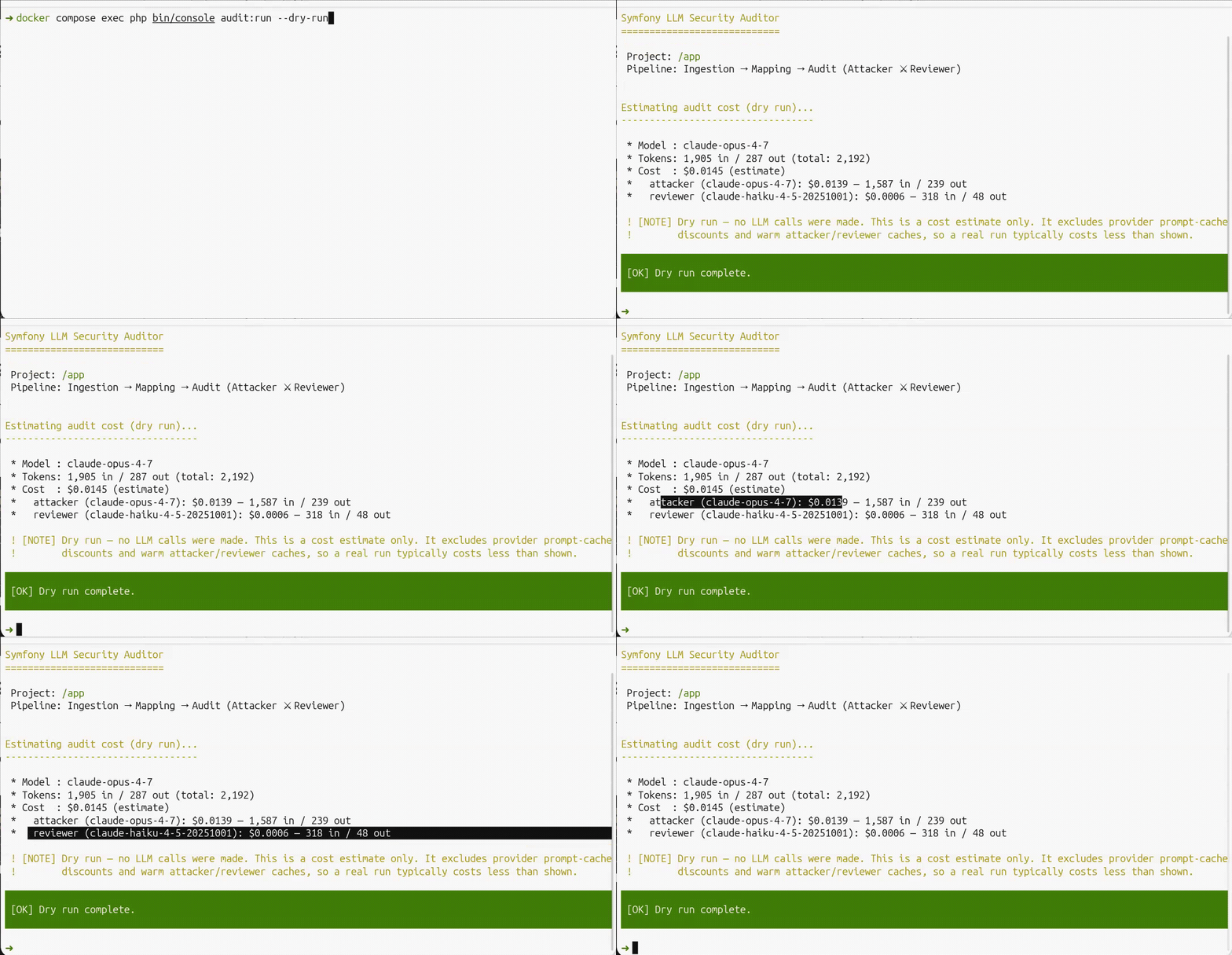
Scans files and estimates token usage and cost without calling the LLM. Use this to gauge cost before committing to a full audit.
bin/console audit:run --dry-run
No LLM calls are made; exit code is always 0.
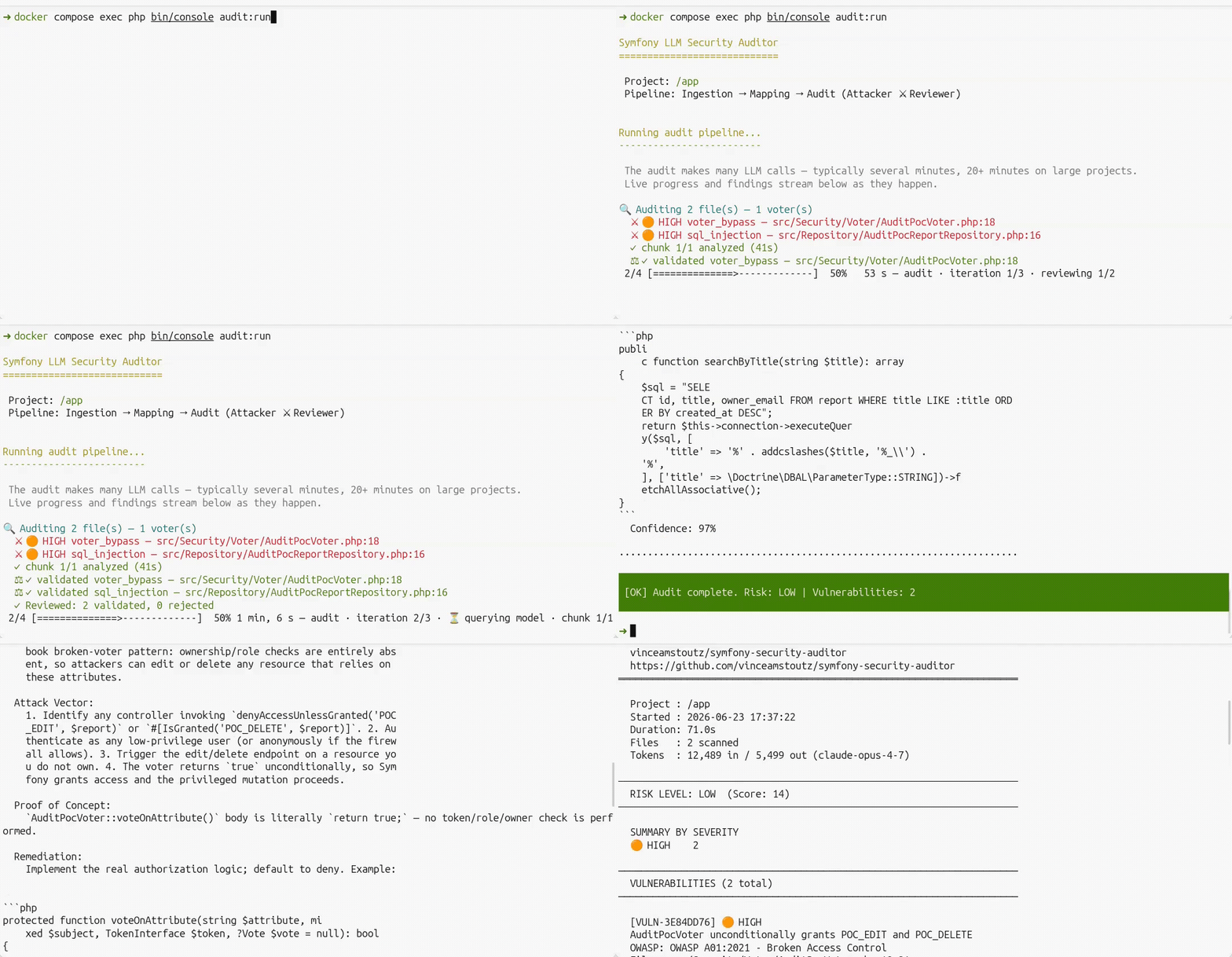
While the pipeline runs, the audit narrates itself live — an attack-surface overview, each finding streamed (color-coded by severity in a terminal) the moment the Attacker flags it, per-chunk timing, and a reviewer tally. In CI or any non-TTY output it degrades to clean, append-only lines (no bar, no ANSI codes). Progress is suppressed for any non-console --format to stdout and for --dry-run.
The full report renders the same way in console, JSON, SARIF, HTML, and Markdown — see CLI reference and output formats.
The auditor ships two maintained ways to run it — pick the one that fits:
dev dependencies.[!TIP]
> Both expose the same audit command, options, and output formats — see the CLI reference — and both can serve the auditor to your AI assistant over MCP.
Run the auditor like PHPStan or Psalm — one install, many projects, zero footprint in the audited app. Each release ships a self-contained native binary that bundles its own PHP runtime (nothing to install on the host) for Linux, macOS, and Windows.
One command — Linux, macOS, and Windows (under WSL):
curl -fsSL https://raw.githubusercontent.com/vinceAmstoutz/symfony-security-auditor/main/install.sh | sh
install.sh detects your OS and CPU architecture, downloads the matching binary, and verifies its SHA-256 checksum before installing — anywhere you have a POSIX shell.
Native Windows (PowerShell) — when you are not using WSL; Git Bash / MSYS / Cygwin users need this installer too (install.sh detects those shells and points here):
irm https://raw.githubusercontent.com/vinceAmstoutz/symfony-security-auditor/main/install.ps1 | iex
[!TIP]
> One command, installed _and_ configured. SetSSA_INIT=1and the installer runs the guidedinitfor you right after downloading, so you skip step 2. With a terminal attached it prompts for your provider and offers to store your API key at the end, leaving you ready to audit; in a pipe or CI it takes the Anthropic defaults and stores no key, so export one or runauth:setbefore auditing.initfetches the provider bridge withcomposer, so composer must be available for this combined step.
>> curl -fsSL https://raw.githubusercontent.com/vinceAmstoutz/symfony-security-auditor/main/install.sh | SSA_INIT=1 sh
Or download the binary for your platform straight from the latest release:
| Platform | Asset |
| ------------------- | --------------------------------------------- |
| Linux x86-64 | symfony-security-auditor-linux-x86_64 |
| Linux arm64 | symfony-security-auditor-linux-aarch64 |
| macOS Intel | symfony-security-auditor-macos-x86_64 |
| macOS Apple Silicon | symfony-security-auditor-macos-arm64 |
| Windows x86-64 | symfony-security-auditor-windows-x86_64.exe |
Every binary ships with a .sha256 checksum, and the install scripts abort rather than install a binary they cannot verify. To check a manual download yourself:
sha256sum -c symfony-security-auditor-linux-x86_64.sha256
initsymfony-security-auditor init
Writes the config file (~/.config/symfony-security-auditor/config.yaml on Linux/macOS, %APPDATA%\symfony-security-auditor\config.yaml on Windows), downloads the provider bridge you pick, and finally asks for your API key — pasted invisibly, never echoed, never in your shell history. init fetches that bridge with composer, so composer must be available for this one-time setup step; running audits afterward needs only the binary. The file is rootless (the same keys as the bundle, without the symfony_security_auditor: wrapper) plus a platform: block handed verbatim to symfony/ai. See configuration for the format and provider switching.
Press Enter at the key prompt to skip it — you can store the key any time with auth:set, or keep using an environment variable and store nothing at all.
symfony-security-auditor audit /path/to/your/symfony/project
audit is an alias for audit:run; every option documented in the CLI reference (--format, --output, --dry-run, --since, --fail-on, …) works identically.
Every run names the key it is about to spend, masked:
API key: sk-ant…qF4A
Project: /path/to/your/symfony/project
| Command | What it does |
| --- | --- |
| auth:set | Store or replace the key — prompts invisibly, writes an owner-only file |
| auth:status | Show which key an audit would use, where it came from, and its SHA-256 fingerprint — never the key |
| auth:remove | Forget the stored key on this machine |
The key is kept in credentials.json next to your config, created 0600 on Linux/macOS (and inside the %APPDATA% profile directory, protected by its inherited ACL, on Windows). An audit refuses to read it if other users on the machine can, and tells you to rotate the key and chmod 600 the file.
An exported variable always wins, so nothing changes for Docker, Kubernetes, CI, or a per-run secret-manager prefix:
ANTHROPIC_API_KEY=$(pass show anthropic/api-key) symfony-security-auditor audit .
Rather not store the key at all, and no secret manager to read it from? Prompt for it per shell — read -rs keeps it off the screen, and a bare export keeps it out of ~/.bash_history:
# read the key your config references & keep it out of your shell history
printf 'Anthropic API key: '; read -rs ANTHROPIC_API_KEY; echo
export ANTHROPIC_API_KEY
[!TIP]
> Storing nothing is a perfectly good choice. Providing the API key covers the environment variable, a mounted secret file (%env(file:…)%), a password manager, and a CI secret store — and how they rank against the stored key.
symfony-security-auditor self-update          # download + verify + replace, if newer
symfony-security-auditor self-update --check  # only report whether a newer version exists
self-update fetches the latest release for your platform, verifies its checksum before replacing the binary, and swaps it in place — see the CLI reference.
Installing the bundle requires PHP 8.3+ and Symfony 7.4+ in the host application (see composer.json) — the standalone binary has no such requirement, since it bundles its own runtime.
composer require --dev vinceamstoutz/symfony-security-auditor
The official Flex recipe registers the bundle (dev/test) and drops a pre-configured config/packages/symfony_security_auditor.yaml.
Not using Flex? See Manual setup.
# Anthropic shown
composer require symfony/ai-anthropic-platform
Full list of supported providers: Configuration → Supported platforms.
# config/packages/ai.yaml (or e.g. config/packages/ai_anthropic_platform.yaml)
ai:
  platform:
    anthropic:
      api_key: '%env(ANTHROPIC_API_KEY)%'
The Flex recipe already created this file — pick your model:
# config/packages/symfony_security_auditor.yaml
symfony_security_auditor:
    model: 'claude-opus-5'
Optionally pick a one-knob preset — fast, balanced (default), or thorough:
# config/packages/symfony_security_auditor.yaml
symfony_security_auditor:
    profile: 'fast'
A profile only fills the keys you leave unset — any explicitly configured key always wins. See Cost & Performance for exactly what each profile sets.
# audit the current directory (bin/console audit is an equivalent alias)
bin/console audit:run
or point at another project
bin/console audit:run /path/to/your/symfony/project
Want JSON, SARIF, HTML, or Markdown instead? Add --format json --output report.json, --format sarif --output report.sarif, --format html --output report.html, or --format markdown --output report.md. See CLI reference.
Estimate cost before running:
bin/console audit:run --dry-run
[!WARNING]
> Audit reports list your application's vulnerabilities. On a public repository, CI artifacts are publicly downloadable — storing the report exposes your attack surface. Prefer GitHub Code Scanning (SARIF, restricted to collaborators), private storage (S3/GCS with IAM), or notification-only. See Report Visibility on Public Repositories.
[!TIP]
> Schedule the audit as a nightly CI job — the multi-agent LLM loop can take minutes, so blocking PRs on it hurts productivity. CI Integration has ready-to-copy GitHub Actions and GitLab CI schedules and a split-model config to control API costs. For dependency CVEs, pair it with Dependabot or Renovate — this auditor targets the application-level logic flaws those scanners cannot see.
mcp:serve starts a Model Context Protocol server, so any MCP client — Claude Code, Claude Desktop, Cursor, VS Code, Windsurf, Gemini CLI, Codex CLI, … — can audit a project on request and read back the JSON report. It works from the standalone binary and from the bundle alike:
# Claude Code, with the standalone binary
claude mcp add --transport stdio symfony-security-auditor -- symfony-security-auditor mcp:serve
{
    "mcpServers": {
        "symfony-security-auditor": {
            "command": "symfony-security-auditor",
            "args": ["mcp:serve"]
        }
    }
}
The second snippet is the shape Claude Desktop, Cursor, Windsurf and Gemini CLI read; with the bundle, use "command": "php" and "args": ["/absolute/path/to/bin/console", "mcp:serve"].
[!NOTE]
> The audit still runs on your configured provider and model, not on the assistant's, so it needs the same API key as a CLI run — with the binary, store it once withauth:setso a desktop client finds it. Point the auditor at a local Ollama and it needs no key at all. Setup for every client, including VS Code and Codex CLI:mcp:serve.
#[IsGranted], denyAccessUnlessGranted, #[MapRequestPayload], Twig/Live Components, and surfaces controllers without proper access checks.|raw, hardcoded secrets, unsafe Doctrine, …) to focus the LLM; optional lean mode drops marker-free files to cut tokens. Results from other SAST tools can be imported as markers via SARIF.audit:run --since=main audits only changed files for fast pull-request CI.read_file, grep, list_files, and lookup_advisory (zero-config live CVE lookups via composer audit, backed by Packagist + GitHub Security Advisories).fast, balanced, and thorough preset the cost/speed/depth levers in a single line; any explicit key still wins.attacker_max_concurrent / reviewer_max_concurrent), Anthropic prompt caching on by default (~90% input-token discount), content-hash caching that skips identical chunks, cheap→expensive escalation, and code slicing.privacy.offline_only refuses every network call the auditor owns (see Security by design).Retry-After-aware exponential backoff plus an optional proactive token-bucket limiter keep you inside provider quotas (see Cost & Performance).console, executive (stakeholder summary: risk level, business impact, severity/type/hotspot distributions, no per-finding detail), json, sarif (GitHub Code Scanning / GitLab Security Dashboard), html (self-contained, shareable), markdown (PR-friendly), junit (CI test-report panels), github (inline PR annotations, no SARIF upload step), and github-comment (PR comment headlined by the grade and score, self-updating on rerun). Baseline suppression: --generate-baseline accepts known findings, --baseline drops them from the report and exit code so only new findings fail CI; --min-score gates on the normalized score independently of --fail-on.mcp:serve exposes the audit as an MCP tool to Claude Code, Claude Desktop, Cursor, VS Code and any other MCP client, from the binary or the bundle (see Use it from your AI assistant).audit:diff compares two JSON reports by finding fingerprint, audit:trend tracks counts across a series of them.uses: vinceamstoutz/symfony-security-auditor@1.21.0) plus GitLab CI templates, with SARIF upload to Code Scanning and an optional shields.io badge tracking the report's letter grade. See CI Integration.LLMClientInterface seam let you plug in custom providers, agents, stages, advisory feeds, or report formats; project-specific attacker skills need only configuration, no PHP.self-update and preflighted with doctor (see Standalone tool).The auditor is conservative about what leaves your machine:
scan.secret_scrubbing.enabled: true (the default), credential-shaped strings are redacted from file content _before_ it reaches the LLM: AWS / GitHub / Stripe / Slack / Google API keys, JWTs, PEM private keys, env-style credential assignments, and connection-string URIs with embedded credentials (postgres://user:pass@host). Add project-specific shapes with scan.secret_scrubbing.additional_patterns.cache.dir.ai.yaml. For zero third-party exposure, run fully offline with Ollama — nothing leaves your network. Set privacy.offline_only: true to have that enforced rather than assumed: the advisory feed is dropped (no composer audit) and the standalone CLI refuses to boot against a platform endpoint that is not loopback or private-range. docs/faq.md carries a tcpdump recipe for verifying it yourself.Profiles (fast / balanced / thorough), split-model, concurrency, caching, budget caps, and 429 rate-limit handling are covered in Cost & Performance — start with a profile, then override individual keys as needed.
| Platform | Bridge package | Key env var(s) |
| --- | --- | --- |
| Anthropic (Claude) | symfony/ai-anthropic-platform | ANTHROPIC_API_KEY |
| OpenAI | symfony/ai-open-ai-platform | OPENAI_API_KEY |
| OpenAI Responses API | symfony/ai-open-responses-platform | OPENAI_API_KEY plus a base_url |
| Azure OpenAI | symfony/ai-azure-platform | AZURE_OPENAI_API_KEY, AZURE_OPENAI_BASEURL |
| Google Gemini | symfony/ai-gemini-platform | GEMINI_API_KEY |
| Google Vertex AI | symfony/ai-vertex-ai-platform | GCP credentials |
| AWS Bedrock | symfony/ai-bedrock-platform | BEDROCK_API_KEY, or AWS credentials |
| DeepSeek | symfony/ai-deep-seek-platform | DEEPSEEK_API_KEY |
| Mistral | symfony/ai-mistral-platform | MISTRAL_API_KEY |
| MiniMax | symfony/ai-mini-max-platform | MINIMAX_API_KEY |
| Ollama (local) | symfony/ai-ollama-platform | _(none)_ |
| Albert (French gov) | symfony/ai-albert-platform | ALBERT_API_KEY plus a base_url |
| amazee.ai | symfony/ai-amazee-ai-platform | AMAZEEAI_API_KEY plus a base_url |
| Fireworks AI | symfony/ai-fireworks-platform | FIREWORKS_API_KEY |
| Together AI | symfony/ai-together-platform | TOGETHER_API_KEY |
| Venice AI | symfony/ai-venice-platform | VENICE_API_KEY |
| Eden AI | symfony/ai-eden-ai-platform | EDENAI_API_KEY |
| Generic (AI gateway) | symfony/ai-generic-platform | depends on the gateway |
Swapping providers requires only a config/packages/ai.yaml change — no PHP edits.
Any OpenAI-compatible endpoint behind a custom URL and token (an in-house AI gateway, LiteLLM, vLLM, LocalAI) goes through the generic platform. It is configured per instance, so the instance name is part of the platform block and, in standalone mode, part of provider: as well:
# config/packages/ai.yaml
ai:
    platform:
        generic:
            my_gateway:
                base_url: '%env(GATEWAY_URL)%'
                api_key: '%env(GATEWAY_TOKEN)%'
See Configuration → Instance-keyed platforms.
→ →
→ →
→ →
→ →
→ →
→ →
→ →
→