1
 →
→
The self-hosted AI SRE agent. You don't have to monitor your systems alone. Versus Incident will keep track of your services, applications, and systems, detect new or unexpected problems
VersusControl/versus-incident is an open-source project on GitHub, mainly written in Go. The self-hosted AI SRE agent. You don't have to monitor your systems alone. Versus Incident will keep track of your services, applications, and systems It currently holds 870 stars and 162 forks with 0 open issues, and was last pushed on an unknown date (repository created unknown).
AI Homed tracks it on the Today's Trending board, currently at rank #66 with 6 new stars today.


Your AI SRE Teammate
You don't have to monitor your systems alone. Versus Incident will keep track of your services, applications, and systems, detect new or unexpected problems, and provide your team with the evidence needed to investigate.
Auto-detecting incident in your system
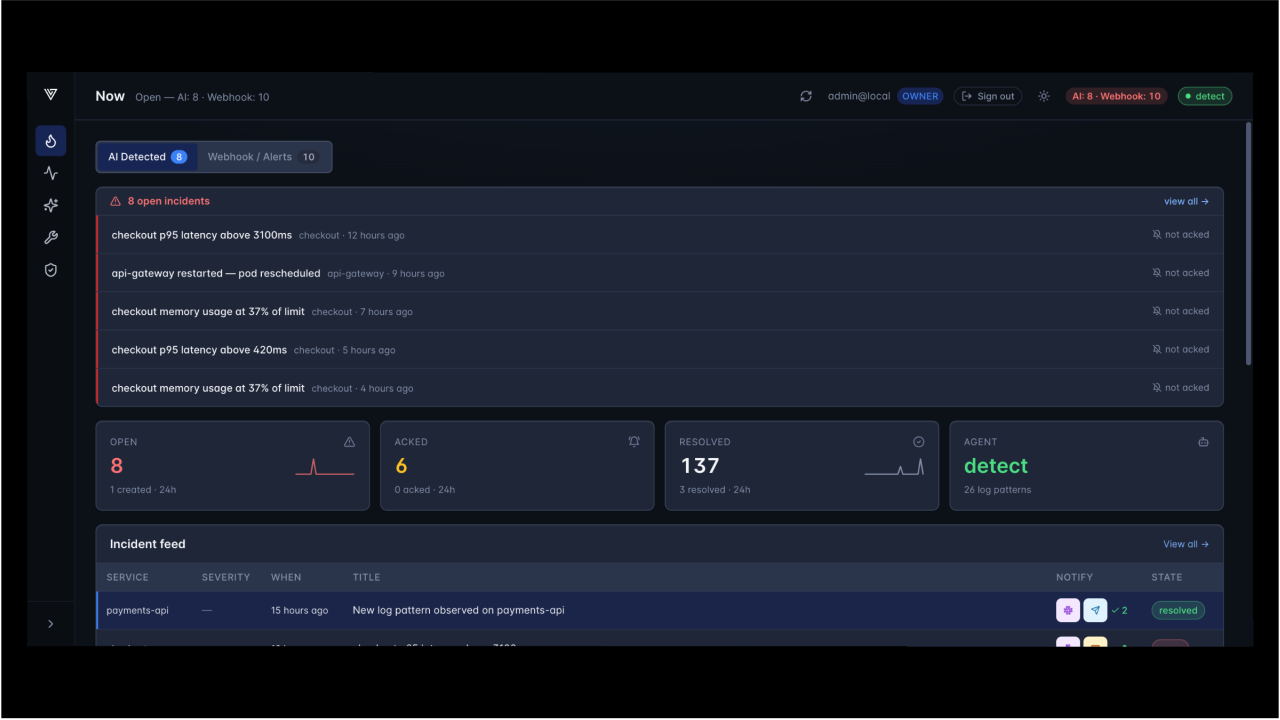
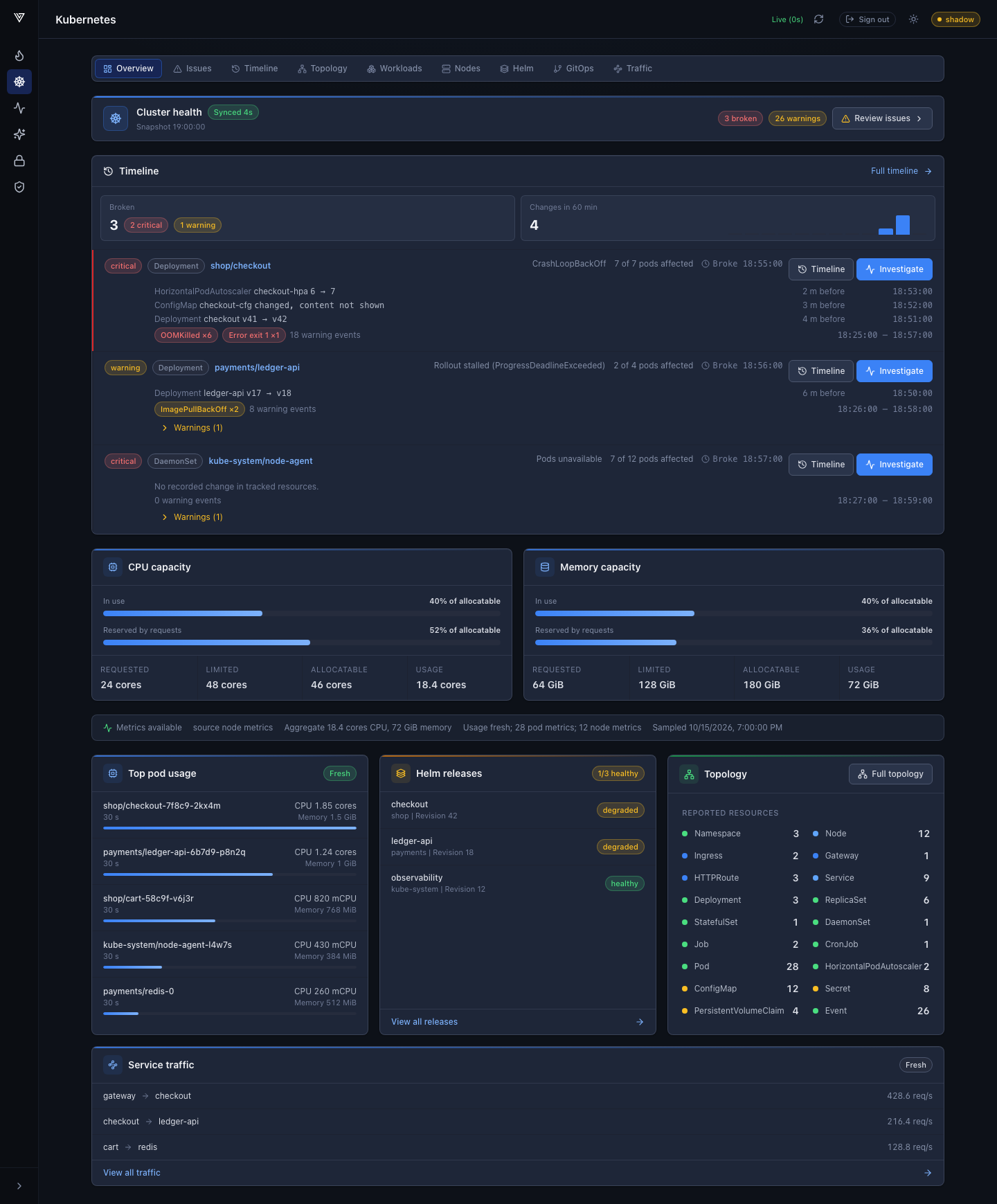
Auto-detecting issues in Kubernetes
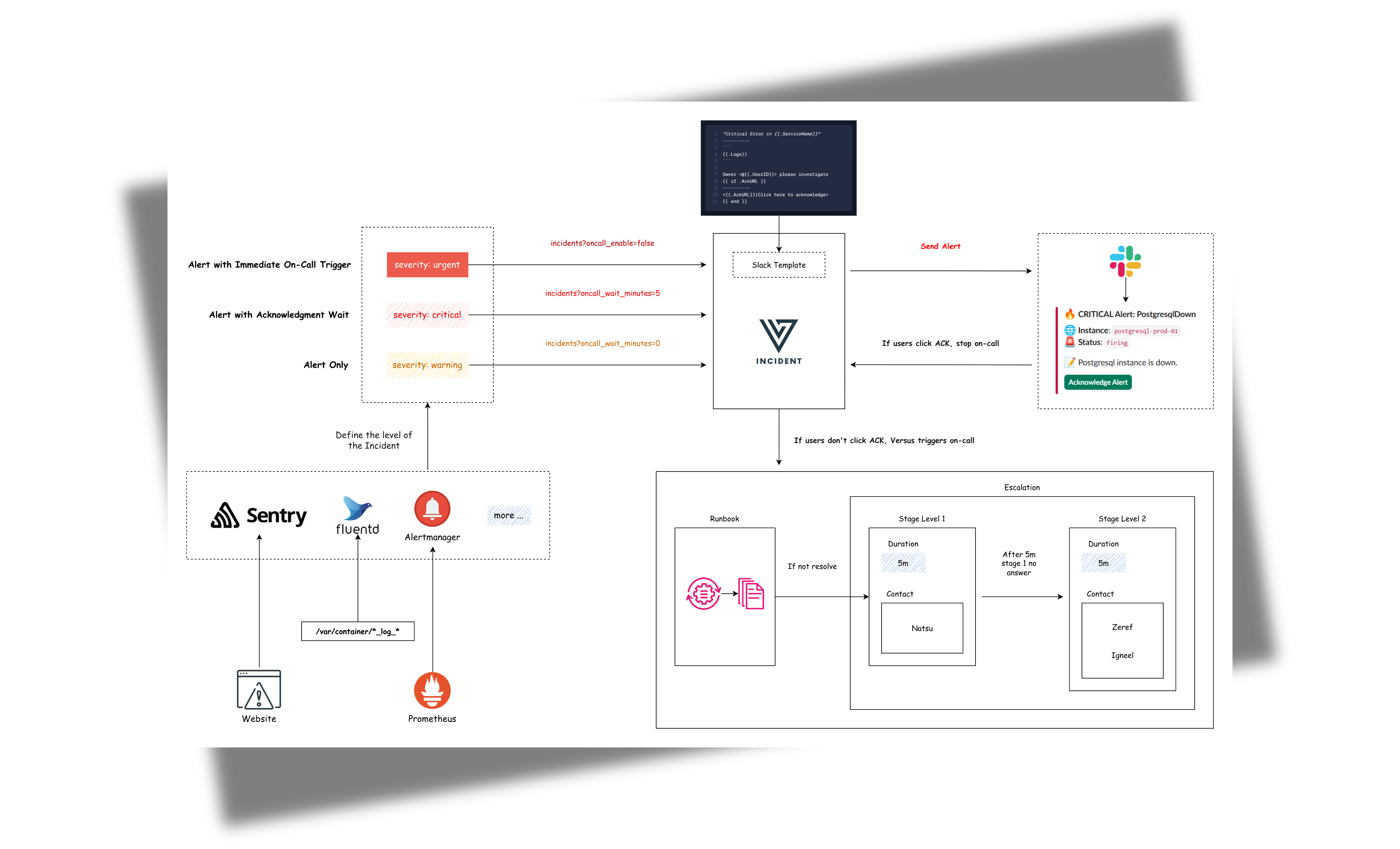
Incidents reach Versus two ways, and both are handled by the same notification, templating, and on-call logic:
Let the agent learn your logs and surface what's new. The AI SRE Agent has three modes:
training — just watch and learn. No alerts.shadow — watch and learn, plus write a "would have alerted"detect — actually create incidents for lines the agent hasStart it in training mode — it only watches and learns, and never sends an alert until you're ready.
# Redis is used to remember where the agent left off in each log source.
docker run -d --name versus-redis -p 6379:6379 redis:7
docker run -p 3000:3000 \
  -e GATEWAY_SECRET=change-me \
  -e AGENT_ENABLE=true \
  -e AGENT_MODE=training \
  -e REDIS_HOST=host.docker.internal \
  -e REDIS_PORT=6379 \
  -v $(pwd)/config:/app/config \
  -v $(pwd)/data:/app/data \
  ghcr.io/versuscontrol/versus-incident
The agent needs a config.yaml and an agent_sources.yaml that point it at your logs. Once it's running, review the patterns it learns on the admin dashboard at , then switch AGENT_MODE from training → shadow → detect when you trust it.
Full walkthrough (with ready-to-copy config and a sample log generator): AI Agent — Getting Started.
Already have monitoring? Run Versus and POST your alerts to its webhook endpoint.
docker run -p 3000:3000 \
  -e GATEWAY_SECRET=change-me \
  -e SLACK_ENABLE=true \
  -e SLACK_TOKEN=your_token \
  -e SLACK_CHANNEL_ID=your_channel \
  ghcr.io/versuscontrol/versus-incident
Versus listens on port 3000 by default and exposes:
POST /api/incidents — webhook endpoint for monitoring tools.GET / — the embedded admin dashboard, open in your browser. For the full UI walkthrough and the build/watch scripts, see Admin Dashboard.You can use both. The AI agent and webhook alerts are not mutually exclusive — run them together and every incident, whether auto-detected or forwarded from your tools, flows through the same channels, templates, and on-call logic.
The AI SRE agent is what makes Versus different: point it at your logs and it learns what normal looks like, then automatically opens an incident the moment a brand-new error or anomaly appears — no alert rules to maintain.
Configuration example with agent features:
name: versus
host: 0.0.0.0
port: 3000
... existing alert configurations ...
Shared secret required for ALL admin endpoints (/api/admin/* and
/api/agent/*). API clients send it in X-Gateway-Secret; the dashboard
exchanges it once for an opaque HttpOnly session cookie.
gateway_secret: ${GATEWAY_SECRET}
Storage backend for the pattern catalog, shadow log, and incident
history. Only file is implemented today; redis and database
are config stubs.
storage:
type: file # file | redis | database (env: STORAGE_TYPE)
file:
max_incidents: 1000 # rolling cap on persisted incidents
agent:
enable: false # Use this to enable or disable the agent for all sources
mode: training # Valid values: "training", "shadow", or "detect"
poll_interval: 30s
# Sources are kept in a separate file so they can be managed independently
# (e.g. swap fixtures, per-environment lists). Path is resolved relative to
# this config file. Override via env: AGENT_SOURCES_PATH.
sources_path: ./agent_sources.yaml
catalog:
persist_interval: 30s
auto_promote_after: 100 # In detect mode, this many sightings = "known"
redaction:
enable: true
redact_ips: false
extra_patterns: # Optional: extra regex rules to scrub before clustering
- "(?i)password=\\S+"
- "Authorization:\\s*Bearer\\s+\\S+"
miner:
similarity_threshold: 0.4
tree_depth: 4
max_children: 100
regex:
# Optional: tag any signal whose message matches this pattern
# if none of the named rules below hit. Leave empty to disable.
default_pattern: "(?i)error|exception|fatal|panic"
# Named rules are tried first, in order. The first match wins.
rules:
- name: oom
pattern: "(?i)out of memory|OOMKilled|java\\.lang\\.OutOfMemoryError"
- name: db-timeout
pattern: "(?i)(connection|query) timeout|deadlock detected"
- name: auth-failure
pattern: "(?i)401 unauthorized|invalid credentials|permission denied"
redis: # Required for the agent to persist source cursors across restarts
host: ${REDIS_HOST}
port: ${REDIS_PORT}
password: ${REDIS_PASSWORD}
db: 0
Explanation:
The agent section includes:
1. enable: Turn the agent on or off (default: false). When disabled, nothing extra runs — no background processes, no extra files written.
2. mode: How the agent behaves after it has learned your log patterns:
training: observation only — the agent learns patterns and saves them, but sends no alerts.shadow: same as training, but also logs a note every time it would have sent an alert. Good for reviewing before going live.detect: the agent actively sends alerts for any pattern it has never seen before.poll_interval: How often the agent checks your log sources for new entries.
4. catalog: Where the agent stores the list of known patterns and how often to write updates. mode selects the storage backend — only file is supported today, which writes to data/patterns.json (the filename and directory are fixed).
Admin secret. All admin endpoints (/api/admin/* and
/api/agent/*) are protected by the root-levelgateway_secret
(env GATEWAY_SECRET). Set it to any value you choose; clients send
the same value in the X-Gateway-Secret header. The dashboard sends it
only to POST /api/auth/gateway-session, then uses an HttpOnly,
SameSite=Strict cookie with an eight-hour absolute lifetime. Reloads reuse
the cookie; sign-out, expiry, cookie clearing, or secret rotation requires
signing in again. When no secret is
configured the admin endpoints are not registered and the agent
refuses to start.
> Set the root-level public_host to the exact browser-visible HTTP(S) origin,
for example https://versus.example.com. Versus validates and normalizes it
at startup and uses it for external links, cookie Secure, and exact-origin
checks behind TLS-terminating or Host-rewriting proxies. Forwarded
protocol/host headers are not trusted implicitly. Leave it empty for a direct
deployment, where the request's actual protocol and Host are used for browser
security checks.
Storage. The agent's catalog and the incident history shown in the
UI are persisted via the root-level storage: block (default:
type: file). The file backend writes to the fixed./datadirectory
(/app/data in the container image).
5. redaction: Rules for automatically removing sensitive information (passwords, tokens, emails, etc.) from logs before the agent processes them.
6. miner: Controls how aggressively the agent groups similar log lines together. The defaults work well for most setups.
7. regex: Acts as a pre-filter for the agent. Only signals whose message matches at least one rule (a named entry under rules or default_pattern) are forwarded to the pattern miner and stored in the catalog. Anything that doesn't match is dropped before clustering, so boring noise (200-OK requests, debug lines, etc.) never bloats patterns.json.
rules are tried in order; the first match wins and tags the signal with that name (stored as rule_name on the pattern).default_pattern is tried. Matches there are tagged with name=default.default_pattern: ".*". This is useful in early training when you don't yet know what's interesting.default_pattern: "" (empty)** and rely on your named rules — anything that doesn't match an explicit rule is dropped.sources_path: Path to a separate YAML file that lists the log sources the agent should read from. Keeping sources in their own file makes it easier to manage per-environment source lists or swap fixtures without touching the rest of the config. The path is resolved relative to the main config file. Override via the AGENT_SOURCES_PATH env var.
The sources file (default ./agent_sources.yaml) has a single top-level sources: list. Each entry needs name, type (file or elasticsearch), enable, plus a matching file: or elasticsearch: block. Example:
sources:
- name: prod-app
type: elasticsearch
enable: true
elasticsearch:
addresses:
- https://es.example.internal:9200
username: ${ES_USERNAME}
password: ${ES_PASSWORD}
index: "logs-app-*"
time_field: "@timestamp"
query: 'log.level:(error OR warn)'
message_field: message
page_size: 500
- name: sample-app
type: file
enable: true
file:
path: ./local/resource/sample-app.log
format: text
from_beginning: true
The redis section is required when agent.enable is true. Redis is used to remember where the agent left off in each log source, so it picks up from the right place after a restart.
For detailed information on integration, please refer to the document here: Enable AI Agent.
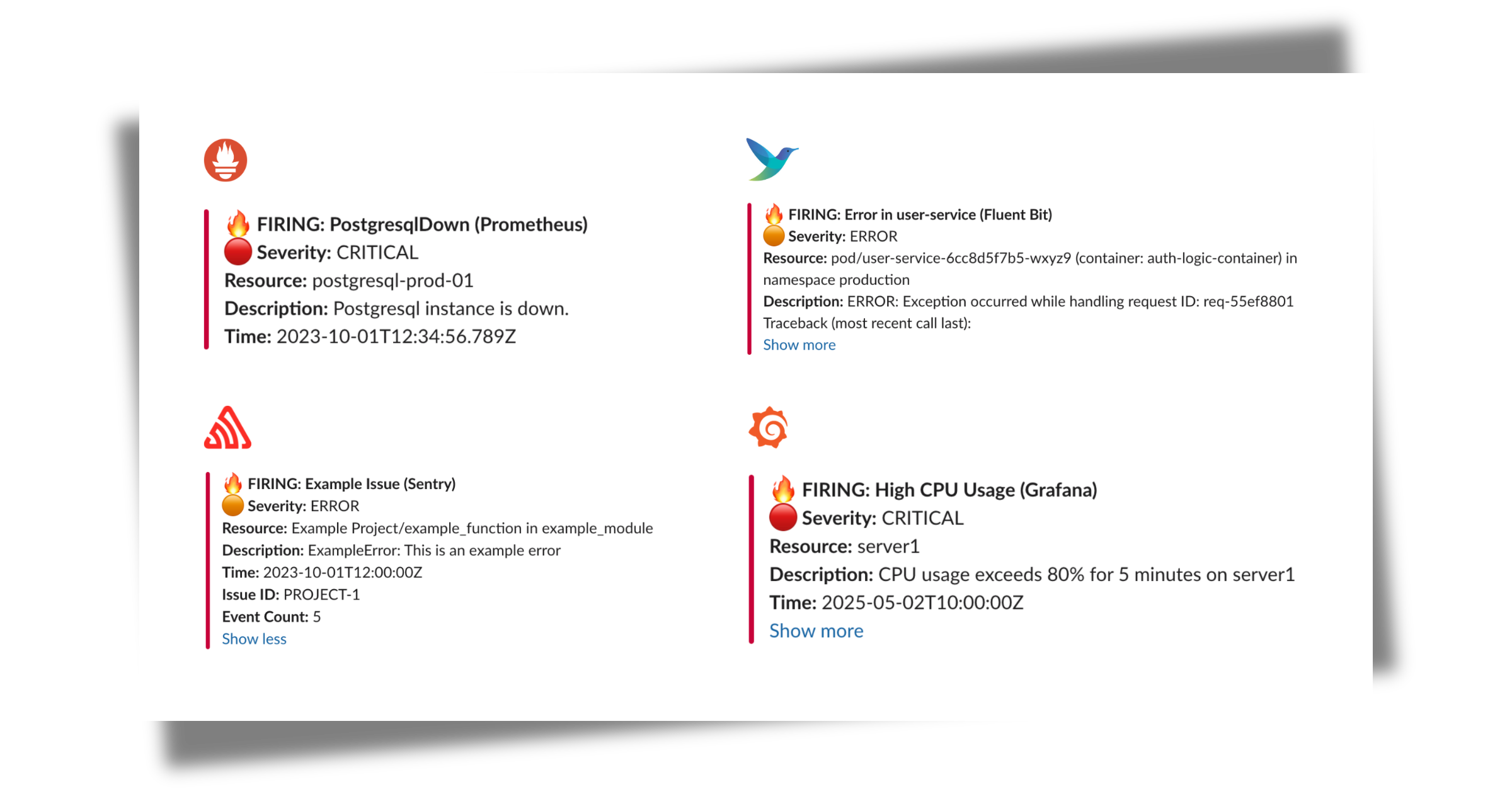
Already using other monitoring tools? Versus also accepts incidents from anything that can POST JSON to /api/incidents, so you can route existing alerts through the same channels, templates, and on-call.
Our default template (Slack, Telegram) automatically handles alerts from multiple sources, including:
curl -X POST "http://localhost:3000/api/incidents" \
  -H "Content-Type: application/json" \
  -d '{
    "receiver": "webhook-incident",
    "status": "firing",
    "alerts": [
      {
        "status": "firing",
        "labels": {
          "alertname": "PostgresqlDown",
          "instance": "postgresql-prod-01",
          "severity": "critical"
        },
        "annotations": {
          "summary": "Postgresql down (instance postgresql-prod-01)",
          "description": "Postgresql instance is down."
        },
        "startsAt": "2023-10-01T12:34:56.789Z",
        "endsAt": "2023-10-01T12:44:56.789Z",
        "generatorURL": ""
      }
    ],
    "groupLabels": {
      "alertname": "PostgresqlDown"
    },
    "commonLabels": {
      "alertname": "PostgresqlDown",
      "severity": "critical",
      "instance": "postgresql-prod-01"
    },
    "commonAnnotations": {
      "summary": "Postgresql down (instance postgresql-prod-01)",
      "description": "Postgresql instance is down."
    },
    "externalURL": ""
  }'
curl -X POST "http://localhost:3000/api/incidents" \
  -H "Content-Type: application/json" \
  -d '{
    "action": "created",
    "data": {
      "issue": {
        "id": "123456",
        "title": "Example Issue",
        "culprit": "example_function in example_module",
        "shortId": "PROJECT-1",
        "project": {
          "id": "1",
          "name": "Example Project",
          "slug": "example-project"
        },
        "metadata": {
          "type": "ExampleError",
          "value": "This is an example error"
        },
        "status": "unresolved",
        "level": "error",
        "firstSeen": "2023-10-01T12:00:00Z",
        "lastSeen": "2023-10-01T12:05:00Z",
        "count": 5,
        "userCount": 3
      }
    },
    "installation": {
      "uuid": "installation-uuid"
    },
    "actor": {
      "type": "user",
      "id": "789",
      "name": "John Doe"
    }
  }'
Result:
For the custom templates, see Development Custom Templates
For a complete Deployment + Service + PersistentVolumeClaim
manifest (with the persistent data volume the admin dashboard needs),
see Deploy on Kubernetes.
For the packaged install, see Helm Chart or the chart source under helm/versus-incident.
Versus supports On-Call integrations with AWS Incident Manager and PagerDuty. Updated configuration example with on-call features:
name: versus
host: 0.0.0.0
port: 3000
public_host: https://your-ack-host.example # Required for on-call ack
... existing alert configurations ...
oncall:
  ### Enable overriding using query parameters
  # /api/incidents?oncall_enable=false => Set to true or false to enable or disable on-call for a specific alert
  # /api/incidents?oncall_wait_minutes=0 => Set the number of minutes to wait for acknowledgment before triggering on-call. Set to 0 to trigger immediately
  initialized_only: true  # Initialize on-call feature but don't enable by default; use query param oncall_enable=true to enable for specific requests
  enable: false # Use this to enable or disable on-call for all alerts
  wait_minutes: 3 # If you set it to 0, it means there's no need to check for an acknowledgment, and the on-call will trigger immediately
  provider: aws_incident_manager # Valid values: "aws_incident_manager" or "pagerduty"
aws_incident_manager: # Used when provider is "aws_incident_manager"
    response_plan_arn: ${AWS_INCIDENT_MANAGER_RESPONSE_PLAN_ARN}
    other_response_plan_arns: # Optional: Enable overriding the default response plan ARN using query parameters, eg /api/incidents?awsim_other_response_plan=prod
      prod: ${AWS_INCIDENT_MANAGER_OTHER_RESPONSE_PLAN_ARN_PROD}
      dev: ${AWS_INCIDENT_MANAGER_OTHER_RESPONSE_PLAN_ARN_DEV}
      staging: ${AWS_INCIDENT_MANAGER_OTHER_RESPONSE_PLAN_ARN_STAGING}
pagerduty: # Used when provider is "pagerduty"
    routing_key: ${PAGERDUTY_ROUTING_KEY} # Integration/Routing key for Events API v2 (REQUIRED)
    other_routing_keys: # Optional: Enable overriding the default routing key using query parameters, eg /api/incidents?pagerduty_other_routing_key=infra
      infra: ${PAGERDUTY_OTHER_ROUTING_KEY_INFRA}
      app: ${PAGERDUTY_OTHER_ROUTING_KEY_APP}
      db: ${PAGERDUTY_OTHER_ROUTING_KEY_DB}
redis: # Required for on-call functionality
  insecure_skip_verify: true # dev only
  host: ${REDIS_HOST}
  port: ${REDIS_PORT}
  password: ${REDIS_PASSWORD}
  db: 0
Explanation:
The oncall section includes:
1. enable: A boolean to toggle on-call functionality for all incidents (default: false).
2. initialized_only: Initialize on-call feature but keep it disabled by default. When set to true, on-call is triggered only for requests that explicitly include ?oncall_enable=true in the URL. This is useful for having on-call ready but not enabled for all alerts.
3. wait_minutes: Time in minutes to wait for an acknowledgment before escalating (default: 3). Setting it to 0 triggers the on-call immediately.
4. provider: Specifies which on-call provider to use ("aws_incident_manager" or "pagerduty").
5. aws_incident_manager: Configuration for AWS Incident Manager when it's the selected provider, including response_plan_arn and other_response_plan_arns.
6. pagerduty: Configuration for PagerDuty when it's the selected provider, including routing keys.
The redis section is required when oncall.enable or oncall.initialized_only is true. It configures the Redis instance used for state management or queuing, with settings like host, port, password, and db.
For detailed information on integration, please refer to the document here: On-Call setup with Versus.
A sample configuration file is located at config/config.yaml:
```yaml name: versus host: 0.0.0.0 port: 3000 public_host: https://your-ack-host.example # Required for on-call ack
alert: debug_body: true # Default value, will be overridden by DEBUG_BODY env var
slack: enable: false # Default value, will be overridden by SLACK_ENABLE env var token: ${SLACK_TOKEN} # From environment channel_id: ${SLACK_CHANNEL_ID} # From environment template_path: "config/slack_message.tmpl" message_properties: button_text: "Acknowledge Alert" # Custom text for the acknowledgment button button_style: "primary" # Button style: "primary" (default blue), "danger" (red), or empty for default gray disable_button: false # Set to true to disable the button, if you want to handle acknowledgment differently
telegram: enable: false # Default value, will be overridden by TELEGRAM_ENABLE env var bot_token: ${TELEGRAM_BOT_TOKEN} # From environment chat_id: ${TELEGRAM_CHAT_ID} # From environment template_path: "config/telegram_message.tmpl" use_proxy: false # Set to true to use global proxy settings for Telegram API calls
viber: enable: false # Default value, will be overridden by VIBER_ENABLE env var bot_token: ${VIBER_BOT_TOKEN} # From environment (token for bot or channel) api_type: ${VIBER_API_TYPE} # From environment - "channel" (default) or "bot" # Channel API (recommended for incident management) channel_id: ${VIBER_CHANNEL_ID} # From environment (required for channel API) # Bot API (for individual user notifications) user_id: ${VIBER_USER_ID} # From environment (required for bot API) template_path: "config/viber_message.tmpl" use_proxy: false # Set to true to use global proxy settings for Viber API calls
email: enable: false # Default value, will be overridden by EMAIL_ENABLE env var smtp_host: ${SMTP_HOST} # From environment smtp_port: ${SMTP_PORT} # From environment username: ${SMTP_USERNAME} # From environment password: ${SMTP_PASSWORD} # From environment to: ${EMAIL_TO} # From environment, can contain multiple comma-separated email addresses subject: ${EMAIL_SUBJECT} # From environment template_path: "config/email_message.tmpl"
msteams: enable: false # Default value, will be overridden by MSTEAMS_ENABLE env var power_automate_url: ${MSTEAMS_POWER_AUTOMATE_URL} # Automatically works with both Power Automate workflow URLs and legacy Office 365 webhooks template_path: "config/msteams_message.tmpl" other_power_urls: # Optional: Define additional Power Automate URLs for multiple MS Teams
→ →
→ →
→ →
→ →
→ →
→ →
→ →
→