1
 →
→
Secure MCP runtime for AI agents to operate local machines, servers, and containers with multi-device orchestration.
uvwt/agentdock is an open-source project on GitHub, mainly written in Go. Secure MCP runtime for AI agents to operate local machines, servers, and containers with multi-device orchestration. It currently holds 965 stars and 119 forks with 0 open issues, and was last pushed on an unknown date (repository created unknown).
AI Homed tracks it on the Today's Trending board.
English | 简体中文
Give AI agents secure, controlled access to every machine you operate.
Open ChatGPT in your browser and manage multiple computers and servers from one conversation. Write code, change configuration, run commands, and deploy in the real environment where the work belongs—without consuming a dedicated Codex coding quota.
Documentation · Download · Community

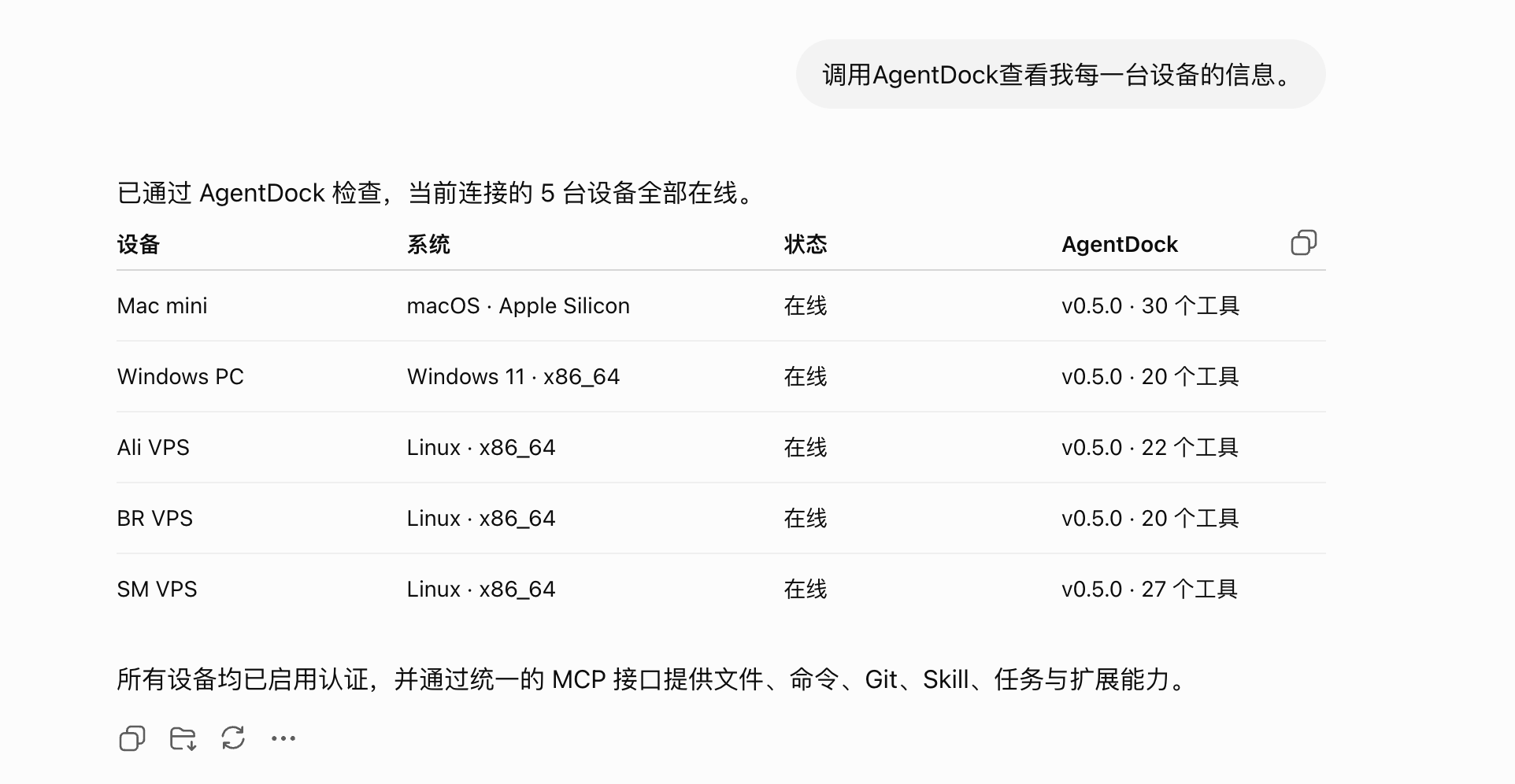
AgentDock is an independent tool runtime for AI agents.
It provides unified, secure, and controlled file, command, Git, Skill, MCP, browser automation, and task execution across local computers, remote servers, and containers. Connect multiple AgentDock instances to coordinate work across devices and finish multi-machine workflows in a single conversation.
AgentDock does not provide a chat interface or perform model inference. It focuses on one responsibility:
Let AI agents operate real environments within explicit permission boundaries and return structured, traceable, and verifiable results.
              ChatGPT / Claude / Codex
                        │
                        │ MCP (multiple instances supported)
          ┌─────────────┼─────────────┐
          ▼             ▼             ▼
   ┌───────────┐ ┌───────────┐ ┌───────────┐
   │ AgentDock │ │ AgentDock │ │ AgentDock │
   │ Local Mac │ │ LAN Host  │ │ Cloud VPS │
   └─────┬─────┘ └─────┬─────┘ └─────┬─────┘
         │             │             │
         ▼             ▼             ▼
   Files · Shell · Git  Tunnels       Proxy · Deploy
Regular users can install AgentDock from the official package for their operating system. You do not need the source code or Go.
See Install AgentDock for the complete instructions.
| Platform | Documentation | | --- | --- | | Docker | Docker installation | | Linux | Automated Linux installation | | Linux / VPS | Manual systemd deployment | | macOS | macOS installation | | Windows | Graphical Windows installer |
AgentDock exposes tools over MCP Streamable HTTP. The exact client syntax varies, but a typical configuration looks like this:
{
  "mcpServers": {
    "agentdock": {
      "url": "http://127.0.0.1:8765/mcp",
      "headers": {
        "Authorization": "Bearer <AGENTDOCK_AUTH_TOKEN>"
      }
    }
  }
}
Official and community Skill sources live in uvwt/agentdock-skills. This repository only keeps core Skills that must ship with the AgentDock runtime, including bootstrap/security Skills and the built-in agentdock-user-guide official user guide.
AgentDock can optionally act as a native ACP client and host a local coding-agent adapter.
acp_session to create and manage sessions, acp_prompt to run and observe prompts, and acp_interaction to answer agent permission requests.AgentDock can optionally pair with NexusDock as a multi-device aggregation entrypoint:
| Path | Purpose |
| --- | --- |
| ~/AgentDock | Default working directory for relative file operations |
| ~/.agentdock | AgentDock state, configuration, sessions, and extension data |
Default MCP URL for Docker, native installs, and local development:
http://127.0.0.1:8765/mcp
Ports are configurable. Clients must use the address defined by the actual deployment.
For public deployments, enable Bearer Token or OAuth authentication and use HTTPS. Never expose an unauthenticated MCP service to the public internet.
Run the full check before submitting code:
make check
GitHub Actions continuously run tests, static checks, builds, and release validation.
User documentation is maintained separately in uvwt/agentdock-docs. Changes to user-visible behavior, configuration, installation, or tool schemas should update the matching documentation in the same change set.
Changes involving device pairing, cross-node tool routing, Recall, or Workflow integrations may also require coordinated changes in uvwt/nexusdock. The shared protocol is maintained in uvwt/agentdock-protocol. When changing shared interfaces or data structures, update the protocol definitions first, then align both implementations and their protocol dependency versions, check compatibility, update the corresponding documentation, and link related cross-repository changes in the PR.
Submit bugs and feature requests through GitHub Issues.
If AgentDock helps you, please consider giving it a Star ⭐. Thank you for your support
| Alipay | |
|---|---|
 |
 |
Apache License 2.0. See LICENSE.
→ →
→ →
→ →
→ →
→ →
→ →
→ →
→