1
 →
→
An open-source stack for generalist computer-use agents, combining code execution, GUI interaction, and cross-device control.
Tongyi-MAI/OpenGCUA is an open-source project on GitHub, mainly written in HTML. An open-source stack for generalist computer-use agents, combining code execution, GUI interaction, and cross-device control. It currently holds 111 stars and 4 forks with 0 open issues, and was last pushed on an unknown date (repository created unknown).
AI Homed tracks it on the Today's Trending board, currently at rank #92 with 0 new stars today.
News · Results · Demos · Quick start · SDK · Open stack · How it works · Contributing · Contact
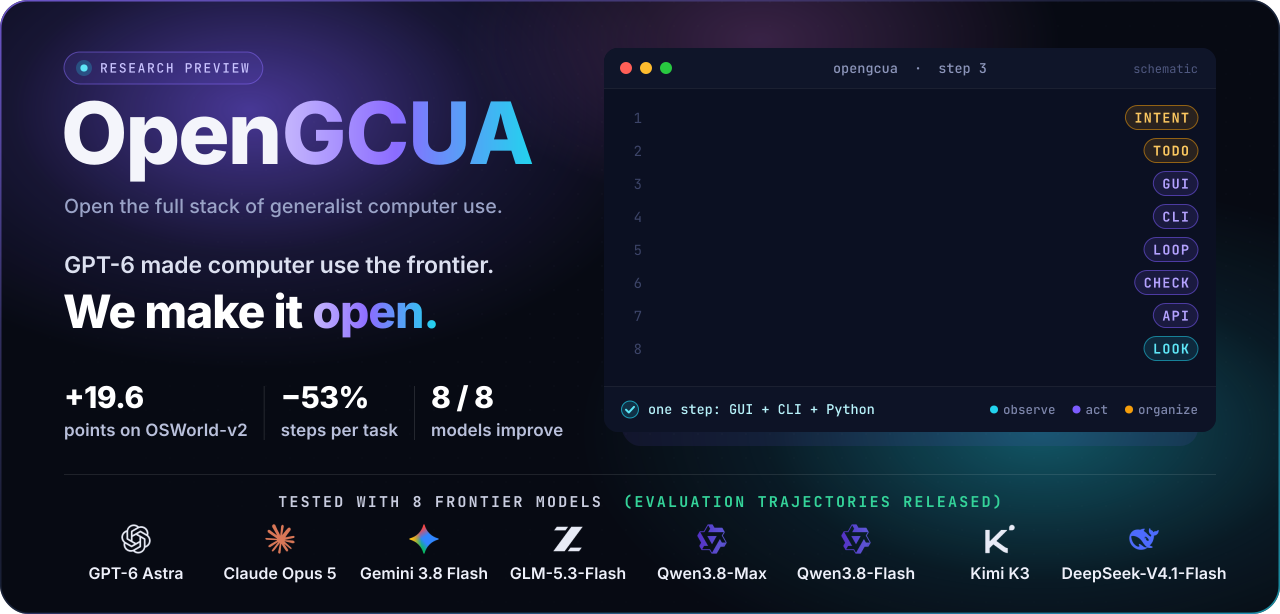
Computer use has reached a turning point. GPT-6 Astra's demos offered an exciting vision of what computer-use agents could make possible, and the focus is expanding from GUI-only interaction to both visual and programmatic interfaces. The question has changed, from how well a model operates a GUI to how well a system completes work on a real computer by whatever means works.
We call such a system a generalist computer-use agent (GCUA). It uses a computer in more ways than you do. It reads the accessibility tree and calls app APIs, runs shell commands, and operates the GUI when it needs to. With code execution, it writes GUI operations as code and combines them with all of these in one program, with loops and conditions. It can also share the computer with you, working in background windows without interrupting what you are doing.
Yet frontier systems remain largely closed. We therefore introduce Open Generalist CUA (OpenGCUA), an ongoing project to develop and open the full stack for GCUAs with the community, including model, system, trajectories, efficiency optimization, and evaluation.
What we open in this version:
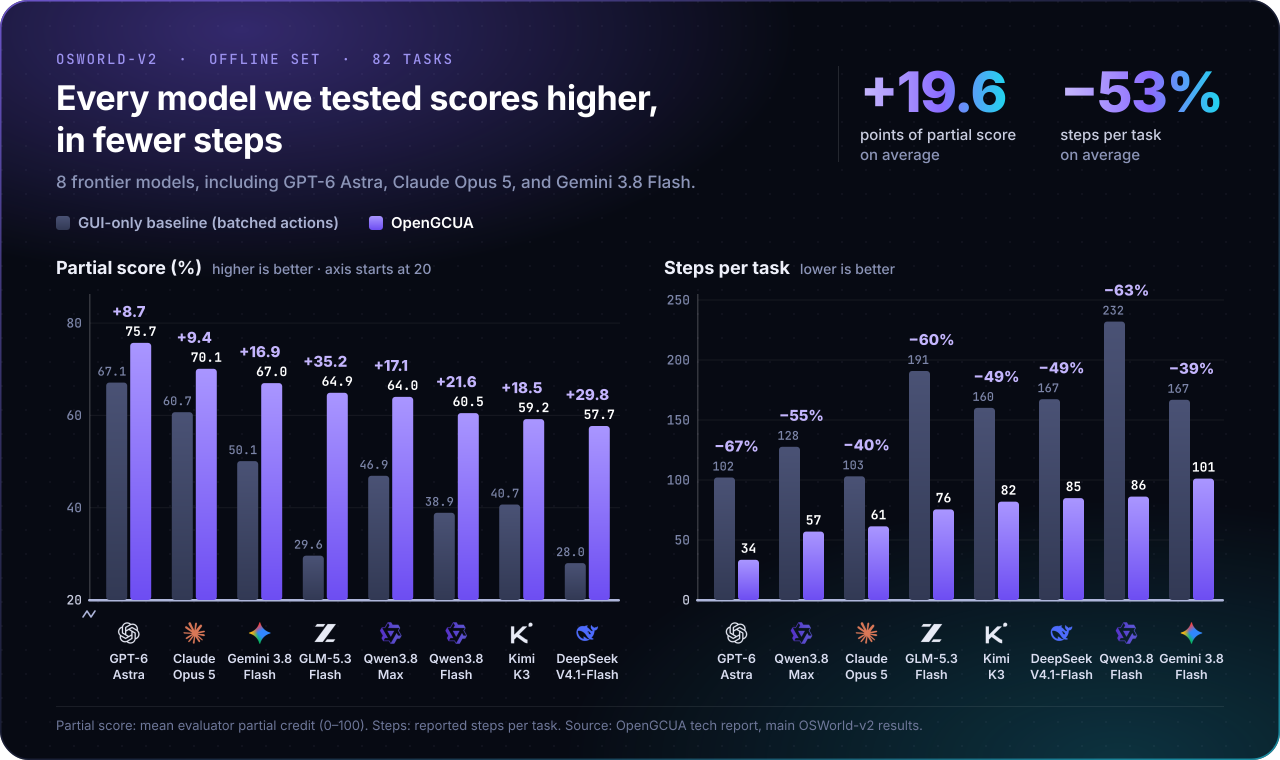
We test the design on two fronts: OSWorld-v2 with eight frontier models, and real Macs with our real-device harness.
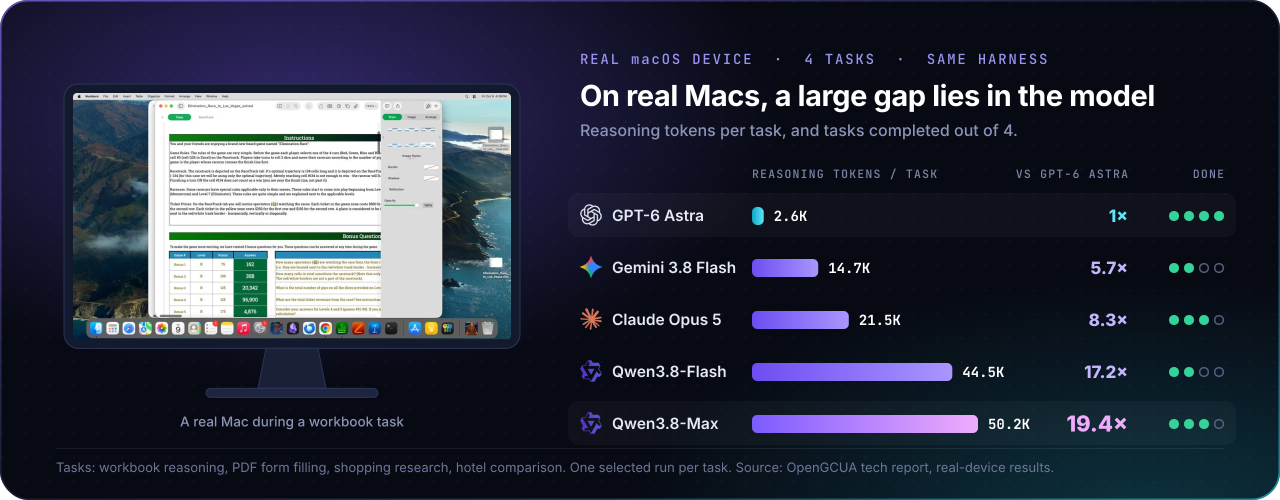
With our real-device harness held fixed, on four macOS tasks Qwen3.8-Max used 19.4 times the reasoning tokens of GPT-6 Astra and still completed fewer tasks. The case studies trace this gap to model behavior, which is what our next release, the GCUA model, works on. The paper has the full setup, ablations, and case studies.
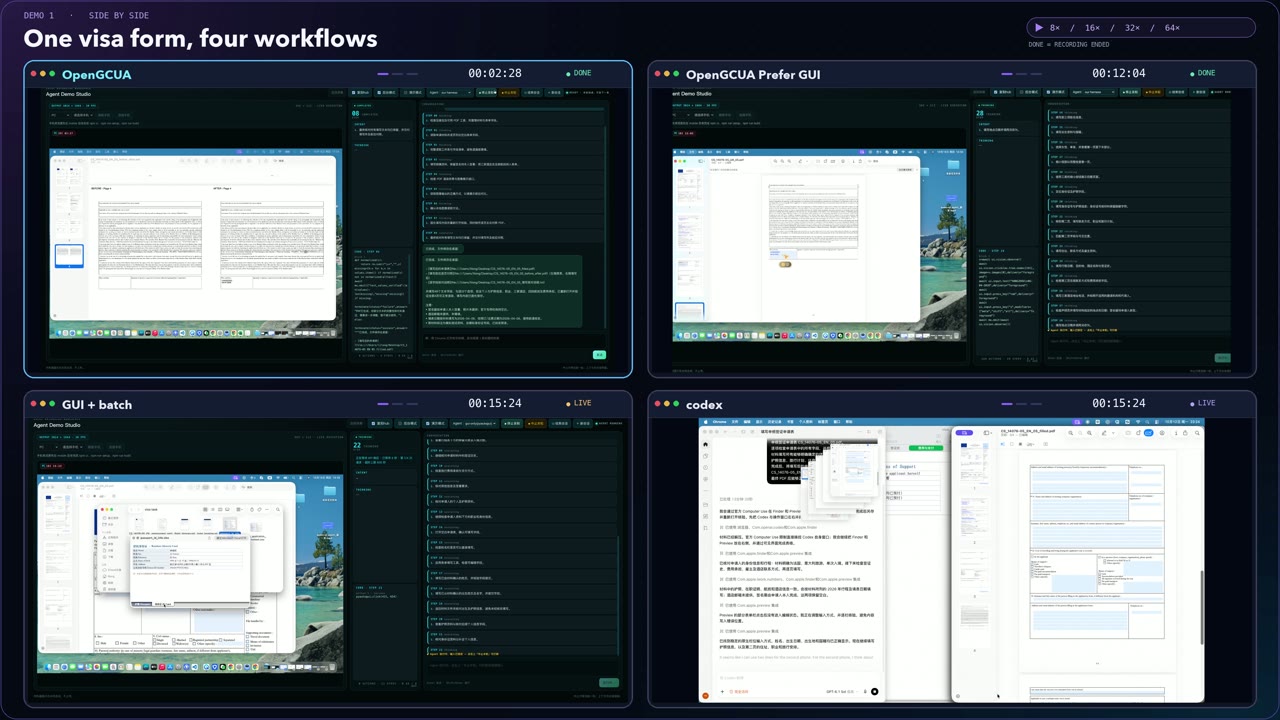
Click a screenshot to watch the video.
One visa form, four workflows. OpenGCUA, OpenGCUA (prefer GUI), GUI + batch, and Codex work on the same visa application on a real Mac. Playback speeds vary; use the in-video clocks for elapsed task time.
Hotel research. OpenGCUA researches and compares hotel options across desktop apps and the browser.
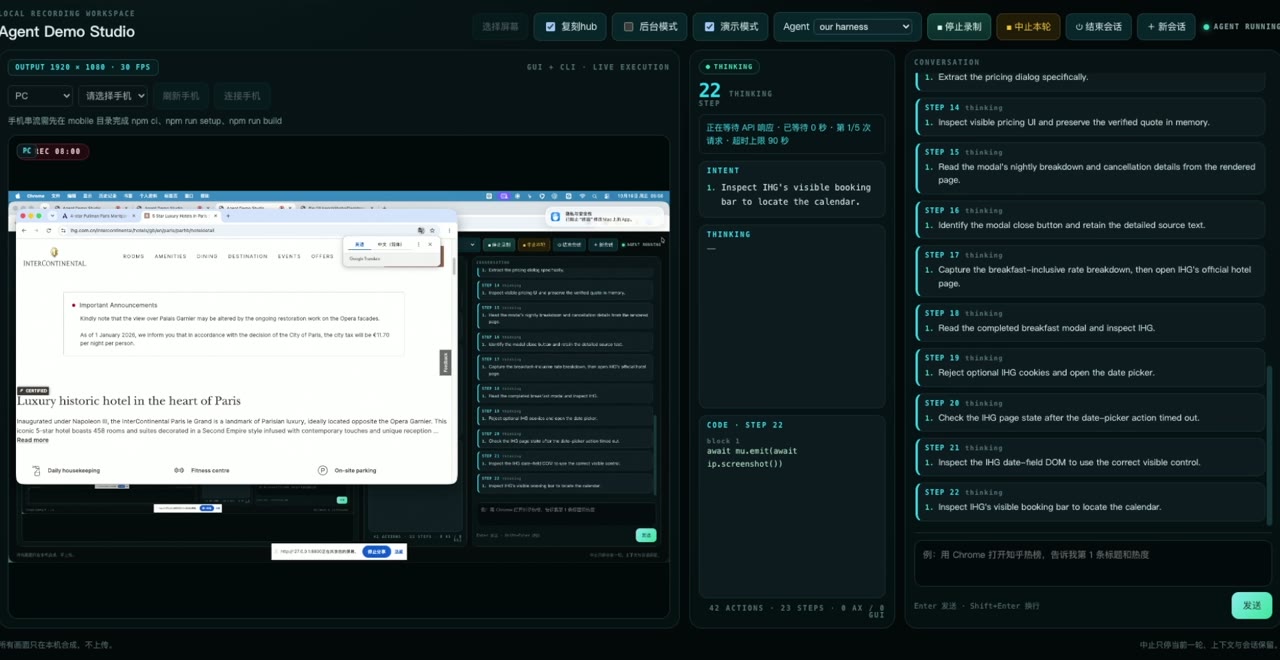
GUI click sequence. A short excerpt of GUI actions during the visa-form workflow.
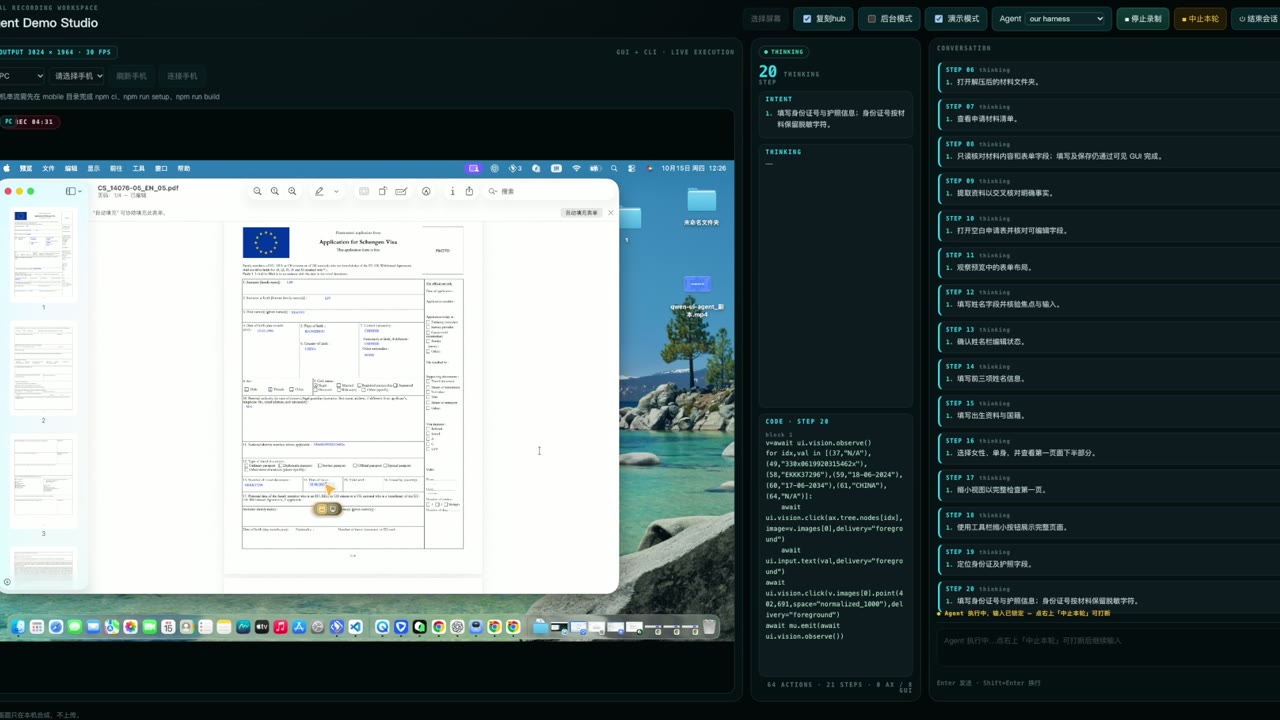
▶ Watch the click sequence · 0:25
This is the shortest path from a clean clone to an interactive agent. It requires macOS 14+, uv, Python 3.11–3.14, Rust/Cargo 1.89+, and Xcode Command Line Tools. Python 3.12 is recommended. Prebuilt SDK wheels do not require Rust.
git clone https://github.com/Tongyi-MAI/OpenGCUA.git
cd OpenGCUA
uv venv --python 3.12
source .venv/bin/activate
uv pip install -e ./packages/sdk -e ./packages/harness/runtime
Install the native driver app. Its daemon is included in the app bundle.
.venv/bin/mu setup macos
.venv/bin/mu doctor macos
.venv/bin/mu setup browser --engine chromium
.venv/bin/mu doctor browser --engine chromium
Create a private local configuration from the shipped defaults.
cp packages/harness/configs/macos_demo.json packages/harness/configs/local.json
Edit the following fields in packages/harness/configs/local.json:
{
  "api_key": "YOUR_API_KEY",
  "model_name": "qwen3.8-flash",
  "llm_base_url": "https://dashscope.aliyuncs.com/compatible-mode/v1",
  "llm_protocol": "openai"
}
Keep the other fields copied from macos_demo.json; the object above shows only the values
normally changed. Chat Completions-compatible gateways use "llm_protocol": "openai";
GPT reasoning endpoints with Responses support can use "openai-thinking" to replay
encrypted reasoning across turns. Native Anthropic Messages endpoints use "anthropic";
set "anthropic_thinking": {"type": "adaptive"} in local.json for Claude models
that support adaptive thinking. The Anthropic path preserves signed thinking blocks
in subsequent requests; reasoning_effort is not an Anthropic thinking switch.
Provider examples and every advanced setting are documented
in Setup, configuration, and troubleshooting.
Grant CuaDriver.app access in System Settings → Privacy & Security → Accessibility and Screen Recording, quit and reopen CuaDriver, then verify the installation:
.venv/bin/mu doctor macos
Start either the terminal agent or the browser demo studio. The terminal command automatically
uses the visual interface when stdin/stdout are an interactive terminal; pipes and TERM=dumb
keep the compatible plain-text interface.
# Persistent visual terminal conversation. Type /exit or press Ctrl-D to stop.
.venv/bin/python packages/harness/runtime/mac_agent.py
Force the original line-oriented output (also useful for scripts and logs).
.venv/bin/python packages/harness/runtime/mac_agent.py --ui plain
Or start the demo studio at http://127.0.0.1:8800.
bash packages/harness/runtime/start_demo.sh
In the visual terminal, reasoning and generated code are hidden by default. Use /reasoning on
or /code on to show future output, /help for shortcuts, and Alt/Option+Enter to insert a
newline. Ctrl-C during an active step aborts that turn; operations already sent to applications
or the shell are not rolled back.
If you see PERMISSION_DENIED, DEVICE_OFFLINE, a native-extension import error, or a recording
problem, use the error-indexed troubleshooting guide. For SDK-only
installation and wheel builds, see the SDK guide. The standalone
native macOS app is a separate distribution path with its runtime bundled.
OpenGCUA for macOS implements the menu bar assistant: enter a task, collapse into a floating control panel, reply to questions, and review saved results. SwiftUI + AppKit, with Python, the SDK and signed CuaDriver bundled inside the app; no browser or separately installed runtime is required. Apple Silicon / macOS 14+, currently a local development build. See the app guide for building, packaging and the remaining public-release validation. Version tags can automatically build the DMG and Python SDK downloads through GitHub Actions.
The Cross-Device SDK is the interface the model programs against. It binds every operation to an explicit device, app, window, or tab, keeps accessibility and vision as separate ways to observe and act, and lets one program coordinate several devices in a task.
import asyncio
from qwen_intelligence import Runtime
async def main():
    async with Runtime() as runtime:
        await runtime.add_macos(name="local-mac")
        async with runtime.session() as mu:
            mac = await mu.register("local-mac", name="mac")
            app = await mac.apps.get("com.apple.TextEdit")
            await mu.emit(await app.ui.ax.observe())   # TextEdit's accessibility tree
            await mu.emit(await app.windows.list())
asyncio.run(main())   # open TextEdit first
It has adapters for macOS, Android, browsers, and Linux, built on a Rust core with Python bindings.
The source setup above installs it. The package is qwen-intelligence-sdk, imported as qwen_intelligence
(mai_ui is the same API under its internal name). See packages/sdk/ and the examples.
OpenGCUA aims to open the full stack of generalist computer use. This preview releases the first layers, and the rest come next.
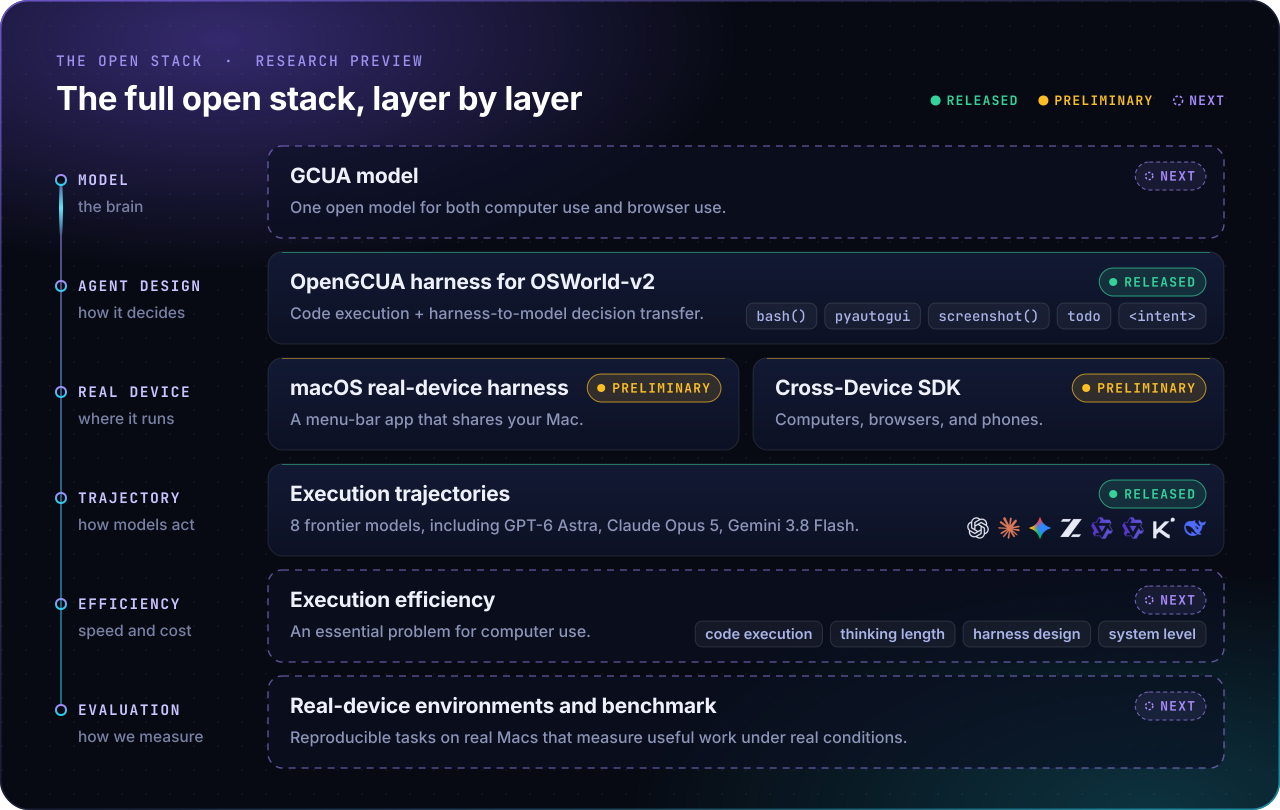
We do not commit to dates. The plan follows the evidence and what the community proposes, including directions beyond this list. Details are in ROADMAP.md.
Formally, a GCUA is an agent system that completes diverse computer tasks through visual interaction and programmatic access, choosing how to observe, act, and organize its work as each task requires. These are three decisions made at every step. A GUI agent leaves all three to fixed rules in its harness. OpenGCUA lets the model make them.
| Decision | GUI agent | OpenGCUA |
|:--|:--|:--|
| 👁️ What to observe | a screenshot after every action | screenshot(), only when the model needs one |
| ✋ How to act | one click or keystroke at a time | a Python program that combines the accessibility tree and app APIs, shell commands, and GUI actions, with loops, branches, and checks |
| 🗂️ How to organize work | fixed by the harness | the model keeps a todo list and states its `` before each program |
Two designs make this work. Code execution lets a model bring the programming skill it already has, and lets intermediate results decide the next operation without another model call. Harness-to-model decision transfer moves choices such as when to look and what to track out of harness rules and into the model. GUI agents, CLI agents, and GUI+CLI hybrids such as our earlier Qwen-UI-Agent are special cases that fix some of these decisions in advance.
Here is one real step by GPT-6 Astra on a CRM task in OSWorld-v2. Lines marked ... are cut, and long lines
are wrapped:
Apply the 29 evidence-based status changes while preserving all original
customer details.

todo.update(id="updates", kind="task", content="Applying 29 reviewed status changes ...",
            status="attempted")
r = bash(r"""...
cat > /tmp/apply_lead_statuses.py <<'PY'
...
current=api(p,'/api/crm/workspace')['workspace']
assert current==original,'Workspace changed since original review; stopped before edits.'
for change in changes:
    d=api(p,'/api/crm/leads/'+change['leadId'],'PATCH',{'status':change['to']})
    ...
    assert lead['status']==change['to']
...
print('VERIFIED:',len(log),'status changes; all 40 statuses correct; ...')
PY
python /tmp/apply_lead_statuses.py""")
if r.ok:
    todo.update(id="status_updates", kind="task",
                content="Applied and API-verified all 29 planned status changes. ...",
                status="claimed_verified")
In one step, the model states its intent and records its plan. It then writes and runs a script that stops if the app changed since it last looked, applies 29 edits through the app's own API, and checks each one. Only after the script succeeds does it record the result as verified.
We hope the community will shape not only how GCUAs are built, but also what they should be able to do and how progress is measured. There are three ways to join:
Start with CONTRIBUTING.md.
WeChat group |
Discord |
| Hanzhang Zhou Project co-lead hanzhang.zhou@alibaba-inc.com |
Long Li Project co-lead longyu.ll@alibaba-inc.com |
Yue Wang Project lead yue.w@alibaba-inc.com |
@misc{opengcua2026,
  title         = {{OpenGCUA}: Toward a Fully Open Stack for Generalist Computer Use},
  author        = {Hanzhang Zhou and Long Li and Quyu Kong and Lei Wang and
                   Panrong Tong and Long Chen and Tianyu Xia and Gongjie Zhang and
                   Xu Zhang and Chen Liu and Jianan Zhang and Chenglin Cai and
                   Zhengwen Zeng and Steven Hoi and Yue Wang},
  year          = {2026},
  eprint        = {2610.22200},
  archivePrefix = {arXiv},
  primaryClass  = {cs.CV},
  url           = {https://arxiv.org/abs/2610.22200}
}
OpenGCUA builds on our earlier work, Qwen-UI-Agent. The macOS driver is CuaDriver by trycua. We evaluate on OSWorld-v2, and our definition of a GCUA follows the system-level view of Agents' Last Exam.
Apache-2.0. See LICENSE.
→ →
→ →
→ →
→ →
→ →
→ →
→ →
→