1
 →

AI-native note-taking app & Evernote/Obsidian alternative. Instant all-platform sync, rich notes (tables, mind maps, diagrams, posters), web clipper & MCP. 100% free on Cloudflare or Docker.
tianma-if/edgeever is an open-source project on GitHub, mainly written in TypeScript. AI-native note-taking app & Evernote/Obsidian alternative. Instant all-platform sync, rich notes (tables, mind maps, diagrams, posters), web clipper & MCP. It currently holds 3,434 stars and 1,788 forks with 67 open issues, and was last pushed on 2026-11-19 (repository created 2026-06-26).
AI Homed tracks it on the Today's Trending board, currently at rank #54 with 26 new stars today.
 EdgeEver
AI-native note-taking app & Evernote/Obsidian alternative. Instant all-platform sync, rich notes (tables, mind maps, diagrams, posters), web clipper & MCP. 100% free on Cloudflare or Docker.

简体中文 | 繁體中文 | English | Español | Deutsch | Français | 日本語 | Polski | Русский
 Telegram Group |
🌐 Live Demo |
🗺️ Roadmap |
📱 Clients & Extension |
Feature Matrix & Capabilities |
📥 Note Migration
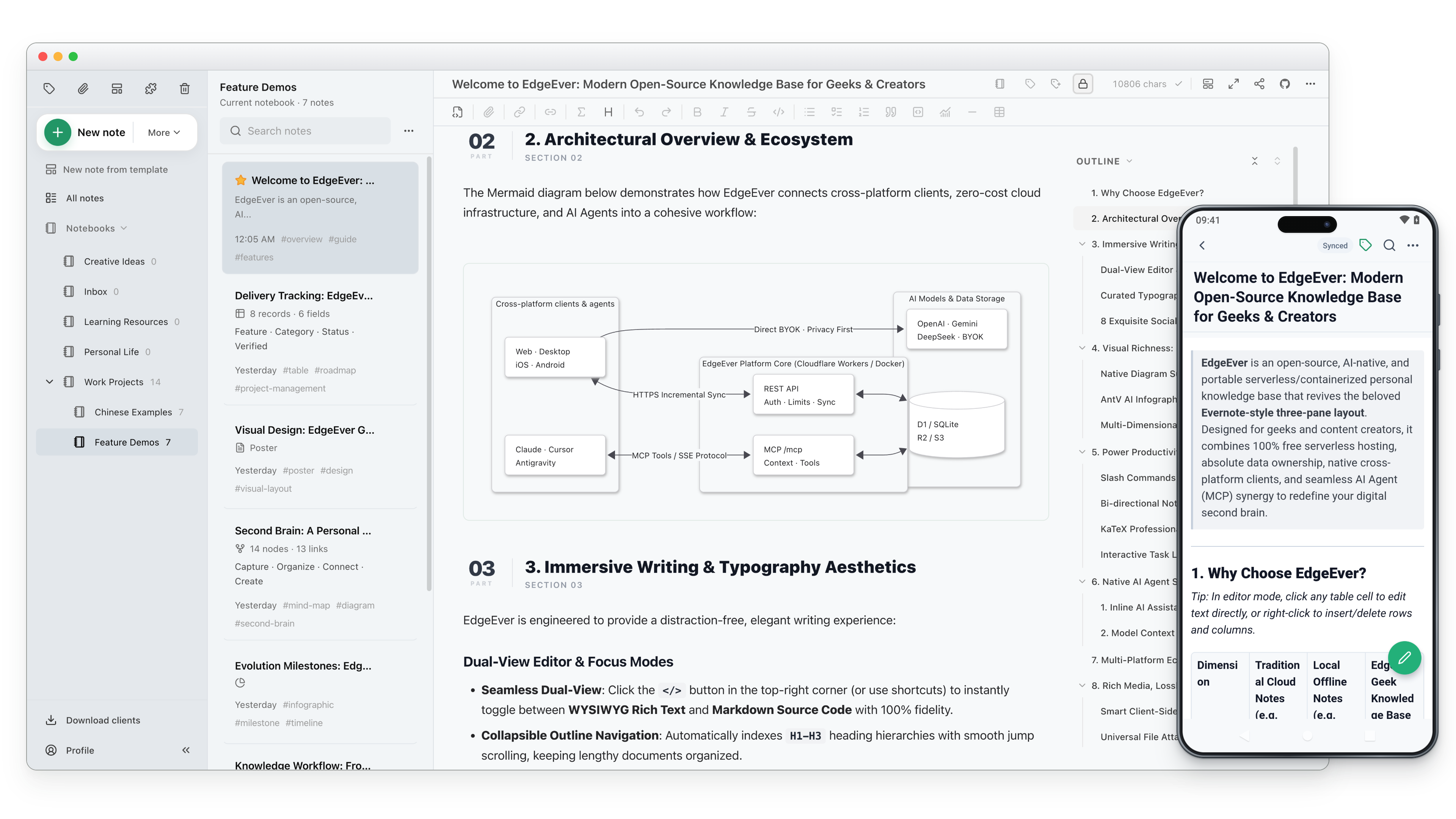
EdgeEver is a modern, open-source notes and knowledge base workspace. It preserves the classic, high-efficiency three-pane productivity workflow (Tree View · Note List · Editor) while offering an open data architecture and seamless AI Agent integration for complete ownership and smart productivity.
💡 Serverless & 100% Free Forever
EdgeEver can run within Cloudflare's free quotas with no server purchase or VPS maintenance. Users who prefer a VPS, NAS, or home server can deploy the same application with Docker.
⭐ If EdgeEver is useful to you, consider giving it a Star. Your support helps more people discover the project.
Many users of note-taking apps and personal knowledge bases simply want a reliable, open, and fast personal knowledge base. However, existing mainstream solutions all present tradeoffs:


The iOS app requires an Apple ID from outside mainland China.


An all-in-one workspace connecting inspiration capture, deep creation, and knowledge compounding (👉 Explore 20 step-by-step showcases with screenshots):
| Module | Core Features | Advanced Features |
| :--- | :--- | :--- |
| Writing & Editing | • Classic 3-pane layout with resizable panel width
• Seamless toggle between rich-text WYSIWYG & raw Markdown
• Syntax highlighting, math formulas, task lists & Focus Mode
• Second-level auto-save, instant multi-device sync & revision history | • Native Poster Notes: Canvas-based structured visual card layouts, double-click to edit
• WeChat Official Account Formatter: One-click copy with inline CSS to newsletters/blogs
• Poster Image Export: Curated themes, Monogram avatars; export to MD, HTML, or PDF
• Desktop Productivity Tools: Global shortcut screen-region capture to notes, automatic writeback for externally edited attachments, and multi-window note editing |
| Organization & Search | • Infinite-depth notebooks & folder tree navigation
• Tagging system, drag-and-drop sorting, batch note merging/moving
• Millisecond-level full-text search with historical filtering | • Standalone Knowledge Base Publishing: One-click publish entire notebooks as static documentation sites with tree navigation & password protection
• One-Click Third-Party Migration: Native GUI import for flomo, Evernote, Obsidian, and Joplin with full notes, hierarchies, and attachments
• Multi-user spaces & physical tenant data isolation |
| Capture & Media | • Universal attachment uploads (PDF, Office, audio/video, archives)
• Browser extension precision clipping for web text & images
• Mobile system share sheet to save photos & articles | • Deep Multi-Platform Structured Clipping: Deeply adapted for Xiaohongshu, X (Twitter), Zhihu, Reddit, GitHub, YouTube, Bilibili, and 20+ sources
• WeChat Chat History Archiving: One-click full transcript import with timestamps, quotes, emojis, and media
• Client-Side Image Compression: Automatic 50%–90% silent size reduction; chunked streaming safely supports up to 1 GiB files
• OSS Object Storage & Desktop Image Hosting: S3-compatible object storage per instance; direct desktop uploads via PicGo / PicList and CloudFlare ImgBed |
| Data & Visuals | • Native table editing & Markdown table rendering
• Native Mermaid diagrams (flowcharts, sequence diagrams, architecture) | • AI Multi-Dimensional Tables: Prompt-to-database with automatic field typing (tags, dates, selects)
• Public Online Collection Forms: One-click shareable forms without login, syncing responses into tables in real time
• AI Diagram & Infographic Generation: In-place creation of timelines, comparison charts, quadrant matrices & mind maps |
| AI & Ecosystem | • Companion sidebar AI assistant for summaries, proofreading & translations
• BYOK (Bring Your Own Key): compatible with OpenAI, Claude, Gemini & custom endpoints | • Native Agent Protocols (MCP & ACP): Built-in MCP for external agent read/write; ACP in desktop app to drive local agents such as Codex, Claude Code, Antigravity and WorkBuddy directly
• AI Audio & Video Transcription: Client-side audio extraction and chunking, connecting directly to OpenAI-compatible speech models to transcribe and insert text into notes
• Open Plugin API & Theme Ecosystem: One-click install from marketplace or GitHub with cross-device sync; supports reading/writing notes and editor interactions, custom panels and commands, AI invocation, desktop scheduled tasks, and codeless theme customization |
| Multi-Device Sync & Foundation | • Seamless, low-latency sync across desktop, mobile, and web with zero device limits
• Official client support across Web, macOS, Windows, Linux, iOS, and Android
• Offline-first with auto-sync queue: write smoothly offline, automatically resume and sync when reconnected
• Standard SQLite database, lossless ZIP backup & Markdown export/import | • Zero Server Cost for Life: 100% runnable on Cloudflare Free tier (~150k short notes & ~50k images)
• Flexible Docker Self-Hosting: One-click deployment for VPS, NAS, or home server with millions of notes & instant sync
• Desktop Auto-Backup: Scheduled local backups with multi-snapshot retention, optional password encryption, and automatic WebDAV off-site copies
• Server-side brute-force protection, TOTP two-factor authentication (2FA), active device session management, and tenant isolation |
Cloudflare is the recommended zero-server deployment. Docker is available for users who prefer a VPS, NAS, or home server.
For Cloudflare, choose either of the following online deployment options:
Copy the prompt below directly into an AI Agent (such as Codex, Claude Code, DeepSeek Harness, WorkBuddy, Antigravity, etc.). During execution, if access to GitHub or Cloudflare is required, review the requested permissions and follow the prompts to authorize access.
Deploy EdgeEver entirely through GitHub and Cloudflare:
1. Fork https://github.com/tianma-if/edgeever.
2. Create D1 edgeever and R2 edgeever-resources in Cloudflare.
3. In Workers & Pages, select "Start with Hello World!" and create a Worker named edgeever.
4. Add the user's chosen password as the runtime Secret EDGE_EVER_AUTH_PASSWORD
   under Settings → Variables and Secrets, and deploy the Secret (preferably at least
   32 characters). The username defaults to admin.
5. Only after the Secret is deployed, open this Worker's Settings → Builds → Connect
   and connect the Fork's main branch.
6. In this Worker's Settings → Builds → API token, select or create the Cloudflare API token used for deployment, with D1 read/edit permission for the target account.
7. In the Fork's GitHub repository, open Actions → Update deployed EdgeEver, enable the workflow if prompted, and select Run workflow on main. After confirming in Cloudflare that the corresponding build succeeded and deployment completed, verify /api/health and /api/openapi.json, then log in with the administrator
   username and password.
   This workflow will automatically sync future stable releases and fixes.
Detailed requirements: AI Agent Cloudflare Deployment.
Complete the following 7 web steps strictly in order:
1. Fork the Repository: Click Fork at the top right of GitHub to fork EdgeEver into your personal account.
2. Create Cloudflare Resources: Create D1 edgeever and R2 edgeever-resources.
3. Create the Worker: In Cloudflare Workers & Pages, select Create application → Start with Hello World!, name the Worker edgeever, and deploy it. This creates a placeholder; EdgeEver is deployed in Step 7.
4. Set the Administrator Password: Under the Worker’s Settings → Variables and Secrets, add EDGE_EVER_AUTH_PASSWORD as type Secret and click Deploy. Its value is your chosen login password, preferably at least 32 characters. Complete this before connecting the Fork.
5. Connect the Fork: In the existing Worker’s Settings → Builds → Connect, select the Fork and production branch main.
6. Configure Deployment Permissions: In this Worker's Settings → Builds → API token, select or create the Cloudflare API token used for deployment, with D1 read/edit permission for the target account.
7. Build & Verify: In the Fork's GitHub repository, open Actions → Update deployed EdgeEver, enable the workflow if prompted, and select Run workflow on main. After confirming in Cloudflare that the corresponding build succeeded and deployment completed, confirm /api/health returns 200 and verify login. This workflow will automatically sync future stable releases and fixes.
📖 For full step-by-step instructions and configuration details, see the Online Deployment Guide.
Custom Domain & Access: After deployment, you can directly use the default *.workers.dev domain assigned by Cloudflare, or attach your own custom domain in the Worker settings under Settings → Domains & Routes.
> Cloudflare R2 Activation: Although Cloudflare R2 offers a generous free storage allowance that note-taking workloads remain completely within, you must first activate an R2 subscription and add a payment method. Cloudflare officially supports UnionPay, Visa, Mastercard, and other cards, as well as PayPal, Apple Pay, Google Pay, and other payment methods.
Docker runs the same frontend, API routes, services, authentication, MCP implementation, and migrations as Cloudflare. The container uses SQLite with local files or S3-compatible attachment storage and supports amd64 and arm64. See Deploy EdgeEver with Docker and Self-hosting and Docker architecture.
Use the GitHub-hosted installer and the official GHCR image:
curl -fsSL https://edgeever.org/install.sh | bash
The command pulls the latest image, generates an administrator password, and starts EdgeEver with Docker Compose.
See the Docker deployment guide for manual deployment and configuration.
After installation, updates run automatically each day by default. To update manually, run ~/edgeever/update.sh on the deployment server.
---
Whether for routine data backups, seamless cross-instance migration, or switching from existing note platforms, EdgeEver provides reliable, complete data mobility:
notes/ directory keeps clean plaintext Markdown files and attachments for local archival or direct reading, while internal structured metadata enables lossless full restoration across different EdgeEver instances. Importing preserves existing unrelated data on the target instance and automatically overwrites records with matching IDs..edgeever.enc archives whenever content changes, plus automatic WebDAV uploads to a NAS or compatible storage after each local backup.Create an API token in Profile -> API / MCP and copy the Remote MCP configuration in one click to let AI Agents such as Claude Code, Codex, DeepSeek Harness, and Antigravity securely manage your knowledge base within account permissions. EdgeEver supports full CRUD for text notes, visual diagram notes (mind maps, flowcharts, and architecture diagrams), structured table notes, and native poster notes. Agents can also manage notebook hierarchies, tags, attachments, revision history, note templates, and AI instructions.
For client setup, token access levels, troubleshooting and suggested rules for agents, see Using EdgeEver with MCP clients.
💡 Inspiration:
Make AI your true knowledge orchestrator and creative co-pilot—instantly turn concepts into interactive mind maps, flowcharts, architecture diagrams, and structured tables, while supplying private context to your AI Agents. Paired with EdgeEver’s powerful rich-text editing and elegant typography, AI-assisted content becomes beautifully structured, polished, and publication-ready knowledge assets.
Once deployed, a single instance supports multi-account login.
The instance administrator can create, disable, or reset member accounts in Profile -> User accounts. Each member gets a fully isolated personal workspace, including notebooks, notes, attachments, Trash, import/export, and MCP tokens. An intuitive storage usage dashboard provides real-time visibility into attachment storage consumed across the whole instance as well as per account.
/upload, so a PicList behind a reverse proxy works too.{Y}/{m}/{d} and {memoId}. Web access requires HTTPS and CORS allowing your EdgeEver origin and the Authorization header. Credentials stay in the current browser or desktop app; images are excluded from EdgeEver backups.Web and desktop apps support functional plugins and custom themes, installable from the official marketplace, GitHub, or a Manifest URL, with seamless sync across your workspace. Developers can extend capabilities using @edgeever/plugin-api; see the plugin development guide and marketplace submission policy.
---
bun install
bun run dev
Local develop
→ →
 →
 →
 →
 →
 →
 →