1
 →

📡 Your own AI-powered news radar. Generates daily briefings in English & Chinese. | 用 AI 构建你专属的新闻雷达
Thysrael/Horizon is an open-source project on GitHub, mainly written in Python. 📡 Your own AI-powered news radar. Generates daily briefings in English & Chinese. | 用 AI 构建你专属的新闻雷达 It currently holds 12,419 stars and 1,815 forks with 26 open issues, and was last pushed on 2026-11-03 (repository created 2026-02-20).
AI Homed tracks it on the Today's Trending board, currently at rank #24 with 121 new stars today.
Enjoy the News itself. Leave others to Horizon



📡 Your own AI-powered news radar. Generates daily briefings in English & Chinese. | 构建你专属的 AI 新闻雷达
📖 Live Demo · 📋 Configuration Guide · 💬 QQ Group · 简体中文 · 日本語
|
Ranked Daily Briefing 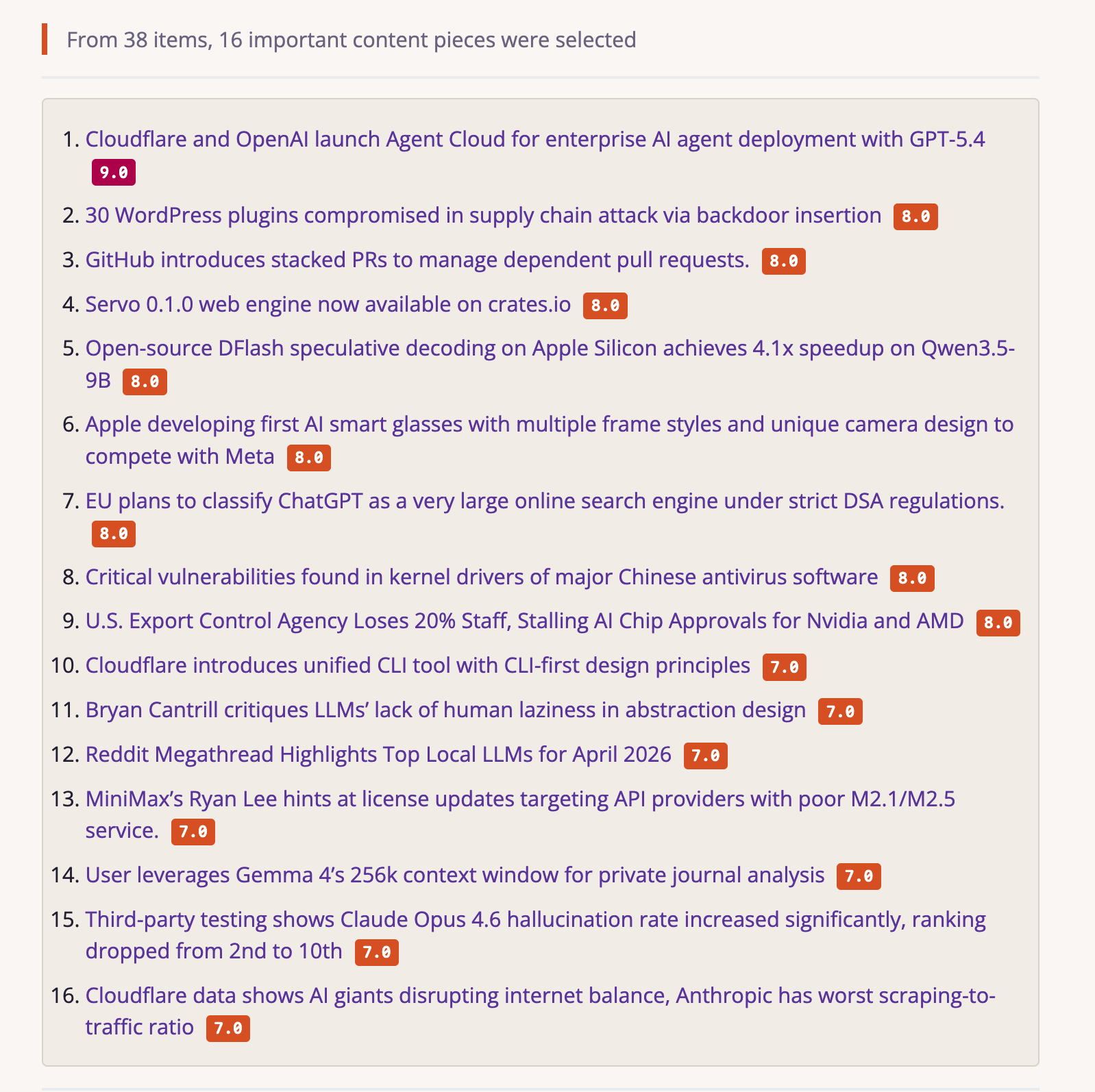
|
Context, Summary & Discussion 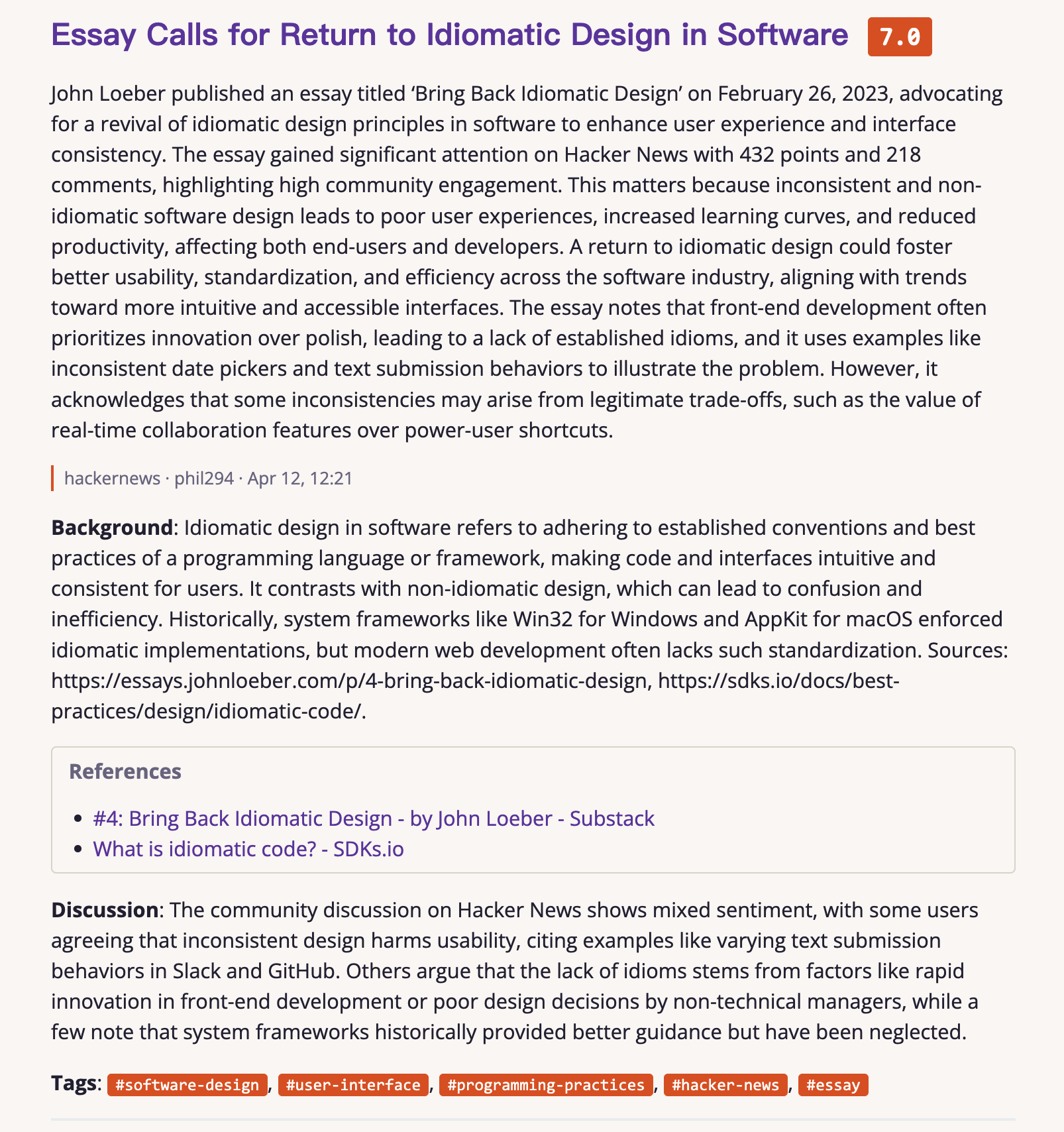
|
|
Terminal Output 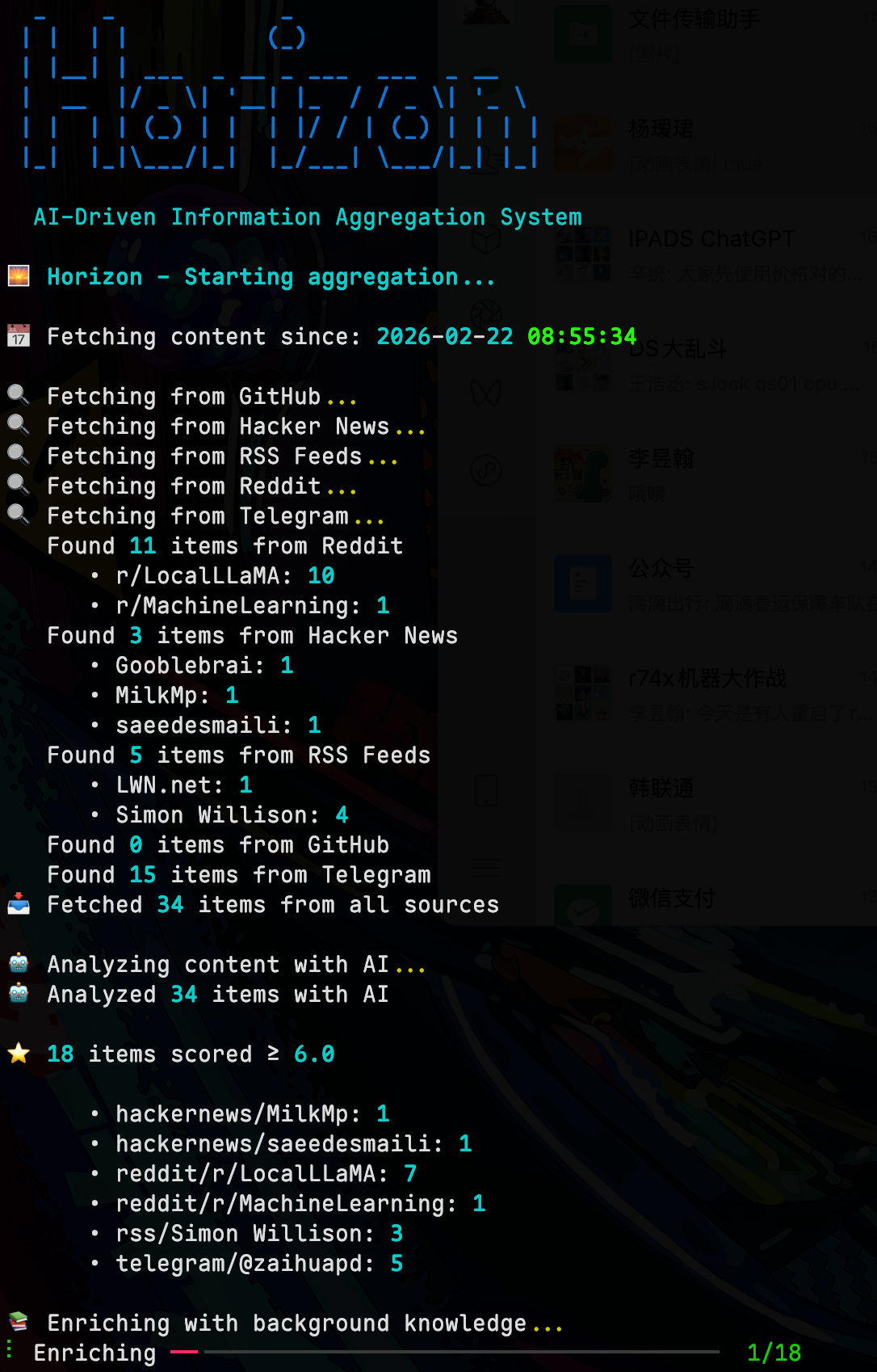
|
Feishu Notification 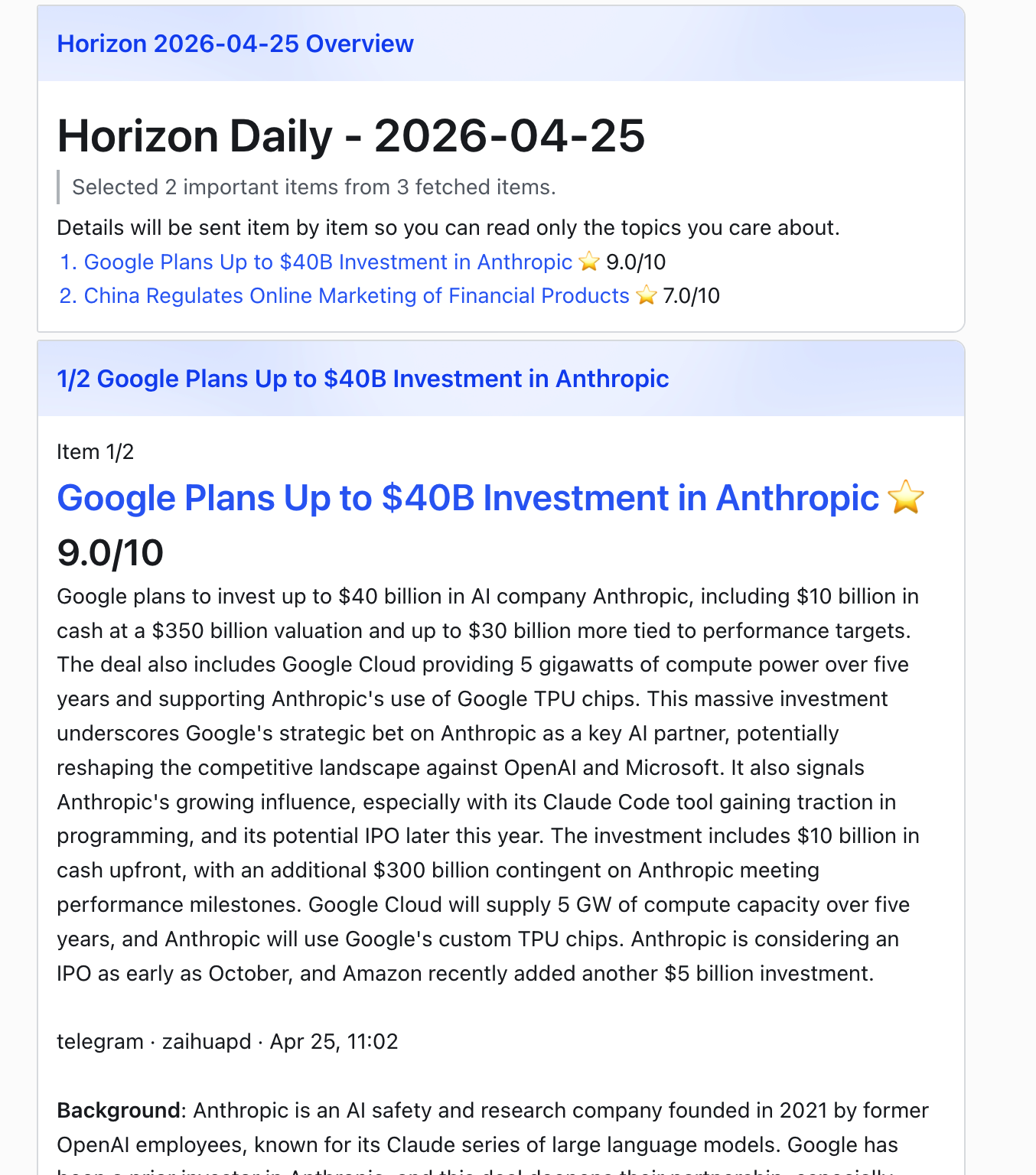
|
|
Email Delivery 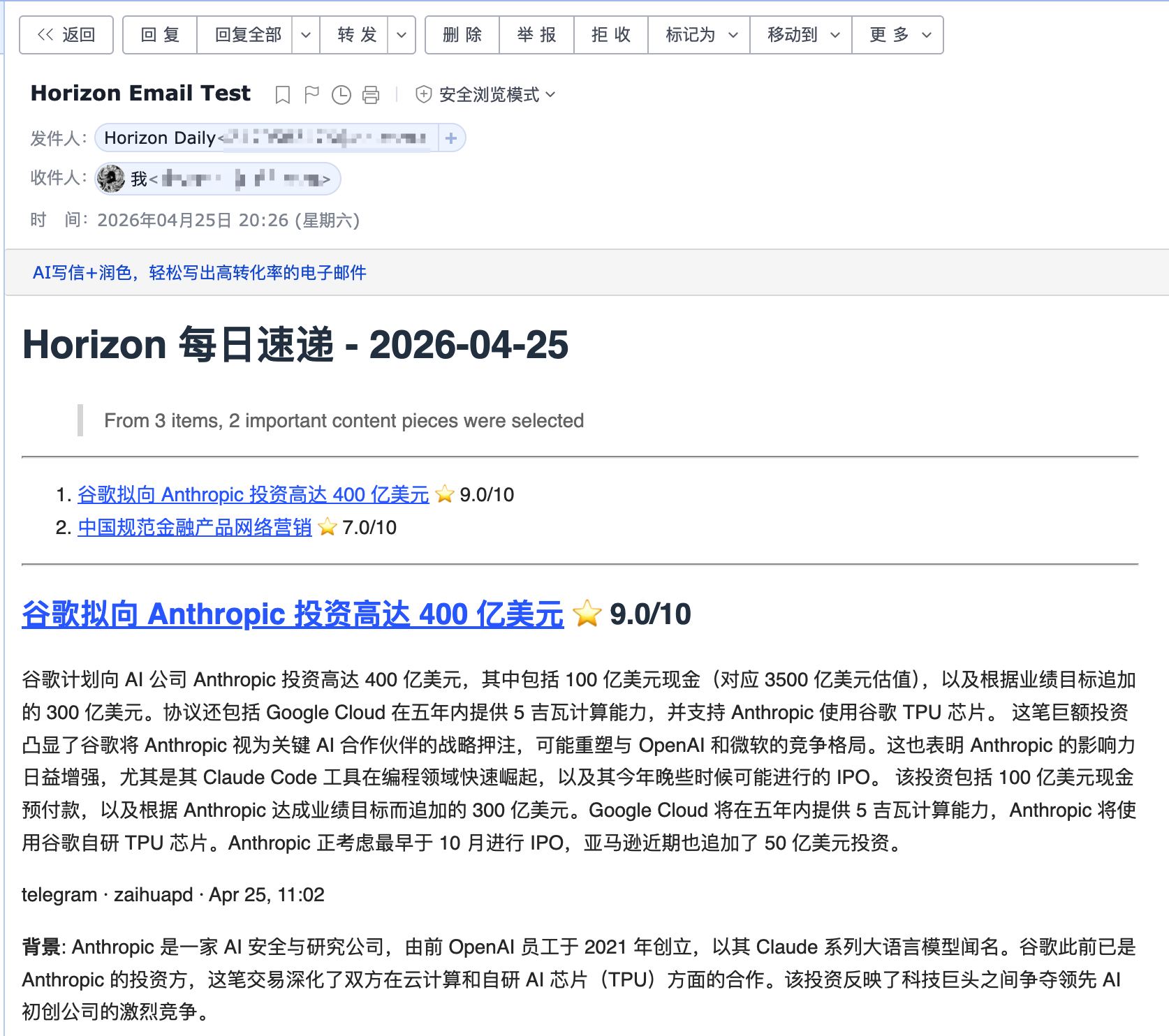
|
WeChat Delivery 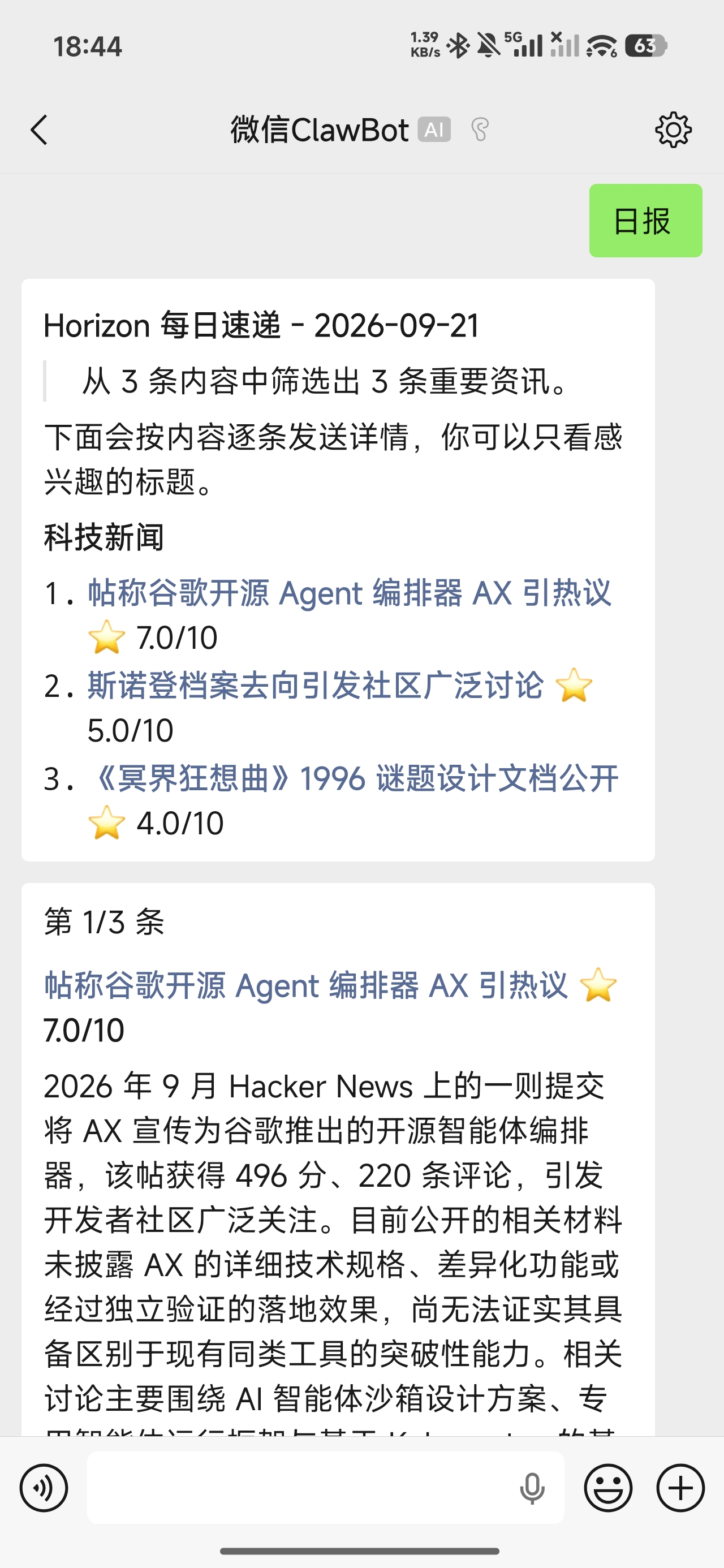
|
Good reads are scattered across feeds, forums, and timelines. Your attention isn't unlimited. Horizon collects, filters, and deduplicates them, then brings the worthwhile ones to you with context and community discussion.
Your taste shapes what you read—and what you want from it. A news story calls for “why it matters”; an engineering deep dive calls for “what I can use.” Horizon's profiles give each kind of content its own scoring criteria and output, for a briefing that feels handpicked.
A profile is a reusable set of editorial rules: what belongs, what's worth keeping, and what to write. Built-in examples:
| What you follow | Profile | What you get |
|---|---|---|
| Technology news | tech-news | Events and context, with impact and community discussion when useful |
| Engineering deep dives | tech-blog | Background, solution, and practical takeaways |
| AI creator material | ai-creator | A summary, with timely hooks and content angles when useful |
Assign a profile to a source, or let AI choose. Want a different take? Adapt an existing profile—usually without changing Python. Make a profile your own →
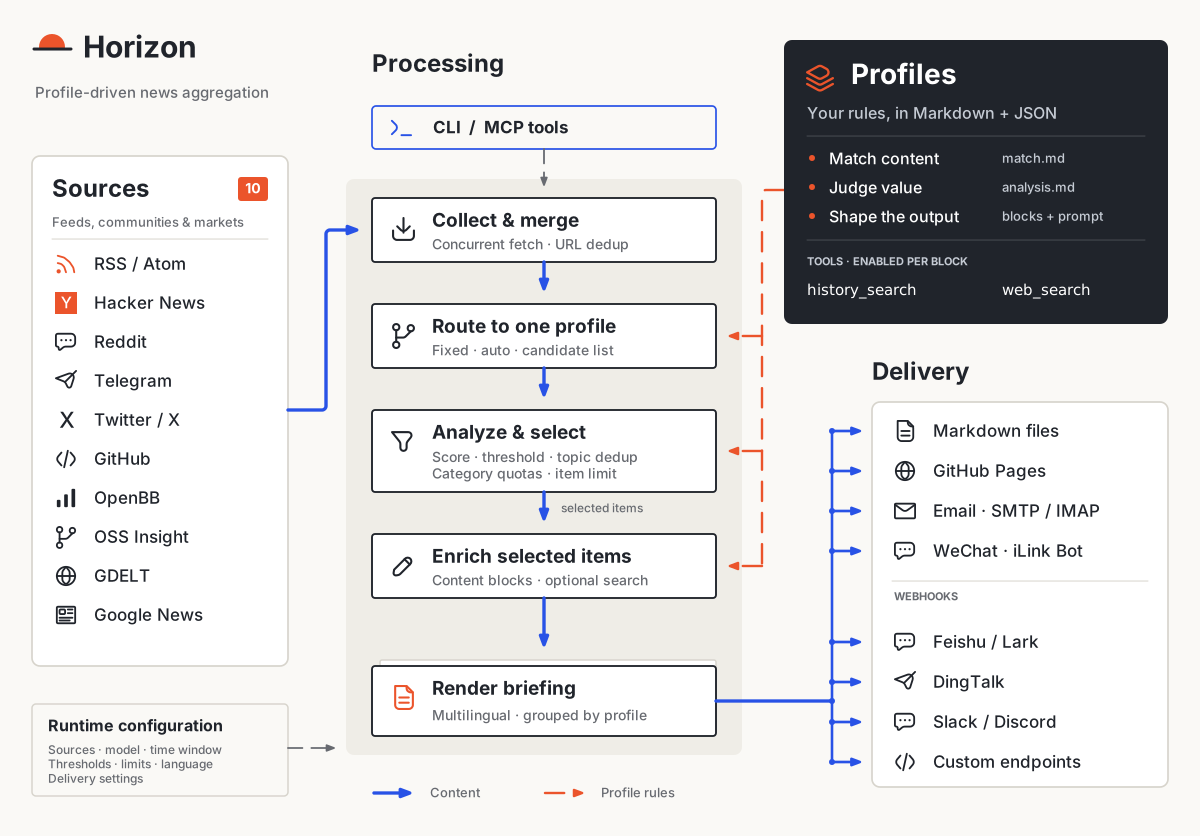
Profiles define the treatment; runtime settings reflect your reading preferences. Each item routes to one profile. Analysis, filtering, and deduplication happen before enrichment, then the selected items become a briefing grouped by profile.
Run the full pipeline through the CLI, or let an AI assistant call its stages through MCP.
Let your AI assistant configure sources, customize Profiles, and run Horizon:
npx skills add Thysrael/Horizon --skill horizon -g
Setup and usage · Download Skill ZIP
The command requires Node.js 22.20+. Then ask your assistant to install and configure Horizon, or follow the Quick Start below.
Option A: Local Installation
git clone https://github.com/Thysrael/Horizon.git
cd Horizon
Install with uv (recommended)
uv sync
Install test/development extras when needed
uv sync --extra dev
Or with pip
pip install -e .
dev is currently defined as an optional extra in pyproject.toml, so use uv sync --extra dev for pytest and other development dependencies.
If you want the optional OpenBB financial-news source, install its extra too:
uv sync --extra openbb
If openbb pulls packages without wheels on your machine, install the SDK manually with binaries only:
uv pip install --only-binary=:all: openbb openbb-benzinga
Option B: Docker
git clone https://github.com/Thysrael/Horizon.git
cd Horizon
Optional: build with comma-separated extras before the first run
docker compose build --build-arg EXTRAS=openbb horizon
Full-text extraction with trafilatura is included in the base install. The twitter extra also requires a Playwright browser and system packages, which the current Dockerfile does not install.
Option A: Interactive wizard (recommended)
uv run horizon-wizard
The wizard asks about your interests (e.g. "LLM inference", "嵌入式", "web security") and auto-generates data/config.json. See Interactive Wizard for CLI options.
Eligible ChatGPT subscribers can choose openai-chatgpt to use their plan through Sign in with ChatGPT, without an OpenAI API key.
Option B: Manual configuration
cp .env.example .env          # Add your API keys
cp data/config.example.json data/config.json  # Customize your sources
Minimal manual configuration:
{
  "ai": {
    "provider": "openai",
    "model": "gpt-4",
    "api_key_env": "OPENAI_API_KEY"
  },
  "sources": {
    "rss": [
      {
        "name": "Simon Willison",
        "url": "https://simonwillison.net/atom/everything/",
        "profile": "tech-news"
      }
    ]
  },
  "processing": {
    "profiles_dir": "profiles",
    "default_profile": "tech-news",
    "profile_settings": {
      "tech-news": {
        "threshold": 7.0,
        "topic_dedup": true
      }
    }
  }
}
An explicit source profile uses that profile directly. Omit it or set it to
"auto" to let AI match the item against all available profiles. Set it to an
array such as ["tech-news", "finance-news"] to restrict AI matching to those
profiles. See
Processing Profiles for profile structure and behavior.
Per-profile user preferences such as score thresholds and topic deduplication
belong in processing.profile_settings, not in the profile files.
Balanced digest (optional)
Limit the final digest size and prevent one category from dominating the
results. Categories come from source configuration such as
sources.rss[].category.
{
  "digest": {
    "max_items": 20,
    "category_groups": {
      "ai": {
        "limit": 5,
        "categories": ["ai-news", "ai-tools", "machine-learning"]
      },
      "finance": {
        "limit": 5,
        "categories": ["finance", "business", "equities"]
      }
    },
    "default_group": "other",
    "default_group_limit": 3
  }
}
Group limits are applied after profile filtering and before enrichment. If
category_groups, max_items, and default_group_limit are omitted, no balanced
digest limits apply.
api_key_env must be the name of an environment variable, not the API key
itself. Put the real secret in .env:
OPENAI_API_KEY=sk-your-key
For Gemini, use GOOGLE_API_KEY:
{
  "ai": {
    "provider": "gemini",
    "model": "gemini-2.0-flash",
    "api_key_env": "GOOGLE_API_KEY"
  }
}
Any string value in data/config.json can reference environment variables with ${VAR_NAME}. This is useful for values such as ai.base_url, private RSS feed URLs, webhook endpoints, or custom header templates.
For the full reference, see the Configuration Guide.
A. Local installation
uv run horizon [OPTIONS]
B. Docker
docker compose run --rm horizon [OPTIONS]
| Option | Default | Description |
|--------|---------|-------------|
| --hours N | 24 | Fetch from last N hours |
| -d, --data-dir PATH | data | Path to the data directory |
| -c, --config PATH | /config.json | Path to config file |
| -l, --log-level LEVEL | WARNING | Logging level (DEBUG/INFO/WARNING/ERROR/CRITICAL) |
--data-dir changes the state directory, including summaries, subscribers, and the default config location; --config changes only the config file. The generated report is saved to data/summaries/ (or /summaries/ if --data-dir is set). See Configuration Paths for combining both flags and initializing a custom config location.
Schedule Horizon with GitHub Actions using the daily workflow template. The template is disabled in this repository; configure it for your deployment and rename it to daily-summary.yml to enable it.
| Source | What it fetches | Comments | |--------|----------------|----------| | Hacker News | Top stories by score | Yes (top N comments) | | RSS / Atom | Any RSS or Atom feed | — | | Reddit | Subreddits + user posts | Yes (top N comments) | | Telegram | Public channel messages | — | | Twitter / X | User timelines + keyword searches (Apify) | Yes (top N replies) | | GitHub | User events & repo releases | — | | OpenBB | Financial company news by watchlist/provider | — | | OSS Insight | Trending open-source repositories | — | | GDELT | News matching a search query | — | | Google News | News search via RSS | — |
Horizon can publish or deliver the generated briefing in several ways:
| Channel | What it does |
|---------|--------------|
| GitHub Pages Daily Site | Copies generated Markdown into docs/ so GitHub Pages can publish a daily-updated briefing site |
| Email Subscription | Sends the daily briefing to subscribers and handles subscribe/unsubscribe requests through SMTP/IMAP |
| Webhook Notification | Pushes success or failure results to Feishu/Lark, DingTalk, Slack, Discord, or any custom webhook endpoint |
| WeChat Notification | Sends briefings through iLink Bot after QR login and a message from you; WeChat reply limits apply |
For delivery setup, see the Configuration Guide. To run pipeline stages from an AI assistant, use the MCP Server: tools · client setup.
Horizon is an open-source project maintained in spare time. If you'd like to support the project or be listed here, feel free to open an issue or email me.
| Supporter | Details |
|-----------|---------|
|  | Thanks to Modelflare for sponsoring this project! Modelflare: Full strength, stable, nothing watered down. Global SOTA models at a lower cost. Operated by US-based Havenbyte LLC, Modelflare supports GPT, Claude, Gemini, Grok, and other leading models through common compatible protocols, plus 40+ image and video models.
Cache compensation is a highlight: selected OpenAI groups (price-first, stable, and premium) guarantee daily cache hit rates of 65%, 75%, or 85%, and if eligible requests fall short, Modelflare refunds the difference, visible on the usage dashboard after settlement.
Special offers: a single top-up of US$20 unlocks the GPT discount group at a 0.015x price multiplier, and a single top-up of US$50 unlocks the Claude discount group at a 0.03x multiplier. Register via this exclusive link to get started. |
|  | Compshare currently supports Horizon. Compshare is UCloud's AI cloud platform, offering cost-effective monthly and pay-as-you-go domestic model agent plans starting from RMB 49/month, as well as stable officially relayed overseas models. It supports Claude Code, Codex, and API usage, with enterprise-grade high concurrency, 24/7 technical support, and self-service invoicing.
Register through their link to receive a free RMB 5 trial credit. |
|  | OfoxAI is a unified AI API platform bringing together text, image, and video models from multiple providers. With OpenAI-compatible endpoints and native Anthropic and Gemini interfaces, developers can access models for AI applications, agents, and content creation through one platform.
Explore OfoxAI models and APIs → |
| 
AstraFlow | Thanks to AstraFlow for sponsoring Horizon! AstraFlow is UCloud's model platform, bringing together 200+ leading AI models and video generation models for text and video creation in one place. It offers per-key billing and detailed usage records.
Exclusive offer for Horizon users: claim RMB 50 in compute credits to try model APIs and content creation. |
| Guide | Description | |-------|-------------| | Configuration | AI providers, sources, profiles, filtering, email, webhook, WeChat, GitHub Pages, and MCP setup | | Processing Profiles | Profile routing, prompts, runtime filtering preferences, enrichment blocks, and tools | | Scoring | How Horizon evaluates and ranks news items | | Scrapers | Source scraper details and extension notes | | Extractors | Full article extraction for RSS sources | | MCP Tools | Tool reference for MCP-compatible clients | | Agent Skill | Use an AI assistant to configure, run, customize, schedule, and extend Horizon |
Horizon already supports the full daily briefing loop: multi-source collection, profile-driven analysis and enrichment, deduplication, comment summaries, bilingual generation, GitHub Pages publishing, email delivery, webhook delivery, WeChat delivery, Docker deployment, MCP integration, and the setup wizard.
Planned improvements:
pip installJoin the Horizon user and developer QQ group to share sources, profiles, and deployment tips.

QQ group: 110612190
→ →
 →
 →
 →
 →
 →
 →