1
 →
→
Self-hosted AI gateway for multi-channel, multi-credential setups — API keys and subscription accounts, scheduling, failover, request logs and usage. 自托管 AI 网关:多渠道多凭据统一接入,含密钥与订阅账号、调度容错、日志与用量。
tbphp/gpt-load is an open-source project on GitHub, mainly written in Go. Self-hosted AI gateway for multi-channel, multi-credential setups — API keys and subscription accounts, scheduling, failover, request logs and usage. It currently holds 6,876 stars and 761 forks with 0 open issues, and was last pushed on an unknown date (repository created unknown).
AI Homed tracks it on the Today's Trending board.

A self-hosted AI gateway for multi-channel, multi-credential setups
API keys, subscription accounts, traffic scheduling, failure handling, request logs, and usage accounting — behind a single entry point.
English · 中文 · 日本語 | Official Website


---
 |
OfoxAI: Text, image, and video AI in one platform OfoxAI is a unified AI API platform bringing together text, image, and video models from multiple providers. With OpenAI-compatible endpoints and native Anthropic and Gemini interfaces, developers can access models for AI applications, agents, and content creation through one platform. Explore OfoxAI models and APIs → |
 |
PackyCode Access leading AI models through PackyCode with one API endpoint and one API key. Enjoy fast, reliable access with automatic failover and dedicated high-speed routes for Codex and Claude Code. Get started with $1 in free credits, a discount on your first top-up, and savings of up to 80% on eligible routes. Pay in RMB with no currency conversion markups or extra top-up fees. Sign up through the link and start building today. |
 |
One entry point to connect and manage the world's leading AI models Fluxion AI serves individual developers, technical teams, and enterprises with a unified API for connecting to and managing leading AI models worldwide. Dynamic multi-route scheduling improves availability, while model performance, response times, and costs remain transparent and easy to review. Depending on the model and route, API calls can cost 40%–98% less than official or benchmark prices. Visit and sign up now to receive $7 in API credits. (Dedicated link) |
 |
Protect and accelerate websites and APIs, serving users in mainland China and around the world, and extend acceleration and security capabilities to native/mobile apps through a client SDK — self-built private-deployment CDN | subscription-based high-protection CDN | an independently controllable, flexibly composable CDN network. |
 |
Thanks to APIMart for sponsoring this project! APIMart is a low-cost API platform for AI image & video generation — GPT-Image-2 from $0.006/image, 160+ images per dollar. One async API covers both image and video: submit a task, get an ID, fetch results via polling or callback. Batch tens of thousands of images without timeouts, switch models without changing code. Pay-as-you-go with no monthly fee — sign up here to get started. |
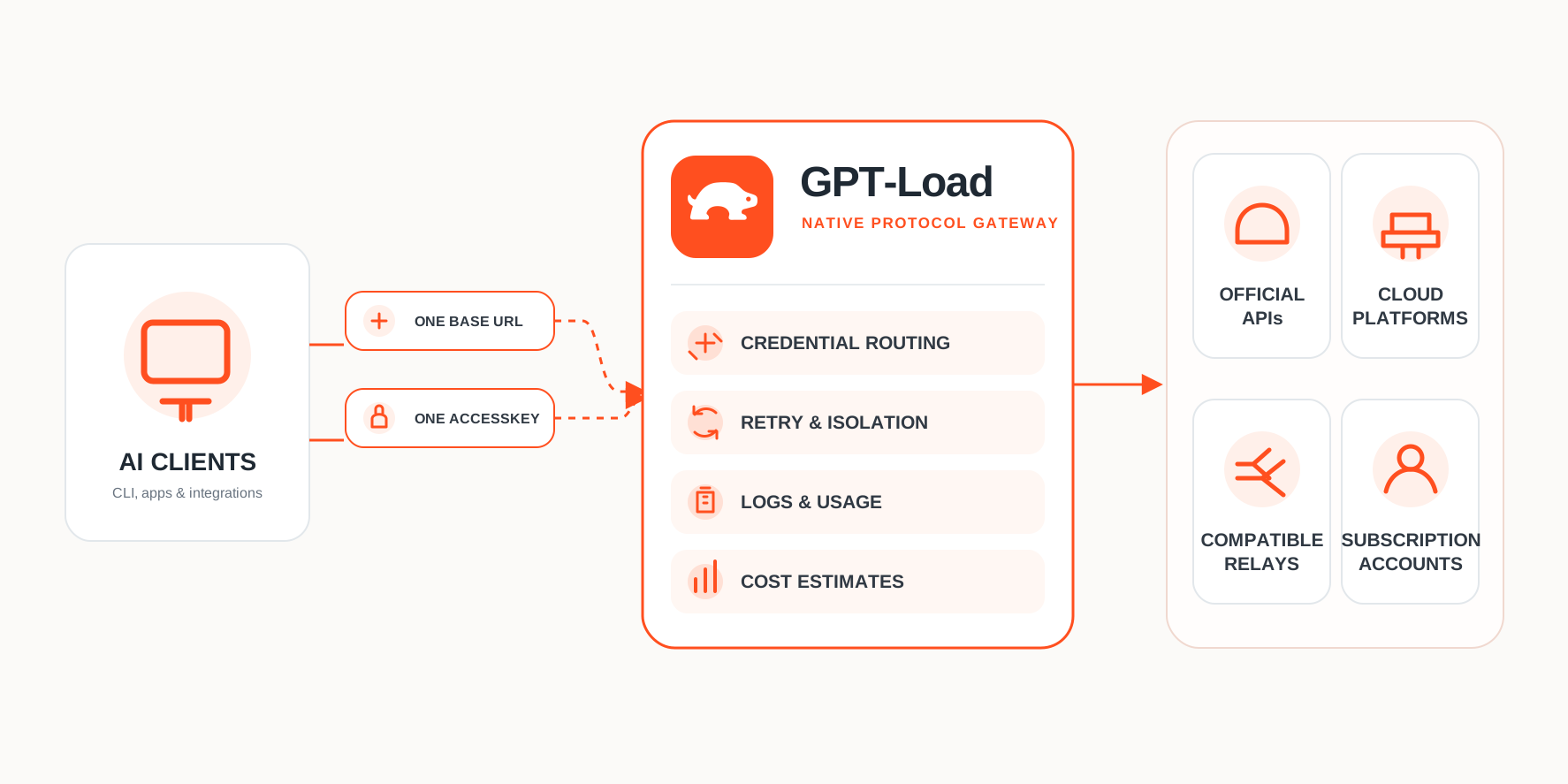
Your application only needs one base URL and one AccessKey. Providers, accounts, credentials, models, and routing policy are all configured in the management UI.
[!WARNING]
If you are using 1.x, read Moving from 1.x first. 2.0 cannot open, import, or migrate 1.x data in place.
Requires Docker and Docker Compose.
git clone --depth 1 https://github.com/tbphp/gpt-load.git
cd gpt-load
cp .env.example .env
docker compose up -d
Confirm the service is up:
curl --fail http://127.0.0.1:3001/health
The first start generates a management key. Read it and store it safely:
docker compose exec gpt-load sh -c 'cat /app/data/auth.key'
Open and sign in to the console with that key.
You can also setAUTH_KEYexplicitly in.envbefore starting. By default the service listens on the loopback address only and is not exposed to the internet.
Initial setup takes three steps:
1. Add a channel — Choose an upstream service and add one or more API keys. For subscription channels, complete the OAuth flow or import credentials as prompted. 2. Create a group — Pick a channel, then configure available models and runtime policy. 3. Create an AccessKey — Set the groups and client protocols it may use, then give the generated AccessKey to your application.
The Codex, Claude, and Antigravity OAuth clients use fixed callback ports. Compose publishes them on the address configured by HOST, which defaults to 127.0.0.1; setting HOST=0.0.0.0 also publishes these callback ports on all host interfaces. Because the ports are fixed by the upstream clients, only one default Compose instance can run on a host at a time.
When working over SSH or from a remote browser, the browser's localhost may not reach GPT-Load — paste the full callback URL into the authorization dialog to finish the flow.
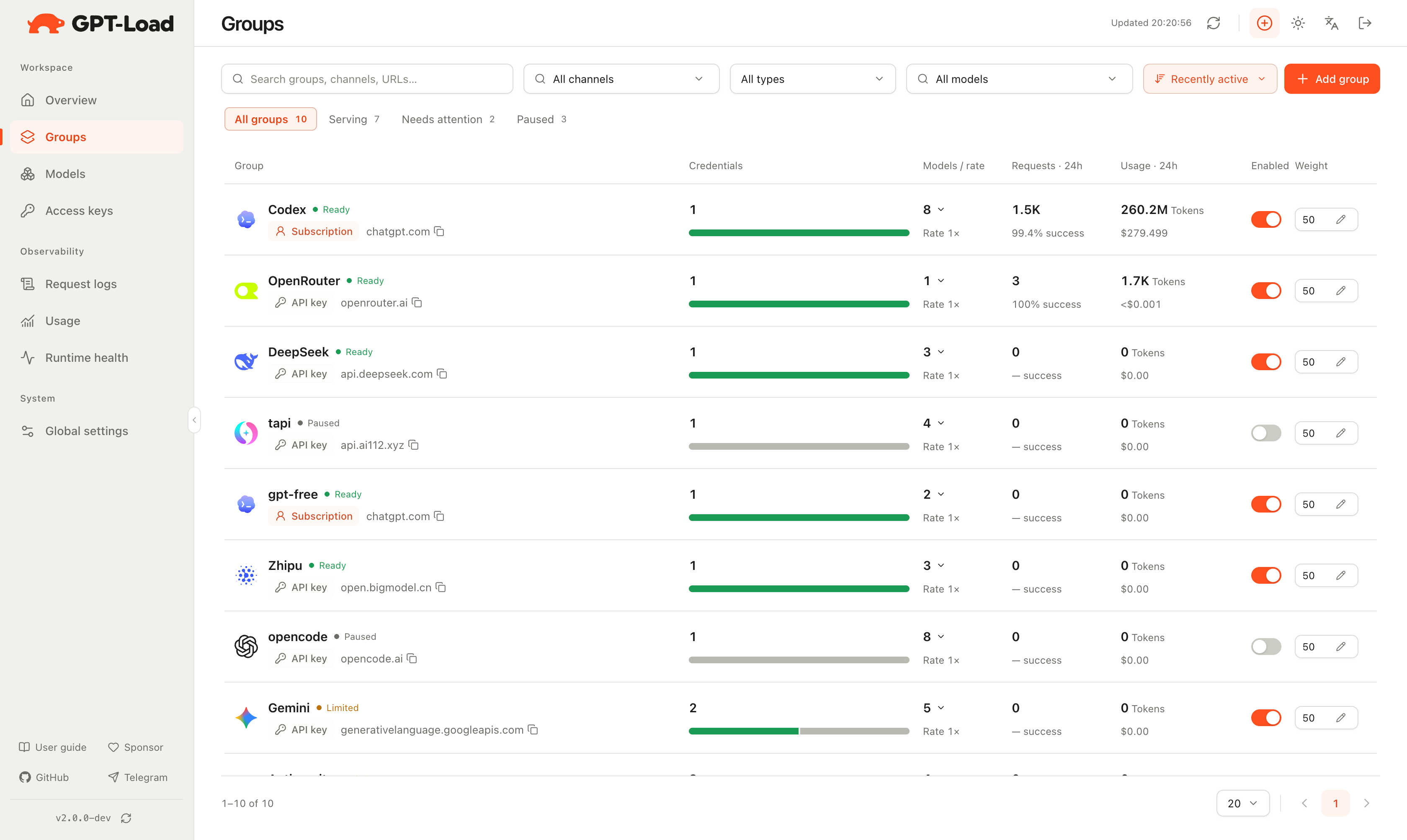
Groups — View channels, models, credential counts, traffic, and health in one place
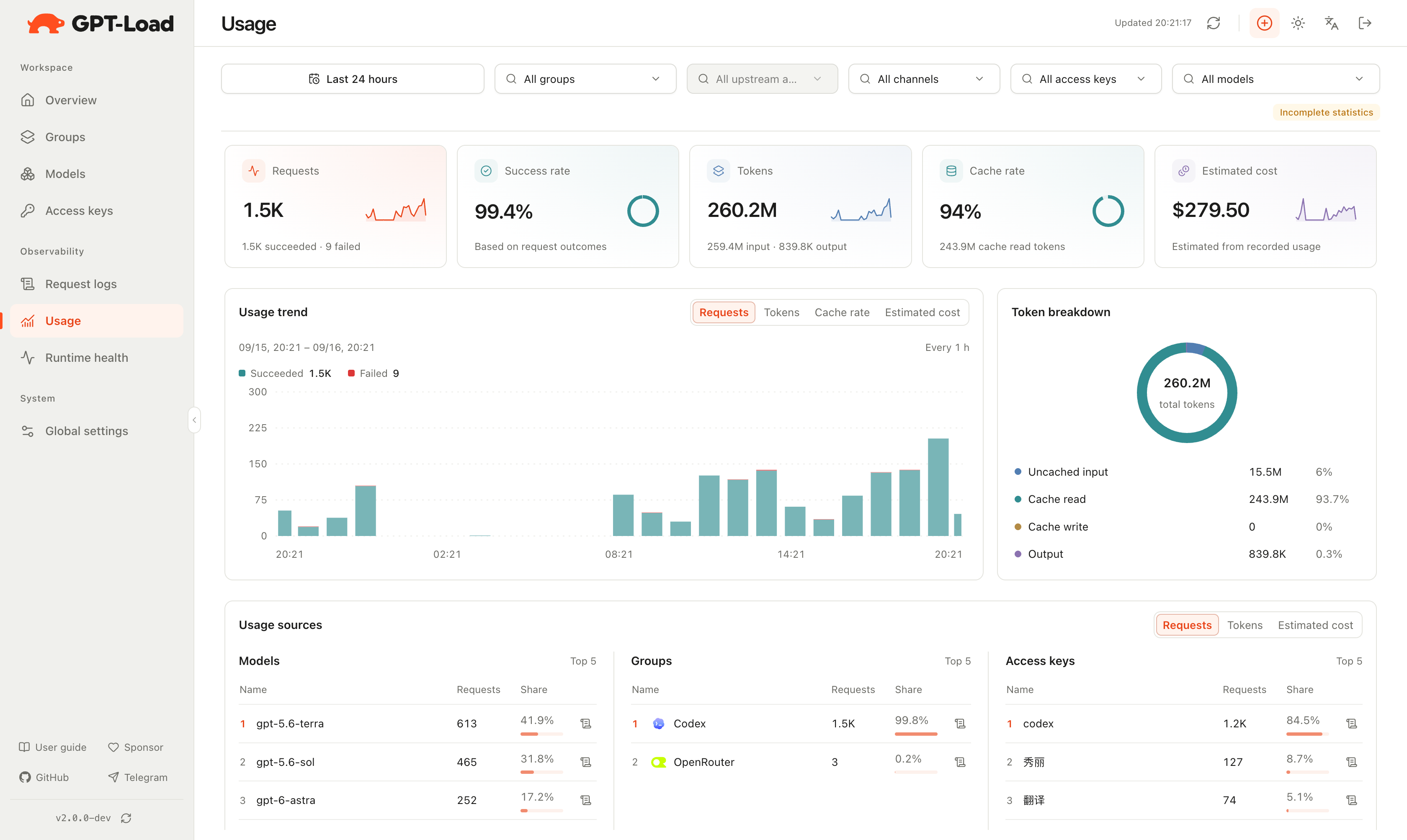
Usage statistics — Review request trends, cache hit rate, token categories, and cost estimates
| Protocol | Main entry |
| ----------------------- | -------------------------------------- |
| OpenAI Chat Completions | POST /v1/chat/completions |
| OpenAI Responses | /v1/responses and its resource paths |
| OpenAI Images | POST /v1/images/... |
| OpenAI Embeddings | POST /v1/embeddings |
| Rerank | POST /v1/rerank |
| Anthropic Messages | POST /v1/messages |
| Gemini | /v1beta/models/... |
Each channel declares exactly which protocols and capabilities it can execute. GPT-Load converts between supported capabilities, but it is not a general-purpose any-protocol, any-JSON translator.
Embeddings initially uses the native OpenAI-compatible wire only on the OpenAI, OpenRouter, and OpenAI Compatible API-key channels; subscription channels and protocol conversion are not supported. An AccessKey without a protocol filter keeps its existing “all enabled protocols” behavior and therefore gains Embeddings access after upgrade. Least-privilege deployments should configure an explicit protocol filter.
Rerank uses the independent rerank protocol through POST /v1/rerank on the OpenAI Compatible, New API, and GPT-Load API-key channels. Requests contain model, query, and a text-only documents array, with optional upstream parameters such as top_n and return_documents. Streaming, subscription channels, and protocol conversion are not supported. OpenAI Compatible takes a complete API prefix (for example, https://host/v1); New API / GPT-Load take the gateway root. The upstream must implement a compatible Rerank endpoint. AccessKeys without a protocol filter also gain Rerank access. Responses containing only non-token units such as search_units remain unpriced; these units are not treated as tokens or free requests.
Docker Compose uses application-managed SQLite by default. Data lives in the gpt-load-data named volume and includes the database, auth.key, and encryption.key.
[!IMPORTANT]
encryption.key decrypts channel credentials. When backing up or migrating, the database and the key must be kept together. Once the key is lost or replaced, existing encrypted credentials cannot be recovered, and this version does not support master key rotation.Use the unified DATABASE_DSN to connect SQLite, MySQL, or PostgreSQL:
mysql://user:password@db.example:3306/gpt_load?charset=utf8mb4&collation=utf8mb4_bin
postgres://user:password@db.example:5432/gpt_load?sslmode=require
Common operations:
docker compose logs -f      # view logs
docker compose pull && docker compose up -d   # update to the latest 2.x image
docker compose stop         # stop the service
The official Compose file uses ghcr.io/tbphp/gpt-load:2. Before GA, 2 tracks verified 2.0 Beta and RC releases; after GA, it tracks stable 2.x releases only. Exact image tags omit the Git tag's v prefix (for example, 2.0.0-beta.25), while 2.0-beta remains the 2.0 Beta channel. latest remains on 1.x.
Download the build for your platform from GitHub Releases, and verify it against the bundled SHA256SUMS first:
chmod +x ./gpt-load-linux-amd64
HOST=127.0.0.1 DATA_DIR=./data ./gpt-load-linux-amd64
Then open . Portable builds are provided for five targets across Linux, macOS (amd64 / arm64), and Windows; gpt-load-windows-amd64.exe keeps running in the foreground as before.
Windows desktop users can instead download gpt-load-windows-setup.exe. After one administrator approval, Setup installs and starts a low-privilege Windows service, enables automatic startup, and creates desktop and Start Menu shortcuts to the GPT-Load management page. Setup displays the generated management key before it finishes; save it before closing the page. The protected copy remains at %ProgramData%\GPT-Load\data\auth.key. Service configuration and its .env live in %ProgramData%\GPT-Load, with persistent data in %ProgramData%\GPT-Load\data.
Installing a newer Setup stops the service gracefully before updating it. Windows uninstall removes the program and service but preserves data. Advanced users can still manage an installed service with gpt-load-windows-amd64.exe service start|stop|restart|status.
At startup, the application reads .env in the current directory; existing process environment variables take precedence. Unless noted otherwise, changes require restarting the process or container; see .env.example for the common configuration template.
| Variable | Default | Description |
| --- | --- | --- |
| HOST | 127.0.0.1 | Native listening address, and the default host address for Compose's main port and OAuth callback ports; Compose always listens on 0.0.0.0 inside the container. |
| PORT | 3001 | HTTP service port, must be 1–65535; Compose also uses it for the container port, host publishing, and health check. |
| BIND_ADDRESS | Empty, inherits HOST | Compose only; overrides the host publishing address for the main service port without changing OAuth callback ports. |
| OAUTH_CALLBACK_BIND_ADDRESS | Empty, inherits HOST | Compose only; overrides the host publishing address for the fixed OAuth callback ports 1455, 54545, and 51121. |
| GRACEFUL_SHUTDOWN_TIMEOUT | 10 | Maximum time to wait for requests after a stop signal, positive integer in seconds. |
| CONTAINER_STOP_GRACE_PERIOD | 15s | Docker duration to wait before Compose force-stops the container; should be longer than GRACEFUL_SHUTDOWN_TIMEOUT. |
| READ_TIMEOUT | 60 | HTTP request read timeout, positive integer in seconds. |
| IDLE_TIMEOUT | 120 | HTTP keep-alive idle connection timeout, positive integer in seconds. |
| DATA_DIR | ./data | Directory for the managed database, auth.key, encryption.key, and runtime state; official Compose uses /app/data, while the Windows Setup service uses %ProgramData%\GPT-Load\data. |
| DATABASE_DSN | Empty, uses ${DATA_DIR}/gpt-load.db | Empty uses application-managed SQLite; non-empty values support SQLite paths or URLs, MySQL URLs, and PostgreSQL URLs, and are treated as operator-managed external databases. Container file paths must be inside a mounted directory. |
| DATABASE_MAX_OPEN_CONNECTIONS | 10 | Maximum open connections for MySQL and PostgreSQL, positive integer. SQLite always uses one connection. |
| DATABASE_MAX_IDLE_CONNECTIONS | 5 | Maximum idle connections for MySQL and PostgreSQL, positive integer and no greater than DATABASE_MAX_OPEN_CONNECTIONS. SQLite always uses one connection. |
| AUTH_KEY | Empty, reads or generates ${DATA_DIR}/auth.key | Bearer key for the management UI and /api management API, not a data-plane AccessKey. |
| ENCRYPTION_KEY | Empty, reads or generates ${DATA_DIR}/encryption.key | Encrypts channel credentials; changing or losing it makes existing credentials undecryptable, so back it up with the database. |
| HTTP_PROXY | Empty | Environment proxy for HTTP upstream requests. |
| HTTPS_PROXY | Empty | Environment proxy for HTTPS upstream requests. |
| NO_PROXY | Empty | Comma-separated hosts, domains, or IPs that bypass the environment proxy. |
| LOG_LEVEL | info | Supports panic, fatal, error, warn, warning, info, debug, and trace; invalid values warn and fall back to info. |
| LOG_FORMAT | text | Supports text and json; any other value fails startup. |
| MODELS_DEV_AUTO_SYNC_ENABLED | Unset, initial default true | When unset, uses the persisted management UI setting; when set, forces Models.dev auto-sync on or off and makes the same UI option read-only. |
Environment proxies apply only when no proxy is specified on the credential, group, or global settings.
127.0.0.1 only by default. For remote access, expose it through a controlled network or a TLS reverse proxy, and configure ACLs and firewall rules.AUTH_KEY and ENCRYPTION_KEY carefully. Never commit real keys to a repository, log, screenshot, or public issue.previous_response_id automatically uses native Responses routes that declare upstream-managed storage: currently openai, gpt_load, xai, newapi, cliproxyapi, and sub2api. Ownership is isolated by AccessKey and pins the original credential when current routing permits, independently of soft affinity; actual state availability depends on the upstream. Stateless and converted responses are not registered as persistent state. Unknown IDs, including IDs created before upgrading or outside this gateway, are rejected. Group parameter overrides cannot change this field.GET /v1/responses on the same port. Admission follows declared upstream capabilities for OpenAI, xAI, Codex, and compatible native CPA/sub2api and GPT-Load endpoints. Clients may include the boolean stream:true/false; both values still use the WS event stream. Each turn checks current permissions, rate and cost limits, and routing, with separate usage and cost records. One connection keeps one upstream identity; there is no HTTP fallback or conversation-history replay.responses_websocket_enabled defaults to enabled. An explicit group setting overrides the global value; otherwise the group inherits it. Disabling immediately closes affected WS connections and interrupts generation without affecting HTTP/SSE. Re-enabling does not restore the old connection's temporary state.stream_id multiplexing and forks are enabled for OpenAI and GPT-Load cascades that support them end to end. The other channels above run serially and reject named streams. Prewarming sends generate:false upstream. Codex continuation requires the original live connection: store:true and restoration by an old ID on a new connection are unsupported. Persistent continuation on other channels depends on storage capabilities and valid ownership. Existing Codex SDK proxy, reading, and shutdown limits still apply.conversation and other existing resource IDs are outside this ownership routing scope and still depend on a single credential or upstream resource sharing across credentials.[!WARNING]
GPT-Load 2.0 is a complete rewrite. It cannot open, import, or migrate 1.x data in place.
Deploy 2.0 with its own database, DATA_DIR, port, and Docker volume. Cut traffic over only after verification, and keep the original 1.x deployment until the rollback window closes. Documentation for the 1.4.x maintenance line is at the official docs.
Some of GPT-Load's capabilities build on these projects, with thanks:
| Project | Role | License | | ----------------------------------------------------------- | ------------------------------------------------------------------------------------ | ---------- | | Bifrost Core | Provider authentication, request/response conversion, streaming, usage normalization | Apache-2.0 | | CLIProxyAPI | OAuth and execution adapter for subscription channels | MIT | | Lobe Icons | Channel brand icons in the management UI | MIT |
GPT-Load owns credential storage, account selection, scheduling, retry, health, affinity, logging, and usage policy. Third-party notices are in THIRD_PARTY_NOTICES.md, full license texts in LICENSES/, and each release ships a CycloneDX SBOM covering the Go dependency graph.
Channel icons identify their respective upstream providers. All trademarks belong to their owners; this project is not affiliated with or endorsed by them.

Platform support |

Community support |

Infrastructure support |
---
→ →
→ →
→ →
→ →
→ →
→ →
→ →
→