1
 →
→
[MLsys2026 Best Paper]: https://arxiv.org/abs/2506.08276. RAG on Everything with LEANN. Enjoy 97% storage savings while running a fast, accurate
StarTrail-org/LEANN is an open-source project on GitHub, mainly written in Python. [MLsys2026 Best Paper]: https://arxiv.org/abs/2506.08276. RAG on Everything with LEANN. It currently holds 12,945 stars and 1,169 forks with 0 open issues, and was last pushed on an unknown date (repository created unknown).
AI Homed tracks it on the Local & On-Device AI board.




We track zero telemetry. This survey is the ONLY way to tell us if you want
GPU Acceleration or More Integrations next.
👉 Click here to cast your vote (2 mins)
We'd love for you to be part of the LEANN community!
👉 Join LEANN Slack
If the invite link has expired or you have trouble joining, please open an issue and we'll help you get in!
LEANN is an innovative vector database that democratizes personal AI. Transform your laptop into a powerful RAG system that can index and search through millions of documents while using 97% less storage than traditional solutions without accuracy loss.
LEANN achieves this through graph-based selective recomputation with high-degree preserving pruning, computing embeddings on-demand instead of storing them all. Illustration Fig → | Paper →
Ready to RAG Everything? Transform your laptop into a personal AI assistant that can semantic search your file system, emails, browser history, chat history (WeChat, iMessage), agent memory (ChatGPT, Claude), live data (Slack, Twitter), codebase\*, or external knowledge bases (i.e., 60M documents) - all on your laptop, with zero cloud costs and complete privacy.
\* Claude Code only supports basic grep-style keyword search. LEANN is a drop-in semantic search MCP service fully compatible with Claude Code, unlocking intelligent retrieval without changing your workflow. 🔥 Check out the easy setup →
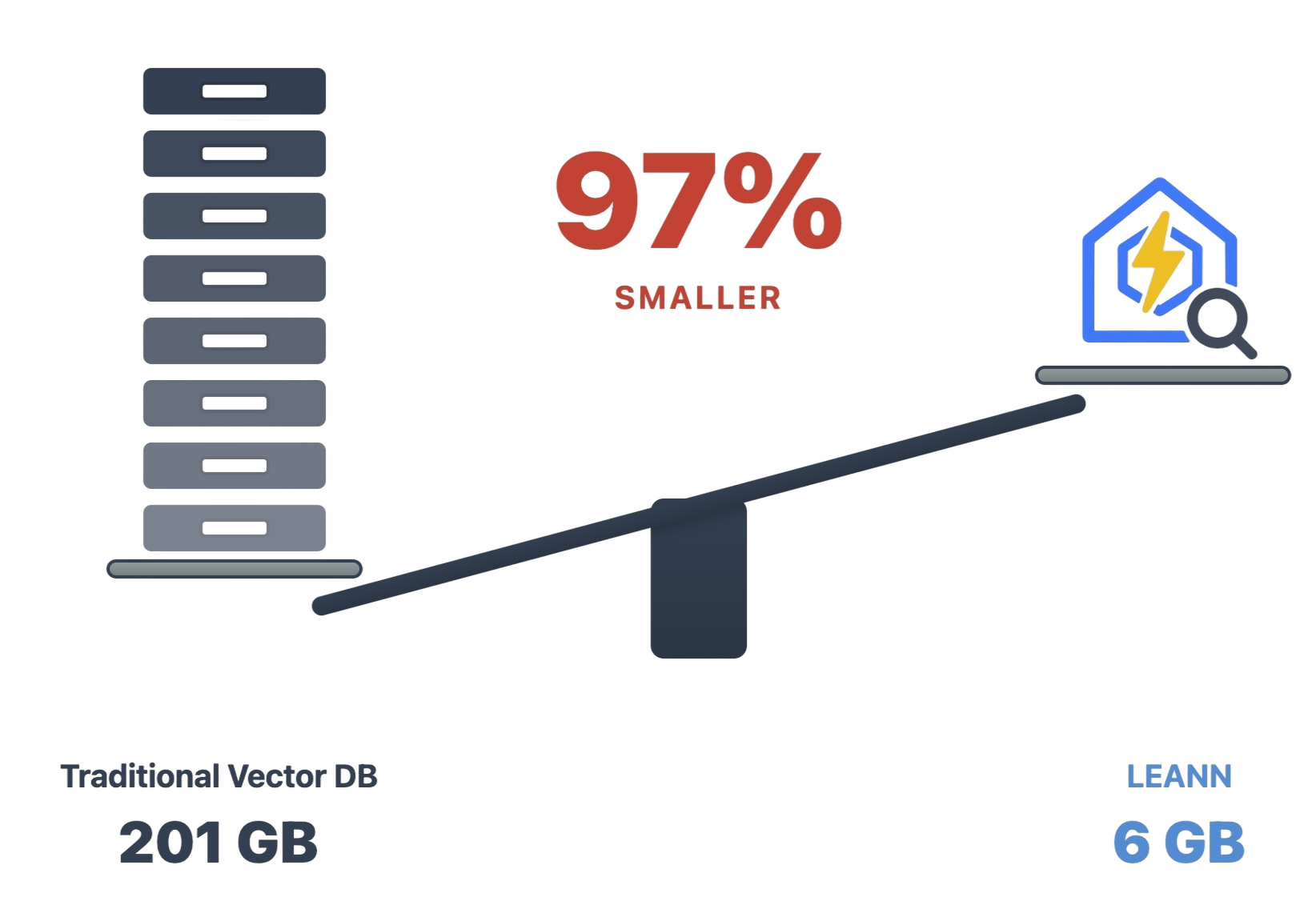
The numbers speak for themselves: Index 60 million text chunks in just 6GB instead of 201GB. From emails to browser history, everything fits on your laptop. See detailed benchmarks for different applications below ↓
🔒 Privacy: Your data never leaves your laptop. No OpenAI, no cloud, no "terms of service".
🪶 Lightweight: Graph-based recomputation eliminates heavy embedding storage, while smart graph pruning and CSR format minimize graph storage overhead. Always less storage, less memory usage!
📦 Portable: Transfer your entire knowledge base between devices (even with others) with minimal cost - your personal AI memory travels with you.
📈 Scalability: Handle messy personal data that would crash traditional vector DBs, easily managing your growing personalized data and agent generated memory!
✨ No Accuracy Loss: Maintain the same search quality as heavyweight solutions while using 97% less storage.
We plugged LEANN into Claude Code and compared it with BM25 on 30 SWE-Bench Pro tasks from ContextBench, keeping the model, agent, tools, and 8,192-token retrieval budget fixed.
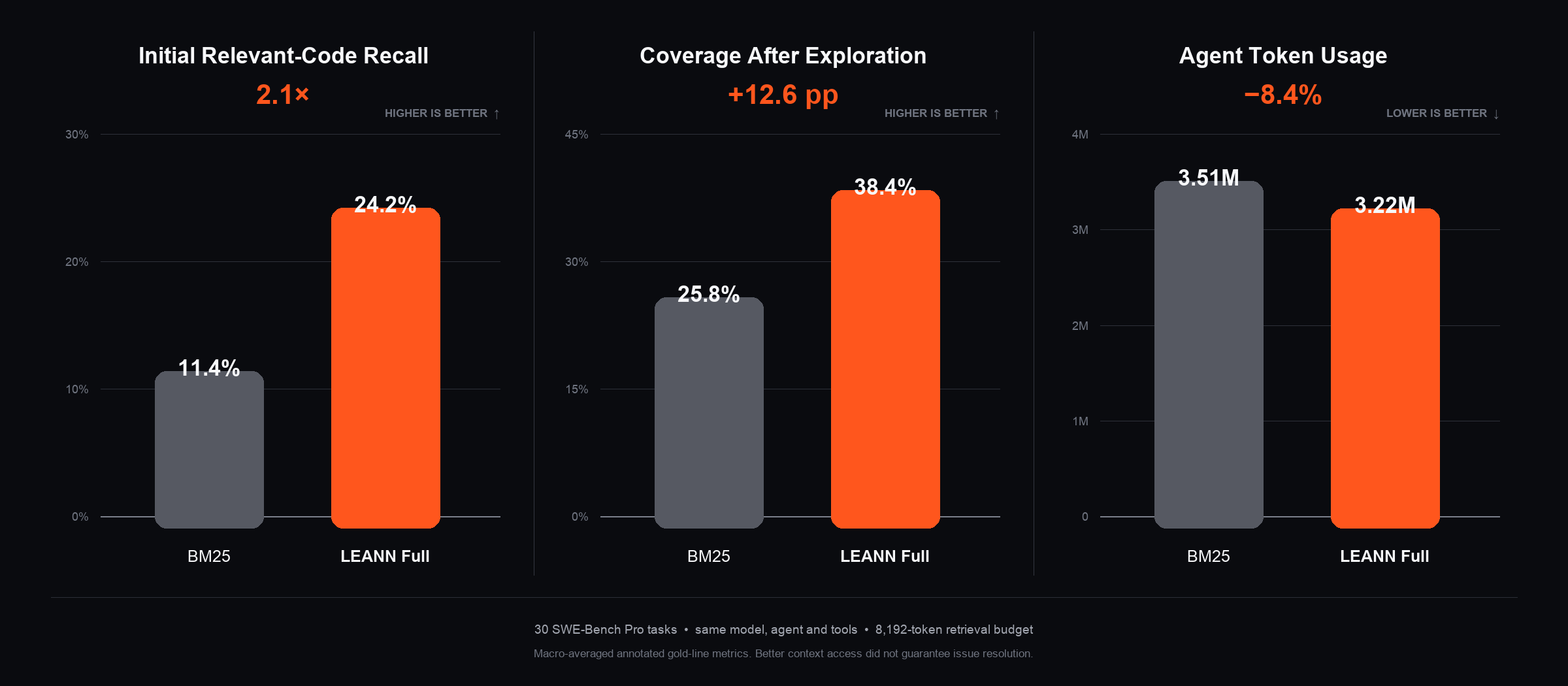
With LEANN, the agent achieved 2.1× the initial relevant-code recall (24.2% vs. 11.4%), reached 12.6 percentage points higher relevant-code coverage after exploration (38.4% vs. 25.8%), and used 8.4% fewer tokens (3.22M vs. 3.51M).
LEANN surfaces relevant code earlier, so coding agents can spend more of their context window reasoning about the right files instead of repeatedly scanning the repository. Reproduce the benchmark →
Note: Results are macro-averaged annotated gold-line metrics over 30 SWE-Bench Pro tasks. Better context access does not guarantee issue resolution.
Install uv first if you don't have it. Typically, you can install it with:
curl -LsSf https://astral.sh/uv/install.sh | sh
Clone the repository to access all examples and try amazing applications,
git clone https://github.com/yichuan-w/LEANN.git leann
cd leann
and install LEANN from PyPI to run them immediately:
uv venv
source .venv/bin/activate
uv pip install leann
CPU-only (Linux): use the cpu extra (e.g. leann[cpu])
Linux note: if a laterleann buildfails withSecurity Violation [pathsec.open]: refusing multiply-linked file, reinstall withUV_LINK_MODE=copy uv pip install --reinstall ...(orUV_LINK_MODE=copy uv tool install --reinstall ...) - uv's default hardlink installs trip nltk's hardened file loader bundled with llama-index. Details in the FAQ.
git clone https://github.com/yichuan-w/LEANN.git leann
cd leann
git submodule update --init --recursive
macOS:
Note: DiskANN requires MacOS 13.3 or later.
brew install libomp boost protobuf zeromq pkgconf
uv sync --extra diskann
Linux (Ubuntu/Debian):
Note: On Ubuntu 20.04, you may need to build a newer Abseil and pin Protobuf (e.g., v3.20.x) for building DiskANN. See Issue #30 for a step-by-step note.
You can manually install Intel oneAPI MKL instead of libmkl-full-dev for DiskANN. You can also use libopenblas-dev for building HNSW only, by removing --extra diskann in the command below.
sudo apt-get update && sudo apt-get install -y \
  libomp-dev libboost-all-dev protobuf-compiler libzmq3-dev \
  pkg-config libabsl-dev libaio-dev libprotobuf-dev \
  libmkl-full-dev
uv sync --extra diskann
Linux (Arch Linux):
sudo pacman -Syu && sudo pacman -S --needed base-devel cmake pkgconf git gcc \
  boost boost-libs protobuf abseil-cpp libaio zeromq
For MKL in DiskANN
sudo pacman -S --needed base-devel git
git clone https://aur.archlinux.org/paru-bin.git
cd paru-bin && makepkg -si
paru -S intel-oneapi-mkl intel-oneapi-compiler
source /opt/intel/oneapi/setvars.sh
uv sync --extra diskann
Linux (RHEL / CentOS Stream / Oracle / Rocky / AlmaLinux):
See Issue #50 for more details.
sudo dnf groupinstall -y "Development Tools"
sudo dnf install -y libomp-devel boost-devel protobuf-compiler protobuf-devel \
  abseil-cpp-devel libaio-devel zeromq-devel pkgconf-pkg-config
For MKL in DiskANN
sudo dnf install -y intel-oneapi-mkl intel-oneapi-mkl-devel \
  intel-oneapi-openmp || sudo dnf install -y intel-oneapi-compiler
source /opt/intel/oneapi/setvars.sh
uv sync --extra diskann
Windows:
Requires Visual Studio 2022 Build Tools with the C++ desktop development workload, and vcpkg.
# Install toolchain (if not already present)
choco install cmake swig pkgconfiglite nuget.commandline -y
Install C++ dependencies via vcpkg
vcpkg install zeromq:x64-windows openblas:x64-windows lapack:x64-windows `
  boost-program-options:x64-windows protobuf:x64-windows
Set environment variables (adjust VCPKG_ROOT to your vcpkg path)
$env:CMAKE_PREFIX_PATH = "$env:VCPKG_ROOT\installed\x64-windows"
$env:PKG_CONFIG_PATH = "$env:VCPKG_ROOT\installed\x64-windows\lib\pkgconfig"
$env:PKG_CONFIG_EXECUTABLE = "C:\ProgramData\chocolatey\bin\pkg-config.exe"
$env:OPENBLAS_LIB = "$env:VCPKG_ROOT\installed\x64-windows\lib\openblas.lib"
$env:PATH += ";$env:VCPKG_ROOT\installed\x64-windows\bin"
$env:PATH += ";$env:VCPKG_ROOT\installed\x64-windows\tools\protobuf"
uv sync --extra diskann
Our declarative API makes RAG as easy as writing a config file.
Check out demo.ipynb or 
from leann import LeannBuilder, LeannSearcher, LeannChat
from pathlib import Path
INDEX_PATH = str(Path("./").resolve() / "demo.leann")
Build an index
builder = LeannBuilder(backend_name="hnsw")
builder.add_text("LEANN saves 97% storage compared to traditional vector databases.")
builder.add_text("Tung Tung Tung Sahur called—they need their banana‑crocodile hybrid back")
builder.build_index(INDEX_PATH)
Search
searcher = LeannSearcher(INDEX_PATH)
results = searcher.search("fantastical AI-generated creatures", top_k=1)
Chat with your data
chat = LeannChat(INDEX_PATH, llm_config={"type": "hf", "model": "Qwen/Qwen3-0.6B"})
response = chat.ask("How much storage does LEANN save?", top_k=1)
LEANN supports RAG on various data sources including documents (.pdf, .txt, .md), Apple Mail, Google Search History, WeChat, ChatGPT conversations, Claude conversations, iMessage conversations, and live data from any platform through MCP (Model Context Protocol) servers - including Slack, Twitter, and more.
LEANN supports many LLM providers for text generation (HuggingFace, Ollama, Anthropic, and Any OpenAI compatible API).
Set your OpenAI API key as an environment variable:
export OPENAI_API_KEY="your-api-key-here"
Make sure to use --llm openai flag when using the CLI.
You can also specify the model name with --llm-model flag.
Thanks to the widespread adoption of the OpenAI API format, LEANN is compatible out-of-the-box with a vast array of LLM and embedding providers. Simply set the OPENAI_BASE_URL and OPENAI_API_KEY environment variables to connect to your preferred service.
export OPENAI_API_KEY="xxx"
export OPENAI_BASE_URL="http://localhost:1234/v1" # base url of the provider
To use OpenAI compatible endpoint with the CLI interface:
If you are using it for text generation, make sure to use --llm openai flag and specify the model name with --llm-model flag.
If you are using it for embedding, set the --embedding-mode openai flag and specify the model name with --embedding-model .
-----
Below is a list of base URLs for common providers to get you started.
| Provider | Sample Base URL |
| ---------------- | --------------------------- |
| Ollama | http://localhost:11434/v1 |
| LM Studio | http://localhost:1234/v1 |
| vLLM | http://localhost:8000/v1 |
| llama.cpp | http://localhost:8080/v1 |
| SGLang | http://localhost:30000/v1 |
| LiteLLM | http://localhost:4000 |
-----
🚨 A Note on Privacy: Before choosing a cloud provider, carefully review their privacy and data retention policies. Depending on their terms, your data may be used for their own purposes, including but not limited to human reviews and model training, which can lead to serious consequences if not handled properly.
| Provider | Base URL |
| ---------------- | ---------------------------------------------------------- |
| OpenAI | https://api.openai.com/v1 |
| OpenRouter | https://openrouter.ai/api/v1 |
| Gemini | https://generativelanguage.googleapis.com/v1beta/openai/ |
| x.AI (Grok) | https://api.x.ai/v1 |
| Groq AI | https://api.groq.com/openai/v1 |
| DeepSeek | https://api.deepseek.com/v1 |
| SiliconFlow | https://api.siliconflow.cn/v1 |
| Zhipu (BigModel) | https://open.bigmodel.cn/api/paas/v4/ |
| Mistral AI | https://api.mistral.ai/v1 |
| Anthropic | https://api.anthropic.com/v1 |
| Jina AI (Embeddings) | https://api.jina.ai/v1 |
💡 Tip: Separate Embedding Provider
> To use a different provider for embeddings (e.g., Jina AI) while using another for LLM, use--embedding-api-baseand--embedding-api-key:
> leann build my-index --docs ./docs \
--embedding-mode openai \
--embedding-model jina-embeddings-v3 \
--embedding-api-base https://api.jina.ai/v1 \
--embedding-api-key $JINA_API_KEY
If your provider isn't on this list, don't worry! Check their documentation for an OpenAI-compatible endpoint—chances are, it's OpenAI Compatible too!
macOS:
First, download Ollama for macOS.
# Pull a lightweight model (recommended for consumer hardware)
ollama pull llama3.2:1b
Linux:
# Install Ollama
curl -fsSL https://ollama.ai/install.sh | sh
Start Ollama service manually
ollama serve &
Pull a lightweight model (recommended for consumer hardware)
ollama pull llama3.2:1b
LEANN provides flexible parameters for embedding models, search strategies, and data processing to fit your specific needs.
📚 Need configuration best practices? Check our Configuration Guide for detailed optimization tips, model selection advice, and solutions to common issues like slow embeddings or poor search quality.
All RAG examples share these common parameters. Interactive mode is available in all examples - simply run without --query to start a continuous Q&A session where you can ask multiple questions. Type 'quit' to exit.
# Environment Variables (GPU Device Selection)
LEANN_EMBEDDING_DEVICE       # GPU for embedding model (e.g., cuda:0, cuda:1, cpu)
LEANN_LLM_DEVICE             # GPU for HFChat LLM (e.g., cuda:1, or "cuda" for multi-GPU auto)
Core Parameters (General preprocessing for all examples)
--index-dir DIR              # Directory to store the index (default: current directory)
--query "YOUR QUESTION"      # Single query mode. Omit for interactive chat (type 'quit' to exit), and now you can play with your index interactively
--max-items N                # Limit data preprocessing (default: -1, process all data)
--force-rebuild              # Force rebuild index even if it exists
Embedding Parameters
--embedding-model MODEL      # e.g., facebook/contriever, text-embedding-3-small, mlx-community/Qwen3-Embedding-0.6B-8bit or nomic-embed-text
--embedding-mode MODE        # sentence-transformers, openai, mlx, or ollama
LLM Parameters (Text generation models)
--llm TYPE                   # LLM backend: openai, ollama, hf, or anthropic (default: openai)
--llm-model MODEL            # Model name (default: gpt-4o) e.g., gpt-4o-mini, llama3.2:1b, Qwen/Qwen2.5-1.5B-Instruct
--thinking-budget LEVEL      # Thinking budget for reasoning models: low/medium/high (supported by o3, o3-mini, GPT-Oss:20b, and other reasoning models)
Search Parameters
--top-k N                    # Number of results to retrieve (default: 20)
--search-complexity N        # Search complexity for graph traversal (default: 32)
Chunking Parameters
--chunk-size N               # Size of text chunks (default varies by source: 256 for most, 192 for WeChat)
--chunk-overlap N            # Overlap between chunks (default varies: 25-128 depending on source)
Index Building Parameters
--backend-name NAME          # Backend to use: hnsw or diskann (default: hnsw)
--graph-degree N             # Graph degree for index construction (default: 32)
--build-complexity N         # Build complexity for index construction (default: 64)
--compact / --no-compact     # Use compact storage (default: true). Must be no-compact for no-recompute build.
--recompute / --no-recompute # Enable/disable embedding recomputation (default: enabled). Should not do a no-recompute search in a recompute build.
.pdf, .txt, .md)!Ask questions directly about your personal PDFs, documents, and any directory containing your files!
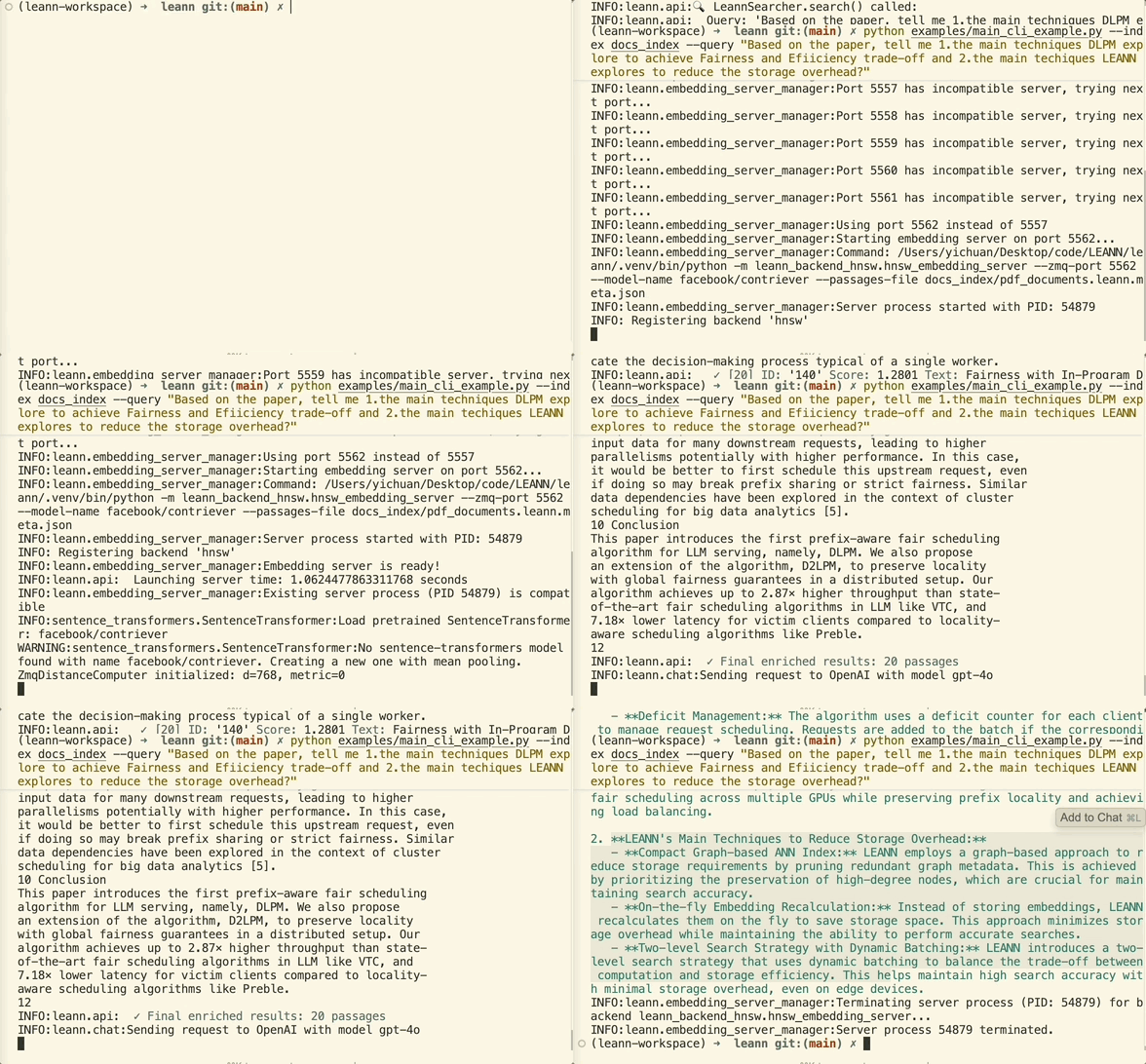
The example below asks a question about summarizing our paper (uses default data in data/, which is a directory with diverse data sources: two papers, Pride and Prejudice, and a Technical report about LLM in Huawei in Chinese), and this is the easiest example to run here:
source .venv/bin/activate # Don't forget to activate the virtual environment
python -m apps.document_rag --query "What are the main techniques LEANN explores?"
--data-dir DIR           # Directory containing documents to process (default: data)
--file-types .ext .ext   # Filter by specific file types (optional - all LlamaIndex supported types if omitted)
# Process all documents with larger chunks for academic papers
python -m apps.document_rag --data-dir "~/Documents/Papers" --chunk-size 1024
Filter only markdown and Python files with smaller chunks
python -m apps.document_rag --data-dir "./docs" --chunk-size 256 --file-types .md .py
Enable AST-aware chunking for code files
python -m apps.document_rag --enable-code-chunking --data-dir "./my_project"
Or use the specialized code RAG for better code understanding
python -m apps.code_rag --repo-dir "./my_codebase" --query "How does authentication work?"
Search through PDFs using both text and visual understanding with ColQwen2/ColPali models. Perfect for research papers, technical documents, and any PDFs with complex layouts, figures, or diagrams.
🍎 Mac Users: ColQwen is optimized for Apple Silicon with MPS acceleration for faster inference!
# Build index from PDFs
python -m apps.colqwen_rag build --pdfs ./my_papers/ --index research_papers
Search with text queries
python -m apps.colqwen_rag search research_papers "How does attention mechanism work?"
Interactive Q&A
python -m apps.colqwen_rag ask research_papers --interactive
# Install dependencies
uv pip install colpali_engine pdf2image pillow matplotlib qwen_vl_utils einops seaborn
brew install poppler  # macOS only, for PDF processing
python -m apps.colqwen_rag build \
  --pdfs ./pdf_directory/ \
  --index my_index \
  --model colqwen2  # or colpali
python -m apps.colqwen_rag search my_index "your question here" --top-k 5
colqwen2): Latest vision-language model with improved performancecolpali): Proven multimodal retrieverNote: The examples below currently support macOS only. Windows support coming soon.
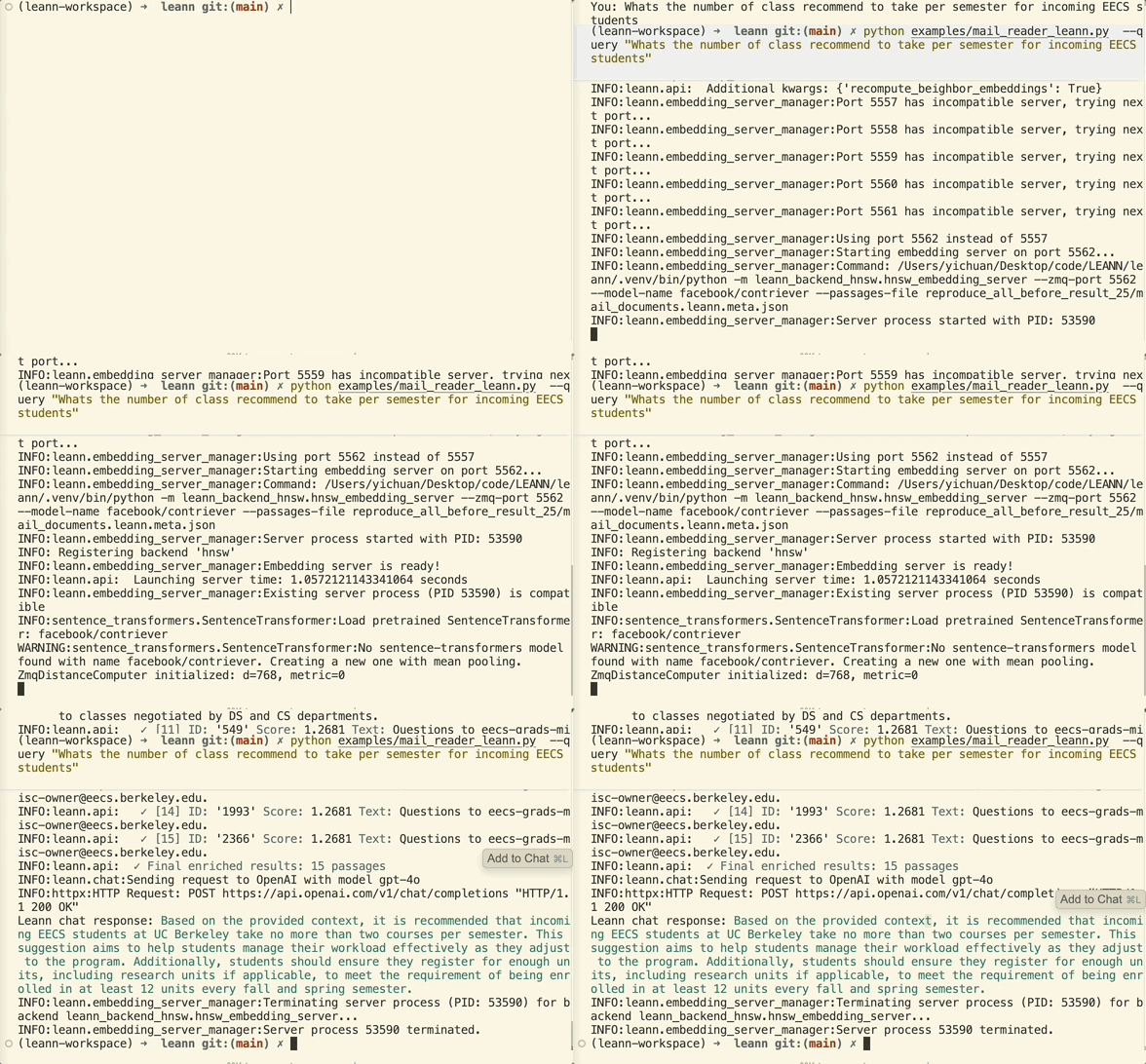
Before running the example below, you need to grant full disk access to your terminal/VS Code in System Preferences → Privacy & Security → Full Disk Access.
python -m apps.email_rag --query "What's the food I ordered by DoorDash or Uber Eats mostly?"
--mail-path PATH         # Path to specific mail directory (auto-detects if omitted)
--include-html          # Include HTML content in processing (useful for newsletters)
# Search work emails from a specific account
python -m apps.email_rag --mail-path "~/Library/Mail/V10/WORK_ACCOUNT"
Find all receipts and order confirmations (includes HTML)
python -m apps.email_rag --query "receipt order confirmation invoice" --include-html
Once the index is built, you can ask questions like:
→ →
→ →
→ →
→ →
→ →
→ →
→ →
→