1
 →
→
Production-grade SQL gateway in front of DuckDB Quack + DuckLake + Iceberg. Multi-tenant pools, pluggable auth (DB/JWT/OIDC), table-level ACLs, role-aware routing, and a live admin console
starlake-ai/quack-on-demand is an open-source project on GitHub, mainly written in Scala. Production-grade SQL gateway in front of DuckDB Quack + DuckLake + Iceberg. Multi-tenant pools, pluggable auth (DB/JWT/OIDC), table-level ACLs It currently holds 135 stars and 9 forks with 0 open issues, and was last pushed on an unknown date (repository created unknown).
AI Homed tracks it on the Today's Trending board, currently at rank #97 with 2 new stars today.

The open-source serving layer for DuckDB and DuckLake. Multi-tenant DuckDB serving with table, row, and column level security, and Arrow Flight SQL on the wire.



uvx qod@latest serve --demo             # the full gateway on your laptop: no install, no Postgres
uvx qod@latest serve ./sales.duckdb     # the same gateway over YOUR DuckDB file, persistent + secured
uvx qod@latest serve ./warehouse/       # ...or a directory of parquet / csv
uvx qod@latest serve s3://bucket/data/  # ...or a remote prefix
QOD_ADMIN_PASSWORD='change-me' uvx qod@latest serve ./sales.duckdb  # set the admin password up front, no prompt
admin login: user admin; password admin with --demo, otherwise the one chosen on the first run
(prompted, or QOD_ADMIN_PASSWORD; first run only, never stored; uvx qod@latest admin reset-password recovers it)
admin UI: http://localhost:20900/ui/
FlightSQL edge: localhost:31338
DuckDB (native Quack): quack:localhost:9494
Ctrl-C stops the gateway and its nodes; so does uvx qod@latest stop from another terminal
One command boots a seeded warehouse with row, column, and table security already live. Connect with tenant=acme + pool=bi (in the admin UI login, set the tenant to acme) and switch principals to watch the policies apply:
alice / demo-alice (analyst) - c_phone comes back masked to ***, and only BUILDING-segment rows appearacme-admin / demo-acme-admin - same query, full unmasked dataalice has no grant on - denied, , `):
JDBC : jdbc:arrow-flight-sql://localhost:31338/?tenant=&pool=&user=&useEncryption=true&disableCertificateVerification=true
ADBC : uri=grpc+tls://localhost:31338  (adbc_driver_flightsql; db_kwargs: username, password, plus grpc headers tenant=, pool=)
ODBC : Driver={Arrow Flight SQL ODBC Driver};Host=localhost;Port=31338;UseEncryption=true;DisableCertificateVerification=true;UID=;PWD=;TENANT=;POOL=
DuckDB : ATTACH 'quack:localhost:9494' AS qod (TYPE quack, TOKEN 'tenant=&pool=&user=&password=');
Any DuckDB that carries the quack extension (the CLI, the Python package, an embedded DuckDB) can attach the gateway as a database over DuckDB's own native Quack protocol, no driver in between. The token string is the same set of parameters the JDBC URL takes after ?. Local tables and gateway tables then join in one query; the gateway applies the user's row and column policies to its side, and a table the user has no grant on is refused with the same access denied a FlightSQL client would see.
ATTACH 'quack:localhost:9494' AS qod (TYPE quack, TOKEN 'tenant=acme&pool=bi&user=alice&password=demo-alice');
CREATE TABLE my_segments AS SELECT * FROM read_csv('segments.csv');
SELECT s.label, count(*) AS customers
FROM qod.tpch1.customer c JOIN my_segments s ON c.c_mktsegment = s.segment
GROUP BY 1 ORDER BY 2 DESC;
-- one-shot, no ATTACH
SELECT  FROM quack_query('quack:localhost:9494', 'SELECT count() FROM tpch1.orders',
  token := 'tenant=acme&pool=bi&user=alice&password=demo-alice');
The DuckDB client speaks plain HTTP to localhost and TLS to any other host; the gateway's Quack listener is plain HTTP by default (QOD_QUACK_TLS_ENABLED=true turns TLS on, reusing the FlightSQL edge's certificate), so from a remote machine either enable TLS or add DISABLE_SSL true to the ATTACH options. Superusers add &superuser=true to the token, exactly like the JDBC parameter.
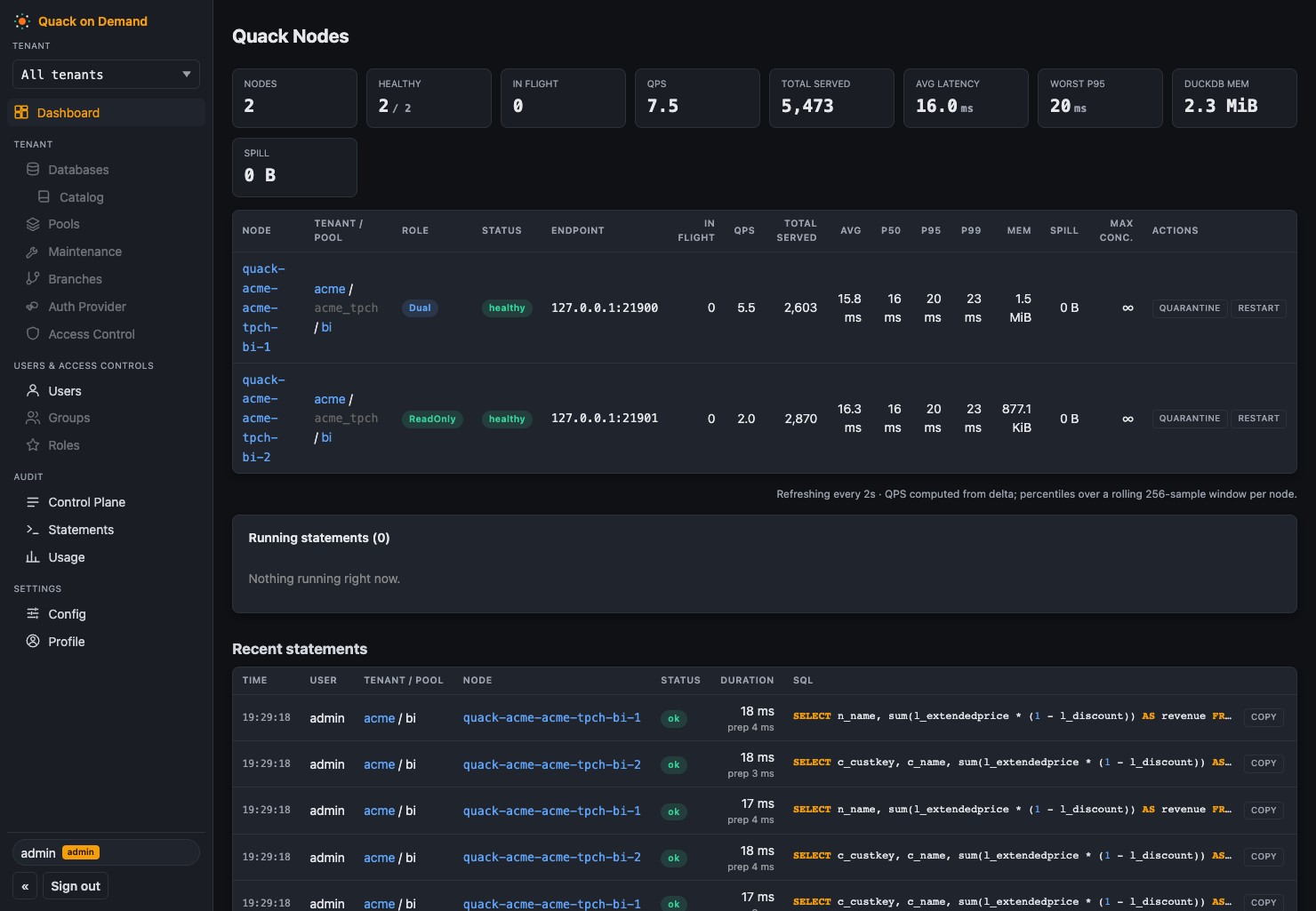
DuckLake gives you a Postgres-backed lakehouse catalog. DuckDB gives you the engine. Between them and a room full of analysts sits the part DuckLake explicitly leaves out by design: concurrent users, authentication, authorization, and connection routing.
Quack on Demand is that part. It turns a DuckLake lakehouse into a multi-tenant SQL warehouse your whole org can query: on-demand DuckDB nodes, least-loaded routing, table-level RBAC with column-level security and dynamic data masking, and Arrow Flight SQL on the wire so Power BI, Tableau, DBeaver, and any JDBC / ODBC / ADBC client just connect. Think self-hosted MotherDuck, scoped to serving, on your own infrastructure. Single binary.
Use Quack on Demand if you want to:
The command below boots a fully seeded instance against an embedded, throwaway Postgres. With uv installed there are no other prerequisites - the launcher fetches everything it needs (sha256-verified against the GitHub release) and caches it under your user cache dir.
uvx qod@latest serve --demo # the full gateway on your laptop: no install, no Postgres
pip install qod && qod serve --demo is equivalent. The @latest matters: uvx otherwise freezes on the first version it ever resolved.
# trivial on Linux; on Mac/Windows requires Docker Desktop or a
drop-in like Podman/Colima/OrbStack
docker run --rm -p 20900:20900 -p 31338:31338 starlakeai/quack-on-demand demo
It starts an embedded ephemeral Postgres, seeds tenant acme (acme_tpch.tpch1) with a small TPC-H dataset, boots the manager REST API on :20900 and the FlightSQL edge on :31338 (TLS on with an auto-generated self-signed cert; clients skip verification), and prints a connect snippet. All state lives under /tmp/qod-demo and is deleted when you stop it with Ctrl-C.
Demo mode is insecure by design (self-signed TLS, open REST, demo credentials, ephemeral catalog). Use it to evaluate, never in production.
The demo is throwaway. To point the same gateway at data you already have, with nothing else to install (no Postgres, no Docker):
uvx qod@latest serve ./sales.duckdb          # an existing DuckDB file
uvx qod@latest serve ./warehouse/            # a directory of parquet / csv
uvx qod@latest serve s3://bucket/sales/      # a remote prefix
uvx qod@latest serve                         # a fresh, empty DuckLake to load into
One command provisions a tenant, a database, and a pool around the target, then
prints the JDBC / ADBC / ODBC strings. The control plane runs on a bundled
embedded Postgres under your user data dir, and it persists: restart and
everything is still there. Re-running adds a second database beside the first,
so qod serve ./other.duckdb extends the same gateway rather than replacing it.
Unlike --demo, this keeps the normal secure posture: TLS on, database auth on,
ACL on, and an admin password you choose on the first run (prompted, or taken
from QOD_ADMIN_PASSWORD) and never stored; qod admin reset-password recovers it.
If a gateway is already running locally, qod serve provisions straight into it
instead of booting a second one; qod stop still stops it.
An existing .duckdb file is attached read-write and served by a single node.
Parquet and CSV targets become views (read_parquet / read_csv), so nothing is
copied or converted.
Not sure which command you want?
| Command | What it is | Needs |
|---|---|---|
| qod serve --demo | throwaway showcase on sample data, insecure by design | nothing |
| qod serve ./your-data | persistent gateway over your own data, secure defaults | nothing |
| qod start | your deployment: your own Postgres, your config | Postgres + qod setup |
For production, run against your own Postgres instead: see the deployment shapes below.
Zero to first query in under 5 minutes. Clone this repo, then:
cp .env.example .env                            # tweak ports / auth / admin password (before the first run)
LOAD_TPCH=1 ./scripts/docker/run-docker-compose.sh     # pulls starlakeai/quack-on-demand:latest + seeds TPC-H SF=1
Windows: run inside WSL2 with LOAD_TPCH=1 ./scripts/docker/run-docker-compose.sh
That brings up Postgres + the manager, bootstraps the demo tenants acme (tenant-db acme_tpch with pools bi and etl) and globex (pool bi), and seeds the DuckLake catalog with TPC-H at scale factor 1 (~6M lineitem rows) into acme_tpch.tpch1. The admin UI is on http://localhost:20900/ui/: log in as admin with the ADMIN_PASSWORD from .env (default admin; QOD_ADMIN_PASSWORD also works and wins). It applies on the first boot only, so set it before the first run, or rotate it later with qod auth change-password; never expose the default beyond localhost. The FlightSQL edge is on localhost:31338; every client scopes its session with tenant=acme + pool=bi.
Connect a BI tool or client with the connection strings at the top - for this stack use tenant=acme, pool=bi, user admin.
The Power BI walkthrough, full ADBC db_kwargs examples, and the Python load tester are in Quickstart and Connecting clients.
Runnable client examples live in examples/: FlightSQL clients in TypeScript, Python, Java, and Rust, each running a single query and the 22 TPC-H queries. An n8n community node lives in its own repo.
Past the demo, the manager runs against your own Postgres and your own object store.
Pick the deployment shape in the docs:
qod serve, QOD_PG_EMBEDDED=true)charts/quack-on-demand/QOD_RUNTIME_TYPE=fleet and a join token, then start qod fleet join (for example uvx qod fleet join --manager https://mgr:20900 --advertise-host ) under systemd or launchd on each Linux or macOS server; every joined server runs one node, and pools are scheduled onto free servers as they joinQOD_* / PROXY_* env var).
---
Each table lists what Quack on Demand adds on top of a bare DuckDB process plus a DuckLake catalog.
| Feature | Description | Added value over DuckDB / DuckLake alone |
|---|---|---|
| Arrow Flight SQL edge (:31338) | gRPC endpoint with TLS on by default (auto-generated self-signed cert; drop in a CA-signed one for prod) | DuckDB has no network listener. Any JDBC / ODBC / ADBC / PyArrow / Spark / DBeaver / Power BI / Tableau client connects without a DuckDB library on the client side |
| Native Quack front door (:9494) | A plain DuckDB client runs ATTACH 'quack:host:9494' and queries remotely, result bytes relayed untouched | Turns a local DuckDB into a thin client of the shared warehouse, with hybrid local-plus-remote joins, while the base tables never leave the server |
| qod serve | One command over a .duckdb file, a parquet/csv directory, or an object-store prefix, control plane on a bundled embedded Postgres | Zero-install path from "files on disk" to a secured multi-user endpoint |
| qod sql and MCP query | Ad-hoc SQL from the CLI or from an AI agent, with optional --branch targeting | Scripted and agentic access share the same auth, ACL and audit path as BI users |
| Feature | Description | Added value |
|---|---|---|
| Pluggable authenticators | Postgres / any JDBC backend (BCrypt passwords), external JWT (HS256 / RS256 / PEM), or OIDC (Keycloak with ROPC, Google, Azure AD, AWS Cognito) | DuckDB has no users. QoD ties every connection to an identity from your IdP |
| OIDC SSO for the admin console | Browser SSO, JWT session in an HttpOnly cookie | Admin access follows corporate identity |
| Personal access tokens | Self-scoped, tenant-inferred tokens with restrictions such as read-only, one database, or branch-only | Least-privilege credentials for agents and CI |
| SCIM 2.0 provisioning | Users and groups pushed by Okta / Entra | Joiner-mover-leaver lifecycle drives RBAC membership automatically |
| Account lockout and self-service reset | Opt-in lockout after N failed attempts (QOD_AUTH_LOCKOUT_ENABLED), single-use emailed reset link over SMTP. Database users can carry an email; an email-format username is its own email | Standard account hygiene the engine cannot provide |
| Forced password change | mustChangePassword blocks both the REST login and the FlightSQL handshake until the password is rotated | Onboarding and rotation policies enforced on the wire |
| Revocation kills statements | Revoking a grant or token cancels that principal's in-flight statements | Access removal is immediate, not "at next connect" |
| Feature | Description | Added value |
|---|---|---|
| RBAC graph | Users, roles, groups, role permissions and pool permissions, computed into a cached EffectiveSet per session; two gates at handshake (user-scope, pool-access). See the RBAC model | Table-level grants for a database that has no GRANT statement |
| Per-statement ACL | SQL is parsed at the edge, table refs extracted, verb collapsed to Read / Write / Ddl and matched against grants | Enforcement is independent of client and node |
| Row-level security | Predicate filters injected per role by rewriting the statement (QOD_RLS_ENABLED=false as kill switch) | Same data, different rows per user, with no views to maintain |
| Column-level security and masking | Per-role policies on catalog.schema.table.column either deny the column or mask it through a custom SQL transform, applied before the node sees the statement (QOD_CLS_ENABLED=false as kill switch) | Dynamic masking without copying tables |
| Protected-write guard | Fail-closed deny on any write that wraps or references a masked or filtered table | Closes the classic "write it somewhere I can read" bypass |
| Attached-catalog resolution and ATTACH governance | Unqualified refs resolved fail-closed; ATTACH for ordinary users constrained to allowed catalogs | Prevents catalog-alias confusion from leaking cross-tenant data |
| Encryption at rest | qod database create --encrypted makes a DuckLake database write encrypted Parquet (DuckLake mints a key per file into its own catalog) or a duckdb-file database an AES-256-GCM encrypted file. Create-time only, per database, with QOD_REQUIRE_ENCRYPTION as the manager-wide policy gate. | DuckLake supports it but nothing forces it. QoD makes it a policy and keeps the key inside the control plane |
| Audit log | Every statement, admin mutation and autoscale action recorded with its actor, filterable in the console | DuckDB keeps no history of who ran what |
| Feature | Description | Added value |
|---|---|---|
| Node pools per tenant-db | Child DuckDB processes (local) or pods (Kubernetes) with roles READONLY / WRITEONLY / DUAL | DuckDB is single-process, single-writer. Pools give many concurrent users a compatible node each |
| Statement classification and least-loaded routing | Each statement is classified READ / WRITE / DDL and sent to a compatible, least-loaded node | Writes are funneled to write-capable nodes so DuckLake's single-writer constraint is enforced for the user, not by the user |
| Cache-aware routing | Reader affinity so repeated scans hit warm nodes | Better cache hit rates than random placement across N processes |
| Self-healing on restart | The registry is reconciled against the runtime backend; dead nodes are respawned before the edge accepts traffic. Full matrix in Resilience | Nothing in DuckDB restarts a crashed engine for you |
| Resume-on-query | A suspended pool wakes on the first statement with a bounded hold | Scale-to-zero without client-side retry logic |
| Feature | Description | Added value |
|---|---|---|
| Tenants, tenant-dbs, pools | Registry of tenants, each owning databases (ducklake, duckdb-file, memory) and pools; each DuckLake catalog DB (${tenant}_${tenantDb}) is auto-provisioned next to the control-plane DB | DuckLake has no notion of tenant. QoD isolates tenants at the Postgres-database boundary, not just row level |
| Tenant resource caps and quotas | Per-tenant limits on nodes and pools, enforced on every scale action including autoscale | Shared infrastructure without one tenant starving the others |
| Per-pool lockdown | Deny-set that blocks node-side escape hatches (file reads, other buckets, extensions) | A DuckDB process can read any path its OS user can. Lockdown closes that for served users |
| Filtered metadata | information_schema and duckdb_* catalog functions are filtered to what the principal may see | DuckDB shows every table to everyone. QoD hides what you cannot query |
| Regular-user profile sessions | Non-admin users log into the console for their own usage and statements only | Self-service without exposing the admin plane |
| Feature | Description | Added value |
|---|---|---|
| Snapshot browser and time travel | Browse snapshots, query as-of a snapshot or timestamp from the UI or CLI | DuckLake stores snapshots. QoD makes them navigable without SQL archaeology |
| Table history timeline and data diff | Per-table change feed and diff between two snapshots | Turns raw ducklake_snapshot_changes into a reviewable change set |
| Tags and pinning | Named tags on snapshots; pinned snapshots survive maintenance | Human-readable release points that expiry cannot delete |
| Undrop | Recover a dropped table from an earlier snapshot | Operational safety net on top of DuckLake's retention |
| Restore and rollback | Roll a database back to a snapshot as a new snapshot | Point-in-time recovery as a one-liner |
| Managed maintenance | Scheduled expire-snapshots, merge-adjacent-files, cleanup-old-files and orphan sweep, leader-gated | DuckLake ships the functions; QoD schedules them, respects pins, and skips branches |
| Branches for agents and pipelines | qod branch create clones a DuckLake database at its current head without copying data (the branch reads the parent's Parquet in place and writes its own files), served by its own pool. Agents target it with the FlightSQL branch connection header or the MCP branch argument, review the change set (qod branch changes / diff, or the tenant page's Branches tab), propose a merge, and a different human fast-forward merges it into main in one stamped, tagged snapshot. A branch-only personal access token (--branch-only) makes writes on the live database impossible for that agent. Maintenance on main never expires a snapshot a live branch was forked from | Git-style workflow for agents and pipelines that DuckLake does not have |
| Database init SQL | Per-database or per-pool SQL run at node spawn | Consistent extensions, settings and secrets on every node |
| Feature | Description | Added value | |---|---|---| | Per-database object-store credentials | Each database carries its own endpoint and keys, injected as node secrets | Multiple buckets and clouds behind one gateway | | Managed object storage | QoD provisions an id-keyed bucket prefix, with a retention window and purge sweep on delete | Self-service databases with no bucket plumbing by the user | | Statement-level federation | Registered external sources (Postgres, MySQL, other catalogs) attached on the nodes, secrets resolved per source | Federated queries governed by the same ACL | | External Iceberg REST catalogs | Attach Iceberg catalogs next to DuckLake, with SQL screening | One endpoint over lakehouse formats you did not create | | Default metastore sparse create | Metastore keys omitted at create resolve from the manager defaults | Fewer secrets to hand around |
| Feature | Description | Added value | |---|---|---| | Pool suspend / resume | Scale to zero keeping the role distribution; wake on REST, query, module, or idle policy | Pay for compute only while queried | | Idle hibernation | Leader-gated sweep suspends pools after an idle window | Automatic cost control per pool | | Demand scale-out | Owner-declared min / max band; readers added under load and shed when quiet | Elastic read capacity with a hard cap and quota gating | | Active-active manager HA | N managers on Kubernetes, one leader by Postgres advisory lock, caches synced by LISTEN / NOTIFY | No single point of failure for the control plane | | Kubernetes backend | Pod plus Service per node, Secrets for tokens, federation SQL and metastore passwords, pod resources and templates, registry-drift healing | Production deployment shape, with the local backend for a single box |
| Feature
→ →
→ →
→ →
→ →
→ →
→ →
→ →
→