1
 →
→
Optimize any AI agent’s skills, tools/MCP, and prompts against your own evals.
skillberry-ai/cap-evolve is an open-source project on GitHub, mainly written in Python. Optimize any AI agent’s skills, tools/MCP, and prompts against your own evals. It currently holds 57 stars and 16 forks with 0 open issues, and was last pushed on an unknown date (repository created unknown).
AI Homed tracks it on the AI Prompt Engineering board.

watch capability evolve
cap-evolve improves an AI agent's prompts, tools, and skills by learning from failed evaluation traces.
You bring the agent and the eval you already have. cap-evolve runs the loop — evaluate → diagnose the failures → propose an edit → keep it only if it beats a held-out split by a significant margin → commit — and reports one honest number. It optimizes what your agent reads, not its weights.
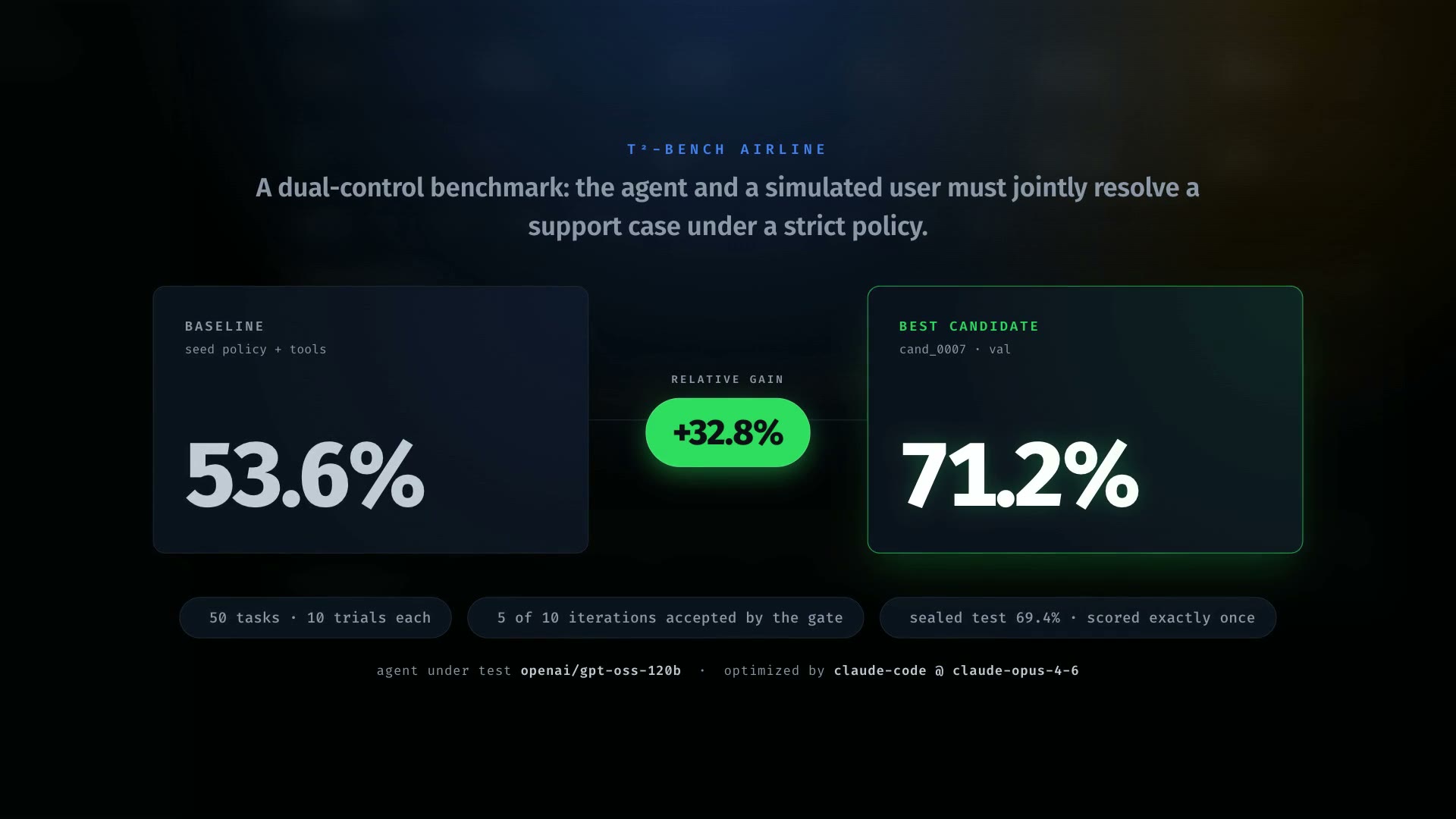
▶︎ Watch
the 85-second demo · plays inline on the site
Quickstart · Documentation · Examples · Results · Contributing
toy_calc is a deterministic stand-in agent that only answers correctly when its system
prompt contains a [CALC] marker. The mock optimizer adds it, so the score provably
rises — no model is called.
git clone https://github.com/skillberry-ai/cap-evolve.git
cd cap-evolve
python3 -m venv .venv && source .venv/bin/activate
pip install ./core                 # package: cap-evolve-core · CLI: cap-evolve · zero runtime deps
bash examples/toy_calc/run.sh
Expected — the seed prompt scores 0.0 on val; the optimized prompt is gate-accepted and
scores 1.0 on the sealed test split:
baseline_val 0.0 -> test_reward 1.0 (gate-accepted, test sealed) + dashboard.html
Open the printed dashboard.html in any browser. Full walkthrough:
Getting started.
Start with no arguments — cap-evolve prints a branded home screen with the golden path and
every command grouped by what it's for.
cap-evolve                         # home: the 3-step path + all commands
cap-evolve init                    # scaffold a project and write capevolve.yaml
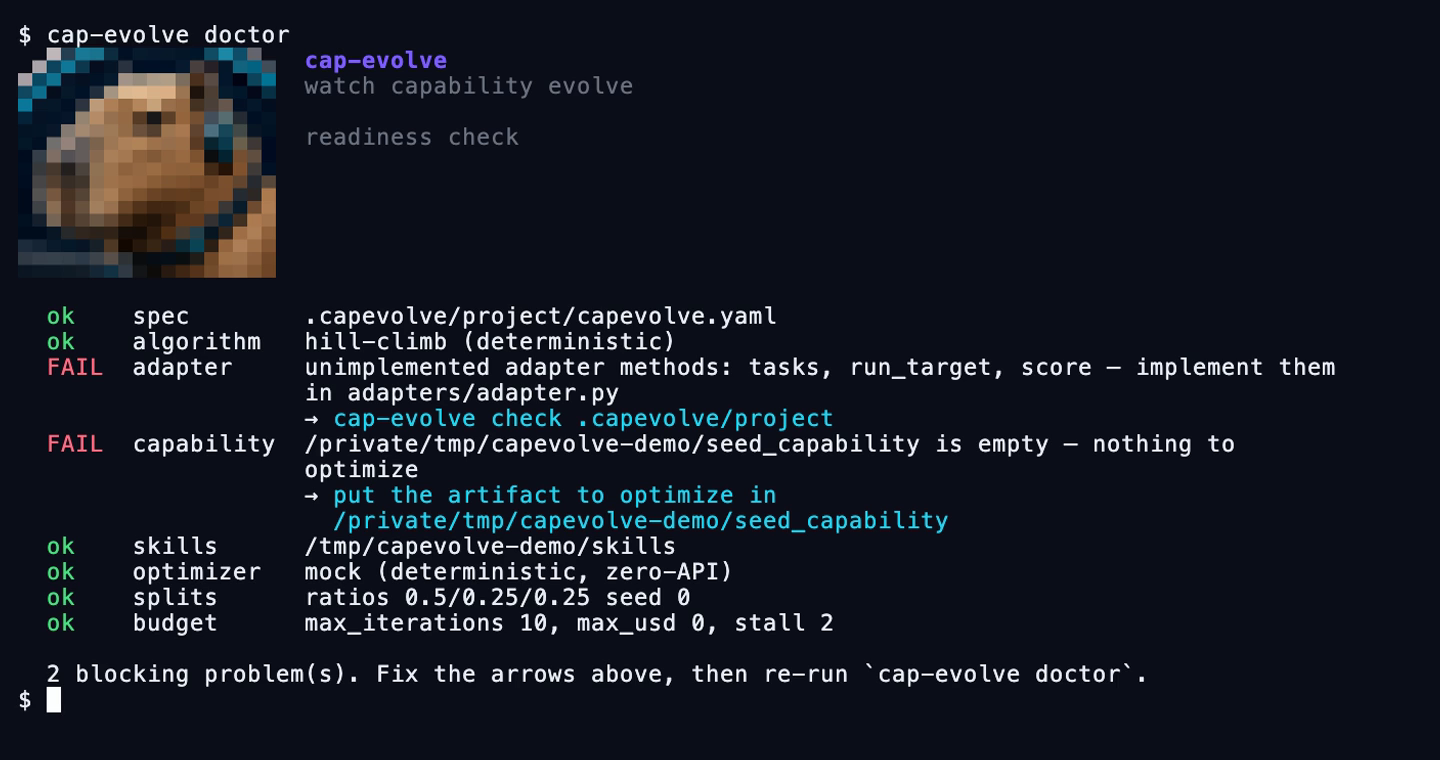
cap-evolve doctor                  # readiness check: what's missing + the command that fixes it
cap-evolve algorithms              # the five algorithms and the exact spec lines to pick one
cap-evolve help           # full help with copy-paste examples
doctor is the one to run before spending anything. Every failing row names the fix:
Every candidate is a snapshot, so you can read the edit that moved the number — unified below 120 columns, side-by-side above:
cap-evolve diff --best             # seed → the winning candidate
cap-evolve diff cand_0003          # against its parent
cap-evolve diff cand_0003 --stat   # just the per-file +/- counts
cap-evolve watch                   # live view of the newest run
cap-evolve replay --demo           # no API key, no config — replays a bundled recording
cap-evolve run --tui               # the live view instead of the line log
cap-evolve watch --diff            # …and show what each accepted candidate changed
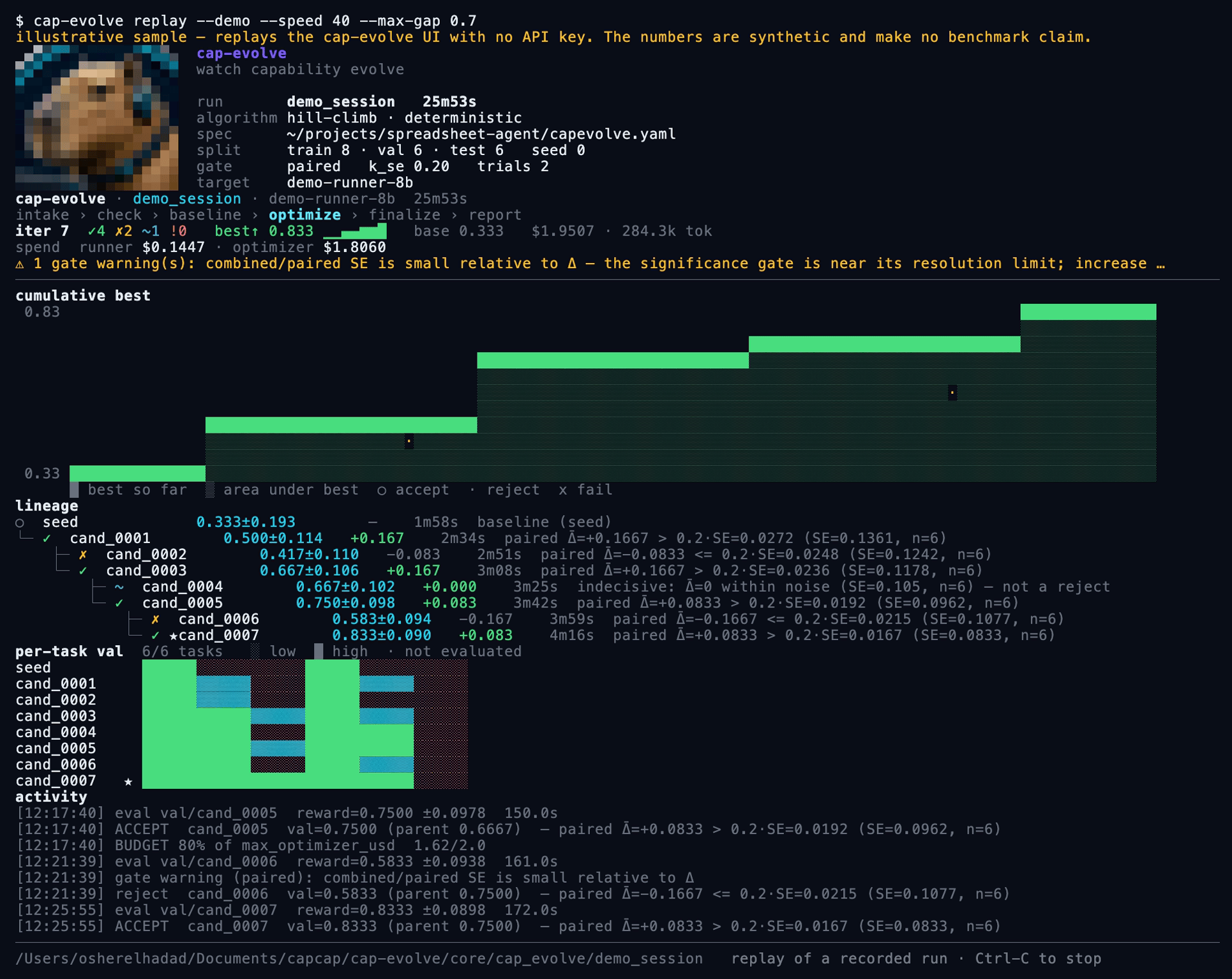
The live view. The masthead answers is this the run I meant to launch? — resolved
spec, algorithm and mode, split sizes, gate bar. Then the cumulative-best stair, the lineage
with the paired-gate reason behind every accept (✓), reject (✗) and
indecisive (~) step, a per-task heatmap that marks
not evaluated distinctly from failed, and spend split into
runner / optimizer / intake.
cap-evolve dashboard # live, over a base dir of runs
Every run gets the same tabs whatever algorithm produced it — Overview, Candidates, Gate,
Tasks, Cost, Logs, Diffs, Trajectories, Memory, Files — and an algorithm that has extra signal
gets an extra tab rather than a different dashboard. GEPA's minibatch-vs-full-val gates and
Pareto selection, SkillOpt's epochs and edit-budget schedule, and
agent-optimize's free-form rounds are all read from events the engine already emitted.
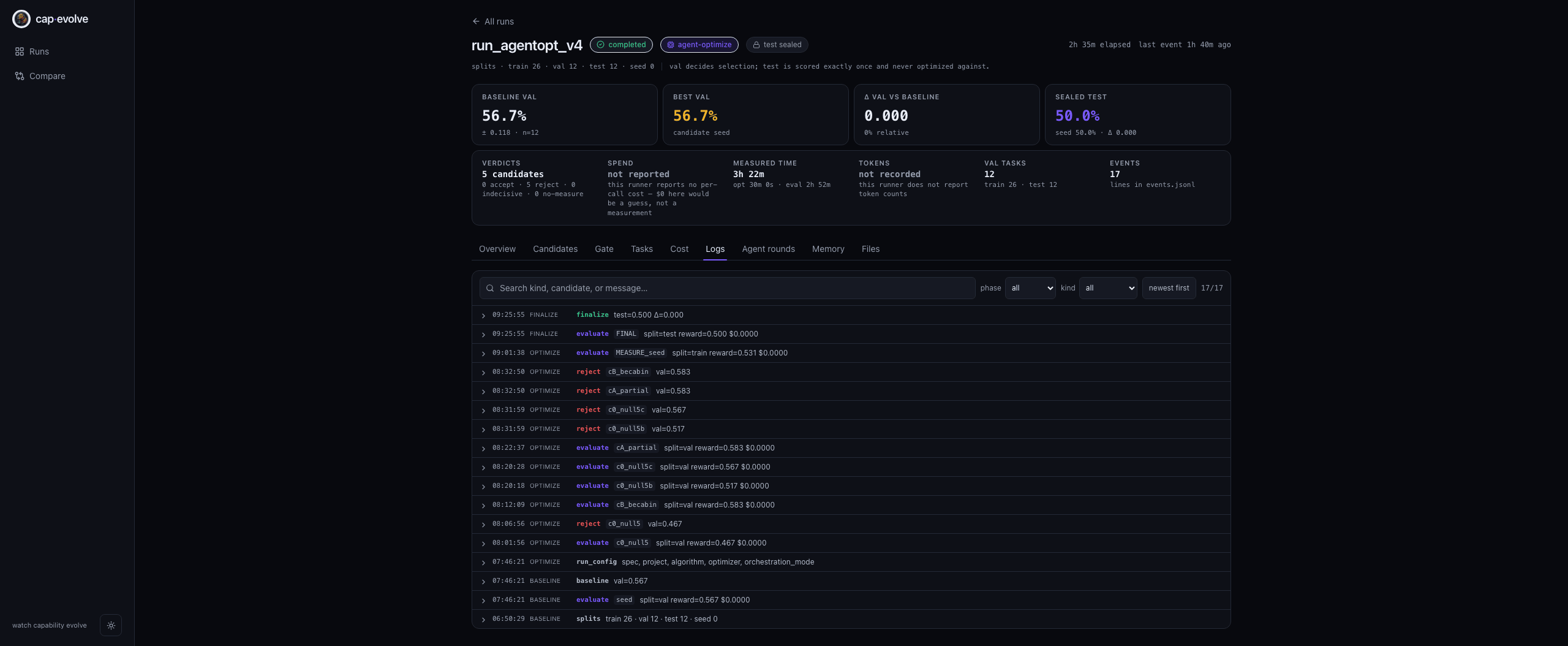
Logs: every line of events.jsonl, phase-tagged and filterable — including the
optimizer's own stderr and each budget warning. Model- and subprocess-authored text is
sanitized and rendered as text nodes only, so a log line can never drive the page.
The dashboard and the terminal are the same projection (events.jsonl → reduce_run), so they
cannot disagree about what happened. run also writes a self-contained dashboard.html that
needs no server.
| Path | Use it when | Start |
|---|---|---|
| Claude Code plugin | You use Claude Code and want slash commands + honesty hooks | claude --plugin-dir ./plugins/cap-evolve then follow RUN.md |
| Another coding-agent host | Codex, Gemini, opencode, Cursor, Droid, Copilot, Kimi, Pi, Antigravity, openclaw, IBM Bob, bare | ./install.sh --host then follow RUN.md |
| Manual adapter + CLI | You want to wire the adapter yourself and drive cap-evolve directly | Optimize your own agent |
Each path shares the same core install and the same honesty guarantees. Full setup, credentials, and the optional dashboard: Installation.
| Capability | What the optimizer may change |
|---|---|
| System prompts | Rewrite / consolidate / add rules, examples, output contracts — never drop a needed rule |
| Tool implementations | Edit tool code for deterministic enforcement; add/wrap/swap tools (never bare-remove) |
| MCP tool surfaces | Safe edits only — tool docs, in-description examples, and which tools are exposed |
| Skill packages | An Agent Skill dir — SKILL.md bodies, references, and executable scripts |
Combine them, e.g. [system-prompt, tools]. See Architecture.
Each result is labeled fit metric (no holdout) or held-out (test scored once on ids the optimizer never saw). Full detail, models, task/trial counts, commits, and costs: docs/RESULTS.md. Every row is cross-checked against a committed run artifact except RH-SWE-bench, whose artifact is not in this repo — see the caveats in docs/RESULTS.md before quoting it.
| Benchmark | Split | Baseline → Optimized | Gain |
|---|---|---|---|
| RH-SWE-bench (skill-package + system-prompt, Harbor) | val — fit metric (119 tasks) | 0.580 → 0.765 | +0.185 / +31.9% |
| toy_calc (zero-API) | sealed test | 0.0 → 1.0 | deterministic proof |
| τ²-bench airline (policy + tools) | val — fit metric | 0.536 → 0.712 | +0.176 / +32.8% |
| τ²-bench airline, held-out 30(=val)/20 | sealed test | 30.0 → 47.5 | +17.5 pp / +58.3% |
| SkillsBench (skill package) | sealed test (held-out) | 0.556 → 0.667 | +0.111 / +20.0% |
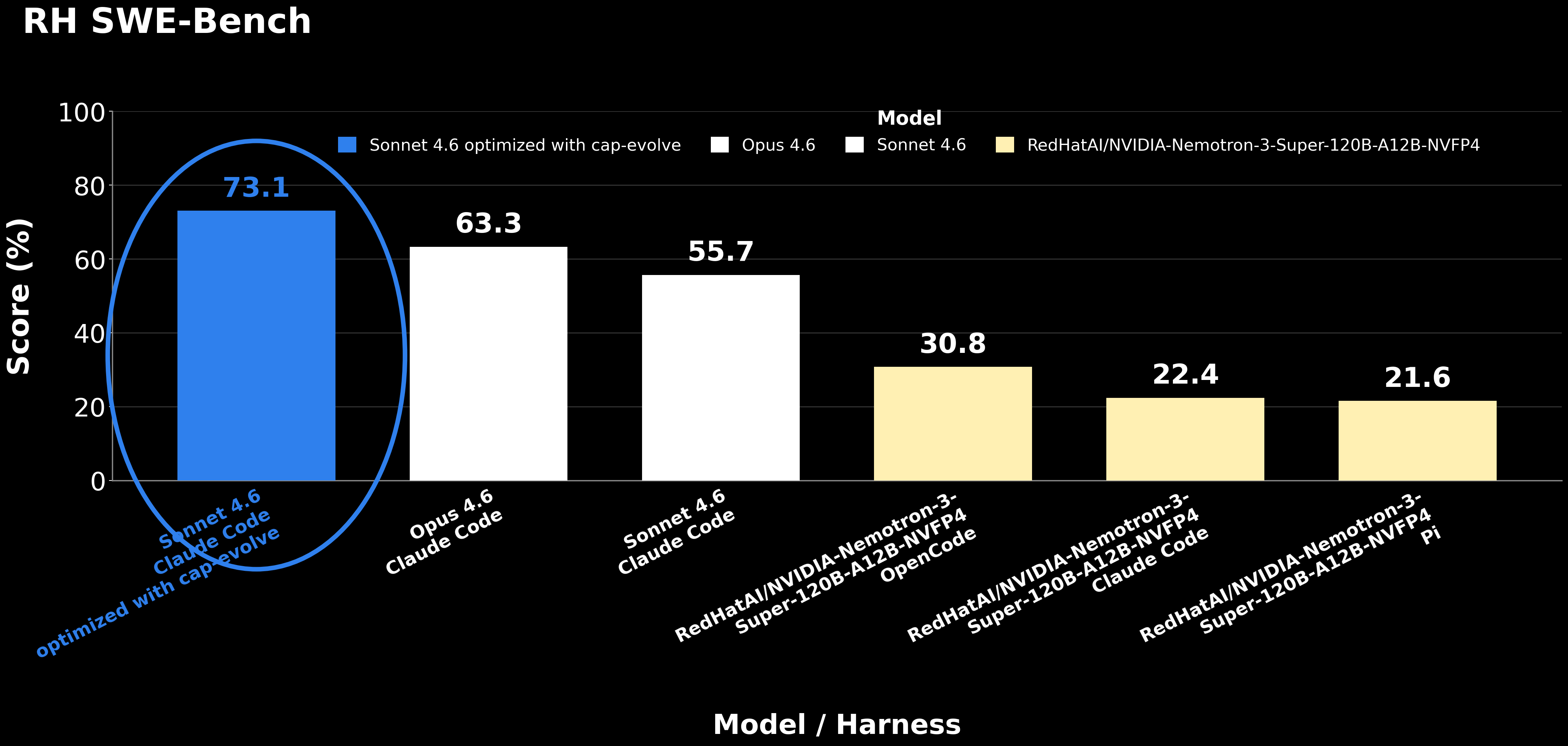
RH SWE-Bench by model and harness: a cap-evolve-optimized Sonnet 4.6 (73.1) scores
above an unoptimized Opus 4.6 (63.3) and its own unoptimized baseline (55.7).
This chart's numbers are a different measurement from the 58.0 → 76.5 fit-metric run in
the table above, and the relationship between the two is unresolved — see
the caveats.
At a glance — baseline → optimized across all benchmarks:
reward × 100
─────────────────────────────────────────────────────────────────────
RH-SWE-bench (119 tasks, fit metric)    ●────────────●  58.0 → 76.5  +18.5 pp / +31.9%
τ²-bench airline (50 tasks, fit metric) ●──────────●    53.6 → 71.2  +17.6 pp / +32.8%
τ²-bench airline (20 tasks, held-out)   ●──────────●    30.0 → 47.5  +17.5 pp / +58.3%
SkillsBench (3 tasks, held-out)         ●──────●        55.6 → 66.7  +11.1 pp / +20.0%
─────────────────────────────────────────────────────────────────────
○ = baseline (seed)   ● = optimized (best candidate)
Not an apples-to-apples leaderboard. For how the held-out τ²-bench result sits next to external tool-optimization work (EvoTool on the original τ-Bench, and Evolutionary Context Search), with defined criteria and caveats, see docs/COMPARISON.md.
flowchart LR
    A[Prompt, tools, MCP, or skills] --> B[Run evaluation]
    B --> C[Diagnose failures]
    C --> D[Generate candidate]
    D --> E[Validation gate]
    E -->|Accepted| F[Git-versioned best candidate]
    E -->|Rejected| C
    F --> G[Final evaluation and report]
Each iteration receives the current best capability, its failed trajectories, per-task impact (what previous edits broke and fixed), and the history of previous attempts. It proposes one bold, multi-part candidate, evaluates it on val, and records whether the gate accepted it. The pipeline is intake → implement-and-check → baseline → algorithm → finalize → report; the exact optimizer-context files, run-dir layout, and honesty guarantees are in Architecture and Honest evaluation.
Wire one small adapter — three required methods (plus optional hooks):
tasks(split)                   -> list[Task]   # your eval cases for 'train'|'val'|'test'|'all'
run_target(task, ctx, *, seed) -> Rollout      # run your agent with the candidate LIVE as ctx
score(task, rollout)           -> Score        # reward in [0,1] + feedback (never leak the gold)
Everything else — splits, trials, gating, pass^k, the sealed test, memory, and the dashboard — is provided by the core. Two ways to get there:
RUN.md. It runs intake, asks for anything missing, writes
the adapter, passes cap-evolve check, then runs the loop.
| Example | What it shows | Needs | Run |
|---|---|---|---|
| toy_calc | The full loop, deterministically | nothing | bash examples/toy_calc/run.sh |
| tau2_airline | Onboard a real benchmark from one prompt; optimize policy + tool code | gateway creds, Claude Code | bash examples/tau2_airline/setup.sh && bash examples/tau2_airline/run.sh |
| skillsbench | Optimize a skill package; agent runs in Docker | Docker, uv, Claude creds | bash examples/skillsbench/setup.sh && bash examples/skillsbench/run.sh |
Each example's paste-to-agent brief is its PROMPT.md, its narrative is DEMO.md, and its
committed run is under run_full/. See the full interactive dashboard for the tau2 run with
no backend: cd examples/tau2_airline/run_full/ui && python3 -m http.server 8000. Reproduce
from zero: tau2 · SkillsBench.
| Document | Use it when |
|---|---|
| Site (home) | You want the interactive site — hero, results, and doc navigation in one place |
| Getting started | You want your first successful run |
| Installation | You need host-specific setup, credentials, or the dashboard |
| Optimize your own agent | You want to integrate your agent or benchmark |
| Adapter templates | You want a copy-and-run adapter (JSONL, HuggingFace, tau2, SWE-bench, SkillsBench) |
| Adapter contract | You are implementing an adapter |
| Architecture | You want to understand the pipeline and optimizer context |
| Agent orchestration | You want the agent to drive the loop itself (orchestration_mode: agent, agent-optimize) |
| Honest evaluation | You need details on splits, gates, and sealing |
| Results | You want the full experiments and artifacts |
| Comparison | You want positioning vs other tools and external results |
| Extending cap-evolve | You are adding a capability, optimizer, or algorithm |
| Troubleshooting | Installation or a run failed |
| Roadmap | You want planned work |
| How-to guides | You want a specific harness + benchmark recipe |
| Docker/Podman on CCC | You are running on a cluster with no root, no sudo, no subuid range (IBM CCC), or submitting cap-evolve through LSF |
Beta (0.x). Contributions welcome — see CONTRIBUTING.md and the
Code of Conduct. Report security issues via SECURITY.md.
Changes are tracked in CHANGELOG.md.
@software{cap-evolve,
  title  = {cap-evolve: a skills-native, host-agnostic harness for honestly
            optimizing AI-agent capabilities},
  year   = {2026},
  note   = {https://github.com/skillberry-ai/cap-evolve}
}
Acknowledgements. cap-evolve includes no third-party code — the gepa and
skillopt skills are independent implementations of the GEPA (arXiv:2507.19457) and
SkillOpt (arXiv:2605.23904) papers, and it draws on ideas from DSPy and Anthropic's
Agent Skills standard. The bundled example uses
tau2-bench (MIT). Full citations:
docs/sources.bib.
Apache-2.0.
→ →
→ →
→ →
→ →
→ →
→ →
→ →
→