
1
 →
→sammcj/gollama is an open-source project on GitHub, mainly written in Go. Go manage your Ollama models It currently holds 1,837 stars and 113 forks with 0 open issues, and was last pushed on an unknown date (repository created unknown).
AI Homed tracks it on the Local & On-Device AI board.

Gollama is a macOS / Linux tool for managing Ollama models.
It provides a TUI (Text User Interface) for listing, inspecting, deleting, copying, and pushing Ollama models.
The application allows users to interactively select models, sort, filter, edit, run, unload and perform actions on them using hotkeys.
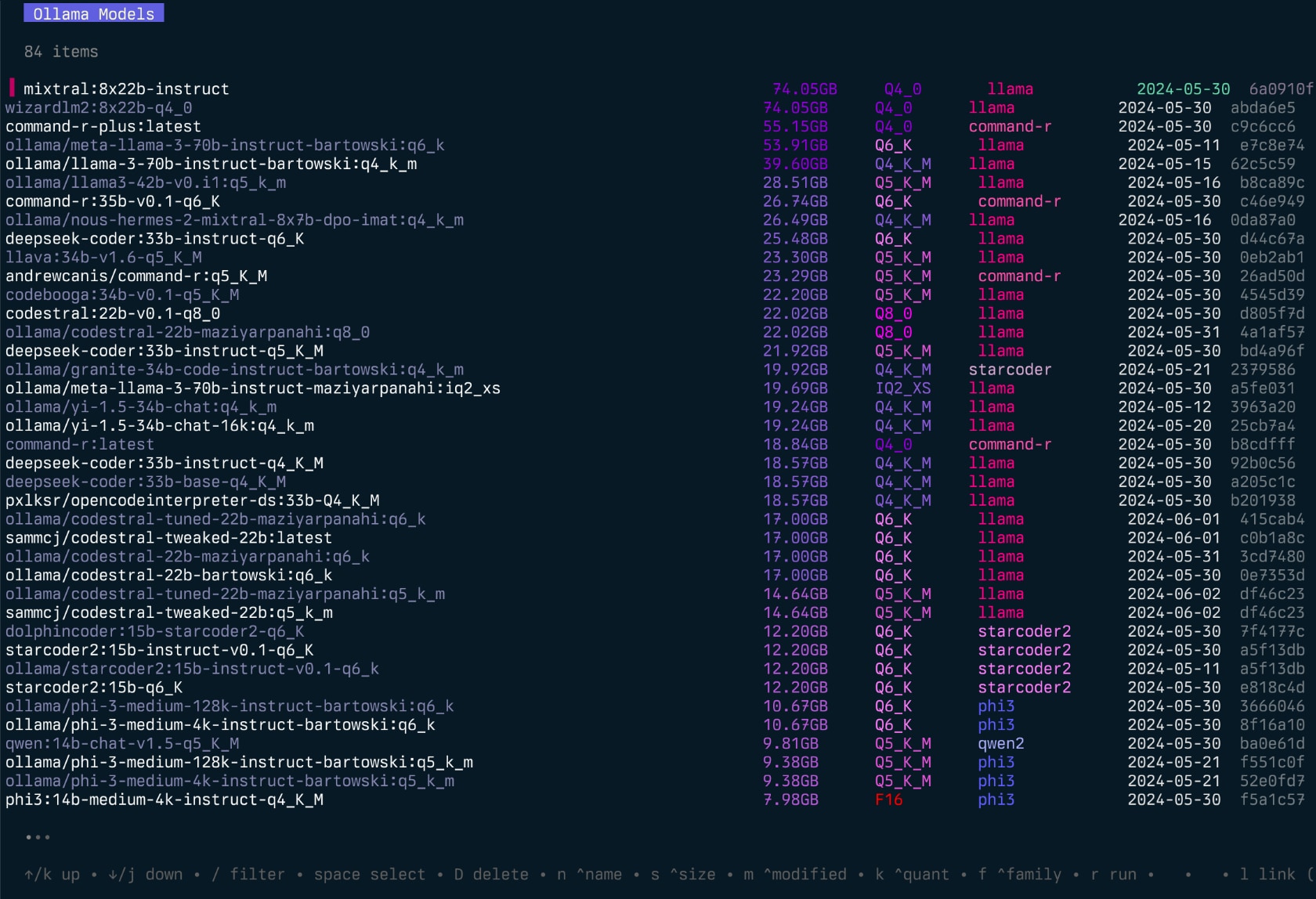
Gollama is a tool for managing Ollama models with an easy-to-use interface.
It's in active development, so there are some bugs and missing features, however I'm finding it useful for managing my models every day, especially for cleaning up old models.
---
As of the v2.0.1 release of Gollama, LM Studio linking will no longer be available.
Linking from/to LM Studio became more hassle to maintain than it was worth. Ongoing changes to both upstream applications and trying to cater for each users local configuration meant investing too much of my time for a feature I rarely used.
I'm simply not dog-fooding with Ollama enough. This has meant that development has slowed down as I focus on other projects.
I was an early adopter and contributor to Ollama, but the value I got from Ollama has diminished throughout 2025 to the point where I rarely ever use it. For model serving I have mostly moved to llama.cpp running with llama-swap. Llama.cpp has become far more user friendly over the past year, the project is well maintained, easier to configure, with _many_ more features and _significantly_ better performance. For serving models on my laptop I use LM Studio as it provides both MLX models and the standard llama.cpp runtime for GGUF models, in addition to oMLX which has been great for serving MLX models locally for agentic coding with tools like Pi or OpenCode.
---
go install github.com/sammcj/gollama/v2@latest
I don't recommend this method as it's not as easy to update, but you can use the following command:
curl -sL https://raw.githubusercontent.com/sammcj/gollama/refs/heads/main/scripts/install.sh | bash
Download the most recent release from the releases page and extract the binary to a directory in your PATH.
e.g. zip -d gollama*.zip -d gollama && mv gollama /usr/local/bin
If you see this error, add environment variables to .zshrc or .bashrc.
echo 'export PATH=$PATH:$HOME/go/bin' >> ~/.zshrc
source ~/.zshrc
To run the gollama application, use the following command:
gollama
_Tip_: I like to alias gollama to g for quick access:
echo "alias g=gollama" >> ~/.zshrc
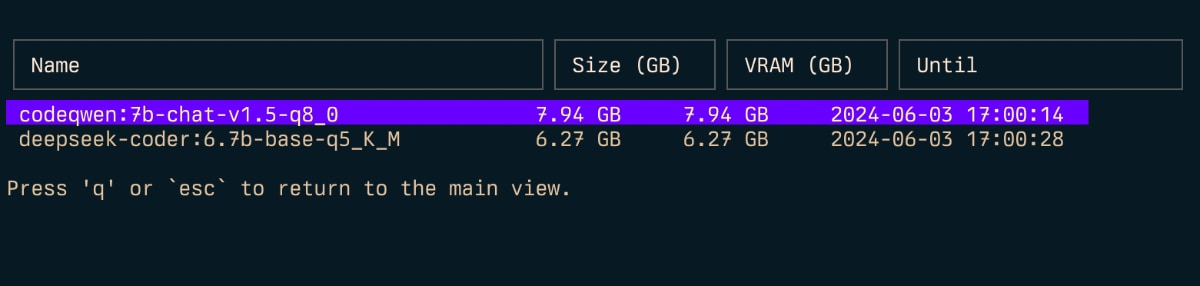
Space: SelectEnter: Run model (Ollama run)i: Inspect modelt: Top (show running models)D: Delete modele: Edit modelc: Copy modelU: Unload all modelsp: Pull an existing modelctrl+k: Pull model & preserve user configurationctrl+p: Pull (get) new modelP: Push modeln: Sort by names: Sort by sizem: Sort by modifiedk: Sort by quantisationf: Sort by familyB: Sort by parameter sizer: Rename model _(Work in progress)_q: QuitTop (t)
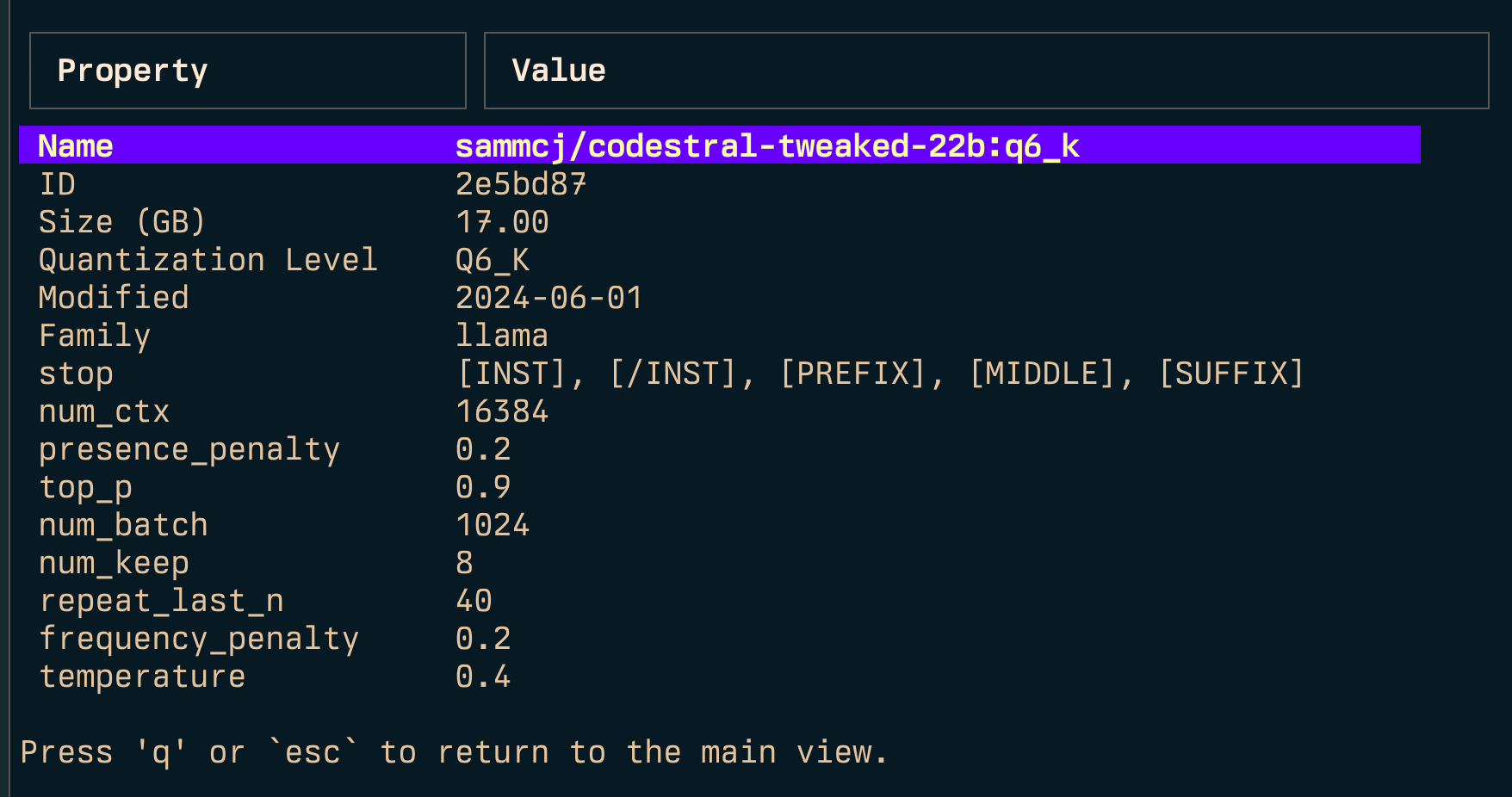
Inspect (i)
Model Management:
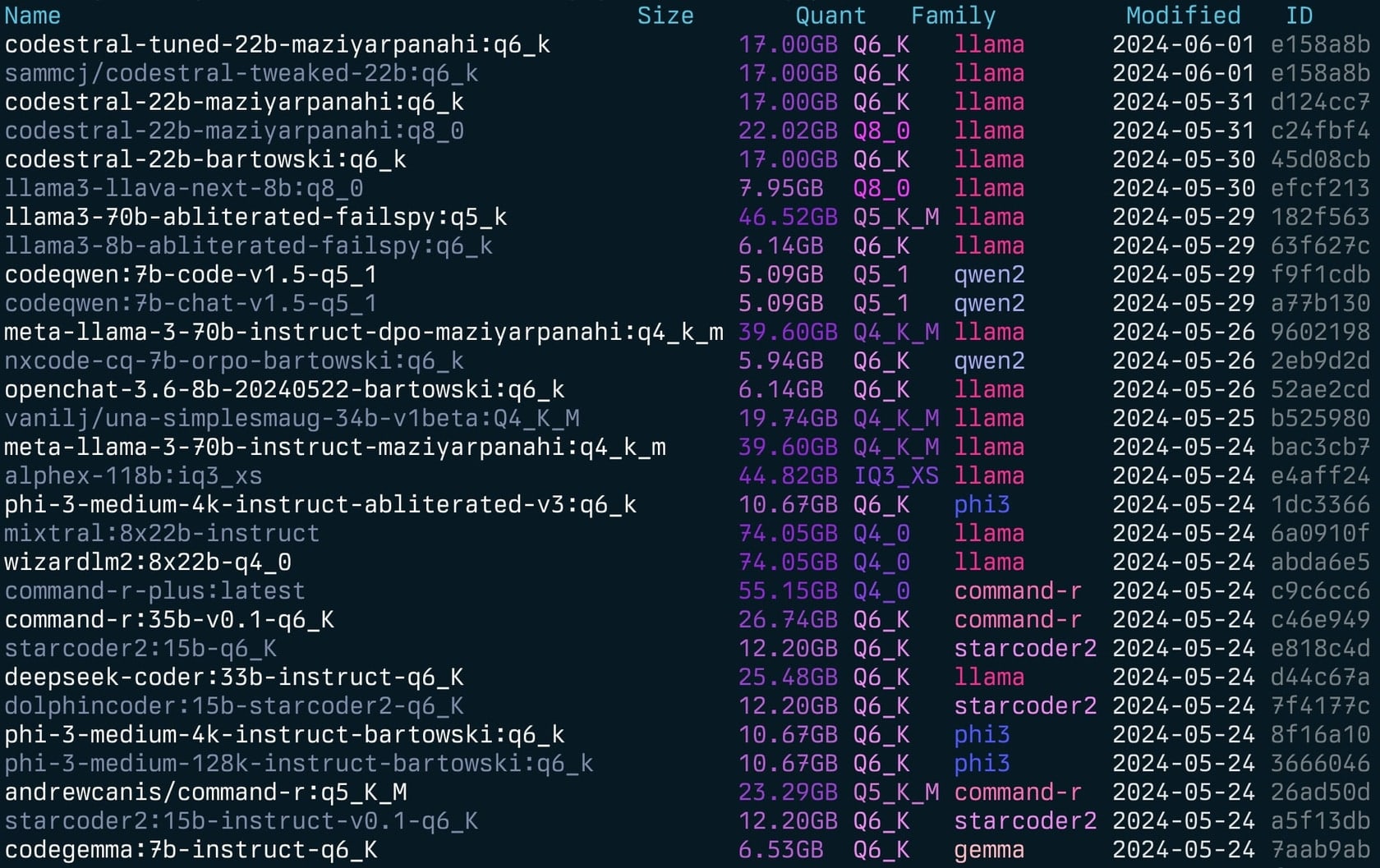
-l: List all available Ollama models and exit-s : Search for models by name'term1|term2') returns models that match either term'term1&term2') returns models that match both terms-e : Edit the Modelfile for a model-u: Unload all running models-v: Print the version and exit-h, or --host: Specify the host for the Ollama API-H: Shortcut for -h http://localhost:11434 (connect to local Ollama API)--ollama-dir: Custom Ollama models directory--log or --log-level: Override log level (debug, info, warn, error)--no-cleanup: Don't cleanup broken symlinks--vram: Estimate vRAM usage for a model. Accepts:llama3.1:8b-instruct-q6_K, qwen2:14b-q4_0)NousResearch/Hermes-2-Theta-Llama-3-8B)--fits: Available memory in GB for context calculation (e.g. 6 for 6GB)--vram-to-nth or --context: Maximum context length to analyze (e.g. 32k or 128k)--quant: Override quantisation level (e.g. Q4_0, Q5_K_M)Gollama can also be called with -l to list models without the TUI.
gollama -l
List (gollama -l):
Gollama can be called with -e to edit the Modelfile for a model.
gollama -e my-model
Gollama can be called with -s to search for models by name.
gollama -s my-model # returns models that contain 'my-model'
gollama -s 'my-model|my-other-model' # returns models that contain either 'my-model' or 'my-other-model'
gollama -s 'my-model&instruct' # returns models that contain both 'my-model' and 'instruct'
Gollama includes a comprehensive vRAM estimation feature:
my-model:mytag), or huggingface model ID (e.g. author/name)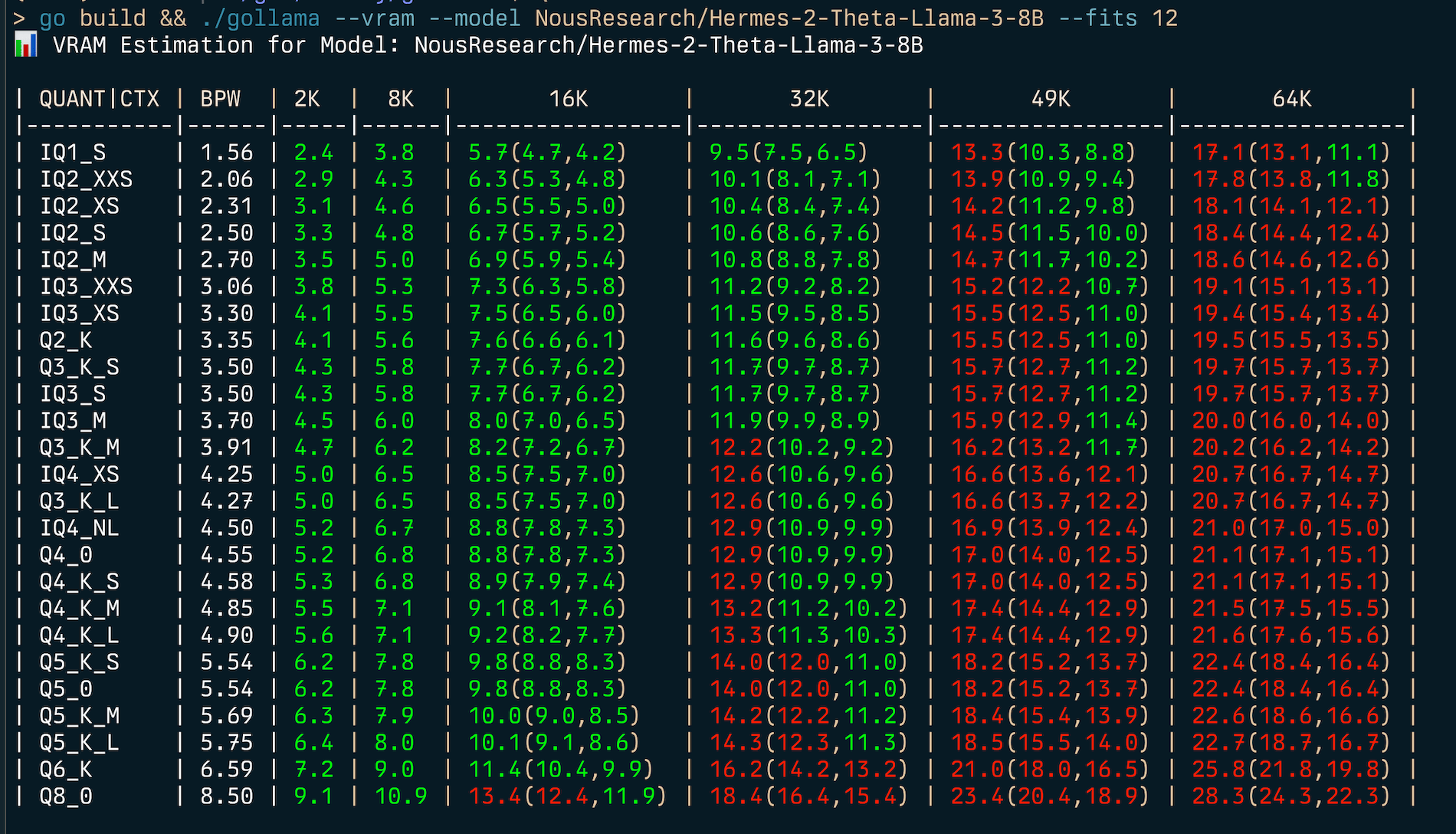
To estimate (v)RAM usage:
gollama --vram llama3.1:8b-instruct-q6_K
📊 VRAM Estimation for Model: llama3.1:8b-instruct-q6_K
| QUANT   | CTX  | BPW | 2K  | 8K              | 16K             | 32K             | 49K             | 64K |
| ------- | ---- | --- | --- | --------------- | --------------- | --------------- | --------------- |
| IQ1_S   | 1.56 | 2.2 | 2.8 | 3.7(3.7,3.7)    | 5.5(5.5,5.5)    | 7.3(7.3,7.3)    | 9.1(9.1,9.1)    |
| IQ2_XXS | 2.06 | 2.6 | 3.3 | 4.3(4.3,4.3)    | 6.1(6.1,6.1)    | 7.9(7.9,7.9)    | 9.8(9.8,9.8)    |
| IQ2_XS  | 2.31 | 2.9 | 3.6 | 4.5(4.5,4.5)    | 6.4(6.4,6.4)    | 8.2(8.2,8.2)    | 10.1(10.1,10.1) |
| IQ2_S   | 2.50 | 3.1 | 3.8 | 4.7(4.7,4.7)    | 6.6(6.6,6.6)    | 8.5(8.5,8.5)    | 10.4(10.4,10.4) |
| IQ2_M   | 2.70 | 3.2 | 4.0 | 4.9(4.9,4.9)    | 6.8(6.8,6.8)    | 8.7(8.7,8.7)    | 10.6(10.6,10.6) |
| IQ3_XXS | 3.06 | 3.6 | 4.3 | 5.3(5.3,5.3)    | 7.2(7.2,7.2)    | 9.2(9.2,9.2)    | 11.1(11.1,11.1) |
| IQ3_XS  | 3.30 | 3.8 | 4.5 | 5.5(5.5,5.5)    | 7.5(7.5,7.5)    | 9.5(9.5,9.5)    | 11.4(11.4,11.4) |
| Q2_K    | 3.35 | 3.9 | 4.6 | 5.6(5.6,5.6)    | 7.6(7.6,7.6)    | 9.5(9.5,9.5)    | 11.5(11.5,11.5) |
| Q3_K_S  | 3.50 | 4.0 | 4.8 | 5.7(5.7,5.7)    | 7.7(7.7,7.7)    | 9.7(9.7,9.7)    | 11.7(11.7,11.7) |
| IQ3_S   | 3.50 | 4.0 | 4.8 | 5.7(5.7,5.7)    | 7.7(7.7,7.7)    | 9.7(9.7,9.7)    | 11.7(11.7,11.7) |
| IQ3_M   | 3.70 | 4.2 | 5.0 | 6.0(6.0,6.0)    | 8.0(8.0,8.0)    | 9.9(9.9,9.9)    | 12.0(12.0,12.0) |
| Q3_K_M  | 3.91 | 4.4 | 5.2 | 6.2(6.2,6.2)    | 8.2(8.2,8.2)    | 10.2(10.2,10.2) | 12.2(12.2,12.2) |
| IQ4_XS  | 4.25 | 4.7 | 5.5 | 6.5(6.5,6.5)    | 8.6(8.6,8.6)    | 10.6(10.6,10.6) | 12.7(12.7,12.7) |
| Q3_K_L  | 4.27 | 4.7 | 5.5 | 6.5(6.5,6.5)    | 8.6(8.6,8.6)    | 10.7(10.7,10.7) | 12.7(12.7,12.7) |
| IQ4_NL  | 4.50 | 5.0 | 5.7 | 6.8(6.8,6.8)    | 8.9(8.9,8.9)    | 10.9(10.9,10.9) | 13.0(13.0,13.0) |
| Q4_0    | 4.55 | 5.0 | 5.8 | 6.8(6.8,6.8)    | 8.9(8.9,8.9)    | 11.0(11.0,11.0) | 13.1(13.1,13.1) |
| Q4_K_S  | 4.58 | 5.0 | 5.8 | 6.9(6.9,6.9)    | 8.9(8.9,8.9)    | 11.0(11.0,11.0) | 13.1(13.1,13.1) |
| Q4_K_M  | 4.85 | 5.3 | 6.1 | 7.1(7.1,7.1)    | 9.2(9.2,9.2)    | 11.4(11.4,11.4) | 13.5(13.5,13.5) |
| Q4_K_L  | 4.90 | 5.3 | 6.1 | 7.2(7.2,7.2)    | 9.3(9.3,9.3)    | 11.4(11.4,11.4) | 13.6(13.6,13.6) |
| Q5_K_S  | 5.54 | 5.9 | 6.8 | 7.8(7.8,7.8)    | 10.0(10.0,10.0) | 12.2(12.2,12.2) | 14.4(14.4,14.4) |
| Q5_0    | 5.54 | 5.9 | 6.8 | 7.8(7.8,7.8)    | 10.0(10.0,10.0) | 12.2(12.2,12.2) | 14.4(14.4,14.4) |
| Q5_K_M  | 5.69 | 6.1 | 6.9 | 8.0(8.0,8.0)    | 10.2(10.2,10.2) | 12.4(12.4,12.4) | 14.6(14.6,14.6) |
| Q5_K_L  | 5.75 | 6.1 | 7.0 | 8.1(8.1,8.1)    | 10.3(10.3,10.3) | 12.5(12.5,12.5) | 14.7(14.7,14.7) |
| Q6_K    | 6.59 | 7.0 | 8.0 | 9.4(9.4,9.4)    | 12.2(12.2,12.2) | 15.0(15.0,15.0) | 17.8(17.8,17.8) |
| Q8_0    | 8.50 | 8.8 | 9.9 | 11.4(11.4,11.4) | 14.4(14.4,14.4) | 17.4(17.4,17.4) | 20.3(20.3,20.3) |
To find the best quantisation type for a given memory constraint (e.g. 6GB) you can provide --fits :
gollama --vram NousResearch/Hermes-2-Theta-Llama-3-8B --fits 6
📊 VRAM Estimation for Model: NousResearch/Hermes-2-Theta-Llama-3-8B
| QUANT/CTX | BPW  | 2K  | 8K  | 16K          | 32K           | 49K            | 64K             |
| --------- | ---- | --- | --- | ------------ | ------------- | -------------- | --------------- |
| IQ1_S     | 1.56 | 2.4 | 3.8 | 5.7(4.7,4.2) | 9.5(7.5,6.5)  | 13.3(10.3,8.8) | 17.1(13.1,11.1) |
| IQ2_XXS   | 2.06 | 2.9 | 4.3 | 6.3(5.3,4.8) | 10.1(8.1,7.1) | 13.9(10.9,9.4) | 17.8(13.8,11.8) |
...
This will display a table showing vRAM usage for various quantisation types and context sizes.
The vRAM estimator works by:
1. Fetching the model configuration from Hugging Face (if not cached locally) 2. Calculating the memory requirements for model parameters, activations, and KV cache 3. Adjusting calculations based on the specified quantisation settings 4. Performing binary and linear searches to optimize for context length or quantisation settings
Note: The estimator will attempt to use CUDA vRAM if available, otherwise it will fall back to system RAM for calculations.
Gollama uses a JSON configuration file located at ~/.config/gollama/config.json. The configuration file includes options for sorting, columns, API keys, log levels, theme etc...
Example configuration:
{
  "default_sort": "modified",
  "columns": [
    "Name",
    "Size",
    "Quant",
    "Family",
    "Modified",
    "ID"
  ],
  "ollama_api_key": "",
  "ollama_api_url": "http://localhost:11434",
  "log_level": "info",
  "log_file_path": "/Users/username/.config/gollama/gollama.log",
  "sort_order": "Size",
  "strip_string": "my-private-registry.internal/",
  "editor": "/Applications/Visual Studio Code.app/Contents/Resources/app/bin/code",
  "docker_container": ""
}
strip_string can be used to remove a prefix from model names as they are displayed in the TUI. This can be useful if you have a common prefix such as a private registry that you want to remove for display purposes.editor specifies which editor to use for editing modelfiles when pressing 'e'. If empty, falls back to the EDITOR environment variable, then defaults to vim. External editors like VS Code are supported and will show a popup interface.docker_container - experimental - if set, gollama will attempt to perform any run operations inside the specified container.theme - experimental The name of the theme to use (without .json extension)1. Clone the repository:
    git clone https://github.com/sammcj/gollama.git
    cd gollama
2. Build:
    go get
    make build
3. Run:
./gollama
Gollama has basic customisable theme support, themes are stored as JSON files in ~/.config/gollama/themes/.
The active theme can be set via the theme setting in your config file (without the .json extension).
Default themes will be created if they don't exist:
default - Dark theme with neon accents (default)light-neon - Light theme with neon accents, suitable for light terminal backgrounds1. Create a new JSON file in the themes directory (e.g. ~/.config/gollama/themes/my-theme.json)
2. Use the following structure:
{
  "name": "my-theme",
  "description": "My custom theme",
  "colours": {
    "header_foreground": "#AA1493",
    "header_border": "#BA1B11",
    "selected": "#FFFFFF",
    ...
  },
  "family": {
    "llama": "#FF1493",
    "alpaca": "#FF00FF",
    ...
  }
}
Colours can be specified as ANSI colour codes (e.g. "241") or hex values (e.g. "#FF00FF"). The family section defines colours for different model families in the list view.
_Note: Using the VSCode extension 'Color Highlight' makes it easier to find the hex values for colours._
Logs can be found in the gollama.log which is stored in $HOME/.config/gollama/gollama.log by default.
The log level can be set in the configuration file or overridden via command-line:
# Override log level for a single command
gollama -C --log debug
Or use the long form
gollama --create-from-lmstudio --log-level debug
Available log levels: debug, info, warn, error
Contributions are welcome! Please fork the repository and create a pull request with your changes.

Sam |

Cameron Kingsbury |

KimCookieYa |

lif |

Denis Balan |

Doug Coleman |

Impact |

Jose Almaraz |

Jose Roberto Almaraz |

Oleksii Filonenko |

SouthWolf |

Vigilans |

agustif |

anrgct |

ondrej |


Copyright © 2024 Sam McLeod
This project is licensed under the MIT License. See the LICENSE file for details.
→ →
→ →
→ →
→ →
→ →
→ →
→ →
→