
1
 →
→RunanywhereAI/runanywhere-sdks is an open-source project on GitHub, mainly written in C++. Production ready toolkit to run AI locally It currently holds 10,295 stars and 380 forks with 0 open issues, and was last pushed on an unknown date (repository created unknown).
AI Homed tracks it on the Local & On-Device AI board.

One SDK. Every device.
LLMs, vision, speech, voice agents, RAG, embeddings, and image generation, running locally on
phones, browsers, desktops, and servers.
Private by default. Offline by design. Accelerated by whatever silicon the device has.
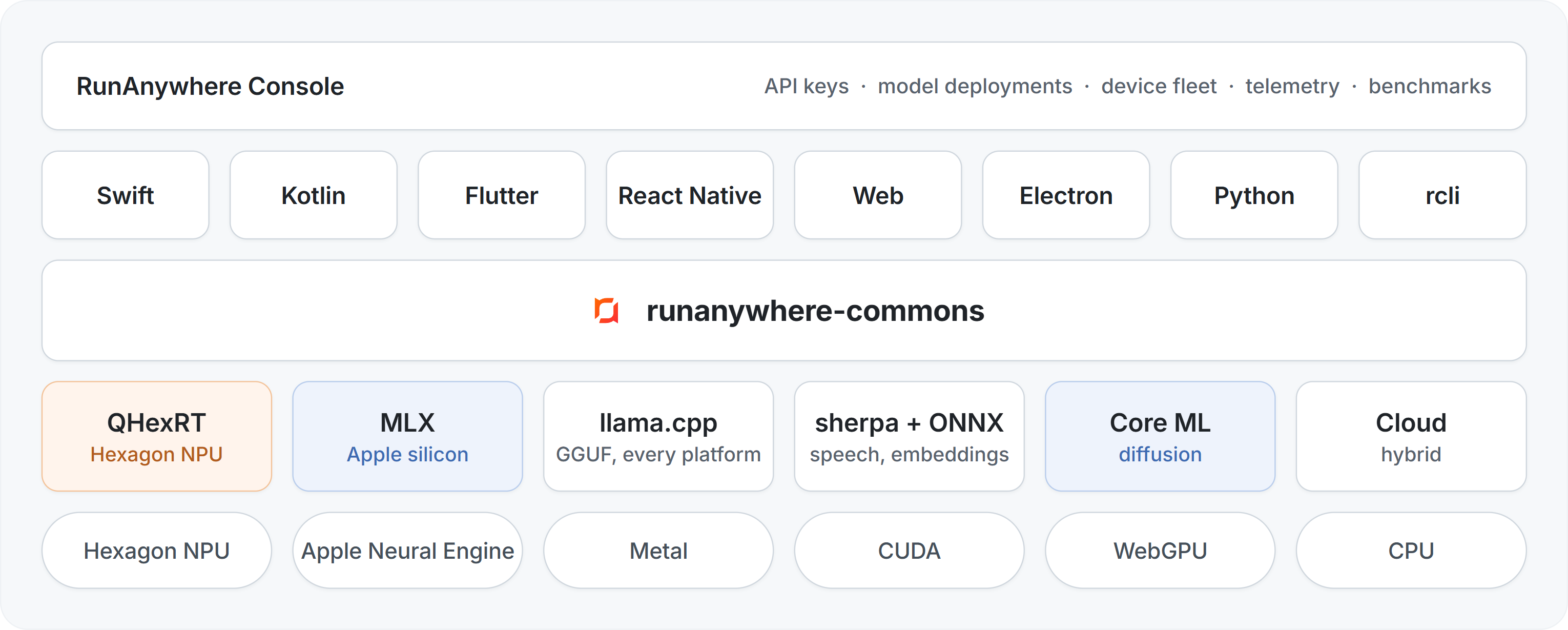
Eight SDKs, one C++ core. A capability registry routes every call to the best engine on the device, and the Console manages your fleet from above.
---
Every capability below runs fully on-device behind one semantic API across the eight SDKs.
Call RunAnywhere.capabilities() (v4) to discover what the current package and device can
actually execute — enum presence alone does not mean an engine is installed.
generateStructured + enforcement mode)SpeechHandle-scoped playback (wake-word detection is not implemented)---
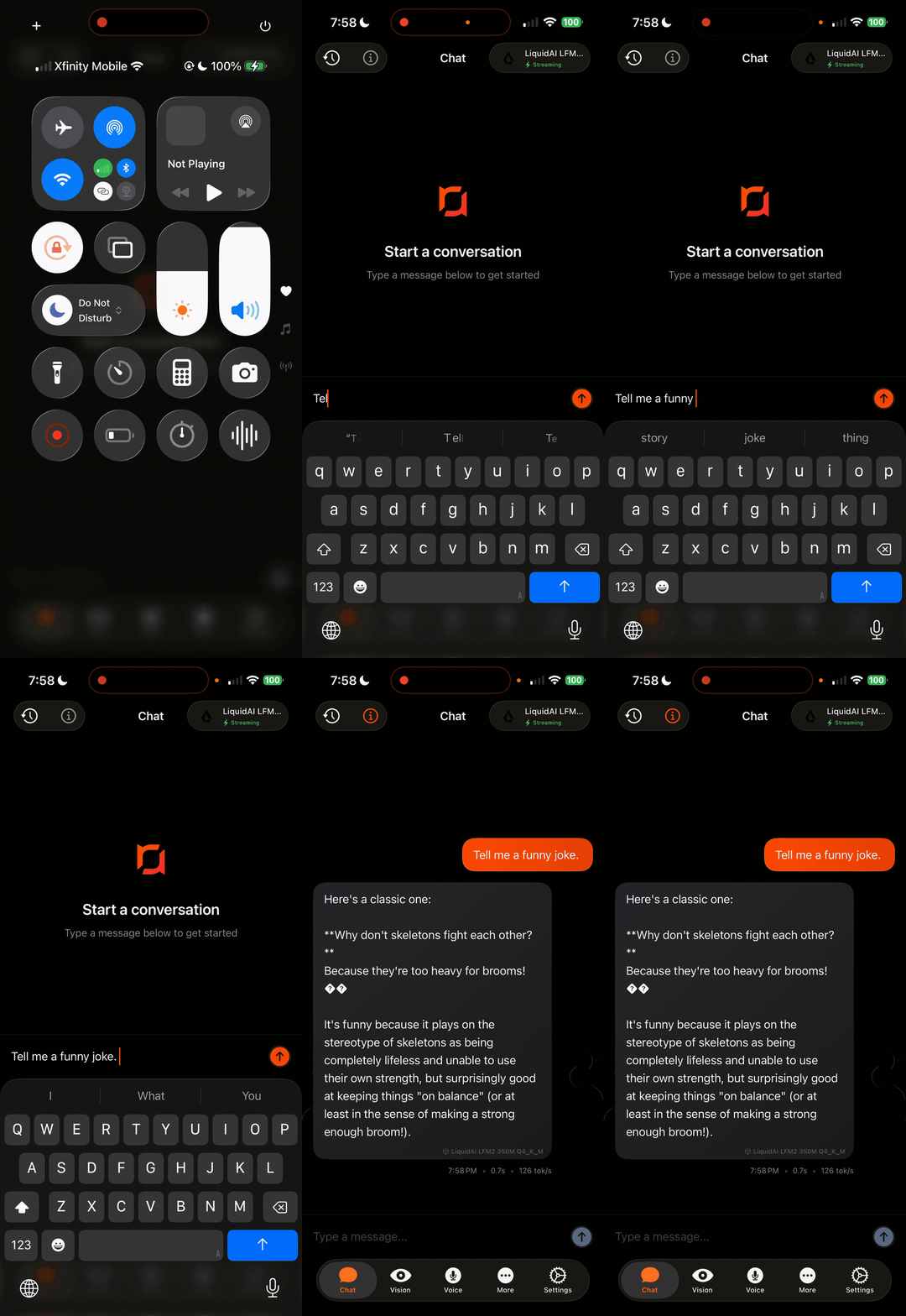 Text Generation LLM inference, 100% on-device |
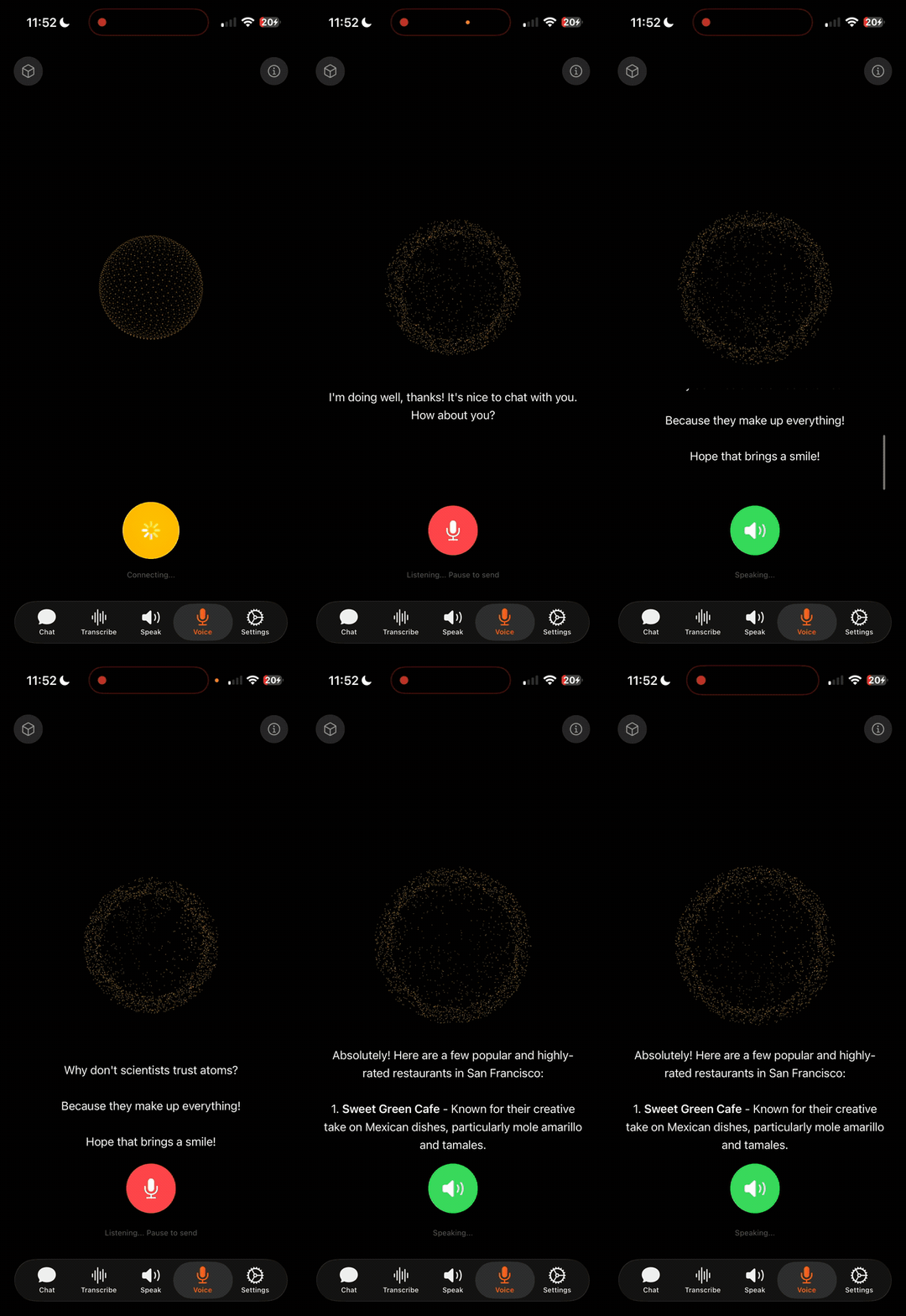 Voice AI STT → LLM → TTS pipeline, fully offline |
|
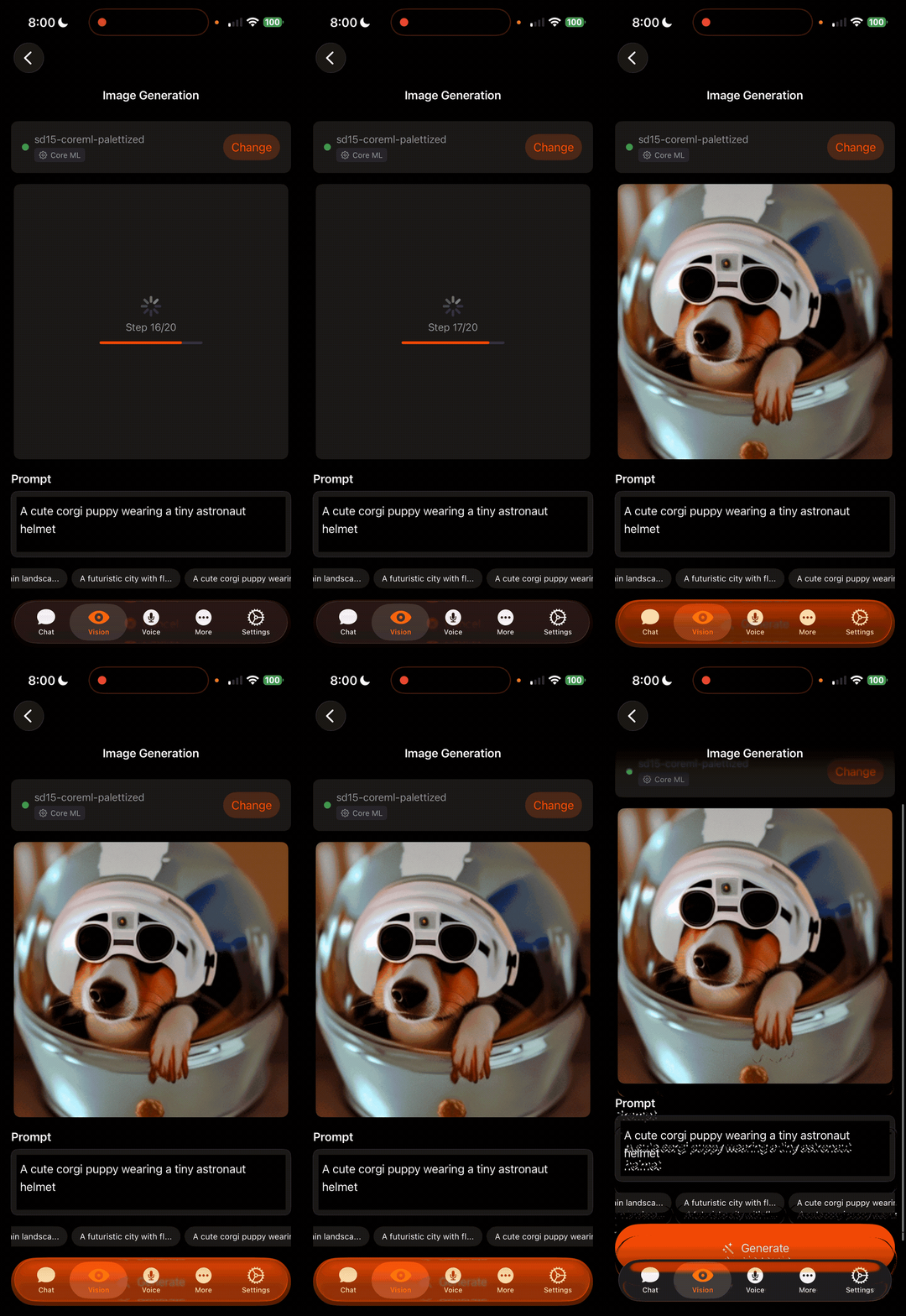 Image Generation On-device diffusion model |
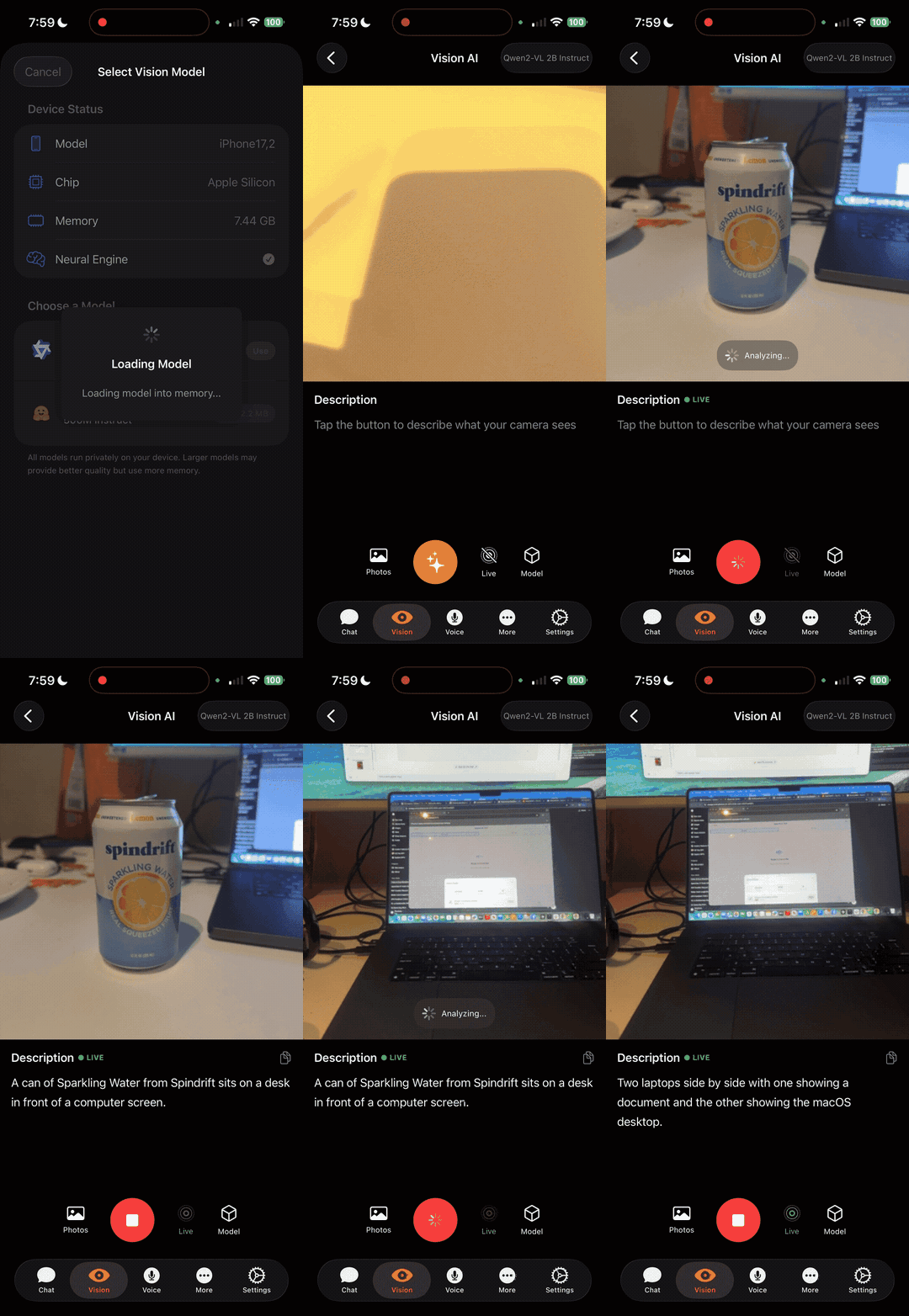 Visual Language Model Vision + language understanding on-device |
---
The fastest way to feel it. Install, load, generate, all local:
pip install runanywhere
import runanywhere as ra
from runanywhere import LlmOptions
ra.initialize()
downloads on first use
print(ra.llm.generate("Explain on-device AI in one sentence.",
                      LlmOptions(model="qwen2.5-0.5b")).text)
Prefer a terminal? Install the CLI from RunanywhereAI/RCLI — it consumes the C++ desktop kit this repo publishes:
brew install runanywhereai/tap/rcli
or
curl -fsSL https://raw.githubusercontent.com/RunanywhereAI/RCLI/main/install.sh | sh
rcli run qwen3 "Explain on-device AI in one sentence."
Building for mobile, web, or desktop? Every platform below speaks the same API.
import RunAnywhere
import LlamaCPPRuntime
// 1. Initialize
LlamaCPP.register()
try RunAnywhere.initialize()
// 2. Load a model
var load = RAModelLoadRequest()
load.modelID = "smollm2-360m"
load.category = .language
load.framework = .llamaCpp
_ = await RunAnywhere.loadModel(load)
// 3. Generate
var req = RALLMGenerateRequest()
req.prompt = "What is the capital of France?"
let result = try await RunAnywhere.generate(req)
print(result.text) // "Paris is the capital of France."
Add the MLX backend (import RunAnywhereMLX; MLX.register()) for Apple-native LLM, VLM, STT, TTS, and embeddings on Apple silicon.
Install via Swift Package Manager:
https://github.com/RunanywhereAI/runanywhere-sdks
import ai.runanywhere.proto.v1.ModelCategory
import ai.runanywhere.proto.v1.SDKEnvironment
import com.runanywhere.sdk.llm.llamacpp.LlamaCPP
import com.runanywhere.sdk.public.RunAnywhere
import com.runanywhere.sdk.public.extensions.*
import com.runanywhere.sdk.public.types.RAModelInfo
import com.runanywhere.sdk.public.types.RAModelLoadRequest
// 1. Initialize (in a coroutine scope)
LlamaCPP.register()
RunAnywhere.initialize(
    context = this,
    environment = SDKEnvironment.SDK_ENVIRONMENT_DEVELOPMENT,
)
// 2. Download and load a model
val modelId = "smollm2-360m-instruct-q8_0"
RunAnywhere.downloadModelStream(RAModelInfo(id = modelId)).collect { / progress / }
RunAnywhere.loadModel(
    RAModelLoadRequest(model_id = modelId, category = ModelCategory.MODEL_CATEGORY_LANGUAGE),
)
// 3. Generate
val result = RunAnywhere.generate("What is the capital of France?")
println(result.text) // "Paris is the capital of France."
Install via Gradle (Maven Central):
dependencies {
    implementation("io.github.sanchitmonga22:runanywhere-sdk:0.20.11")
    implementation("io.github.sanchitmonga22:runanywhere-llamacpp:0.20.11")
    // Optional: STT / TTS / VAD
    // implementation("io.github.sanchitmonga22:runanywhere-onnx:0.20.11")
}
import 'package:runanywhere/runanywhere.dart';
import 'package:runanywhere_llamacpp/runanywhere_llamacpp.dart';
// 1. Initialize
LlamaCpp.register();
await RunAnywhere.initialize();
// 2. Download and load a model
await RunAnywhere.downloadModel('smollm2-360m');
await RunAnywhere.llm.load('smollm2-360m');
// 3. Generate
final response = await RunAnywhere.llm.chat('What is the capital of France?');
print(response); // "Paris is the capital of France."
Install via pub.dev:
dependencies:
  runanywhere: ^0.20.11
  runanywhere_llamacpp: ^0.20.11  # LLM/VLM text generation
  # runanywhere_onnx: ^0.20.11    # STT, TTS, VAD, voice agent
  # runanywhere_mlx: ^0.20.11     # Apple-native LLM/VLM/STT/TTS/embeddings
  # runanywhere_qhexrt: ^0.20.11  # Snapdragon Hexagon NPU
import { RunAnywhere, SDKEnvironment } from '@runanywhere/core';
import { LlamaCPP } from '@runanywhere/llamacpp';
// 1. Initialize
await RunAnywhere.initialize({ environment: SDKEnvironment.SDK_ENVIRONMENT_DEVELOPMENT });
LlamaCPP.register();
// 2. Download and load a model
await RunAnywhere.downloadModel('smollm2-360m');
await RunAnywhere.loadModel('smollm2-360m');
// 3. Generate
const result = await RunAnywhere.generate('What is the capital of France?');
console.log(result.text); // "Paris is the capital of France."
Install via npm:
npm install @runanywhere/core@0.20.11 @runanywhere/llamacpp@0.20.11
optional backends: @runanywhere/onnx @runanywhere/mlx @runanywhere/qhexrt
import { RunAnywhere, SDKEnvironment } from '@runanywhere/web';
import { LlamaCPP } from '@runanywhere/web-llamacpp';
// 1. Initialize
await RunAnywhere.initialize({ environment: SDKEnvironment.SDK_ENVIRONMENT_DEVELOPMENT });
await LlamaCPP.register({ acceleration: 'auto' }); // WebGPU when available, WASM otherwise
await RunAnywhere.completeServicesInitialization();
// 2. Load a model
await RunAnywhere.loadModel({ modelId: 'qwen2.5-0.5b' });
// 3. Generate
const result = await RunAnywhere.generate({
  prompt: 'What is the capital of France?',
});
console.log(result.text); // "Paris is the capital of France."
Install via npm:
npm install @runanywhere/web@0.20.11 @runanywhere/web-llamacpp@0.20.11
@runanywhere/web-onnx for STT/TTS/VAD/embeddings in the browser
const { RunAnywhere } = require('@runanywhere/electron');
// 1. Initialize
RunAnywhere.initialize();
// 2. Load a model (catalog id or a local path)
const llm = await RunAnywhere.loadLLM('qwen2.5-0.5b');
// 3. Generate (streaming)
for await (const token of llm.generate('What is the capital of France?')) {
  process.stdout.write(token);
}
llm.unload();
RunAnywhere.shutdown();
A native N-API addon over the C core. Inference runs in an isolated Electron utility process and streams to the renderer over a MessagePort. LLM, VLM, STT, TTS, embeddings, RAG, structured output, tool calling, and a voice pipeline, with a prebuilt win32-x64 addon. CUDA is available as an opt-in source build.
Install: build from source (Windows x64 preview), see the SDK README for steps.
import runanywhere as ra
from runanywhere import LlmOptions
1. One call brings the SDK up
ra.initialize()
2. Stream tokens (the model auto-downloads and auto-loads)
for event in ra.llm.generate_stream("What is the capital of France?",
                                    LlmOptions(model="qwen2.5-0.5b")):
    if event.is_token:
        print(event.text, end="", flush=True)
2b. Or async
async for event in ra.llm.agenerate_stream("..."):
...
3. Or grab the whole result, metrics included
result = ra.llm.generate("Capital of France? One word.")
print(result.text, result.tokens_per_second)   # "Paris" 41.2
Namespaces per modality (llm, vlm, stt, tts, vad, embeddings, rag, models), an a-prefixed async twin for every blocking verb, structured output and tool calling, with prebuilt wheels that bundle the native runtime. CUDA is available as an opt-in source build.
Install via pip:
pip install runanywhere==0.20.11
$ rcli pull qwen3
pulling qwen3-0.6b ▕████████████▏ 100%  639 MB/639 MB  32 MB/s
$ rcli run qwen3 "Reply with exactly: RCLI WORKS" --no-think
RCLI WORKS
$ rcli tts --text "RunAnywhere runs models on device." --output hello.wav
$ rcli stt --input hello.wav
 Run anywhere runs models on device.
$ rcli voice --input question.wav --output reply.wav   # full STT > LLM > TTS turn
$ rcli serve qwen3        # OpenAI-compatible API on :8080
Also: rcli run --image photo.jpg (VLM), rcli vad, rcli embed, rcli image (diffusion, Apple), rcli lora, and --json on everything.
Install (macOS Apple Silicon, Linux x86_64):
brew install runanywhereai/tap/rcli
or
curl -fsSL https://raw.githubusercontent.com/RunanywhereAI/RCLI/main/install.sh | sh
Windows (x64):
irm https://raw.githubusercontent.com/RunanywhereAI/RCLI/main/install.ps1 | iex
---
| SDK | Platforms | Status | Install | Docs |
|-----|-----------|--------|---------|------|
| Swift | iOS 17.5+, macOS 14.5+ | Stable | Swift Package Manager | docs.runanywhere.ai/swift |
| Kotlin | Android API 24+ | Stable | Gradle (io.github.sanchitmonga22:runanywhere-sdk) | docs.runanywhere.ai/kotlin |
| Flutter | iOS, Android | Beta | pub.dev (runanywhere) | docs.runanywhere.ai/flutter |
| React Native | iOS, Android | Beta | npm (@runanywhere/core) | docs.runanywhere.ai/react-native |
| Web | Chromium, Safari, Firefox | Beta | npm (@runanywhere/web) | SDK README |
| Electron | Windows x64 desktop | Preview | Build from source | SDK README |
| Python | Windows, macOS, Linux | Alpha | pip (runanywhere) | SDK README |
| rcli | macOS, Linux, Windows | Stable | Homebrew / install script | RCLI |
All SDKs ship on one version line, currently 0.20.29, from a single C++ core. Pin the same version across the core package and its backends. See Releases for what is published today.
---
| Feature | Swift | Kotlin | Flutter | RN | Web | Electron | Python | rcli |
|---------|:-:|:-:|:-:|:-:|:-:|:-:|:-:|:-:|
| LLM generation + streaming | Yes | Yes | Yes | Yes | Yes | Yes | Yes | Yes |
| Vision language models (VLM) | Yes | Yes | Yes | Yes | Yes | Yes | Yes | Yes |
| Computer-use agent (CUA) | Yes | Yes | Yes | Yes | API only | n/a | n/a | n/a |
| Speech-to-Text | Yes | Yes | Yes | Yes | Yes | Yes | Yes | Yes |
| Text-to-Speech | Yes | Yes | Yes | Yes | Yes | Yes | Yes | Yes |
| Voice activity detection | Yes | Yes | Yes | Yes | Yes | Yes | Yes | Yes |
| Voice agent pipeline | Yes | Yes | Yes | Yes | Yes | Yes | Stub | Yes |
| Wake word | No | No | No | No | No | No | No | No |
| Embeddings | Yes | Yes | Yes | Yes | Yes | Yes | Yes | Yes |
| RAG (with streaming) | Yes | Yes | Yes | Yes | Yes* | Yes | Yes | n/a |
| Structured output (JSON) | Yes | Yes | Yes | Yes | Yes | Yes | Yes | n/a |
| Tool calling | Yes | Yes | Yes | Yes | Yes | Yes | Yes | n/a |
| Image generation (diffusion) | Yes | Yes | Yes | Yes | n/a | n/a | Stub | Yes |
| LoRA adapters | Yes | Yes | Yes | Yes | Yes | Partial | Stub | Yes |
| Diarization (standalone) | Yes | Yes | Gated | Yes | Yes | n/a | Stub | n/a |
| Segmentation | Yes | Yes | Gated | Yes | Yes | n/a | Stub | n/a |
| capabilities() discovery | Yes | Yes | Yes | Yes | Yes | Partial | Yes | n/a |
\* Web RAG may be limited to one session per process — check capabilities().rag.multiSession.
Stub / Gated / Partial mean the verb is absent, preflight-fails, or only partially wired; call capabilities() for the installed build.
| Hexagon NPU (QHexRT) | n/a | Yes | Yes | Yes | n/a | n/a | n/a | n/a |
| MLX (Apple silicon) | Yes | n/a | Yes | Yes | n/a | n/a | n/a | Yes |
| OpenAI-compatible server | n/a | n/a | n/a | n/a | n/a | n/a | Yes | Yes |
| Model download + progress | Yes | Yes | Yes | Yes | Yes | Yes | Yes | Yes |
| Connect (LAN host/client) | Host (macOS) / Client (iOS, iPadOS) | Client | — | — | — | — | — | — |
Connect lets a macOS Swift app host a loaded language model on the local network so iOS, iPadOS, and Android clients can discover it and stream generation without downloading that model. It is app-scoped (lives with the host app process), not an OS daemon.
| Role | Supported today | Not in this release | |------|-----------------|---------------------| | Host | macOS (Swift example / SDK) | Windows, Electron, Web, RN, Flutter | | Client | iOS, iPadOS (Swift), Android (Kotlin) | React Native, Flutter, Web, Electron |
_runanywhere-connect._tcpidl/connect.proto, rac_connect_*)RunAnywhereMain.connect() is local MessagePort / utility-process IPC inside one Electron app. It is unrelated to LAN Connect---
Every SDK is a thin binding over runanywhere-commons, a single C++ core behind a pure C ABI. Engines plug into a capability registry and declare, per modality, what they can run. At inference time the highest-priority engine that serves the modality on the current device wins. Same code, different silicon, no branching in your app.
| Engine | Modalities | Runs on | Notes | |---|---|---|---| | QHexRT | LLM, VLM, STT, TTS, embeddings, inpainting | Snapdragon Hexagon NPU (v75 / v79 / v81) | RunAnywhere's own NPU runtime, details below | | MLX | LLM, VLM, STT, TTS, embeddings | Apple silicon | Apple-native inference via mlx-swift, safetensors models | | llama.cpp | LLM, VLM | Everywhere: Metal on Apple, CUDA opt-in on Windows/Linux, WebGPU + WASM in the browser, CPU with NEON/AVX | GGUF models | | sherpa + ONNX | STT, TTS, VAD, embeddings | All platforms | sherpa-onnx for speech, ONNX Runtime for embeddings and RAG | | Core ML | Image generation (diffusion) | iOS, macOS | Core ML dispatches each layer across CPU, GPU, and the Apple Neural Engine | | Platform | Apple Foundation Models, system TTS | iOS, macOS, Android | Native OS capabilities behind the same API | | Cloud | Hybrid STT | All platforms | Optional confidence-cascade routing to hosted providers |
MetalRT, RunAnywhere's proprietary GPU inference engine for Apple silicon, powers RCLI, our on-device voice assistant for macOS with local RAG and 40+ system actions at sub-200 ms latency. Signed binaries live at metalrt-binaries.
---
QHexRT is RunAnywhere's inference runtime for the Qualcomm Hexagon NPU. It runs LLM, vision, speech, and text-to-speech models directly on the Snapdragon NPU (Hexagon v75 / v79 / v81) and ships as a built-in accelerator: your app calls the same loadModel and generate, and it uses the NPU automatically on supported devices.
| Model | Task | Params | Decode | Time to first token | |---|---|---|---|---| | LFM2.5-230M | LLM | 0.23 B | 164 tok/s | 32 ms | | Qwen3-0.6B | LLM | 0.6 B | 33 tok/s (prefill up to 3,692 tok/s) | 127 ms | | Llama-3.2-1B | LLM | 1.2 B | 16.3 tok/s | 56 ms | | Phi-tiny-MoE | MoE LLM | 3.8 B (1.1 B active) | 5-7 tok/s | ~2.5 s | | InternVL3.5-1B | VLM | 1 B | 37 tok/s | 290 ms | | Whisper base | ASR | 74 M | ~5x real-time | n/a | | MeloTTS-EN | TTS | n/a | ~4.5x real-time | n/a |
Available on the Kotlin, Flutter, and React Native SDKs. Snapdragon (Android arm64) only.
---
The Python SDK and rcli both expose the local runtime as a drop-in OpenAI API, so anything that speaks the OpenAI client works against models running on your machine:
pip install "runanywhere[server]"
runanywhere serve        # http://127.0.0.1:8000
from openai import OpenAI
client = OpenAI(base_url="http://localhost:8000/v1", api_key="not-needed")
reply = client.chat.completions.create(
    model="qwen2.5-0.5b",
    messages=[{"role": "user", "content": "Hello from the edge."}],
)
Endpoints: /v1/chat/completions (streaming and non-streaming, text and vision), /v1/completions, /v1/embeddings, /v1/audio/transcriptions, /v1/audio/speech, and /v1/models. rcli serve offers the same on port 8080.
---
The Console is the control plane for on-device AI fleets. SDKs authenticate with an API key, register the device with its hardware profile, pull their assigned models, and report per-modality telemetry.
→ →
→ →
→ →
→ →
→ →
→ →
→ →
→