1
 →
→
Learn AI Engineering! Learn it. Build it. Ship it for others.
rohitg00/ai-engineering-from-scratch is an open-source project on GitHub, mainly written in Python. Learn AI Engineering! Learn it. Build it. Ship it for others. It currently holds 68,188 stars and 11,941 forks with 71 open issues, and was last pushed on 2026-10-12 (repository created 2026-03-18).
AI Homed tracks it on the AI Image Projects board and on the AI AI Image Projects list, currently at rank #65 with 0 new stars today.
Implement model internals, retrieval pipelines, and agent runtimes. Test them, inspect failures, and keep the code and evaluation results.
Start learning · Choose a path · Try a lab · Build a project · Browse the curriculum
Free, open source, MIT. Learn on the website, with a coding agent, or by running local code.
528 lessons. 20 phases. Python, TypeScript, Rust, Julia.
🇬🇧 English · 🇨🇳 简体中文 · 🇹🇼 繁體中文(台灣) · 🇯🇵 日本語 · 🇰🇷 한국어 · 🇵🇹 Português · 🇧🇷 Português (Brasil) · 🇪🇸 Español · 🇩🇪 Deutsch · 🇫🇷 Français · 🇮🇹 Italiano · 🇳🇱 Nederlands · 🇵🇱 Polski · 🇨🇿 Čeština · 🇷🇴 Română · 🇭🇺 Magyar · 🇬🇷 Ελληνικά · 🇸🇪 Svenska · 🇩🇰 Dansk · 🇳🇴 Norsk · 🇫🇮 Suomi · 🇷🇺 Русский · 🇺🇦 Українська · 🇹🇷 Türkçe · 🇮🇱 עברית · 🇸🇦 العربية · 🇮🇷 فارسی · 🇮🇳 हिन्दी · 🇧🇩 বাংলা · 🇵🇰 اردو · 🇹🇭 ไทย · 🇻🇳 Tiếng Việt · 🇮🇩 Bahasa Indonesia · 🇵🇭 Tagalog

Your support keeps every lesson free and open source. See all supporters · Become a sponsor
| Route | Starting lesson | |---|---| | Model foundations | Setup and tooling | | LLM systems | Prompt engineering | | Agents and delivery | The agent loop |
Compare career paths · Prerequisites and study time
Twenty starting points follow gradient descent on a quadratic loss. The graph shows their positions and mean loss after each update.
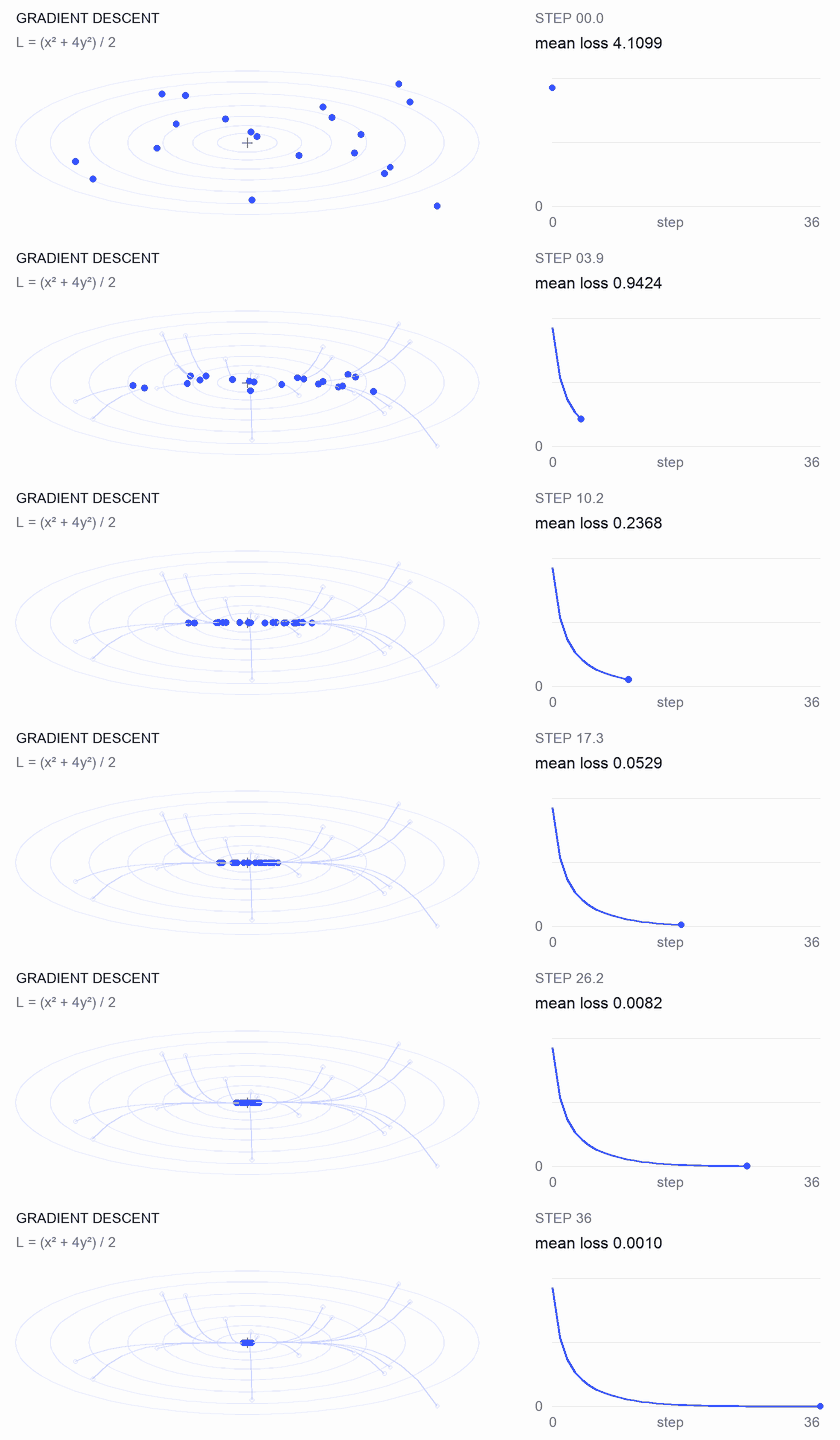
Adjust the learning rate in the lesson · Compare GD, momentum, and Adam in code
Three projects with staged starters, reference implementations, and local graders. Run commands from the repository root after setup. Starters fail until you implement the stages.
A candidate improves mean NDCG while one query ranks its most relevant evidence lower. Build a query-by-query comparison that reports the regression and can fail a release check.
Use Python 3.10+. Review RAG and model evaluation. Implement ranking validation, precision and recall, rank-sensitive metrics, then system comparison.
python3 scripts/project_test.py retrieval-evaluation-lab \
  --init learning-artifacts/retrieval-evaluation-lab
python3 scripts/project_test.py retrieval-evaluation-lab \
  --stage 1 --path learning-artifacts/retrieval-evaluation-lab --strict
python3 scripts/project_test.py retrieval-evaluation-lab \
  --all --path learning-artifacts/retrieval-evaluation-lab --strict
Keep: a reproducible comparison with per-query deltas and the judgments used to score them. Metrics describe those judgments; they do not establish answer correctness.
Start the project · Inspect the reference · Run on your own inputs
A supplied trace still takes 100 ms, but total token usage rises by 200 and one span starts failing. Separate overlapping child work from parent execution time, then produce a report that exposes the change.
Use Node.js 22.18+ and Python 3 for the grader. Implement JSONL parsing, parent validation, interval arithmetic, then an inspectable timeline.
python3 scripts/project_test.py agent-trace-debugger \
  --init learning-artifacts/agent-trace-debugger
python3 scripts/project_test.py agent-trace-debugger \
  --stage 1 --path learning-artifacts/agent-trace-debugger --strict
python3 scripts/project_test.py agent-trace-debugger \
  --all --path learning-artifacts/agent-trace-debugger --strict
Keep: the input trace, an HTML timeline, and a JSON regression report. Preserve exclusive per-span token counts so parent and child usage are not counted twice.
Start the project · Inspect the reference · Explore timing interactively
A write changes after review, or an approval is replayed. Validate the call envelope, check the caller's role and path, then consume an approval bound to the exact request and content.
Use Rust and Python 3.10+. Review tool schema design and security boundaries. The caller application supplies identity; the model proposes an operation.
python3 scripts/project_test.py tool-call-firewall \
  --init learning-artifacts/tool-call-firewall
python3 scripts/project_test.py tool-call-firewall \
  --stage 1 --path learning-artifacts/tool-call-firewall --strict
python3 scripts/project_test.py tool-call-firewall \
  --all --path learning-artifacts/tool-call-firewall --strict
Keep: an audit receipt showing the requested operation and the policy decision. Approvals are single-use within one invocation; this project does not provide persistent authorization or an operating-system sandbox.
Start the project · Inspect the reference · Explore approval boundaries
Browse all projects · Career practice guide
Open any completed lesson on aiengineeringfromscratch.com or expand a phase under Contents. No setup, no cloning.
If Node.js, npx, and a skill-capable coding agent are already installed, your coding agent can become your tutor. A repository clone is not needed to install or read the tutor. Runnable focused-path labs need python3. Agent Skills host labs also need a selected host and a writable user or project skill scope.
npx skills add rohitg00/ai-engineering-from-scratch
Choose the host and scope when the installer asks. Use start-learning in Codex, /start-learning in Claude Code, or ask your host to use the skill by name.
Check the local requirements first:
node --version
npx --version
python3 --version
skills writes to the host and scope selected during installation, such as
.claude/skills/, .cursor/skills/, .codex/skills/, or another supported
skills folder. Verify that the selected host discovers that exact destination.
Invocation syntax belongs to the host, not to the portable SKILL.md format:
| Host | Start the course | Start Model Context Protocol (MCP) | Start Agent Skills | Run a phase quiz |
|---|---|---|---|---|
| Codex | start-learning, or choose it from /skills | learn-mcp, or choose it from /skills | learn-agent-skills, or choose it from /skills | check-understanding 13, or choose it from /skills |
| Claude Code | /start-learning | /learn-mcp | /learn-agent-skills | /check-understanding 13 |
| Other compatible hosts | Use start-learning to begin the course. | Use learn-mcp to start the Model Context Protocol (MCP) path. | Use learn-agent-skills to start the Agent Skills Engineering path. | Use check-understanding to quiz me on Phase 13. |
A ten-question placement quiz maps what you already know to a starting phase and
saves a personalized study plan to LEARNING.md. From there, the learn skill
teaches one lesson per session: concept, math, code, quiz. It streams lessons
straight from this repo, and the course-guide skill jumps you to the exact
lesson that covers anything you are stuck on. In Codex, invoke these skills with
learn and course-guide; in Claude Code, use /learn and /course-guide;
in other compatible hosts, ask to use the skill by name.
Only want Model Context Protocol (MCP)? Use the MCP invocation for your host. It creates
MCP-LEARNING.md and follows one 17-lesson route through stateless
requests, transports, bidirectional work, security, reliability, registry
governance, and conformance evidence. The exact order and checkpoints live in
the Model Context Protocol (MCP) manifest.
Only want Agent Skills? Use the Agent Skills invocation for your host. It
creates AGENT-SKILLS-LEARNING.md and follows one coherent five-lesson route:
contract, discovery, invocation, sandbox boundaries, then release evals and
real-host portability. Start on the web with the
Agent Skills path.
The installer lists the hosts it can configure and asks where to install. If
you do not have Node.js, npx, python3, a supported host, or a writable
scope yet, use the website or read docs/en.md manually. That path teaches the
concepts, but real-host discovery, invocation, script, and uninstall evidence
remains pending until the preflight is available. Read the lessons at
aiengineeringfromscratch.com.
| Skill | What it does |
|---|---|
| start-learning | One-time onboarding: why you're learning, placement quiz, personalized plan saved to LEARNING.md. |
| learn | The tutor loop. Warm-up recall, then the next lesson taught interactively, then its quiz; records progress and a review queue. |
| course-guide | Topic router. "Where do I learn attention?" or "my loss is NaN" → the exact lessons, with links. |
| learn-mcp | Focused Model Context Protocol (MCP) tutor. Creates MCP-LEARNING.md, follows the 17-lesson manifest, and records wire, security, reliability, and conformance evidence. |
| learn-agent-skills | Focused Agent Skills tutor. Creates AGENT-SKILLS-LEARNING.md, teaches lessons 22, 24, 25, 26, and 27, and records real-host evidence. |
| claude-certification | Certification tutor. Chooses CCAO-F, CCDV-F, CCAR-F, or CCAR-P; teaches each lesson; runs labs; reviews artifacts; administers diagnostics and mocks; saves progress. |
| mcpa-certification | MCPA tutor. Follows the 34-lesson mcpa-f route on the 2026-07-28 protocol; teaches each lesson; runs labs and the wire checker; administers the diagnostic and three mocks; saves progress. |
| find-your-level | Ten-question placement quiz. Maps your knowledge to a starting phase and produces a personalized path with hour estimates. |
| check-understanding | Per-phase quiz, eight questions, with feedback and specific lessons to review. Use the Codex, Claude Code, or natural-language form in the invocation table above. |
git clone https://github.com/rohitg00/ai-engineering-from-scratch.git
cd ai-engineering-from-scratch
python3 phases/00-setup-and-tooling/01-dev-environment/code/verify.py --route beginner
python3 phases/01-math-foundations/01-linear-algebra-intuition/code/vectors.py
The preflight separates requirements needed now from tools needed later. Every
required failure includes the detected reason and a corrective command. The
vectors.py command is a dependency-free lesson and ends by showing that a matrix
times a vector is the operation inside a neural network layer. Save that
terminal output as your first evidence.
1. Read docs/en.md and explain the core idea in your own words.
2. Type and build the important code instead of treating the code block as decoration.
3. Run the lesson command from the repository root, the directory containing README.md and phases/.
4. Keep evidence: the command, working directory, exit code, meaningful output, and the artifact you changed or produced.
5. Continue only when you can explain the output and make one small change without guessing.
Commands in lesson pages are paths from the repository root unless the lesson explicitly says to change directories. If a lesson offers several languages, run the implementation for the language you are learning.
You do not need to scan 528 lessons before beginning. Pick one goal. Each link opens the same curriculum on GitHub or the website, and both versions use the same lesson code.
| Your goal | Learn on GitHub | Learn on the website | |---|---|---| | I am new and want the complete foundation | Phase 0: Setup and Tooling | Dev Environment | | I know Python and want math plus ML foundations | Phase 1: Math Foundations | Linear Algebra Intuition | | I want to build production LLM applications | Phase 11: LLM Engineering | Prompt Engineering | | I want to build agents | Phase 14: Agent Engineering | The Agent Loop | | I want to use coding agents on real repositories | Agent-Assisted Engineering path | Agent-Assisted Engineering | | I want to shape the right build before implementation | Product Judgment and Delivery path | Product Judgment and Delivery |
Not sure where you fit? Use the start-learning placement tutor
or the website prerequisites guide.
Compare four core domains and six career routes in the AI Engineering Learning Paths.
| Your goal | Learn on GitHub | Learn on the website | |---|---|---| | I want to build with Model Context Protocol (MCP) | Model Context Protocol (MCP) route | Model Context Protocol (MCP) path | | I want to write and ship Agent Skills | Focused Agent Skills route | Agent Skills path |
| Background | Start at | Estimated time | |---|---|---| | New to programming and AI | Phase 0 — Setup | ~306 hours | | Know Python, new to ML | Phase 1 — Math Foundations | ~270 hours | | Know ML, new to deep learning | Phase 3 — Deep Learning Core | ~200 hours | | Know deep learning, want LLMs and agents | Phase 10 — LLMs from Scratch | ~100 hours | | Senior engineer, only want agent engineering | Phase 14 — Agent Engineering | ~60 hours | | Only want to build production MCP systems | Model Context Protocol (MCP) path | ~23 hours 15 min | | Only want to build production Agent Skills | Agent Skills Engineering path | ~9.5 hours |
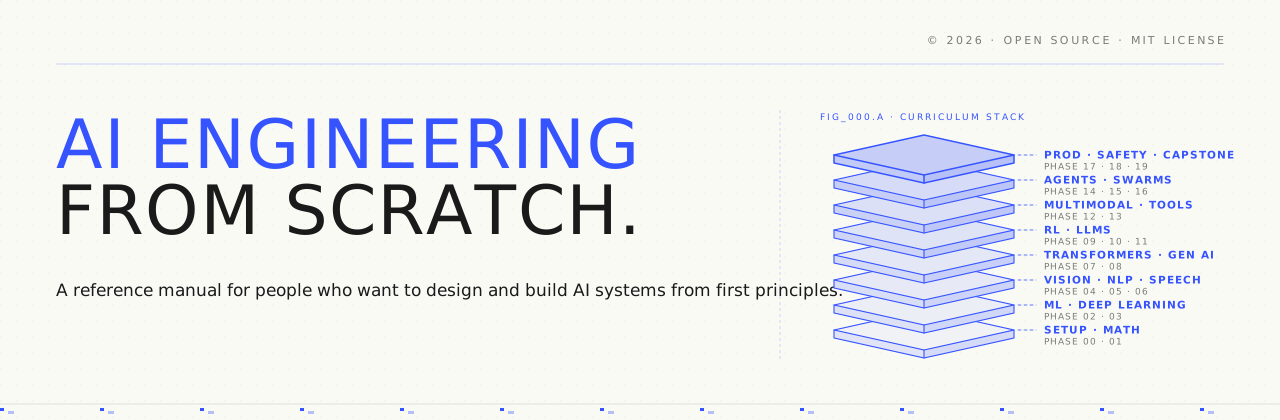
Twenty phases stack on top of each other. Math is the floor. Agents and production are the roof. Skip ahead if you already know the lower layers, but don't skip and then wonder why something at the top is breaking.
%%{init: {'theme':'base','themeVariables':{'primaryColor':'#fafaf5','primaryTextColor':'#1a1a1a','primaryBorderColor':'#3553ff','lineColor':'#3553ff','fontFamily':'JetBrains Mono','fontSize':'12px'}}}%%
flowchart TB
  P0["Phase 0 — Setup & Tooling"] --> P1["Phase 1 — Math Foundations"]
  P1 --> P2["Phase 2 — ML Fundamentals"]
  P2 --> P3["Phase 3 — Deep Learning Core"]
  P3 --> P4["Phase 4 — Vision"]
  P3 --> P5["Phase 5 — NLP"]
  P3 --> P6["Phase 6 — Speech & Audio"]
  P3 --> P9["Phase 9 — RL"]
  P5 --> P7["Phase 7 — Transformers"]
  P7 --> P8["Phase 8 — GenAI"]
  P7 --> P10["Phase 10 — LLMs from Scratch"]
  P10 --> P11["Phase 11 — LLM Engineering"]
  P10 --> P12["Phase 12 — Multimodal"]
  P11 --> P13["Phase 13 — Tools & Protocols"]
  P13 --> P14["Phase 14 — Agent Engineering"]
  P14 --> P15["Phase 15 — Autonomous Systems"]
  P15 --> P16["Phase 16 — Multi-Agent & Swarms"]
  P14 --> P17["Phase 17 — Infrastructure & Production"]
  P15 --> P18["Phase 18 — Ethics & Alignment"]
  P16 --> P19["Phase 19 — Capstone Projects"]
  P17 --> P19
  P18 --> P19
Twenty phases. Click any phase to expand its lesson list.
13 lessonsGet your environment ready for everything that follows.
| # | Lesson | Type | Lang | |:---:|--------|:----:|------| | 01 | Dev Environment | Build | Python | | 02 |
→ →→
→→ →→
→→ →
→ →
→ →
→