1
 →
→
Open-source coding agents memory. Records issues, attempts, fixes and decisions, then warns your agent before it repeats an approach that already failed.
riponcm/projectmem is an open-source project on GitHub, mainly written in Python. Open-source coding agents memory. Records issues, attempts, fixes and decisions, then warns your agent before it repeats an approach that already failed. It currently holds 828 stars and 0 forks with 0 open issues, and was last pushed on an unknown date (repository created unknown).
AI Homed tracks it on the AI Agent Memory board.

🎉 v0.3.3 is out —
pjm precheck no longer slows down as your project grows, and Windows works end to end.
See what changed →
We don't make AI smarter. We make it experienced.
Coding agent memory — the local-first memory + judgment layer for AI coding agents. One MCP server for every project. Save up to 50%+ of AI tokens. Stop repeating yesterday's bug.





Website • Guide • Demo • Changelog • Paper
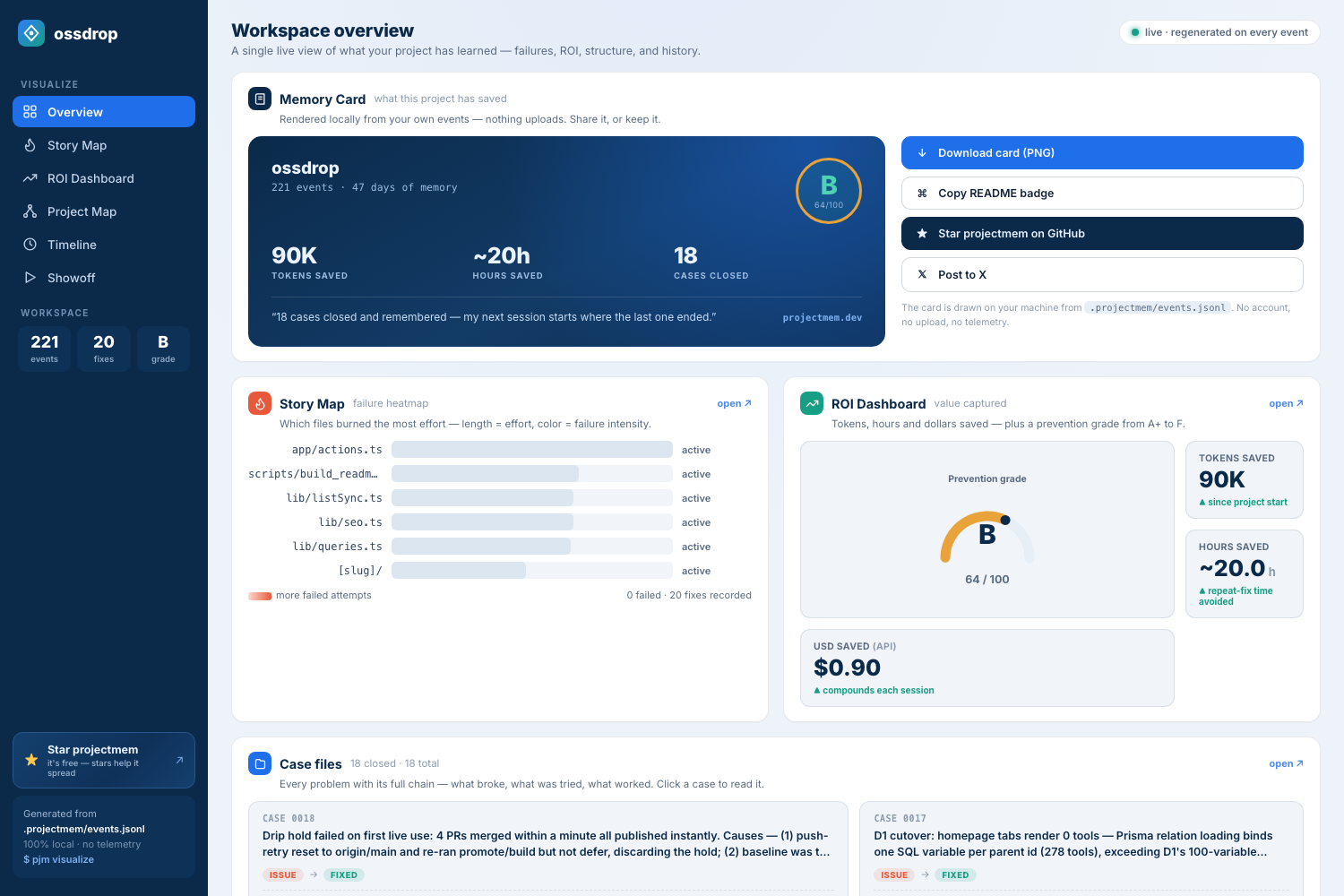
pjm visualize — every case your project solved, what failed on the way, and what it saved. Generated locally from .projectmem/events.jsonl.
---
## 🚀 Start here — five minutes, once
> *Five minutes if you follow along here. Want to be shown instead — every
command, the exact output it prints back, and the dashboards at the end?
Take the complete setup guide.*
> New to projectmem, or upgrading from 0.1.x / 0.2.x? Since 0.3.0 one MCP
server serves every project, so this is the last time you configure anything.
> 1. Install or update
>> pip install -U projectmem
> 2. Find the projects you already have
>> pjm doctor
> It looks where code lives —~/Developer,~/code,~/projects, your cloud
folders, and every drive on Windows — and lists projects with memory that
aren't registered yet. Anything it missed, add by hand:
>> pjm project register "/Users/you/Developer/repos/ossdrop"
> 3. Register them
>> pjm doctor --fix
> 4. Point your AI at all of them with one config
>> "mcpServers": {
"projectmem": {
"command": "/absolute/path/to/python",
"args": ["-m", "projectmem.mcp_server"]
}
}
> No--root, nocwd— that's what makes it serve everything. Per-client
instructions (Claude Desktop, Claude Code, Cursor, Antigravity, Codex) are in
MCP Integration; pjm init prints this block
with your own Python path filled in. Then fully restart the client — MCP
servers only load on a cold start.
> 5. Check your work
>> pjm doctor
> Add --online if you also want it to tell you when a newer projectmem is out
— projectmem makes no network calls otherwise, and --auto turns that into a
once-a-day check if you prefer.
> Run it again after editing the config. It flags any client still pinned to a
single repo — the most common reason a new project is invisible to your agent.
> All green? You're done. From here on it is one command per repo:
>> pjm init
> Your agent reads what the project already learned instead of rediscovering it,
and writes down what it finds. Fewer tokens, no repeated dead ends, memory that
outlives the session.
---
Coding agent memory is a persistent record of what happened while building a project — the issues hit, the approaches attempted, the fixes that worked and the decisions made — stored so an AI coding agent can read it at the start of a new session. Without it every session begins from zero.
projectmem is an open-source agent memory layer built for that job. It is
local-first: memory lives in a plain .projectmem/ directory inside your
repository, with no cloud, no account and no telemetry — the only network call
it can make is an update check you turn on yourself. A native MCP server
exposes 17 tools to Claude Code, Claude Desktop, Cursor, Antigravity and Codex,
so your agent reads memory and logs its work on its own.
Unlike chat-history memory tools, projectmem stores typed events — issues, attempts, fixes, decisions, notes — which is what makes the one thing no other tool does possible: a pre-commit warning that fires before you repeat an approach that already failed.
pip install projectmem
cd your-project && pjm init
---
Full screen-recorded tutorial- watch on YouTube
| Doc | What's in it |
|---|---|
| Complete setup guide | The full walkthrough on the web — install, MCP setup per client, pjm doctor, your first logged issue, and both dashboards. Every terminal output is captured from a real run. |
| TUTORIAL.md | 15-minute step-by-step walkthrough — set up projectmem on your own project, watch the lifecycle, see the pre-commit warning fire. |
| CHANGELOG.md | Release history. Latest: v0.3.3 — pjm precheck is flat rather than linear in project age, and six Windows reports are closed. |
| Research paper (arXiv:2606.12329) | PROJECTMEM: A Local-First, Event-Sourced Memory and Judgment Layer for AI Coding Agents — the peer-readable version: design, Memory-as-Governance framing, capability comparison, and the 207-event dogfooding study. |
| LICENSE | MIT |
---
Every new AI session starts from zero. Claude, Cursor, Aider — they all forget yesterday's decisions, repeat failed debugging attempts, and burn millions of tokens reconstructing context from raw source files.
The model isn't the problem. The architecture is. Stateless models need a memory cortex.
projectmem is the local-first memory + judgment layer that sits above your AI tools. It captures every failed attempt, decision, and gotcha — then injects that experience back into future AI sessions. Git tracks what changed. projectmem tracks why it changed, what was tried, and what failed.
First time here? → The complete setup guide
walks the whole path end to end: install, connecting Claude Desktop, Claude Code,
Cursor, Codex or Antigravity, checking it with pjm doctor, and reading your
memory back through the dashboards — with the real terminal output at every step.
Three commands to a project that remembers:
pip install projectmem
cd your-project
pjm init
That's it. pjm init installs three git hooks (pre-commit warnings, post-commit classification, post-merge tracking), auto-starts a real-time file watcher, inherits cross-project memory if available, and creates .projectmem/. Capture is active from minute one.
The canonical command isprojectmem. Apjmalias is installed for speed.
---
pjm precheck runs before every edit — the instructions tell agents to call it
first — so its cost is paid constantly. It was taking 26 seconds on a
1,200-event project, and getting worse every week, because it ran one
git log per event to answer a question about a single file. It now makes one
call per distinct file, bounded by the oldest event citing it.
| events | before | after | |---|---|---| | 100 | 2,210 ms | 48 ms | | 400 | 8,905 ms | 51 ms | | 1,500 | ~33 s, 1,501 git processes | 82 ms, 2 processes |
Latency is now flat rather than linear in project age. Results are unchanged — verified against a reimplementation of the old algorithm, including across merge commits.
A retired decision no longer resurfaces. supersedes has existed since
0.1.4, but the two surfaces an agent actually reads during work — get_context
and precheck_file — were not filtering it. You could retire a decision and
still be told about it. Both filter now, and AI_INSTRUCTIONS.md finally
documents how to retire one, which is why models never called it.
Your project is named in the bridge file, and AGENTS.md is written too.
One server serves every project, so a call naming none is refused rather than
guessed at — but nothing told the agent the name, so it learned it from the
error and retried, every session. The name is in the bridge now. It goes into
AGENTS.md as well as CLAUDE.md, because Antigravity and Codex never read
the latter.
Six Windows reports are closed. Git hooks shipped a bash shebang that
Git for Windows often cannot resolve — and an unresolvable shebang does not
skip the hook, it aborts your commit. The baked binary path lost its
backslashes to shell escaping. The venv fallback looked in bin/, which
cannot exist there. pjm watch --daemon could not be seen or stopped. And a
box-drawing character in the output killed pjm init outright on a cp1252
console — after it had already created everything, so the command both did its
work and reported failure.
Every one was fixed by running projectmem on the machines that reported it — Windows 11, and the four MCP clients — not by reading the code. Reported by @medium-effort, who also contributed the 0.3.2 Windows daemon support.
pjm watch --daemon crashed on Windows with `AttributeError: module 'os' has no
attribute 'fork'`. It now spawns a detached worker instead of forking, so
background watching works on every platform.
Fixing that uncovered a second bug hiding behind it. Liveness was checked with
os.kill(pid, 0) — a POSIX idiom that does not port, because on Windows
os.kill routes to TerminateProcess and signal 0 is not a check at all. The
watcher could not be seen or stopped there, and each pjm watch --daemon leaked
another process. Both are fixed.
Windows daemon support was contributed by @medium-effort (#13).
pjm doctor also got two things. It now tells you to quit your AI client
before editing its config — those files hold the app's own preferences too, so
a running client can rewrite the whole thing on exit and restore the --root
you just removed. And it remembers what it saw last time, so a config that was
clean and is pinned again gets named as a revert rather than looking like doctor
being flaky. Local files only; nothing leaves your machine.
Both dashboards now show which version generated the page, with a check for
updates link beside it. The page makes no request until you click — PyPI's
public JSON is fetched straight from your browser and nothing about your machine
is sent. On the command line, pjm doctor --online checks once and
pjm doctor --auto remembers to check daily; both are off unless you ask.
Until now an MCP config was tied to one repository: eleven projects meant eleven
server entries and eleven restarts. 0.3.0 serves every registered project from
a single server. Paste the config once; every repo you pjm init afterwards is
reachable from it.
pjm project list          # what this server can reach
pjm project use ossdrop   # the default when a call names no project
log_issue(summary="stars come back empty", project="ossdrop")
→ Logged issue #0019 → ossdrop: stars come back empty
Every write names the project it landed in — in a shared server, the dangerous
failure is not "nothing works", it is a write that succeeds against the wrong
repo. Existing --root configs keep working untouched, and a pinned server now
refuses to write anywhere else even when asked.
Also in 0.3.0:
FastMCP and left the old import path raising — since 2026-07-28 every new
pip install projectmem got a server that died at import. Caught and fixed by
@VIVAAN-DHAWAN.
pjm visualize. Event summaries reached the DOMRegistry migration is automatic: the 0.2.x list of paths is converted on first
read, with a .bak kept beside it.
0.1.6 made one project's memory something you could watch. **0.2.0 lifts that to your whole workspace — and closes the gap between what happened (memory) and what your code is (structure).
Global dashboard** — pjm dashboard is one page over every project you've pjm init-ed: total issues captured, fixes confirmed, dead-ends prevented, tokens saved, a grade per project, and a "needs attention" list. Click any card to open that repo's own dashboard, generated fresh. It's a global view, not a global store — each repo's .projectmem/ is aggregated at read time and never leaves its folder. Default is serverless (a static snapshot); add --serve for a tiny, ephemeral live server where the Refresh button re-reads your files — no background daemon, Ctrl+C stops it.
pjm map --build (run automatically at pjm init) walks your codebase and, for Python, resolves imports into a real dependency graph. The Project Map's Graph and Flow views now render actual files and the import edges between them. The cache (structure.json) is derived from code, gitignored, and never committed — code is only ever read.plan.md — a new editable intent file: **ideas and plans, what you mean to do** — deliberately not the event log. events.jsonl → summary.md records what happened; plan.md records what you intend. The AI reads it at session start and edits it directly; a plan never becomes an event. pjm plan / pjm plan "idea" / MCP get_plan().
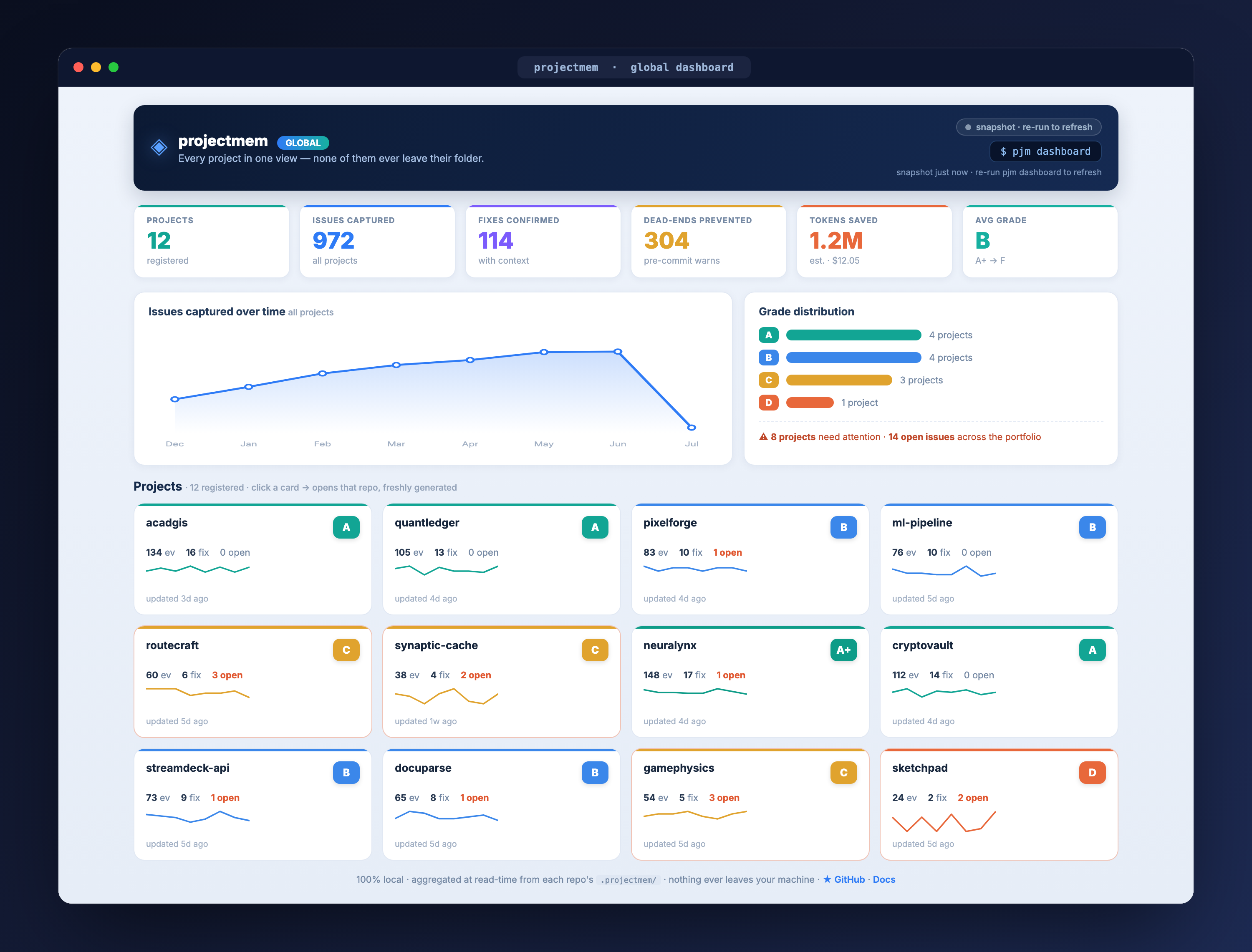
Global Dashboard — every pjm init-ed project in one view: grades, issues, savings, and a "needs attention" list, aggregated at read time. Each card opens that repo's own dashboard.
Your project's memory is also something you can watch — and share.
.webm clip of the animation, rendered 100% locally with a "made with projectmem" badge. Your debugging story, ready for a tweet or a standup.PROJECT → DIRECTORIES → FILES → WHAT HAPPENED → MEMORY. Files with repeated failures glow red along their path, every file shows its outcome chips, and everything flows into the events.jsonl cylinder. Tree and Graph views are one click away.
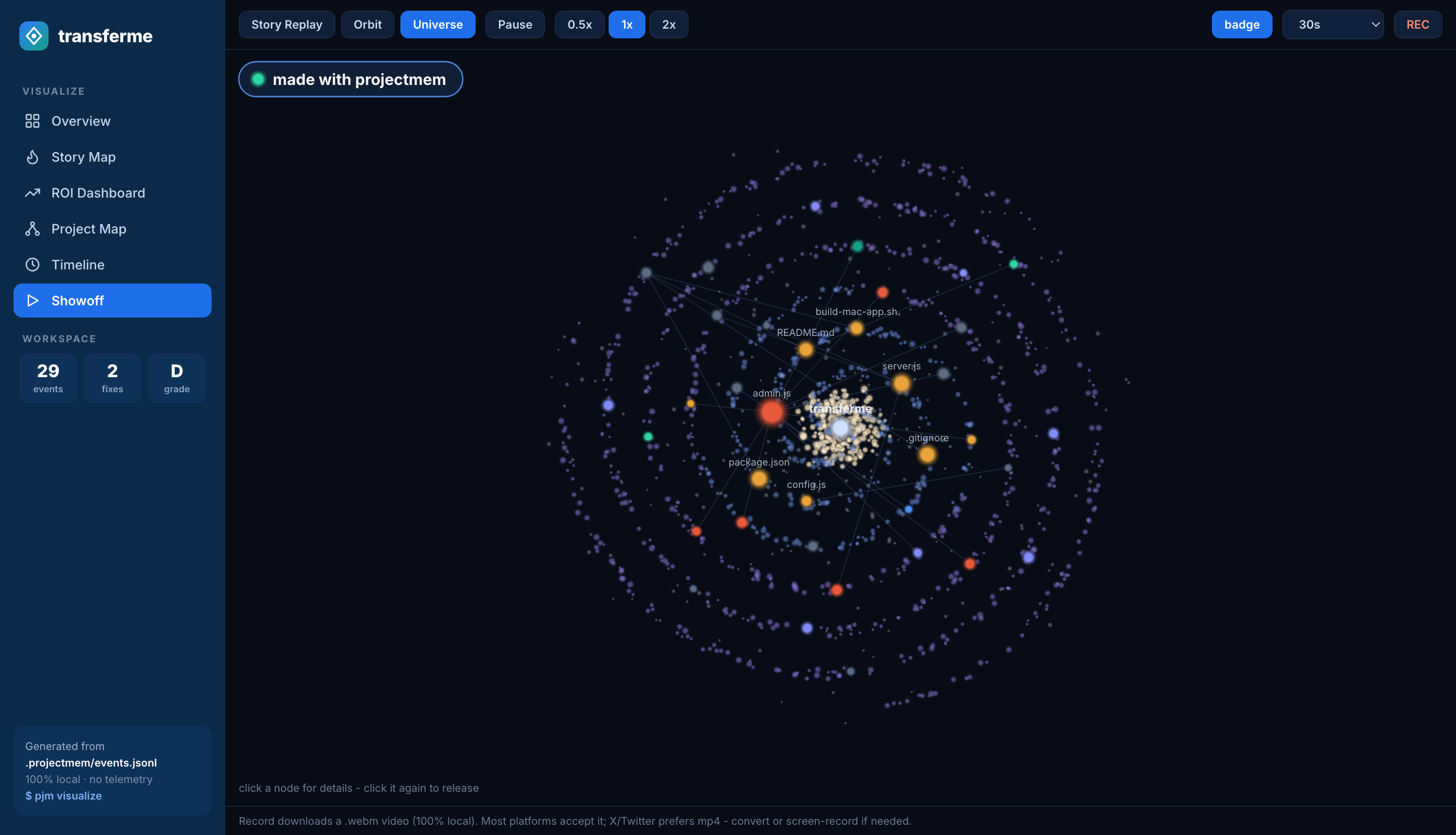
Showoff · Universe — every bright star is a real event from this project's memory
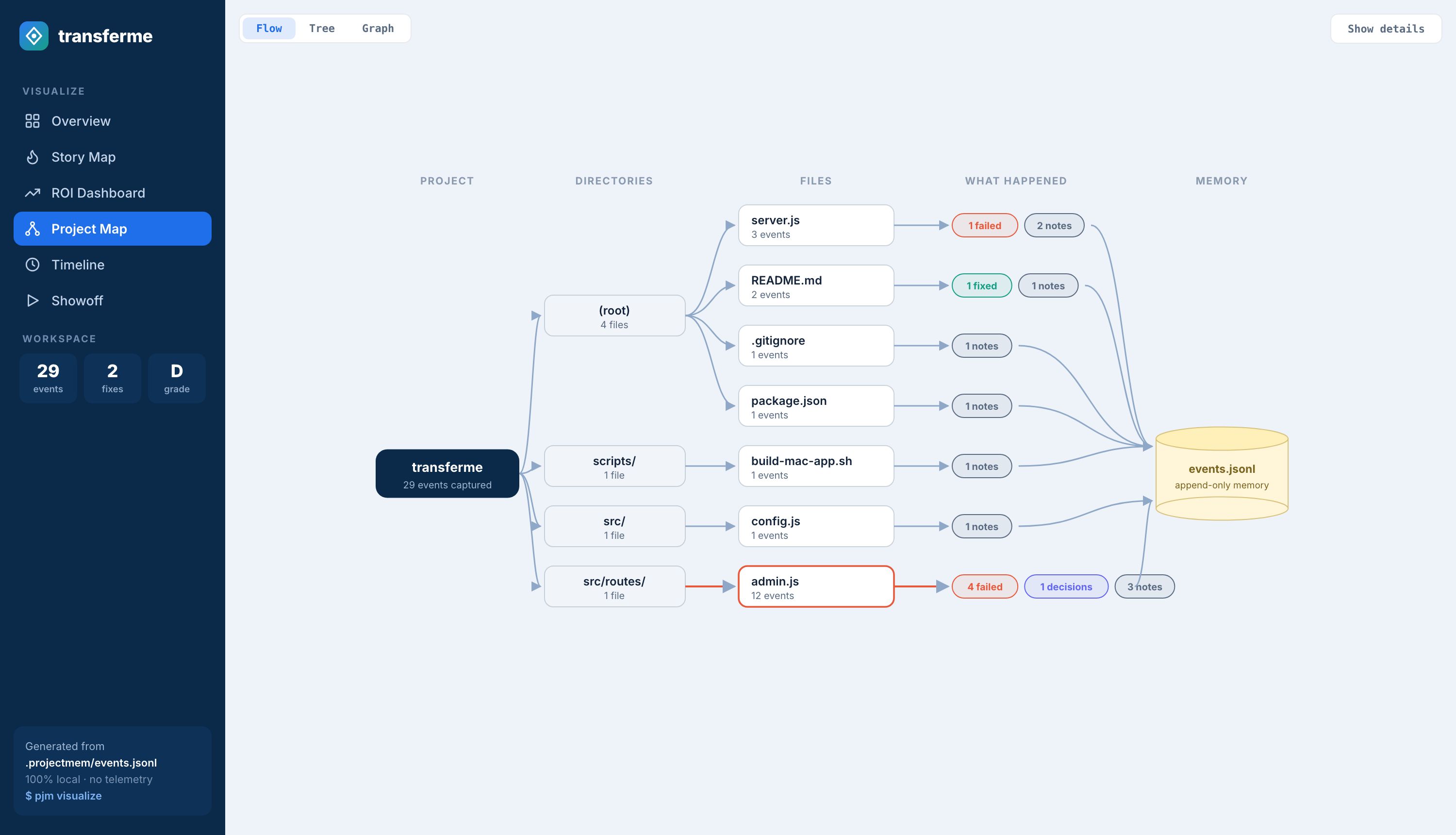
Project Map · Flow — what happened, file by file, flowing into append-only memory
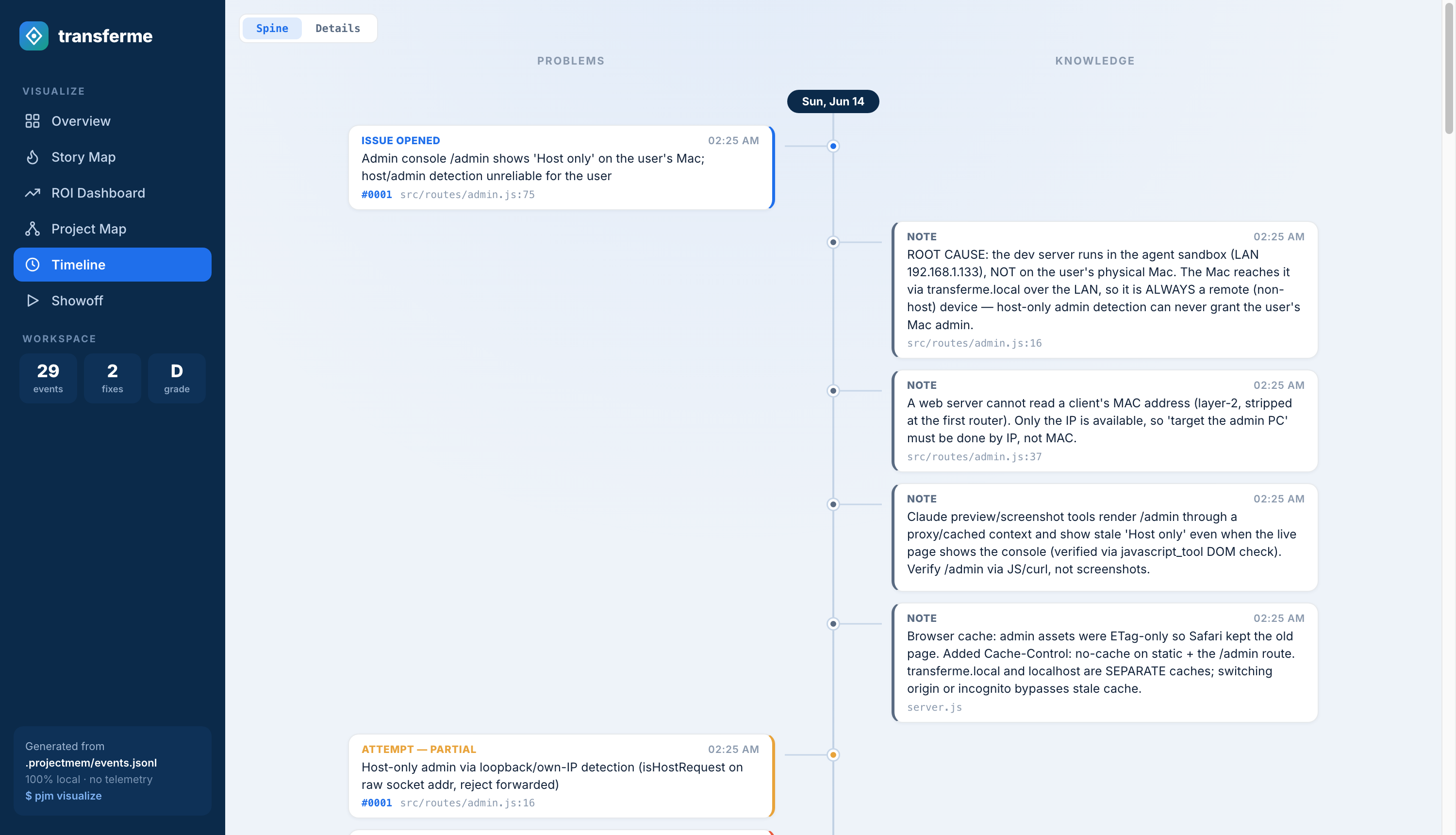
Timeline · Time Spine — problems on the left, knowledge on the right, real time down the middle
---
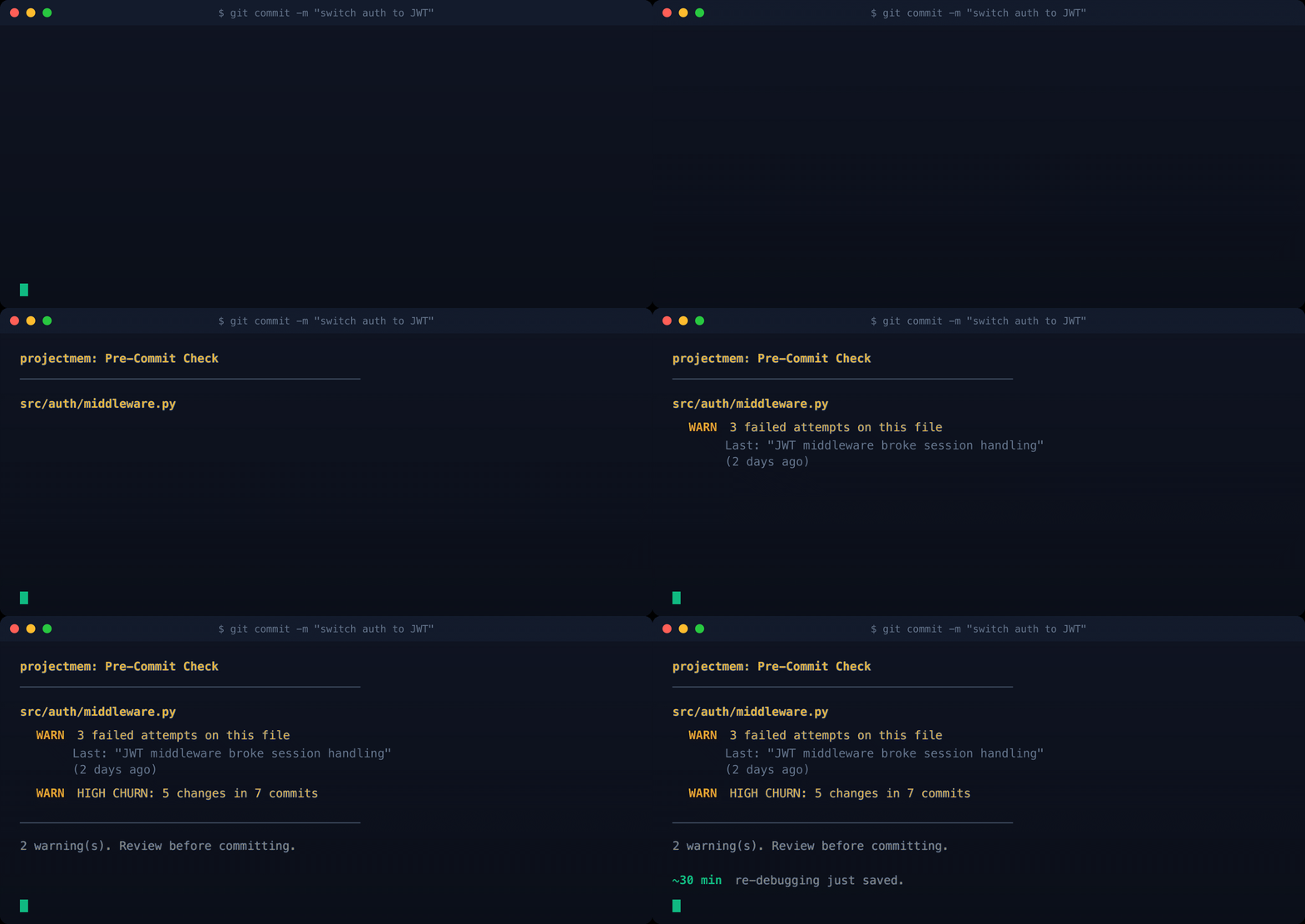
pjm precheck warns you before you commit if you're about to repeat a failed approach, modify a high-churn file, or touch an unresolved issue. No other AI tool does this — it requires the memory layer underneath. The warning now lists the dead ends themselves ("What already failed here: ✗ tried CSS contain:layout"), and pjm precheck --snooze 2h silences it politely — the snooze is itself logged, so even the silence is audited.pjm decision "new way" --supersedes : the old event stays in the log, tagged, forever.pjm brief answers "where was I?" in one screen: active warnings, possibly-stale memories, open issues, recent decisions, stack gotchas, and your prevention score with a week-over-week delta.pjm export --claude-md compiles live decisions, gotchas, and a "Do NOT retry — these already failed" list into a marked block in CLAUDE.md (or .cursorrules). Copilot, plain Claude, any agent that reads the file inherits your project's judgment.pjm wrap claude (or cursor/aider) injects a token-budgeted memory block into your AI before the session opens. Your AI starts experienced, not blank.pjm score outputs a letter grade (A+ → F) backed by concrete numbers — debugging hours saved, tokens prevented, dollars protected. CI-friendly JSON output and shields.io badge for your README.~/.projectmem/global/ and auto-inherit into every new project that matches your stack.pjm init.plan.md, and log work automatically. Verified end-to-end against all four clients.pjm visualize opens a six-tab local dashboard: Overview, Story Map (failure heatmap with collapse/focus controls), ROI Dashboard, Project Map (Flow / Tree / Graph, now over your real code structure), Timeline (Time Spine / Details), and Showoff — animated story scenes with a built-in video recorder.project="ossdrop"), or fall back to the active one; every write reports which repo it landed in, and a pinned --root server refuses to write outside its own. Existing single-project setups are untouched.pjm dashboard is one cross-project view over every repo you've pjm init-ed: grades, issues, savings, and per-project drill-in. A global view, never a global store — each repo's memory is aggregated at read time and never leaves its folder. Serverless by default; --serve for an ephemeral live server (Ctrl+C to stop).pjm map --build reads your codebase into a real import graph, and the Project Map overlays failure heat from your event log on top: the files that keep breaking, glowing red over the structure that actually connects them. The structure cache is derived from code and gitignored — never committed.plan.md holds ideas and plans (what you mean to do), kept deliberately apart from the append-only event log (what happened). pjm plan, or the MCP get_plan(); the AI edits it directly and a plan never becomes an event.→ →
→ →
→ →
→ →
→ →
→ →
→ →
→