1
 →
→
Turns corrections into Preferences, Project-specific skills, and Shared skills for Claude Code, Codex, and OpenCode.
ReflexioAI/claude-smart is an open-source project on GitHub, mainly written in Python. Turns corrections into Preferences, Project-specific skills, and Shared skills for Claude Code, Codex, and OpenCode. It currently holds 781 stars and 0 forks with 0 open issues, and was last pushed on an unknown date (repository created unknown).
AI Homed tracks it on the AI Agent Memory board.





Quick Start • How It Works • Commands • Dashboard • Configuration • Troubleshooting • License
claude-smart learns from your corrections and from what's already working — so the assistant stops repeating mistakes and reuses proven paths. Project-specific skills capture repo-local rules, and shared skills roll up durable patterns for reuse across projects.
vs claude-mem: ~3× better at turning your corrections into rules Claude follows, ~50% more of your guidance is retained. Read the benchmark →
⭐ Built on the open-source reflexio engine — if claude-smart helps you, star reflexio on GitHub.
---
Requires Node.js 20+ (for npx) and the host CLI you're installing into (claude, codex, or opencode) on PATH.
npx claude-smart install
Then restart Claude Code.
npx claude-smart install --host codex
Then fully quit and reopen Codex so hooks reload.
npx claude-smart install --host opencode
Then restart OpenCode in your project so it loads the plugin from opencode.json. Add --global to install for all OpenCode projects on this machine instead.
npx claude-smart uninstall                    # Claude Code
npx claude-smart uninstall --host codex       # Codex
npx claude-smart uninstall --host opencode    # OpenCode
Restart the host afterward. Learned data under ~/.reflexio/ and ~/.claude-smart/ is preserved and shared across hosts, so you can uninstall or switch hosts without losing skills or preferences.
For per-host details — what the installers and uninstallers touch, OpenCode config resolution and model/env overrides, and Windows notes — see Host install notes in DEVELOPER.md. Developing the plugin itself? See Developing locally.
Not supported: Claude Code Cowork, claude.ai/code web, or remote Codex environments without local plugin hooks — they run outside your local machine, so the local backend/dashboard and ~/.reflexio/ aren't reachable.
---
Most memory tools just record. Claude remembers what happened, but doesn't change what it does next.
claude-smart focuses on learning instead.
Four things this changes:
prisma from 5.x to 6.0; you tell it to roll back because 6.0 breaks nested writes in your order flow.pnpm dev:all instead of the usual npm run dev.npm run dev did not work”pnpm dev:all to start the full local stack — npm run dev only starts the frontend and causes missing service errors”
Instead of re-exploring, Claude Code starts from the proven path—reducing planning steps, latency, and token usage.
https://github.com/user-attachments/assets/ed84d73a-d5b7-4a0d-ab2c-f2c060c3f276
---
npm test --run gotcha twice → consolidated into one rule. New evidence shows it applies to vitest too → scope broadened. Switch policy to pnpm test → old rule archived, new one supersedes it.
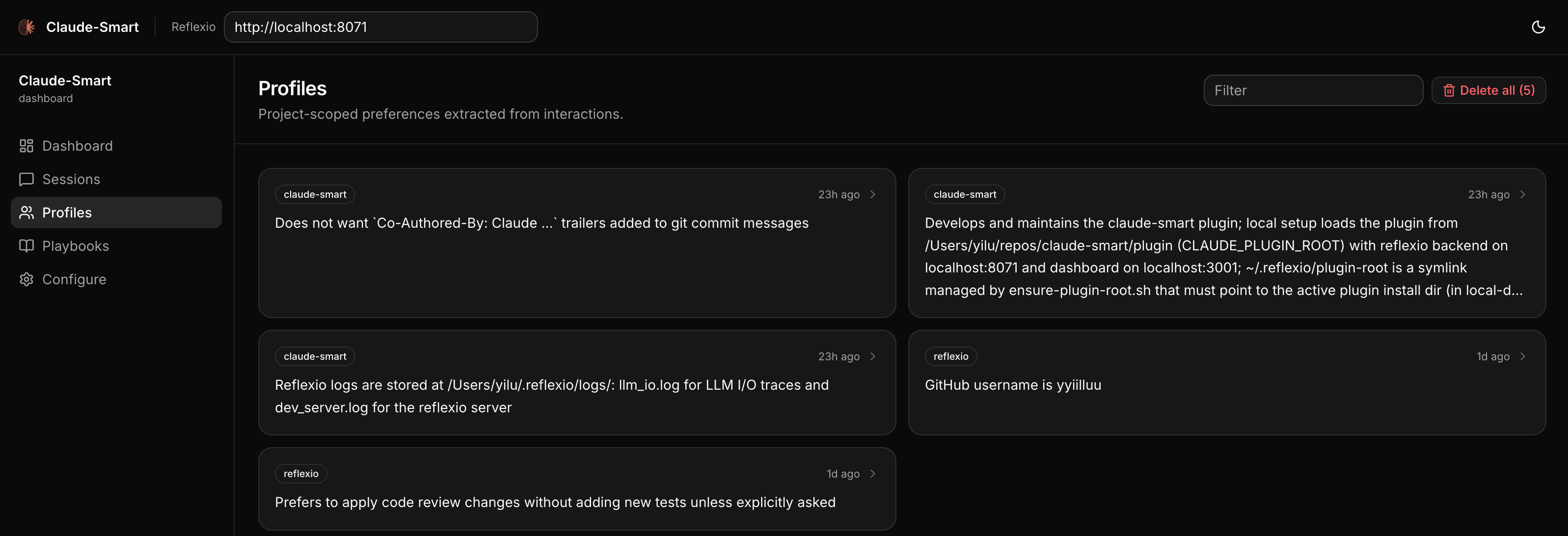
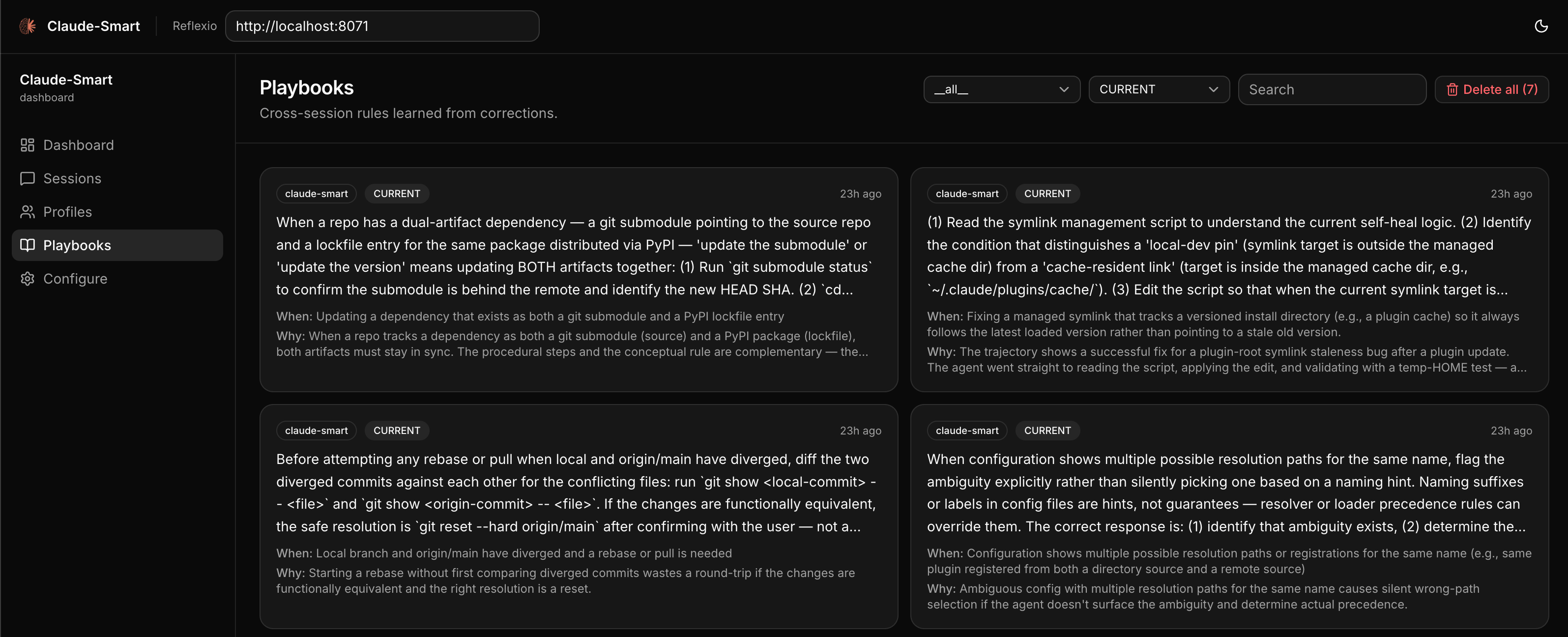
~/.reflexio/ and ~/.claude-smart/)./claude-smart:learn in Claude Code, or bash ~/.reflexio/plugin-root/scripts/cli.sh learn in Codex, flags the last turn as a correction so the extractor weights it heavily.A web UI for browsing session histories, inspecting preferences, and editing project-specific and shared skills. The dashboard auto-starts alongside the backend, so you can open http://localhost:3001 directly. Or run /claude-smart:dashboard in Claude Code to open it in your browser. In Codex, run bash ~/.reflexio/plugin-root/scripts/dashboard-open.sh.
---
claude-smart builds three artifacts as you work and injects the relevant ones into Claude Code, Codex, or OpenCode:
--run to npm test — watch mode hangs CI."Under the hood: hooks watch your turns, tool calls, and assistant replies, auto-flagging corrections (or anything you flag with /claude-smart:learn). At session end (or on /claude-smart:learn), reflexio — the self-improving engine that powers claude-smart — extracts preferences and project-specific skills, then rolls durable patterns into shared skills. On each new user prompt, claude-smart searches for matching context and injects only the relevant hits. Run /claude-smart:show or the equivalent CLI command to audit the current learned state. Everything runs on your machine.
Citations. At the end of a reply, the assistant may append a short marker:
✨ claude-smart rule applied: git safety | brief answer preference · ⚡Reflexio
That signals a preference or skill materially shaped the reply. Open the session's detail page in the dashboard to see the exact cited item.
See ARCHITECTURE.md for hooks, data flow, and reflexio details.
---
Claude Code installs these as plugin slash commands. Codex does not currently support plugin-provided slash commands, so claude-smart ships a Codex skill that maps requests like "claude-smart show" or "run claude-smart learn" to the equivalent action.
| Claude Code | Codex request | What it does |
| --- | --- | --- |
| /claude-smart:dashboard | open claude-smart dashboard | Open the dashboard in your browser, auto-starting the reflexio backend and dashboard services if they aren't already running. |
| /claude-smart:show | claude-smart show | Print current project-specific skills, shared skills, and the current project's preferences so you can audit learned state manually. |
| /claude-smart:learn [note] | claude-smart learn with note "optional note" | Flag the most recent turn as a correction (for cases the automatic heuristic missed) and force reflexio to run extraction now on the session's unpublished interactions. The optional note becomes the correction description the extractor sees. |
| /claude-smart:restart | restart claude-smart | Restart the reflexio backend and dashboard to pick up new changes (e.g. after upgrading the plugin or editing local reflexio code). |
| /claude-smart:clear-all | clear all claude-smart learnings | Destructive. Delete all reflexio interactions, preferences, and skills. Use when you want to wipe learned state and start fresh. |
---
Advanced users can tune claude-smart via environment variables — see DEVELOPER.md for the full list.
| Path | What |
| --- | --- |
| ~/.reflexio/data/reflexio.db | Source of truth for learned preferences, skills, interactions, full-text indexes, and embedding tables (plus .db-shm / .db-wal WAL sidecars). Inspect with sqlite3. |
| ~/.claude-smart/.env | claude-smart local runtime config — CLAUDE_SMART_HOST, CLAUDE_SMART_USE_LOCAL_CLI, CLAUDE_SMART_USE_LOCAL_EMBEDDING, and CLAUDE_SMART_OPENCODE_PATH. |
| .claude/settings.local.json or ~/.claude/settings.json | Claude Code hook environment, such as CLAUDE_SMART_ENABLE_OPTIMIZER; use project-local settings for one repo or user settings for all projects. |
| ~/.codex/config.toml | Codex plugin state, hook feature flags, and per-hook trust entries after claude-smart install --host codex. |
| ~/.codex/plugins/cache/reflexioai/claude-smart// | Codex's cached install of the claude-smart plugin from the ReflexioAI marketplace. |
| opencode.json / opencode.jsonc, or existing .opencode/opencode.json* | OpenCode local plugin config patched by claude-smart install --host opencode; the installer updates only the claude-smart entry in OpenCode's plugin list. |
| ~/.claude-smart/opencode/claude-smart/ | OpenCode's stable local copy of the active npm package. OpenCode config points here with file:// so restarts do not re-resolve claude-smart from npm. |
| ~/.reflexio/plugin-root | Self-healed symlink to the active plugin dir (managed by ensure-plugin-root.sh — written on install, refreshed each SessionStart). Claude Code slash commands and Codex shell-command helpers resolve through it, so don't delete it; if you do, the next session will recreate it. |
| ~/.claude-smart/sessions/{session_id}.jsonl | Per-session buffer. User turns, assistant turns, tool invocations, {"published_up_to": N} watermarks. Safe to inspect and safe to delete — everything past the latest watermark has already been written to reflexio's DB. |
| ~/.claude-smart/node/current/ | Private Node.js/npm runtime used by hooks and the dashboard after install. |
| ~/.cache/chroma/onnx_models/all-MiniLM-L6-v2/ | Cached ONNX weights (~86 MB, downloaded once). Delete to force a re-download. |
For troubleshooting, see TROUBLESHOOTING.md.
---
claude-smart is powered by Reflexio (reflexio.ai) — the open-source self-improving engine that turns interactions into durable, reusable skills. If claude-smart is useful to you, ⭐ star reflexio on GitHub.
---
This project is licensed under the Apache License 2.0. Reflexio is a separate Apache 2.0 project consumed as the reflexio-ai Python package. Claude Code is Anthropic's and not covered by this license.
See the LICENSE file for details.
---
~/.claude-smart/backend.log) and the relevant lines of ~/.claude-smart/sessions/{session_id}.jsonl.Powered by Reflexio · Runs on Claude Code, Codex, and OpenCode · Written in Python 3.12+
→ →
→ →
→ →
→ →
→ →
→ →
→ →
→