
1
 →
→
Qwen3-VL is the multimodal large language model series developed by Qwen team, Alibaba Cloud.
QwenLM/Qwen3-VL is an open-source project on GitHub, mainly written in Jupyter Notebook. Qwen3-VL is the multimodal large language model series developed by Qwen team, Alibaba Cloud. It currently holds 19,948 stars and 1,848 forks with 0 open issues, and was last pushed on an unknown date (repository created unknown).
AI Homed tracks it on the Today's Trending board, currently at rank #74 with 10 new stars today.
💜 Qwen Chat   |   🤗 Hugging Face   |   🤖 ModelScope   |   📑 Blog   |   📚 Cookbooks   |   📑 Paper  
🖥️ Demo   |   💬 WeChat (微信)   |   🫨 Discord   |   📑 API   |   🖥️ PAI-DSW
This generation delivers comprehensive upgrades across the board: superior text understanding & generation, deeper visual perception & reasoning, extended context length, enhanced spatial and video dynamics comprehension, and stronger agent interaction capabilities.
Available in Dense and MoE architectures that scale from edge to cloud, with Instruct and reasoning‑enhanced Thinking editions for flexible, on‑demand deployment.
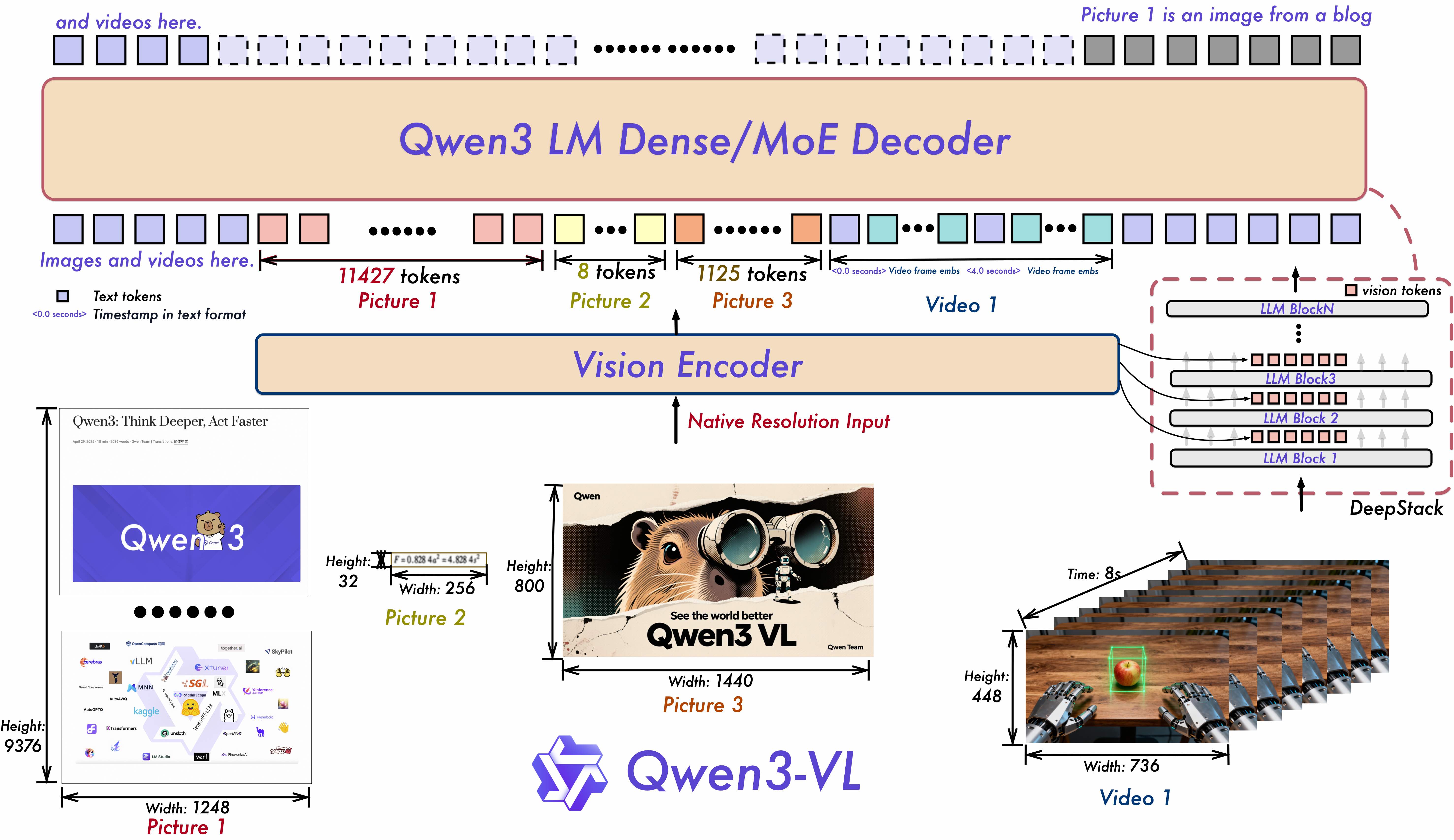
1. Interleaved-MRoPE: Full‑frequency allocation over time, width, and height via robust positional embeddings, enhancing long‑horizon video reasoning.
2. DeepStack: Fuses multi‑level ViT features to capture fine‑grained details and sharpen image–text alignment.
3. Text–Timestamp Alignment: Moves beyond T‑RoPE to precise, timestamp‑grounded event localization for stronger video temporal modeling.
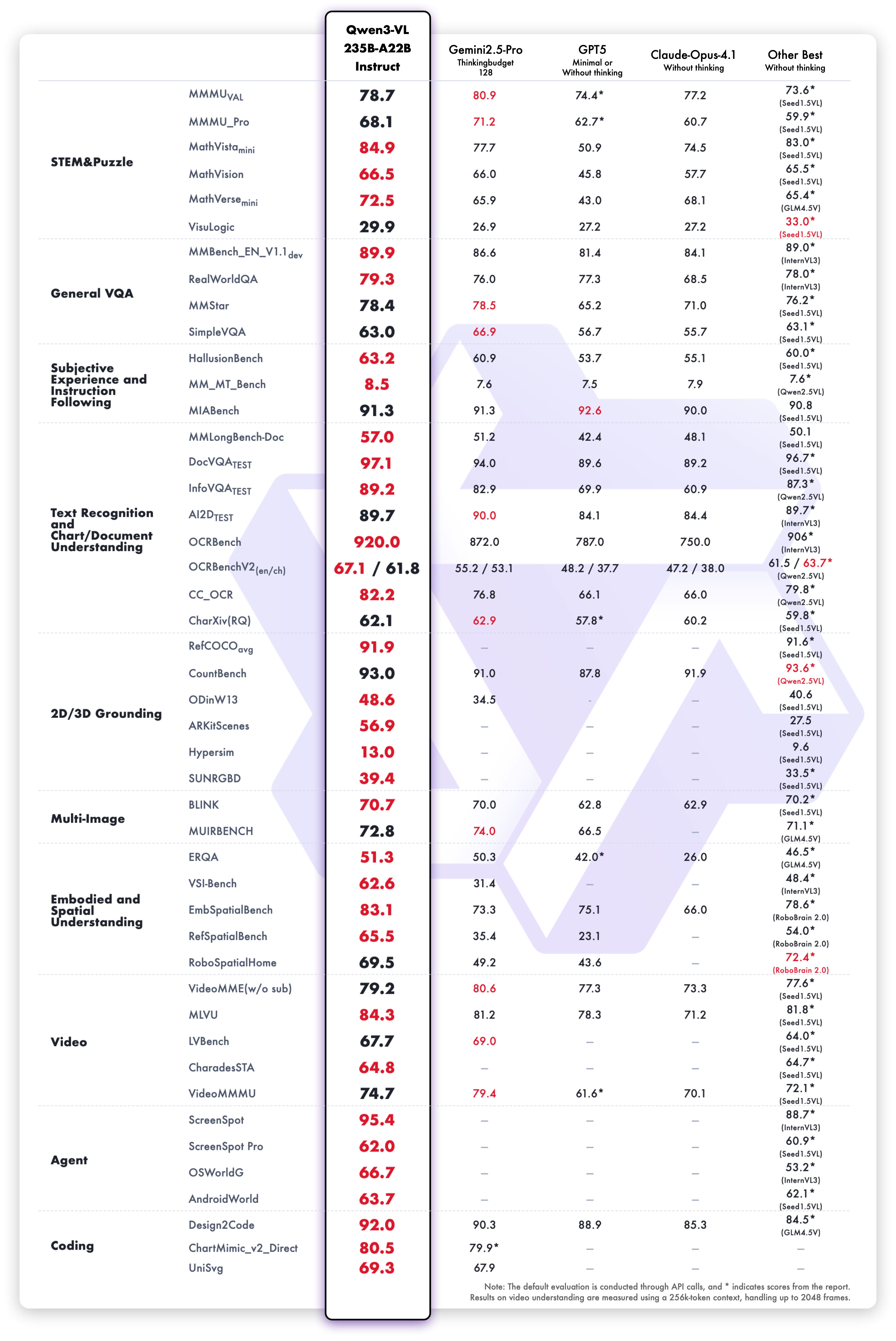
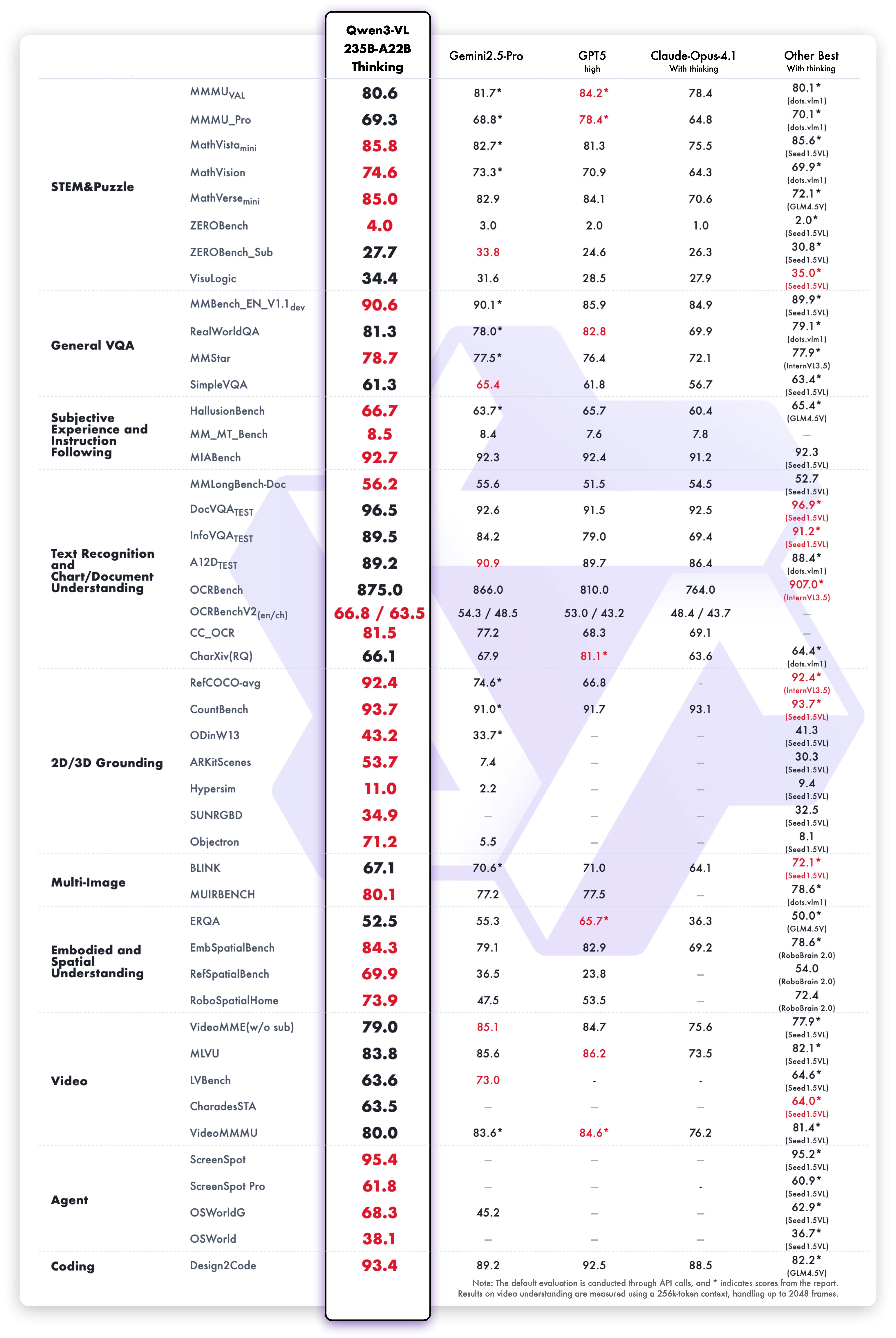
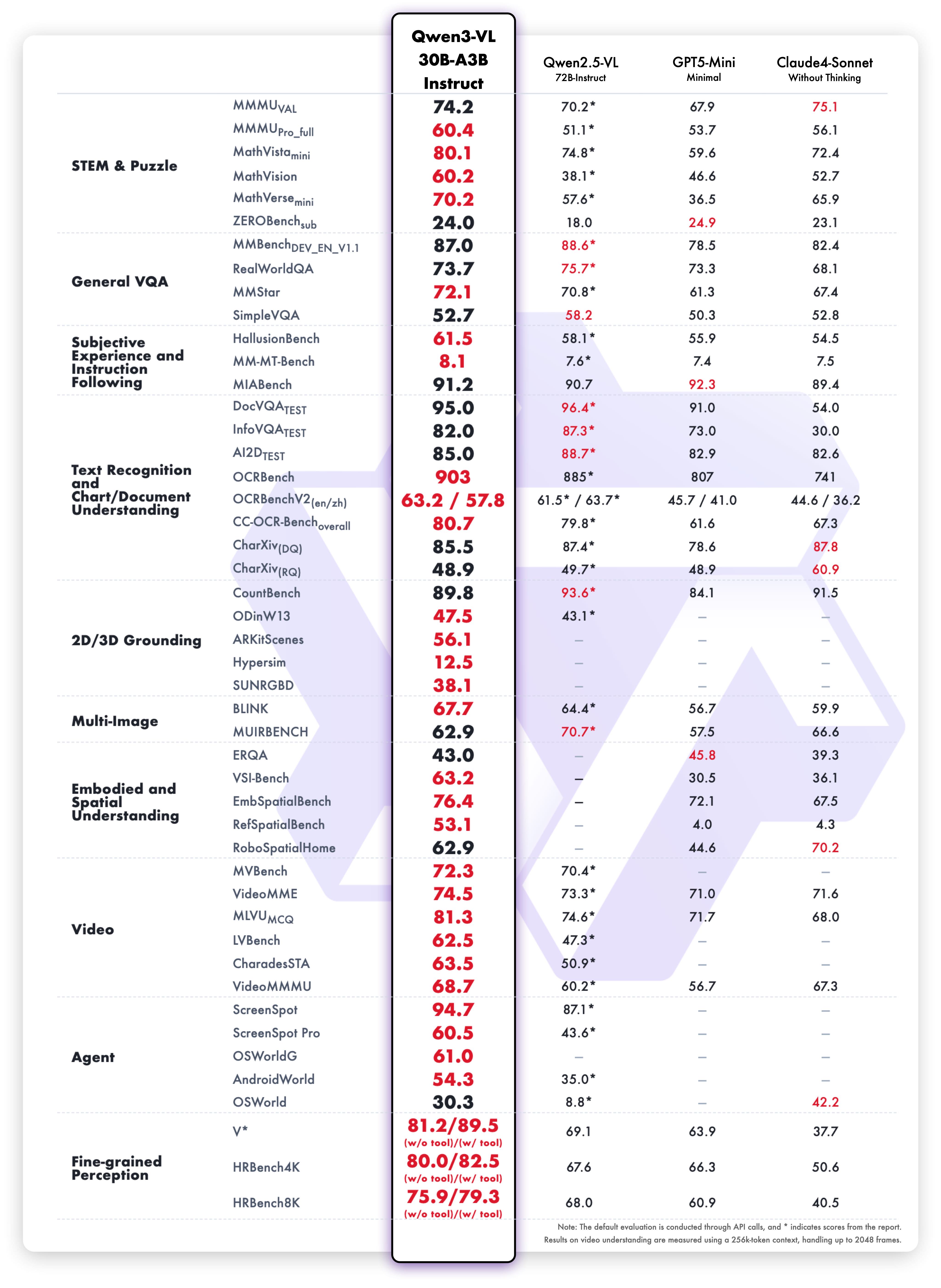
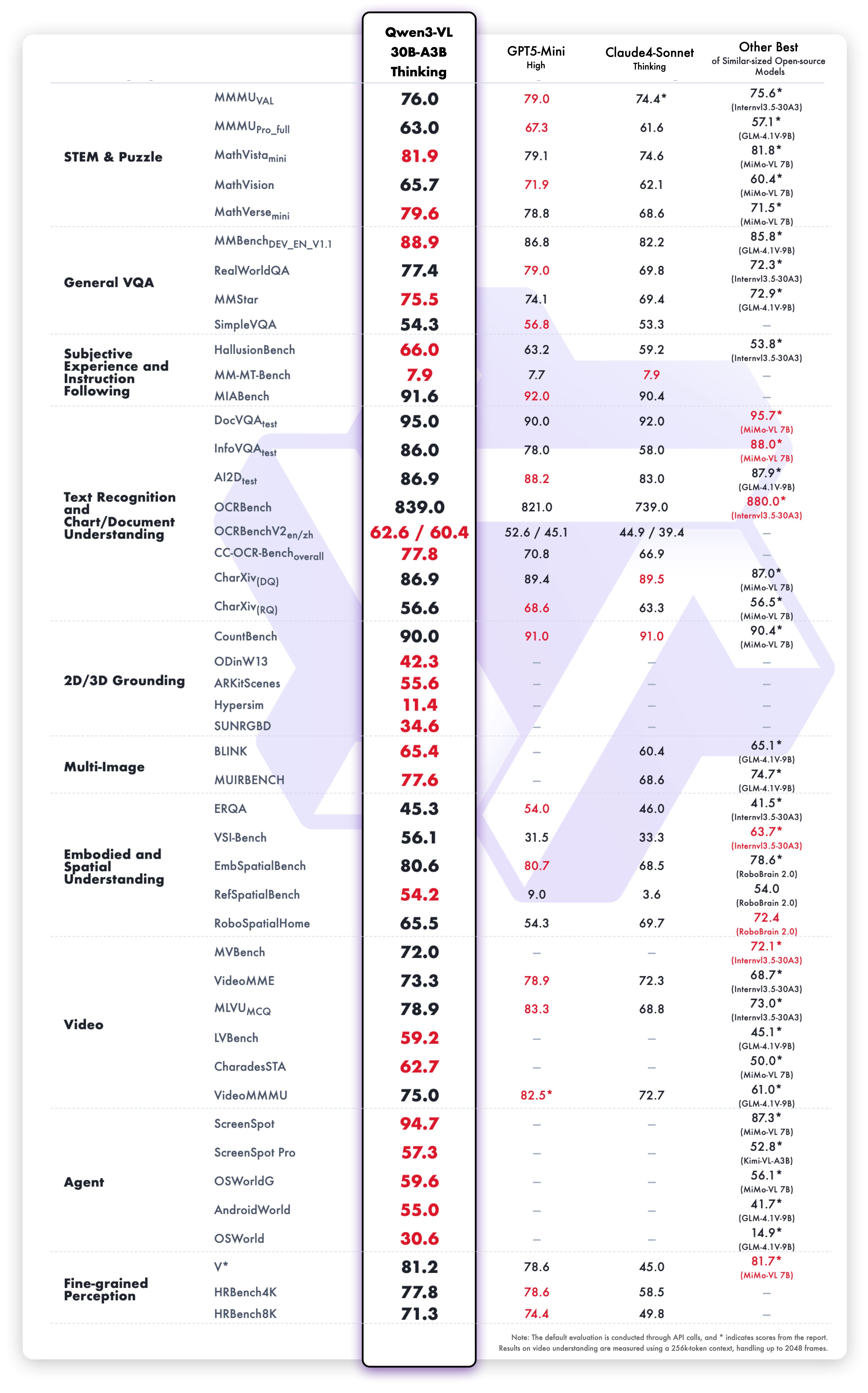
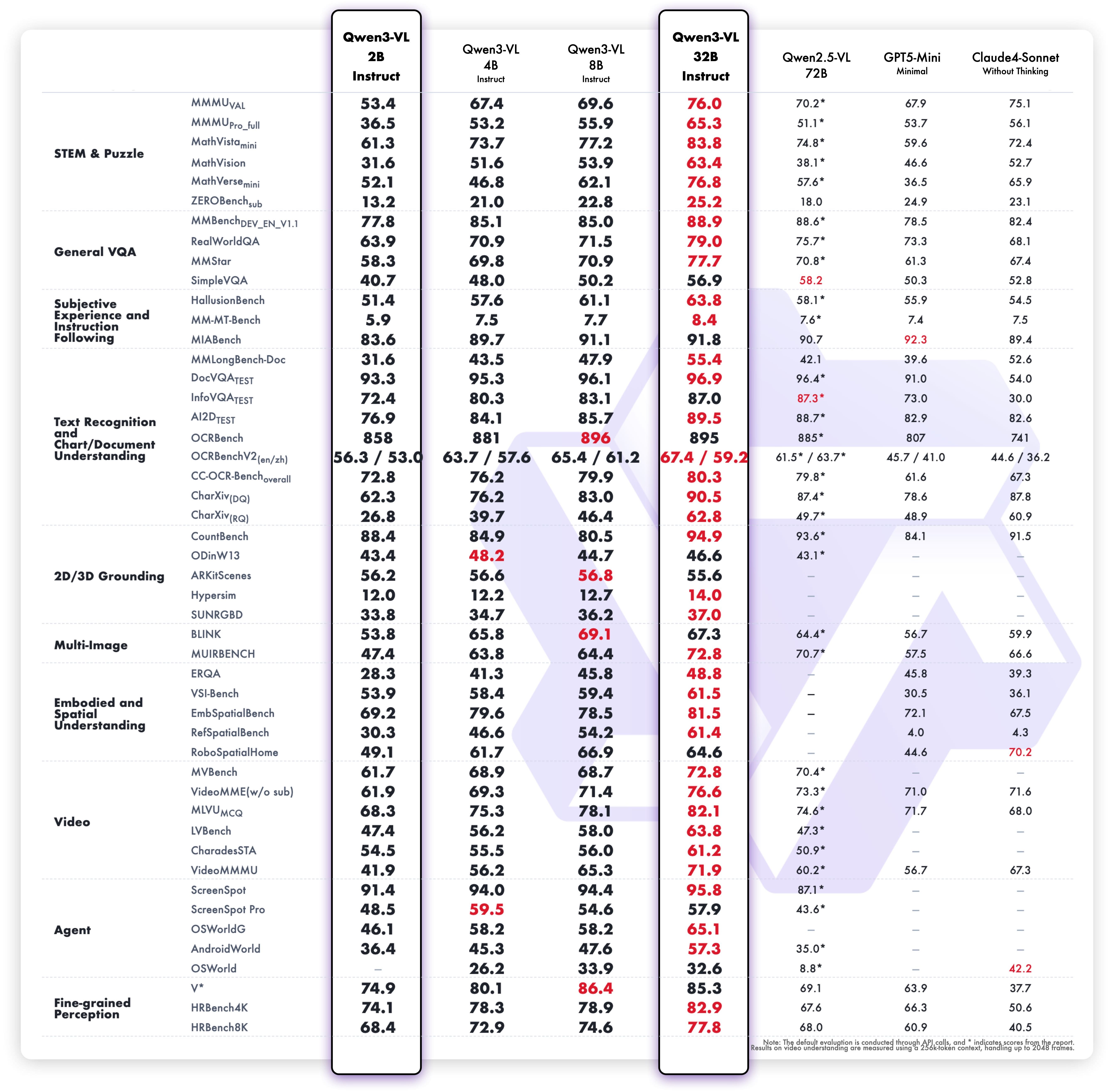
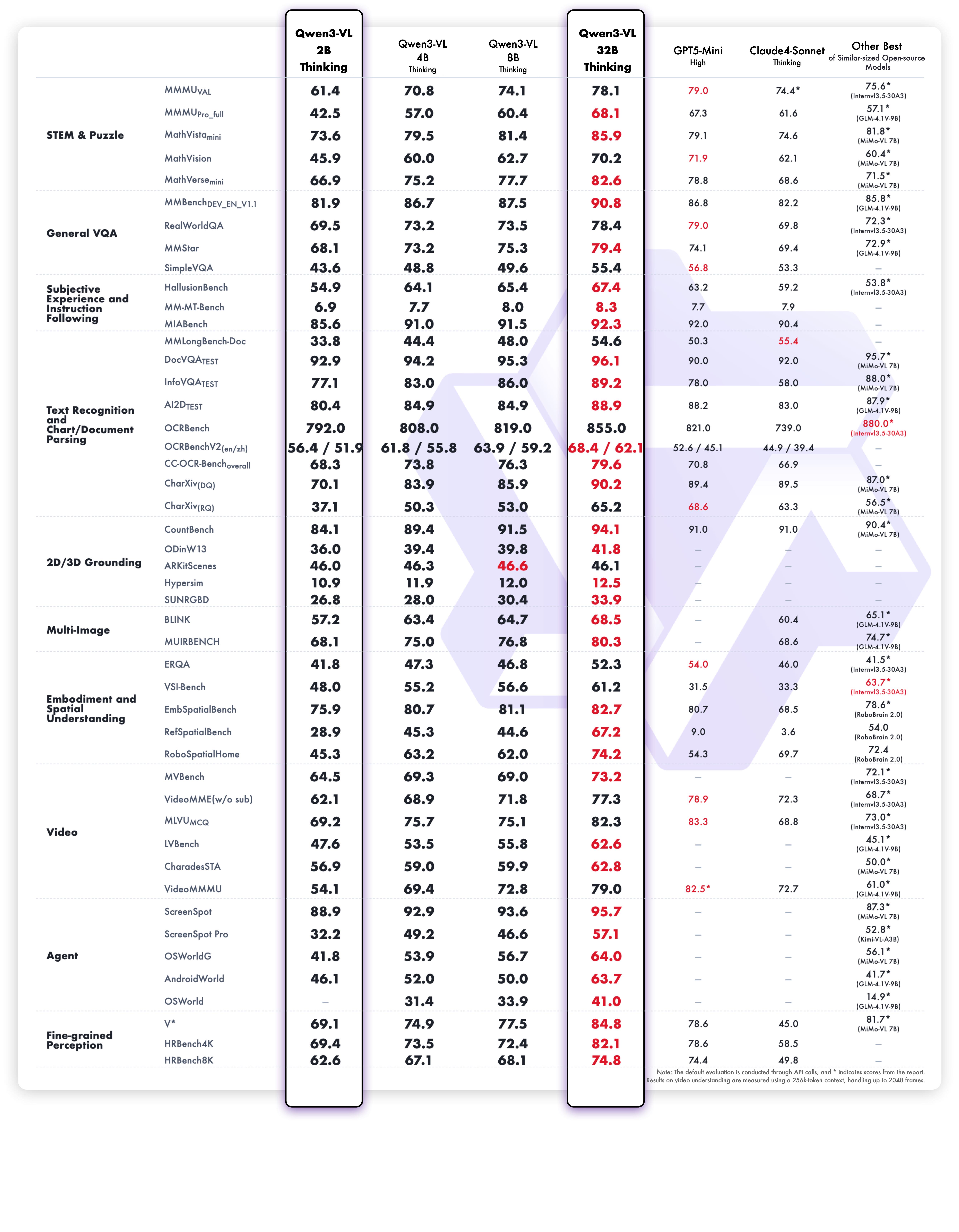
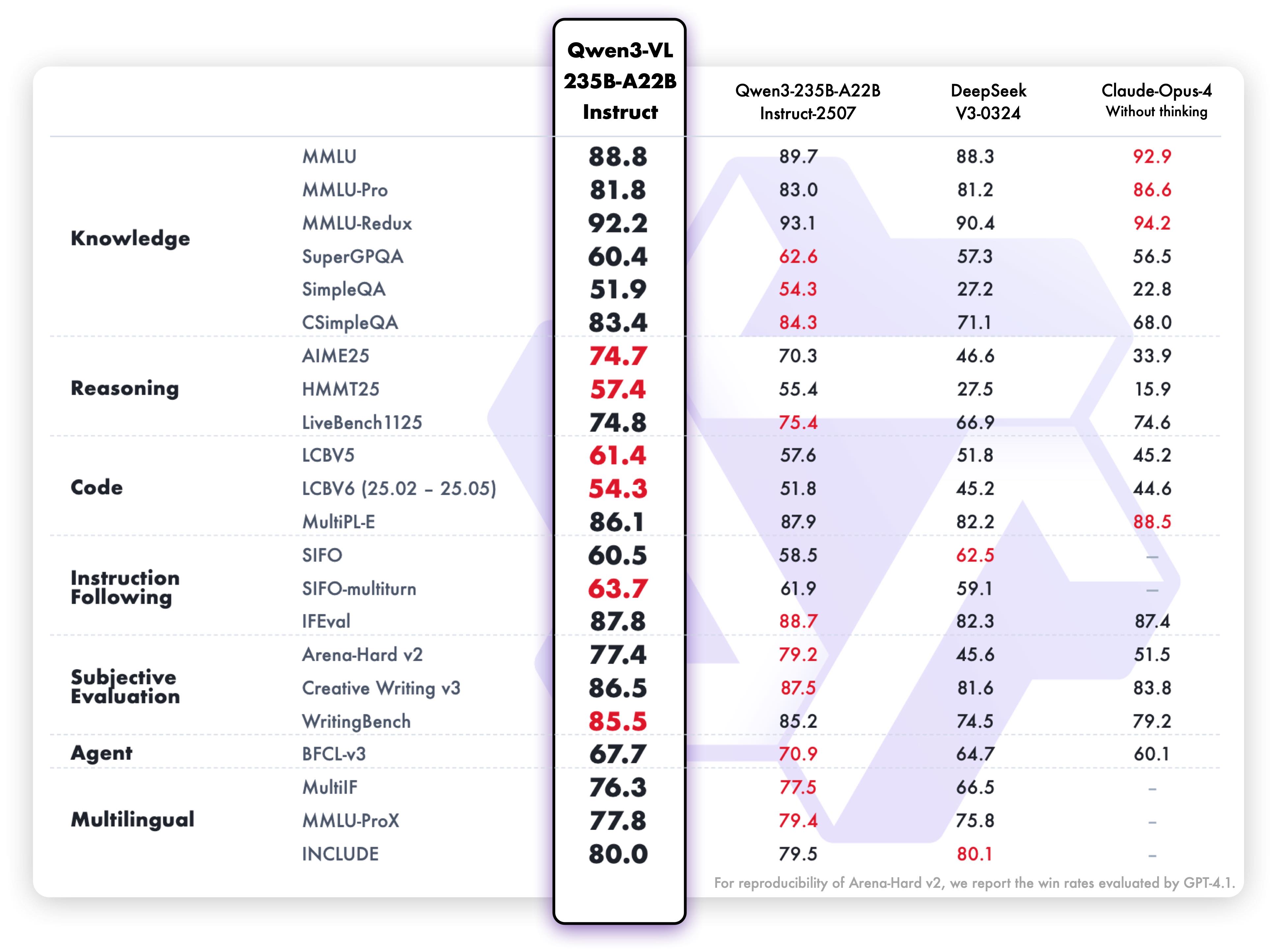
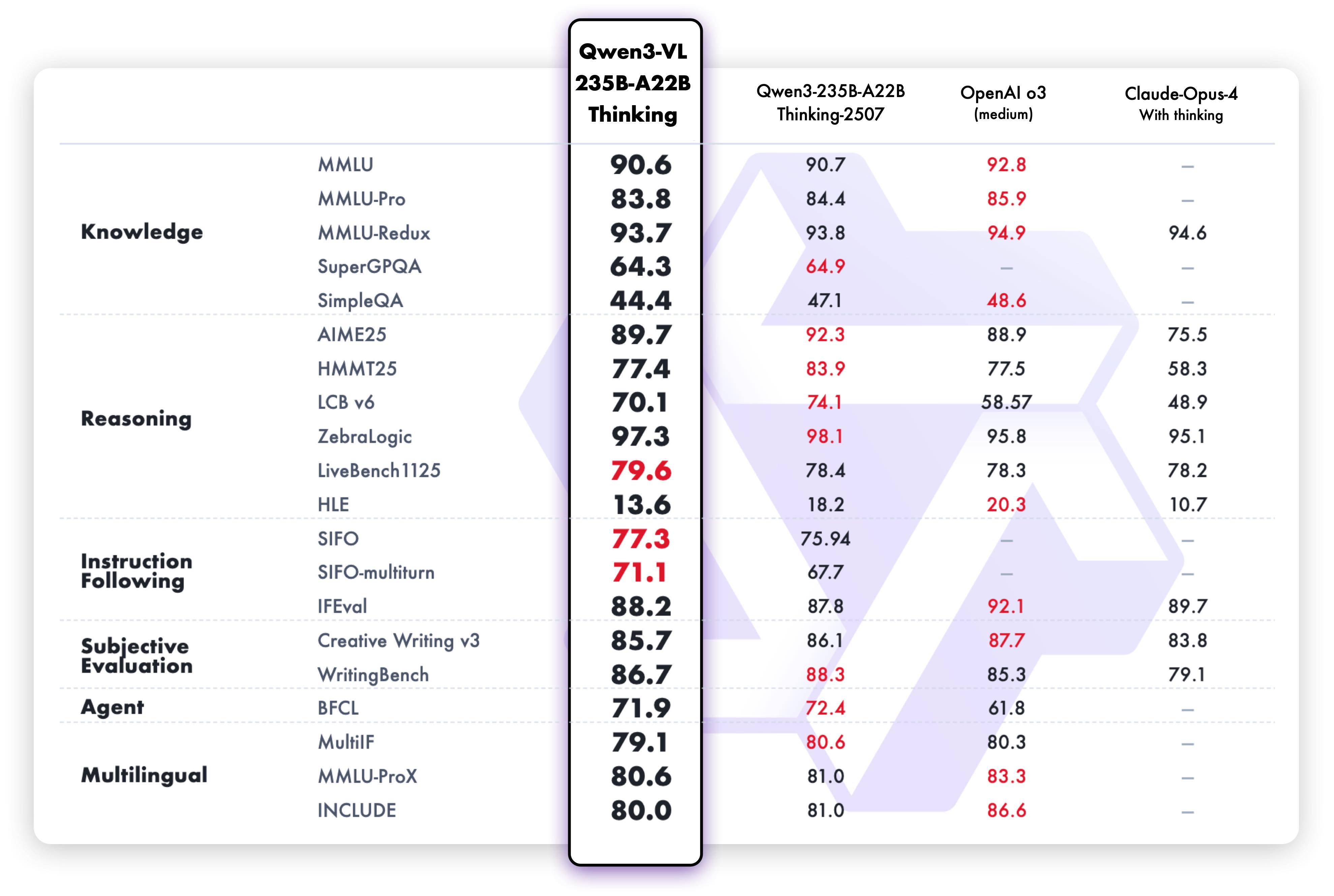
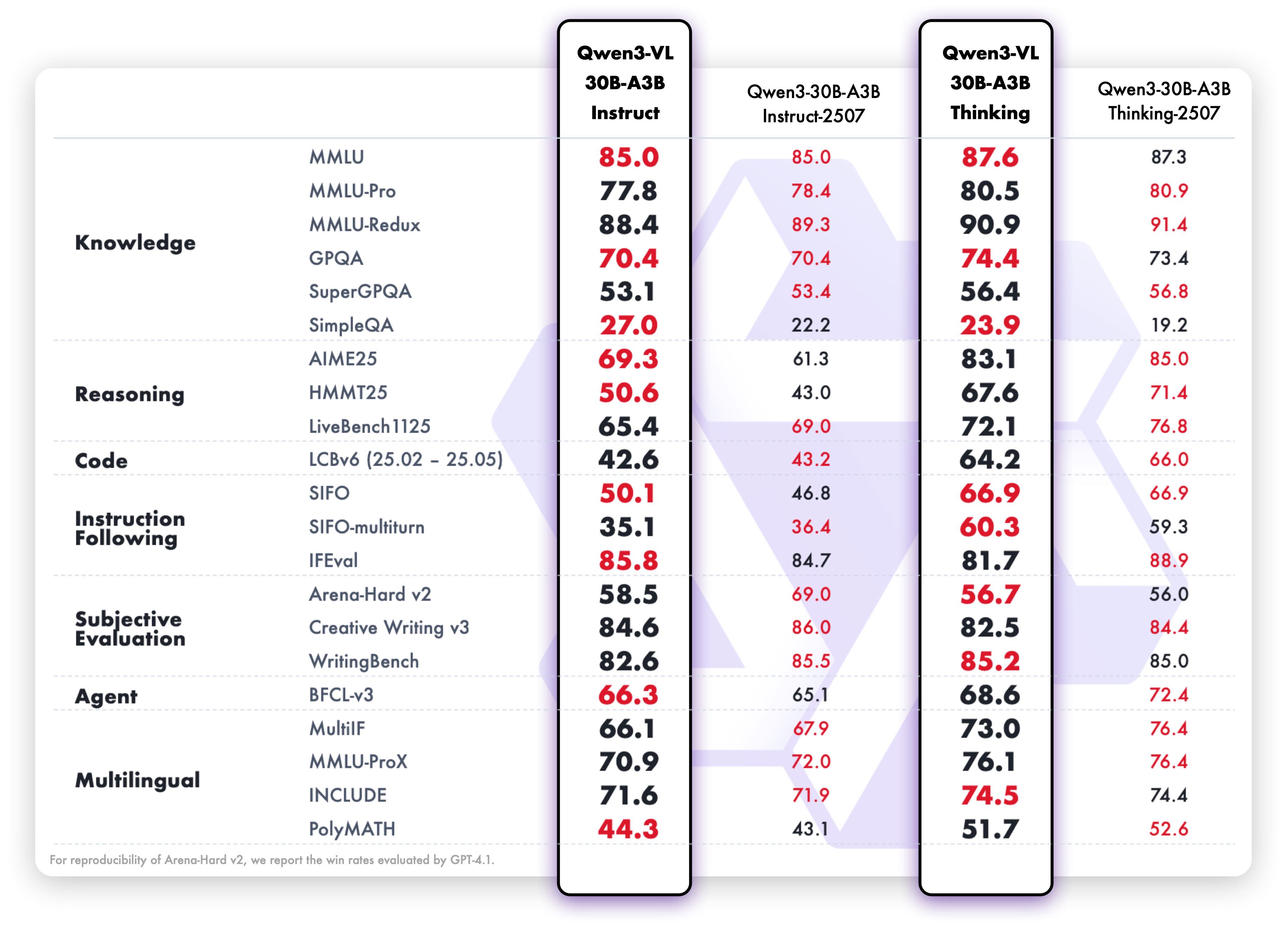
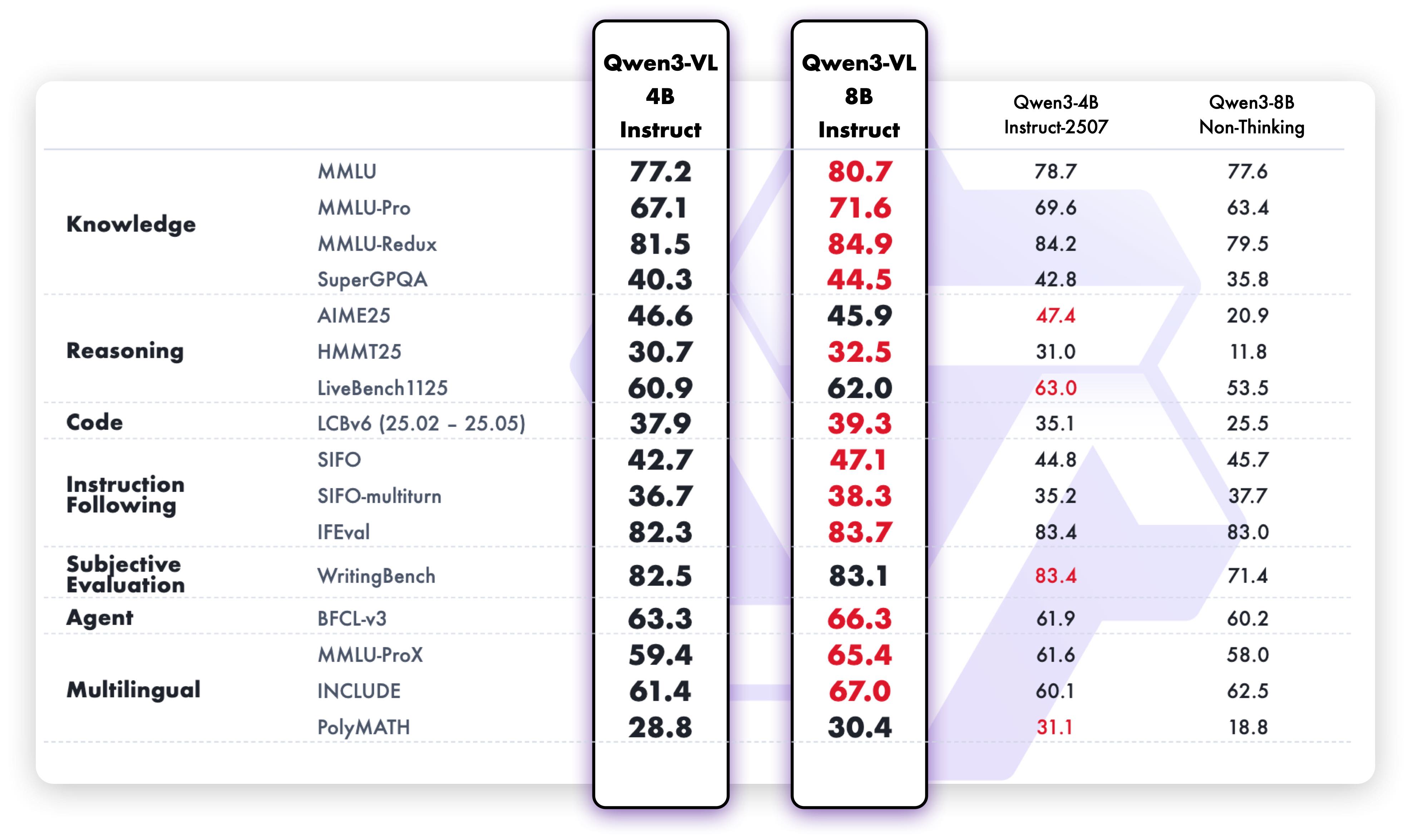
We are preparing cookbooks for many capabilities, including recognition, localization, document parsing, video understanding, key information extraction, and more. Welcome to learn more!
| Cookbook | Description | Open |
| -------- | ----------- | ---- |
| Omni Recognition | Not only identify animals, plants, people, and scenic spots but also recognize various objects such as cars and merchandise. |  |
| Powerful Document Parsing Capabilities | The parsing of documents has reached a higher level, including not only text but also layout position information and our Qwen HTML format. | |
| Precise Object Grounding Across Formats | Using relative position coordinates, it supports both boxes and points, allowing for diverse combinations of positioning and labeling tasks. | |
| General OCR and Key Information Extraction | Stronger text recognition capabilities in natural scenes and multiple languages, supporting diverse key information extraction needs. | |
| Video Understanding | Better video OCR, long video understanding, and video grounding. | |
| Mobile Agent | Locate and think for mobile phone control. | |
| Computer-Use Agent | Locate and think for controlling computers and Web. | |
| 3D Grounding | Provide accurate 3D bounding boxes for both indoor and outdoor objects. | |
| Thinking with Images | Utilize image_zoom_in_tool and search_tool to facilitate the model’s precise comprehension of fine-grained visual details within images. | |
| MultiModal Coding | Generate accurate code based on rigorous comprehension of multimodal information. | |
| Long Document Understanding | Achieve rigorous semantic comprehension of ultra-long documents. | |
| Spatial Understanding | See, understand and reason about the spatial information | |
|
| Powerful Document Parsing Capabilities | The parsing of documents has reached a higher level, including not only text but also layout position information and our Qwen HTML format. | |
| Precise Object Grounding Across Formats | Using relative position coordinates, it supports both boxes and points, allowing for diverse combinations of positioning and labeling tasks. | |
| General OCR and Key Information Extraction | Stronger text recognition capabilities in natural scenes and multiple languages, supporting diverse key information extraction needs. | |
| Video Understanding | Better video OCR, long video understanding, and video grounding. | |
| Mobile Agent | Locate and think for mobile phone control. | |
| Computer-Use Agent | Locate and think for controlling computers and Web. | |
| 3D Grounding | Provide accurate 3D bounding boxes for both indoor and outdoor objects. | |
| Thinking with Images | Utilize image_zoom_in_tool and search_tool to facilitate the model’s precise comprehension of fine-grained visual details within images. | |
| MultiModal Coding | Generate accurate code based on rigorous comprehension of multimodal information. | |
| Long Document Understanding | Achieve rigorous semantic comprehension of ultra-long documents. | |
| Spatial Understanding | See, understand and reason about the spatial information | |
Below, we provide simple examples to show how to use Qwen3-VL with 🤖 ModelScope and 🤗 Transformers.
# The Qwen3-VL model requires transformers >= 4.57.0
pip install "transformers>=4.57.0"
snapshot_download can help you solve issues concerning downloading checkpoints.
Here we show a code snippet to show you how to use the chat model with transformers:
from transformers import AutoModelForImageTextToText, AutoProcessor
default: Load the model on the available device(s)
model = AutoModelForImageTextToText.from_pretrained(
    "Qwen/Qwen3-VL-235B-A22B-Instruct", dtype="auto", device_map="auto"
)
We recommend enabling flash_attention_2 for better acceleration and memory saving, especially in multi-image and video scenarios.
model = AutoModelForImageTextToText.from_pretrained(
"Qwen/Qwen3-VL-235B-A22B-Instruct",
dtype=torch.bfloat16,
attn_implementation="flash_attention_2",
device_map="auto",
)
processor = AutoProcessor.from_pretrained("Qwen/Qwen3-VL-235B-A22B-Instruct")
messages = [
    {
        "role": "user",
        "content": [
            {
                "type": "image",
                "image": "https://qianwen-res.oss-cn-beijing.aliyuncs.com/Qwen-VL/assets/demo.jpeg",
            },
            {"type": "text", "text": "Describe this image."},
        ],
    }
]
Preparation for inference
inputs = processor.apply_chat_template(
    messages,
    tokenize=True,
    add_generation_prompt=True,
    return_dict=True,
    return_tensors="pt"
)
inputs = inputs.to(model.device)
Inference: Generation of the output
generated_ids = model.generate(inputs, max_new_tokens=128)
generated_ids_trimmed = [
    out_ids[len(in_ids) :] for in_ids, out_ids in zip(inputs.input_ids, generated_ids)
]
output_text = processor.batch_decode(
    generated_ids_trimmed, skip_special_tokens=True, clean_up_tokenization_spaces=False
)
print(output_text)
# Messages containing multiple images and a text query
messages = [
    {
        "role": "user",
        "content": [
            {"type": "image", "image": "file:///path/to/image1.jpg"},
            {"type": "image", "image": "file:///path/to/image2.jpg"},
            {"type": "text", "text": "Identify the similarities between these images."},
        ],
    }
]
Preparation for inference
inputs = processor.apply_chat_template(
    messages,
    tokenize=True,
    add_generation_prompt=True,
    return_dict=True,
    return_tensors="pt"
)
inputs = inputs.to(model.device)
Inference: Generation of the output
generated_ids = model.generate(inputs, max_new_tokens=128)
generated_ids_trimmed = [
    out_ids[len(in_ids) :] for in_ids, out_ids in zip(inputs.input_ids, generated_ids)
]
output_text = processor.batch_decode(
    generated_ids_trimmed, skip_special_tokens=True, clean_up_tokenization_spaces=False
)
print(output_text)
# Messages containing a video url(or a local path) and a text query
messages = [
    {
        "role": "user",
        "content": [
            {
                "type": "video",
                "video": "https://qianwen-res.oss-cn-beijing.aliyuncs.com/Qwen2-VL/space_woaudio.mp4",
            },
            {"type": "text", "text": "Describe this video."},
        ],
    }
]
Preparation for inference
inputs = processor.apply_chat_template(
    messages,
    tokenize=True,
    add_generation_prompt=True,
    return_dict=True,
    return_tensors="pt"
)
inputs = inputs.to(model.device)
Inference: Generation of the output
generated_ids = model.generate(inputs, max_new_tokens=128)
generated_ids_trimmed = [
    out_ids[len(in_ids) :] for in_ids, out_ids in zip(inputs.input_ids, generated_ids)
]
output_text = processor.batch_decode(
    generated_ids_trimmed, skip_special_tokens=True, clean_up_tokenization_spaces=False
)
print(output_text)
# for batch generation, padding_side should be set to left!
processor.tokenizer.padding_side = 'left'
Sample messages for batch inference
messages1 = [
    {
        "role": "user",
        "content": [
            {"type": "image", "image": "file:///path/to/image1.jpg"},
            {"type": "image", "image": "file:///path/to/image2.jpg"},
            {"type": "text", "text": "What are the common elements in these pictures?"},
        ],
    }
]
messages2 = [
    {"role": "system", "content": [{"type": "text", "text": "You are a helpful assistant."}]},
    {"role": "user", "content": [{"type": "text", "text": "Who are you?"}]},
]
Combine messages for batch processing
messages = [messages1, messages2]
Preparation for inference
inputs = processor.apply_chat_template(
    messages,
    tokenize=True,
    add_generation_prompt=True,
    return_dict=True,
    return_tensors="pt",
    padding=True # padding should be set for batch generation!
)
inputs = inputs.to(model.device)
Inference: Generation of the output
generated_ids = model.generate(inputs, max_new_tokens=128)
generated_ids_trimmed = [
    out_ids[len(in_ids) :] for in_ids, out_ids in zip(inputs.input_ids, generated_ids)
]
output_text = processor.batch_decode(
    generated_ids_trimmed, skip_special_tokens=True, clean_up_tokenization_spaces=False
)
print(output_text)
Using the official HF processor, we can conveniently control the budget of visual tokens. Since the Qwen3-VL processor separates image and video processing, we can independently configure the pixel budget for each modality.
size['longest_edge'] originally corresponds to max_pixels, which defines the maximum number of pixels allowed for an image (i.e., for an image of height H and width W, H × W must not exceed max_pixels; image channels are ignored for simplicity).
Similarly, size['shortest_edge'] corresponds to min_pixels, specifying the minimum allowable pixel count for an image.
size['longest_edge'] represents the maximum total number of pixels across all frames in a video — for a video of shape T×H×W, the product T×H×W must not exceed size['longest_edge'].
Similarly, size['shortest_edge'] sets the minimum total pixel budget for the video.
processor = AutoProcessor.from_pretrained("Qwen/Qwen3-VL-235B-A22B-Instruct")
budget for image processor, since the compression ratio is 32 for Qwen3-VL, we can set the number of visual tokens of a single image to 256-1280 (32× spatial compression)
processor.image_processor.size = {"longest_edge": 1280*32*32, "shortest_edge": 256*32*32}
budget for video processor, we can set the number of visual tokens of a single video to 256-16384 (32× spatial compression + 2× temporal compression)
processor.video_processor.size = {"longest_edge": 16384*32*32*2, "shortest_edge": 256*32*32*2}
messages = [
    {
        "role": "user",
        "content": [
            {
                "type": "video",
                "video": "https://qianwen-res.oss-cn-beijing.aliyuncs.com/Qwen2-VL/space_woaudio.mp4",
            },
            {"type": "text", "text": "Describe this video."},
        ],
    }
]
for video input, we can further control the fps or num_frames. \
defaultly, fps is set to 2
set fps = 4
inputs = processor.apply_chat_template(
    messages,
    tokenize=True,
    add_generation_prompt=True,
    return_dict=True,
    return_tensors="pt",
    fps=4
)
inputs = inputs.to(model.device)
set num_frames = 128 and overwrite the fps to None!
inputs = processor.apply_chat_template(
messages,
tokenize=True,
add_generation_prompt=True,
return_dict=True,
return_tensors="pt",
num_frames=128,
fps=None,
)
inputs = inputs.to(model.device)
Inference: Generation of the output
generated_ids = model.generate(**inputs, max_new_tokens=128)
generated_ids_trimmed = [
    out_ids[len(in_ids) :] for in_ids, out_ids in zip(inputs.input_ids, generated_ids)
]
output_text = processor.batch_decode(
    generated_ids_trimmed, skip_special_tokens=True, clean_up_tokenization_spaces=False
)
print(output_text)
qwen-vl-utils UsageWith the latest qwen-vl-utils toolkit (backward compatible with Qwen2.5-VL), you can control pixel constraints per visual input.
pip install qwen-vl-utils==0.0.14
It's highly recommended to use [decord] feature for faster video loading.
pip install qwen-vl-utils[decord]
Compared to previous version, the new qwen-vl-utils introduces:
14 for Qwen2.5-VL and 16 for Qwen3-VL. Default set to 14.False.→→ →
→ →
→ →
→ →
→ →
→ →
→