1
 →
→
Run frontier LLMs and VLMs locally on Qualcomm devices across NPU, GPU, and CPU with a few lines of code
qualcomm/GenieX is an open-source project on GitHub, mainly written in Rust. Run frontier LLMs and VLMs locally on Qualcomm devices across NPU, GPU, and CPU with a few lines of code It currently holds 8,384 stars and 1,056 forks with 0 open issues, and was last pushed on an unknown date (repository created unknown).
AI Homed tracks it on the Local & On-Device AI board.

---
GenieX is an on-device Gen AI inference runtime for Qualcomm devices. Bring almost any GGUF model from Hugging Face — or a pre-compiled bundle from Qualcomm AI Hub — and run it locally on the Hexagon NPU, Adreno GPU, or CPU in a few lines of code. One C SDK underneath, exposed through a CLI, Python, Kotlin/Java, Docker, and an OpenAI-compatible server. It is the community version of Qualcomm GENIE.
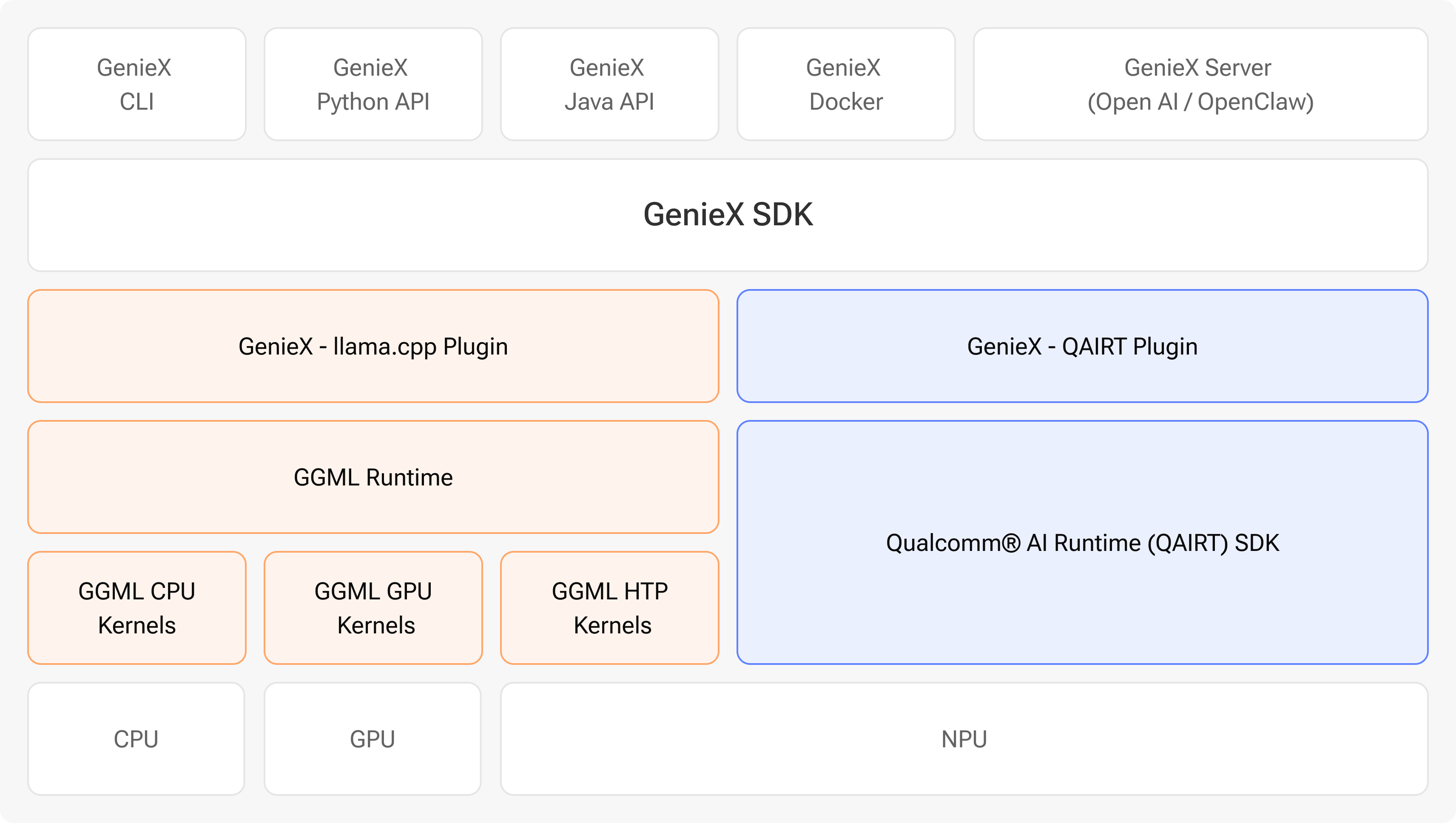
GenieX runs only on Qualcomm Snapdragon. Find your platform, then jump straight to the interface you want to use.
| Platform | Example devices | Jump to a quickstart | | --- | --- | --- | | 🪟 Windows ARM64 (Compute) | Snapdragon X · X Elite | CLI · Python · Local server | | 🤖 Android (Mobile) | Snapdragon 8 Elite · 8 Elite Gen 5 | Android SDK | | 🐧 Linux ARM64 (IoT) | Dragonwing QCS9075 | CLI · Docker · Python |
No device on hand? Spin up a remote session on Qualcomm Device Cloud.
---
Pick your interface below. Each one follows the same three steps — Install, Run, and Docs — and shows both runtimes: a GGUF model from Hugging Face (llama_cpp) and a pre-compiled bundle from Qualcomm AI Hub (qairt, NPU).
Install
sudo: curl -fsSL https://qaihub-public-assets.s3.us-west-2.amazonaws.com/qai-hub-geniex/install.sh | sh
Run — chat with any model in one line (drag in an image for VLMs):
# GGUF from Hugging Face → llama.cpp (NPU / GPU / CPU)
geniex infer google/gemma-4-E4B-it-qat-q4_0-gguf
Pre-compiled bundle from Qualcomm AI Hub → Qualcomm AI Engine Direct (NPU)
geniex infer ai-hub-models/Qwen2.5-VL-7B-Instruct
GGUF from Docker Hub (https://hub.docker.com/u/ai) → llama.cpp (NPU / GPU / CPU)
geniex infer docker.io/ai/gemma3
📖 Docs — Install · Quickstart · Command reference
Install
pip install geniex
Run — mirrors Hugging Face transformers (from_pretrained() → .generate()):
# GGUF from Hugging Face → llama.cpp
from geniex import AutoModelForCausalLM
model = AutoModelForCausalLM.from_pretrained("unsloth/Qwen3.5-2B-GGUF", precision="Q4_0")
messages = [{"role": "user", "content": "What is 2+2?"}]
prompt = model.tokenizer.apply_chat_template(messages, add_generation_prompt=True)
for chunk in model.generate(prompt, max_new_tokens=256, stream=True):
    print(chunk, end="", flush=True)
model.close()
# Pre-compiled bundle from Qualcomm AI Hub → Qualcomm AI Engine Direct (NPU)
from geniex import AutoModelForCausalLM
model = AutoModelForCausalLM.from_pretrained("ai-hub-models/Qwen3-4B")
messages = [{"role": "user", "content": "What is 2+2?"}]
prompt = model.tokenizer.apply_chat_template(messages, add_generation_prompt=True)
for chunk in model.generate(prompt, max_new_tokens=256, stream=True):
    print(chunk, end="", flush=True)
model.close()
📖 Docs — Install · Quickstart · API reference
Install — ships with the CLI (install above).
Run — pull any model (GGUF or Qualcomm AI Hub bundle), then serve an OpenAI-compatible API:
geniex pull ai-hub-models/Qwen3-4B-Instruct-2507
geniex serve   # serves http://127.0.0.1:18181/v1
curl http://127.0.0.1:18181/v1/chat/completions \
  -H "Content-Type: application/json" \
  -d '{
    "model": "ai-hub-models/Qwen3-4B-Instruct-2507",
    "messages": [{"role": "user", "content": "Hello!"}]
  }'
Point any OpenAI client at http://127.0.0.1:18181/v1 — no code changes.
📖 Docs — Local server guide
Install — add the SDK to your app module's build.gradle.kts:
dependencies {
    implementation("com.qualcomm.qti:geniex-android:0.3.1")
}
Run — fastest path is the sample app (chat UI, model picker for GGUF + Qualcomm AI Hub bundles, VLM support):
The Android demo app lives in qualcomm/ai-hub-apps. Clone it, open the sample app in Android Studio, and hit Run.
📖 Docs — Install · Quickstart · API reference
Install
docker pull docker.io/qualcomm/geniex:latest
Run — the container wraps the CLI, so geniex infer … works exactly as above.
📖 Docs — Docker guide
Install — link against the single C header sdk/include/geniex.h; every other interface is a thin wrapper over it.
📖 Docs — sdk/README.md · notes/build.md
---
GenieX has two runtimes so you get broad model coverage and peak Snapdragon performance in one stack. Both LLMs and VLMs are supported.
| | llama.cpp (llama_cpp) | Qualcomm AI Engine Direct (qairt) |
| --- | --- | --- |
| Get models from | Hugging Face (any GGUF) | Qualcomm AI Hub (pre-compiled) |
| Format | GGUF | Per-chipset bundle |
| Compute units | NPU · GPU · CPU | NPU only |
| Best for | Bringing your own GGUF | Highest NPU performance |
For llama.cpp, pick the Q4_0 precision when prompted — it has the best Hexagon NPU support. See the Models guide → for the full list, precisions, and how to run a local model.
Contributions are welcome! Before opening a PR, please read CONTRIBUTING.md for branch naming, commit / PR title format, pre-commit checks, and the FFI-update rule for public SDK headers.
| | | | --- | --- | | 🏗️ Build the CLI, SDK, or Python bindings | notes/build.md | | ▶️ Run & select compute units / pull models | notes/run.md | | 🏷️ Release — SemVer tags, channels, HTP signing | notes/release.md | | 📚 All developer docs | docs/README.md |
Questions, ideas, or want to show off what you built? Come say hi.
Thanks to everyone building GenieX 💙
---
BSD 3-Clause — see LICENSE and NOTICE.
Use of this project is also subject to Qualcomm's Terms of Use.
→ →
→ →
→ →
→ →
→ →
→ →
→ →
→