1
 →
→
Answer me with HTML — an agent skill that answers hard questions with a one-page HTML you can actually read. 让 AI Agent 用一页 HTML 回答复杂问题。
QingYunA/answer-me-with-html is an open-source project on GitHub, mainly written in JavaScript. Answer me with HTML — an agent skill that answers hard questions with a one-page HTML you can actually read. 让 AI Agent 用一页 HTML 回答复杂问题。 It currently holds 282 stars and 26 forks with 0 open issues, and was last pushed on an unknown date (repository created unknown).
AI Homed tracks it on the Today's Trending board, currently at rank #93 with 0 new stars today.

An agent skill. Ask a hard question, get a page you can actually read instead of a wall of text.
The model writes about 1/7 of the tokens it would need to hand-write the HTML.

English · 简体中文
Once installed, ask questions the way you always do:
> Explain the TCP three-way handshake
Map out how the modules in this repo fit together
Redis or Memcached for our cache?
The agent writes a short Markdown draft and hands it to the CLI that ships with the skill. About 50 ms later you have a page:
https://github.com/user-attachments/assets/1f13b1fe-70a9-4c39-8530-b12e553e17ea
24-second demo. Watch the MP4 for the version with music.
You can. Models write decent HTML now. The problem is the bill you pay in output tokens: the model has to type every line of CSS, every wrapper div and every SVG coordinate. Output tokens are also what you sit and wait for.
With this skill, the model writes only the content. We asked the same questions with the same model both ways (3 topics × 3 runs, medians, Claude Sonnet 5.5):
| | Ask for HTML directly | Answer me with HTML | | | :--- | ---: | ---: | :--- | | Output tokens | 6,873 | 923 | 7.4× fewer | | Time | 46 s | 13 s | 3.6× faster | | Cost per answer | $0.22 | $0.26 | about the same |
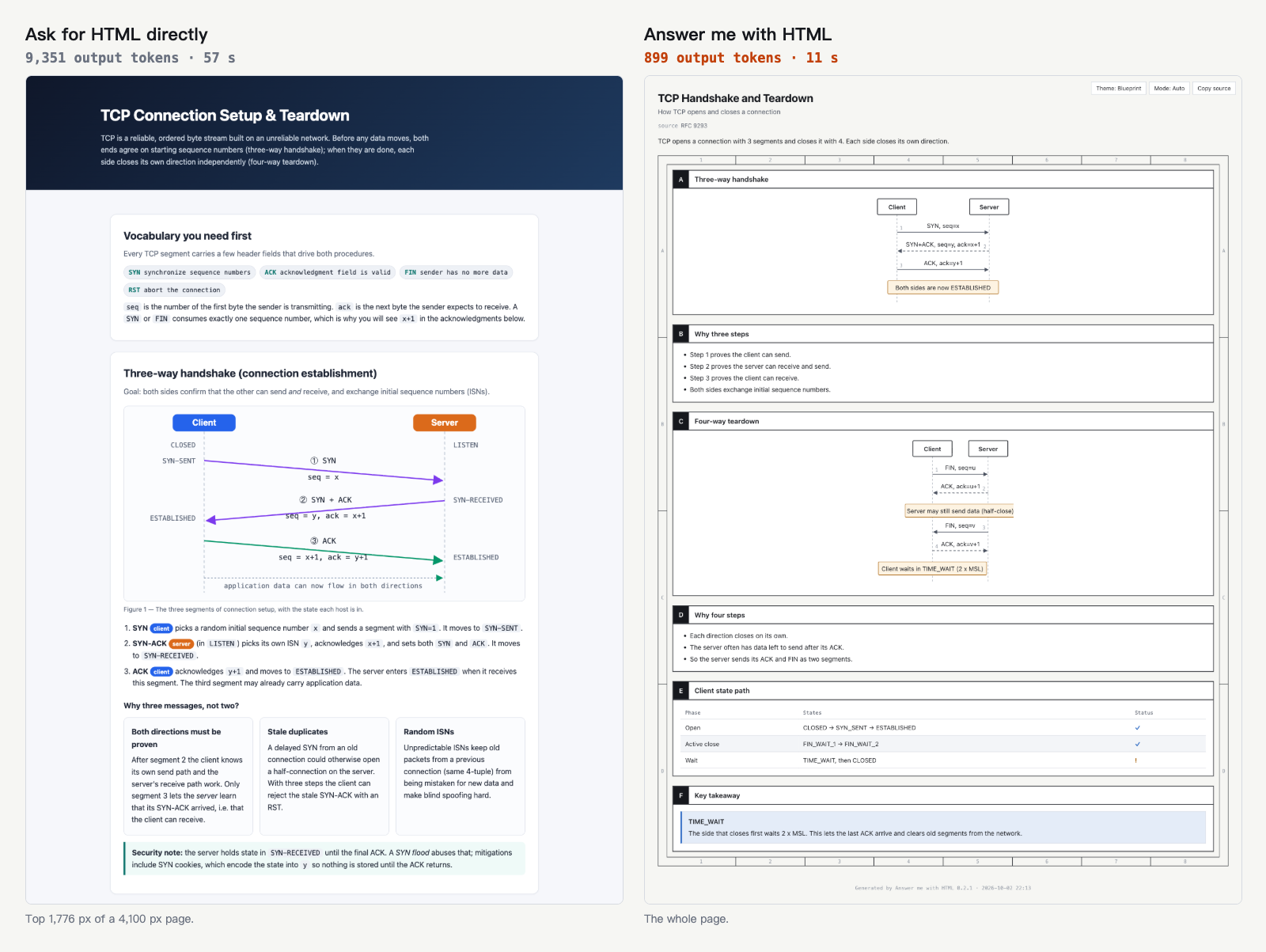
Same prompt, same model. Both pages are usable. One took 9,351 output tokens, the other 899.
Why the cost doesn't drop too: the skill adds two short turns (load the skill, run the CLI), and every turn re-reads the conversation context. You save the waiting, not the bill. Per-topic numbers and the script to reproduce them are in bench/.
You need Node.js 20 or newer. There is no npm install step. The CLI is bundled inside the skill.
Paste this into Claude Code, Codex, Cursor, OpenCode or any other agent:
Install the Answer me with HTML skill: runnpx -y skills add QingYunA/answer-me-with-html -g -y, and pass-awith your own agent name (for Claude Code,-a claude-code). Then read its SKILL.md and use it to make a page that explains the TCP three-way handshake, so we know it works.
Run this inside Claude Code:
/plugin marketplace add QingYunA/answer-me-with-html
/plugin install answer-me-with-html@answer-me-with-html
npx skills add QingYunA/answer-me-with-html
It asks which agents to install into. The installer, vercel-labs/skills, supports more than 70 agents.
Copy the skills/answer-me-with-html folder into your agent's skill folder. For Claude Code:
git clone --depth 1 https://github.com/QingYunA/answer-me-with-html.git /tmp/answer-me-with-html
cp -R /tmp/answer-me-with-html/skills/answer-me-with-html ~/.claude/skills/answer-me-with-html
Skill folders for other agents: Codex ~/.codex/skills/, Cursor ~/.cursor/skills/, OpenCode ~/.config/opencode/skill/.
No setup is needed after install.
| You ask | You get |
| :--- | :--- |
| "Explain the TCP three-way handshake" | A sequence diagram, a state diagram and a flag table |
| "How are the modules in this repo organized?" | A folder tree plus a call graph |
| "Redis or Memcached?" | A comparison table with ✓ and ✗, then a verdict |
| "What's wrong with this paragraph?" | Each sentence annotated, with the problem words and fixes |
| "How did Kubernetes come about?" | A timeline with the key moments highlighted |
| "How do I show hidden files with ls?" | No page. A one-line question gets a one-line answer |
The agent decides when a page is worth it: related concepts, multi-step flows, multi-way comparisons. You can also just say "explain it in HTML".
Pages are saved in ~/.answer-me-with-html/pages/. The buttons in the top-right corner switch the theme and light/dark mode, and copy the Markdown that produced the page.
Karpathy's ladder for understanding LLM output ends with explainer videos. Ask for one: "make a 3b1b-style video on the TCP handshake".
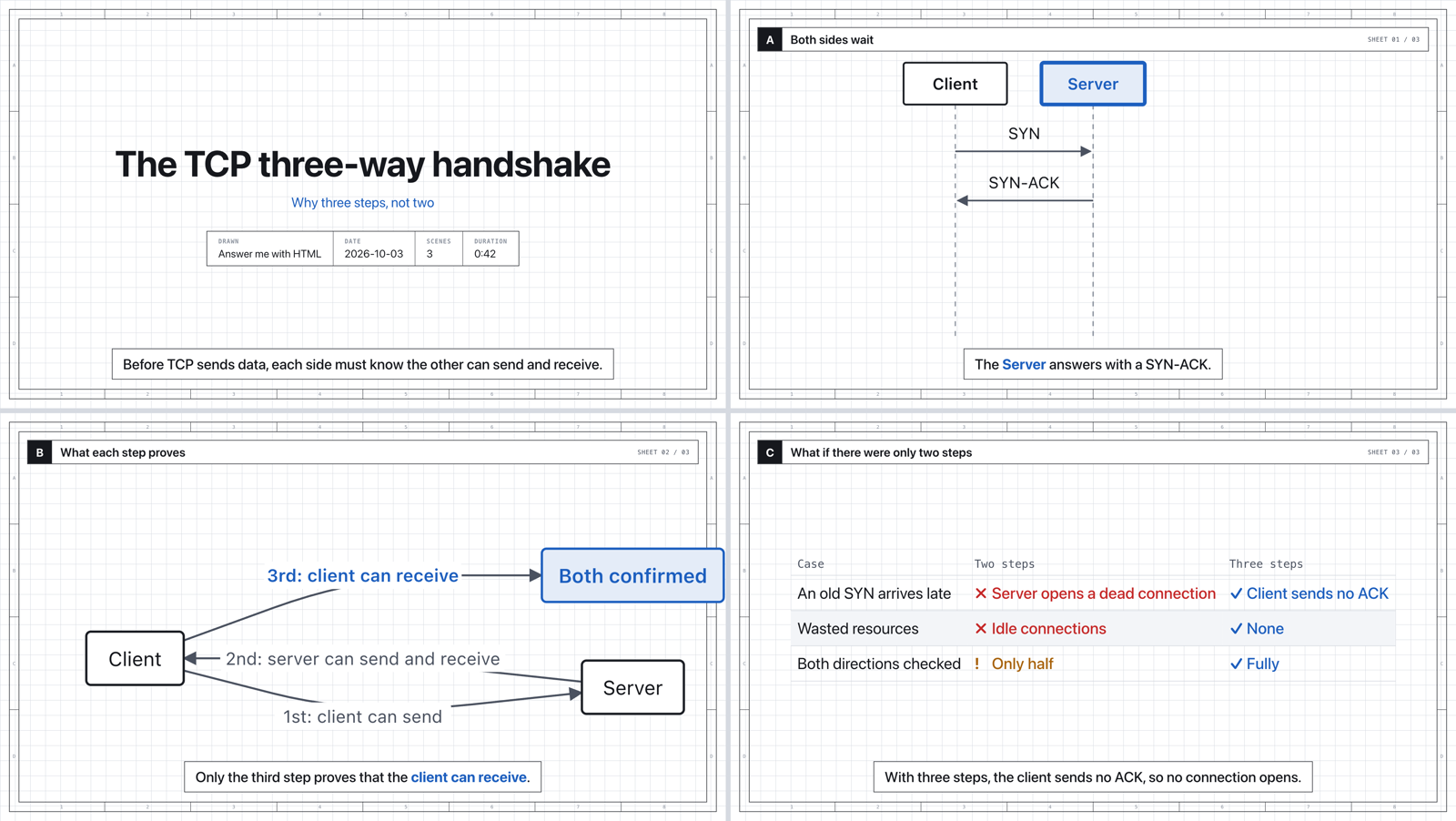
The agent writes the same kind of draft as for a page, plus one line of narration per beat. Nothing else:
`
## Both sides wait
> The client sends a SYN to ask for a connection.
The [Server] answers with a SYN-ACK.
am video turns it into a player page:
[Server] in the narration pushes the camera toward that node and highlights it. The diagram never leaves the frame.ELEVENLABS_API_KEY is set, the system voice otherwise (macOS say: Tingting for Chinese, Samantha for English), and captions only if neither exists. Each beat lasts as long as its audio, so picture and voice stay in sync.theme: 3b1b for the dark 3Blue1Brown look. theme: shadcn and mode: dark also work.--mp4 for a 1080p video file. This needs Chrome, ffmpeg and Node.js 22+ on your machine. Export takes about 1.3 times the video length.am help video.
Change settings with a slash command. There are no config files to edit by hand.
| Where | How |
| :--- | :--- |
| Claude Code (plugin install) | /answer-me-with-html:config asks what to change. /answer-me-with-html:config open off changes it directly |
| Any agent | /answer-me-with-html config open off, or just say "stop opening the browser" |
| Terminal | am config to view, am config set open off to change, am config reset to restore defaults |
| Key | Default | What it does |
| :--- | :--- | :--- |
| open | on | Open each page in the browser after it is made. Turn it off if pop-ups interrupt you |
| always | on | Always-on mode (see below). Only matters when the always-on plugin is installed |
| theme | blueprint | Default theme: blueprint or shadcn |
| mode | auto | Default color mode: auto, light or dark |
| style | 80 | Writing check: off, 80 (warn only) or strict (refuse to render) |
| voice | auto | Video narration: auto (ElevenLabs if ELEVENLABS_API_KEY is set, else system voice), elevenlabs, system or off |
Settings live in ~/.answer-me-with-html/config.json. A theme written in a draft beats the default. --open and --no-open affect one run only.
By default, the agent makes a page only for questions that need one. If you want a page with every conclusion, turn on always-on mode.
The agent then gets a short reminder each turn (about 90 tokens). Whenever it gives a conclusion, summary, plan or comparison, even a short one, it adds a small page with 2 to 4 panels and puts the path at the end of the reply. These pages never pop open, so they don't interrupt you. Casual chat and replies with no conclusion stay as they are. Claude Code makes no pages in plan mode.
Claude Code: install one more plugin.
/plugin marketplace add QingYunA/answer-me-with-html
/plugin install answer-me-with-html-always@answer-me-with-html
Pause it with /answer-me-with-html:config always off. You don't need to uninstall.
Other agents: paste this to your agent so it writes the rule into its own rules file, such as AGENTS.md:
Turn on always-on mode for Answer me with HTML: add a global rule — "[answer-me-with-html always-on] Whenever a reply gives a conclusion, summary, plan, comparison, review or explanation, even a short one, also make a page with the answer-me-with-html skill (2 to 4 panels for routine answers), render it with --no-open, and end the reply with the page path. Skip casual chat, one- or two-sentence replies with no conclusion, pure command output, and requests for plain text."
Andrej Karpathy posted that as LLMs do more of the work, keeping up with their output becomes the hard part. A diagram or a web page is far easier to take in than a long block of text.
I tried asking agents to answer in HTML directly. The pages were good. They were also slow.
A decent page took a minute or two. Most of that time went into hundreds of lines of CSS that were nearly the same every time. Diagrams were worse: the model had to compute SVG coordinates by hand, and arrows often pointed at nothing.
So Answer me with HTML takes that work away from the model. The model writes content. The CLI handles layout, color and drawing.
This is all the model writes:
`
---
title: TCP three-way handshake
---
A Three-way handshake {span=2}
C State changes {span=2}
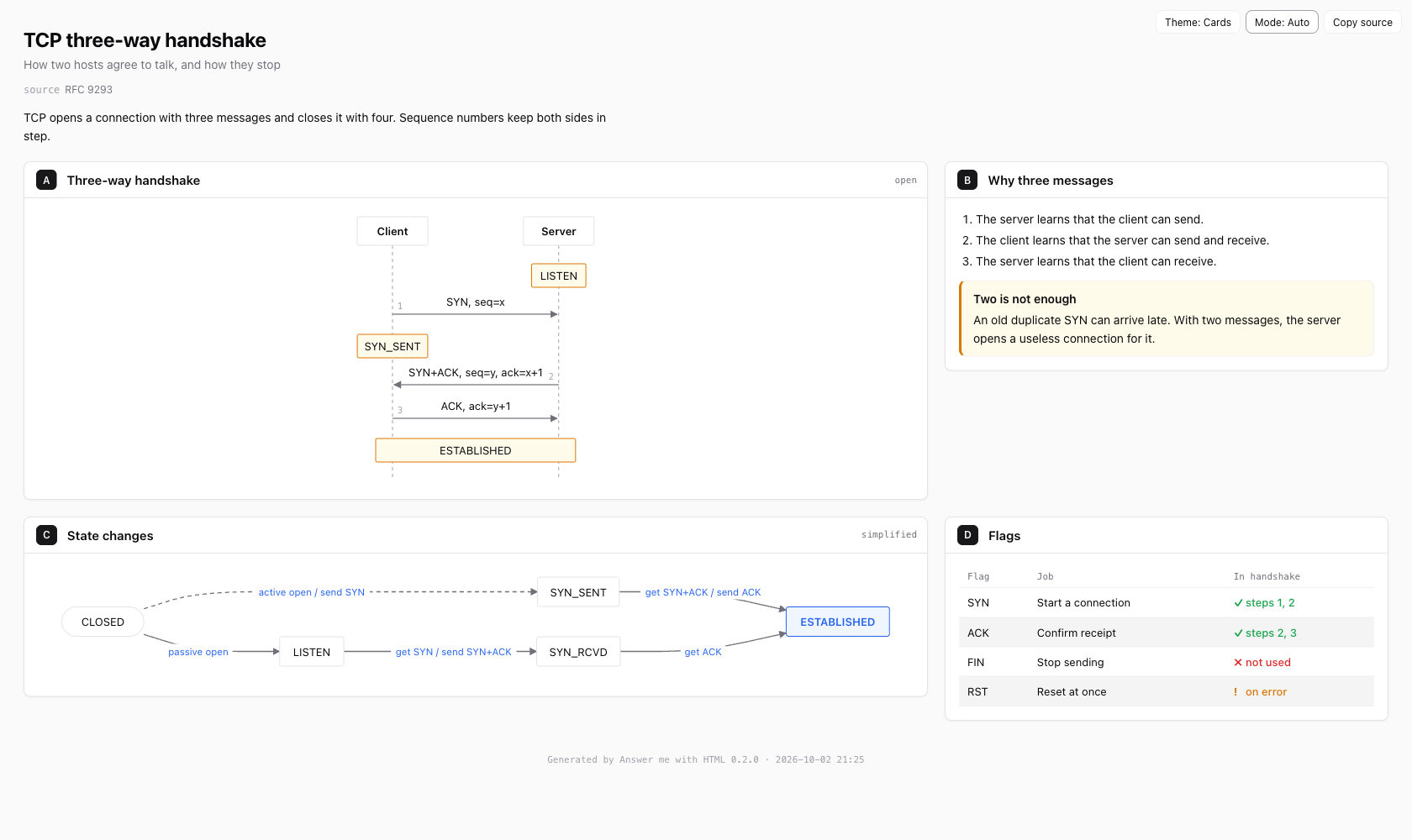
The CLI does the rest. It picks the template, places the panels, applies the theme, lays out the flow chart with dagre and spaces the sequence diagram by label width. The full draft, examples/tcp.en.md, becomes this page:
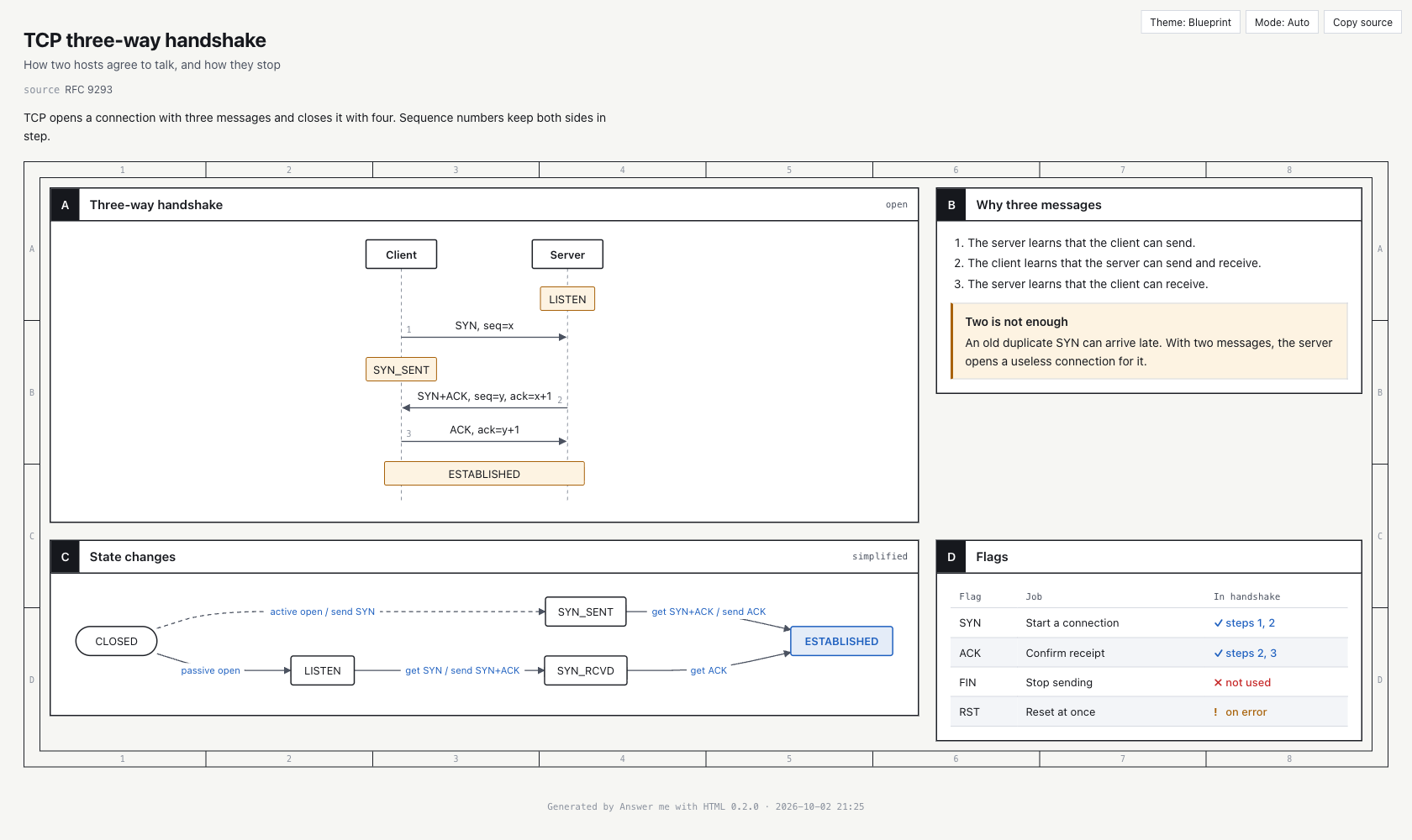
blueprint looks like an engineering drawing. shadcn uses clean cards. Both have light and dark modes..html with no CDN links or web fonts. It opens offline and is easy to share.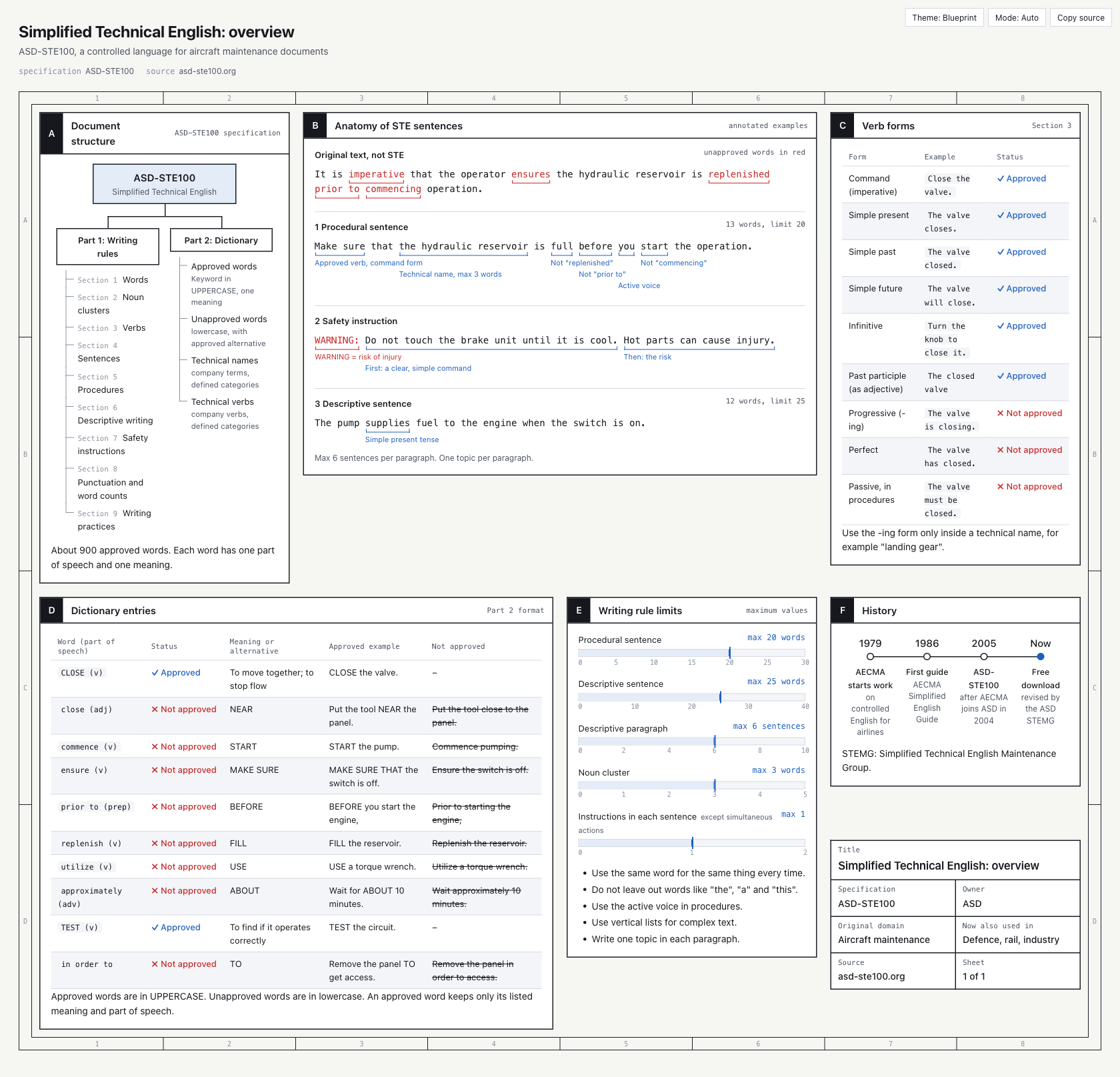 |
 |
| Blueprint theme (examples/ste100.md) | shadcn theme, dark mode |
The agent picks a component by the shape of the information:
| Component | Good for |
| :--- | :--- |
| flow | Architecture, call chains, decision branches. Auto layout, with groups, decisions and databases |
| sequence | Messages going back and forth between several parties over time |
| tree | Folders, modules, taxonomies |
| timeline | History, releases, phases |
| limits | A value against its limit |
| annot | Word-by-word notes on a sentence |
| kv | Metadata, a drawing's title block |
| callout | A conclusion, a tip, a warning |
| Table | Multi-way comparison. Write ok / no / warn in a cell to get ✓ ✗ ! |
`
---
template: sheet        # sheet = grid of panels (default), doc = one column with a table of contents
theme: blueprint       # blueprint or shadcn
title: Page title
subtitle: One line
cols: 3                # columns for sheet
source: RFC 9293       # any other field shows under the title
---
A sentence or two with the main point.
A Panel title {span=2 meta="small text, top right"}
Plain Markdown: paragraphs, lists, tables.
## heading is a panel. The letters A, B, C are optional and added for you.span=2 makes a panel two columns wide, rows=2 makes it two rows tall, and bare removes its title bar. `html `` or `` `svg ``` block to embed raw markup.am help .
The CLI is scripts/am.mjs inside the skill folder.
`
AM=skills/answer-me-with-html/scripts/am.mjs
node $AM render examples/tcp.en.md                # render and open in the browser
node $AM render notes.md -o out.html --no-open    # choose the output file, don't open
node $AM render notes.md --theme shadcn           # pick a theme for this run
node $AM lint notes.md                            # writing check only
node $AM list                                     # list components
node $AM config                                   # view settings
Read from stdin. This is how agents call it.
node $AM render - <<'AM_EOF'
A One panel
AM_EOF
Pages go to ~/.answer-me-with-html/pages/ by default. Set AM_HOME to move them.
ASD-STE100 is a controlled form of English first used for aircraft maintenance manuals. Its rules are concrete: keep sentences short, give each word one meaning, write steps as commands. Karpathy noted that asking an LLM to follow these rules makes its writing much easier to read.
Answer me with HTML turns the parts a machine can check into an English and Chinese rule set, and runs it on every render:
/answer-me-with-html:config style strict, or per page with style: in the draft.
git clone https://github.com/QingYunA/answer-me-with-html.git && cd answer-me-with-html
npm install
npm test          # run the tests
AM_E2E=1 npm test # also run end-to-end video tests (system TTS, Chrome, ffmpeg)
npm run build     # after changing src/, rebuild skills/answer-me-with-html/scripts/am.mjs
There are two runtime dependencies: marked parses Markdown and @dagrejs/dagre lays out flow charts. Both are bundled into am.mjs.
To refresh the demo video: serve docs/demo/demo.html next to the rendered examples/tcp.en.md (tcp.html), open it at 1920×1080, wait for window.ready, then call window.render(i / 30) and screenshot frame-0000.jpg … frame-0719.jpg. Run node docs/demo/make-demo.mjs to add the music and encode. The animation is deterministic, and the music from docs/demo/music.mjs is synthesized at 120 BPM, so every scene change lands on a beat.
→ →
→ →
→ →
→ →
→ →
→ →
→ →
→