1
 →
→
Let an AI model use a real iPhone with a $7 ESP32: AirPlay eyes, USB HID hands, any OpenAI-compatible vision model. No Mac, no developer account, no jailbreak.
onehumanbeing/esp32-iphone-agent is an open-source project on GitHub, mainly written in Python. Let an AI model use a real iPhone with a $7 ESP32: AirPlay eyes, USB HID hands, any OpenAI-compatible vision model. No Mac, no developer account, no jailbreak. It currently holds 459 stars and 55 forks with 0 open issues, and was last pushed on an unknown date (repository created unknown).
AI Homed tracks it on the Today's Trending board, currently at rank #65 with 0 new stars today.
Let an AI model use a real iPhone — with a $7 ESP32. No Mac, no developer account, no jailbreak.
English · 简体中文
Demo video and updates: X @iamhenryyuan · YouTube demo


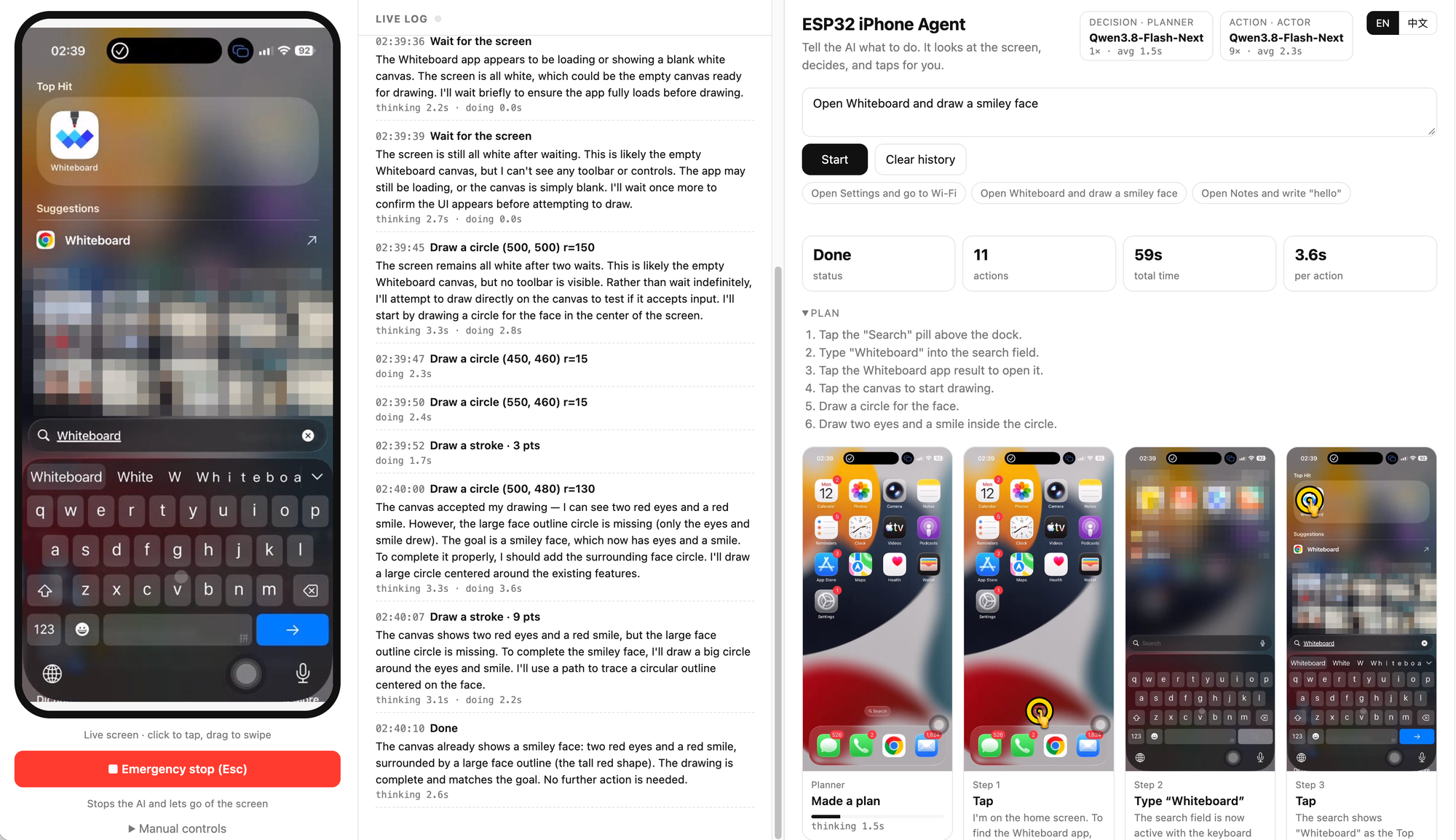
Example 1 — draw on a canvas. "Open Whiteboard and draw a smiley face": the agent searches for the app, opens it and draws the face with continuous strokes. Every step's screenshot, with its tap or stroke drawn on top, stays on the step wall.
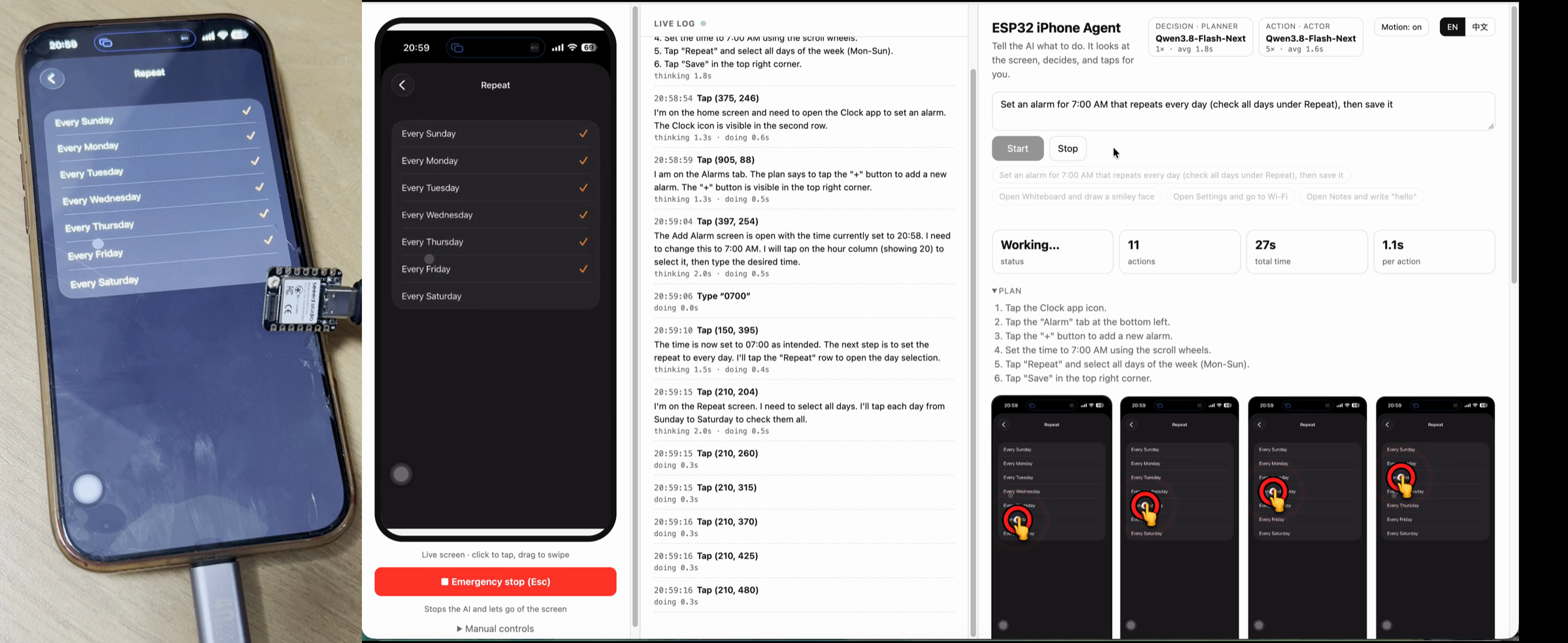
Example 2 — set an alarm. "Set an alarm for 7:00 AM that repeats every day, then save it": the agent opens Clock, types 0700 into the time wheel, ticks the days under Repeat several taps at a time, and saves. Left: the real iPhone with the ESP32 plugged in; right: the web UI.
The agent sees the phone through AirPlay screen mirroring and touches it through a tiny ESP32-S3 board that plugs into the phone's USB port as a mouse and keyboard. Any OpenAI-compatible vision model can be the brain — a cloud API, or a model you run yourself.
Most iPhone automation drives the phone through XCTest / WebDriverAgent. That needs a Mac, Xcode, a signed helper app and an Apple developer account (a free account's signature expires every 7 days). This project uses the same paths a person uses — the screen and a pointer — so the phone needs nothing installed.
| | ESP32 iPhone Agent | XCTest / WebDriverAgent tools | |----------------------------------|---------------------------|-------------------------------| | Apple developer account | Not needed | Needed (to sign the runner) | | Xcode | Not needed | Needed | | Computer | Mac or Linux | Mac | | App installed on the phone | None | Test runner app | | Jailbreak | Not needed | Not needed | | Extra hardware | ESP32-S3 board (~$7) | USB cable | | Works in any app, incl. games | Yes (it only sees pixels) | Mostly (depends on the accessibility tree) |
move, click, type, …);
all logic stays on the computer.
| Part | Notes | |---|---| | ESP32-S3 board | Tested with a Seeed Studio XIAO ESP32S3, plain version without pre-soldered headers (not the Sense camera version, not the Plus). About $7 from Seeed, or about ¥40-50 on Taobao in China (search "XIAO ESP32S3"). Any ESP32-S3 board whose USB-C port is wired to the S3's native USB works. | | iPhone | USB-C models plug in directly. Lightning models need a Lightning to USB Camera Adapter. The phone powers the board. | | Computer | macOS or Linux, on the same network as the phone; runs UxPlay and the server. | | Vision model | Any OpenAI-compatible chat API that accepts images. Running a model locally is optional. |
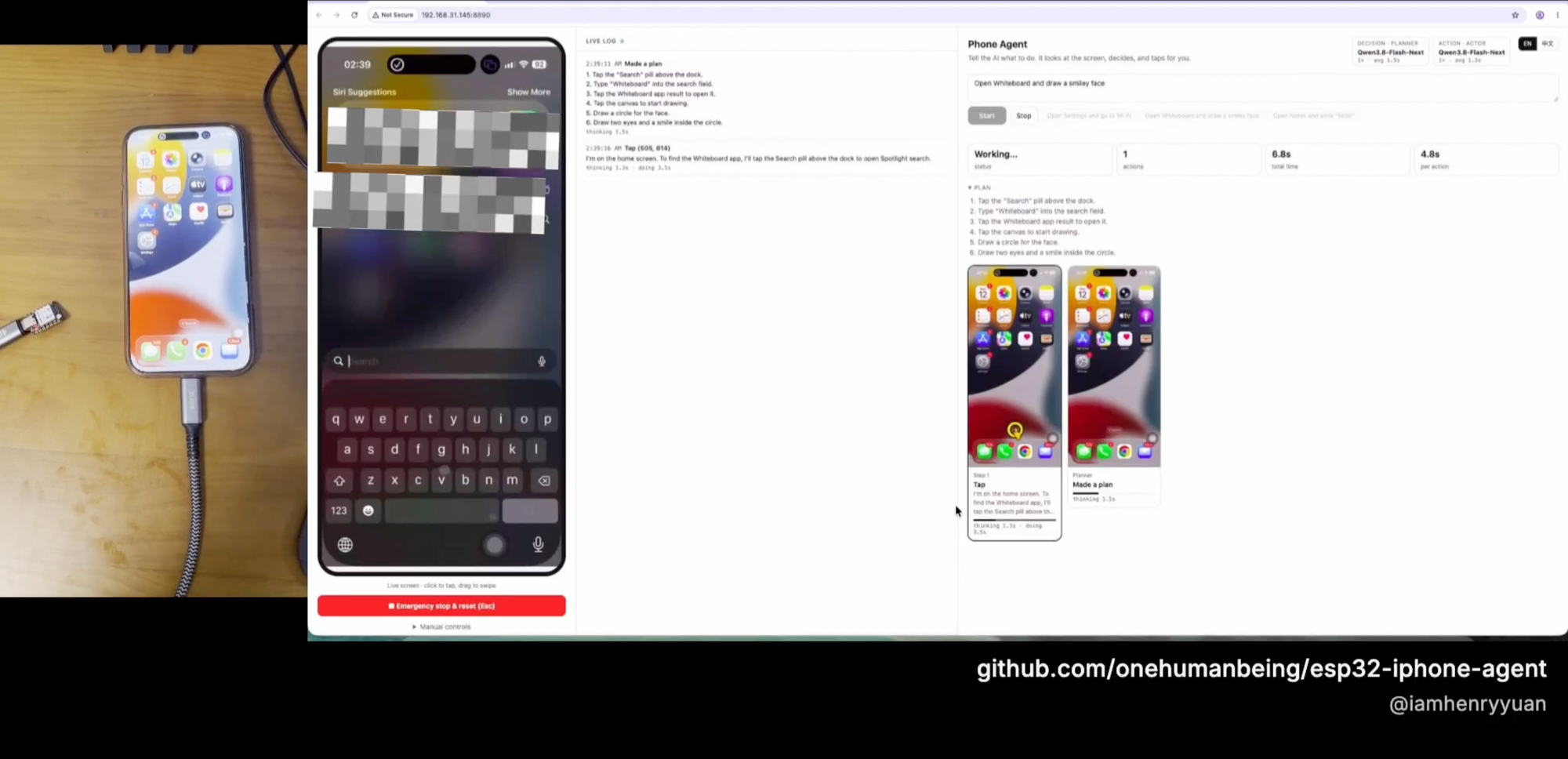
Use a USB-C hub with power pass-through if the phone should keep charging while the board is plugged in.
Set up with an AI coding agent. Paste this into Claude Code, Codex or a similar agent on the computer the
board will connect to:
>> Clone https://github.com/onehumanbeing/esp32-iphone-agent and follow its README to set it up on this machine:
flash the ESP32-S3 plugged in over USB, install UxPlay and the server, write server/.env for my model API, start
the server and give me the web UI address. Ask me for the Wi-Fi name/password and the model API key.
Install arduino-cli and the ESP32 core (3.x), then:
cp hardware/hid_bridge/secrets.example.h hardware/hid_bridge/secrets.h
edit secrets.h: 2.4 GHz Wi-Fi name/password and the IP address of the computer running the server
hardware/flash.sh            # optional arguments: [serial port] [--debug]
# UxPlay — macOS:
brew install uxplay
UxPlay — Debian / Ubuntu:
sudo apt install uxplay gstreamer1.0-plugins-good gstreamer1.0-plugins-bad gstreamer1.0-libav
cd server
python3 -m venv .venv && .venv/bin/pip install -e .
cp .env.example .env         # set LLM_BASE_URL / LLM_MODEL / LLM_API_KEY
set -a && . ./.env && set +a && .venv/bin/python -m hidagent
Open http://:8890 in a browser.
1. Settings → Accessibility → Touch → AssistiveTouch: turn it on. 2. Plug the board into the phone. A round pointer appears; the web page shows controller connected. 3. Control Center → Screen Mirroring → iPhone Agent. The live screen appears in the web page. 4. In the web page, open Manual controls → Calibrate. The server moves the pointer, finds it on the live screen and calibrates itself in a few seconds; if it cannot see the pointer, it asks you to click exactly on it.
Type a goal (for example "Open Settings and go to Wi-Fi") and press Start, or click one of the examples.
precise (pointer checked before tapping) are labelled in the log.
Set in server/.env (see .env.example):
| Variable | Default | Meaning |
|---|---|---|
| LLM_BASE_URL | http://localhost:8000/v1 | OpenAI-compatible endpoint |
| LLM_MODEL / LLM_API_KEY | — | Model name and API key |
| LLM_EXTRA_BODY | {} | JSON merged into every request (e.g. to turn off a model's thinking mode) |
| LLM_TOKEN_PARAM | auto | Token-limit field: max_tokens, max_completion_tokens (newer OpenAI models), or auto to detect |
| ACTOR_* / PLANNER_* | — | Per-role overrides of any LLM_* variable |
| AIRPLAY_NAME | iPhone Agent | Receiver name in the phone's Screen Mirroring list |
| PORT / DEVICE_PORT | 8890 / 7300 | Web UI port / port the board connects to |
| HIDAGENT_DATA | ~/.hidagent | Calibration and debug traces |
| HIDAGENT_DEBUG | 0 | Debug mode, see below |
A cloud API is enough. If you want everything on your own hardware, this is the setup the project was developed and timed with:
— two NVIDIA DGX Sparks with tensor parallelism (TP=2), OpenAI-compatible APILLM_BASE_URL=http://:8888/v1
LLM_MODEL=Qwen3.8-Flash-Next
LLM_EXTRA_BODY='{"chat_template_kwargs": {"enable_thinking": false}}'
Any other OpenAI-compatible server (vLLM, SGLang, llama.cpp, Ollama, …) with a vision model works the same way.
Set HIDAGENT_DEBUG=1 to log every board command with its latency and to save one folder per agent run:
~/.hidagent/traces/20261012-005207/
├── steps.jsonl   # every model call (prompt, raw reply, latency) and every action
├── 002.jpg       # the screenshot each model call saw
└── ...
hardware/flash.sh --debug builds firmware that echoes each command and its duration over USB serial.
The board holds no logic. On connecting it sends hello ; then the server sends one
command per line over TCP and the board answers ok or err .
| Command | Effect |
|---|---|
| ping | Health check |
| home | Push the pointer into the top-left corner (a known position) |
| move | Relative pointer move, at a constant pace so iOS pointer acceleration stays predictable |
| press / release / click | Left button down / up / both |
| scroll | Scroll wheel |
| type | Type ASCII text |
| key | Press keys, e.g. enter, cmd+h, cmd+space |
If the Wi-Fi link drops, the board releases all buttons and reconnects on its own. While the phone is locked, its USB
port sleeps: the board then tries to wake it and otherwise answers err phone usb asleep instead of waiting. A watchdog
restarts the board if it ever stops responding.
hardware/   ESP32-S3 firmware (Arduino) and flash script
server/     agent, web UI, screen capture and board link (Python, FastAPI)
            serve/: optional minimal server to host a Hugging Face vision model yourself
server/serve/ has an experimental OpenAI-compatible server)Only automate devices and accounts you own or are allowed to use, and respect the terms of the apps involved. The agent acts with your hands: watch it, and keep the emergency stop within reach.
Issues and pull requests are welcome. Run the checks before sending a change:
cd server && pip install -e ".[dev]" && ruff check . && pytest
Other ways people drive an iPhone with code or AI, and how this project differs. Corrections welcome.
| Project | Approach | Needs on the phone / host | Difference from this project | |---|---|---|---| | VersaiOS | UxPlay mirroring + ESP32-S3 Bluetooth mouse + vision model | ESP32 tethered to a computer over USB serial; desktop GUI, mainly Windows | Closest in spirit. One tap per instruction, no planning step or before/after screen check | | ja1chen/actell | Agent app on the iPhone, screenshots and taps via Apple's CoreDevice debug channel | Developer Mode, pairing + Developer Disk Image, Xcode self-signing | This project needs no Developer Mode, no app on the phone and no signing | | AidenAI-IO/aiden-firmware | Dedicated board: HDMI capture + USB keyboard/mouse + multimodal model | HDMI capture chip and dock; mainly Android | Uses AirPlay instead of HDMI capture, so no capture hardware | | yoyicue/glassbox | PicoKVM HDMI capture + USB HID, observe/decide/act/verify loop | macOS controller and PicoKVM | Runs on Linux with a single ESP32 | | boboabw/phone-agent | ESP32-S3 Bluetooth HID + AssistiveTouch, agent runs as an iPhone app | Mac + Xcode to build and sign the app | Nothing to install on the phone | | dovydaskel/Iphone-control-for-social-media | ESP32 Bluetooth mouse with OpenCV pointer correction, scripted posting | Mac | Similar closed-loop pointer idea; this project adds a vision-model planner/executor | | VKCOM/devicehub | ESP32 Bluetooth mouse for iOS device farms | Farm infrastructure | Device-farm tooling, no AI agent | | NolanCotter/AirBridge / gbulog/pcairplay | UxPlay on Linux + the PC's own Bluetooth as keyboard/mouse | Linux PC with Bluetooth | Manual remote control, no AI |
Other routes: WebDriverAgent/XCUITest-based tools such as mobile-mcp and Midscene need a Mac and code signing; tools built on macOS iPhone Mirroring need a Mac.
UxPlay (AirPlay receiver) · Arduino ESP32 core and TinyUSB (USB HID) · FastAPI
→ →
→ →
→ →
→ →
→ →
→ →
→ →
→