1
 →
→
Qwen3.8-Flash-Next on any consumer hardware: one-click install for Windows / Linux. Strata inference engine, OpenAI/Anthropic API on localhost, optional image input.
Niko1221/Strata is an open-source project on GitHub, mainly written in C++. Qwen3.8-Flash-Next on any consumer hardware: one-click install for Windows / Linux. It currently holds 4,467 stars and 392 forks with 0 open issues, and was last pushed on an unknown date (repository created unknown).
AI Homed tracks it on the Today's Trending board.
Run a 125-billion-parameter AI model on a normal gaming PC
one NVIDIA card (12-24 GB) + 64 GB of RAM · Windows or Linux · one click to install

A voxel pagoda garden, 1 shot prompt running on an RTX 5070 with Strata (IQ3_S, 128K context) ·
full video (49 s)
Strata runs Qwen3.8-Flash-Next - a large, smart AI model that normally needs a server - on your own PC. It writes its answers at 60-95 tokens per second (a token is about ¾ of a word): faster than you can read.
Jump to: How fast? · Which model? · Install ·
Using it · Problems? · How it works ·
All the details
---
Measured on an RTX 5070 (12 GB), a Ryzen 5 7600 and 64 GB of RAM:
| Size | Writes answers (short chat) | Writes answers (128K context) | Reads your prompt | | --- | ---: | ---: | ---: | | Q2_0 | 93 tokens/s | 74 tokens/s | 2,170 tokens/s | | IQ2_XS | 79 tokens/s | 63 tokens/s | 2,090 tokens/s | | IQ3_XXS | 62 tokens/s | 49 tokens/s | 1,750 tokens/s | | IQ3_S | 53 tokens/s | 46 tokens/s | 1,620 tokens/s | | Coder (IQ1_M) | 55 tokens/s | 43 tokens/s | 2,180 tokens/s |
A card with more VRAM is faster, because more of the model fits on the GPU: an RTX 3090 (24 GB) should do roughly 100-140 tokens per second. All measurements, long-context numbers and estimates for other cards are in the details.
Every PC is different: START-HERE.bat --calibrate measures a few engine settings on yours and keeps the fastest
(about 5-10 minutes; on the PC above it made the Coder 7% faster).
Measured Strata on your own PC? See Community benchmark results for a report template and how to share your results in a pull request.
Two or three NVIDIA cards? Just run START-HERE.bat: it lists your cards, says which ones Strata can use, and
asks whether to share the model across them (recommended when two can). An install made on one card asks once at
its next start. Or choose yourself: START-HERE.bat --gpus 0,2 (both, remembered), --gpus all, or --gpu 0 (one
card, this start only). Each card keeps the experts of its own layers, and prompts flow through the cards in a
pipeline: on an RTX 5080 + RTX 3090 prompts were read 18-20% faster than on the 5080 alone, decoding on par.
Every card must be an RTX 20 series or newer with 8 GB or more. See docs/MULTI_GPU.md.
The size (the same model, compressed more or less):
| Model | RAM+VRAM Requirements | Speed | Quality | | --- | ---: | --- | --- | | Q2_0 | 37.6 GB | fastest | good | | IQ2_XS | 39.2 GB | fast | better (recommended) | | IQ3_XXS | 47.0 GB | slower | great | | IQ3_S | 54.8 GB | slowest | best: matches the full model on the published tests (original model only) |
Will it fit? Shard 1 is the part of the model that gets loaded when it starts: its experts go into your RAM, the rest onto your graphics card (the second shard, a 29 GB lookup table, stays on the SSD). So it fits when your RAM is at least shard 1 + about 10 GB for Windows and your other programs. With 64 GB of RAM every size fits (IQ3_S with little else open); with 48 GB, Q2_0 and IQ2_XS. A bigger graphics card makes it faster, but it doesn't lower the RAM needed.
The version:
Not sure? Take IQ2_XS - or the Coder if you mainly write code, or have 32-48 GB of RAM. You can add another
one later with SETUP.bat (the same as START-HERE.bat --setup; on Linux ./setup.sh --setup).
For OrcaRouter's Flash-Next Uncensored IQ3_XXS, see the manual compatibility setup. It needs an explicit packing conversion and is not an installer menu option.
Unsloth's 4-bit UD-Q4_K_XL (experimental) is the fourth version in setup's menu (--family unsloth): the closest
to the full model, but a 111 GB download whose 77 GB of experts do not fit in RAM. Strata keeps your RAM minus 24 GB
of them in RAM and reads the rest from the SSD while it answers: 7-8.5 tokens/s on a 64 GB PC with a 12 GB GPU, several
times slower than the sizes above, and long prompts are slow. It needs 48 GB of RAM or more, an NVMe SSD and one
NVIDIA GPU (no images yet). Details and measurements: UD-Q4_K_XL.
An AMD Radeon RX 7900 XT / XTX, RX 9070 / 9070 XT or Radeon AI PRO R9700 on Linux works too (experimental; the
RX 7800 XT / 7700 XT and RX 9060 XT were validated by their owners; the RX 6800 / 6900 series, gfx1030, is community-reported):
./setup.sh --backend hip, chosen by itself on a PC with no NVIDIA card Strata can use. It installs ROCm without sudo
and compiles the engine (no images yet; several cards with --gpus). Details: AMD HIP.
You need: an NVIDIA RTX 20, 30, 40 or 50 card with 12 GB of VRAM or more (RTX 20 since 0.1.27), enough RAM for the size you pick (above; a big GPU makes up for less RAM - the low-RAM mode), ~80 GB of free disk space (an SSD makes the first start much faster), and Windows 10/11 or Linux. The only thing you install yourself is a current NVIDIA driver (nvidia.com/drivers or the NVIDIA App). Everything else - Python, the engine, the model - is set up for you.
Windows
1. Download this project and unzip it (or git clone it).
2. Double-click START-HERE.bat.
3. Answer a few questions - or just press Enter each time for the recommended choice:
--rope-scaling/--rope-scale override) (details)
http://127.0.0.1:8080.
While the model starts, your PC can be slow or stop responding for 1-3 minutes (longest the first time): Strata
loads 35-55 GB into your RAM and locks part of it for the graphics card. That's normal - wait, and don't close the
window. The window tells you what it is doing.
Next time, just double-click START-HERE.bat again: it starts right away, nothing is downloaded twice. Close its
window to stop the model.
Updating: download the new version and unzip it anywhere (or git pull), then run START-HERE.bat in it. The
model files are kept in a Strata-data folder next to your Strata folder, so a new copy finds them and sets itself up
the same way - nothing big is downloaded again.
Linux: run ./setup.sh - same questions, same result.
Docker (Linux): the same idea, in a container.
1. Host: Docker with the NVIDIA Container Toolkit
and a driver 580 or newer (CUDA 13.0).
2. Build (this compiles the engine into the image, so the container never compiles):
docker build -t strata .
docker build -t strata --build-arg CUDA_ARCHITECTURES=89 . builds for one card only (faster).
The default covers RTX 30 (86), RTX 40 (89), RTX 50 (120) and A-series (80); a card outside that
set needs a rebuild with its own arch. Add --build-arg BUILD_VISION=0 to skip the image encoder.
3. Run (the first start downloads the ~70 GB model, then starts; later starts go straight to serving):
docker run --rm --gpus all -p 8080:8080 --ulimit memlock=-1 -v strata-data:/data strata
The setup choices are env vars: -e MODEL=IQ2_XS -e FAMILY=qwen -e CONTEXT=32768 -e VISION=no
(or MODEL=Q2_0|IQ3_XXS|IQ3_S, FAMILY=swift|coder; the defaults above are the recommended ones).
-e VISION=cpu keeps the image encoder on the CPU. -e KV=int8|q4_0|k8v4 picks the KV cache
precision; k8v4 is INT8 K with 4-bit V and keeps its KV in VRAM from 64K up.
Only the model files, the prepared pack, the MTP layer and the install config live in the
strata-data volume; the engine is part of the image. Switching between models already on the
volume needs no setup pass: -e MODEL=Q2_0 -e FAMILY=coder picks that model's config. Add
-e REINSTALL=1 only to change settings for a model already set up (context, vision, KV, host,
api_key, LOW_RAM), since those are recorded in its config.
Strata loads 32-62 GB into RAM. --gpus all on a host with two usable cards takes both: the
layer split is setup's recommended default (docs/MULTI_GPU.md), and a volume
set up for one card switches to the pair on its first start there. Pin one card with -e GPU=0,
or name them with -e GPUS=0,2 and where the later card's layers start with -e LAYER_SPLIT=18.
A memory limit needs -e LOW_RAM=on, which maps the model's experts from the pack instead of
keeping them in RAM: setup.py measures the host's RAM, not the container's limit, so it cannot
see a cap. LOW_RAM runs on one card.
The server listens on 0.0.0.0:8080 by default; set -e API_KEY= before exposing the port
to a network. The image has a HEALTHCHECK on /health, so docker ps shows the container
healthy once the model is loaded, and GET /v1/status says what it is running.
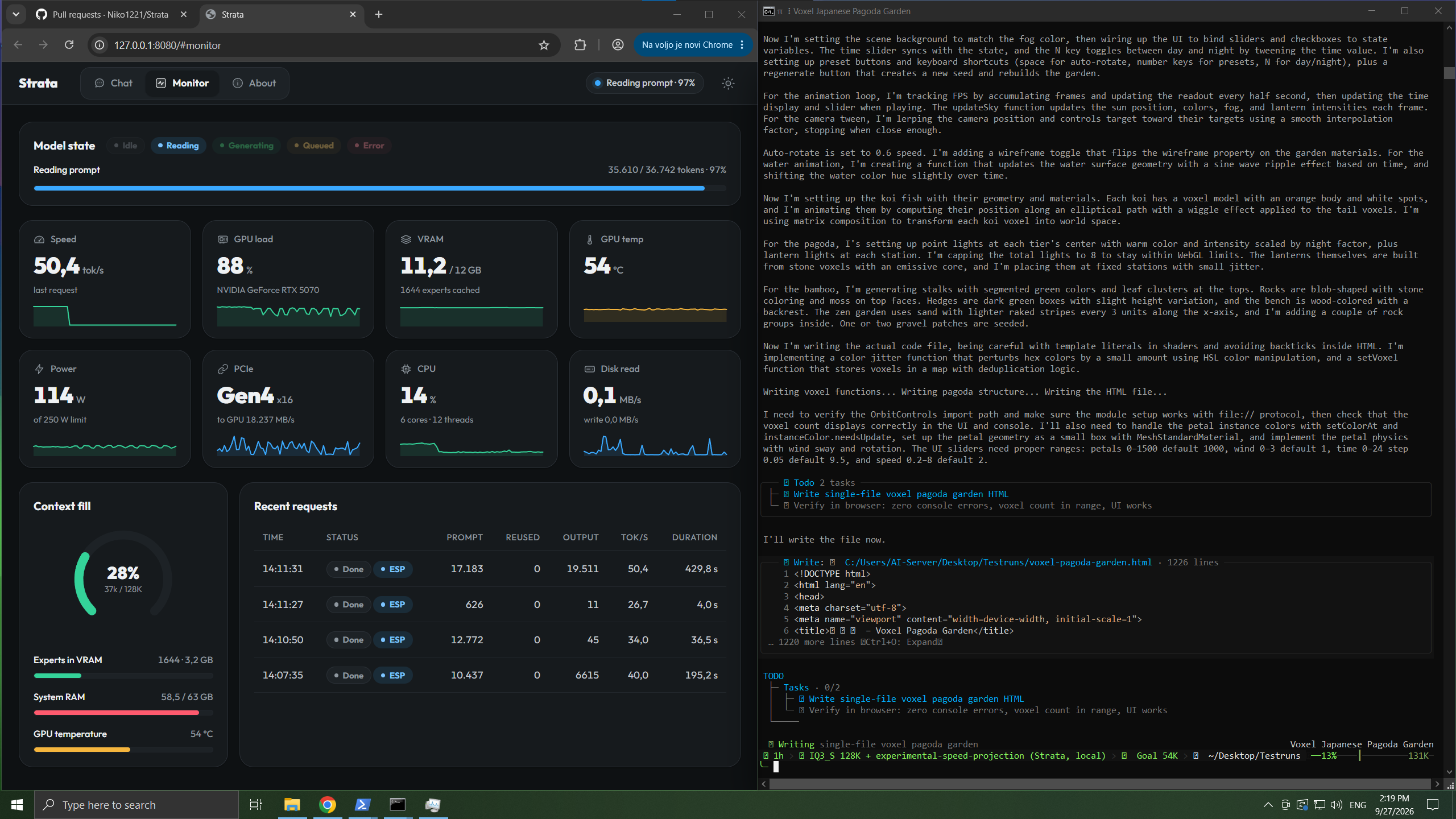
The Strata app's Monitor (left) while a coding agent writes the pagoda garden from the video (right)
http://127.0.0.1:8080 - the Strata app (it opens by itself when the model starts): Chat, a.venv\Scripts\python chat.pyhttp://127.0.0.1:8080/v1, any API key and any model name. Apps that use Anthropic's API: http://127.0.0.1:8080/v1/messages.
/think low in chat.py, or with your app's "reasoning effort" setting. Off is fastest; high is best for hard questions.
chat.py type /image ; in apps just attach them.START-HERE.bat --setup --host 0.0.0.0 --api-key , then open theGood to know: it answers one request at a time. The first message of a chat is read in full (about 1 minute per 30,000 tokens); after that it keeps the conversation and reads only what is new, so follow-ups start in seconds.
strata.* keys) - not on the server and not in the Strata folder. Pictures are not
kept, only their names. Another browser or a private window starts empty; clearing the site's data deletes them.
strata-.json in the Strata folder (context, GPUs, host, API key, ...), writtenrun-.bat / .sh, the log strata-.log and, when you use "Use for other
apps too", strata-.shared-settings.json.
models/, packs/, mtp/, 70-120 GB): in Strata-data next to the Strata folder, or--data-dir put them.
%APPDATA%\Strata\settings.json on Windows, ~/.config/strata/settings.json onMy PC froze, or got very slow, the first time Strata started. That's normal while it starts, most of all the first time. Strata loads 35-55 GB into your RAM, locks part of it for the graphics card, and works out how much of the model fits on your GPU. The mouse can freeze for a few minutes. Wait, and don't close the window. The next starts are much faster. Still frozen after 10 minutes? Restart the PC, close other programs (browsers use a lot of RAM) and try again. If it keeps happening, pick a smaller size (Q2_0 or IQ2_XS).
It stopped while downloading or installing.
Run START-HERE.bat again. It continues where it stopped.
It says the NVIDIA driver is too old.
Update it (NVIDIA App or nvidia.com/drivers), restart the PC, and run
START-HERE.bat again.
It says port 8080 is already in use. Strata is already running. Look for its window.
It's very slow and the disk light keeps blinking. Your PC is out of free RAM. Close other programs, or pick a smaller size (Q2_0 or IQ2_XS).
An answer stopped with "the engine stopped unexpectedly". Usually not enough RAM (on Linux the system then stops the engine). Just send your message again: Strata starts the engine by itself. If it keeps happening, close other programs or pick a smaller size.
It says the prompt exceeds the context.
The conversation is longer than the context you chose. Start a new chat, or run SETUP.bat and pick more
context.
Still stuck? Look in the full troubleshooting table, or open an issue and
attach strata-.log from the Strata folder.
Models like this one normally run on servers with hundreds of gigabytes of graphics memory. Your graphics card has 12-24 GB. Strata makes it fit by sharing the work across your whole PC - the same idea as a kitchen, where the things you use all the time stay on the counter and the rest waits in the pantry.
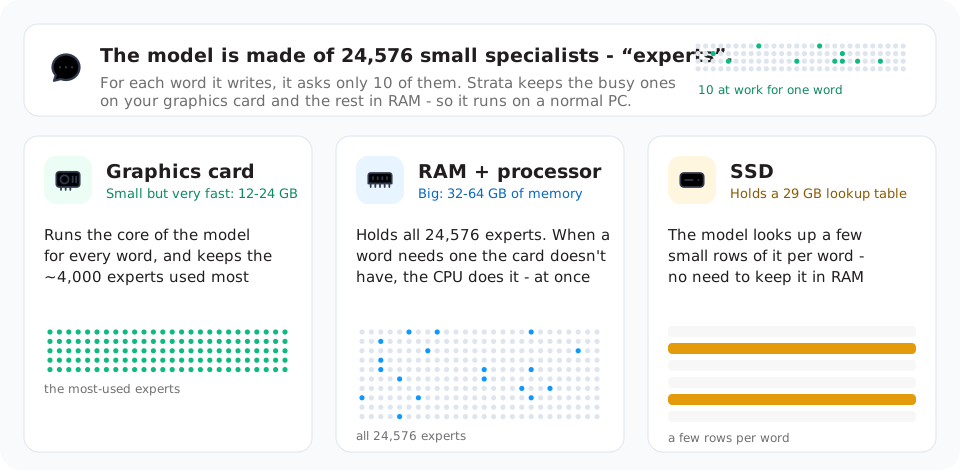
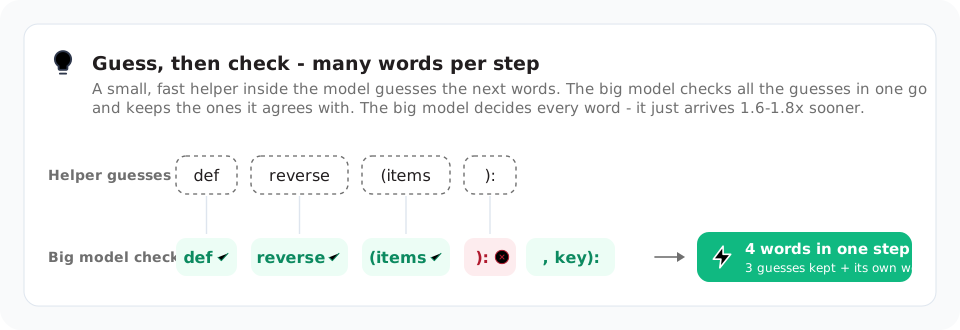
Want the full picture? The details explain every part and its numbers, and the paper tells the whole story, with the measurements behind it.
Strata is open source under the MIT License. A few parts carry their own licenses: third_party/ggml
(MIT, llama.cpp / ggml), the web app's font (SIL Open Font License 1.1) and the experimental speed projection's
vector in data/experimental-speed-projection (Qwen Community License 1.0, from the model's activations). The
models are not part of this repository; each model's own license applies to its files.
→ →
→ →
→ →
→ →
→ →
→ →
→ →
→