1
 →
→
AI agents with graph based reasoning memory, scaffolded in seconds
neo4j-labs/create-context-graph is an open-source project on GitHub, mainly written in Python. AI agents with graph based reasoning memory, scaffolded in seconds It currently holds 726 stars and 0 forks with 0 open issues, and was last pushed on an unknown date (repository created unknown).
AI Homed tracks it on the AI Agent Memory board.
Neo4j Labs Project — This project is part of Neo4j Labs. It is maintained by Neo4j staff and the community, but not officially supported. For help, use GitHub Issues or the Neo4j Community Forum.
Interactive CLI scaffolding tool that generates fully-functional, domain-specific context graph applications. Pick your industry domain, pick your agent framework, and get a complete full-stack app in under 5 minutes.
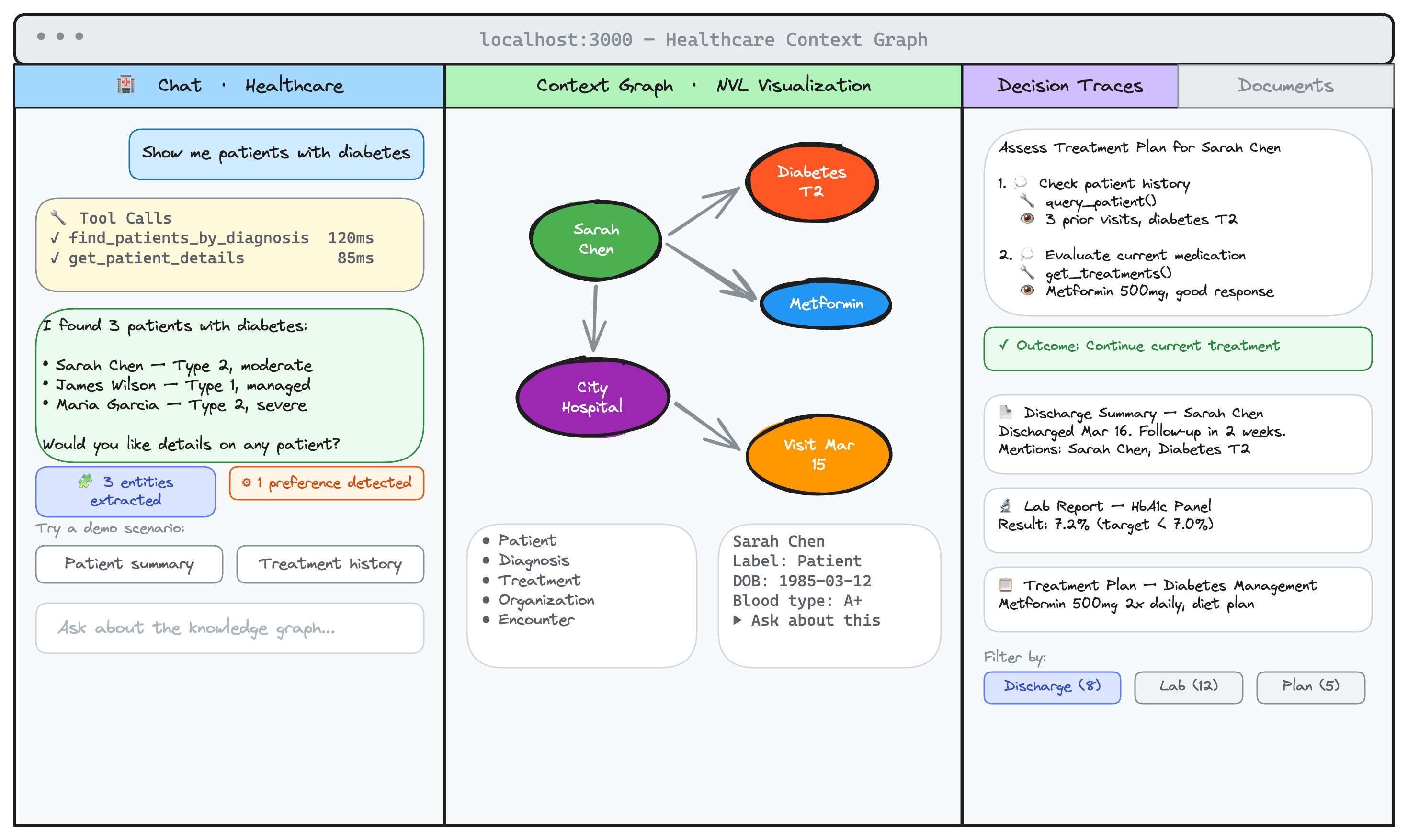
# Python — NAMS-default (hosted memory)
uvx create-context-graph my-app --domain healthcare --framework strands --nams-api-key sk-nams-...
Self-hosted Neo4j with full demo fixtures
uvx create-context-graph my-app --domain healthcare --framework pydanticai --self-hosted --demo
Node.js / interactive wizard
npx create-context-graph
Create Context Graph walks you through an interactive wizard and generates a complete project:
--self-hosted).MEMORY_LLM / MEMORY_EMBEDDING env vars (Anthropic, OpenAI, Bedrock, Vertex AI, Ollama, Groq, Together, …). Native adapters resolve first; everything else routes through LiteLLM.--with-mcp) Creating context graph application...
Domain: Wildlife Management
Framework: PydanticAI
Data: Demo (synthetic)
Neo4j: Docker (neo4j://localhost:7687)
[1/6] Generating domain ontology... ✓
[2/6] Creating project scaffold... ✓
[3/6] Configuring agent tools & system prompt... ✓
[4/6] Generating synthetic documents (25 docs)... ✓
[5/6] Writing fixture data... ✓
[6/6] Bundling project... ✓
Done! Your context graph app is ready.
cd my-app
make install && make start
There are two flows depending on what you want:
--self-hosted) — bolt Neo4j you run yourself (Aura, Docker, neo4j-local). Full demo fixtures available via make seed.ANTHROPIC_API_KEY for the agent (or OPENAI_API_KEY/GOOGLE_API_KEY depending on framework)uvx create-context-graph my-app \
--domain healthcare \
--framework strands \
--nams-api-key sk-nams-...
cd my-app
echo 'ANTHROPIC_API_KEY=sk-ant-...' >> .env # Strands needs Anthropic
make install
make start
Open http://localhost:3000. Graph starts empty — chat with the agent and entities populate via auto-extraction.
uvx create-context-graph my-app \
  --domain healthcare \
  --framework pydanticai \
  --self-hosted \
  --demo
cd my-app
echo 'ANTHROPIC_API_KEY=sk-ant-...' >> .env
make install
make docker-up   # or: make neo4j-start  (for neo4j-local)
make seed
make start
Open http://localhost:3000. Pre-populated graph with ~85 entities, 180 relationships, 25 documents, and decision traces.
# Interactive wizard (asks 6 prompts, autocomplete domain picker)
uvx create-context-graph
Custom domain from description
uvx create-context-graph my-app \
  --custom-domain "veterinary clinic management" \
  --framework pydanticai \
  --self-hosted --demo \
  --anthropic-api-key $ANTHROPIC_API_KEY
Import real data from SaaS services
uvx create-context-graph my-app \
  --domain personal-knowledge --framework pydanticai --self-hosted \
  --connector github --connector slack
With MCP server for Claude Desktop (works on either backend)
uvx create-context-graph my-app \
  --domain healthcare --framework strands \
  --nams-api-key sk-nams-... --with-mcp
Pick a specific LiteLLM provider for memory entity extraction
uvx create-context-graph my-app \
  --domain healthcare --framework strands --nams-api-key sk-nams-... \
  --memory-llm bedrock/anthropic.claude-3-haiku-20240307-v1:0 \
  --memory-embedding sentence-transformers/all-MiniLM-L6-v2
The NAMS REST API has a narrower write surface than bolt Cypher. The CLI and the generated import_data.py work around it with a hybrid write shape:
ccg-edges YAML blocks inside each source entity's description. The frontend graph view parses them out and renders edges; a future migration replays them as native edges when NAMS adds add_relationship.description as a markdown block (NAMS REST accepts only name/type/description).long_term.add_entity(type=OBJECT) (queryable, matches bolt :Document) AND short_term.add_message(role="document") (extraction fuel).auto_preferences forced off on NAMS.--self-hosted --demo.
27 industry domains, each with a purpose-built ontology, sample data, agent tools, and demo scenarios:
| Domain | Key Entities | Domain | Key Entities | |--------|-------------|--------|-------------| | Financial Services | Account, Transaction, Decision, Policy | Real Estate | Property, Listing, Agent, Inspection | | Healthcare | Patient, Provider, Diagnosis, Treatment | Vacation & Hospitality | Resort, Booking, Guest, Activity | | Retail & E-Commerce | Customer, Product, Order, Review | Oil & Gas | Well, Reservoir, Equipment, Permit | | Manufacturing | Machine, Part, WorkOrder, Supplier | Data Journalism | Source, Story, Claim, Investigation | | Scientific Research | Researcher, Paper, Dataset, Grant | Trip Planning | Destination, Hotel, Activity, Itinerary | | GenAI / LLM Ops | Model, Experiment, Prompt, Evaluation | GIS & Cartography | Feature, Layer, Survey, Boundary | | Agent Memory | Agent, Conversation, Memory, ToolCall | Wildlife Management | Species, Sighting, Habitat, Camera | | Gaming | Player, Character, Quest, Guild | Conservation | Site, Species, Program, Funding | | Personal Knowledge | Note, Contact, Project, Topic | Golf & Sports Mgmt | Course, Player, Round, Tournament | | Digital Twin | Asset, Sensor, Reading, Alert | Software Engineering | Repository, Issue, PR, Deployment | | Product Management | Feature, Epic, UserPersona, Metric | Hospitality | Hotel, Room, Reservation, Service | | Options Intelligence | Underlying, OptionsContract, Regime, KeyLevel | Legal | Case, Matter, Contract, Filing | | Education | Student, Instructor, Course, Assessment | Cybersecurity | Asset, Vulnerability, Alert, Incident | | Government | Agency, Program, Policy, Regulation | | |
# List all available domains
create-context-graph --list-domains
Custom domains: Don't see your industry? Select "Custom (describe your domain)" in the wizard or use --custom-domain "your description". The LLM generates a complete ontology with entity types, relationships, agent tools, and more.
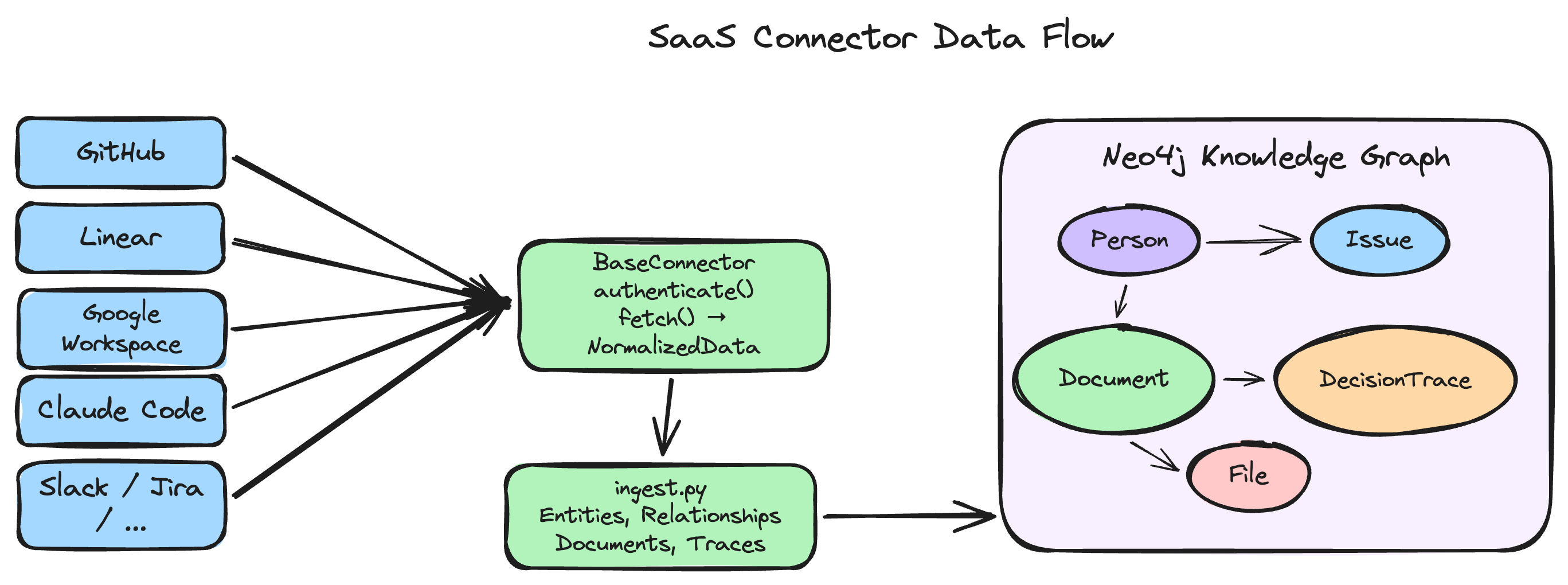
Import real data from your existing tools instead of (or in addition to) synthetic demo data:
| Service | What's Imported | Auth | |---------|----------------|------| | GitHub | Issues, PRs, commits, contributors | Personal access token | | Notion | Pages, databases, users | Integration token | | Jira | Issues, sprints, users | API token | | Slack | Channel messages, threads, users | Bot OAuth token | | Gmail | Emails (last 30 days) | Google Workspace CLI or OAuth2 | | Google Calendar | Events, attendees (last 90 days) | Google Workspace CLI or OAuth2 | | Salesforce | Accounts, contacts, opportunities | Username/password | | Linear | Issues, projects, cycles, teams, users, labels, comments, milestones, initiatives, attachments + decision traces from history | Personal API key | | Google Workspace | Drive files, comment threads (as decision traces), revisions, Drive Activity, Calendar events, Gmail metadata | Google OAuth 2.0 | | Claude Code | Session history, messages, tool calls, files, decisions, preferences, errors | None (local files) | | Claude AI | Conversations, messages, tool calls, thinking traces from Claude AI web/app export | None (local file) | | ChatGPT | Conversations, messages, tool results from ChatGPT data export | None (local file) |
The Google Workspace connector extracts resolved comment threads from Google Docs as first-class decision traces — capturing the question, deliberation, resolution, and participants. Combined with Linear, it provides the full decision lifecycle: from meeting discussion to code execution.
The Claude Code connector reads your local session history from ~/.claude/projects/ — no API keys needed. It extracts decision traces from user corrections and error-resolution cycles, identifies developer preferences from explicit statements and behavioral patterns, and automatically redacts secrets before storage.
The Claude AI and ChatGPT connectors import your conversation exports directly from the official data export features. Export your data from Settings, pass the .zip file to the CLI with --import-type claude-ai or --import-type chatgpt, and get a fully populated context graph from your real conversations — no API keys needed.
Connectors run at scaffold time to populate initial data. They're also generated into your project so you can re-import with make import:
cd my-app
make import            # Re-import from connected services
make import-and-seed   # Import and seed into Neo4j
Select your preferred agent framework at project creation time:
| Framework | Description |
|-----------|-------------|
| PydanticAI | Structured tool definitions with Pydantic models and RunContext | Full streaming | ANTHROPIC_API_KEY |
| Claude Agent SDK | Anthropic tool-use with agentic loop | Full streaming | ANTHROPIC_API_KEY |
| OpenAI Agents SDK | @function_tool decorators with Runner.run() | Full streaming | OPENAI_API_KEY |
| LangGraph | Stateful graph-based agent workflow with create_react_agent() | Full streaming | ANTHROPIC_API_KEY |
| CrewAI | Multi-agent crew with role-based tools | Tool streaming | ANTHROPIC_API_KEY |
| Strands | Tool-use agents with Anthropic model | Tool streaming | ANTHROPIC_API_KEY |
| Google ADK | Gemini agents with FunctionTool calling | Full streaming | GOOGLE_API_KEY |
| Anthropic Tools | Modular tool registry with Anthropic API agentic loop | Full streaming | ANTHROPIC_API_KEY |
All frameworks share the same FastAPI HTTP layer, Neo4j client, and frontend. Only the agent implementation differs. "Full streaming" means token-by-token text + real-time tool calls. "Tool streaming" means real-time tool calls with text delivered at the end.
Note on memory providers: Conversation memory uses localsentence-transformers/all-MiniLM-L6-v2embeddings by default — no API key required. Override withMEMORY_EMBEDDING(LiteLLM provider string) for OpenAI, Vertex AI, Bedrock, or others. The entity-extraction LLM defaults toanthropic/claude-haiku-4-5whenANTHROPIC_API_KEYis set, oropenai/gpt-4o-miniif onlyOPENAI_API_KEYis set. Override withMEMORY_LLMfor full control. See Configure Memory Providers.
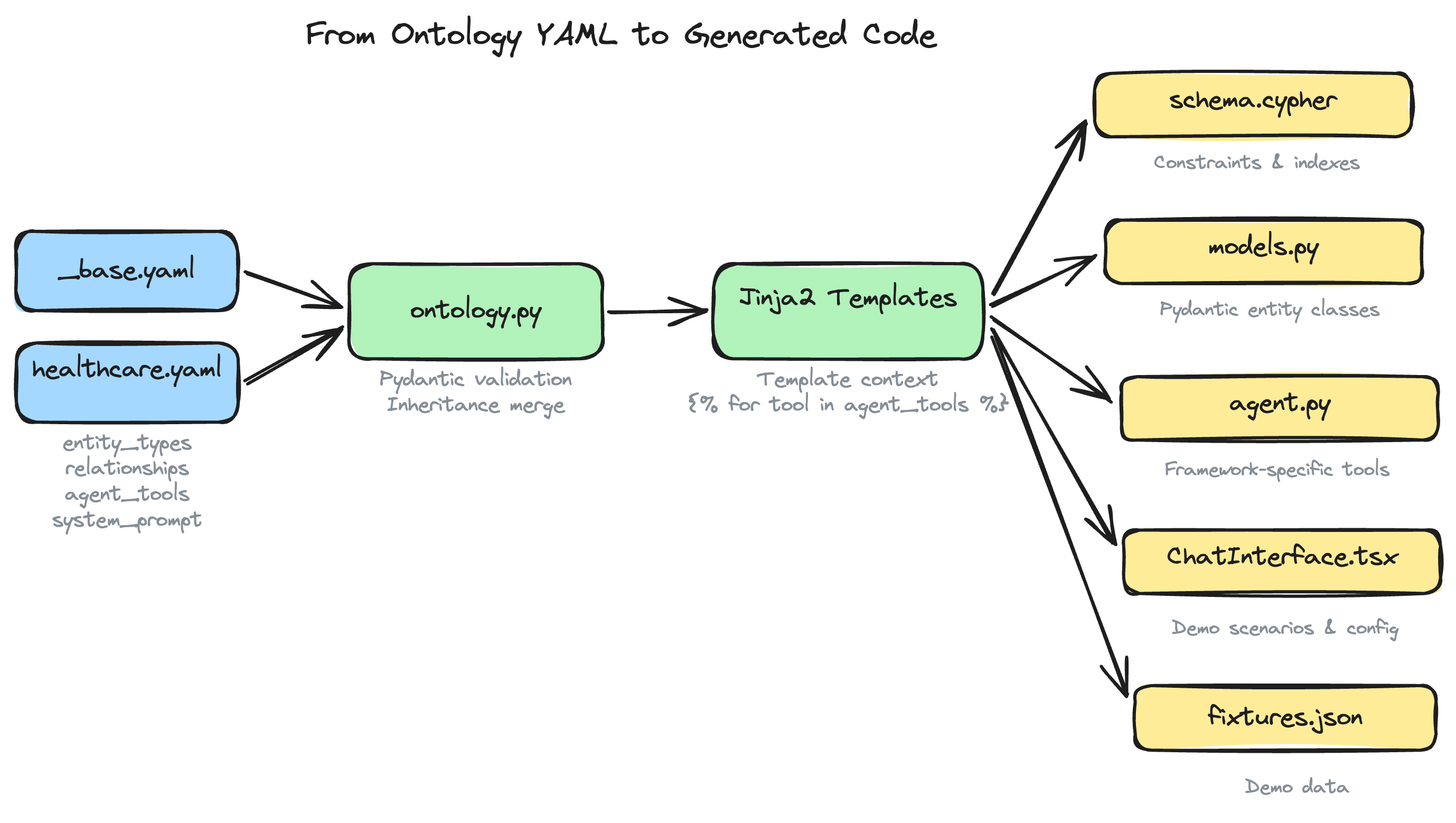
A single domain YAML drives the entire generated application — schema, models, agent tools, and visualization — through the Jinja2 template engine.
my-app/
├── backend/
│   ├── app/
│   │   ├── main.py                # FastAPI application
│   │   ├── agent.py               # AI agent (framework-specific)
│   │   ├── config.py              # Settings from .env
│   │   ├── routes.py              # REST API endpoints
│   │   ├── models.py              # Pydantic models (from ontology)
│   │   ├── context_graph_client.py # Neo4j CRUD operations
│   │   ├── memory.py              # Memory integration (MemoryIntegration)
│   │   ├── gds_client.py          # Graph Data Science algorithms
│   │   ├── vector_client.py       # Vector search
│   │   └── connectors/            # SaaS connectors (if selected)
│   ├── scripts/
│   │   ├── generate_data.py       # Data seeding script
│   │   └── import_data.py         # SaaS import script (if connectors selected)
│   └── pyproject.toml
├── frontend/
│   ├── app/                       # Next.js pages
│   ├── components/
│   │   ├── ChatInterface.tsx      # Streaming AI chat (SSE) with real-time tool calls + graph data flow
│   │   ├── ContextGraphView.tsx   # Interactive NVL graph (schema view, expand, drag/zoom, properties)
│   │   ├── DecisionTracePanel.tsx  # Reasoning trace viewer with step details
│   │   ├── DocumentBrowser.tsx    # Document browser with template filtering
│   │   └── Provider.tsx           # Chakra UI v3 provider
│   ├── lib/config.ts              # Domain configuration
│   ├── theme/index.ts             # Chakra theme with domain colors
│   └── package.json
├── cypher/
│   ├── schema.cypher              # Constraints & indexes
│   └── gds_projections.cypher     # GDS algorithm config
├── data/
│   ├── ontology.yaml              # Domain ontology definition
│   └── fixtures.json              # Pre-generated sample data
├── .env                           # Neo4j + API key configuration
├── .env.example                   # Configuration template (tracked in git)
├── .dockerignore                  # Docker build context exclusions
├── docker-compose.yml             # Local Neo4j instance (Docker mode only)
├── Makefile                       # start, seed, reset, install, test, test-connection, lint
├── mcp/                           # MCP server config (only if --with-mcp)
└── README.md                      # Domain-specific documentation (with framework docs + troubleshooting)
create-context-graph [PROJECT_NAME] [OPTIONS]
Arguments:
  PROJECT_NAME              Project name (optional — auto-generated from domain+framework if omitted)
Options:
  --domain TEXT             Domain ID (e.g., healthcare, gaming)
  --framework TEXT          Agent framework (strands [default], pydanticai, claude-agent-sdk, openai-agents, langgraph, crewai, google-adk, anthropic-tools)
  --self-hosted             Use self-hosted Neo4j (bolt) instead of NAMS hosted memory
  --nams-api-key TEXT       NAMS API key [env: MEMORY_API_KEY] — obtain at https://memory.neo4jlabs.com
  --nams-endpoint TEXT      Override NAMS endpoint URL (default: https://memory.neo4jlabs.com/v1)
  --memory-llm TEXT         LiteLLM provider string for memory entity extraction (e.g. anthropic/claude-haiku-4-5)
  --memory-embedding TEXT   LiteLLM provider string for memory embeddings (e.g. sentence-transformers/all-MiniLM-L6-v2)
  --demo-data               Generate synthetic demo data
  --custom-domain TEXT      Generate custom domain from description (requires --anthropic-api-key)
  --connector TEXT          SaaS connector to enable; repeatable (github, slack, jira, notion, gmail, gcal, salesforce, linear, google-workspace, claude-code, claude-ai, chatgpt)
  --import-type TEXT        Chat history import: claude-ai or chatgpt (requires --import-file)
  --import-file PATH        Path to chat export file (.zip, .json, .jsonl)
  --import-depth TEXT       Import extraction depth: fast (default) or deep
  --import-filter-after TEXT Only import conversations after this date (ISO 8601)
  --import-filter-before TEXT Only import conversations before this date (ISO 8601)
  --import-filter-title TEXT Only import conversations matching title pattern (regex)
  --import-max-conversations INT Max conversations to import, 0=all (default: 0)
  --linear-api-key TEXT    Linear API key (required for --connector linear) [env: LINEAR_API_KEY]
  --linear-team TEXT       Linear team key to filter import (e.g., ENG) [env: LINEAR_TEAM]
  --gws-folder-id TEXT     Google Drive folder ID to scope import [env: GWS_FOLDER_ID]
  --gws-include-comments / --gws-no-comments  Import comment threads (default: on)
  --gws-include-revisions / --gws-no-revisions  Import revision history (default: on)
  --gws-include-activity / --gws-no-activity  Import Drive Activity (default: on)
  --gws-include-calendar   Import Calendar events (default: off)
  --gws-include-gmail      Import Gmail thread metadata (default: off)
  --gws-since TEXT         Import data since date (ISO format, default: 90 days ago)
  --gws-mime-types TEXT    MIME types to include (default: docs,sheets,slides)
  --gws-max-files INT      Maximum files to import (default: 500)
  --claude-code-scope TEXT Import current project or all (default: current)
  --claude-code-project TEXT Explicit project path to import sessions for
  --claude-code-since TEXT Import sessions since date (ISO format)
  --claude-code-max-sessions INT Max sessions to import, 0=all (default: 0)
  --claude-code-content TEXT Content mode: truncated, full, none (default: truncated)
  --with-mcp                Generate MCP server configuration for Claude Desktop
  --mcp-profile TEXT        MCP tool profile: core (6 tools) or extended (16 tools, default)
  --session-strategy TEXT   Memory session strategy: per_conversation (default), per_day, persistent
  --auto-extract/--no-auto-extract  Auto-extract entities from messages (default: on)
  --auto-preferences/--no-auto-preferences  Auto-detect user preferences (default: on)
  --ingest                  Ingest data into Neo4j after generation
  --neo4j-uri TEXT          Neo4j connection URI [env: NEO4J_URI] (--self-hosted only)
  --neo4j-username TEXT     Neo4j username [env: NEO4J_USERNAME] (--self-hosted only)
  --neo4j-password TEXT     Neo4j password [env: NEO4J_PASSWORD] (--self-hosted only)
  --neo4j-aura-env PATH    Path to Neo4j Aura .env file with credentials (--self-hosted only)
  --neo4j-local             Use @johnymontana/neo4j-local for local Neo4j (--self-hosted only)
  --anthropic-api-key TEXT  Anthropic API key for LLM generation [env: ANTHROPIC_API_KEY]
  --openai-api-key TEXT    OpenAI API key for LLM generation [env: OPENAI_API_KEY]
  --google-api-key TEXT    Google/Gemini API key (required for google-adk) [env: GOOGLE_API_KEY]
  --output-dir PATH         Output directory (default: ./)
  --demo                    Shortcut for --reset-database --demo-data --ingest
  --reset-database          Clear all Neo4j data before ingesting
  --dry-run                 Preview what would be generated without creating files
  --verbose                 Enable verbose debug output
  --list-domains            List available domains and exit
  --version                 Show version and exit
  --help                    Show help and exit
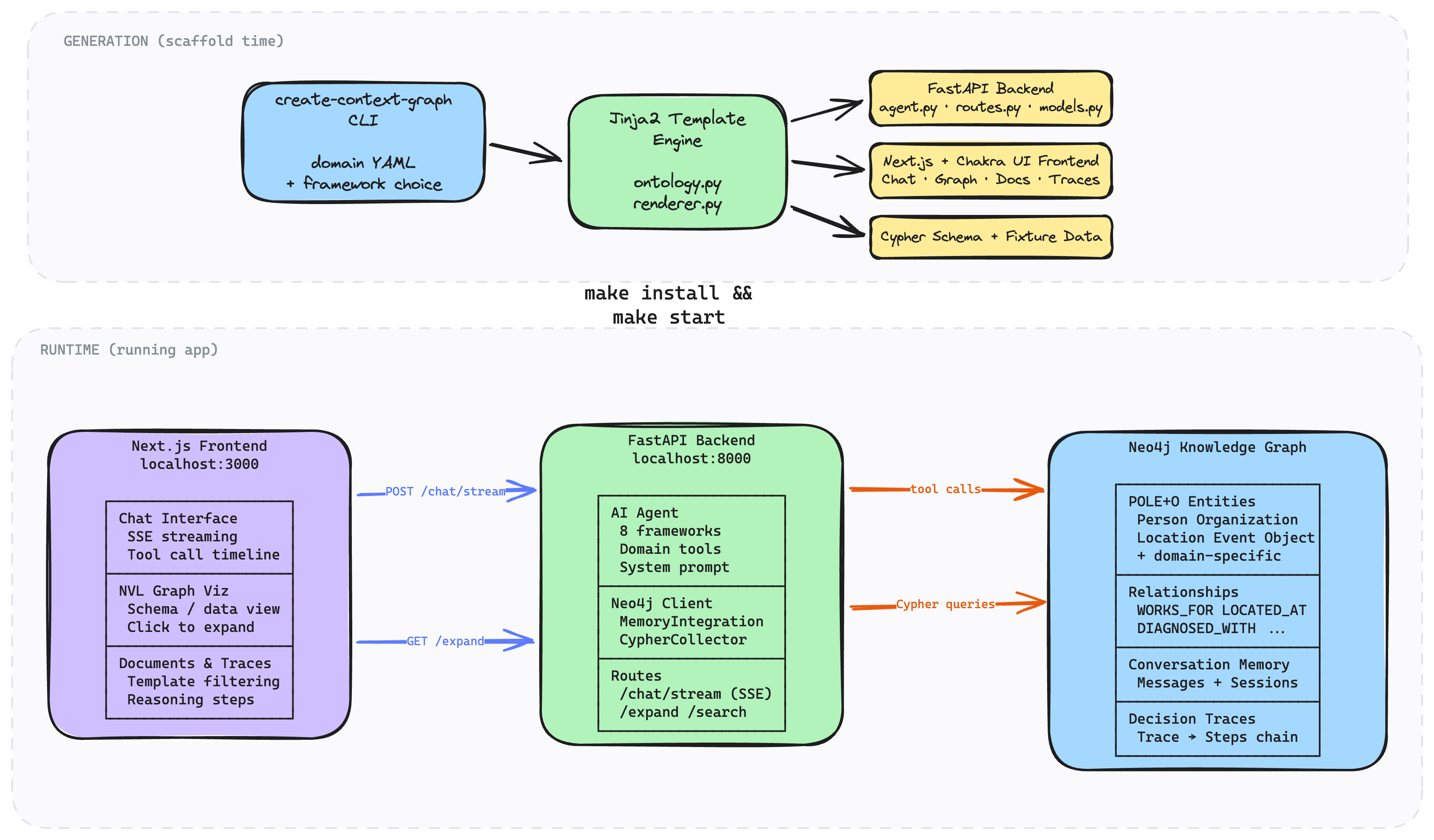
Every generated app demonstrates the three-memory-type architecture from neo4j-agent-memory:
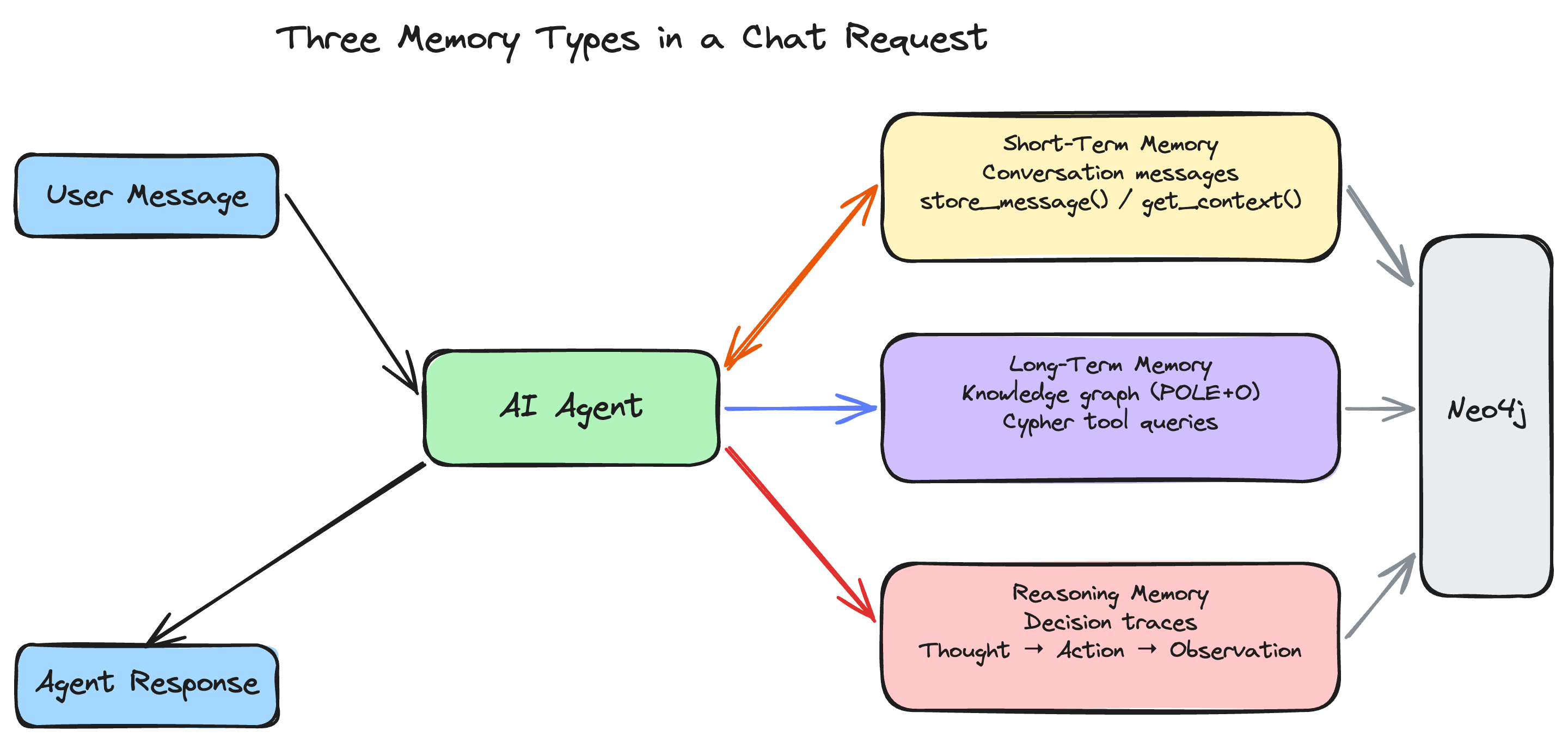
With --with-mcp, the generated project also includes an MCP server configuration that connects Claude Desktop to the same knowledge graph. This dual-interface architecture means the web app and Claude Desktop share one context graph — entities, conversations, and reasoning traces are available everywhere.
# Clone and install
git clone https://github.com/neo4j-labs/create-context-graph.git
cd create-context-graph
uv venv && uv pip install -e ".[dev]"
Run tests (no Neo4j or API keys required)
source .venv/bin/activate
pytest tests/ -v               # Fast: 1,177 tests
pytest tests/ -v --slow        # Full: 1,398 tests (includes domain x framework matrix + perf + generated project tests)
pytest tests/ --integration    # Integration tests (requires running Neo4j)
Test a specific scaffold
create-context-graph /tmp/test-app --domain software-engineering --framework pydanticai --demo-data
| Target | Description | Requirements |
|--------|-------------|--------------|
| make test | Run fast unit tests (1,177 tests) | None |
| make test-slow | Full suite including matrix + p
→ →
→ →
→ →
→ →
→ →
→ →
→ →
→