1
 →
→
Make humans and AI agents work as one team — open-source and self-hostable.
multica-ai/multica is an open-source project on GitHub, mainly written in Go. Make humans and AI agents work as one team — open-source and self-hostable. It currently holds 52,294 stars and 6,810 forks with 0 open issues, and was last pushed on an unknown date (repository created unknown).
AI Homed tracks it on the Today's Trending board, currently at rank #26 with 118 new stars today.

Agents that show up on the board.
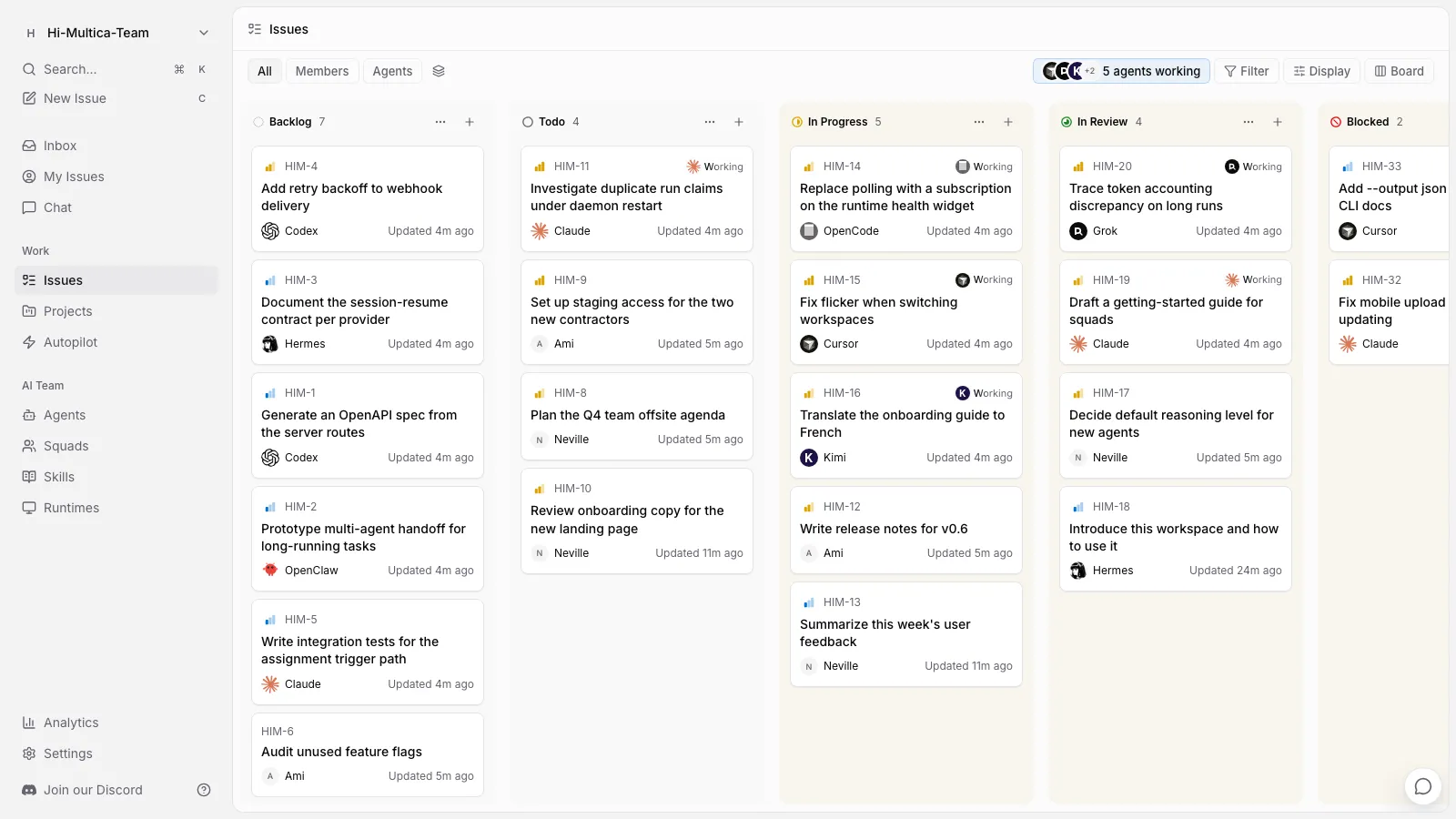
Multica is a source-available workspace where you assign work to AI coding agents the way you'd assign it to a teammate — they pick up the issue, report progress, raise blockers, and hand it back for review. Self-hostable, works with the agent CLIs you already use, no lock-in.

Website · Docs · Quickstart · Download · Vision · Self-Hosting · Discord · X
English | 简体中文
Your next 10 hires won't be human.
---
You already run Claude Code, Codex, and three other agents. Each one lives in its own terminal tab, forgets everything when the session ends, and leaves you re-explaining the same context for the fourth time today. The more agents you add, the more of your day goes to babysitting them.
Multica puts those agents and your teammates in one workspace. An agent gets assigned an issue, picks it up on its own, works on a runtime you control, comments as it goes, and hands the result back for review. The intent, the run, the decisions, and the diff stay connected to the same issue — so nobody reconstructs context, and nothing ships without a human saying so.
---
Claude Code, Codex, Cursor, Kimi — you don't pick one. You hire them all.
It starts as three rough sentences in an issue. It ends as a pull request.
Which agent touched this? What did it run? What did it cost? Open the run.
Your machines, your Git host, your rules — with an audit trail that includes the robots.
owner, admin, and member — and exactly which agents each member can run.curl -fsSL https://raw.githubusercontent.com/multica-ai/multica/main/scripts/install.sh | bash -s -- --with-server
multica setup self-host
On Windows, set $env:MULTICA_MODE="with-server", then run the PowerShell installer:
irm https://raw.githubusercontent.com/multica-ai/multica/main/scripts/install.ps1 | iex.
This pulls the official images from GHCR and requires Docker. See the
Self-Hosting Guide; if the selected GHCR tag has not been published yet,
fall back to make selfhost-build from a checkout.
A self-hosted server sends one anonymous, deployment-level snapshot a day: the release version
plus bucketed counts, with no names, content, or IDs. Set DO_NOT_TRACK=1 on the API server to
turn it off — what's collected.
1. Connect a computer. A runtime is any machine agents can work on — your laptop, or a cloud box. Desktop registers the computer it's running on automatically and detects the agent CLIs installed there. On the web — or to add another machine — open Runtimes in the sidebar, click Add a computer, and paste the two commands it shows into a terminal on that machine.
2. Create an agent. Open Agents in the sidebar and click New agent. Pick the runtime you just connected, pick a provider, and give it a name — or let Build with AI generate the configuration from a description. That name is how it shows up on the board and in comments.
3. Assign it something. File an issue and set the agent as assignee. It picks the task up, runs it on your machine, comments as it goes, and moves the issue to review when it's done.
Full walkthrough: Quickstart · Tutorial
---
Multica does not ship a model. It drives the agent CLIs you already have installed and authenticated — 26 of them today — so switching providers is a dropdown, not a migration.
| Provider | CLI | Provider | CLI |
| --- | --- | --- | --- |
| Claude Code | claude | OpenAI Codex | codex |
| Cursor Agent | cursor-agent | GitHub Copilot CLI | copilot |
| OpenCode | opencode | OpenClaw | openclaw |
| Hermes | hermes | Pi | pi |
| Antigravity | agy | CodeBuddy | codebuddy |
| DevEco Code | deveco | Grok | grok |
| Kimi | kimi | Kiro CLI | kiro-cli |
| Qoder CLI | qodercli | Qoder CN | qoderclicn |
| Qwen Code | qwen | QwenPaw | qwenpaw |
| Reasonix | reasonix | Trae CLI | traecli |
| DeepSeek Harness | dsh | Oh-My-Pi | omp |
| MiniMax Code | mcode | Dim | dim |
| Huawei Cloud CodeArts | codearts | ZeroClaw | zeroclaw |
Installing and authenticating them: Install an agent runtime · Providers
---
| I want to… | Start here | | --- | --- | | Get an agent doing something today | Quickstart · Tutorial | | Understand how the pieces fit | Core concepts · How Multica works | | Create and configure agents | Agents · Create an agent · Skills | | Get work to an agent | Triggering agents · Assigning issues · Mentions | | Connect my machines | Daemon and runtimes · Install an agent runtime | | Connect Git and chat tools | GitHub · Self-hosted Git · Channels | | Run it on my own infrastructure | Self-hosting · Security model · Environment variables | | Script it | CLI reference · CLI and daemon guide · Auth tokens | | Drive Multica from Codex, Claude Code, or Cursor | Multica CLI skill | | Work out why an agent is stuck | Runs · Troubleshooting |
The docs are also available in 简体中文, 日本語, 한국어, and Français.
---
   Web (browser)        Desktop (Electron)        iPhone · iPad (Expo)
         │                      │                          │
         ▼                      │                          │
  ┌──────────────┐              │                          │
  │   Next.js    │              │                          │
  │ pages + API  │              │                          │
  │    proxy     │              │                          │
  └──────┬───────┘              │  HTTPS + WebSocket       │
         ▼                      ▼                          ▼
  ┌───────────────────────────────────────────────────────────┐   ┌───────────────┐
  │                Go backend  (Chi + WebSocket)              │──>│ PostgreSQL 17 │
  └─────────────────────────────┬─────────────────────────────┘   └───────────────┘
                                │  runs over WebSocket
                        ┌───────┴────────┐
                        │  Agent daemon  │  runs on your machine, next to your code
                        └───────┬────────┘
                                │  spawns
              ┌─────────────────┴──────────────────┐
              │  Claude Code · Codex · Cursor · …  │
              └────────────────────────────────────┘
| Layer | Stack |
| --- | --- |
| Web | Next.js 16 (App Router) |
| Desktop | Electron, sharing the web UI packages |
| Mobile | Expo / React Native (iPhone and iPad) |
| Backend | Go (Chi router, sqlc, gorilla/websocket) |
| Database | PostgreSQL 17 (pgcrypto + pg_trgm) |
| Agent runtime | Local daemon executing any supported agent CLI |
---
Contributors: start with the Contributing Guide.
Prerequisites: Node.js 22, pnpm 10.28.2, Go 1.26.9, Docker
make dev
make dev auto-detects your environment (main checkout or worktree), creates the env file,
installs dependencies, sets up the database, runs migrations, and starts every service.
See CONTRIBUTING.md for the full workflow, worktree support, testing, and
troubleshooting. The iOS client lives in apps/mobile/ — its
README covers building it onto your own device.
We release most weekdays, so main moves quickly — pull often.
---
Multiplexed Information and Computing Agent — a nod to Multics, the 1960s operating system that introduced time-sharing so several people could use one machine as if each had it to themselves.
Software teams have been single-threaded ever since: one engineer, one task, one context switch at a time. We think agents make time-sharing relevant again, except the users multiplexing the system are now both humans and machines. A small team shouldn't feel small.
The longer argument, and where we think this goes: VISION.md.
---
Multica License — the complete Apache License 2.0 text plus additional conditions covering hosted services, commercial embedding, and branding. Self-host it, modify it, build on it; the exact terms are in the LICENSE, attribution notices in NOTICE.
→ →
→ →
→ →
→ →
→ →
→ →
→ →
→