1
 →
→
A virtual camera films an AI agent's screen while a tracker locks onto every glyph. Two fframes passes, one SkSL shader, all sound synthesized.
mrsarac/ff-tracking is an open-source project on GitHub, mainly written in Rust. A virtual camera films an AI agent's screen while a tracker locks onto every glyph. Two fframes passes, one SkSL shader, all sound synthesized. It currently holds 217 stars and 13 forks with 0 open issues, and was last pushed on an unknown date (repository created unknown).
AI Homed tracks it on the Today's Trending board, currently at rank #84 with 0 new stars today.
A virtual camera films an AI agent's screen while a tracker locks onto every glyph it types.
Six seconds, two fframes passes, one SkSL shader. No footage, no stock audio: every pixel and every sound comes from code.

▶ Full 1080p with sound · On X · How it works · Quick start
fframes studies · #1 ff-tracking · #2 ff-unmute, the one you can unmute
---
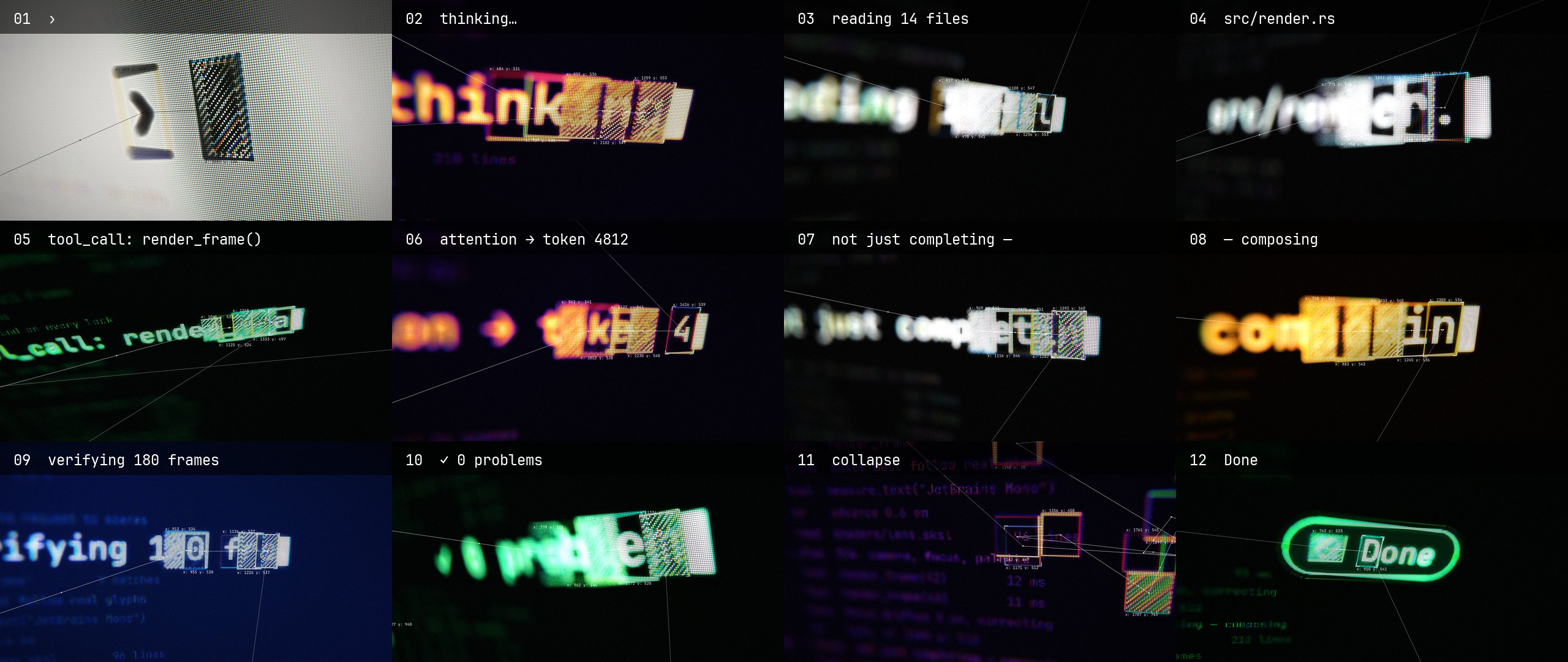
An agent thinks out loud in a terminal: thinking… → reading 14 files →
tool_call: render_frame() → … → ✓ 0 problems → Done. A computer-vision style tracker
follows the newest characters. A camera that never sits still films the screen up close.
x: 1403 y: 559 label is the box's actual pixel position inDone pill before the fade to black.
hud ──► flat    pass 1: SVG, 3840×2160 ─────────► out/pass/flat.mp4 ──┐ iChannel0
 │                                                                      ▼
 ├────► lens    pass 2: SkSL on Skia Metal + camera tracker ──► out/tracking.mp4
 │                                                                      ▲ audio
 └────► tracks ──► out/tracks.json ──► sfx.py ──► out/pass/sfx.wav ─────┘
Pass 1, flat, draws the screen the way a terminal would: black, white, monospace, one
`` per glyph, so the position of every character is known exactly. The tracker boxes
are on the screen itself. Some are hatched with an SVG pattern in `mix-blend-mode:
difference`, so the stripes turn dark where they cross a glyph. The only color is pure red,
and it marks a locked box. The pass renders at 2× because the lens magnifies it up to 3×.
Pass 2, lens, binds each frame of pass 1 as a shader input and films it. One SkSL
shader does everything physical:
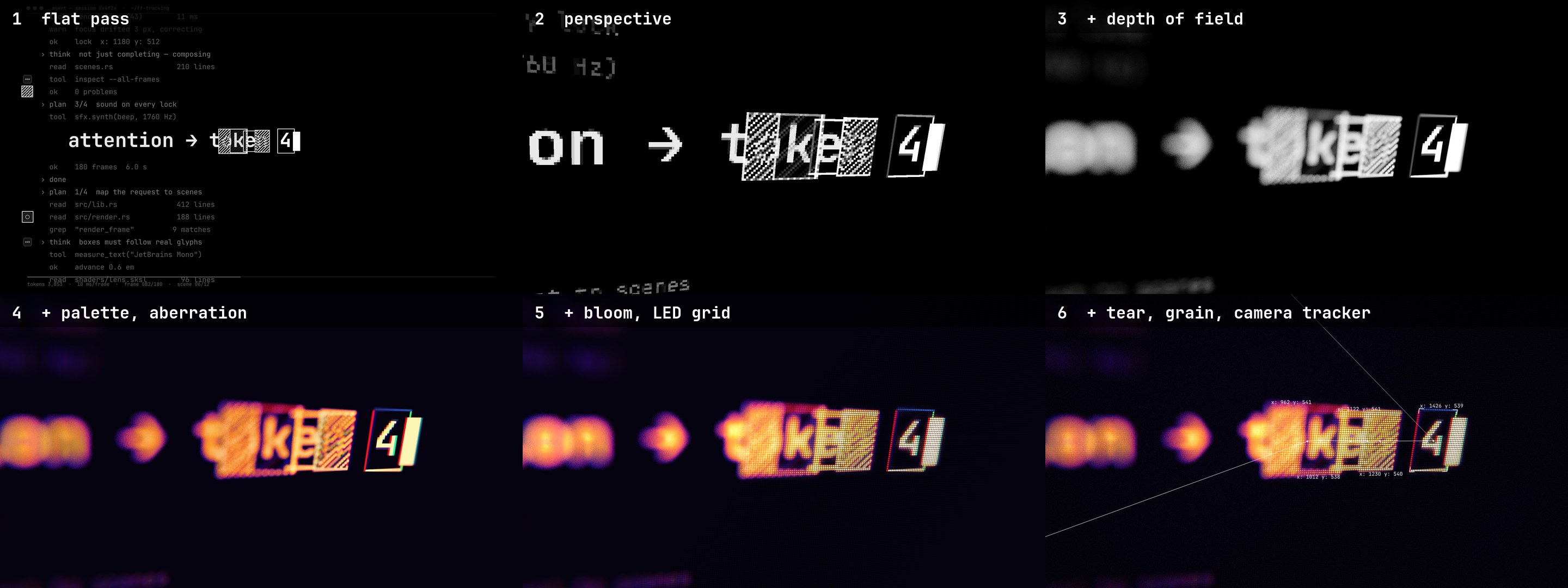
1. Perspective. Every pixel shoots a ray at a tilted plane: real perspective, not an SVG skew.
2. Depth of field. The circle of confusion comes from the depth difference to the tracked
target, with 36 golden-angle taps and highlights weighted like bokeh.
3. Palette and aberration. Brightness maps through five color stops per shot. R, G and B
sample at radially shifted points, and the shift grows on a lock.
4. Bloom and LED grid. A wide ring of taps lifts everything around bright glyphs. The
grid uses equal-area RGB stripes, so it adds no tint, and it fades out of focus.
5. Tear, grain, camera tracker. Rows slide on a lock and right after a cut. On top, the
lens draws its own tracker sharp: links, labels and target brackets, projected with
hud::project, the CPU copy of the shader's camera.
Both passes and the sound read the same hud crate, so the lens always knows where the
glyph it focuses on actually is.
Sound: tools/sfx.py reads out/tracks.json and synthesizes everything. It makes a
screen hum, a bit-crushed glitch on each cut, a click per keystroke and a pentatonic beep
per lock, panned to the box. It adds a riser into the collapse and a chime with a sub hit on
Done. Loudness is measured with ffmpeg's ebur128 and set to -14 LUFS.
Score (optional): score/score.py is a second soundtrack, made in
Slab: a darker, heavier piece at 120 BPM, so every cut lands
on a beat. It reads the same out/tracks.json, plus out/camera.json from the camera
binary, so the mix follows the lens. The tracked box pans the lock blips and keystrokes, the
screen's slide pans the pad, riser and glitches, each zoom push opens the bass filter, and the
red lock frames tear the bass. See Slab score.
Requirements: macOS with Apple silicon (Skia on Metal), Rust, ffmpeg, Python 3 with numpy
and scipy. The README images also need Pillow and img2webp.
git clone https://github.com/mrsarac/ff-tracking && cd ff-tracking
tools/render.sh            # → out/tracking.mp4
render.sh builds the workspace, exports the tracks, renders pass 1, synthesizes the sound
and renders pass 2. It takes about 40 s on an M3 Pro, plus the first build.
Every pass is an fframes CLI, so the usual tools work on each of them:
target/release/lens strip all -n 12        # contact sheet of the final video
target/release/lens frame 81 -o frames     # one full-size frame
target/release/lens preview                # real-time window with sound
target/release/lens audio analyze          # loudness, true peak
LENS_STAGE=1 target/release/lens frame 81  # stop the shader after a step (0-3), as in the image above
python3 -I tools/readme_media.py           # rebuild the images in this README
tools/score.sh is render.sh with the Slab score in place of sfx.py:
tools/score.sh                          # uses the committed render, score/score.wav
SLAB=/path/to/slab tools/score.sh       # renders the score again from score/score.py
Rendering needs a Slab checkout built with
zig build -Doptimize=ReleaseFast. score/score.py writes the project
score/ff_tracking.slab, which opens in Slab's arrangement and mixer, and renders it headless.
The render runs past the picture for the reverb tail, so score.sh cuts it at 6 s and fades
it with the fade to black. It comes out around -10.7 LUFS with a -1 dBTP true peak.
| File | What it is |
|---|---|
| hud/src/bin/camera.rs | writes out/camera.json: per frame, the zoom, tilt and roll, the tracked box's position in the output and where the filmed screen's centre lands |
| score/score.py | the score: reads both JSON files, writes the Slab project, renders it |
| score/ff_tracking.slab/ | the generated Slab project (tracks, notes, automation, effects) |
| score/score.wav | the score rendered and cut to 6 s, 48 kHz, so the video builds without Slab |
| tools/score.sh | the whole pipeline with the score |
Change a shot and run SLAB=… tools/score.sh: the hits, pans and filter moves follow the
new timing and camera.
The Slab score is by nooga (@MGasperowicz), the author of Slab, contributed in #1; how it was made is in #2.
License note: score/score.py imports slabkit, which ships with Slab under GPL-3.0. slabkit is not
part of this repo and Slab is needed only to re-render the score. Its author offers score/score.py,
the project in score/ff_tracking.slab/ and score/score.wav under this repo's MIT license.
Every shot is one entry in SCENE_LIST in hud/src/lib.rs:
SceneDef {
    kind: Kind::Typing,
    text: "thinking…",                     // what the agent types
    palette: Palette::Thermal,             // Paper, Thermal, Mono, Phosphor, Amber, Navy, Neon
    //         tilt_x tilt_y  roll  zoom 0→1  pan x, y  blur
    cam: cam(0.38, -0.22, 0.04, 2.5, 2.8, 50.0, 0.0, 1.2),
    hero: (560.0, 540.0),                  // where the line starts on the flat screen
    size: 104.0,                           // font size
},
Change the text, a palette or the camera, run tools/render.sh, and the tracker, focus,
labels and beeps all follow. cargo test -p hud checks that every line fits the screen and
that the camera keeps every target in frame.
hud/           shots, tracker boxes, camera per frame, projection (no fframes dependency)
flat/          pass 1: the screen, 3840×2160
lens/          pass 2: lens/shaders/lens.sksl and the camera-space tracker
tools/         render.sh (whole pipeline), sfx.py (sound), readme_media.py (these images),
               score.sh (the pipeline with the Slab score)
score/         the Slab score: score.py, the ff_tracking.slab project, score.wav
docs/          design spec, prompts and decisions, fframes contributions
.image("iChannel0", &frame.get_synced_video_frame(..)?.into_image()). That is what makes
the two-pass camera possible.
flat is a reserved word in SkSL (a GLSL ES interpolation qualifier), so name helpersVideo level, never return Svgr::empty(); return a root ``. An empty root islicenses/JetBrainsMono-OFL.txt).
docs/PROMPT.md is the prompt that makes this video,docs/superpowers/specs/.
MIT © 2026 Mustafa Saraç. The font keeps its own license.
→ →
→ →
→ →
→ →
→ →
→ →
→ →
→