1
 →
→
Experimental macOS 27 App Intents model delegation provider backed by Claude Code
mpociot/claude-siri-ai is an open-source project on GitHub, mainly written in Swift. Experimental macOS 27 App Intents model delegation provider backed by Claude Code It currently holds 185 stars and 13 forks with 0 open issues, and was last pushed on 2026-09-15 (repository created 2026-09-14).
AI Homed tracks it on the Today's Trending board, currently at rank #97 with 0 new stars today.
Use your signed-in Claude Code account from macOS Spotlight and Siri. The menu bar app starts its built-in Swift bridge automatically.
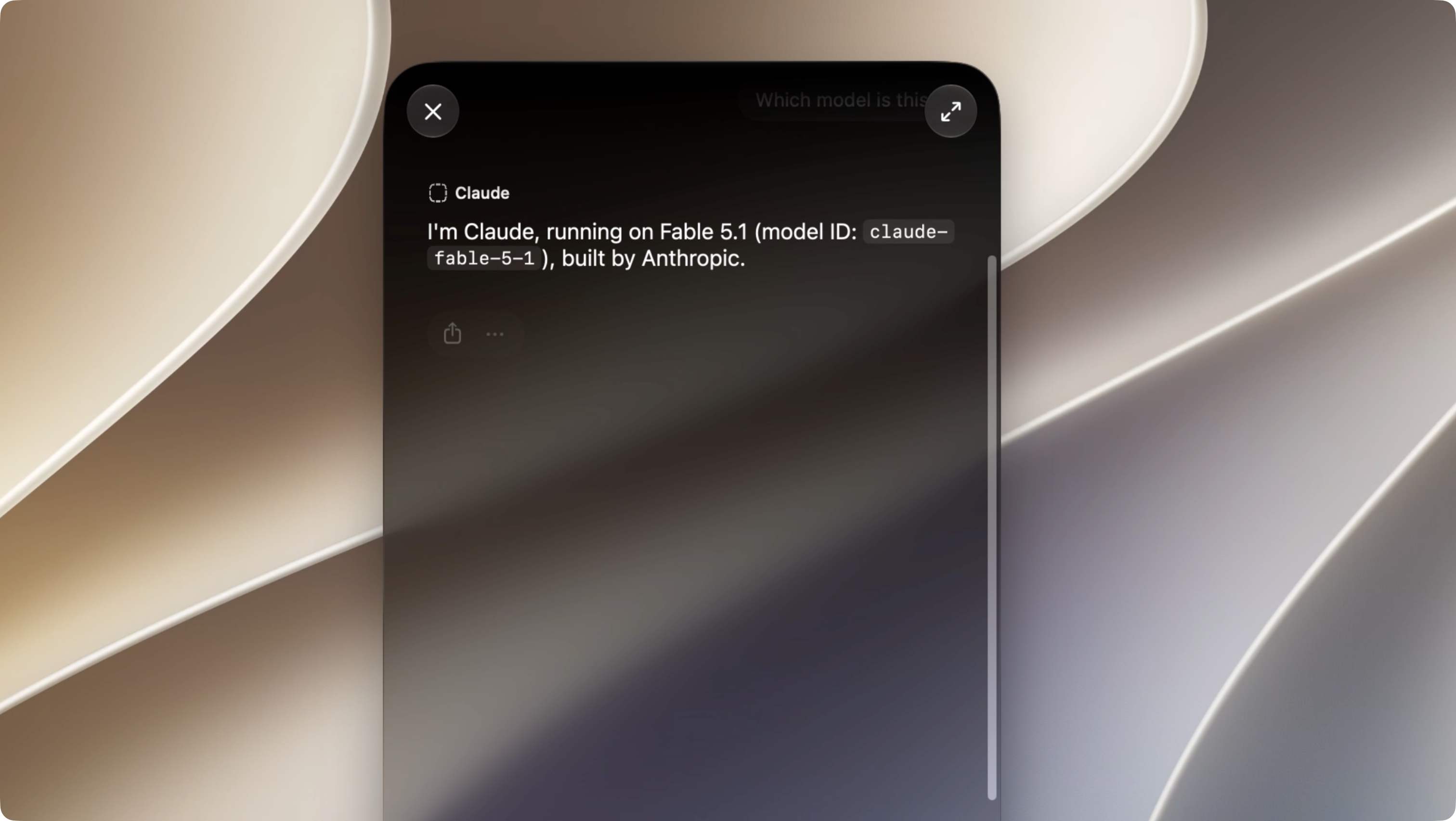
Experimental: requires macOS 27 with SIP and AMFI disabled. This lowers macOS security protections and uses private, beta-specific APIs. Use a development Mac. The app and scripts do not disable SIP or AMFI for you. This is an independent example, not an official Apple or Anthropic integration.
1. Install Xcode 27, accept its license and install its first-launch components. Install XcodeGen (brew install xcodegen) and Claude Code. Sign in with claude auth login.
2. Build and install the app:
   git clone https://github.com/mpociot/claude-siri-ai.git
   cd claude-siri-ai
   ./scripts/install.sh
3. In the Claude window, click Test Connection. The app finds common Claude CLI installations automatically; use Choose Claude CLI… if needed. 4. Click Enable in Spotlight… and authenticate in the macOS administrator dialog. This temporarily restarts Siri and Spotlight with expanded provider discovery. 5. Press ⌘Space, right-click the input, choose Ask… → Claude, and send a prompt. Complete Apple's Turn On flow if prompted.
Keep the app running: closing its settings window leaves the bridge in the menu bar. Open at login is optional. After a reboot or a Siri service restart, use Enable in Spotlight… again. Restore Normal Discovery undoes the temporary process override.
The installer uses ~/Applications/Claude.app. If another app already occupies that location, installation stops. Anthropic's /Applications/Claude.app is separate.
Tested on macOS 27 build 26A428 with Xcode 27 27A266a. Provider discovery is still experimental: Spotlight, Siri's separate Ask menu, and System Settings can show different provider lists. See discovery findings and the earlier input issue.
There is no verified system-wide default setting for this custom extension on the tested build. Explicitly selecting Ask… → Claude is the working route. Selecting a provider for a conversation is not proof that future Spotlight windows or ordinary Siri requests will use it.
The local framework contains private selectedLLMId, defaultLLM, and intendedDefaultLLM APIs. Its selected and default IDs currently resolve to com.apple.openai.chatgpt. These belong to the partner-model settings path; we have not established that changing them makes a third-party AgentIntent the default Ask destination. The app deliberately does not expose an unverified “Make default” toggle.
Apple's documented ChatGPT integration describes explicit “Ask ChatGPT” routing and confirmation controls. Turning off confirmation is a different setting from replacing Siri's default provider. Voice routing to this example remains unverified.
./scripts/install.sh builds, installs, and opens the app. For a build without installation:
./scripts/build.sh
Install an already-built app:
./scripts/install.sh --skip-build
The build uses xcode-select's Xcode. Set DEVELOPER_DIR=/Applications/Xcode.app/Contents/Developer if necessary. XcodeGen generates the project; both the host and extension carry the private com.apple.developer.model-delegation entitlement and are ad-hoc signed. No distributable Apple entitlement is granted by this setup.
A random bearer token is generated once in ignored .local/bridge.json and bundled in both targets. Rebuilding preserves it. Do not distribute a built bundle containing your local token. Configuration, generated projects, build products, and preference backups are excluded from Git.
The bridge, discovery script, and compiled discovery shim are embedded in the app, so the installed app does not need this checkout, Xcode, or Python at runtime. Claude Code must remain installed and signed in. During discovery sessions, keep the installed app at its current path.
For command-line discovery control:
./scripts/discovery-session.sh start
./scripts/discovery-session.sh stop
Spotlight / Siri
  → sandboxed ClaudeProvider.appex
  → authenticated HTTP/NDJSON on 127.0.0.1:17839
  → Swift bridge inside Claude.app
  → your signed-in Claude Code CLI
  → streamed text → native Siri response
The host stays outside the sandbox so it can launch your CLI; the extension is sandboxed and uses loopback networking. The CLI runs in a private temporary directory with tools disabled, no MCP servers, safe mode, no Chrome integration, and no conversation persistence. Temporary prompt input is removed after execution. Prompts, responses, and credentials are not logged by the bridge.
The server binds only to IPv4 loopback, authenticates each request, rejects browser Origin headers and ambiguous HTTP framing, and limits body size, connections, concurrent Claude processes, and execution time. The bundled token guards against accidental/browser access; it is not a security boundary against another local process that can read the app bundle.
Discovery uses a temporary, narrowly scoped runtime shim in Apple's existing Siri/provider processes. It does not edit Apple binaries, launch plists, boot arguments, entitlement checks, or provider consent. You still approve the provider in Apple's native Turn On flow. Details and rollback.
# Native Swift tests; no Claude account needed:
swift test --scratch-path .local/swift-build
One live request through the running app and your Claude account:
./scripts/smoke.sh
claude auth status
pluginkit -m -A -D -v -i dev.goldengate.Claude.Provider
codesign --verify --deep --strict "$HOME/Applications/Claude.app"
Ten Swift tests cover HTTP authentication and request validation, incremental text delivery, completion/error handling, process timeout and cancellation, and a real localhost round trip through a fake CLI. The live smoke test returned Claude bridge works. Writing Tools and persistent default-provider behavior require separate native tests.
If the bridge cannot start, quit duplicate copies and check whether another process occupies port 17839. If Claude disappears from Ask, enable discovery again and complete any native consent prompt. An input-focus issue is recorded in the discovery notes.
Inspired by pdfu's macOS 27 proof of concept. The code is an independent implementation and does not redistribute Apple binaries or SDK files.
MIT. Apple and Anthropic trademarks belong to their respective owners.
→ →
→ →
→ →
→ →
→ →
→ →
→ →
→