1
 →

🤖 Open-source, local-first alternative to Grok Bot, OpenAI dots and Claude Duet. Your own AI bots on any model: GPT, Claude, Gemini, Grok, DeepSeek, Kimi, GLM and 70+ more through one Modelflare key.
modelflare-ai/AnyModelBot is an open-source project on GitHub, mainly written in Python. 🤖 Open-source, local-first alternative to Grok Bot, OpenAI dots and Claude Duet. Your own AI bots on any model: GPT, Claude, Gemini, Grok, DeepSeek, Kimi It currently holds 2,347 stars and 22 forks with 2 open issues, and was last pushed on 2026-11-03 (repository created 2026-10-27).
AI Homed tracks it on the Today's Trending board.


跑在你自己电脑上的 AI 机器人。任意模型,按量付费。
官网 | 下载 | 简体中文 | English | 日本語 | 한국어 | Русский | Modelflare | 价格 | 开发文档 | 问题反馈
[![Release][release-shield]][releases-link] [![Downloads][downloads-shield]][releases-link] [![Stars][stars-shield]][stars-link] [![License][license-shield]][license-link] [![CI][ci-shield]][ci-link]
[![Platform][platform-shield]][releases-link] [![Pricing][pricing-shield]][pricing-link] [![Modelflare][modelflare-shield]][modelflare-link] [![X][x-shield]][x-link]
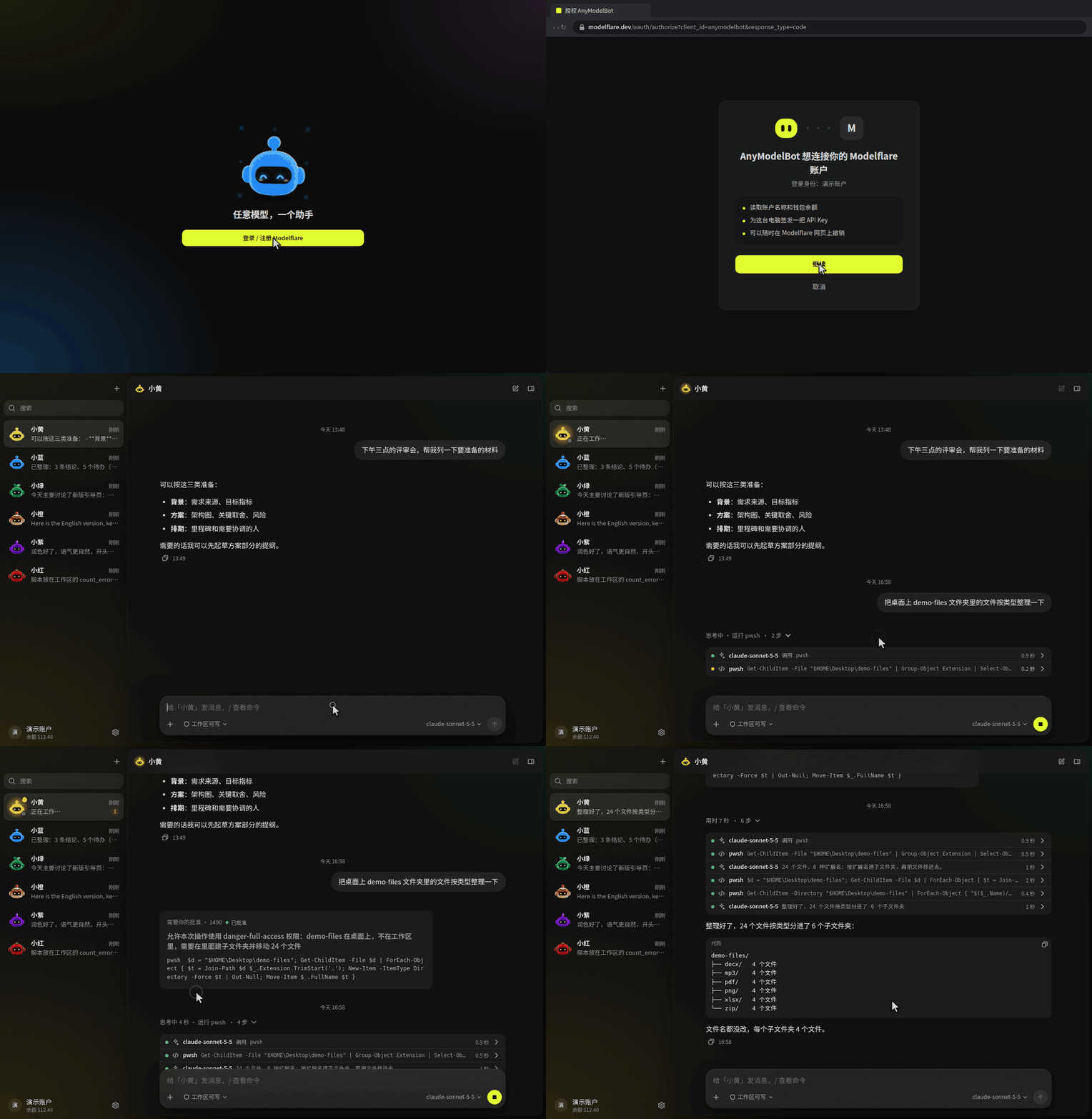
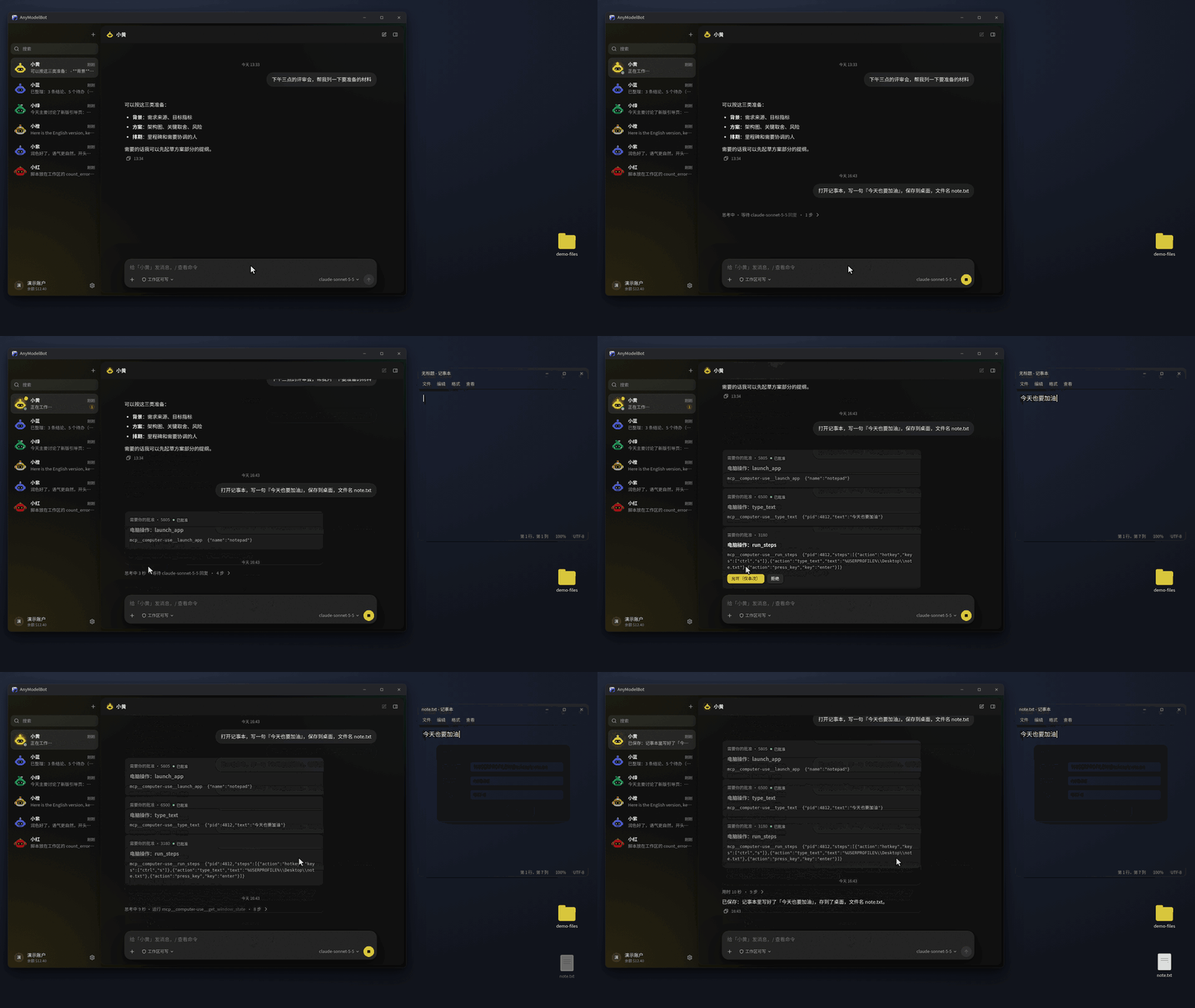
AnyModelBot 是一个本地优先的 AI 智能体应用,支持 Windows、macOS 和 Linux。一个机器人就是一个人设,带着自己的默认模型、工作区和记忆。你可以在应用里和它聊天,也可以在微信、飞书、Telegram、Slack、Discord 里找它。它能读写文件、执行命令、操作你的桌面,一旦要越出自己的工作区,就会先问你。
对话、记忆、文件和 API Key 都留在你的设备上。模型来自 Modelflare:一个账户,任意模型,按 token 计费。AnyModelBot 本身没有订阅。
和 xAI 的 Grok Bot、OpenAI 的 dots、Anthropic 的 Claude Duet 一样,它是一个常驻的个人 AI 智能体:在后台替你干活,需要你拍板时再来问你。不同的是,AnyModelBot 开源(MIT),跑在你自己的电脑或服务器上,GPT、Claude、Gemini、Grok 等任意模型都能用,按量付费,不绑定某一家的订阅(详细对比)。
装好就是一个开箱即用的 Super Agent:后台任务、定时规则和「需要你」都不用另外配置。它的设计参考了 DeepSeek 的 Super Agent 原型,智能体运行在 DeepSeek Harness 上(详细介绍)。
📥 下载 · 🌠 截图 · 🌟 核心功能 · 🆚 对比 · 🔐 工作原理与隐私
⭐ 喜欢 AnyModelBot?点个 Star,第一时间收到新版本。
---
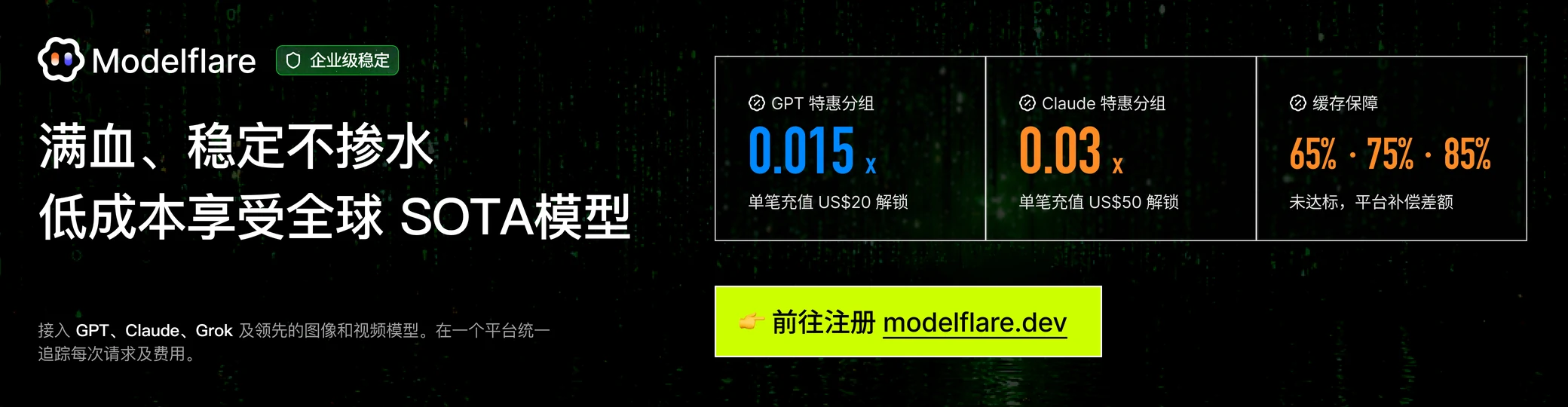
AnyModelBot 的模型全部来自 Modelflare:满血、稳定不掺水,低成本享受全球 SOTA 模型。Modelflare 由美国公司 Havenbyte LLC 运营,已有 20 万+ 注册开发者。一个 API Key 就能调用 13 家供应商的 70+ 个文本、图片和视频模型,GPT、Claude、Gemini、Grok、DeepSeek、Kimi、GLM 都在里面,兼容 OpenAI、Anthropic、Gemini 等常用接口协议。请求会在多个供应商之间路由并自动回退,每一次请求都记录用量和费用,价格表公开,按 token 计费。
缓存补偿是一大亮点:OpenAI 的价格优先、稳定、高级三个分组,分别保证每天 65%、75%、85% 的缓存命中率;符合条件的请求没达到目标,Modelflare 会补偿差额。
特惠活动:单笔充值达到指定金额,就能解锁 0.015 倍价格倍率的 GPT 特惠分组和 0.03 倍的 Claude 特惠分组,适合个人开发、功能验证和轻量使用。这是限时活动,门槛和规则以 Modelflare 页面为准,通过专属链接注册即可参与。
注册 Modelflare → · 价格表 · API 文档 · 信任中心 · X
AnyModelBot 怎么用 Modelflare
选择你的平台。每个 Release 页面都列出全部安装包和 SHA256SUMS 校验文件。
| 平台 | 架构 | 安装包 | |
| :--- | :--- | :--- | :--- |
| ![Windows][win-badge] | x64 | anymodel-bot--win-x64.exe | [下载][releases-link] |
| ![Windows][win-badge] | arm64 | anymodel-bot--win-arm64.exe | [下载][releases-link] |
| ![macOS][mac-badge] | Apple 芯片 | anymodel-bot--mac-arm64.dmg | [下载][releases-link] |
| ![macOS][mac-badge] | Intel | anymodel-bot--mac-x64.dmg | [下载][releases-link] |
| ![Linux][linux-badge] | x64 | anymodel-bot--linux-x86_64.AppImage | [下载][releases-link] |
| ![Linux][linux-badge] | arm64 | anymodel-bot--linux-arm64.AppImage | [下载][releases-link] |
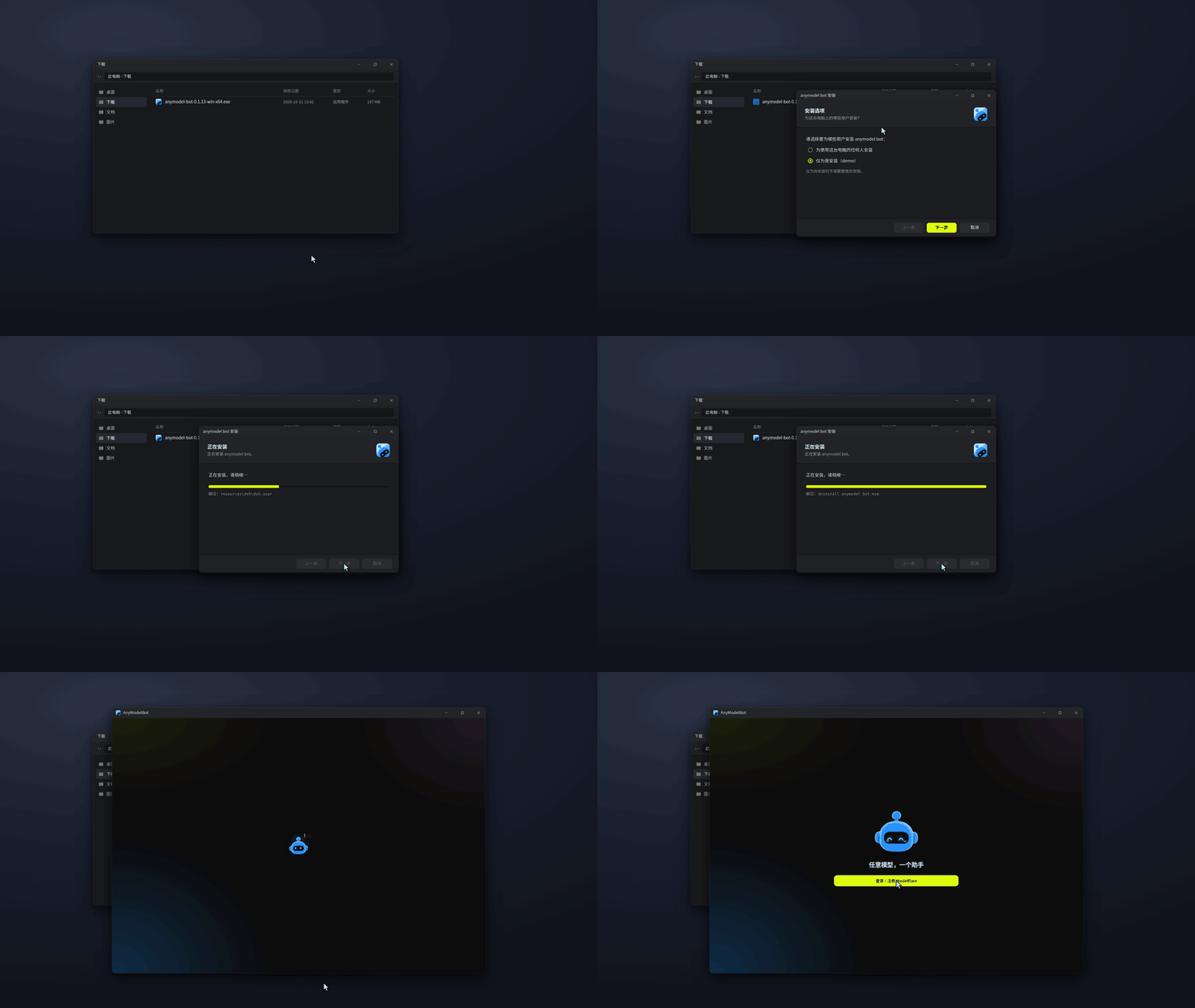
首次打开。 如果系统提示这是从网上下载的应用:Windows 点「更多信息 → 仍要运行」,macOS 在「系统设置 → 隐私与安全性」里点「仍要打开」。Linux 先给 AppImage 加可执行权限(chmod +x)再运行。关闭窗口会把 AnyModelBot 收到托盘,要退出请用托盘菜单或设置里的选项。
校验下载文件。
sha256sum -c SHA256SUMS --ignore-missing
macOS 用 shasum -a 256 <文件名>,Windows PowerShell 用 Get-FileHash <文件名>,再和 SHA256SUMS 里的值对照。
用 Docker 部署到 NAS 或服务器(镜像同时支持 x64 和 arm64)
docker run -d --name amb -p 3600:3600 -v amb-data:/data ghcr.io/modelflare-ai/anymodel-bot
docker exec amb cat /data/ui-token   # 然后打开 http://<主机>:3600/?token=<令牌>
不要把 3600 端口直接暴露到公网。
从源码运行
git clone https://github.com/modelflare-ai/AnyModelBot.git
cd AnyModelBot
npm install
npm run setup      # 拉取并编译内置网关
npm start          # 本地管理界面:http://127.0.0.1:3600/
从源码构建需要 Node.js 22.13+ 和 Go 1.26.8+。想自己构建 Docker 镜像,见开发文档。
截图是简体中文界面;应用也有英文界面,在设置里切换。
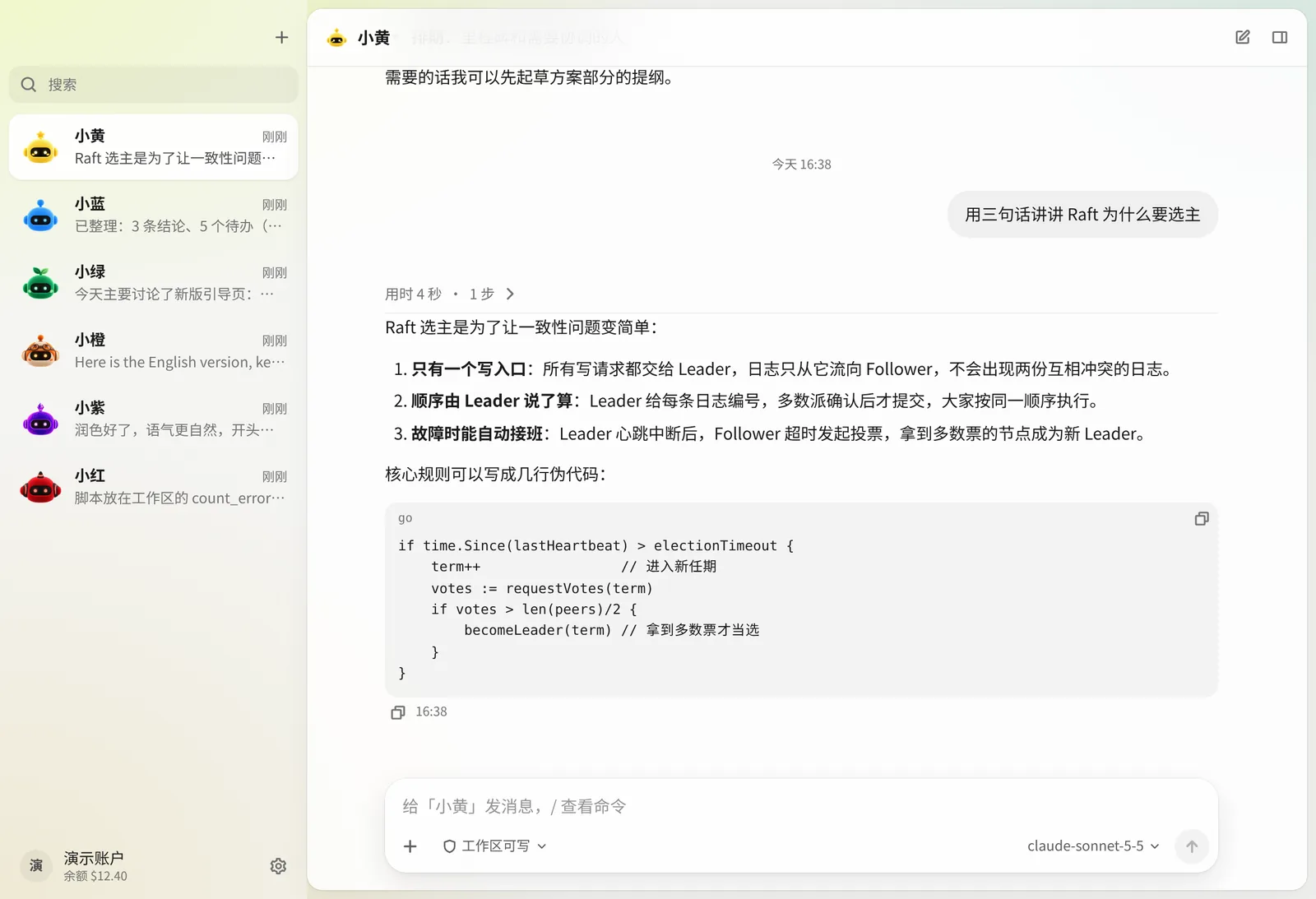
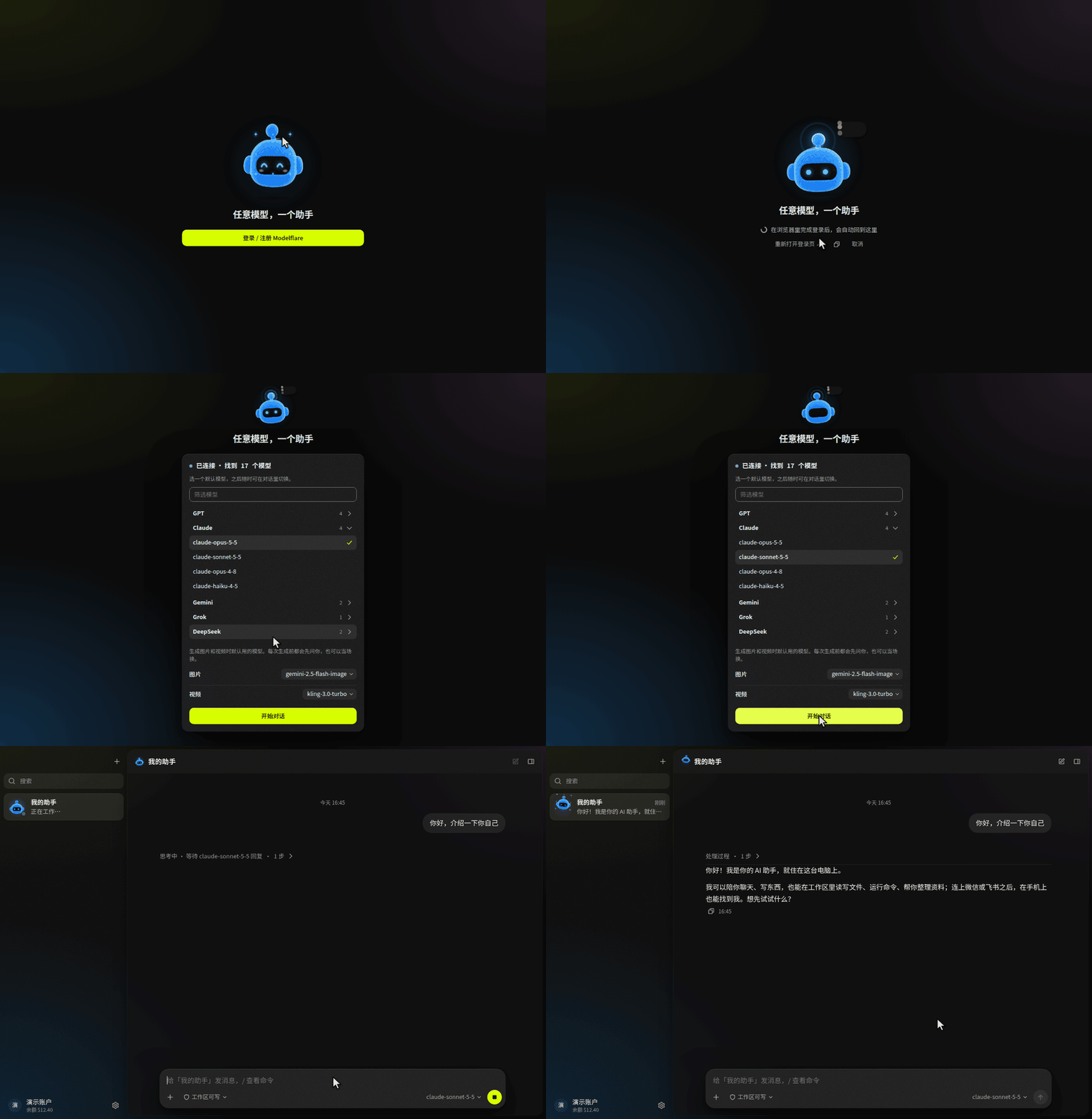
和机器人聊天。回复支持 Markdown 和代码块,输入框会显示当前用的模型。
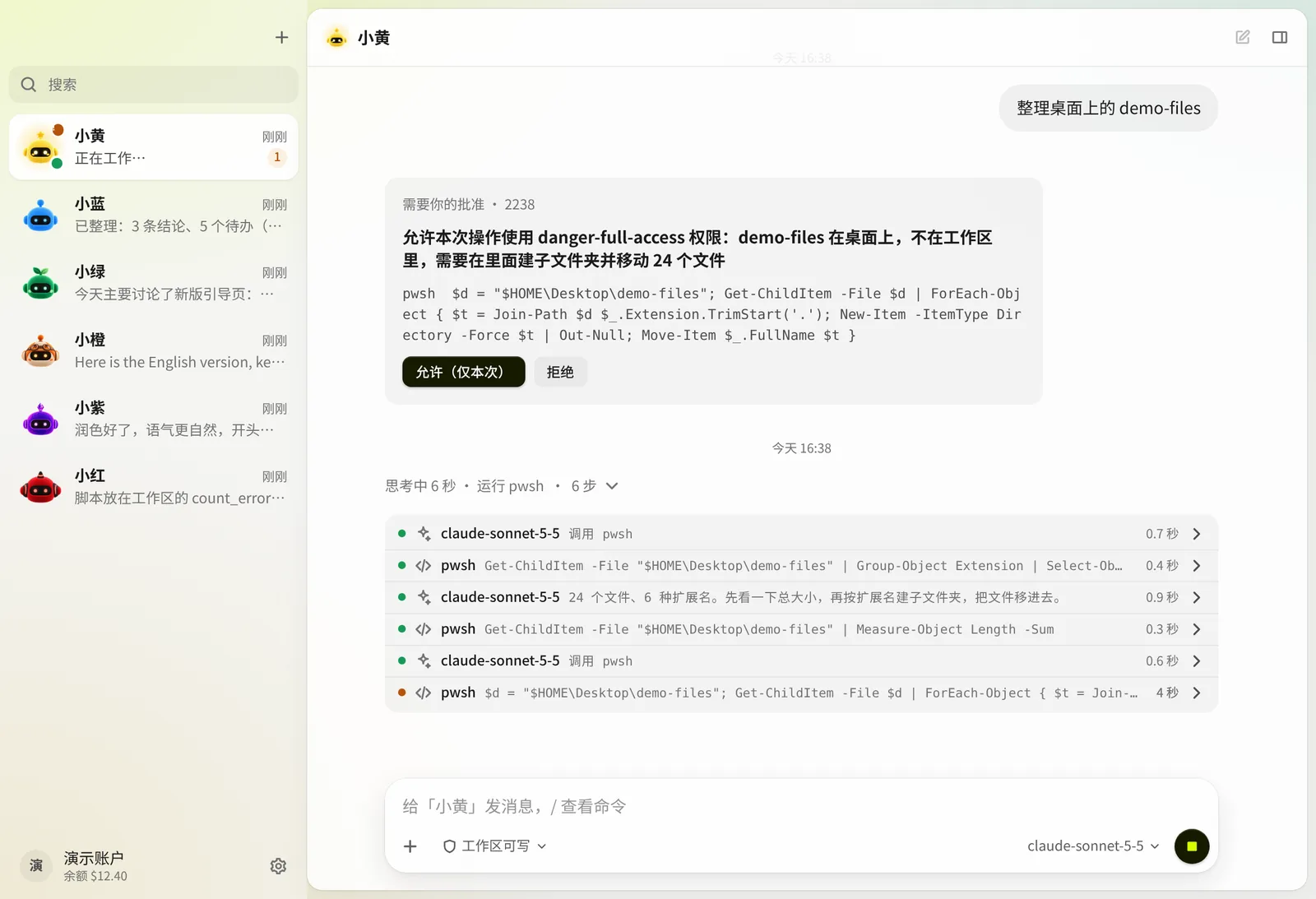
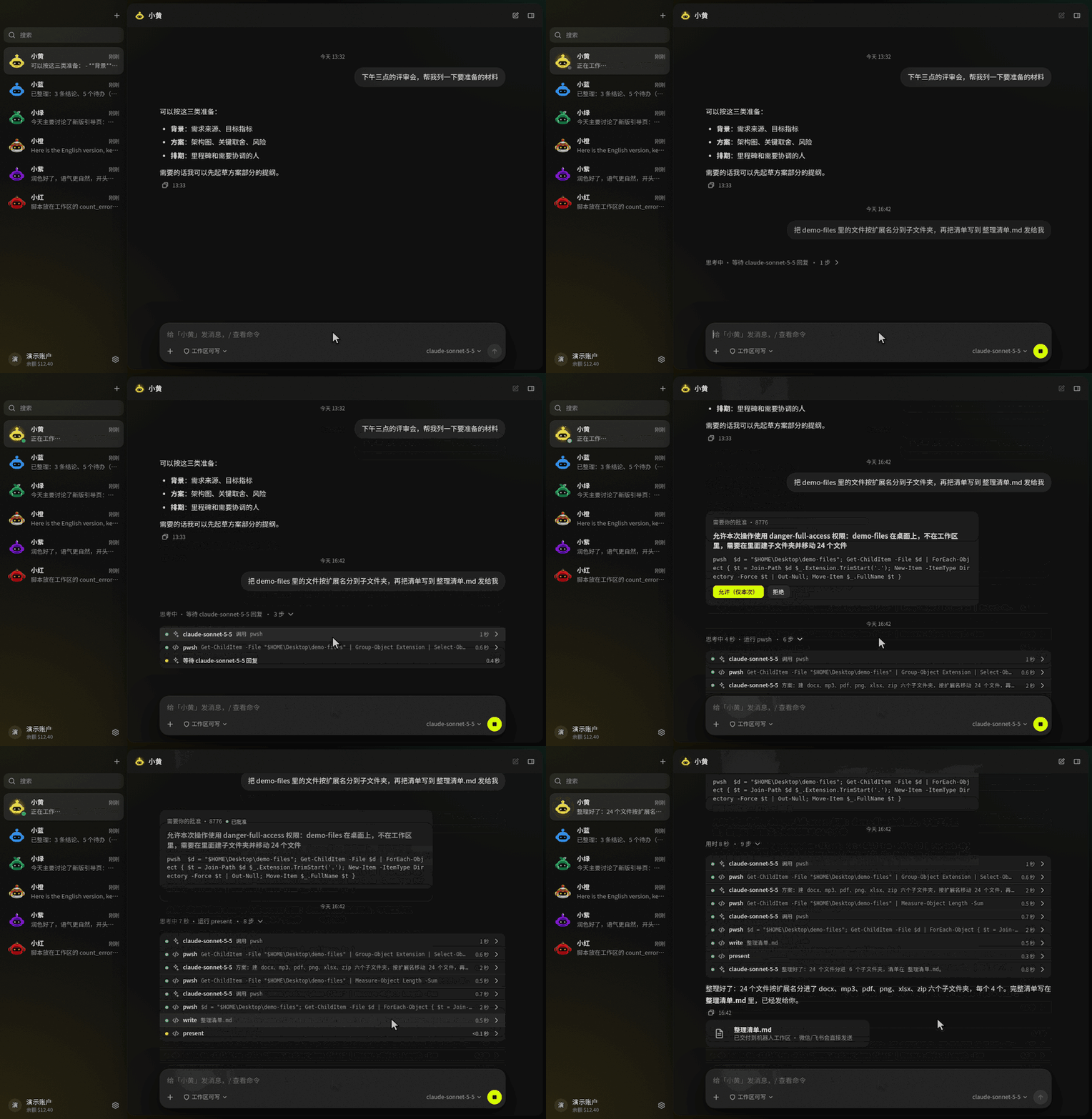
智能体做了什么,一步一步看得见。工作区之外的操作要等你批准。
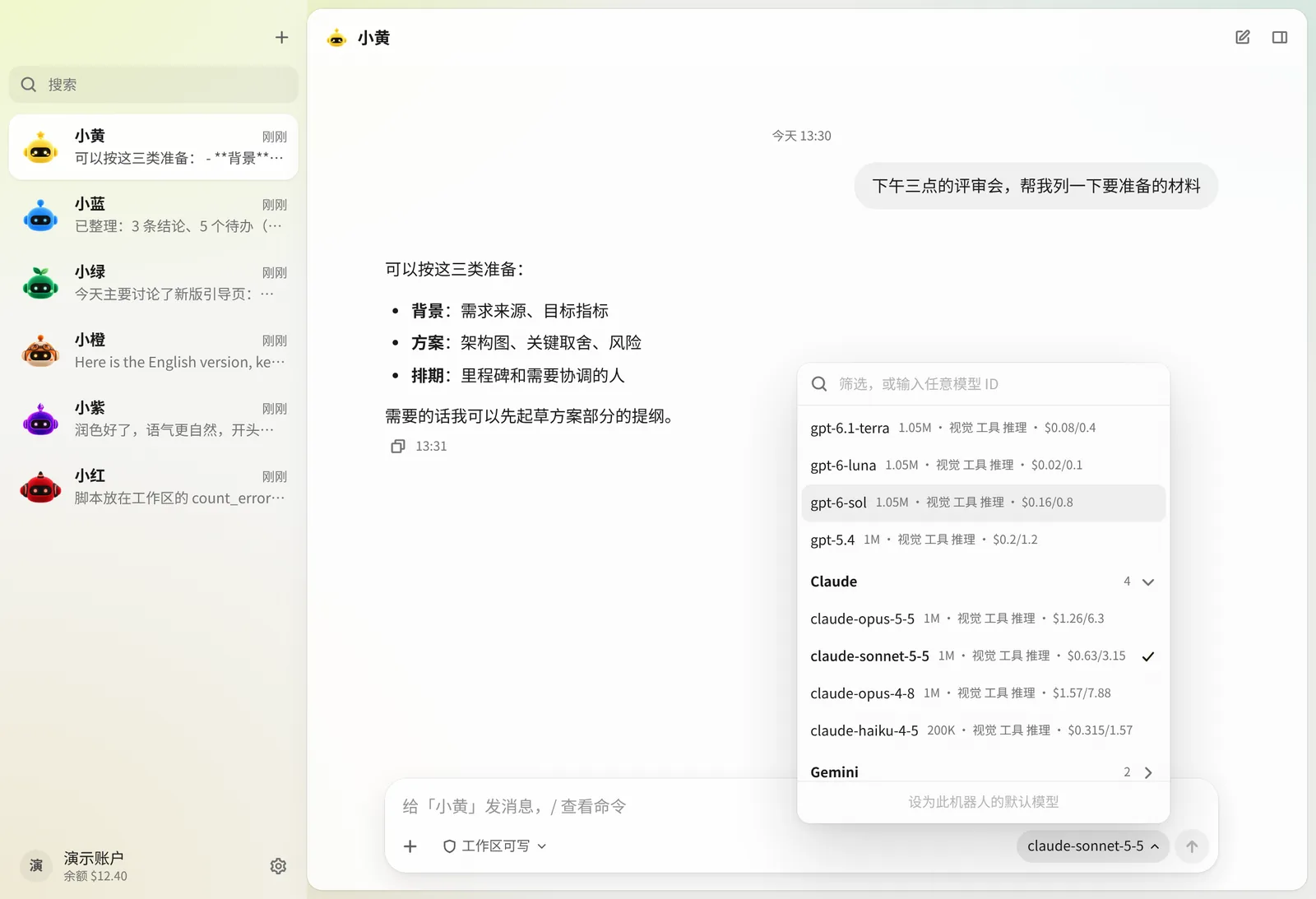
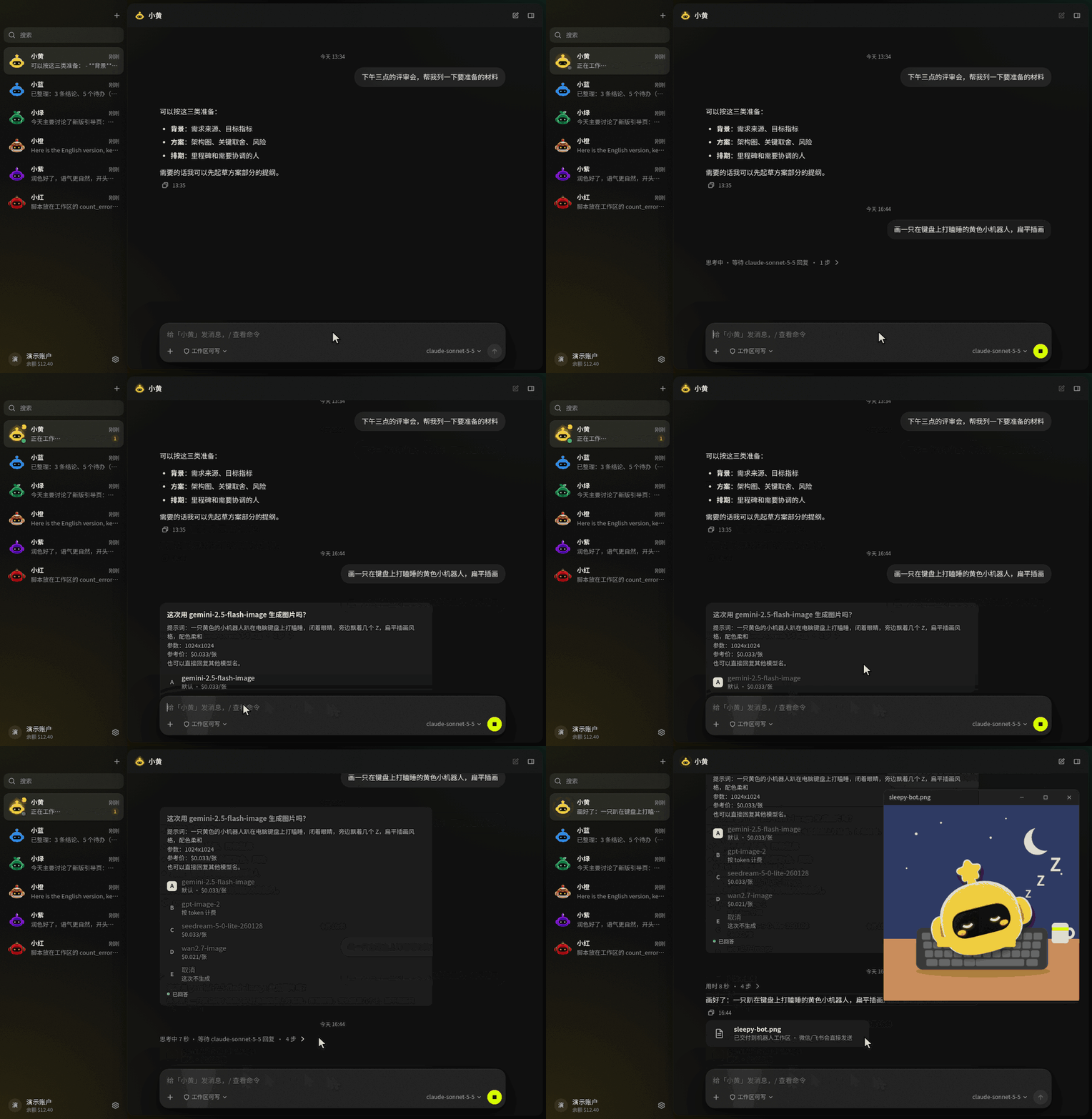
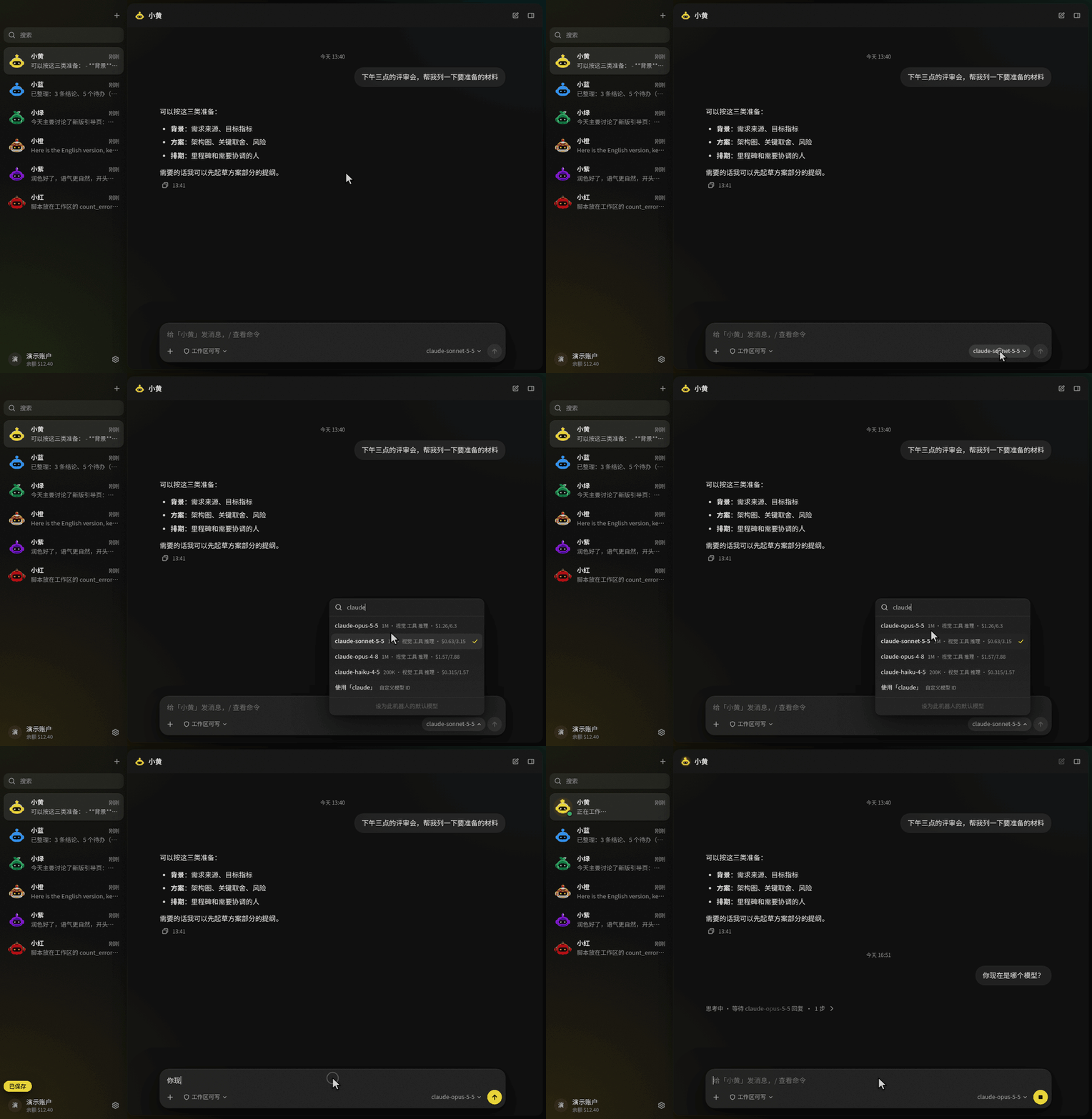
每个对话都能选任意 Modelflare 模型,上下文长度、能力和参考价就在旁边。
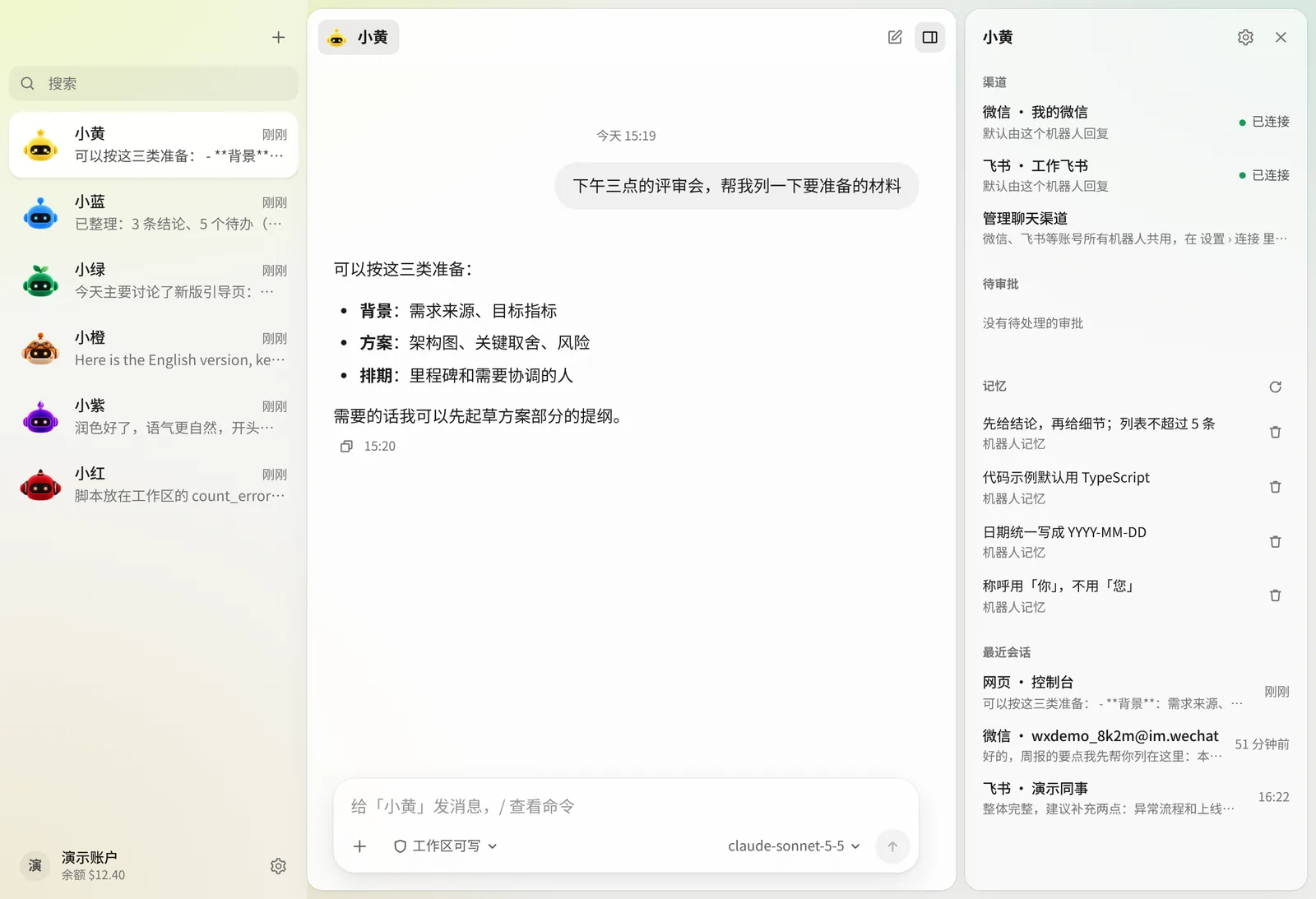
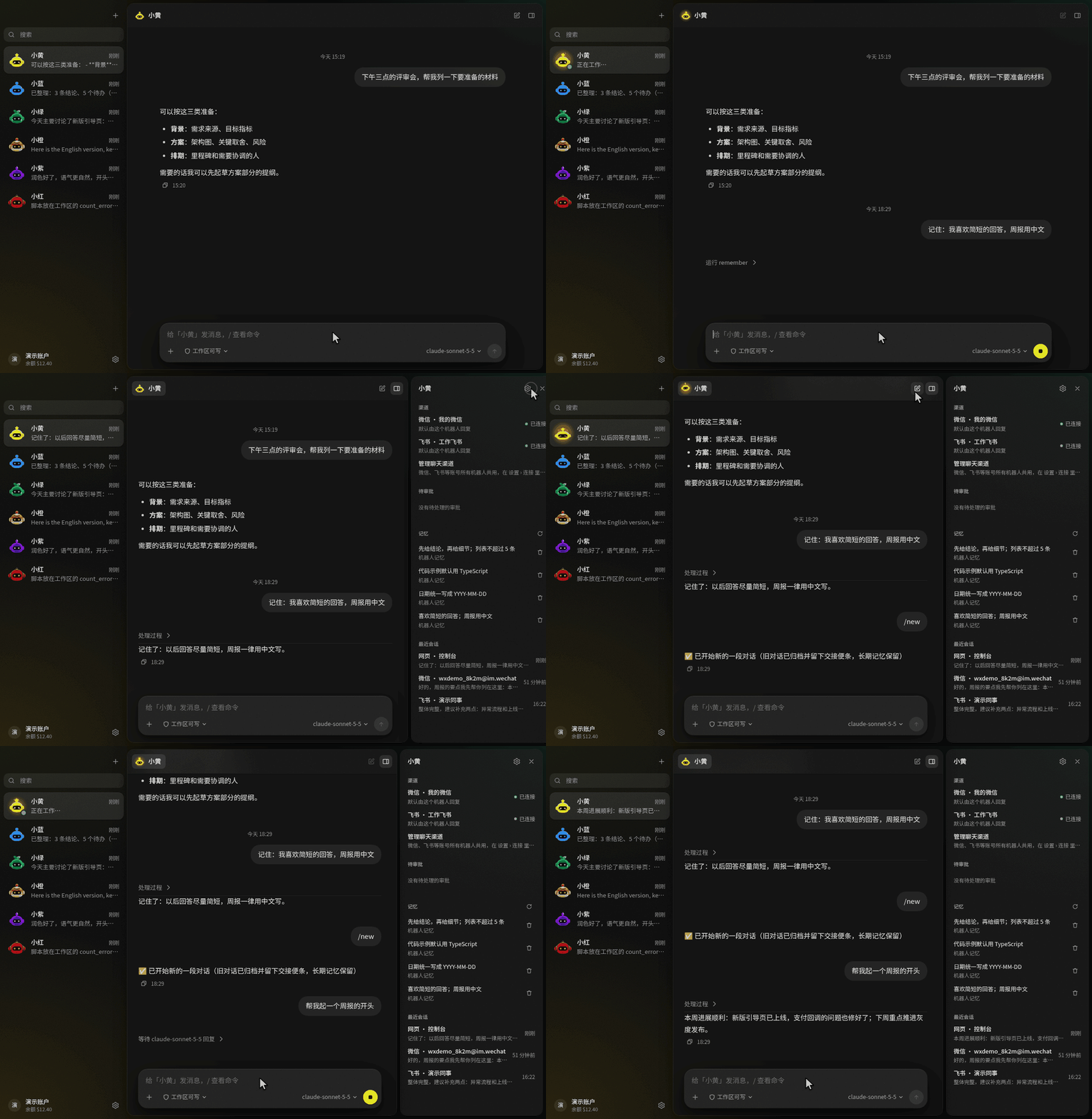
每个机器人的记忆、渠道和会话,集中在一个面板里。
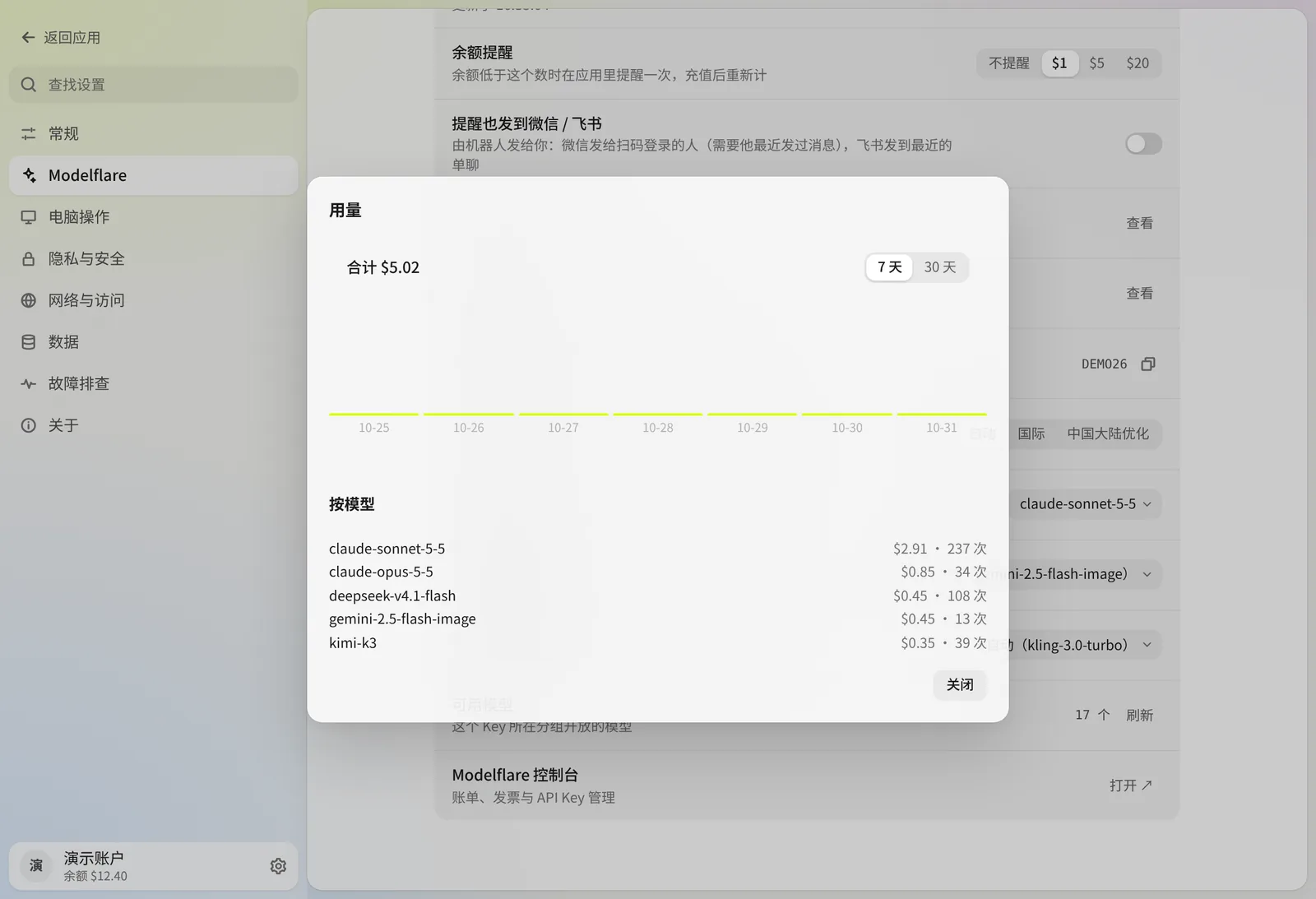
应用里的 Modelflare 账户:余额、用量和默认设置。
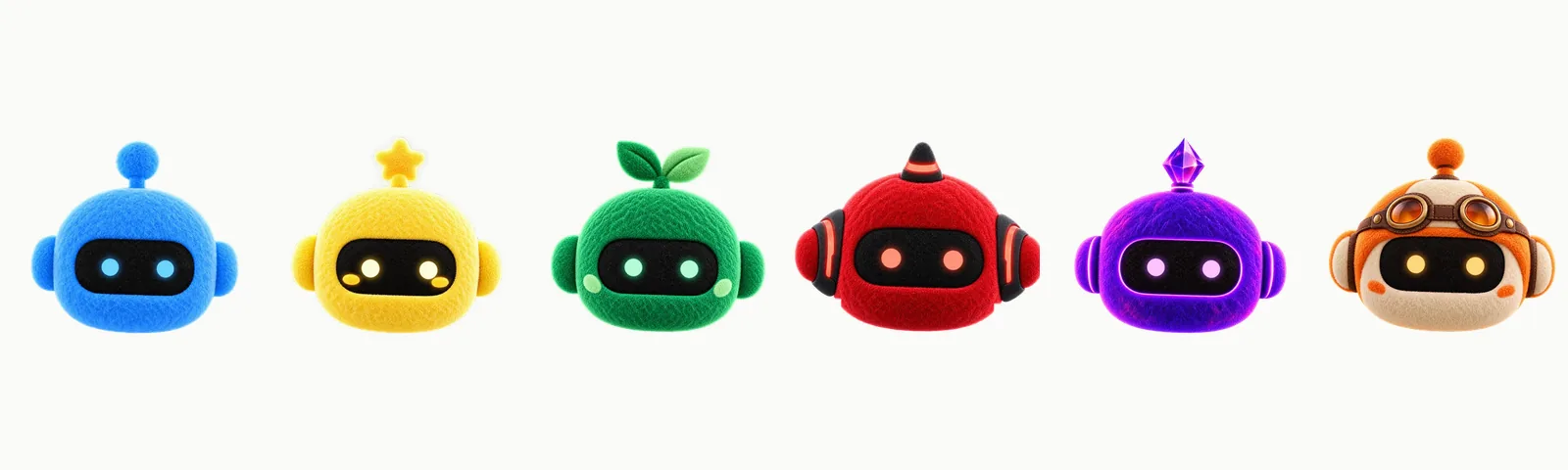
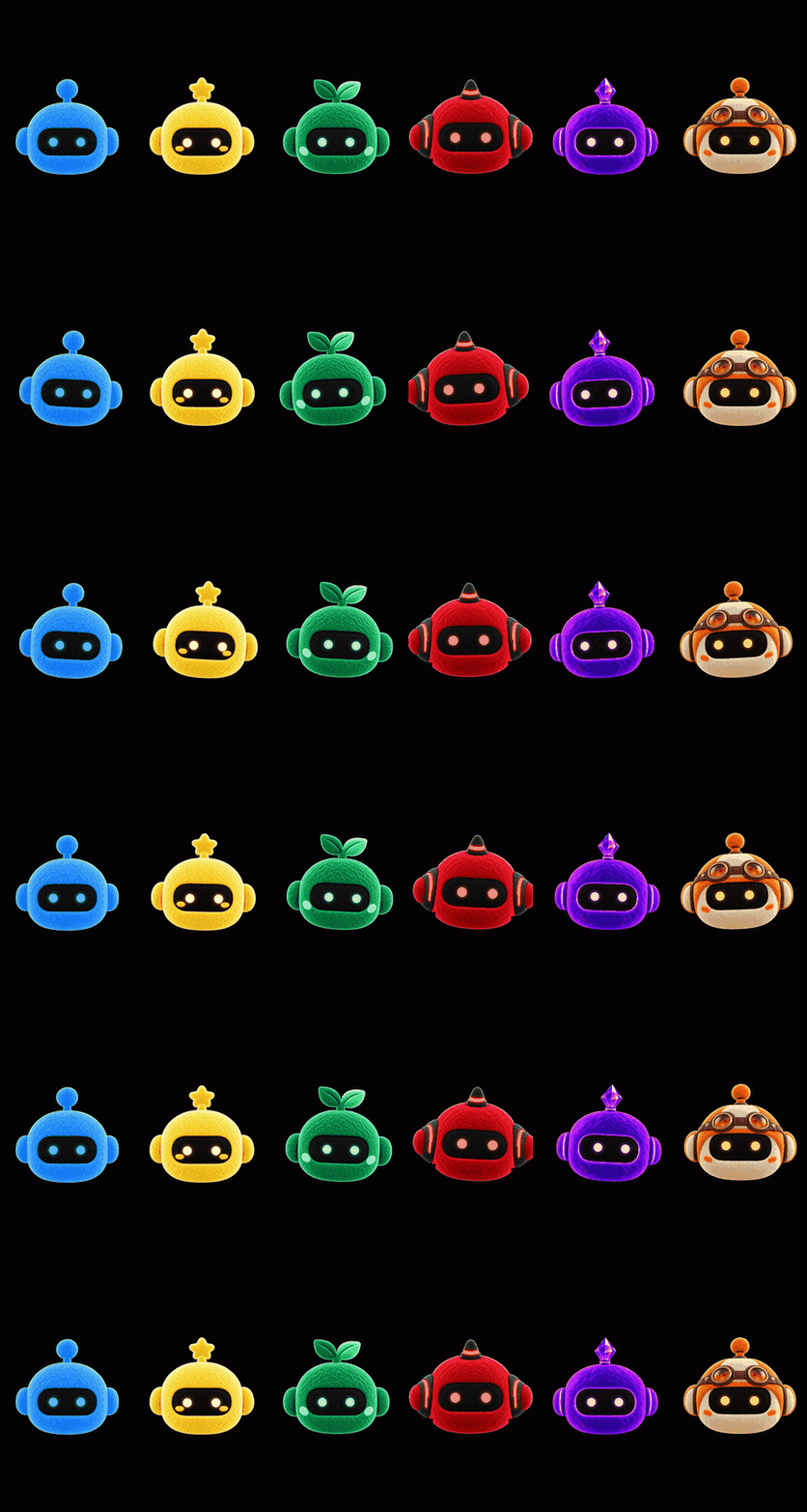
六个角色,帮你分清不同的机器人。它们的眼睛会跟着你的鼠标转。
机器人不只是一个聊天窗口:它有自己的人设、默认模型、工作区和记忆。
/model、/reset,在应用和各个聊天渠道里都能用;在聊天渠道里发 /bot 可以换机器人。
不想自己写人设,可以直接用发现页里备好的 Bot。每个都有自己的界面,打开时先看示例,发第一句话才会安装。
modelflare.dev、origin.modelflare.dev 和 cf.modelflare.dev 均可选择;可在设置中测速,AnyModelBot 不会自动切换。
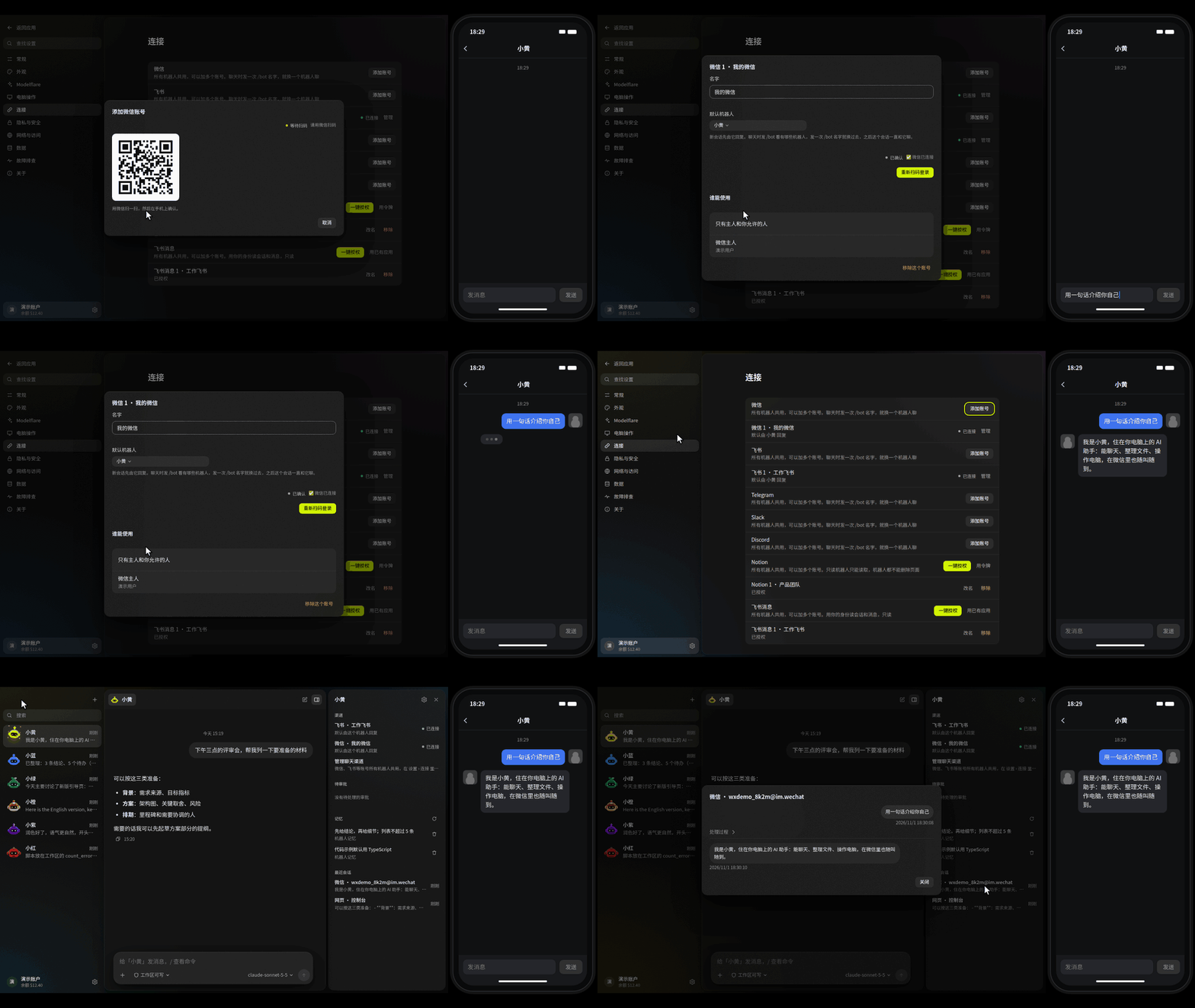
/bot 名字 就换一个机器人聊,也可以让机器人读你的 Notion 和飞书消息。127.0.0.1:3600 的本地网页控制台。
127.0.0.1,桌面版每次启动都会生成新的访问令牌。
[!NOTE]
功能是否可用取决于你选择的模型、操作系统和授予的权限。电脑操作需要桌面会话,macOS 上的电脑操作为 Beta。模型请求会经过 Modelflare 转发给你选定的供应商,详见工作原理与隐私。
2026 年下半年,xAI 的 Grok Bot、OpenAI 的 dots 和 Anthropic 的 Claude Duet 接连发布,"常驻的个人 AI 智能体"成了热门:它替你盯着事情、在后台干活,需要你决定时再来找你。AnyModelBot 做的是同一类事,换了一种做法:开源、跑在你自己的设备上、任意模型都能用。
| | AnyModelBot | Grok Bot | OpenAI dots | Claude Duet | | :--- | :--- | :--- | :--- | :--- | | 开源 | ✅ MIT | — | — | — | | 智能体跑在哪 | 你自己的电脑或服务器 | xAI 的云端电脑 | OpenAI 的云端电脑 | Anthropic 的云端 | | 能用的模型 | GPT、Claude、Gemini、Grok、DeepSeek、Kimi、GLM 等 70+ 个(经 Modelflare) | 以 xAI 的 Grok 模型为主 | OpenAI 的模型 | Claude(Opus 5.5) | | 费用 | 应用免费,模型按 token 计费 | 订阅 | ChatGPT Pro / Business Premium 订阅 | Claude Pro / Max 订阅 | | 在哪找它 | 桌面应用(Windows、macOS、Linux)、Docker、微信、飞书、Telegram、Slack、Discord | 桌面应用、iPhone | ChatGPT、Slack、Teams | iOS、Android、claude.ai | | 现在能用吗 | 直接下载 | 测试版 | 部分地区开放 | 研究预览,美国候补名单 |
AnyModelBot 同样能在后台干活:交代的任务可以在后台跑完,再把结果发到你用的聊天渠道;需要你批准或回答时,它会出现在侧栏的「需要你」里。机器人做的每一步都看得见,越出工作区的操作先问你。
[!NOTE]
其他产品的信息来自 2026 年 10 月的公开报道,可能已有变化,以各家官方说明为准。Grok Bot、dots、Claude Duet 分别是 xAI、OpenAI、Anthropic 的产品和商标,AnyModelBot 与它们没有关联。
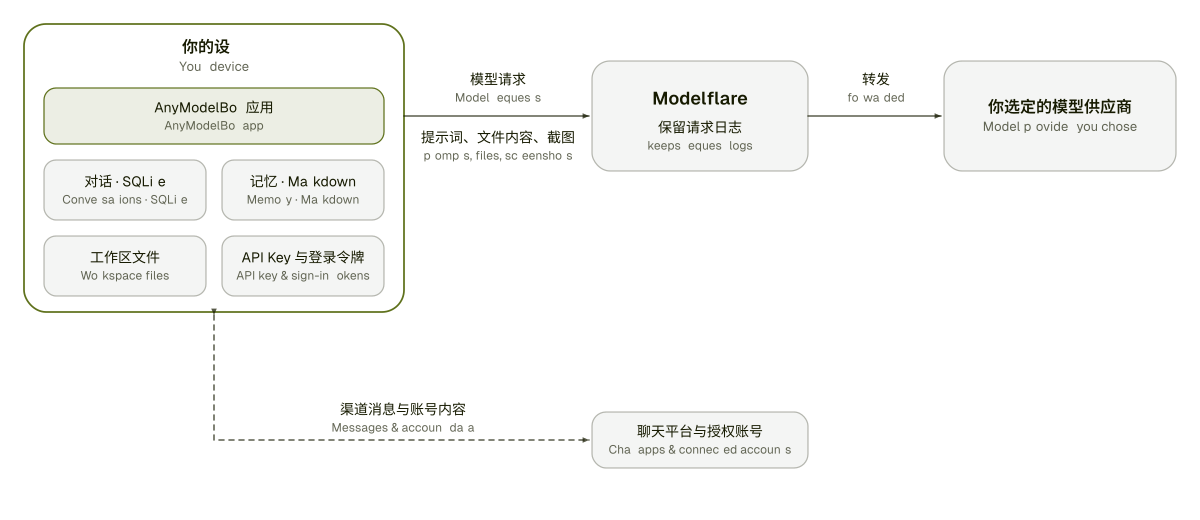
| 留在你的设备上 | 会离开你的设备 | | :--- | :--- | | 对话与会话(本地 SQLite 数据库) | 模型回答所需的提示词、文件内容和工具结果,经 Modelflare 发给你选定的供应商 | | 记忆(Markdown 文件) | 你让机器人用电脑操作看屏幕时的屏幕截图 | | 每个机器人工作区里的文件 | 你通过聊天渠道收发的消息,会经过对应的平台 | | 你的 API Key 和登录令牌 | 你登录 Modelflare 的过程,发生在 modelflare.dev | | 设置 | 你添加 Notion 或飞书账号后,机器人会读写这些账号的内容,读到的内容也会进入模型请求 |
Modelflare 会保留请求日志;保留什么、保留多久,见它的信任中心。我们不声称能做到万无一失:凡是你发给模型的内容,都会离开你的设备。完整清单见 docs/privacy.md。
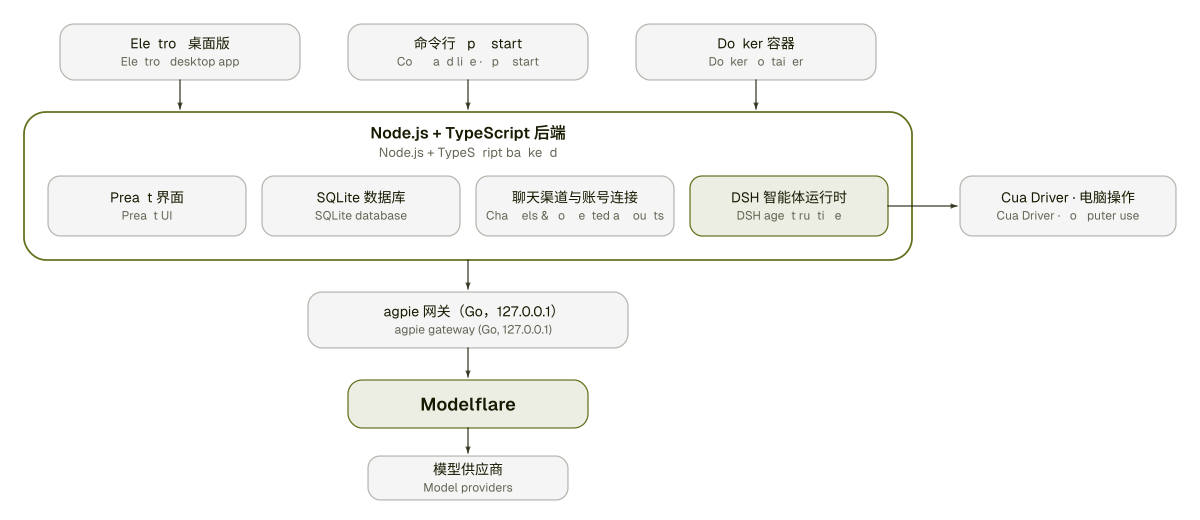
| 层 | 技术 |
| :--- | :--- |
| 界面 | Preact + htm,无构建步骤 |
| 后端 | Node.js 22.13+、TypeScript、node:sqlite |
| 桌面外壳 | Electron,带托盘 |
| 模型网关 | magpie(Go,MIT),随应用打包并由应用启动 |
| 智能体运行时 | DeepSeek Harness(MIT),作为独立进程运行 |
| 电脑操作 | Cua Driver,随应用打包 |
| 渠道 | 飞书(长连接 + 流式卡片)、微信(iLink)、Telegram(长轮询)、Slack(Socket Mode)、Discord(Gateway) |
| 数据账号 | Notion(REST API、官方远程 MCP)、飞书消息(用户身份,只读) |
| 测试与 CI | Vitest、GitHub Actions |
我们正在探索的方向。它们不是承诺,顺序也不是排期。每个版本实际改了什么,见更新日志。
roadmap 标签跟踪。
欢迎提交 bug 报告、修复、文档和想法。
1. 先看看已有的 issue 和讨论。带 good first issue 标签的 issue 适合入门。
2. Fork 仓库,从 master 新建分支。
3. 本地运行并修改:
   npm install
   npm run setup          # 拉取并编译内置网关
   npm run electron:dev   # 开发模式运行桌面版
   npm run typecheck && npm test
4. 向 master 提交 Pull Request,写清楚改了什么、为什么改。比小修复大的改动,请先开 issue,我们先对齐方案。
完整说明见贡献指南。如果要报告安全问题,请按 SECURITY.md 处理,不要公开提 issue。
AnyModelBot 以 MIT 许可证发布。随附的第三方软件保留各自的许可证,见 THIRD_PARTY_NOTICES.md 和 LICENSES/ 目录。
[release-shield]: https://img.shields.io/github/v/release/modelflare-ai/AnyModelBot?include_prereleases&label=release&logo=data:image/svg%2bxml;base64,PHN2ZyB4bWxucz0iaHR0cDovL3d3dy53My5vcmcvMjAwMC9zdmciIHZpZXdCb3g9IjAgMCAxMDAgMTAwIj48cmVjdCB4PSIzIiB5PSI5IiB3aWR0aD0iOTQiIGhlaWdodD0iODIiIHJ4PSIzNiIgZmlsbD0iI2Q3ZmYwMCIvPjxyZWN0IHg9IjI5IiB5PSIzNiIgd2lkdGg9IjEzIiBoZWlnaHQ9IjI4IiByeD0iNi41IiBmaWxsPSIjMTYxYTAwIi8+PHJlY3QgeD0iNTgiIHk9IjM2IiB3aWR0aD0iMTMiIGhlaWdodD0iMjgiIHJ4PSI2LjUiIGZpbGw9IiMxNjFhMDAiLz48L3N2Zz4=&style=flat-square&labelColor=161a00&color=d7ff00 [downloads-shield]: https://img.shields.io/github/downloads/modelflare-ai/AnyModelBot/total?logo=github&logoColor=d7ff00&style=flat-square&labelColor=161a00&color=d7ff00 [stars-shield]: https://img.shields.io/github/stars/modelflare-ai/AnyModelBot?logo=github&logoColor=d7ff00&style=flat-square&labelColor=161a00&color=d7ff00 [license-shield]: https://img.shields.io/github/license/modelflare-ai/AnyModelBot?logo=opensourceinitiative&logoColor=d7ff00&style=flat-square&labelColor=161a00&color=d7ff00 [ci-shield]: https://img.shields.io/github/actions/workflow/status/modelflare-ai/AnyModelBot/ci.yml?branch=master&label=CI&logo=githubactions&logoColor=d7ff00&style=flat-square&labelColor=161a00&color=d7ff00 [platform-shield]: https://img.shields.io/badge/platform-Windows%20%7C%20macOS%20%7C%20Linux%20%7C%20Docker-d7ff00?style=flat-square&labelColor=161a00 [pricing-shield]: https://img.shields.io/badge/pricing-pay--as--you--go-d7ff00?style=flat-square&labelColor=161a00 [modelflare-shield]: https://img.shields.io/badge/Modelflare-modelflare.dev-d7ff00?style=flat-square&labelColor=161a00 [x-shield]: https://img.shields.io/badge/X-@modelflare__dev-d7ff00?style=flat-square&labelColor=161a00&logo=x&logoColor=d7ff00 [win-badge]: https://img.shields.io/badge/Windows-161a00?style=for-the-badge&logo=data:image/svg%2bxml;base64,PHN2ZyB4bWxucz0iaHR0cDovL3d3dy53My5vcmcvMjAwMC9zdmciIHZpZXdCb3g9IjAgMCAyNCAyNCIgZmlsbD0iI2Q3ZmYwMCI+PHJlY3QgeD0iMiIgeT0iMyIgd2lkdGg9IjkuNSIgaGVpZ2h0PSI4LjUiLz48cmVjdCB4PSIxMi41IiB5PSIzIiB3aWR0aD0iOS41IiBoZWlnaHQ9IjguNSIvPjxyZWN0IHg9IjIiIHk9IjEyLjUiIHdpZHRoPSI5LjUiIGhlaWdodD0iOC41Ii8+PHJlY3QgeD0iMTIuNSIgeT0iMTIuNSIgd2lkdGg9IjkuNSIgaGVpZ2h0PSI4LjUiLz48L3N2Zz4= [mac-badge]: https://img.shields.io/badge/macOS-161a00?style=for-the-badge&logo=apple&logoColor=d7ff00 [linux-badge]: https://img.shields.io/badge/Linux-161a00?style=for-the-badge&logo=linux&logoColor=d7ff00
[releases-link]: https://github.com/modelflare-ai/AnyModelBot/releases [stars-link]: https://github.com/modelflare-ai/AnyModelBot/stargazers [license-link]: https://github.com/modelflare-ai/AnyModelBot/blob/master/LICENSE [ci-link]: https://github.com/modelflare-ai/AnyModelBot/actions/workflows/ci.yml [pricing-link]: https://modelflare.dev/pricing?utm_source=anymodelbot&utm_campaign=amb_readme [modelflare-link]: https://modelflare.dev/?utm_source=anymodelbot&utm_campaign=amb_readme [x-link]: https://x.com/modelflare_dev
→ →
 →
 →
 →
 →
 →
 →