
1
 →
→mit-han-lab/TinyChatEngine is an open-source project on GitHub, mainly written in C++. TinyChatEngine: On-Device LLM Inference Library It currently holds 967 stars and 102 forks with 0 open issues, and was last pushed on an unknown date (repository created unknown).
AI Homed tracks it on the Local & On-Device AI board.

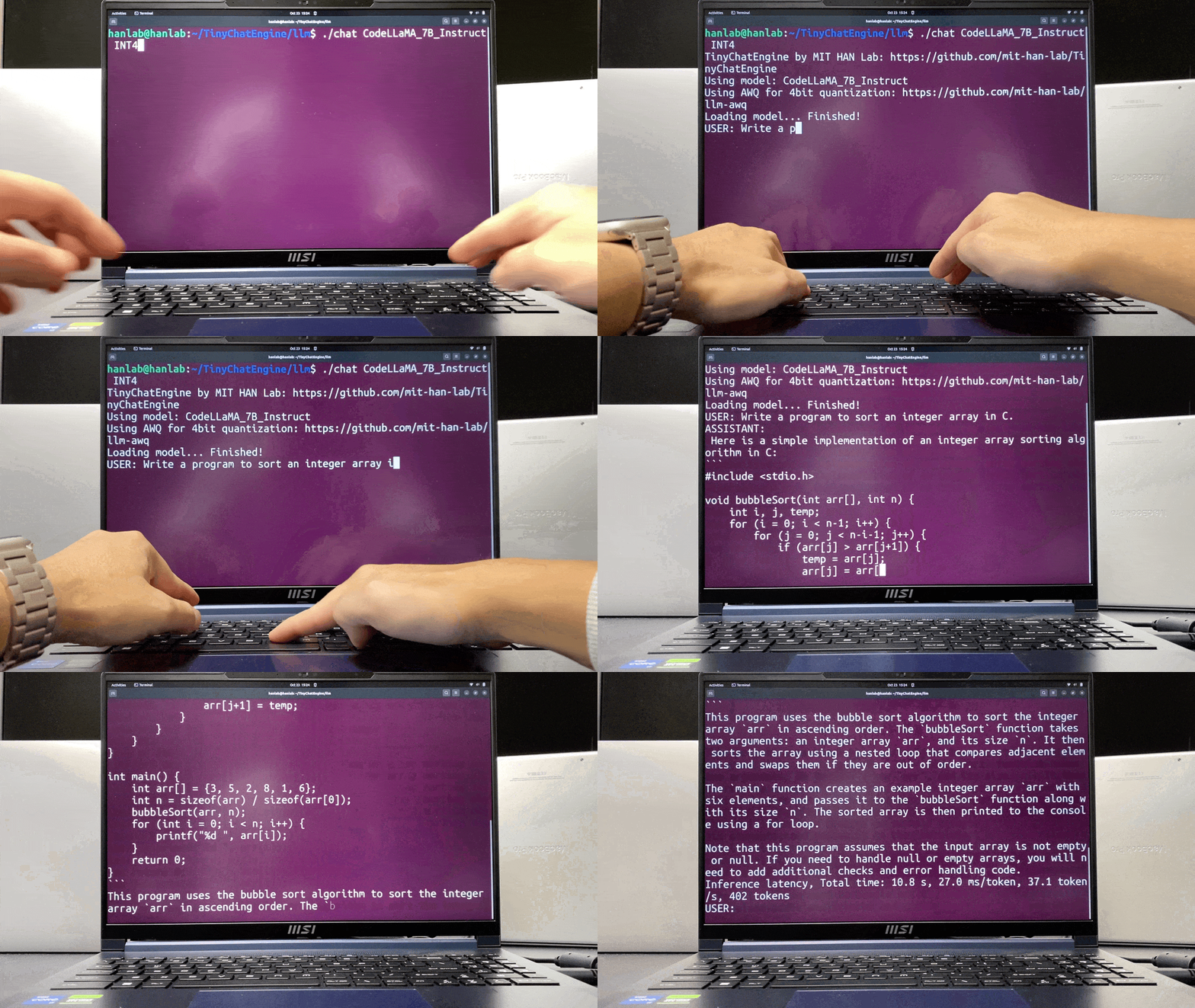
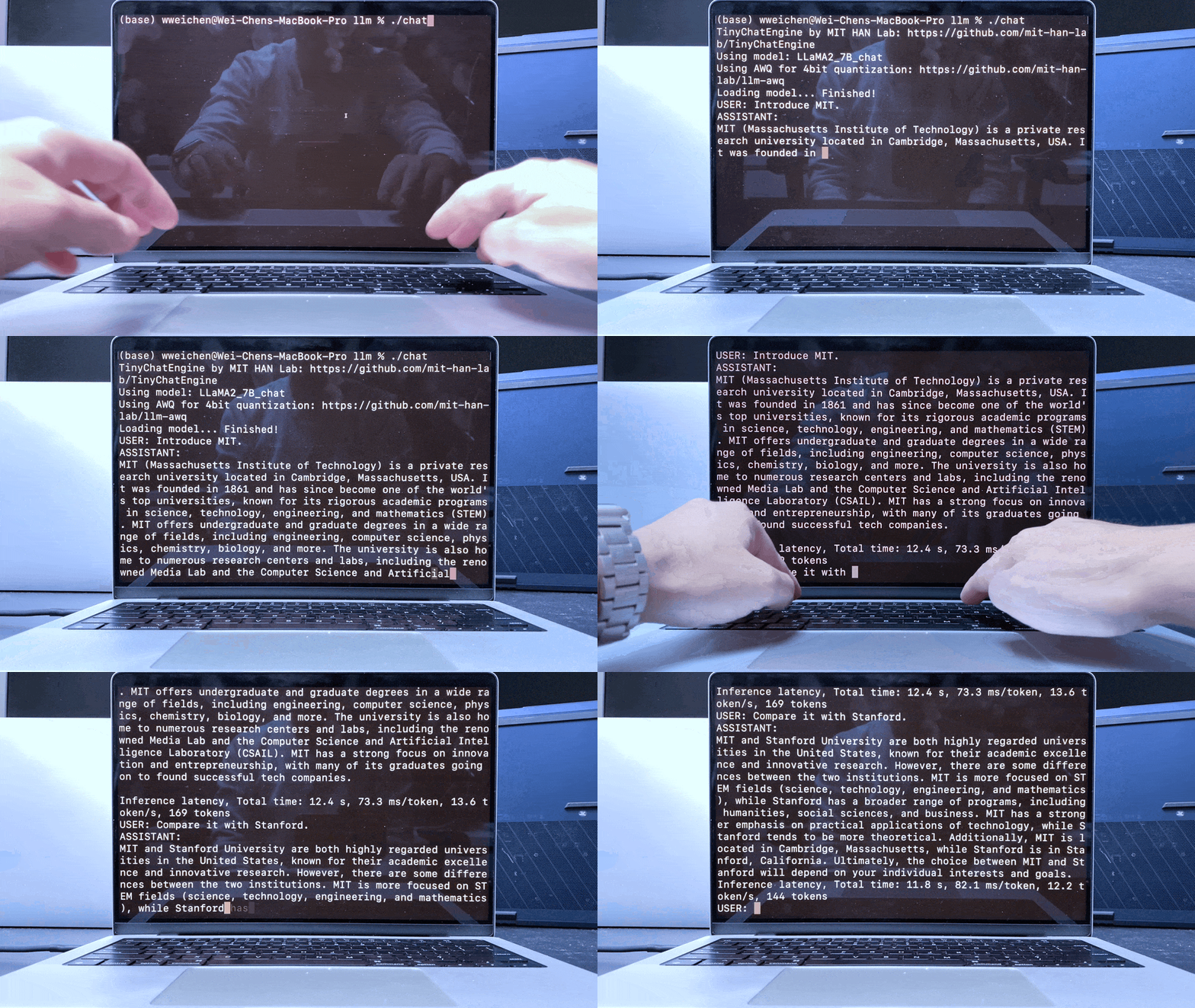
Running large language models (LLMs) and visual language models (VLMs) on the edge is useful: copilot services (coding, office, smart reply) on laptops, cars, robots, and more. Users can get instant responses with better privacy, as the data is local.
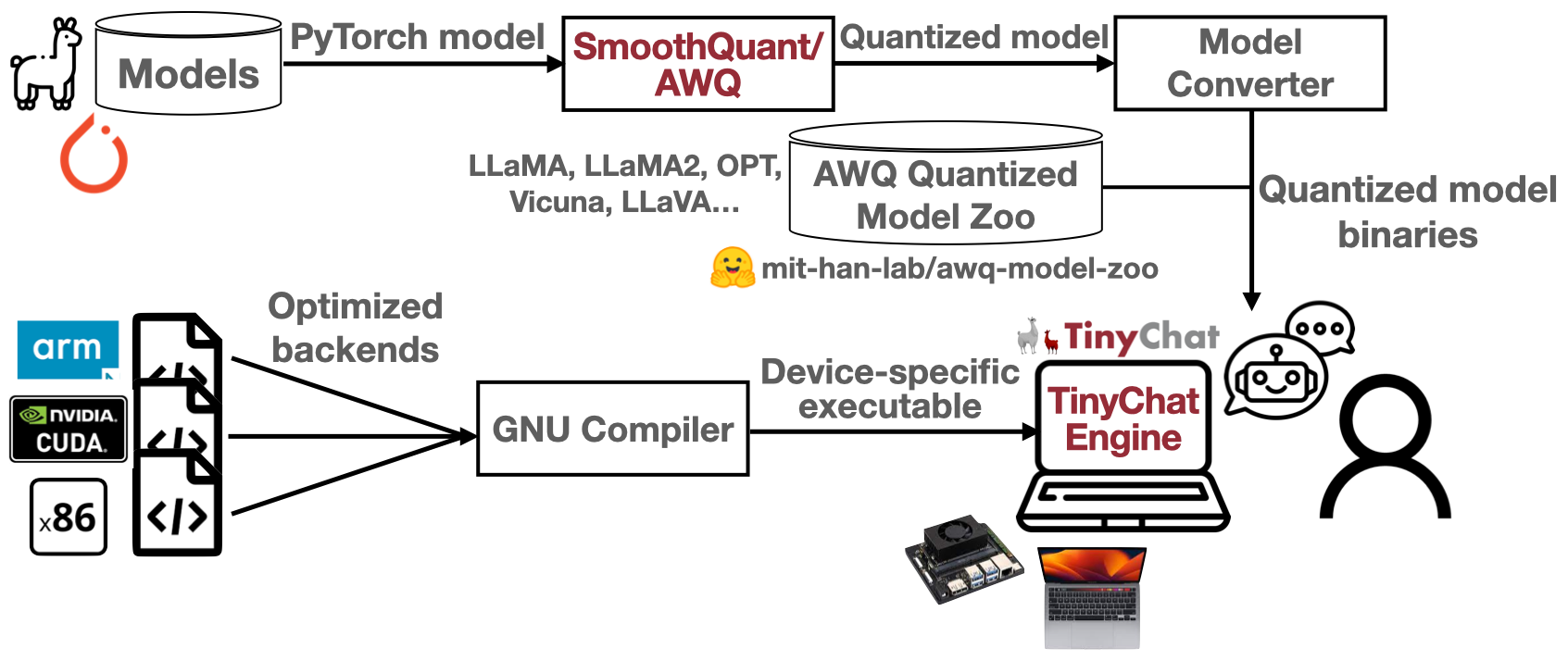
This is enabled by LLM model compression technique: SmoothQuant and AWQ (Activation-aware Weight Quantization), co-designed with TinyChatEngine that implements the compressed low-precision model.
Feel free to check out our slides for more details!
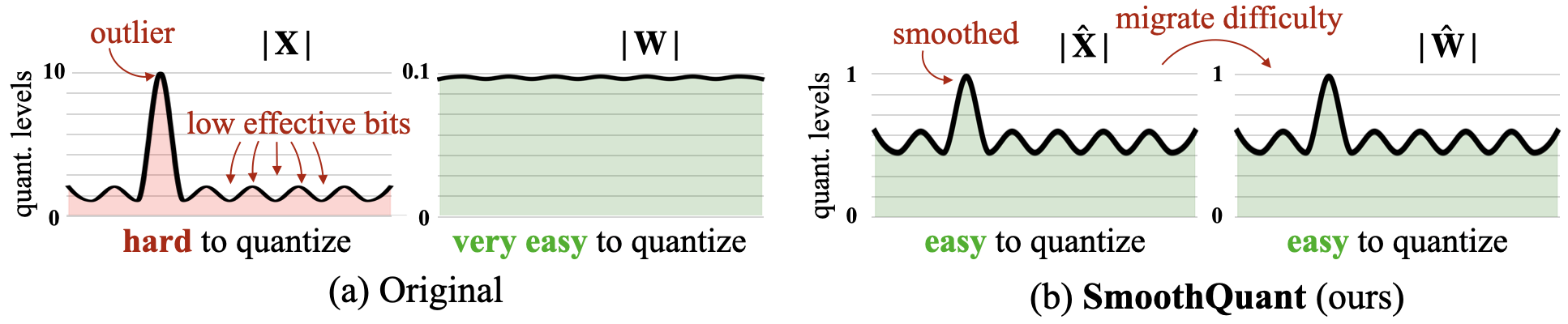
AWQ (Activation-aware Weight Quantization): Protect salient weight channels by analyzing activation magnitude as opposed to the weights.
For MacOS, install boost and llvm by
brew install boost
brew install llvm
For M1/M2 users, install Xcode from AppStore to enable the metal compiler for GPU support.
For Windows, download and install the GCC compiler with MSYS2. Follow this tutorial: https://code.visualstudio.com/docs/cpp/config-mingw for installation.
pacman -S --needed base-devel mingw-w64-x86_64-toolchain make unzip git
Here, we provide step-by-step instructions to deploy Llama-3-8B-Instruct with TinyChatEngine from scratch.
  git clone --recursive https://github.com/mit-han-lab/TinyChatEngine
  cd TinyChatEngine
    conda create -n TinyChatEngine python=3.10 pip -y
    conda activate TinyChatEngine
    pip install -r requirements.txt
cd llm
python tools/download_model.py --model LLaMA_3_8B_Instruct_awq_int4 --QM QM_x86
python tools/download_model.py --model LLaMA_3_8B_Instruct_awq_int4 --QM QM_ARM
python tools/download_model.py --model LLaMA2_7B_chat_awq_int4 --QM QM_CUDA
-arch=sm_xx in Line 54. If using other platforms with Nvidia GPU, please modify -gencode arch=compute_xx,code=sm_xx in Line 60. make chat -j
./chat
TinyChatEngine by MIT HAN Lab: https://github.com/mit-han-lab/TinyChatEngine
Using model: LLaMA_3_8B_Instruct
Using AWQ for 4bit quantization: https://github.com/mit-han-lab/llm-awq
Loading model... Finished!
USER: Write a syllabus for the parallel computing course.
ASSISTANT: Here is a sample syllabus for a parallel computing course:
Course Title: Parallel Computing
Instructor: [Name]
Description: This course covers the fundamental concepts of parallel computing, including parallel algorithms, programming models, and architectures. Students will learn how to design, implement, and optimize parallel programs using various languages and frameworks.
Prerequisites: Basic knowledge of computer science and programming concepts.
Course Objectives:
- Understand the principles of parallelism and its applications
- Learn how to write parallel programs using different languages (e.g., OpenMP, MPI)
...
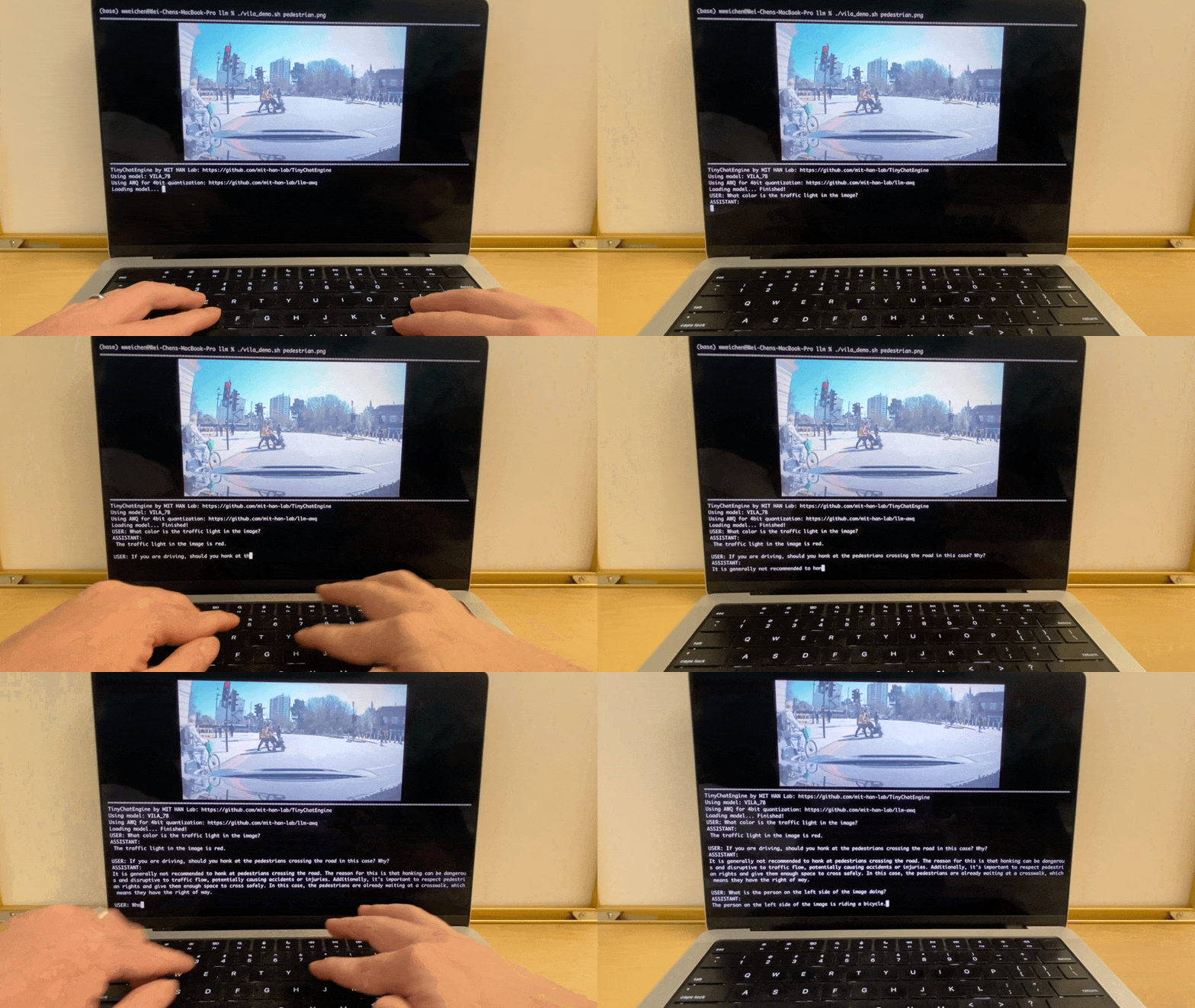
TinyChatEngine supports not only LLM but also VLM. We introduce a sophisticated chatbot for VLM. Here, we provide easy-to-follow instructions to deploy vision language model chatbot (VILA-7B) with TinyChatEngine. We recommend using M1/M2 MacBooks for this VLM feature.
python tools/download_model.py --model VILA_7B_awq_int4_CLIP_ViT-L --QM QM_x86
python tools/download_model.py --model VILA_7B_awq_int4_CLIP_ViT-L --QM QM_ARM
./vila ../assets/figures/vlm_demo/pedestrian.png
../assets/figures/vlm_demo. Feel free to try different images with VILA on your device!| Precision | x86
(Intel/AMD CPU) | ARM
(Apple M1/M2 & RPi) | Nvidia GPU |
| ------ | --------------------------- | --------- | --------- |
| FP32 | ✅ | ✅ | |
| W4A16 | | | ✅ |
| W4A32 | ✅ | ✅ | |
| W4A8 | ✅ | ✅ | |
| W8A8 | ✅ | ✅ | |
The goal of TinyChatEngine is to support various quantization methods on various devices. For example, At present, it supports the quantized weights for int8 opt models that originate from smoothquant using the provided conversion script opt_smooth_exporter.py. For LLaMA models, scripts are available for converting Huggingface format checkpoints to our int4 wegiht format, and for quantizing them to specific methods based on your device. Before converting and quantizing your models, it is recommended to apply the fake quantization from AWQ to achieve better accuracy. We are currently working on supporting more models, please stay tuned!
To mitigate the runtime overheads associated with weight reordering, TinyChatEngine conducts this process offline during model conversion. In this section, we will explore the weight layouts of QM_ARM and QM_x86. These layouts are tailored for ARM and x86 CPUs, supporting 128-bit SIMD and 256-bit SIMD operations, respectively. We also support QM_CUDA for Nvidia GPUs, including server and edge GPUs.
| Platforms | ISA | Quantization methods | | ------------- | ------------- | ------------- | | Intel & AMD | x86-64 | QM_x86 | | Apple M1/M2 Mac & Raspberry Pi | ARM | QM_ARM | | Nvidia GPU| CUDA | QM_CUDA |
We offer a selection of models that have been tested with TinyChatEngine. These models can be readily downloaded and deployed on your device. To download a model, locate the target model's ID in the table below and use the associated script. Check out our model zoo here.
| Models | Precisions | ID | x86 backend | ARM backend | CUDA backend |
|---|---|---|---|---|---|
| LLaMA_3_8B_Instruct | fp32 | LLaMA_3_8B_Instruct_fp32 | ✅ | ✅ | |
| int4 | LLaMA_3_8B_Instruct_awq_int4 | ✅ | ✅ | ||
| LLaMA2_13B_chat | fp32 | LLaMA2_13B_chat_fp32 | ✅ | ✅ | |
| int4 | LLaMA2_13B_chat_awq_int4 | ✅ | ✅ | ✅ | |
| LLaMA2_7B_chat | fp32 | LLaMA2_7B_chat_fp32 | ✅ | ✅ | |
| int4 | LLaMA2_7B_chat_awq_int4 | ✅ | ✅ | ✅ | |
| LLaMA_7B | fp32 | LLaMA_7B_fp32 | ✅ | ✅ | |
| int4 | LLaMA_7B_awq_int4 | ✅ | ✅ | ✅ | |
| CodeLLaMA_13B_Instruct | fp32 | CodeLLaMA_13B_Instruct_fp32 | ✅ | ✅ | |
| int4 | CodeLLaMA_13B_Instruct_awq_int4 | ✅ | ✅ | ✅ | |
| CodeLLaMA_7B_Instruct | fp32 | CodeLLaMA_7B_Instruct_fp32 | ✅ | ✅ | |
| int4 | CodeLLaMA_7B_Instruct_awq_int4 | ✅ | ✅ | ✅ | |
| Mistral-7B-Instruct-v0.2 | fp32 | Mistral_7B_v0.2_Instruct_fp32 | ✅ | ✅ | |
| int4 | Mistral_7B_v0.2_Instruct_awq_int4 | ✅ | ✅ | ||
| VILA-7B | fp32 | VILA_7B_CLIP_ViT-L_fp32 | ✅ | ✅ | |
| int4 | VILA_7B_awq_int4_CLIP_ViT-L | ✅ | ✅ | ||
| LLaVA-v1.5-13B | fp32 | LLaVA_13B_CLIP_ViT-L_fp32 | ✅ | ✅ | |
| int4 | LLaVA_13B_awq_int4_CLIP_ViT-L | ✅ | ✅ | ||
| LLaVA-v1.5-7B | fp32 | LLaVA_7B_CLIP_ViT-L_fp32 | ✅ | ✅ | |
| int4 | LLaVA_7B_awq_int4_CLIP_ViT-L | ✅ | ✅ | ||
| StarCoder | fp32 | StarCoder_15.5B_fp32 | ✅ | ✅ | |
| int4 | StarCoder_15.5B_awq_int4 | ✅ | ✅ | ||
| opt-6.7B | fp32 | opt_6.7B_fp32 | ✅ | ✅ | |
| int8 | opt_6.7B_smooth_int8 | ✅ | ✅ | ||
| int4 | opt_6.7B_awq_int4 | ✅ | ✅ | ||
| opt-1.3B | fp32 | opt_1.3B_fp32 | ✅ | ✅ | |
| int8 | opt_1.3B_smooth_int8 | ✅ | ✅ | ||
| int4 | opt_1.3B_awq_int4 | ✅ | ✅ | ||
| opt-125m | fp32 | opt_125m_fp32 | ✅ | ✅ | |
| int8 | opt_125m_smooth_int8 | ✅ | ✅ | ||
| int4 | opt_125m_awq_int4 | ✅ | ✅ |
For instance, to download the quantized LLaMA-2-7B-chat model: (for int4 models, use --QM to choose the quantized model for your device)
python tools/download_model.py --model LLaMA2_7B_chat_awq_int4 --QM QM_x86
python tools/download_model.py --model LLaMA2_7B_chat_awq_int4 --QM QM_ARM
python tools/download_model.py --model LLaMA2_7B_chat_awq_int4 --QM QM_CUDA
To deploy a quantized model with TinyChatEngine, compile and run the chat program.
make chat -j
./chat <model_name>  <num_threads>
./chat LLaMA2_7B_chat INT4 8
make chat -j
./chat <model_name>
./chat LLaMA2_7B_chat INT4
TinyEngine: Memory-efficient and High-performance Neural Network Library for Microcontrollers
SmoothQuant: Accurate and Efficient Post-Training Quantization for Large Language Models
AWQ: Activation-aware Weight Quantization for LLM Compression and Acceleration
→ →
→ →
→ →
→ →
→ →
→ →
→ →
→