1
 →
→
The affordable newsletter for the agentic era. Open source: self-host it, or use mailcheap.ai.
marclou/mailcheap is an open-source project on GitHub, mainly written in JavaScript. The affordable newsletter for the agentic era. Open source: self-host it, or use mailcheap.ai. It currently holds 926 stars and 234 forks with 0 open issues, and was last pushed on an unknown date (repository created unknown).
AI Homed tracks it on the Today's Trending board.
MailCheap is a newsletter app: write an issue, send it to your list, publish it on the web. Self-host it free with your own Amazon SES or PostShiba account, or let us run it on MailCheap Cloud.
[!IMPORTANT]
No support. Issues are off, and setup questions go unanswered. Fork it, deploy it, make it yours. Or let us run it: mailcheap.ai.
This repository is the whole app: the dashboard, the public archive, the REST API, the MCP server and the docs. MailCheap Cloud runs this same code with MAILCHEAP_CLOUD=true, which adds plans and Stripe billing, and our own sending accounts. Its marketing site (the landing, pricing and legal pages) isn't part of the open source. Every change to the app ships to both.
| | Self-hosted | MailCheap Cloud | | --- | --- | --- | | Price | Free, plus what your provider charges per email | From $19 a month | | Sending | Your Amazon SES or PostShiba account | Ours, set up for you | | Who signs in | The emails you allow | Anyone who signs up | | Limits | None | Emails per month and subscribers, per plan | | Setup | About an hour, most of it waiting for DNS and production access | A few minutes |
Newsletter platforms charge for every subscriber, every month. With your own sending account you pay for the emails you send: 10,000 readers and 4 issues a month is 40,000 emails, about $4 to $6 on Amazon SES.
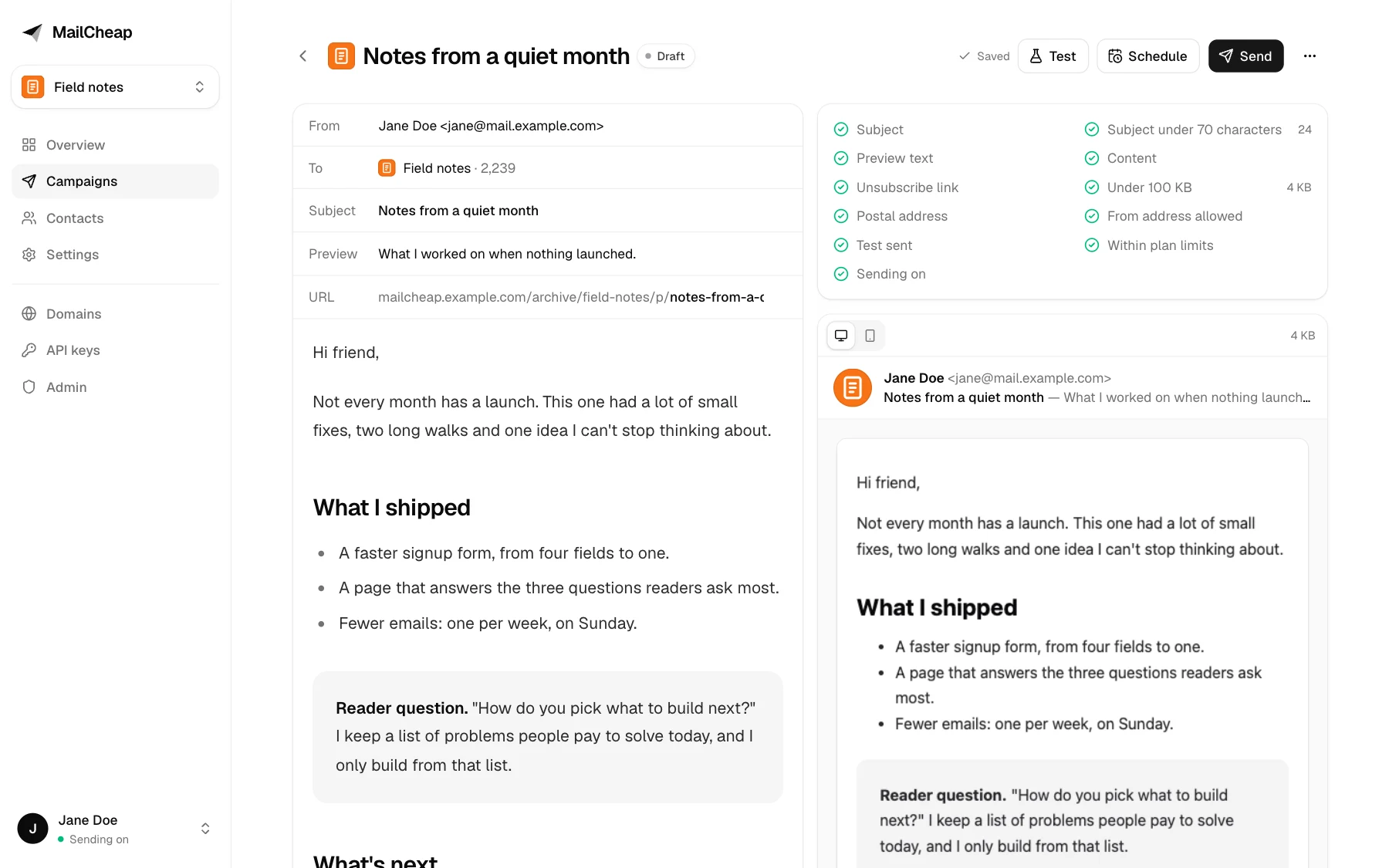
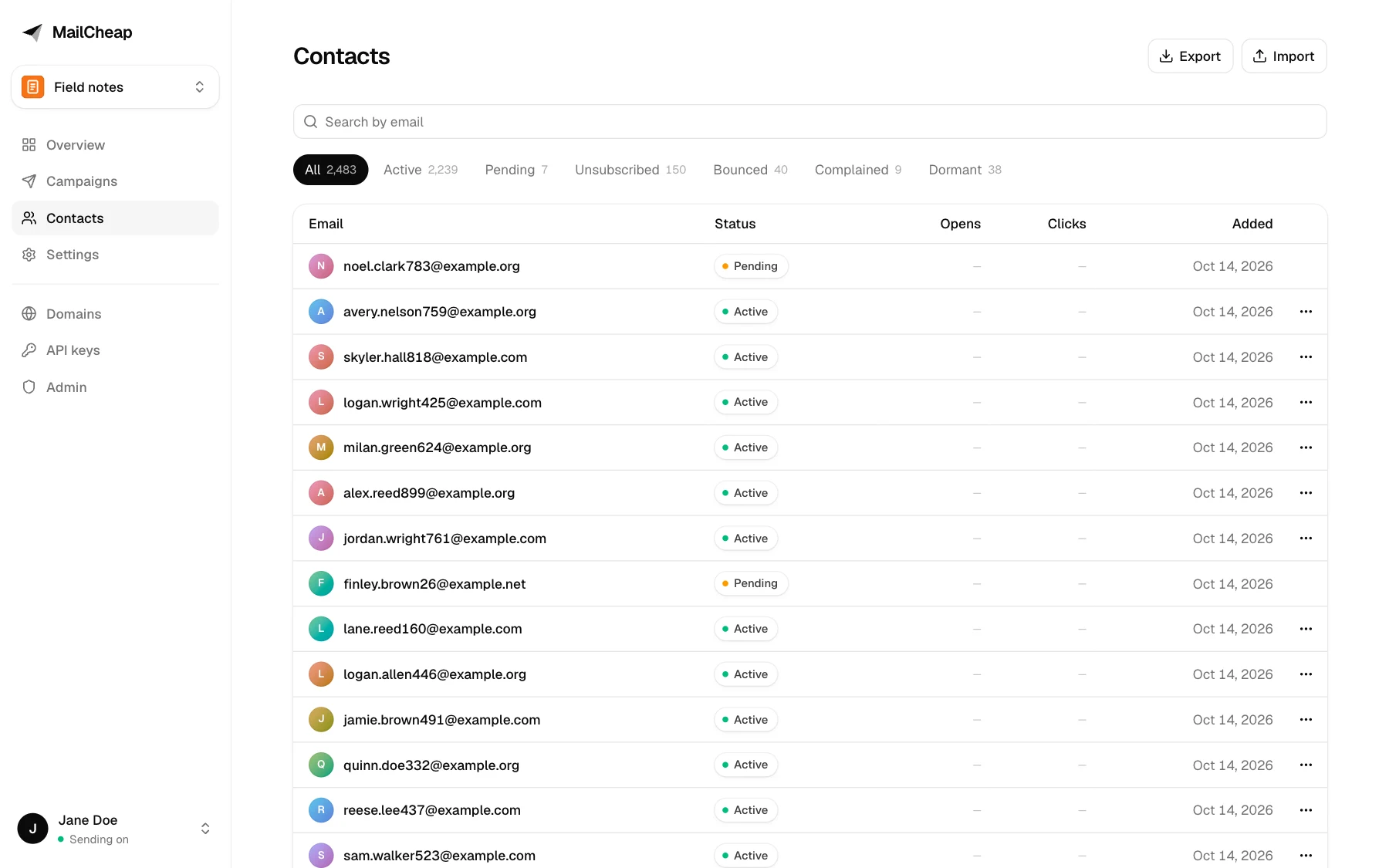
MailCheap is the rest of what a newsletter needs, in one Next.js app: an editor, a list, signup forms, unsubscribe handling, bounce and complaint handling, stats and a public archive. Your list stays in your database, and everything the dashboard does also works from an AI agent, through a REST API and an MCP server.
Write and send
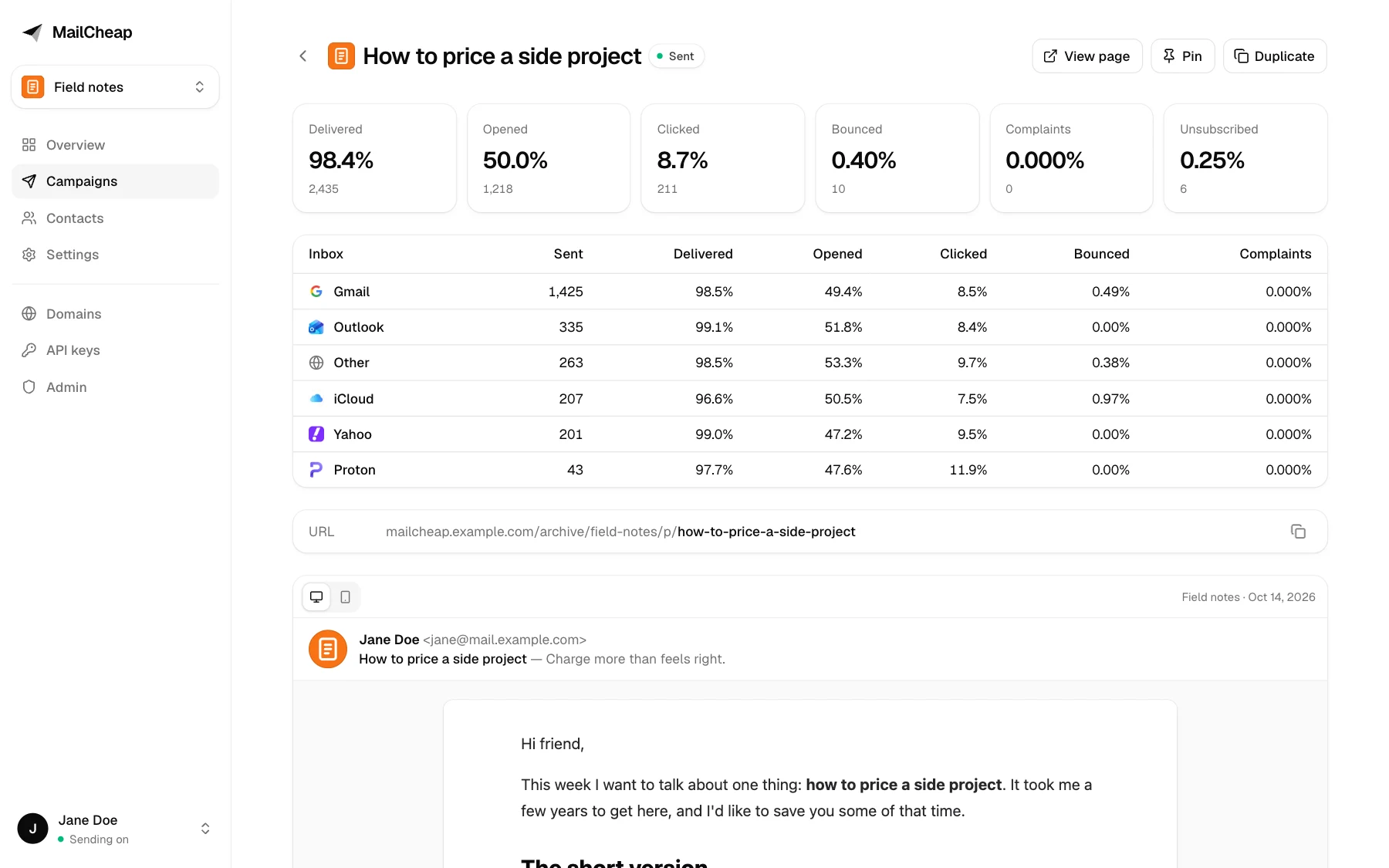
List-Unsubscribe headers) and an unsubscribe page, with signed links./api/v1 and an MCP server at /mcp, with the same API keys and the same checks./docs, an OpenAPI document and /llms.txt on your server.| Editor | Campaign report |
| --- | --- |
|  |
|  |
| Contacts | Public archive |
|
|
| Contacts | Public archive |
|  |
|  |
|
All names and addresses in the screenshots are made up.
| Service | For | Cost | | --- | --- | --- | | MongoDB | Contacts, campaigns, stats | Free tier works | | Amazon SES or PostShiba | Sending | SES: $0.10 to $0.16 per 1,000 emails, depending on its pricing plan. PostShiba: a fixed price per cluster, invite only for now | | Upstash QStash | Background sending and scheduling | Free tier to start, then pay per message. One message sends 50 emails. | | Vercel or any Node.js host | Hosting | Free tier works | | Resend (optional) | Sign-in codes and alerts. Without it, they go through SES or PostShiba | Free plan works | | Upstash Redis (optional) | Rate limits shared by every server instance | Free tier | | Amazon S3 with CloudFront, or Vercel Blob (optional) | Image uploads in the editor, the newsletter settings and the API | S3 and CloudFront: pay per use. Blob: free tier |
Without Redis, MailCheap counts the same rate limits in each server instance's memory. That still stops a script hammering a form, but on serverless hosts the limits aren't shared between instances and reset on each deploy. Add Redis before you put a signup form on a busy site.
Without S3 or Blob, image uploads are off. HTML and Markdown campaigns can still use images hosted anywhere.
Plan for about an hour, most of it waiting for DNS and for your provider to approve production sending.
1. Create a free cluster on MongoDB Atlas.
2. Database Access: add a user with a password and the "Read and write to any database" role.
3. Network Access: allow 0.0.0.0/0. Vercel doesn't have fixed IP addresses.
4. Connect > Drivers: copy the connection string and add a database name before the ?, like ...mongodb.net/mailcheap?retryWrites=true. That's your MONGODB_URI.
1. Click Deploy above.
2. Fill in MONGODB_URI, BETTER_AUTH_SECRET (at least 32 characters; generate it with openssl rand -base64 48), ADMIN_EMAILS (your email) and EMAIL_FROM (like MailCheap , on a domain your Resend account or email provider verified). With a short secret, MailCheap refuses to start and the logs say why.
3. Sign-in codes need a way to reach you. The quickest is Resend: verify EMAIL_FROM's domain there and add RESEND_API_KEY. Without it, codes go through SES or PostShiba once step 4 is done.
4. Open https://.vercel.app/signin and sign in with your email.
Sending stays off until you finish the next steps, so nothing goes out to readers by mistake. On any other Node.js host: npm ci && npm run build && npm start, with the same variables, behind HTTPS. /api/health answers 200, or 503 with what to fix.
If you plan to use your own domain for the dashboard (like mailcheap.example.com), add it in Vercel now and set APP_URL to it. Links in your emails use APP_URL until a newsletter's archive subdomain is set up, so it should be final before your first send.
Only the emails you list: ADMIN_EMAILS (who can also open /admin) and ALLOWED_EMAILS, a comma-separated list of addresses and whole domains, like jane@example.com, @example.org. It's checked at every sign-in, with a code or with Google, and anyone you take off the list is signed out and loses their API keys at their next request. With both lists empty, nobody can sign in.
Everyone gets an account of their own, with up to 3 newsletters and their contacts and campaigns, and the account's domains and API keys. There's no billing on a self-hosted server: no plans, no limits.
Pick Amazon SES or PostShiba (invite only for now). EMAIL_PROVIDER picks one; without it, MailCheap uses PostShiba when POSTSHIBA_API_KEY is set and SES otherwise. Every account gets its own tenant there, with its own domains, suppression list and pause switch. MailCheap creates them; you set up the provider account and its events once.
Use one AWS region for everything below (the examples use us-east-1). An AWS account just for MailCheap is best: SES reputation and limits are per AWS account.
1. Request production access. New accounts are in the sandbox (200 emails a day, verified recipients only). In Account dashboard > Request production access, pick Marketing, and explain that readers opt in, that bounces and complaints are suppressed automatically, and that every email has one-click unsubscribe. AWS usually answers within a day.
2. Create an SNS topic for events, like mailcheap-ses-events, and switch it to signature version 2, which signs messages with SHA256 instead of SHA1: aws sns set-topic-attributes --topic-arn --attribute-name SignatureVersion --attribute-value 2. Then Create subscription with protocol HTTPS and endpoint https:///api/webhooks/ses, raw message delivery off. MailCheap confirms the subscription by itself once it's deployed with the variables of step 4.
3. Create an IAM user for MailCheap with this policy, then create an access key for it:
{
  "Version": "2012-10-17",
  "Statement": [
    {
      "Effect": "Allow",
      "Action": [
        "ses:SendEmail",
        "ses:GetAccount",
        "ses:CreateTenant",
        "ses:GetTenant",
        "ses:DeleteTenant",
        "ses:TagResource",
        "ses:CreateTenantResourceAssociation",
        "ses:DeleteTenantResourceAssociation",
        "ses:UpdateReputationEntityPolicy",
        "ses:UpdateReputationEntityCustomerManagedStatus",
        "ses:CreateConfigurationSet",
        "ses:CreateConfigurationSetEventDestination",
        "ses:DeleteConfigurationSet",
        "ses:CreateEmailIdentity",
        "ses:GetEmailIdentity",
        "ses:PutEmailIdentityMailFromAttributes",
        "ses:DeleteEmailIdentity"
      ],
      "Resource": "*"
    }
  ]
}
4. Add the variables and redeploy: SES_REGION, SES_ACCESS_KEY_ID, SES_SECRET_ACCESS_KEY, SES_AWS_ACCOUNT_ID (the 12-digit account ID) and SES_SNS_TOPIC_ARN. Each account's configuration set publishes its events to that topic.
5. Optional: tenant pauses. SES pauses tenants that send badly. To block the account in MailCheap too, send SES's tenant status and reputation finding events from EventBridge to a second SNS topic, subscribe https:///api/webhooks/ses-tenants to it, and set SES_TENANT_SNS_TOPIC_ARN.
Without Resend, sign-in codes and alerts go out through SES from EMAIL_FROM, outside every tenant, so its domain has to be verified in the AWS account before your first sign-in: Identities > Create identity > Domain, with Easy DKIM. In the sandbox, the addresses you sign in with have to be verified too.
PostShiba approves production sending by hand: until then, sends to anyone outside your team answer kyc_required (campaigns pause with that reason) and a team can have one cluster.
1. Team and key. In API keys, create a full access key: POSTSHIBA_API_KEY, with the team id as POSTSHIBA_TEAM_ID. Add a payment method (clusters need one).
2. Clusters. One bulk cluster sends every email: its id goes in POSTSHIBA_BULK_CLUSTER_ID. Later, a transactional cluster in POSTSHIBA_TRANSACTIONAL_CLUSTER_ID takes welcome, confirmation and test emails, so they never wait behind a campaign. Set SEND_RATE_PER_SECOND to the bulk cluster's hourly cap divided by 3,600, less what welcome and test emails need when they share it. At a cap, PostShiba answers throttled: the batch goes back to the queue and QStash brings it after the hour.
3. Webhook. One endpoint for the whole team (no cluster or tenant) at https:///api/webhooks/postshiba with the events processed, delivered, deferred, bounce, dropped, spamreport and unsubscribe. Its secret goes in POSTSHIBA_WEBHOOK_SECRET.
4. Encryption key. CREDENTIALS_ENCRYPTION_KEY, generated once with openssl rand -base64 32. It encrypts each tenant's SMTP password.
MailCheap creates the rest: a tenant per account (slug mc-), an SMTP credential for it on each cluster (one in all on a single cluster), and its domains. Creating credentials and domains and running domain checks share PostShiba's budget of 60 an hour per key; a failed setup is retried at the account's next send.
Without Resend, sign-in codes and alerts go through a tenant of their own, mc-platform, on the transactional cluster. The first one adds EMAIL_FROM's domain there, and the server log lists the two CNAME records it needs; once PostShiba finds them, codes go out. A domain belongs to one tenant at PostShiba, so EMAIL_FROM needs a domain or subdomain that no newsletter sends from.
1. In the Upstash console, open QStash and copy QSTASH_TOKEN, QSTASH_CURRENT_SIGNING_KEY and QSTASH_NEXT_SIGNING_KEY (and QSTASH_URL if you picked a region other than the default).
2. Add them and redeploy.
QStash calls APP_URL/api/jobs/... to send each batch, so the app has to be reachable on the internet. MailCheap checks QStash's signature on every job.
1. In MailCheap, open Domains and add the domain your newsletter sends from. Use a subdomain like mail.example.com, so your main domain's email is unaffected. Add the DNS records it lists (DKIM, return path, and DMARC if your root domain has none), then click Check now.
2. Create your newsletter. The from address must be on that domain, and the postal address shows in every email's footer (anti-spam laws require one).
3. Set SENDING_ENABLED=true and redeploy.
4. Write a campaign, send yourself a test, then send. A first send to new contacts goes out in steps by itself; for a new domain, also set a limit to reach your most engaged readers first, and use Send to more on the report once the first step looks healthy.
news. by default). Set ARCHIVE_CNAME_TARGET to the host it should point at (cname.vercel-dns.com on Vercel) and add the subdomain to your hosting (on Vercel, to the project's domains): MailCheap doesn't. Once its CNAME resolves, Check now moves the archive, tracked links and unsubscribe links there./archive/ on the app's domain, where the sanitizer, the sandboxed frame and the Content Security Policy protect it.
SHARED_DOMAIN gives every newsletter without a domain of its own an address of its own, hello@.SHARED_DOMAIN, and its archive at .SHARED_DOMAIN. MailCheap adds each subdomain at the provider and has its records published, and removed when the slug changes, by a DNS helper (DNS_BROKER_URL, DNS_BROKER_SECRET): on MailCheap Cloud a Vercel project of its own that holds the Vercel token, so the app never does, and only writes a shared address's records. Without one, DNS automation is off and shared addresses can't be set up. Its DNS has to be on Vercel, with *.SHARED_DOMAIN on the project. Add one DMARC record for the whole domain yourself: _dmarc.SHARED_DOMAIN TXT v=DMARC1; p=none;. It can be the app's own domain, as MailCheap Cloud's is mailcheap.ai: slugs can't take www or the other names in lib/reserved-slugs.js, and those hosts never open an archive. Without a shared domain, every newsletter sends from a domain of its own.<APP_URL>/api/auth/callback/google, then set GOOGLE_CLIENT_ID and GOOGLE_CLIENT_SECRET. The allowlist applies, and a Google sign-in joins an existing user only when Google verified that email.cdn.example.com), put an S3 bucket behind CloudFront. It takes over new uploads, and images already on Blob keep their URLs:us-east-1, validated by DNS. If your domain has CAA records, add 0 issue "amazon.com".
3. Create a CloudFront distribution: the bucket as origin through Origin Access Control (add the bucket policy CloudFront gives you), viewer protocol HTTPS only, the CachingOptimized cache policy, and the subdomain as alternate domain name with that certificate. Point the subdomain at the distribution with a CNAME.
4. Create an IAM user for MailCheap with this policy, then an access key for it. Deleting an account deletes its images and clears them from CloudFront's cache, hence s3:DeleteObject and cloudfront:CreateInvalidation:
     {
       "Version": "2012-10-17",
       "Statement": [
         {
           "Effect": "Allow",
           "Action": ["s3:PutObject", "s3:GetObject", "s3:DeleteObject"],
           "Resource": "arn:aws:s3:::/accounts/*"
         },
         {
           "Effect": "Allow",
           "Action": ["cloudfront:CreateInvalidation"],
           "Resource": "arn:aws:cloudfront:::distribution/"
         }
       ]
     }
5. Set IMAGES_S3_BUCKET, IMAGES_S3_REGION, IMAGES_S3_ACCESS_KEY_ID, IMAGES_S3_SECRET_ACCESS_KEY, IMAGES_CDN_URL (like https://cdn.example.com) and IMAGES_CLOUDFRONT_DISTRIBUTION_ID (the distribution's ID), and redeploy. Builds read IMAGES_CDN_URL too.
Each image gets a name that never changes and Cache-Control: public, max-age=31536000, immutable, so CloudFront and browsers keep it for a year. An account's purge invalidates its folder, /accounts//*, on the distribution, so CloudFront stops serving its deleted images.
UPSTASH_REDIS_REST_URL and UPSTASH_REDIS_REST_TOKEN.mail.example.com), so a bad week doesn't affect your main domain's email.| Variable | Self-hosted | MailCheap Cloud | What it does |
| --- | --- | --- | --- |
| MONGODB_URI | Required | Required | MongoDB connection string with a database name |
| BETTER_AUTH_SECRET | Required | Required | Signs sessions and every link in sent emails. 32+ random characters, or the server refuses to start. Rotating it signs everyone out and breaks links in emails already sent |
| APP_URL | Outside Vercel | Outside Vercel | Public URL of the app: email links, sign-in, Stripe return URLs and the base URL in the docs. On Vercel it defaults to the production domain |
| ADMIN_EMAILS | Required | Optional | Comma-separated emails that can open /admin. On a self-hosted server they can also sign in |
| ALLOWED_EMAILS | Optional | Not used | Who else can sign in to a self-hosted server: addresses and @domain entries, comma-separated |
| EMAIL_FROM | Required | Optional | From address of sign-in codes and alerts. MailCheap Cloud uses MailCheap without it, with replies to hello@mailcheap.ai |
| RESEND_API_KEY | Optional | Required | Sign-in codes and alerts through Resend. Self-hosted without it, they go through the email provider; MailCheap Cloud never does that and refuses to start without it |
| MAILCHEAP_CLOUD | Unset | true | Turns on open sign-up, plans and Stripe billing. Only exactly true counts. Set it for builds too: the public pages read it then |
| STRIPE_SECRET_KEY, STRIPE_WEBHOOK_SECRET | Not used | Required | Billing, and the signing secret of <APP_URL>/api/webhooks/stripe. MailCheap Cloud refuses to start without them |
| `GOOGLE_CLIENT
→ →
→ →
→ →
→ →
→ →
→ →
→ →
→