1
 →
→
[ICLR 2025] Pyramidal Flow Matching for Efficient Video Generative Modeling
jy0205/Pyramid-Flow is an open-source project on GitHub, mainly written in Python. [ICLR 2025] Pyramidal Flow Matching for Efficient Video Generative Modeling It currently holds 3,212 stars and 305 forks with 73 open issues, and was last pushed on 2024-12-21 (repository created 2024-10-06).
AI Homed tracks it on the AI Video Projects board and on the AI AI Video Projects list.
[[Paper]](https://arxiv.org/abs/2410.05954) [[Project Page ✨]](https://pyramid-flow.github.io) [[miniFLUX Model 🚀]](https://huggingface.co/rain1011/pyramid-flow-miniflux) [[SD3 Model ⚡️]](https://huggingface.co/rain1011/pyramid-flow-sd3) [demo 🤗]
This is the official repository for Pyramid Flow, a training-efficient Autoregressive Video Generation method based on Flow Matching. By training only on open-source datasets, it can generate high-quality 10-second videos at 768p resolution and 24 FPS, and naturally supports image-to-video generation.
| 10s, 768p, 24fps | 5s, 768p, 24fps | Image-to-video |
|---|---|---|
2024.11.13 🚀🚀🚀 We release the 768p miniFLUX checkpoint (up to 10s).2024.10.29 ⚡️⚡️⚡️ We release training code for VAE, finetuning code for DiT and new model checkpoints with FLUX structure trained from scratch.2024.10.13 ✨✨✨ Multi-GPU inference and CPU offloading are supported. Use it with less than 8GB of GPU memory, with great speedup on multiple GPUs.2024.10.11 🤗🤗🤗 Hugging Face demo is available. Thanks @multimodalart for the commit! 2024.10.10 🚀🚀🚀 We release the technical report, project page and model checkpoint of Pyramid Flow.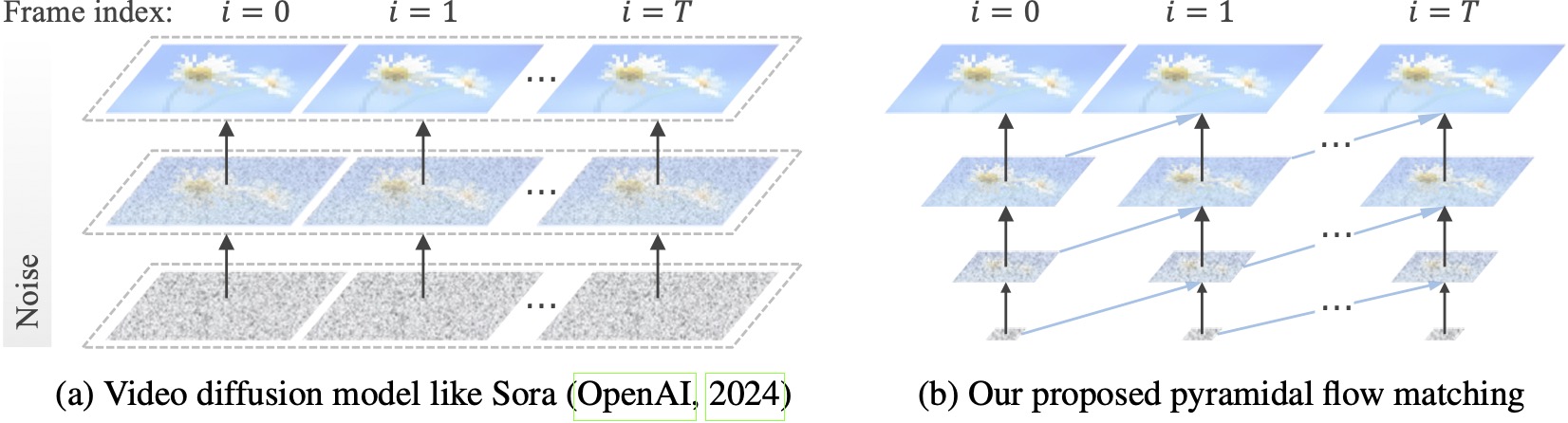
Existing video diffusion models operate at full resolution, spending a lot of computation on very noisy latents. By contrast, our method harnesses the flexibility of flow matching (Lipman et al., 2023; Liu et al., 2023; Albergo & Vanden-Eijnden, 2023) to interpolate between latents of different resolutions and noise levels, allowing for simultaneous generation and decompression of visual content with better computational efficiency. The entire framework is end-to-end optimized with a single DiT (Peebles & Xie, 2023), generating high-quality 10-second videos at 768p resolution and 24 FPS within 20.7k A100 GPU training hours.
We recommend setting up the environment with conda. The codebase currently uses Python 3.8.10 and PyTorch 2.1.2 (guide), and we are actively working to support a wider range of versions.
git clone https://github.com/jy0205/Pyramid-Flow
cd Pyramid-Flow
create env using conda
conda create -n pyramid python==3.8.10
conda activate pyramid
pip install -r requirements.txt
Then, download the model from Huggingface (there are two variants: miniFLUX or SD3). The miniFLUX models support 1024p image, 384p and 768p video generation, and the SD3-based models support 768p and 384p video generation. The 384p checkpoint generates 5-second video at 24FPS, while the 768p checkpoint generates up to 10-second video at 24FPS.
from huggingface_hub import snapshot_download
model_path = 'PATH'   # The local directory to save downloaded checkpoint
snapshot_download("rain1011/pyramid-flow-miniflux", local_dir=model_path, local_dir_use_symlinks=False, repo_type='model')
To get started, first install Gradio, set your model path at #L36, and then run on your local machine:
python app.py
The Gradio demo will be opened in a browser. Thanks to @tpc2233 the commit, see #48 for details.
Or, try it out effortlessly on Hugging Face Space 🤗 created by @multimodalart. Due to GPU limits, this online demo can only generate 25 frames (export at 8FPS or 24FPS). Duplicate the space to generate longer videos.
To quickly try out Pyramid Flow on Google Colab, run the code below:
# Setup
!git clone https://github.com/jy0205/Pyramid-Flow
%cd Pyramid-Flow
!pip install -r requirements.txt
!pip install gradio
This code downloads miniFLUX
from huggingface_hub import snapshot_download
model_path = '/content/Pyramid-Flow'
snapshot_download("rain1011/pyramid-flow-miniflux", local_dir=model_path, local_dir_use_symlinks=False, repo_type='model')
Start
!python app.py
To use our model, please follow the inference code in video_generation_demo.ipynb at this link. We strongly recommend you to try the latest published pyramid-miniflux, which shows great improvement on human structure and motion stability. Set the param model_name to pyramid_flux to use. We further simplify it into the following two-step procedure. First, load the downloaded model:
import torch
from PIL import Image
from pyramid_dit import PyramidDiTForVideoGeneration
from diffusers.utils import load_image, export_to_video
torch.cuda.set_device(0)
model_dtype, torch_dtype = 'bf16', torch.bfloat16   # Use bf16 (not support fp16 yet)
model = PyramidDiTForVideoGeneration(
    'PATH',                                         # The downloaded checkpoint dir
    model_name="pyramid_flux",
    model_dtype=model_dtype,
    model_variant='diffusion_transformer_768p',
)
model.vae.enable_tiling()
model.vae.to("cuda")
model.dit.to("cuda")
model.text_encoder.to("cuda")
if you're not using sequential offloading bellow uncomment the lines above ^
model.enable_sequential_cpu_offload()
Then, you can try text-to-video generation on your own prompts. Noting that the 384p version only support 5s now (set temp up to 16)!
prompt = "A movie trailer featuring the adventures of the 30 year old space man wearing a red wool knitted motorcycle helmet, blue sky, salt desert, cinematic style, shot on 35mm film, vivid colors"
used for 384p model variant
width = 640
height = 384
used for 768p model variant
width = 1280
height = 768
with torch.no_grad(), torch.cuda.amp.autocast(enabled=True, dtype=torch_dtype):
    frames = model.generate(
        prompt=prompt,
        num_inference_steps=[20, 20, 20],
        video_num_inference_steps=[10, 10, 10],
        height=height,
        width=width,
        temp=16,                    # temp=16: 5s, temp=31: 10s
        guidance_scale=7.0,         # The guidance for the first frame, set it to 7 for 384p variant
        video_guidance_scale=5.0,   # The guidance for the other video latent
        output_type="pil",
        save_memory=True,           # If you have enough GPU memory, set it to False to improve vae decoding speed
    )
export_to_video(frames, "./text_to_video_sample.mp4", fps=24)
As an autoregressive model, our model also supports (text conditioned) image-to-video generation:
# used for 384p model variant
width = 640
height = 384
used for 768p model variant
width = 1280
height = 768
image = Image.open('assets/the_great_wall.jpg').convert("RGB").resize((width, height))
prompt = "FPV flying over the Great Wall"
with torch.no_grad(), torch.cuda.amp.autocast(enabled=True, dtype=torch_dtype):
    frames = model.generate_i2v(
        prompt=prompt,
        input_image=image,
        num_inference_steps=[10, 10, 10],
        temp=16,
        video_guidance_scale=4.0,
        output_type="pil",
        save_memory=True,           # If you have enough GPU memory, set it to False to improve vae decoding speed
    )
export_to_video(frames, "./image_to_video_sample.mp4", fps=24)
We also support two types of CPU offloading to reduce GPU memory requirements. Note that they may sacrifice efficiency.
cpu_offloading=True parameter to the generate function allows inference with less than 12GB of GPU memory. This feature was contributed by @Ednaordinary, see #23 for details.model.enable_sequential_cpu_offload() before the above procedure allows inference with less than 8GB of GPU memory. This feature was contributed by @rodjjo, see #75 for details.Thanks to @niw, Apple Silicon users (e.g. MacBook Pro with M2 24GB) can also try our model using the MPS backend! Please see #113 for the details.
For users with multiple GPUs, we provide an inference script that uses sequence parallelism to save memory on each GPU. This also brings a big speedup, taking only 2.5 minutes to generate a 5s, 768p, 24fps video on 4 A100 GPUs (vs. 5.5 minutes on a single A100 GPU). Run it on 2 GPUs with the following command:
CUDA_VISIBLE_DEVICES=0,1 sh scripts/inference_multigpu.sh
It currently supports 2 or 4 GPUs (For SD3 Version), with more configurations available in the original script. You can also launch a multi-GPU Gradio demo created by @tpc2233, see #59 for details.
> Spoiler: We didn't even use sequence parallelism in training, thanks to our efficient pyramid flow designs.
guidance_scale parameter controls the visual quality. We suggest using a guidance within [7, 9] for the 768p checkpoint during text-to-video generation, and 7 for the 384p checkpoint.video_guidance_scale parameter controls the motion. A larger value increases the dynamic degree and mitigates the autoregressive generation degradation, while a smaller value stabilizes the video.The hardware requirements for training VAE are at least 8 A100 GPUs. Please refer to this document. This is a MAGVIT-v2 like continuous 3D VAE, which should be quite flexible. Feel free to build your own video generative model on this part of VAE training code.
The hardware requirements for finetuning DiT are at least 8 A100 GPUs. Please refer to this document. We provide instructions for both autoregressive and non-autoregressive versions of Pyramid Flow. The former is more research oriented and the latter is more stable (but less efficient without temporal pyramid).
The following video examples are generated at 5s, 768p, 24fps. For more results, please visit our project page.
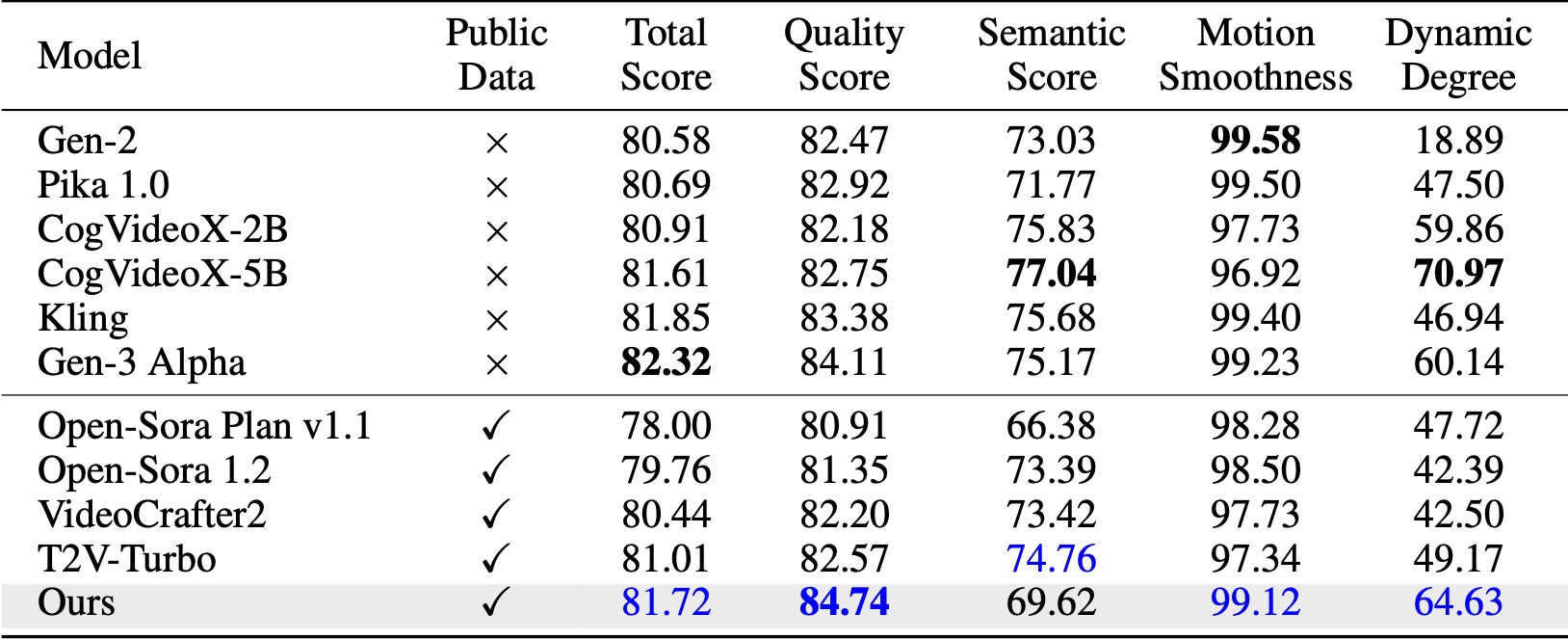
On VBench (Huang et al., 2024), our method surpasses all the compared open-source baselines. Even with only public video data, it achieves comparable performance to commercial models like Kling (Kuaishou, 2024) and Gen-3 Alpha (Runway, 2024), especially in the quality score (84.74 vs. 84.11 of Gen-3) and motion smoothness.
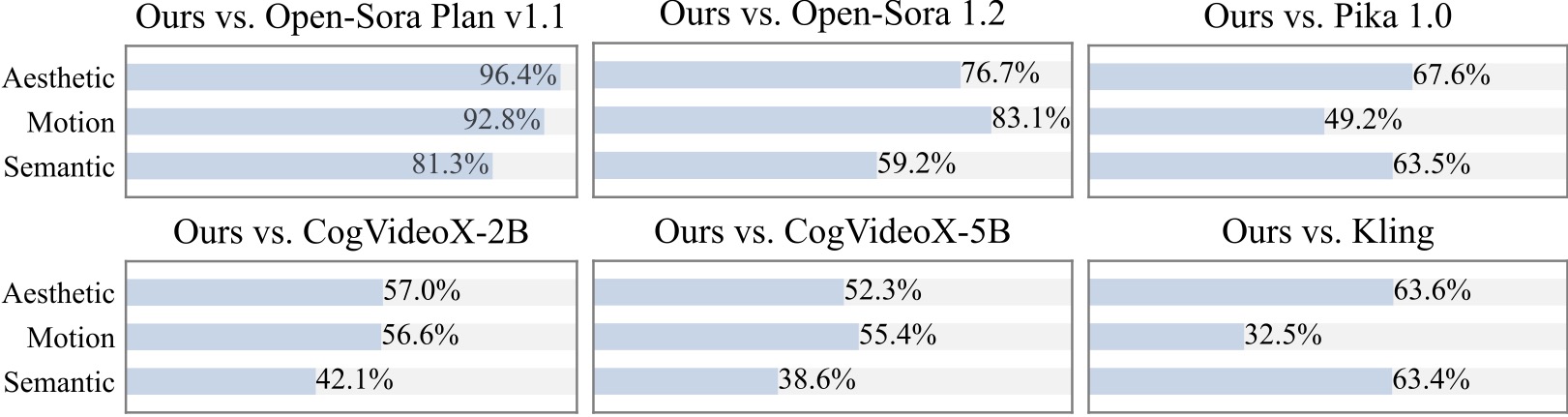
We conduct an additional user study with 20+ participants. As can be seen, our method is preferred over open-source models such as Open-Sora and CogVideoX-2B especially in terms of motion smoothness.
We are grateful for the following awesome projects when implementing Pyramid Flow:
Consider giving this repository a star and cite Pyramid Flow in your publications if it helps your research.
@article{jin2024pyramidal,
  title={Pyramidal Flow Matching for Efficient Video Generative Modeling},
  author={Jin, Yang and Sun, Zhicheng and Li, Ningyuan and Xu, Kun and Xu, Kun and Jiang, Hao and Zhuang, Nan and Huang, Quzhe and Song, Yang and Mu, Yadong and Lin, Zhouchen},
  jounal={arXiv preprint arXiv:2410.05954},
  year={2024}
}
 →
→ →
→ →
→ →
→ →
→ →
→ →
→