1
 →
→
乔木剪藏:剪藏网页到 Obsidian,阅读、编辑,并向 AI 提问 | Clip the web to Obsidian, then read, edit and chat with AI about it.
joeseesun/qiaomu-clipper is an open-source project on GitHub, mainly written in TypeScript. 乔木剪藏:剪藏网页到 Obsidian,阅读、编辑,并向 AI 提问 | Clip the web to Obsidian, then read, edit and chat with AI about it. It currently holds 318 stars and 47 forks with 0 open issues, and was last pushed on an unknown date (repository created unknown).
AI Homed tracks it on the Today's Trending board.
中文 | English
读文章、看视频、听播客,把理解留下来。
正文、播放器、字幕和 AI 对话放在一起,学习笔记直接存进 Obsidian。
Read, watch, listen, and turn what you learn into Obsidian notes.
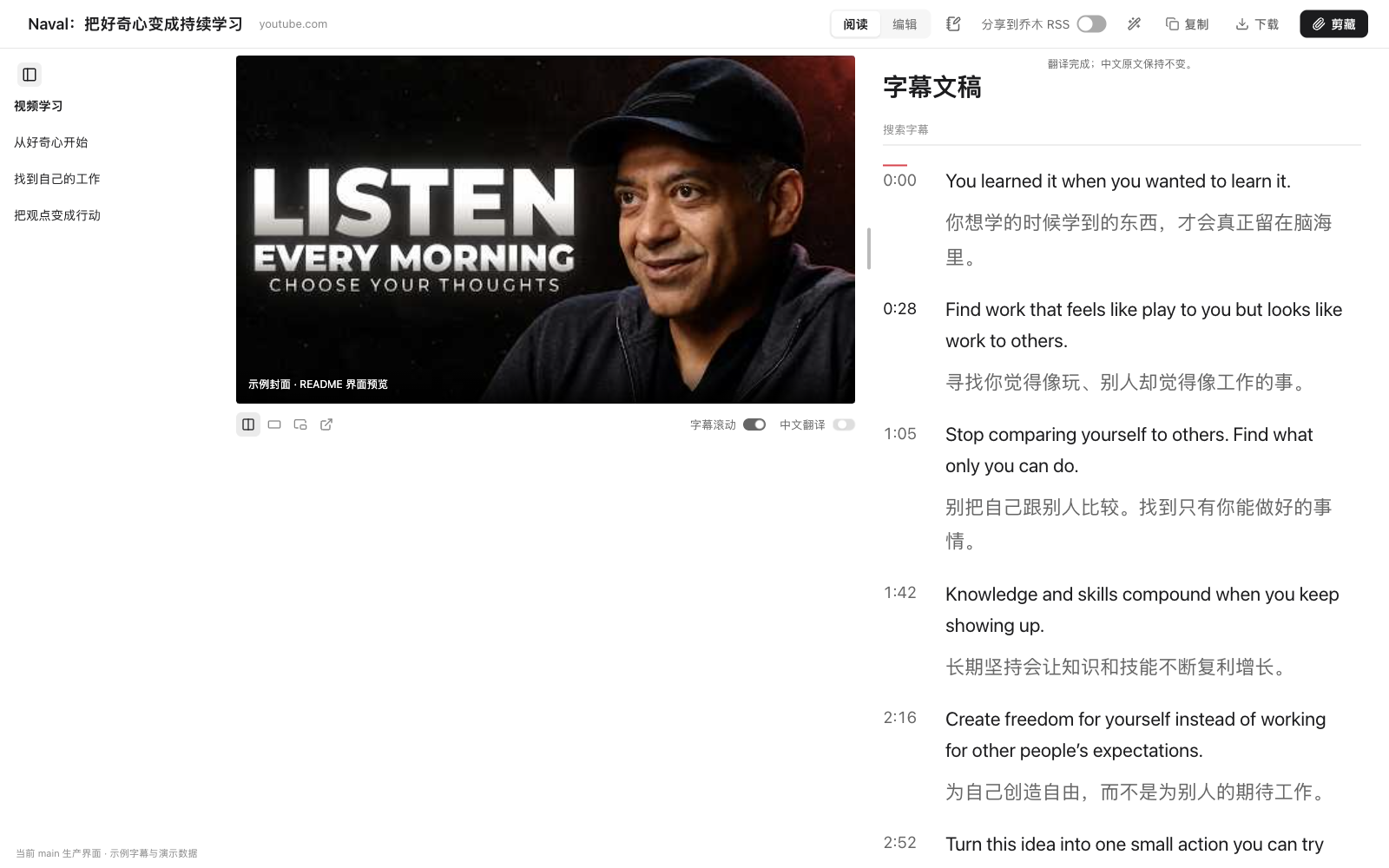
安装建议(2026-10-08):等新版商店上架后安装。 Chrome 应用商店当前公开版本仍为 1.7.1;1.15.8 已提交审核,通过后自动发布,包含九种界面语言和 Windows 助手修复。本页介绍 GitHub 版 1.15.8 的功能;旧商店版不包含全部功能。想现在体验,将下面这段安装 prompt 复制给 Codex、Claude Code 等有本机终端权限的 Agent,插件和 helper 一起安装。
请帮我安装或升级乔木剪藏:https://github.com/joeseesun/qiaomu-clipper 。先读 README.md 和 native/README.md,按我的系统与浏览器操作。
下载最新正式 release 的 -chrome-local.zip,解压并指导我加载扩展;同时安装对应版本的 helper:macOS 下载 qiaomu-clipper-helper.pkg 并指导我双击安装,其他系统按仓库文档安装。已有旧版先备份并保留数据,最后检查扩展与助手连接,指导我选择 Obsidian 笔记库。
| 场景 | 操作 | 留下什么 |
|---|---|---|
| 读到一篇值得保存的文章 | aaa 阅读,划线、问 AI,eee 编辑后剪藏 | 整理好的 Markdown 笔记 |
| 看课程或访谈,想回到某一句话 | 打开学习播放器,搜索字幕、点时间戳 | 可检索、可回看的文稿 |
| 外语视频看得慢 | 翻译字幕,原文与中文对照 | 带时间戳的原文、译文或双语笔记 |
| 播客或录音没有文字稿 | 选择本机或云端识别,生成字幕 | 随播放滚动的文字稿 |
| 听到一句话,突然有了自己的理解 | 学习页按 N,任意网页按 iii | 带摘录、来源和时间点的日记记录 |
| 保存时不想反复打开 Obsidian | 安装 helper,选好笔记库 | 直接写入指定库和文件夹 |
界面完整支持 简体中文、繁體中文、English、日本語、한국어、Español、Français、Deutsch、Português do Brasil,覆盖设置、弹窗、阅读与学习界面、字幕生成和本地助手提示。其他语言保留已有的部分翻译,新增功能回退到英文。更改界面语言后,请刷新已打开的媒体网页;音视频字幕仍优先匹配原语言。阅读、复制正文和已有字幕无需配置 AI;提问、翻译和云端识别使用你自己的服务与凭证。
在商店页面确认版本已更新到 1.15.8 或更高,再安装。需要保存笔记时,请先安装 Obsidian 并创建或打开一个笔记库。
安装扩展后,打开文章或支持的视频、音频页面,在非输入框内连按三次 A。也可以点页面字幕栏的学习入口,或扩展弹窗里的「阅读」:文章进入阅读页,支持的媒体页面进入学习播放器。
复制页面顶部的安装 prompt 给有本机终端权限的 Agent。它会按仓库文档下载插件和 helper;需要你完成的浏览器加载、安装器授权会给出具体指引。
提前体验请下载最新正式 release中 -chrome-local.zip,解压到长期保留的目录。在 chrome://extensions 开启「开发者模式」,点「加载已解压的扩展程序」并选择解压目录。升级前先备份现有设置;旧 ID 的数据不会自动迁入新 ID。
开发者需要 Node.js 22+ 和 npm,可从源码构建本地版:
git clone https://github.com/joeseesun/qiaomu-clipper.git
cd qiaomu-clipper
npm ci
npm run build:local
加载 dist_local,更新源码并重新构建后,在扩展管理页重新加载。npm run build:chrome 生成的是供商店提交使用的 dist,不含本地版音视频下载功能。
helper 是可选的本地助手。 不装助手也能阅读、编辑、复制或下载 Markdown;保存到 Obsidian 可使用 URI 方式。静默写入笔记库、追加学习日记和生成字幕需要助手。
macOS 用户下载 1.15.8 的 qiaomu-clipper-helper.pkg,双击安装。安装包自带 Python,已签名并通过 Apple 公证,不需要先安装 Python、Git 或 Node.js。扩展设置页也提供「下载安装包」入口。安装后重新加载扩展,并在 设置 → 剪藏与保存 的「笔记保存到」下拉列表里选择 Obsidian 库;列表读取 Obsidian 已记录的库,也可选择其他文件夹。
Linux / Windows 或需要源码安装的用户,按助手文档操作。Windows 助手已有实现和自动测试,尚待真机验证。
升级扩展时也要更新助手。 仅重新加载扩展不会更新 helper;macOS 可安装对应版本的 .pkg,源码安装则按助手文档重新运行安装器。首次选择本机识别引擎时,还需要下载该引擎和模型,界面会显示大小与进度,可取消。
1. 打开一篇文章,按 aaa 阅读,选中一段文字或点 AI 按钮提问。AI 需要在 AI 模型设置里配置自己的服务与模型。
2. 打开 YouTube / B 站 / TED 视频或小宇宙节目,进入学习页,搜索字幕并点击时间戳回看。优先读取官方字幕;没有字幕时,再选择「生成字幕」。
3. 按 N 写下自己的理解,确认目标库和今天的日记后保存。需要 helper 和 Obsidian「日记」核心插件;目前要求数字日期格式,且未配置日记模板。
以下插画用于说明功能,展开项展示界面截图。插画为 AI 生成;截图使用实际组件与示例数据,视频区域可能为封面预览。它们不代表每个网站或账号都已通过运行验收。截图说明 · 插画图集。
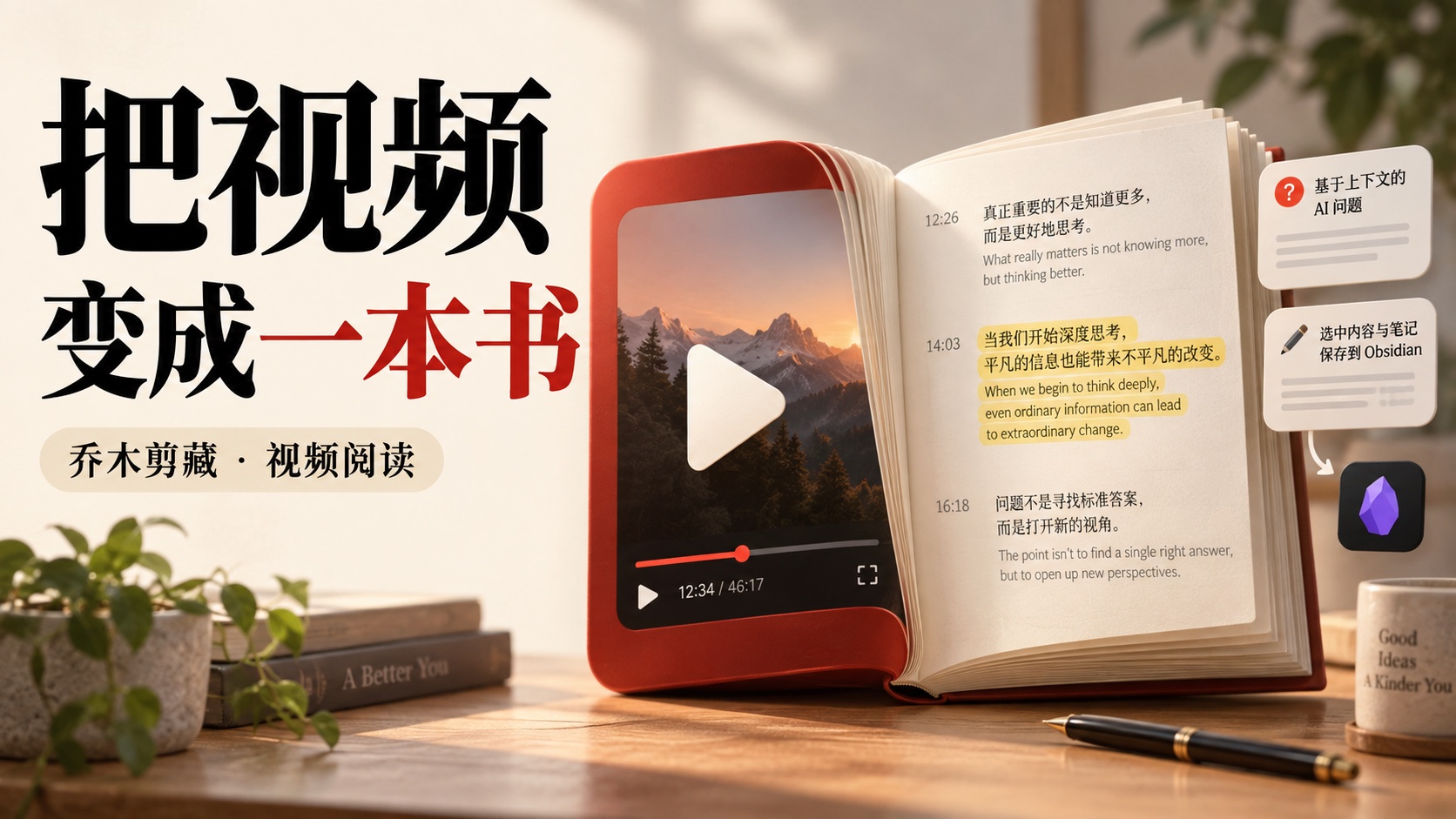
学习页先显示播放器,再加载字幕。你可以搜索文稿、点时间戳回看、跟随播放阅读,也可以调整播放器与文稿的大小,切换停靠、剧场、小窗和支持的画中画模式。字幕加载失败可单独重试。
YouTube、B 站、TED 优先读取官方字幕,并提供可用的字幕语言选择。B 站字幕通常需要登录;部分源播放器的跳转与播放跟随能力受平台限制。支持的媒体页中,aaa、字幕栏入口和弹窗「阅读」都会进入学习播放器。
播客、录音和本地音视频也可以学习。 从「转写学习」粘贴媒体链接、选择本地文件,或浏览推荐播客的最近几集;生成带时间的文稿后进入同一套学习流程。「最近学习」保留已学内容入口。抖音、TikTok、X、Vimeo、SoundCloud 等提供媒体学习入口,实际解析取决于网站、登录状态和网络;直播、DRM 和部分流媒体不保证可用。
没有官方字幕时,helper 获取音频并交给所选识别引擎,进度与生成内容显示在界面中,可取消,完成的结果可缓存复用。

用自己的 AI 模型翻译字幕,原文和中文译文对照阅读,时间戳保留。剪藏时可以选原文、译文或双语;复制和字幕文本下载按当前显示方式导出。未完成的翻译保留原文,失败可重试。

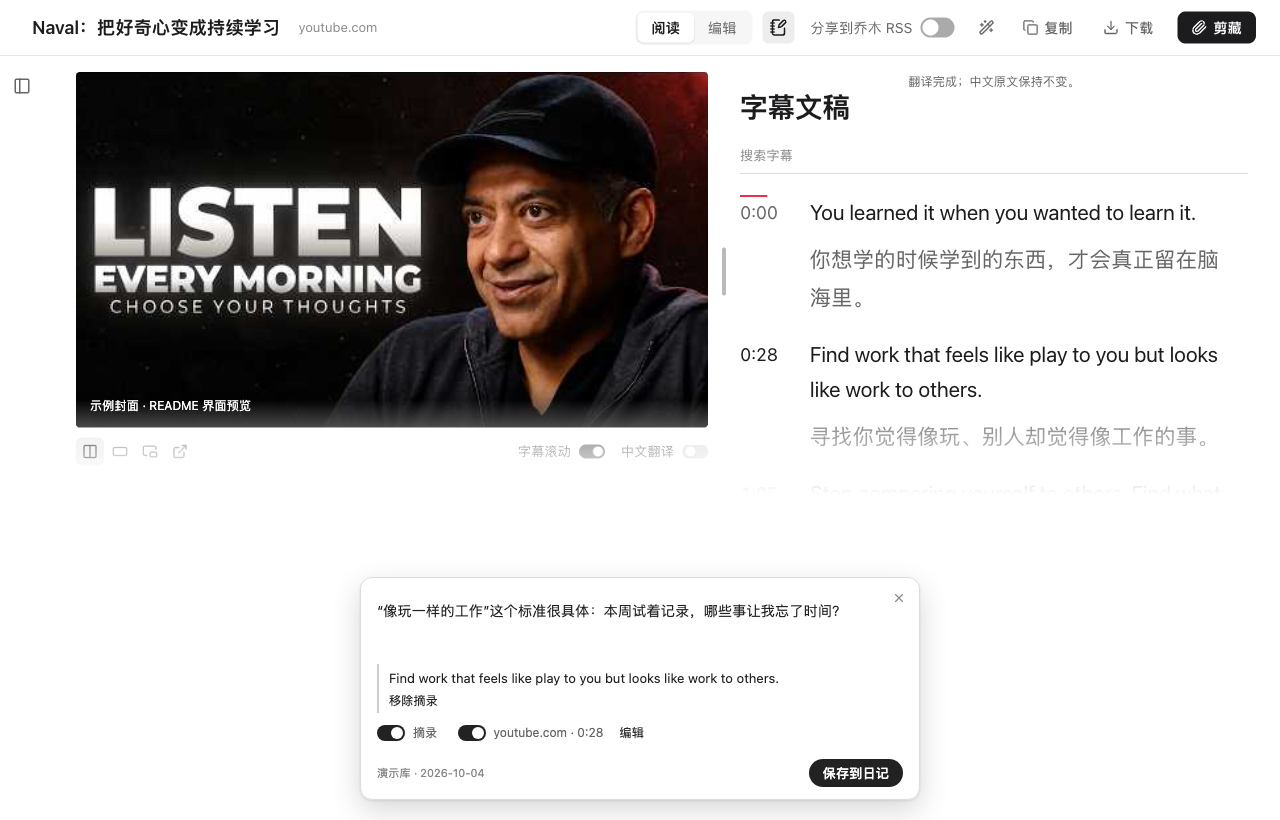
学习页按 N,任意网页按 iii,打开同一张笔记卡片。不选文字也能记;选中文字可以附上摘录,视频记录可带来源和时间点。AI 回答也能加入卡片,再补充自己的理解。
保存前显示目标库和日期;关闭卡片保留草稿,失败可以重试。helper 将笔记追加到今天的 Obsidian 日记,不会提交到 RSS。日记配置不符合要求时会说明原因。日记配置说明。

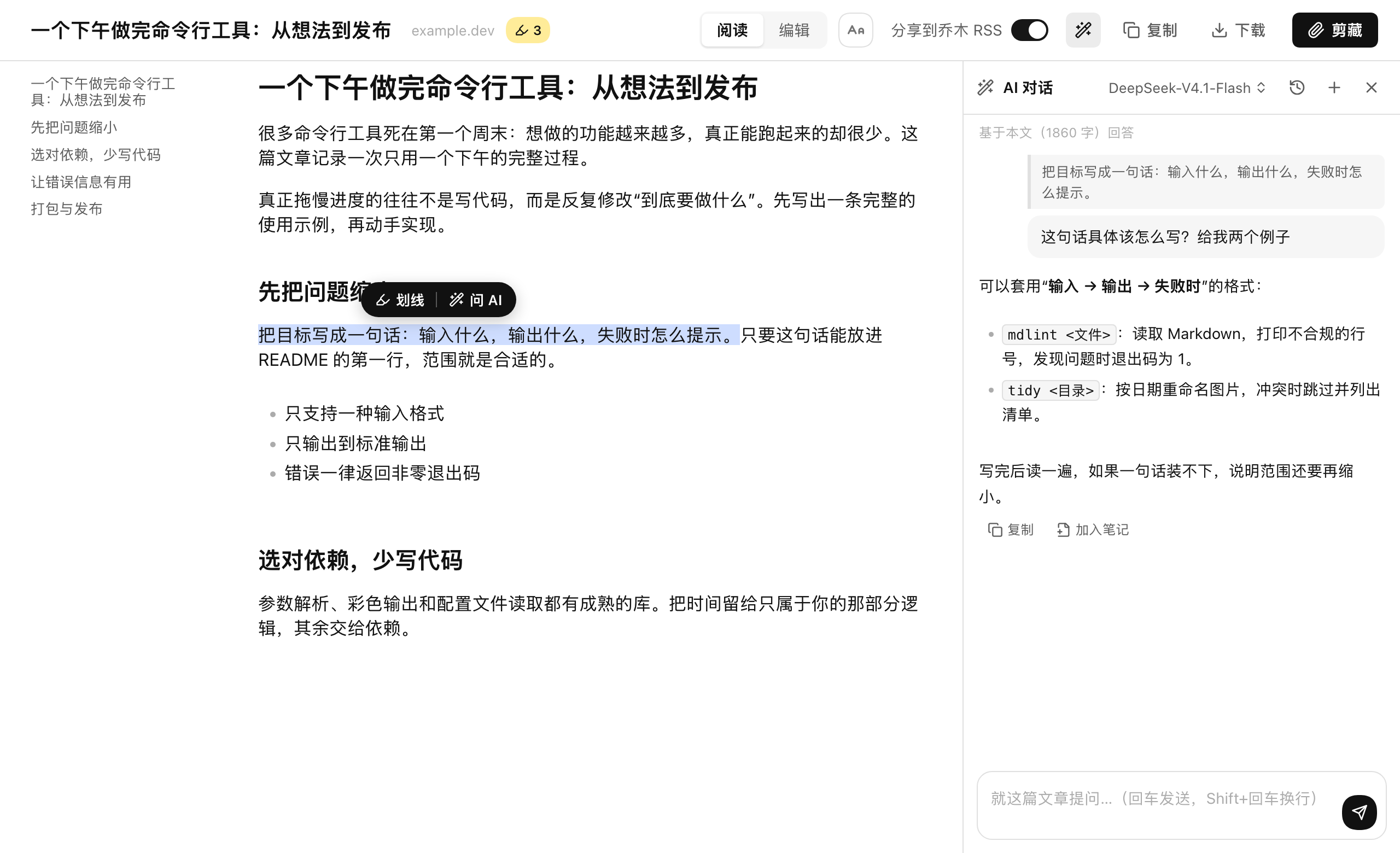
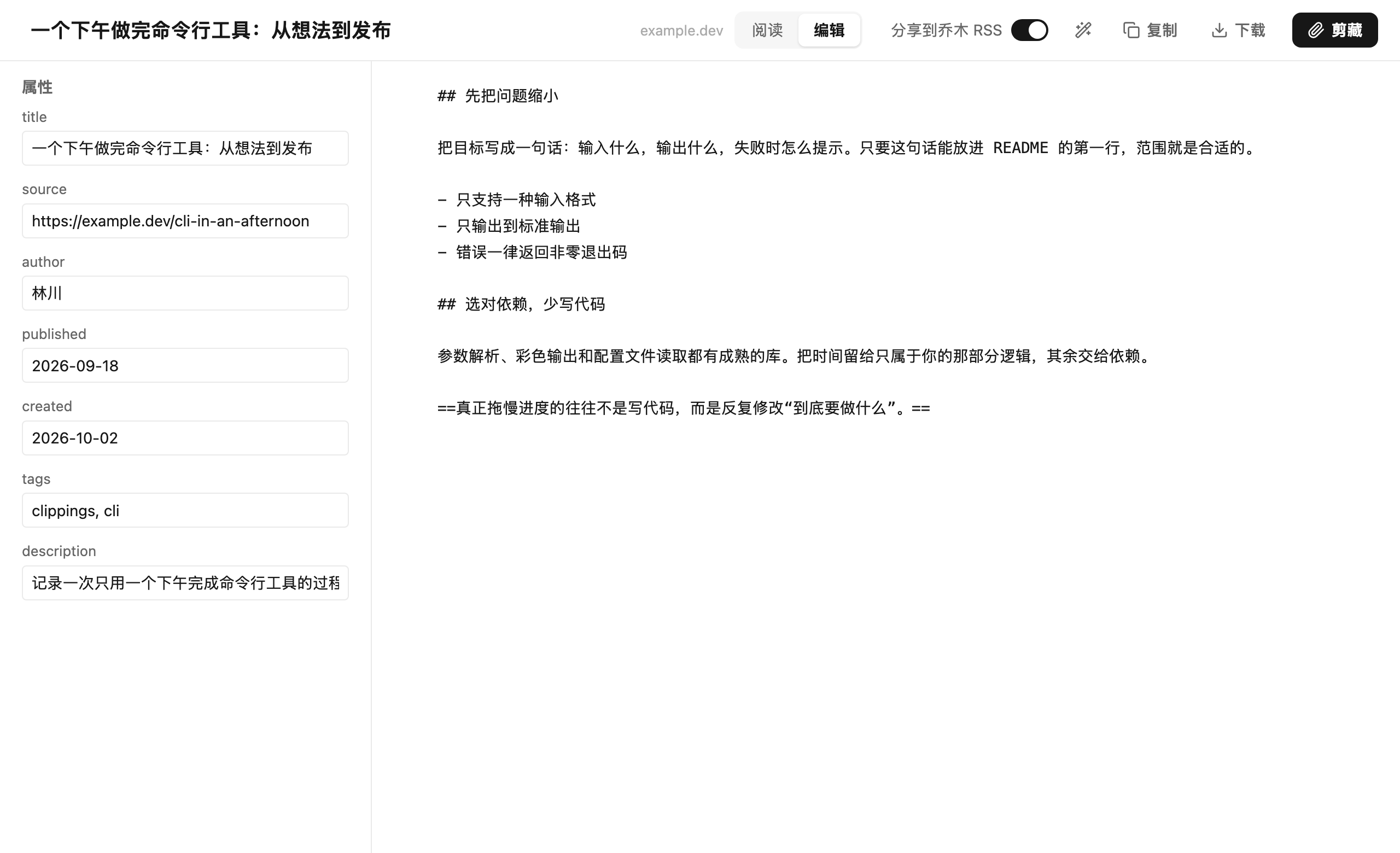
aaa 提取正文,调整字体、字号、行距与配色,划线保留重点。eee 进入整页编辑器,修改标题、属性和 Markdown,再复制、下载或剪藏。阅读与编辑共用草稿,目录和侧栏可收起。
AI 面板支持围绕全文或选中段落提问,流式显示回答,按文章保留对话。可调整面板宽度、字体与字号,保存全局指令和常用提示词;回答可复制或加入笔记。支持多种模型服务和自定义兼容接口,由你提供账号或 API Key。

弹窗提供阅读、复制、Markdown 下载与编辑入口;模板、保存位置和 RSS 分享按需选择。模板可统一属性与正文,按网址自动匹配,也可加入 AI 提示变量。安装 helper 后可直接写入所选笔记库与相对目录。
勾选「分享到乔木 RSS」后,链接、标题、剪藏正文和封面会进入公开读者提交源。默认关闭,可在设置中调整;本地保存和公开投稿分别显示结果。阅读、编辑和学习日记保存不会触发投稿。
GitHub 的 -chrome-local.zip 包在支持的学习页提供音视频下载,调用 helper 保存原媒体,显示进度,可取消,完成后可显示文件所在位置。目标目录为「下载」中的「乔木剪藏」。商店版不包含此功能;两版都支持 Markdown 和字幕文本导出。
抖音、小宇宙、播客的媒体下载,以及普通 Chrome 中的实际目录与文件名,尚未逐项完成真实页面验收。需要这项功能的用户可用本地版,并反馈具体来源与错误。
| 默认按键 | 动作 |
|---|---|
| aaa | 文章阅读;支持的媒体页面进入学习播放器 |
| eee | 整页编辑 |
| qqq | 按默认模板直接剪藏 |
| iii | 任意网页打开学习笔记卡片 |
| N(阅读 / 学习页) | 打开学习笔记卡片 |
| 选中文字 → 右键「保存到日记」 | 打开卡片并带入摘录 |
在非输入框内快速连按同一个键三次,相邻按键间隔不超过约 0.6 秒。三连击按键可自定义、留空关闭或按网站禁用;输入框和 Ctrl / Cmd / Alt / Shift 组合不会触发。浏览器内部页不允许扩展脚本。
npm test
npx tsc --noEmit
python3 -m unittest discover -s native -p 'test_*.py'
npm run build:chrome          # 商店版:dist/
npm run build:local           # 本地版:dist_local/
node scripts/check-editions.mjs
src/ 为扩展界面与后台,native/ 为 helper 与安装器,integration/qmreader/ 为 RSS 接口参考实现,不随扩展 ZIP 打包。界面文字写成 t('中文原文'),译文位于 src/i18n/;测试检查英文与繁体译文是否完整。
基于 Obsidian Web Clipper,保留上游历史与 MIT 许可证;网页正文提取使用 Defuddle,图标来自 Lucide。内置朱雀仿宋使用 SIL Open Font License 1.1,字体许可。本项目以 MIT 许可发布,由 joeseesun 维护。
网站 · 博客 · 推荐 · X @vista8 · GitHub · 微信公众号:向阳乔木推荐看
---
Read articles, watch videos, listen to podcasts, and keep what you learn in Obsidian.
Qiaomu Clipper brings a clean reader, Markdown editor, media player, timed transcripts and contextual AI chat into one workflow. Study a passage, ask a question, and save your own understanding with its source.
Installation recommendation, October 8, 2026: wait for 1.15.8 or later to appear on the Chrome Web Store. The current published version is 1.7.1; 1.15.8 is submitted for review and set to publish automatically after approval, including nine interface languages and Windows helper fixes. This README describes GitHub version 1.15.8. For early access, ask an agent with local terminal access to read the repository and install the GitHub release.
Once the store version is updated, install it, open an article or supported media page, and press A three times outside a text field. The popup's Read action opens the article reader or the study player as appropriate. Obsidian is needed to save notes into a vault; AI chat and translation require your own provider and credentials.
For early access, copy this prompt into Codex, Claude Code or another agent with local terminal access:
Install or upgrade Qiaomu Clipper: https://github.com/joeseesun/qiaomu-clipper . Read README.md and native/README.md first, then follow the instructions for my OS and browser.
Download the latest stable release's -chrome-local.zip, extract it and guide me to load the extension. Install the matching helper too: on macOS download qiaomu-clipper-helper.pkg and guide me through installation; on other systems follow the repository docs. Back up and preserve existing data before upgrading. Verify the extension/helper connection and help me select my Obsidian vault.
The macOS 1.15.8 helper installer is signed, notarized and includes Python. Double-click to install, reload the extension, then select an Obsidian vault under Clipping and saving. No Python, Git or Node.js setup is required for this installer.
The helper enables silent vault writes, appending learning notes to today's daily note, and subtitle generation. Reading, editing, copying and Markdown export work without it; Obsidian URI saving is also available. Update the helper when upgrading the extension. Local recognition engines and models are downloaded separately on demand. Linux/Windows and source installation instructions are in native/README.md; Windows device validation is pending.
N in a reading/study page or iii on any webpage. Add your understanding, optional excerpts, source and media time; the helper appends it to today's Obsidian daily note. Requires Daily notes with a supported numeric date format and no template. Drafts survive closing the card; failures can be retried.-chrome-local.zip offers media-file saving through the helper on supported study pages. The store edition excludes this feature. Markdown and transcript text export are available in both editions. Real-page download checks for Douyin, Xiaoyuzhou and podcasts, including folder/file naming in regular Chrome, remain incomplete.aaa read/study, eee edit, qqq clip and iii open a learning-note card. Triple-press keys can be changed, disabled or excluded per site; typing in editable fields does not trigger them.
RSS sharing publicly submits the URL, title, clipped Markdown and cover when enabled. Keep it off for private content. AI chat, translation and cloud recognition send necessary content or audio to the provider you select, at that provider's cost. Local recognition does not upload recognition audio. Selecting a local file passes it to the helper first; choosing a cloud recognition service uploads audio afterward.
Chat, drafts and recognition caches are stored locally; some settings, templates or credentials may use browser sync. Exports and migration backups may contain credentials. Chrome/macOS is the primary validation target; Firefox/Safari builds and Windows helper support need further device validation. English and Traditional Chinese copy have not been reviewed by native speakers. Illustrations and sample screenshots show workflows, not universal site support or completed runtime acceptance.
Privacy · Security · Screenshot provenance · Report an issue
Source builds need Node.js 22+ and npm. Run npm ci, then npm run build:local and load dist_local for the local edition; npm run build:chrome produces the store edition in dist. Check with npm test, npx tsc --noEmit, the native Python tests and node scripts/check-editions.mjs after building both editions. Translations live in src/i18n/; tests check English and Traditional Chinese coverage.
Independent MIT project based on Obsidian Web Clipper, preserving upstream history. Built with Defuddle and Lucide; Zhuque Fangsong uses the SIL Open Font License. Maintained by joeseesun.
→ →
→ →
→ →
→ →
→ →
→ →
→ →
→